
Gameplay Tags
Updated May 23, 2026
Gameplay Tags are Unreal Engine’s hierarchical label system. Hyper systems use them for attributes, state effects, teams, factions, events, item categories, and other data that needs to stay readable, extensible, and network-friendly.
For shared setup guidance, see the Migration Guide and Integration Guide. Use the System Atlas to look up functions, variables, events, components, and ownership references. Use this page for Gameplay Tag usage, conventions, and project-specific patterns.
For Unreal Engine reference, see Using Gameplay Tags in Unreal Engine.
What Gameplay Tags Are
Gameplay Tags are user-defined labels stored in a central tag dictionary. They are written as dot-separated paths, which makes them readable and gives them hierarchy.
Attribute
├─ Attribute.NonPersistent
│  ├─ Attribute.NonPersistent.Health
│  ├─ Attribute.NonPersistent.Stamina
│  └─ Attribute.NonPersistent.Mana
└─ Attribute.Persistent
   ├─ Attribute.Persistent.MaxHealth
   ├─ Attribute.Persistent.MaxStamina
   └─ Attribute.Persistent.HealthRegen
Each level narrows the meaning: Attribute is the broad category, Attribute.NonPersistent is the subcategory, and Attribute.NonPersistent.Health is the exact attribute.
Why Hyper Uses Gameplay Tags
| Reason | What it solves |
|---|---|
| Scalability | Designers can add new attributes, state effects, teams, factions, or event names without changing enum definitions or recompiling Blueprints. |
| Validation | Tags are selected from a dictionary, which prevents silent typos such as Team.BluTeam. |
| Readability | Attribute.NonPersistent.Health explains its purpose better than a magic number or vague enum value. |
| Hierarchy | Systems can work with specific tags or broad categories such as all StateEffect.Negative tags. |
| Multiple values | An actor can have a container with team, faction, guild, state, and attribute tags at the same time. |
| Networking | Gameplay Tag Containers replicate cleanly in multiplayer workflows. |
Tags vs Enums
| Use Gameplay Tags when | Use Enums when |
|---|---|
| The set may grow during development. | The set is small, fixed, and unlikely to change. |
| Designers need to add or select values. | Values are programmer-owned constants. |
| The data is hierarchical. | The data is naturally flat. |
| An object may need several values at once. | Only one value should be active at a time. |
| Tags need to replicate in multiplayer. | You already own the replication path. |
Good enum example: E_MovementMode with values such as Walking, Running, Sprinting, Jumping, Flying, and Swimming. These are stable engine-style states and do not need designer-created hierarchy.
Where Hyper Uses Tags
Attribute Manager
The Attribute Manager uses tags for attributes and state effects. Tags provide flexibility, while internal tag-to-array-index mapping keeps lookups fast.
Attribute.NonPersistent.Health
Attribute.NonPersistent.Stamina
Attribute.NonPersistent.Mana
Attribute.NonPersistent.Food
Attribute.NonPersistent.Hydration
Attribute.Persistent.MaxHealth
Attribute.Persistent.HealthRegen
State Effects
State effects are identified by tags and configured through DT_StateEffects. A row can connect a state effect tag to a trigger attribute, threshold, and effect behavior.
- State Effect Tag:
StateEffect.LowHealth - Trigger Attribute:
Attribute.NonPersistent.Health - Trigger Threshold: below 25%
Team Affiliation
Team Affiliation uses tag containers so an actor can have several affiliation layers at once.
Team.BlueTeam
Team.RedTeam
Faction.Empire
Faction.Rebels
Guild.Warriors
Guild.Mages
Two actors can be treated as affiliated when their tag containers share at least one relevant tag.
Event Manager
Event Manager can optionally use tags for event names. This gives event registration and triggering the same validation and autocomplete benefits as other systems.
Event.Inventory.AddItem
Event.Inventory.RemoveItem
Event.Quest.Completed
Event.World.BossDefeated
Included Tag Sources
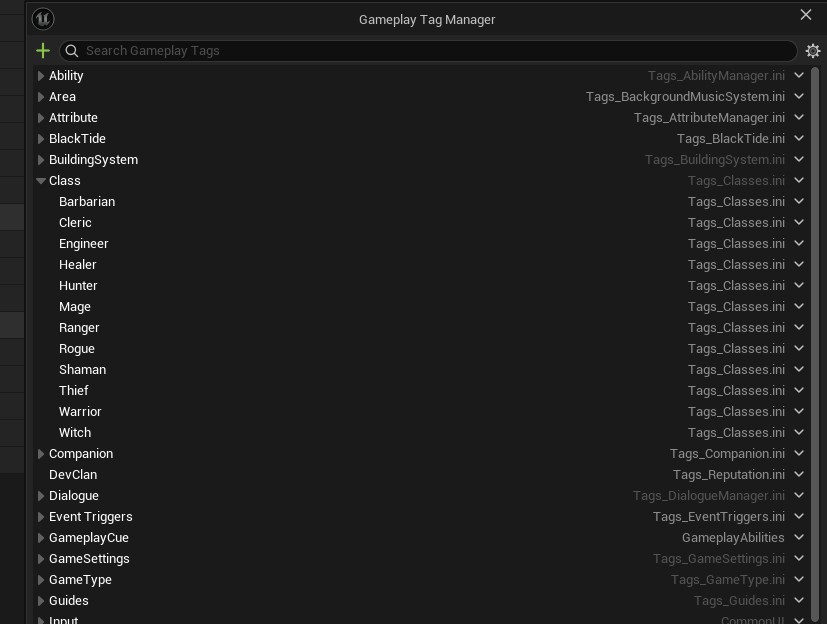
Hyper systems include the Gameplay Tags they require in organized .ini source files. After installing a system, the relevant tags should be visible in Project Settings → Gameplay Tags.
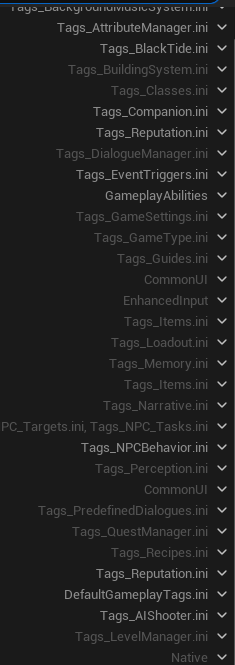
- Provided tags keep system names consistent.
- New module versions can include updated tags.
- Custom project tags can be added alongside Hyper tags.
- Large projects can split tags into separate source files such as
AttributeTags.ini,TeamTags.ini, orEventTags.ini.
Adding Tags
- Open Edit → Project Settings.
- Go to Project → Gameplay Tags.
- Open Manage Gameplay Tags.
- Click Add (+).
- Enter the full tag path, for example
Attribute.NonPersistent.Oxygen. - Add an optional comment and choose a source
.inifile. - Save and verify the tag appears in the hierarchy.
Naming Conventions
- Use descriptive names:
Attribute.NonPersistent.Health, notAttr.NP.HP. - Use a consistent hierarchy:
Category.SubCategory.SpecificItem. - Use PascalCase for each tag level.
- Use dots for hierarchy only.
- Avoid spaces, hyphens, and underscores inside a tag level.
- Prefer two to four levels. Avoid overly deep paths unless the extra specificity is useful.
Common Hyper patterns:
Attribute.[NonPersistent/Persistent].[AttributeName]StateEffect.[EffectName]Team.[TeamName]Faction.[FactionName]Event.[System].[EventName]
Using Tags in Blueprints
| Type | Use | Example |
|---|---|---|
| Gameplay Tag | Stores one tag. | Current team, selected attribute, active state effect. |
| Gameplay Tag Container | Stores multiple tags. | Team + faction + guild tags, active state effects, object categories. |
Common functions:
- Has Tag: checks for one exact tag.
- Has Any Tags: checks whether any tags overlap between containers.
- Has All Tags: checks whether every required tag exists.
- Add Gameplay Tag: adds a tag to a container.
- Remove Gameplay Tag: removes a tag from a container.
See Also
- Epic Games: Using Gameplay Tags in Unreal Engine
- Attribute Manager documentation
- Team Affiliation documentation
- Event Manager documentation
Summary
Use Gameplay Tags for data that needs to be extensible, readable, hierarchical, designer-editable, or replicated. Use enums for small, fixed sets that behave like stable constants. Hyper systems rely on Gameplay Tags because they make attributes, state effects, teams, factions, and optional event names easier to extend without rewriting system logic.