
Trap Defense System
Updated May 23, 2026
Technical Guide and User Guide
For shared setup guidance, see the Migration Guide and Integration Guide. Use the System Atlas to look up functions, variables, events, components, and ownership references. Use this page for Trap Defense System-specific setup, runtime behavior, extension points, and integration notes.
This document explains the Hyper Defense / Trap System from both an implementation and designer-facing point of view. It covers the trap manager component, trap states, trigger actors, buildable inheritance, resource requirements, damage handling, individual trap Blueprints, and common extension workflows.
Overview
The Defense / Trap System is a Blueprint-based trap framework for Unreal Engine projects. It provides reusable trap actors, external trigger actors, trap state management, damage application, inventory/resource requirements, and buildable-world integration.
At a high level, the system is built around AC_TrapManager. The trap actor owns this component and uses it as the central authority for trap state, damage, activation rules, automatic resets, trapped actor tracking, trap effects, and resource requirements. Child trap Blueprints then implement their own visuals and special behaviour by responding to the trap manager state changes.
The system is intended to support two different usage styles at the same time:
Designer-facing placement, where a trap can be placed in a level, connected to an external trigger, armed, activated, and tested without rewriting the manager logic.
Technical extension, where developers can create new trap child Blueprints that reuse the existing manager, interaction, buildable, inventory, and damage flow.
The demo world shows several trap examples, including ground spikes, wall spikes, fly swatter jaws, double fly swatters, a hanging rope snare, a log cleaver, a spiked spinner, static spikes, a trap door, pressure plates, trip wires, lever triggers, and a rolling boulder.
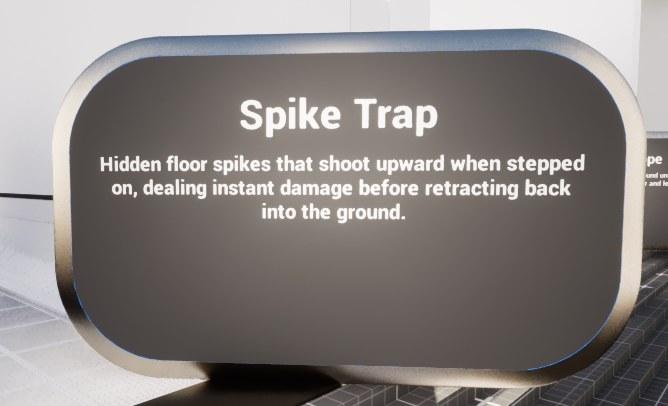
Spike trap sign from the demo level.
System Architecture
The trap system is built from a small set of shared pieces rather than one large monolithic Blueprint. The most important design point is that most traps share the same base class and component layout, while the boulder is handled separately because it is primarily physics-driven.
| Blueprint / Layer | Responsibility |
|---|---|
| BP_Buildable_Base | Parent system class. BP_Trap_Base inherits from this class so traps can participate in the wider buildable workflow. The buildable system itself is outside the scope of this document, but the trap system relies on it for build-completion checks, buildable collision setup, and placement behaviour. |
| BP_Trap_Base | Shared parent for normal traps. It owns AC_TrapManager, AC_Actor_Health, AC_Connectable, buildable collision components, interaction sphere, connection socket, cable attach point, corner points, and mesh containers. |
| BP_Trap_Activatable_Base | A trap-base variant used for traps that can be activated and deactivated through state transitions. It adds interaction text and state-transition rules for activate/deactivate style traps. |
| BP_Trap_Armable_Base | A trap-base variant used for traps that support arming and releasing. It adjusts interaction text and can-interact rules around arm/release behaviour. |
| Individual trap children | Most trap actors inherit from the trap base chain and only implement the visuals, timelines, animation events, overlap zones, or special logic needed for that specific trap. |
| BP_Trap_Boulder | Exception. The rolling boulder is not treated as a normal BP_Trap_Base child in this documentation. It has its own physics, pushing, collision, sound, cooldown, and damage logic. |
The inheritance relationship matters because users should not recreate interaction, building, connection, resource, or trap-state handling for every new trap. A normal new trap should be created as a child of the appropriate trap base, then only the unique behaviour should be added in the child.
Core runtime flow
A typical trap uses the following runtime flow
The trap is built or placed into the world through the buildable actor flow inherited from BP_Buildable_Base.
The trap owns AC_TrapManager, which holds the current state and configuration.
The player or an external trigger attempts to progress or trigger the trap.
AC_TrapManager validates whether the current state can transition to the desired state.
The trap child receives the Trap State Changed event and runs its own animation, timeline, collision, physics, or damage logic.
Damage is applied through Hyper attribute/damage functions, and optional trap effects are constructed and applied.
The trap either resets automatically, moves back to Armed, returns to Unarmed, enters Released, or waits for player interaction depending on configuration.
Trap State Enum and Requirement Struct
E_DefenseSystem_Trap_State
E_DefenseSystem_Trap_State defines the shared state machine vocabulary used by AC_TrapManager and the trap child Blueprints. The same enum is used for interaction text, allowed state transitions, automatic reset logic, animation state selection, and resource requirements.
| State | Meaning |
|---|---|
| None | No meaningful trap state. Used as a safe/default value. |
| Unarmed | The trap is not currently armed. It may need to be armed by interaction, trigger progression, or build completion before it can activate. |
| Arming | The trap is moving toward or preparing the Armed state. Some child traps use this for timelines, lever movement, animation setup, or interpolation. |
| Armed | The trap is ready to trigger. Overlap zones, trip wires, pressure plates, or external triggers usually only activate the trap when it is armed. |
| Triggered | The trap has fired. Child traps usually perform damage, animation, physics, or trap-specific behaviour from this state. |
| Releasing | The trap is releasing a trapped actor or moving out of an active/held state. This is important for traps such as the hanging rope or traps that temporarily disable movement. |
| Released | The trap has completed its release flow. Depending on the trap, this may be a terminal state or an intermediate state before resetting. |
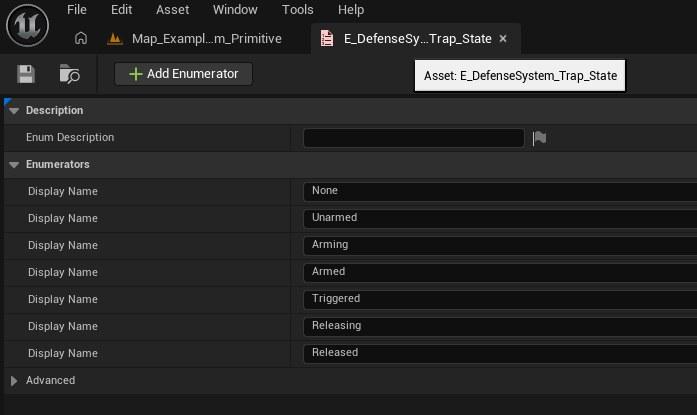
Trap state enum used by the trap manager and child Blueprints.
F_DefenseSystem_TrapState_Item_Requirement
F_DefenseSystem_TrapState_Item_Requirement links a desired trap state to inventory items required to move into that state. This is how the trap base can ask the inventory system whether the interacting controller has the correct resources before allowing a state change.
| Field | Description |
|---|---|
| Trap State | E_DefenseSystem_Trap_State. The target state that requires resources. For example, a trap may require items before it can move from Unarmed into Armed. |
| Inventory Items | Array of inventory slot item entries. These are the item stacks the player must have available before the state transition can be completed. The same entries are removed after a successful interaction if the transition consumes resources. |
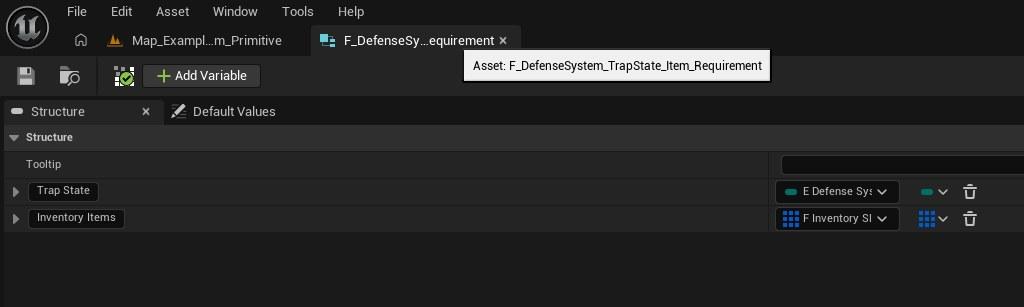
Requirement struct used for trap-state resource requirements.
AC_TRAPMANAGER
AC_TrapManager is the main trap runtime component. It is attached to trap actors and acts as the public API for state changes, activation, damage, trapped-actor tracking, resource requirements, and trap effects. Child trap Blueprints should call into this component instead of duplicating manager logic.
The manager is designed to be reusable across many different trap types. A pressure plate, lever, trip wire, or direct overlap can all request the same manager function, and the trap child can decide how it should visually react after the state changes.
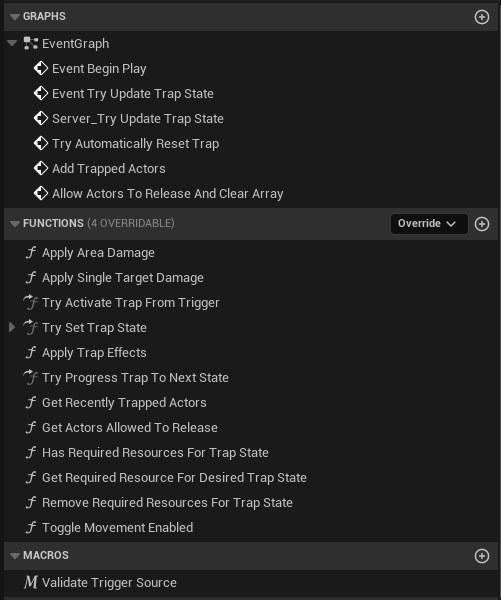
AC_TrapManager function list from the Blueprint editor.
Details panel / important variables
| Variable | Purpose |
|---|---|
| Linked Trap Triggers | Name array used to identify or store linked trigger references. These are the external trigger actors connected to this trap. |
| Should Player Trigger Trap | Controls whether player-controlled pawns are allowed to trigger this trap. Used by Validate Trigger Source. |
| Should AI Trigger Trap | Controls whether AI-controlled pawns are allowed to trigger this trap. Used by Validate Trigger Source. |
| Cached Trap Triggers | Array of Primitive Components used by the trap to cache trigger volumes/components. |
| Should Automatically Arm | If enabled, the manager can attempt to move the trap into its next armed state automatically. |
| Automatic Arm Delay | Delay before automatic arm/reset logic attempts to progress the trap state. |
| Trap Damage Type | Damage type passed into the Hyper attribute/damage application call. |
| Trap Damage | Base damage amount used by Apply Area Damage and Apply Single Target Damage. |
| Trap Effects To Apply On Damage | Map of BP_TrapEffectBase classes/data that should be applied when the trap deals damage. |
| Trap Effects To Apply On Enter Trigger | Map of trap effects that should be applied when an actor enters a trigger, even before or separate from damage. |
| Allowed Trap State Transitions | Map from current state to next state. This drives generic progress logic and keeps child traps from hardcoding every transition. |
| Required Resource For Trap State | Array of F_DefenseSystem_TrapState_Item_Requirement entries used when the player must spend resources to move into a state. |
| Is Initialized | Runtime guard used so the first state set can initialize correctly before normal transition validation is enforced. |
| Recently Trapped Actors | Array of actors recently trapped. Used by interaction checks so the same pawn is not allowed to immediately re-trigger or incorrectly interact. |
| Recently Hit Actors Timer | Timer handle used for recent-hit or recent-trap cleanup. |
| Actors Allowed To Release | Array of actors allowed to release themselves from traps that support release behaviour. |
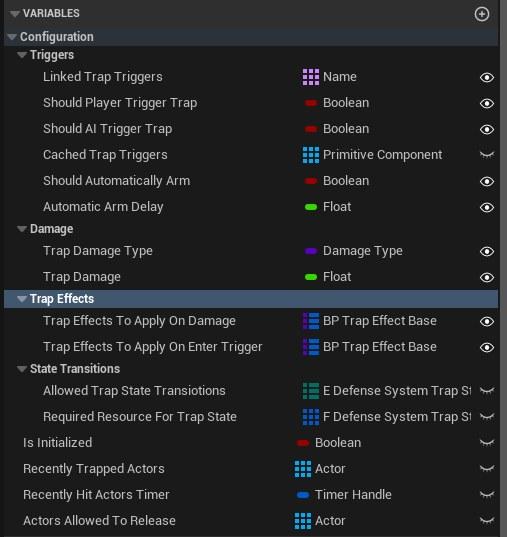
Configuration variables exposed on AC_TrapManager.
State update and replication flow
Trap state changes are routed through Try Update Trap State and Server_Try Update Trap State. The public event can be requested from gameplay code, but the authoritative update is performed on the server. On BeginPlay, the manager waits until the next tick, applies the current trap state, and then optionally attempts automatic reset/arming behaviour.
The Try Set Trap State function checks initialization, validates whether the current state can transition into the desired state, updates Current Trap State, and then calls the Trap State Changed event. This keeps trap children simple: they can bind to state changes and react to the new state without owning the whole transition system.
Trigger validation
Validate Trigger Source checks whether the overlapping pawn is player-controlled or AI-controlled and then compares that result against Should Player Trigger Trap and Should AI Trigger Trap. This gives designers a simple way to make a trap affect only players, only AI, or both.
| Output / Use | Description |
|---|---|
| Player Allowed output | True when the pawn is controlled by a player controller and Should Player Trigger Trap is enabled. |
| AI Allowed output | True when the pawn has a valid AI controller and Should AI Trigger Trap is enabled. |
| Use case | Pressure plates, trip wires, trap overlaps, and state progression functions can all call this macro before firing the trap. |
Damage and trap effects
AC_TrapManager provides both area damage and single-target damage routes. Area damage collects overlapping actors from a supplied collision/primitive component. Single-target damage is used when a specific hit actor and hit result are already known from an overlap or collision event. Both routes resolve the target attribute manager, apply direct damage, and then apply configured trap effects.
| Function | Role |
|---|---|
| Apply Area Damage | Gets overlapping actors from the supplied zone, loops through them, resolves each actor attribute manager, applies damage, then applies configured trap effects. |
| Apply Single Target Damage | Applies damage to one actor using the passed primitive component and hit result, then applies configured trap effects. |
| Apply Trap Effects | Loops through the provided trap-effect map, constructs BP_TrapEffectBase instances, and calls Apply Effect with the affected actor, owning trap, effect data, primitive component, and hit result. |
| Trap Damage Type / Trap Damage | Passed into the damage application function so trap children do not need to know the lower-level damage implementation. |
Resource requirements and inventory integration
The manager can check and consume resources before allowing a state transition. The BP_Trap_Base interaction flow asks the manager for the resources required for the desired state, checks the controller inventory through the inventory manager, and then removes those resources when the transition succeeds.
| Function | Role |
|---|---|
| Has Required Resources For Trap State | Gets the item requirements for the desired state, asks the inventory manager whether all items can be found, and returns a boolean. |
| Get Required Resource For Desired Trap State | Loops through Required Resource For Trap State and returns the inventory items associated with the requested state. |
| Remove Required Resources For Trap State | Loops through the required item stack entries and removes the correct amounts from the controller inventory. |
| Inventory dependency | The trap system depends on the existing inventory manager for item lookup and removal. It does not duplicate inventory storage. |
Movement locking and release tracking
Some traps need to temporarily stop a character moving. Toggle Movement Enabled loops through supplied actors, casts them to characters, resolves AC_CH_Extended_Movement, and calls Disable Movement On Client. Add Trapped Actors can also store trapped actors and later allow them to release or clear them from arrays using timer-based cleanup.
| Function | Role |
|---|---|
| Add Trapped Actors | Disables movement for the trapped actors, starts or updates a release timer, adds actors to Recently Trapped Actors, and later moves them into Actors Allowed To Release or clears tracking arrays. |
| Allow Actors To Release And Clear Array | Allows tracked actors to release themselves and clears the recent trap arrays. |
| Get Recently Trapped Actors | Returns the runtime list used by interaction checks. |
| Get Actors Allowed To Release | Returns actors that are allowed to interact with the trap to release themselves. |
| Toggle Movement Enabled | Uses AC_CH_Extended_Movement to disable or re-enable movement for each affected character. |
BP_TRAP_BASE
BP_Trap_Base is the shared parent for normal trap actors. It is also a child of BP_Buildable_Base, which means the trap system plugs into Hyper buildable behaviour while keeping the buildable implementation separate. This document only covers the trap-specific behaviour and the points where the trap actor calls into the buildable/base flow.
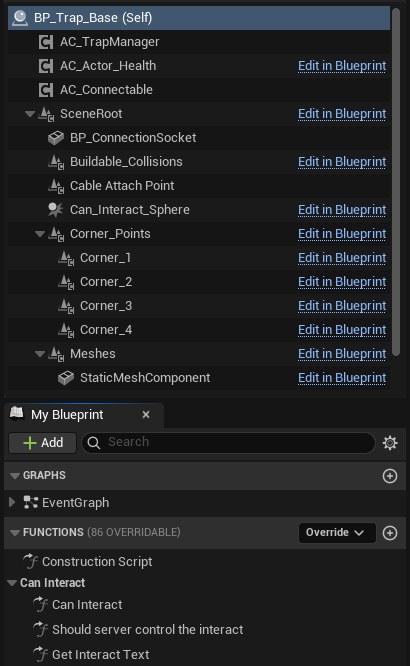
BP_Trap_Base component and function layout.
Components
| Component | Purpose |
|---|---|
| AC_TrapManager | Trap-specific manager component. Owns current state, activation rules, damage, resources, effects, and trapped actor tracking. |
| AC_Actor_Health | Health component present on the trap actor, likely allowing traps to be damaged or destroyed through the broader actor health framework. |
| AC_Connectable | Allows the trap to participate in connection workflows with external trigger actors. |
| BP_ConnectionSocket | World/socket point used when connecting another actor to the trap. |
| Buildable_Collisions | Collision setup inherited from the buildable workflow. |
| Cable Attach Point | Scene component used by connected trigger actors to draw or attach visual cable components. |
| Can_Interact_Sphere | Interaction volume used by the interaction system. |
| Corner_Points | Corner markers used by placement/buildable logic. |
| Meshes / StaticMeshComponent | Visual mesh container and default mesh component for the trap actor. |
Interaction behaviour
BP_Trap_Base overrides interaction functions from its parent chain. It calls parent interaction first, then uses AC_TrapManager to decide whether the player can interact, what text should display, and whether the interaction should release a trapped actor or progress the trap state.
| Function | Behaviour |
|---|---|
| Can Interact | Checks whether the controlled pawn is inside Recently Trapped Actors. If the pawn was recently trapped, interaction returns false so the pawn does not immediately retrigger or exploit the trap. |
| Should server control the interact | Returns true, meaning the server should execute the interaction call. |
| Get Interact Text | Finds the next state from Allowed Trap State Transitions, gets any required resources for that target state, resolves inventory item names, and builds the interaction text. |
| Event Interact | If the controlled pawn is allowed to release, the trap moves to Releasing. Otherwise it checks resources, consumes resources if valid, and progresses the trap to the next allowed state. |
Connection behaviour
When a connection is made, BP_Trap_Base can identify whether the connected actor is a BP_External_Trap_Trigger. If it is, the trap passes its AC_TrapManager reference to the trigger. This is the key link that lets a lever, pressure plate, or trip wire activate a separate trap.
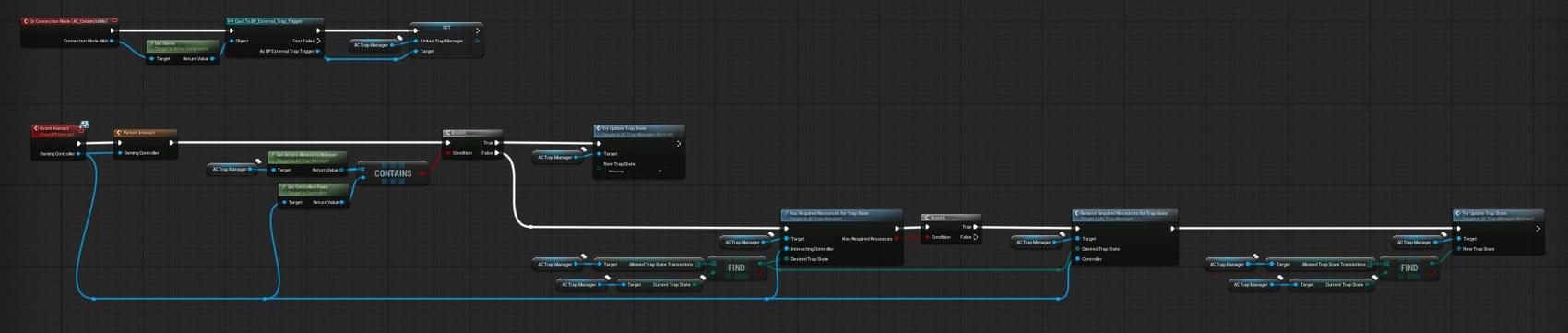
BP_Trap_Base interaction flow: release actors, check resources, consume resources, and progress state.
Trigger Actors
External trigger actors are separate actors that can activate or progress a linked trap. They do not own the trap state themselves. Instead, they store a reference to the linked AC_TrapManager and call manager functions when the trigger is used.
BP_External_Trap_Trigger
BP_External_Trap_Trigger is the generic trigger base. It uses AC_Connectable and cable attach points so that the trigger can be linked visually and functionally to a trap. On connection, it resolves the trap base, finds the trap manager, stores it as Linked Trap Manager, and creates a cable between the two connection points.
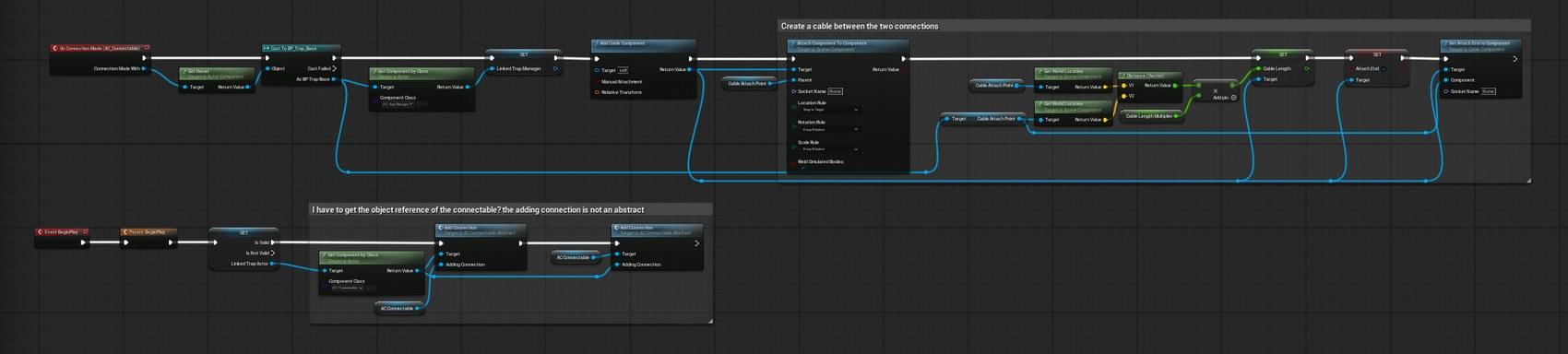
Generic external trigger connection logic and cable setup.
BP_External_Trap_Trigger_Lever_Switch
The lever switch is an interactable external trigger. When the player interacts with it, it calls Try Progress Trap To Next State on the linked trap manager. It also binds to the trap manager state changed event and lerps the lever rotation so the lever visually reflects trap state changes.
| Area | Behaviour |
|---|---|
| Can Interact | Returns true only when Linked Trap Manager is valid. |
| Event Interact | Calls parent interact, then uses the controller pawn as the actor that caused the trigger when progressing the linked trap state. |
| BeginPlay binding | Waits for validation, binds Trap State Changed_Event to the manager, and calls Lerp To Rotation. |
| Rotation logic | Uses a timer and RInterp To so the lever rotates between state-based angles such as neutral and pulled positions. |
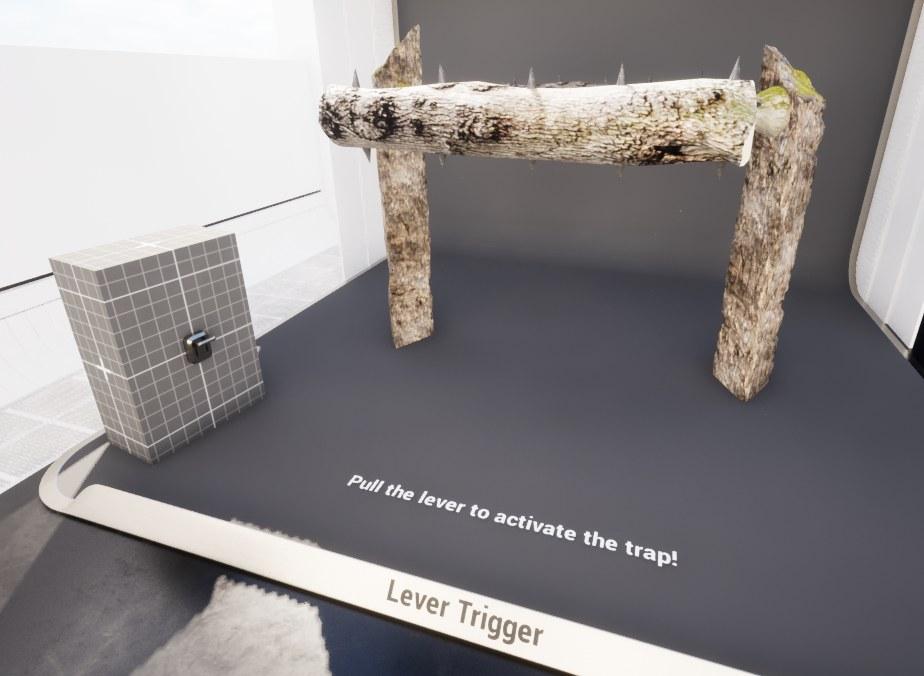
Lever trigger shown in the demo level.
BP_External_Trap_Trigger_PressurePlate
The pressure plate activates when an overlapping character has enough inventory weight. It casts the overlapping actor to a character, reads inventory information through the inventory component, compares the total weight against Weight Required to Trigger, and then calls Try Activate Trap From Trigger when the check passes.
| Area | Behaviour |
|---|---|
| Overlap trigger | On Component Begin Overlap calls Try Activate Trap. |
| Inventory check | Requires AC_Inventory on the character and uses Get Inventory Weight Slot And Coins Info. |
| Weight Required To Trigger | Threshold value. The trap only triggers when total inventory weight is greater than or equal to this value. |
| Failure branch | If the inventory component is missing, a development-only print warns that no inventory component was found. |
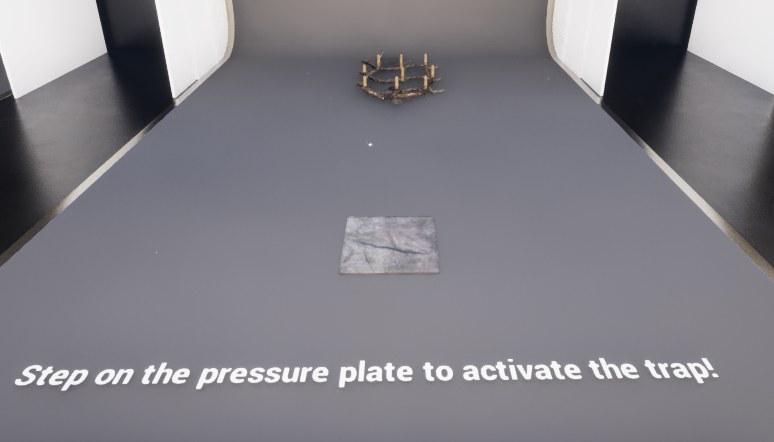
Pressure plate trigger shown in the demo level.
BP_External_Trap_Trigger_TripWire
The trip wire activates when an actor crosses the wire after building is complete. The visual cable ends are detached when overlapped, then the trigger calls Try Activate Trap From Trigger on the linked trap manager.
| Area | Behaviour |
|---|---|
| Build check | Only triggers if Is Building Finished is true. |
| Cable response | Sets the left and right cable attach ends to false, visually breaking or releasing the wire. |
| Activation | Calls Try Activate Trap From Trigger and passes the overlapping actor as the trigger source. |
| State reset visual | Binds to trap state changes so the wire can reattach when the trap returns to an armed state. |
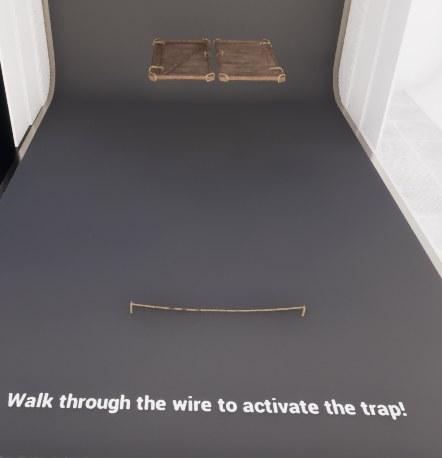
Trip wire trigger shown in the demo level.
Trap Base Variants
BP_Trap_Activatable_Base
BP_Trap_Activatable_Base is used for traps that are activated and deactivated through trap states. It keeps interaction availability tied to build completion and uses state-specific interaction text such as Activate Trap or Deactivate Trap.
| Function / Area | Behaviour |
|---|---|
| Can Transition From Current State To Desired State | Overrides transition validation and returns true only for supported state combinations. This prevents invalid transitions such as activating a trap that is already in the wrong terminal state. |
| Get Interact Text | Maps state to text. Unarmed, Arming, and Armed states display activation-style text, while Triggered and Releasing display deactivation-style text. |
| Can Interact | Returns Is Building Finished, so the trap cannot be used before the buildable flow is complete. |
| Components | Adds Under_Construction_Spawnpoint in addition to the shared trap base components. |
BP_Trap_Armable_Base
BP_Trap_Armable_Base is used for traps that can be armed and potentially released. It builds on BP_Trap_Base interaction behaviour and changes the displayed text depending on whether the interacting pawn is allowed to release itself.
| Function / Area | Behaviour |
|---|---|
| Get Interact Text | If the controlled pawn is in Actors Allowed To Release, the text becomes Release. Otherwise it displays Arm Trap. |
| Can Interact | Requires parent Can Interact, build completion, and a valid current state such as Unarmed, Triggered, or Released depending on the child behaviour. |
| Use case | Best for traps where the player must arm the trap manually or where the trapped pawn can later interact to release themselves. |
Individual Traps
The following traps are implemented as individual child trap Blueprints, except for BP_Trap_Boulder which is documented separately. Each child uses the shared manager for state, damage, effects, and activation, then implements its own visuals and physical response.
BP_Trap_Fly_Swatter
BP_Trap_Fly_Swatter is a primitive jaw trap made from two spiked halves. When triggered, it moves its trap parts toward the target rotation using a timeline, applies area damage, and then updates the trap back to Unarmed. When arming, it plays a reset timeline and then updates to Armed.
| State / Event | Behaviour |
|---|---|
| Trap Triggered | Plays the converge trap parts timeline, updates rotations, applies area damage through AC_TrapManager, then sets the trap to Unarmed. |
| Trap Arming | Plays the reset trap parts timeline and sets the trap to Armed when finished. |
| Trap Armed / Trap Unarmed | Directly sets trap part rotations to the correct ready/resting positions. |
| Trigger overlap | On component overlap with the trap trigger, the child requests the manager to update to Triggered. |
BP_Trap_Fly_Swatter_Double
BP_Trap_Fly_Swatter_Double extends the jaw trap idea by using two moving halves and storing the current roll rotation before animation. It can damage an area, move back to Unarmed, and track trapped actors for release timing.
| Area | Behaviour |
|---|---|
| Store Current Relative Roll Rotation | Caches the current roll so the timeline can animate from the actual current position. |
| Trap Triggered | Runs a timeline from the stored roll toward the target roll, applies area damage, sets the manager to Unarmed, and adds trapped actors with a release timer. |
| Trap Releasing | Runs a release timeline and moves the trap to Released when complete. |
| State handling | Handles Unarmed, Arming, Armed, Triggered, and Releasing states by routing them to dedicated custom events. |
BP_Trap_GroundSpikes
BP_Trap_GroundSpikes uses an animation Blueprint to extend and retract spikes. The trap manager state is converted into a replicated Trap Armed boolean, and animation events feed back into the trap manager when the spikes are armed, triggered, or ready to deal damage.
| Area | Behaviour |
|---|---|
| Automatic reset | The manager automatic reset is used, so the child primarily handles Triggered and reset/arming states. |
| Trap Armed boolean | Server_Set_TrapState sets a replicated Trap Armed variable, which is then injected into ABP_Spike_Trap. |
| Animation events | OnTrapArmed, OnTrapTriggered, and OnTrapDamage events are bound from the animation instance and mapped back to manager state changes and area damage. |
| Overlap damage box | When the trigger/damage box overlaps, the manager state is updated to Triggered. |
BP_Trap_Hanging_Rope
BP_Trap_Hanging_Rope is a suspended snare trap. It catches the overlapping actor, moves the trap upward, attaches the rope to the actor, ragdolls the actor, and constrains the actor to the trap. When released, it disconnects the rope and destroys the spawned physics constraint.
| Area | Behaviour |
|---|---|
| Trap Triggered | Interpolates the trap upward, activates hanging prerequisites, closes the overlap gate, and stores the actor that triggered the trap. |
| Activate Hanging Prerequisites | Sets cable attach end, attaches the cable to the actor mesh/socket, ragdolls the pawn, creates a physics constraint, and connects the trap to the pawn. |
| Trap Arming | Interpolates the trap back to its start location, waits for the timer to finish, then sets the manager state to Armed. |
| Trap Releasing | Disconnects the cable, destroys the spawned physics constraint, and moves the state to Released. |
| Overlap gate | The gate opens in Armed state and closes when the trap has fired so the trap does not repeatedly catch new actors during the same activation. |
BP_Trap_Log_Cleaver
BP_Trap_Log_Cleaver is a heavy swinging log trap. It stores the default center-support rotation, rotates the center support, applies damage from spiked log overlaps, and uses a damaged actor cooldown map so the same target is not damaged too many times per second.
| Area | Behaviour |
|---|---|
| BeginPlay | Initializes damaged actor cooldown tracking and stores the default rotation of the center support. |
| Rotate Center Support | Uses a looping timer and Add Local Rotation. The spiked logs rotate with the center support. |
| Trap Triggered | Allows damage, aborts ramp down, stores the current target value, and ramps the trap down into the active swing. |
| Trap Unarmed | Aborts ramp up, stores current target, ramps back up, and disables damage when finished. |
| Apply Trap Damage | Checks the damaged actor cooldown map before calling Apply Single Target Damage. This prevents repeated instant hits on the same target. |
| Client Allow Damage | Toggles overlap generation and collision response so the damage components only overlap pawns while damage is enabled. |
BP_Trap_Spinner
BP_Trap_Spinner is a rotating wooden beam with spiked balls. It uses constraints for the spiked balls, rotates the spinner base by torque, ramps torque up and down with timelines, and applies single target damage from multiple overlap components.
| Area | Behaviour |
|---|---|
| BeginPlay | Sets constrained components for the left and right spiked balls and starts the rotate timer. |
| Rotate | Adds world rotation every tick/timer interval using Current Torque and delta seconds. |
| Trap Triggered | Enables damage, aborts ramp down, stores current torque, and ramps torque up to the desired value. |
| Trap Unarmed | Aborts ramp up, stores current torque, ramps torque down to zero, and disables damage when finished. |
| Damage overlaps | SpikedBallLeft, SpikedBallRight, and DamageBox overlaps all call Apply Single Target Damage through the manager. |
| Client Allow Damage | Enables/disables Generate Overlap Events and sets pawn collision response to Overlap or Block. |
BP_Trap_Static_Spikes
BP_Trap_Static_Spikes is the simplest trap shown. It applies area damage whenever the Damage Overlap component begins overlap. This is useful for always-dangerous spike fields or traps that do not need a complex state machine.
| Area | Behaviour |
|---|---|
| Damage Overlap | On Component Begin Overlap calls AC_TrapManager.Apply Area Damage. |
| Use case | Good for static hazards where any actor entering the area should immediately take damage. |
| Extension point | Damage amount, damage type, and trap effects still come from AC_TrapManager, so designers can change behaviour without editing the overlap graph. |
BP_Trap_TrapDoor
BP_Trap_TrapDoor uses left and right door meshes, door pivots, and physics constraints to open a floor hatch. It can move into Armed, simulate or stop physics on the door parts, and open the gates/doors when triggered.
| Area | Behaviour |
|---|---|
| Components | LeftDoor, RightDoor, LeftDoorPivot, RightDoorPivot, LeftDoorPhysicsConstraint, and RightDoorPhysicsConstraint are added on top of the shared trap components. |
| Trap State Changed | Arming starts an arm timeline and disables simulation, while Triggered calls Open Gates. |
| Arm timeline | Sets relative rotations for the left and right door based on a timeline rotation track, then updates the manager to Armed on authority when finished. |
| Open Gates | Enables physics simulation on the door meshes so the trap door can open/drop physically. |
BP_Trap_Wall_Spikes
BP_Trap_Wall_Spikes uses a long spike animation Blueprint. The child sets an Extend Trap replicated value, pushes that value into ABP_Spike_Trap_Long, and listens for animation events to apply damage and return to Armed after retracting.
| Area | Behaviour |
|---|---|
| OnRep_Extend Trap | Gets the skeletal mesh anim instance, casts to ABP_Spike_Trap_Long, and sets Trap Triggered from the replicated Extend Trap value. |
| Trap State Changed | Sets Extend Trap based on the current state, then binds animation events such as On Trap Retracted and On Trap Damage. |
| Overlap when armed | When the trigger/damage box overlaps and the current state is Armed, the manager progresses to the next state. |
| On Trap Damage | Calls Apply Area Damage using the trigger/damage box. |
| On Trap Retracted | Updates the manager back to Armed. |
Boulder Trap
BP_Trap_Boulder is the major exception to the normal trap hierarchy. It is documented separately because the boulder is mostly physics-driven and can be pushed by the player when it is not directly impacting the player. It has its own collision, force, sound, cooldown, and velocity-based damage flow.
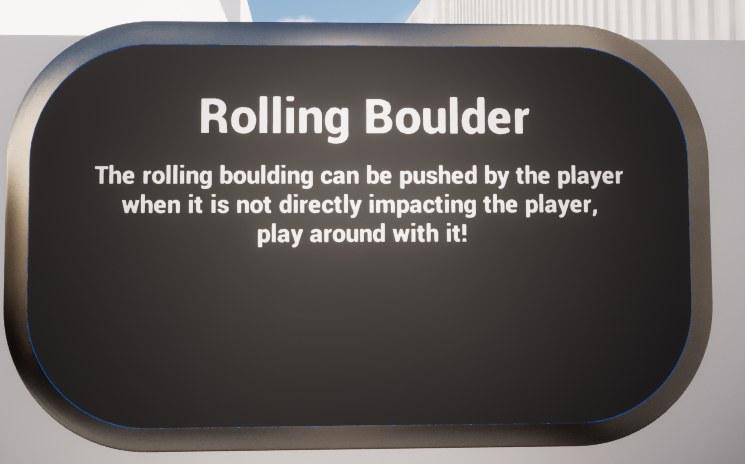
Rolling boulder sign from the demo level.
| Area | Behaviour |
|---|---|
| Player pushing | When the player overlaps the push collision area, the boulder can apply force based on the player push force and impact normal. |
| Impact vs pushing check | Uses dot product and velocity thresholds to decide whether the player is pushing the boulder or being hit by it. |
| Ragdoll response | If the player is being hit by the boulder, the boulder can call Server To Ragdoll on the affected character before applying damage. |
| Velocity-based damage | Damage is mapped from boulder velocity using a clamped range between minimum and maximum boulder damage. |
| Damaged actor cooldown map | A map prevents the same actor from being damaged repeatedly in rapid succession while the boulder remains in contact. |
| Sound handling | Rolling and impact sounds are selected randomly and spawned based on velocity thresholds, with short delays to avoid excessive audio spam. |
| Player collision correction | A separate player collision sphere is updated to the boulder location rather than attached directly, avoiding unusual physics behaviour. |
The boulder should be treated as a special hazard rather than a normal arm/disarm trap. Designers can place it into the world as a rolling physics object and tune its push force, damage velocity thresholds, sound arrays, and cooldown settings.
Functions to Use
The following functions are the main public entry points designers and developers are most likely to use when integrating traps into gameplay logic.
| Function | Use |
|---|---|
| Try Update Trap State | Request a trap state change through the manager. This is the standard route for moving a trap into Unarmed, Armed, Triggered, Releasing, or Released. |
| Server_Try Update Trap State | Server-side replicated version of the state update request. Used when the request originates from a client-owned interaction or trigger. |
| Try Set Trap State | Internal/manager state setter. It validates initialization and transition rules, updates Current Trap State, and calls Trap State Changed. |
| Try Activate Trap From Trigger | Called by trigger actors or trap child overlaps when an actor has caused a trap activation. |
| Try Progress Trap To Next State | Uses the Allowed Trap State Transitions map to progress from the current state to the next configured state. |
| Apply Area Damage | Applies damage to every valid overlapping actor in a supplied damage zone. |
| Apply Single Target Damage | Applies damage to a specific target actor from an overlap or hit event. |
| Apply Trap Effects | Constructs and applies configured BP_TrapEffectBase effects after damage or trigger events. |
| Get Recently Trapped Actors | Returns actors recently affected by a trap. |
| Get Actors Allowed To Release | Returns actors that are allowed to interact with the trap to release themselves. |
| Has Required Resources For Trap State | Checks whether the controller inventory contains the items needed for a desired state. |
| Remove Required Resources For Trap State | Consumes the inventory items required for a state transition. |
| Toggle Movement Enabled | Disables or re-enables movement for affected characters through AC_CH_Extended_Movement. |
| Validate Trigger Source | Macro that checks whether the pawn is player-controlled or AI-controlled and whether the trap settings allow that source type. |
Events and Dispatchers
The system relies on events rather than hardwired child logic. The trap manager broadcasts state changes and the child Blueprints respond with the appropriate visuals, timelines, animation events, or physics changes.
| Event | Use |
|---|---|
| Trap State Changed | Broadcast or called when Current Trap State changes. Child traps bind to this and switch on E_DefenseSystem_Trap_State. |
| Trap Triggered | Common child event used when the trap enters Triggered and should perform its active behaviour. |
| Trap Arming | Common child event used to prepare a trap for the Armed state. |
| Trap Armed | Common child event used when a trap has reached its ready state. |
| Trap Unarmed | Common child event used when a trap returns to a resting or inactive state. |
| Trap Releasing | Common child event used when the trap should release a trapped actor or move toward a released state. |
| Animation events | Specific traps such as ground spikes and wall spikes bind animation Blueprint events back into the trap manager, for example OnTrapDamage or OnTrapRetracted. |
| Connection made | Connectable actors use connection events to assign a trap manager reference and create visible cable links between triggers and traps. |
Hooking Traps Into Other Systems
The trap system integrates with several other Hyper systems while keeping ownership boundaries clear. The trap should request services from those systems rather than copying their logic.
| System | Integration |
|---|---|
| Buildable System | BP_Trap_Base inherits from BP_Buildable_Base. Build completion checks, buildable collisions, construction points, and under-construction visuals belong to the buildable system. |
| Interaction System | Trap actors and lever triggers expose Can Interact, Get Interact Text, and Event Interact overrides. The trap does not need a custom input system. |
| Connectable System | Traps and external triggers use AC_Connectable, BP_ConnectionSocket, cable attach points, and connection-made events to link triggers to traps. |
| Inventory System | Resource-gated trap states use the inventory manager to check and remove required items. Pressure plates can also read inventory weight. |
| Attribute / Damage System | Trap damage is applied through the attribute manager route, using Trap Damage, Trap Damage Type, and the actor hit/overlap context. |
| Extended Movement System | Movement locking uses AC_CH_Extended_Movement to disable movement on trapped actors and then re-enable it through release flow. |
| Animation Blueprints | Animated traps such as ground spikes and wall spikes push replicated booleans into animation instances and listen for animation events to drive state completion and damage timing. |
How to Place a Trap in the World
Use this workflow when adding an existing trap to a map or test level.
- Drag the desired trap Blueprint into the level. For normal traps, use one of the BP_Trap_Base child actors. For the boulder, place BP_Trap_Boulder separately.
- Position and rotate the trap so its damage/trigger zones line up with the intended gameplay path.
- If the trap uses the buildable workflow, make sure it can reach the finished/buildable state before testing interaction. Several trap functions check Is Building Finished before allowing use.
- Select the trap and inspect AC_TrapManager. Confirm Current Trap State, Allowed Trap State Transitions, Trigger settings, Trap Damage, Trap Damage Type, and automatic arm/reset settings.
- Decide whether the trap should be triggered by the player, AI, or both by setting Should Player Trigger Trap and Should AI Trigger Trap.
- Configure Trap Effects To Apply On Damage or Trap Effects To Apply On Enter Trigger if the trap should apply extra effects beyond damage.
- Press Play and test the trap with the intended trigger source.
How to Connect a Trap to an External Trigger
Use this workflow for lever switches, pressure plates, and trip wires.
- Place the trap actor in the level.
- Place the desired BP_External_Trap_Trigger child, such as BP_External_Trap_Trigger_Lever_Switch, BP_External_Trap_Trigger_PressurePlate, or BP_External_Trap_Trigger_TripWire.
- Use the connectable workflow to connect the trigger actor to the trap actor. The trigger should receive the trap manager reference from the trap when the connection is made.
- Check that the visual cable is created between the trigger Cable Attach Point and the trap Cable Attach Point.
- In Play mode, interact with or overlap the trigger. The trigger should call Try Progress Trap To Next State or Try Activate Trap From Trigger on the linked manager.
- If nothing happens, verify Linked Trap Manager is valid on the trigger and that the trap current state can transition to the desired state.
How to Change Trap Damage
Trap damage is configured on AC_TrapManager rather than inside every child trap.
- Select the trap actor in the level or Blueprint defaults.
- Open the AC_TrapManager details.
- Set Trap Damage to the desired amount.
- Set Trap Damage Type to the damage type that should be passed into the attribute/damage system.
- If the child trap uses velocity-based damage, such as BP_Trap_Boulder, tune the boulder-specific min/max damage and velocity threshold values instead of only changing the generic trap manager damage.
- Test the trap against a valid actor with an attribute manager. If no damage is applied, confirm the actor can be resolved by Get Attribute Manager By Actor and that the collision component is overlapping the actor correctly.
How to Make a Trap Require Items to Arm or Activate
The resource requirement workflow is driven by F_DefenseSystem_TrapState_Item_Requirement and the inventory manager.
- Select the trap and open AC_TrapManager.
- Find Required Resource For Trap State.
- Add a new array entry.
- Set Trap State to the desired target state, such as Armed.
- Add the required inventory slot item entries to Inventory Items.
- Make sure Allowed Trap State Transitions allows the current state to progress into the state that has the requirement.
- When the player interacts, BP_Trap_Base will check Has Required Resources For Trap State.
- If the check passes, Remove Required Resources For Trap State consumes the items and then the manager updates the trap state.
- If the interaction text is not showing the item name correctly, verify the inventory item row name and item data lookup used by Get Interact Text.
How to Add a New Normal Trap
A new normal trap should usually be created as a child of an existing trap base, not from Actor directly.
- Decide whether the trap should be a simple trap, activatable trap, or armable/releasable trap.
- Create a child Blueprint of BP_Trap_Base, BP_Trap_Activatable_Base, or BP_Trap_Armable_Base.
- Add the trap-specific meshes, skeletal meshes, collision boxes, trigger boxes, pivots, cables, physics constraints, or scene components needed by the trap.
- Use AC_TrapManager for Current Trap State, damage, trap effects, resources, and trigger validation. Do not create a separate state variable unless the child needs a replicated animation parameter.
- On BeginPlay, call parent BeginPlay and then bind to Trap State Changed if the child needs to react to state changes.
- Add a Switch on E_DefenseSystem_Trap_State in the child and route relevant states to custom events such as Trap Armed, Trap Triggered, Trap Unarmed, or Trap Releasing.
- For damage, call Apply Area Damage or Apply Single Target Damage on AC_TrapManager rather than applying damage manually.
- If the trap catches or locks actors, call Add Trapped Actors and use Actors Allowed To Release for release logic.
- Configure Allowed Trap State Transitions in AC_TrapManager so generic interactions and external triggers know what the next state should be.
- Test the trap in isolation first, then connect it to a lever, pressure plate, or trip wire.
How to Add a New External Trigger
A new external trigger should call the trap manager rather than owning trap behaviour directly.
- Create a child Blueprint of BP_External_Trap_Trigger.
- Keep AC_Connectable and the Cable Attach Point setup so the trigger can be connected to a trap.
- Add the trigger-specific input: interaction, overlap, hit event, timer, proximity check, item check, or weight check.
- When the trigger condition passes, call either Try Activate Trap From Trigger or Try Progress Trap To Next State on Linked Trap Manager.
- Pass the actor that caused the trigger so Validate Trigger Source can check player/AI rules.
- Add visual feedback if needed. For example, a lever lerps rotation, a trip wire detaches its cable, and a pressure plate can depress its mesh.
- In Can Interact or activation logic, verify Linked Trap Manager is valid before allowing use.
How to Add a Trap Effect
Trap effects are configured through AC_TrapManager maps and applied after damage or trigger events.
- Create or choose a BP_TrapEffectBase child that contains the effect behaviour.
- Select the trap actor and open AC_TrapManager.
- Add the effect to Trap Effects To Apply On Damage if it should trigger when damage is dealt.
- Add the effect to Trap Effects To Apply On Enter Trigger if it should trigger when an actor enters a trigger zone.
- Fill in the effect data map value expected by that effect class.
- Test the trap against a valid actor. Apply Trap Effects constructs the effect object and calls Apply Effect with the affected actor, owning trap, hit component, and hit result.
How to Make a Trap Reset Automatically
Automatic reset is controlled through AC_TrapManager and the child trap state implementation.
- Enable Should Automatically Arm on AC_TrapManager if the trap should reset without manual interaction.
- Set Automatic Arm Delay to the time the manager should wait before trying to reset or arm again.
- Ensure Allowed Trap State Transitions contains the path the trap should follow after Triggered or Released.
- In the child trap, make sure the state event for Arming or Unarmed actually plays the reset animation/timeline and updates the manager to Armed when complete.
- For animation-driven traps, bind the animation event that indicates the reset is finished and update the manager from there.
- Test multiple activations to confirm damage, overlap, and recently trapped actor arrays are cleared correctly between activations.
Example Flows
Player steps on a pressure plate
The pressure plate overlap fires.
The actor is cast to Character and its inventory component is resolved.
Total inventory weight is compared against Weight Required To Trigger.
If valid, the pressure plate calls Try Activate Trap From Trigger on the linked trap manager.
The manager validates the trigger source and state transition.
The child trap receives Trap State Changed and performs its own triggered behaviour.
Player pulls a lever to arm or activate a trap
The player interacts with BP_External_Trap_Trigger_Lever_Switch.
The lever calls parent interaction and passes the controlled pawn to Try Progress Trap To Next State.
AC_TrapManager reads Allowed Trap State Transitions and updates the current state if valid.
The lever receives the state changed event and lerps its rotation.
The trap child receives the same state change and animates, arms, triggers, or releases depending on the new state.
Player arms a resource-gated trap
The player interacts with the trap actor.
BP_Trap_Base finds the next state from Allowed Trap State Transitions.
The manager checks Required Resource For Trap State for that desired state.
The inventory manager confirms whether all required items exist.
If valid, the required items are removed and the trap state is updated.
The child trap reacts to the state change and moves into Arming or Armed.
Actor is caught by the hanging rope
The rope trap overlap gate is open while the trap is Armed.
An overlapping character is stored as Actor That Triggered This.
The trap manager is set to Triggered and the actor is added to trapped actor tracking.
The trap interpolates upward, attaches cable to the actor, ragdolls the actor, and creates a physics constraint.
When released, the rope disconnects, the constraint is destroyed, and the manager moves to Released.
Boulder hits a player
The boulder collision detects a player contact.
The boulder calculates direction, velocity, and dot product to decide whether the player is pushing or being hit.
If the player is being hit, the boulder can ragdoll the actor and apply damage.
Damage scales based on current boulder velocity and the configured min/max damage values.
The actor is added to the damaged actor cooldown map so it is not damaged repeatedly every frame.
Troubleshooting
| Issue | Likely fix |
|---|---|
| Trap does not trigger | Check Current Trap State, Allowed Trap State Transitions, Should Player Trigger Trap, Should AI Trigger Trap, and whether the trigger actor has a valid Linked Trap Manager. |
| Lever does nothing | Confirm the lever is connected to the trap, Linked Trap Manager is valid, and the trap has a valid next state in Allowed Trap State Transitions. |
| Pressure plate does nothing | Check that the overlapping actor has AC_Inventory and enough Total Weight In Inventory to meet Weight Required To Trigger. |
| Trip wire does not activate | Confirm Is Building Finished is true and that the cable/overlap component is actually being crossed. |
| Trap interaction is unavailable | Check Is Building Finished, Recently Trapped Actors, parent Can Interact, and whether the current state is one of the states allowed by the trap base variant. |
| Trap consumes no resources | Check Required Resource For Trap State, inventory item row names, item amounts, and whether Remove Required Resources For Trap State is being called after the resource check passes. |
| Trap applies no damage | Check collision overlap settings, the damage zone passed into Apply Area Damage, the target attribute manager, Trap Damage, and Trap Damage Type. |
| Animated trap does not update | Check the skeletal mesh animation instance cast, replicated booleans such as Trap Armed or Extend Trap, and whether animation events are bound on BeginPlay. |
| Trap damages too often | Use a Damaged Actors cooldown map or Recently Trapped Actors timer like the log cleaver and boulder examples. |
| Trapped actor cannot move after release | Confirm Toggle Movement Enabled is called with Disabled false, the physics constraint is destroyed, and the actor is removed from recent/trapped arrays. |
| Boulder feels unfair or too lethal | Tune dot product threshold, damage velocity threshold, minimum/maximum damage, damaged actor cooldown interval, and player push force. |
| New child trap breaks build behaviour | Make sure the new trap inherits from BP_Trap_Base or an appropriate variant and calls parent BeginPlay / parent interaction functions where required. |
Summary
The Defense / Trap System provides a reusable Blueprint foundation for traps, triggers, state transitions, damage, trap effects, resource requirements, and buildable integration. BP_Trap_Base is the shared trap parent and is itself a child of BP_Buildable_Base, so normal traps inherit buildable-world behaviour while keeping trap-specific logic in AC_TrapManager and child trap Blueprints.
Most traps should be extended as children of the trap base chain. The child trap should focus on visuals, timelines, animations, physics, overlap zones, and special behaviour, while AC_TrapManager continues to own the state machine, damage routes, trap effects, resource checks, trigger validation, and release tracking. BP_Trap_Boulder is the main exception and should be treated as a separate physics-driven hazard.
For designers, the system is practical because traps can be placed, configured, connected to external triggers, tuned for player or AI activation, assigned resource requirements, and tested through shared manager settings. For developers, the system is extensible because new traps can be created by inheriting from the trap base, binding to trap state changes, and calling the existing manager functions rather than rebuilding the framework from scratch.