
Turret Defense system
Updated May 23, 2026
DefenceSystem_Modern is a Blueprint-based turret and automated defence framework. It provides reusable targeting, aiming, firing, damage, resource consumption, Niagara effects, and projectile behaviour that can be inherited by multiple turret types.
For shared setup guidance, see the Migration Guide and Integration Guide. Use the System Atlas to look up functions, variables, events, components, and ownership references. Use this page for Turret Defense system-specific setup, runtime behavior, extension points, and integration notes.
This document is for Unreal Engine developers integrating or extending the turret system. It prioritises quick setup and safe extension points, while keeping the underlying Blueprint architecture and key identifiers easy to scan.
Scope: turret behaviour (targeting, firing models, resources, effects). Out of scope: placement/build menus, ownership rules, and wider buildable workflows (covered by the surrounding interaction/build systems).
The system is built around a shared turret parent, then specialised child Blueprints for area, hitscan, laser, and projectile behaviour. Common logic such as detection, target sorting, resource checks, fire timers, and base rotation lives in one place, while individual turret types only override what needs to behave differently.
- Uses BP_Turret_Base as the shared turret parent for detection, target selection, resource checks, firing events, audio, and base rotation.
- Supports area based damage, hitscan traces, laser beam visuals, and projectile or missile based attacks.
- Uses resource consumer helper objects to decide whether the turret can fire and whether ammunition/resources should be consumed.
- Supports inventory driven ammo, data-only ammo/resource child Blueprints, and an infinite resource consumer for power based or always-on examples.
- Uses Niagara components and Niagara user variables for continuous streams, beam endpoints, impact effects, and projectile trails.
- Integrates with the Hyper Attribute System when a target has an attribute manager, with a standard Unreal damage fallback where shown.
Quick Start
Use this section if you want to place a turret and confirm the system is working end-to-end before you dive into the detailed reference.
- Place any supplied turret child Blueprint in the level (hitscan, laser, area, or projectile/missile).
- Verify targeting: set Detection Sphere Radius high enough and confirm a pawn enters Pawns in Radius.
- Verify firing gates: confirm Has A Valid Target becomes true and the turret turns until it is facing the target.
- Verify resources: set Resource Consumer Class to BP_Turret_Resource_Consumer_Infinite for a first test, then switch to an ammo/resource consumer and add matching items.
- Verify output: confirm the expected result for your firing model (hitscan damage, area DamageBox damage, beam visuals, or projectile spawn/impact).
- If something fails, jump to Troubleshooting and follow the checks for targets, facing, and resources.
If you want to: create or change content quickly, go to Common Tasks (new turret, ammo, effects, power/infinite, new projectile). For deeper understanding, start with How the System Works. For tables and settings, use Reference.
How the System Works (Conceptual Overview)
At a high level, every turret follows the same pattern: detect targets, choose the best visible target, rotate toward it, check resources, then fire using a specific damage model (area, hitscan, laser hitscan, or projectile).
- Detection: DetectionSphere maintains a list of candidate pawns.
- Selection: candidates are sorted by distance and the closest visible pawn is chosen.
- Aiming: SM_Turret_Rotator (and SM_Turret_Gun for hitscan) turns toward a predicted target position.
- Gating: Can Fire checks target validity, facing state, and resources (external provider first, then local).
- Firing: the shared fired event handles consumption/effects, then the child turret applies damage (trace, overlap, beam visuals, or spawned projectile impact).
Next, Adding the Turret System to the World covers how to use the supplied turret actors. Later, Detailed Targeting and Firing Flow breaks down the shared Blueprint logic step-by-step.
The demo world presents the system as a collection of turret archetypes. These examples share parent behaviour and specialise only the firing model, resource style, projectile setup, or visual effect required by that turret.
Adding the Turret System to the World
Turret actors are intended to be placed in the world as defence actors. BP_Turret_Base is a child of BP_Interact_Location_Base, so it inherits the wider interact-location behaviour from the surrounding Hyper framework.
This document focuses on the turret system itself. Placement, construction, build menus, ownership rules, and wider buildable workflow should remain in the documentation for the wider interaction or building system unless a project intentionally extends this turret system to own that workflow.
| Task | Use |
|---|---|
| Place a ready-made turret | Use one of the supplied child turret Blueprints such as the hitscan, laser, area, gas blower, flamethrower, or projectile/missile variants. |
| Create a new turret type | Create a child Blueprint from the closest base: area, hitscan, laser, or projectile. Then change its mesh, resource consumer, damage values, fire rate, and effects. |
| Change ammo/resource requirements | Assign a different resource consumer class, or create a data-only child of BP_Turret_Resource_Consumer_Ammo with a different Accepted Ammo gameplay tag. |
| Change visuals | Swap the Niagara System asset and make sure any required Niagara user parameters still match the Blueprint logic. |
| Change damage behaviour | Adjust Damage Amount, Damage Type, radial damage values, the DamageBox size, or the projectile impact settings depending on the turret type. |
| Blueprint / Object | Role |
|---|---|
| BP_Interact_Location_Base | Parent framework class for interact-location style actors. BP_Turret_Base inherits from this class. |
| BP_Turret_Base | Shared turret parent. Owns common detection, target management, base rotation, fire checks, resource consumption, audio, Niagara spawn, and firing events. |
| BP_Turret_Area_Base | Specialised child/base for area damage turrets. It overrides the damage application so actors inside DamageBox are damaged rather than using a single trace. |
| BP_Turret_Hitscan_Base | Specialised child/base for line-trace turrets. It adds gun pitch alignment and applies damage along a visibility trace from the barrel. |
| BP_Turret_Hitscan_Laser | Laser child using the hitscan firing model, with additional laser beam endpoint updates and Niagara activation/deactivation logic. |
| Projectile turret setup | Turret-side projectile firing logic. It fires on a timer, checks Can Fire, multicasts the fired event, and spawns a configured projectile actor. |
| BP_Turret_Projectile_Missile | Projectile actor used by the projectile turret. It owns mesh, Niagara trail, ProjectileMovement, homing setup, impact effects, and impact damage. |
| BP_Turret_Resource_Consumer_Base | Base helper object for turret resource checks. Exposes Initialize Object, Has Enough Resources, and Try Consume Resource. |
| BP_Turret_Resource_Consumer_Ammo | Inventory based resource consumer. Checks an owner inventory for a gameplay tag and removes one matching item when the turret fires. |
| BP_Turret_Resource_Consumer_Infinite | Resource consumer that always reports enough resources. Useful for fake power based or unrestricted turret examples. |
Because the Blueprint design is inherited, changes made in a parent can affect every child. Users should usually avoid editing BP_Turret_Base unless they want to change behaviour for all turret types. For a new weapon, create a child from the most suitable base and only override or change defaults on that child.
Reference
Use this section when you need a specific setting, component, event, or function name. The goal is fast lookup: skim the headings, then use the tables for details.
Provided World Turret Types
The demo world describes the intended design purpose for each turret category. These examples also make good starting points for users who want to customise the system.
| Turret type | Demo behaviour | Best used for |
|---|---|---|
| Hitscan turret | Does not spawn a projectile. It traces on the visibility channel and only counts as a successful hit when the target is visible. | Bullet, laser-like, railgun, instant impact, sentry gun, or line-of-sight weapons. |
| Hitscan turret (laser) | Uses the same underlying hitscan behaviour, but has laser visuals and a different fire rate. | Continuous beam weapons, security lasers, energy turrets, sci-fi weapons. |
| Power based turret | Uses a fake infinite amount of resource in the demo. It can be coupled to a power system so it consumes electricity when powered. | Base defence turrets connected to generators, power grids, or electricity resources. |
| Area based turret | Applies damage inside a configurable box in front of the turret instead of tracing one target. | Gas blowers, flamethrowers, cone sprays, short-range hazard emitters. |
| Fuel turret | Uses fuel as ammo in the demo. Fuel management can be item based, pipe based, or handled by a separate system. | Flamethrowers, burners, chemical sprayers, fuel-consuming traps. |
| Projectile based turret | Spawns homing projectiles that seek the target and apply radial damage on impact. | Missiles, rockets, explosive bolts, magic projectiles, artillery-like weapons. |
Core Components
Turret actors use a consistent component layout. Use this table to understand what each component does and what child Blueprints may safely customise.
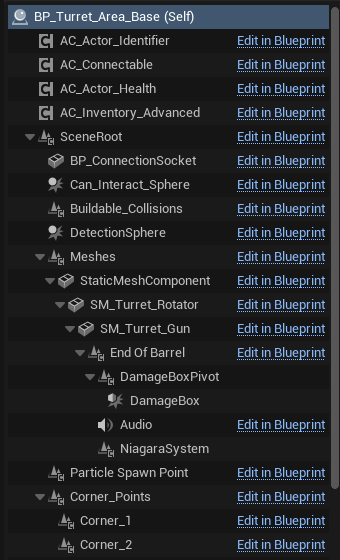
Example component hierarchy from an area turret child.
| Component | Purpose |
|---|---|
| AC_Actor_Identifier | Identifier component used by the wider Hyper systems to identify or categorise the actor. |
| AC_Connectable | Connection component used when an external resource provider is connected to the turret. |
| AC_Actor_Health | Health component. External providers can be unbound or cleared when their health reaches zero. |
| AC_Inventory_Advanced | Inventory component used when the turret has local resources or ammunition. |
| BP_ConnectionSocket | Socket used for connecting compatible providers or resources to the turret. |
| Can_Interact_Sphere | Interaction sphere inherited from the interact-location style parent workflow. |
| Buildable_Collisions | Collision used for buildable/world placement or blocking behaviour. |
| DetectionSphere | Radius used to detect potential pawn targets and maintain the Pawns in Radius list. |
| SM_Turret_Rotator | Rotating turret base or yaw portion. The base rotation logic turns this component toward the selected target. |
| SM_Turret_Gun | Gun mesh or pitch portion. Hitscan turrets rotate this separately so the barrel can aim at the target. |
| End Of Barrel | Scene component used as the muzzle location for traces, projectiles, beam starts, sound, and Niagara spawns. |
| DamageBoxPivot | Pivot used by area turrets to offset the damage box to better match slow-moving Niagara particles. |
| DamageBox | Box collision used by area based turrets to damage overlapping actors. |
| Audio | Audio component used for fire sounds or continuous sound playback. |
| NiagaraSystem | Niagara component used for beam, stream, gas, flame, or other continuous effects. |
| Particle Spawn Point | Additional visual spawn point where required by child effects. |
| Corner_Points / Corner_1-4 | Scene points available for damage box, targeting, or visual setup where the child turret needs them. |
Details Panel / Important Variables
The screenshots show several important variables and settings that are likely exposed on the turret or its children. Exact defaults can be adjusted per child Blueprint.
| Variable / Setting | Where used | Description |
|---|---|---|
| Detection Sphere Radius | BP_Turret_Base | Defines how far the turret can detect targets and how long hitscan traces/projectile targeting ranges can be. |
| Fire Rate | Turret bases | Timer interval used to call Try Fire. Lower values fire more often. |
| Damage Amount | Hitscan, area, projectile | Amount of damage applied through the Attribute System or Unreal damage fallback. |
| Damage Type To Apply | Hitscan / area | Damage type sent into the attribute damage call or standard Apply Damage fallback. |
| Damage Inner Radius | Projectile | Inner radius for radial damage falloff. Actors inside this range receive the strongest damage. |
| Damage Outer Radius | Projectile | Outer radius for radial damage falloff. Actors outside this range are not affected by the radial damage call. |
| Damage Falloff | Projectile | Controls how damage decreases between inner and outer radius. |
| Should Apply Radial Damage | Projectile | When true, projectile impact uses radial damage with falloff. When false, it tries to apply direct damage to the hit actor. |
| Use Smoothed Interp | Base / hitscan aiming | Switches between smooth interpolation and constant interpolation for turning toward the target. |
| Look At Update Rate | Base / hitscan aiming | Timer interval for updating target rotation. |
| Look At Target Speed | Base / hitscan aiming | Interpolation speed used when turning toward the target. |
| Rotator Acceptance Range | Base aiming | Tolerance used to decide if the rotating base is facing the target closely enough. |
| Gun Acceptance Range | Hitscan aiming | Tolerance used to decide if the gun pitch is facing the target closely enough. |
| Prediction Multiplier | Base aiming | Controls how much the turret leads a moving target. |
| Prediction Multiplier Gain Range | Base aiming | Range over which movement prediction ramps up. Close targets should usually have less prediction to avoid overshooting. |
| Resource Consumer Class | BP_Turret_Base | Class used to create the local resource consumer helper object. |
| Resource Consumer Reference | BP_Turret_Base | Runtime object reference used for local resource checks and consumption. |
| External Resource Provider | BP_Turret_Base | Runtime object reference created from a connected resource provider. It is checked before local resources. |
| Accepted Ammo | BP_Turret_Resource_Consumer_Ammo | Gameplay tag that identifies the ammo/resource item this consumer accepts. |
| Owner Inventory Reference | BP_Turret_Resource_Consumer_Ammo | Inventory component reference found during Initialize Object. |
| Niagara System Asset | Niagara component / projectile | Visual effect asset used by the turret or projectile. |
| Impact Niagara | Projectile | Visual effect spawned on projectile impact. |
| Impact Sound | Projectile | Sound spawned when the projectile impacts. |
| Impact Pitch Float Range | Projectile | Random pitch range used to vary repeated impact sounds. |
Resource Consumer Architecture
The resource system is intentionally modular. A turret does not need to know whether ammo comes from local inventory, a connected ammo box, electricity, fuel, missile ammo, or an infinite demo supply. It asks a resource consumer object whether resources are available and asks it to consume a resource when the turret fires.
| Resource consumer | Behaviour |
|---|---|
| BP_Turret_Resource_Consumer_Base | Base object with Initialize Object, Has Enough Resources, and Try Consume Resource. The base versions are minimal/stub behaviours and are intended to be overridden by children. |
| BP_Turret_Resource_Consumer_Ammo | Finds the owner inventory component, checks how many items exist with Accepted Ammo, and removes one matching item by gameplay tag when firing. |
| BP_Turret_Resource_Consumer_Ammo_Fuel | Data-only child of the ammo consumer. Accepted Ammo is Items.Resource.Liquid.Fuel. |
| BP_Turret_Resource_Consumer_Ammo_Power | Data-only child of the ammo consumer. Accepted Ammo is Items.Resource.Electricity. |
| BP_Turret_Resource_Consumer_Ammo_Projectiles | Data-only child of the ammo consumer. Accepted Ammo is Items.Equipment.Ammunition.Missile_ammo. |
| BP_Turret_Resource_Consumer_Infinite | Always reports that enough resources exist. Useful for power based demos, unlimited turrets, or testing. |
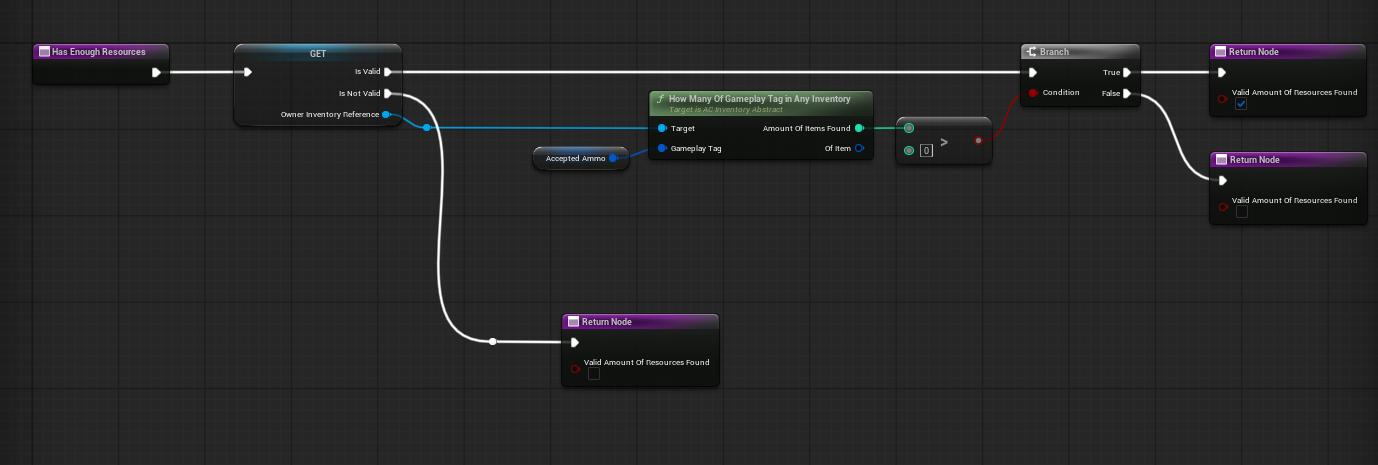
Ammo resource consumer checking the owner inventory for the Accepted Ammo gameplay tag.
The local resource consumer is created on BeginPlay if Resource Consumer Class is valid. The connected external resource provider path can also construct a resource consumer object when a compatible provider is connected. The external provider is checked first. If it cannot consume or is no longer valid, the turret can fall back to its local Resource Consumer Reference.
Damage Types and Firing Models
DefenceSystem_Modern supports several firing models. The main difference between them is how they decide what receives damage.
| Firing model | Damage target selection | Damage application |
|---|---|---|
| Area based | DamageBox overlaps actors in front of the turret. | Loops overlapping actors, gets the Attribute Manager by actor, and calls direct damage if valid. |
| Hitscan | Line trace by Visibility from End Of Barrel forward. | If the hit actor has an Attribute Manager, direct damage is applied. If not, standard Apply Damage can be used. |
| Laser hitscan | Same underlying hitscan fire check, with additional beam endpoint tracing. | Damage remains hitscan-based; visual beam end point is updated separately. |
| Projectile / missile | Projectile actor overlaps or impacts another actor. | Can apply radial damage with falloff, or direct attribute damage when radial damage is disabled. |
All firing models are designed to be driven by the same Can Fire pattern. A turret should only fire when it has a valid target, is facing the target, and has enough resources according to its resource consumer logic.
Detailed Targeting and Firing Flow
BP_Turret_Base owns the shared targeting and firing logic. This is the core layer that child turrets inherit before adding their own damage style.
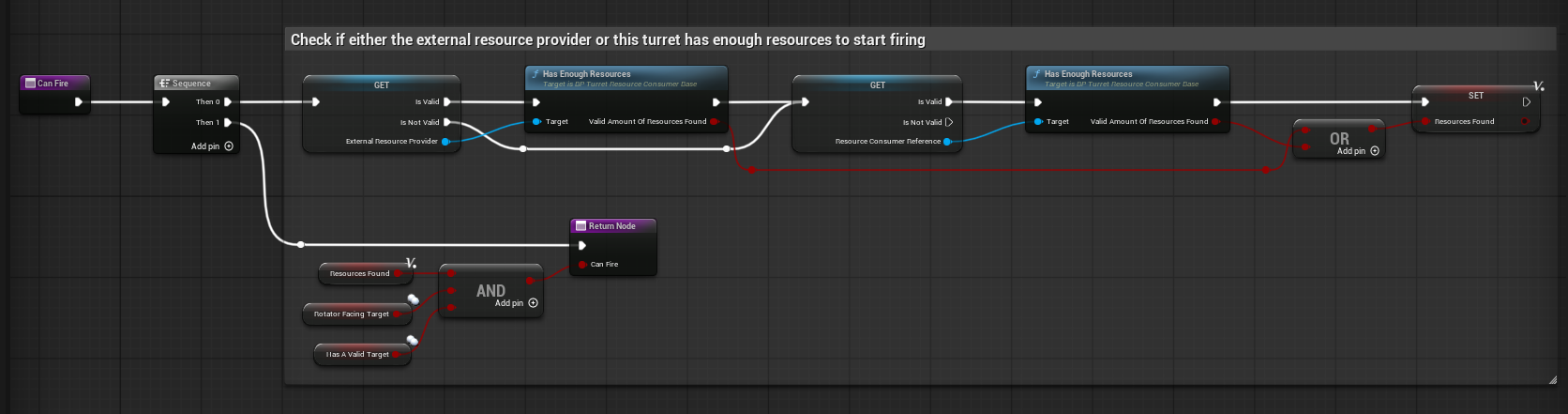
BP_Turret_Base Can Fire checks resources, target validity, and facing state.
Target detection
DetectionSphere overlap events add and remove pawns from the Pawns in Radius array. On begin overlap, the turret can run an affiliation check before adding the actor. If the array was previously empty, it starts the target-looking timer. On end overlap, the pawn is removed from the array.
Target sorting
The Sort Based On Distance function sorts the Pawns in Radius array using squared distance to the turret. This allows the turret to attempt closer targets first without using expensive distance square root calculations.
Line of sight target selection
Get Closest Visible Pawn loops through the sorted array and checks whether each candidate has line of sight from the barrel. The first visible pawn becomes the active target and Has A Valid Target is set true.
Base rotation
Start Looking At First Target runs on a timer using Look At Update Rate. It calculates a target rotator and turns SM_Turret_Rotator toward the target either with smoothed interpolation or constant interpolation. The system also supports target prediction so moving targets can be led instead of aiming only at their current location.
Fire event
When the turret can fire, it triggers the turret fired event, consumes resources, plays sound, spawns Niagara where appropriate, and allows child Blueprints to continue with their own damage implementation.
Area Based Turrets
BP_Turret_Area_Base is used for turrets that damage an area in front of the turret rather than firing a single ray or projectile. The demo examples include flame and gas style turrets.
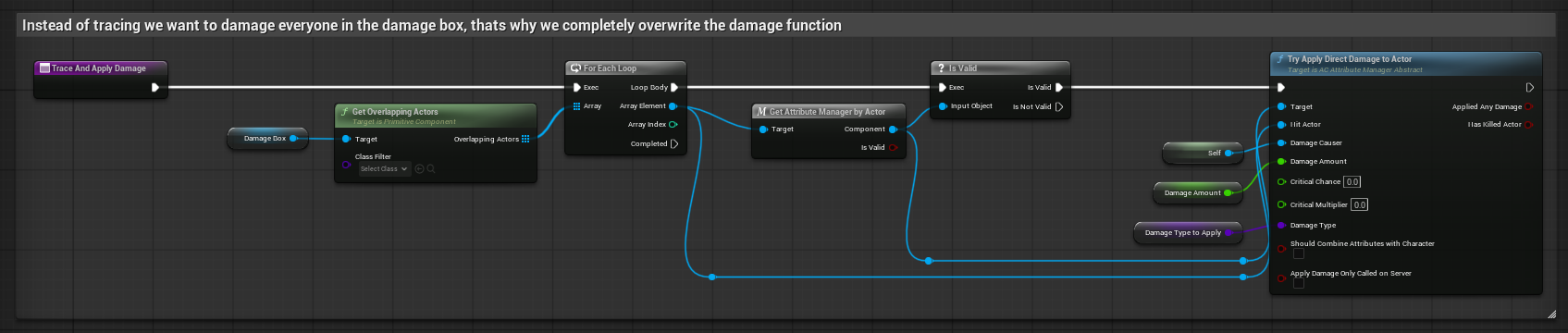
Area turret damage override: overlapping actors inside DamageBox are damaged.
| Area turret behaviour | Description |
|---|---|
| DamageBox driven damage | Trace and Apply Damage is overwritten. Instead of tracing, the turret gets all overlapping actors inside DamageBox and applies direct damage through the Attribute System when available. |
| Continuous Niagara visual | The Niagara component can be activated when the turret can fire and deactivated when it cannot. This prevents the stream from playing when there is no valid fire state. |
| DamageBoxPivot correction | The damage box can be rotated slightly to account for slower particle movement, helping the damage volume line up better with what the player sees. |
| Moving target compensation | The turret checks target velocity and dot product against the turret right vector to decide whether to offset the damage box left or right. |
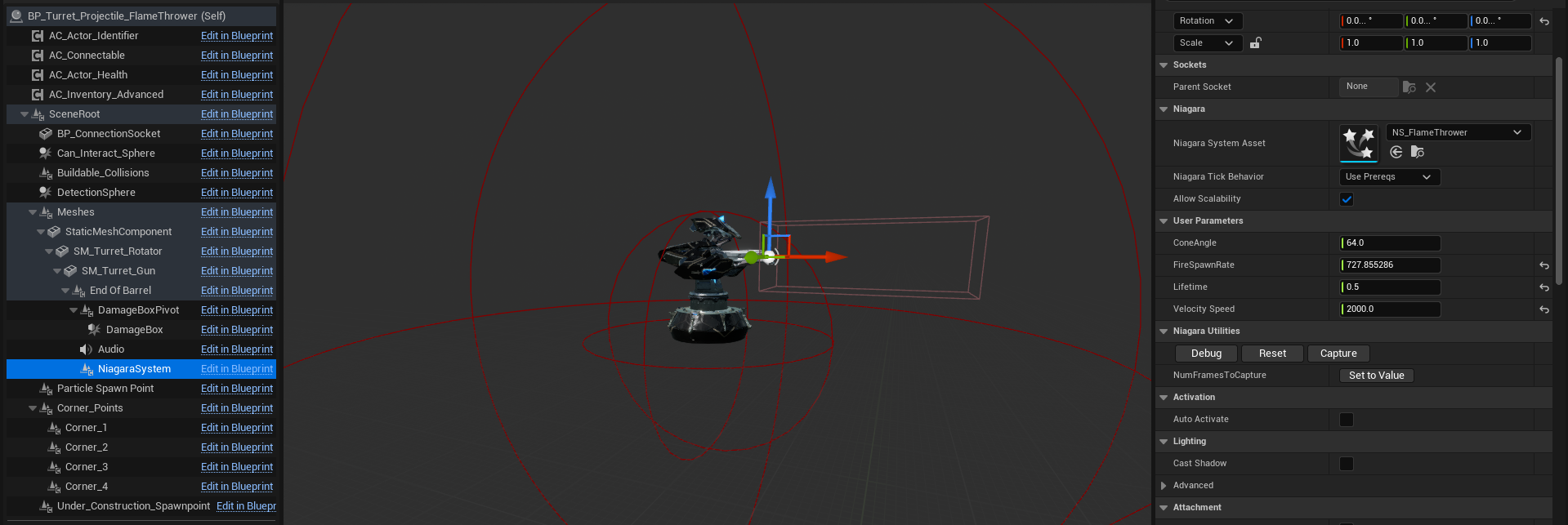
Flamethrower child configured with a flame Niagara system and a forward damage box.
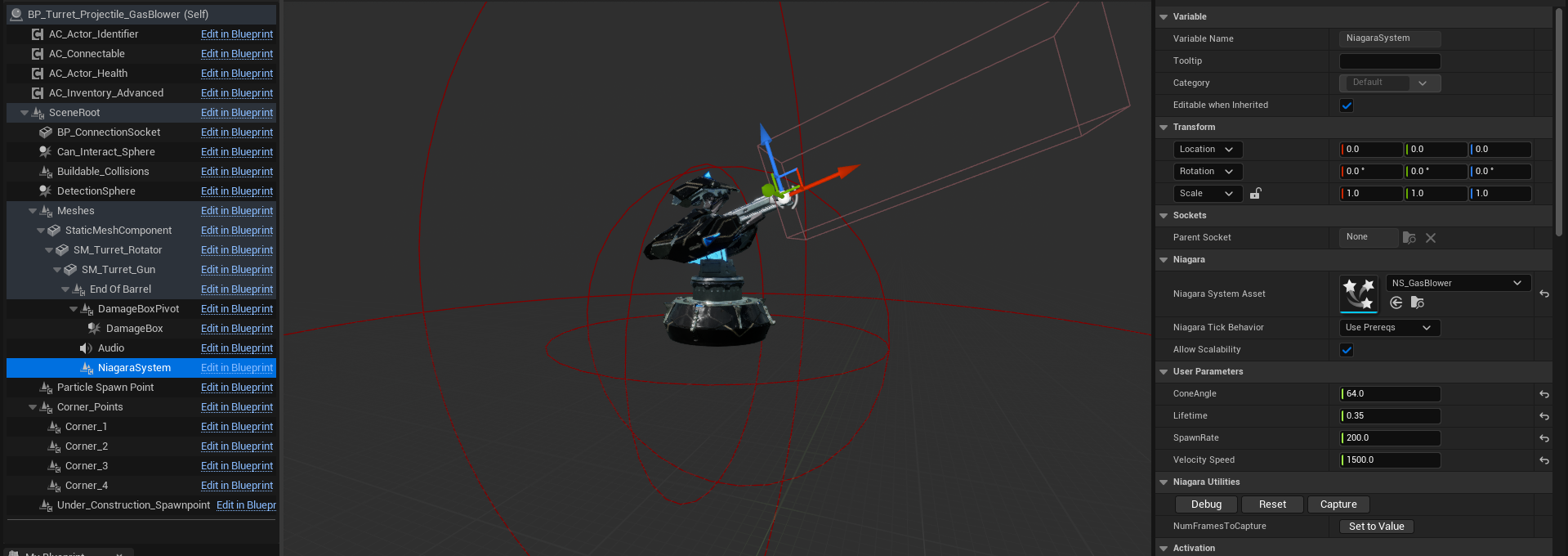
Gas blower child configured with a gas Niagara system and a forward damage box.
Hitscan Turrets
BP_Turret_Hitscan_Base is used for instant-hit turrets. It adds gun pitch aiming on top of the base rotator aiming so the gun mesh can track targets vertically.
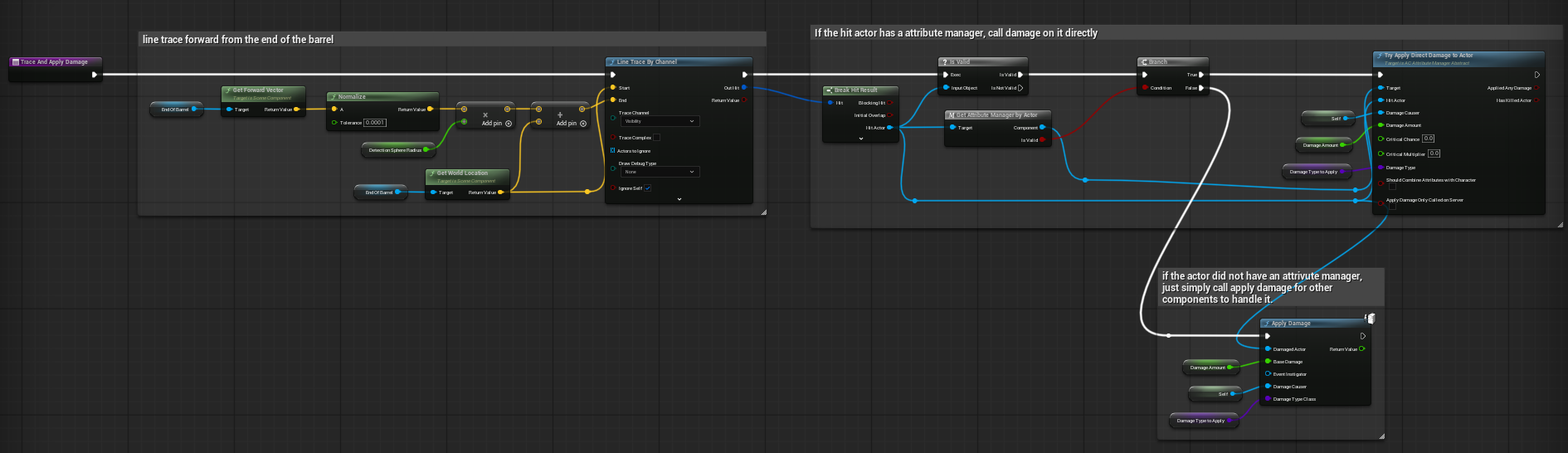
Hitscan trace and damage logic from End Of Barrel forward.
| Hitscan feature | Description |
|---|---|
| Gun pitch tracking | Look At First Target calls the parent, then rotates SM_Turret_Gun toward the target pitch. This is separated from BP_Turret_Base because not every turret type needs its gun mesh to pitch. |
| GunFacingTarget gate | Can Fire calls the parent Can Fire and additionally requires Gun Facing Target to be true. |
| Visibility trace | Trace and Apply Damage performs a line trace on Visibility from End Of Barrel in the forward direction. |
| Attribute damage path | If the hit actor has an Attribute Manager, Try Apply Direct Damage To Actor is used. |
| Fallback damage path | If the hit actor does not have an Attribute Manager, the Blueprint can fall back to standard Apply Damage so non-Hyper actors can still respond. |
Hitscan turrets are a strong base for bullets, energy shots, sentries, or any weapon where projectile travel time is not required.
Laser Hitscan Turrets
BP_Turret_Hitscan_Laser uses the hitscan model but adds constant beam visual updates. The laser is not a separate damage model; it is a hitscan turret with laser-specific Niagara behaviour and fire timing.
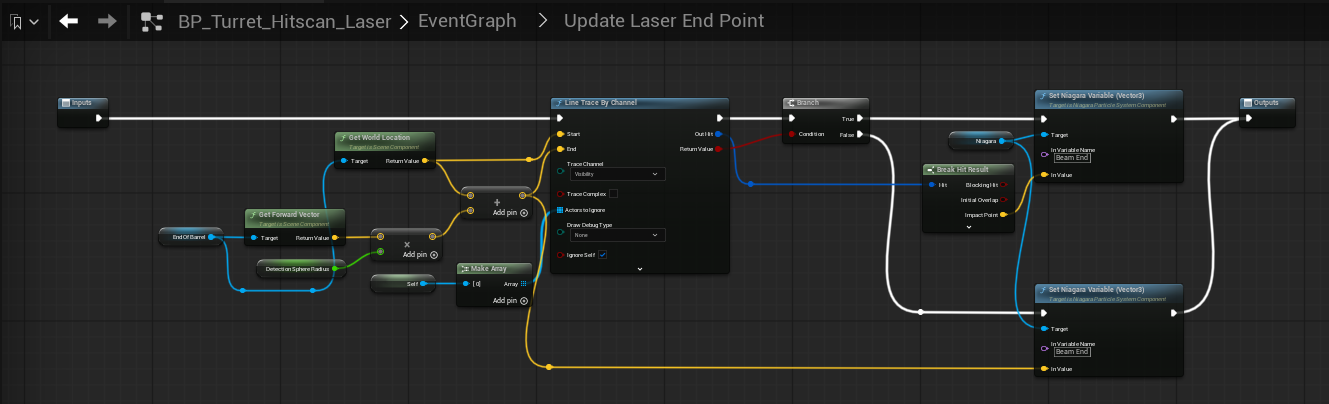
Laser endpoint update: trace forward and set the Niagara Beam End vector.
| Laser behaviour | Description |
|---|---|
| Update Laser timer | BeginPlay starts a looping timer at a short interval to keep the beam endpoint aligned with the current trace. |
| Can Fire check | Update Laser checks Can Fire. When true, it updates the laser endpoint and enables the laser. When false, it disables the laser. |
| Beam End variable | The Niagara component receives a Vector3 variable named Beam End. If the trace hits, Beam End is set to Impact Point. If it does not hit, Beam End is set to the forward trace end. |
| Enable/Disable Laser | The Blueprint uses Do Once gates to avoid repeatedly activating or deactivating the Niagara component every timer tick. |
When changing the laser Niagara system, keep the user variable name consistent with the Blueprint. If the Niagara asset uses a different parameter name, either rename the Niagara parameter to Beam End or update the Blueprint node that sets the Niagara variable.
Projectile Turrets
Projectile turrets differ from hitscan turrets because they spawn an actor rather than applying damage immediately. The turret-side firing logic uses the same parent Can Fire flow, then spawns a projectile actor at End Of Barrel and passes all required movement, homing, damage, impact, and audio settings into the spawned actor.
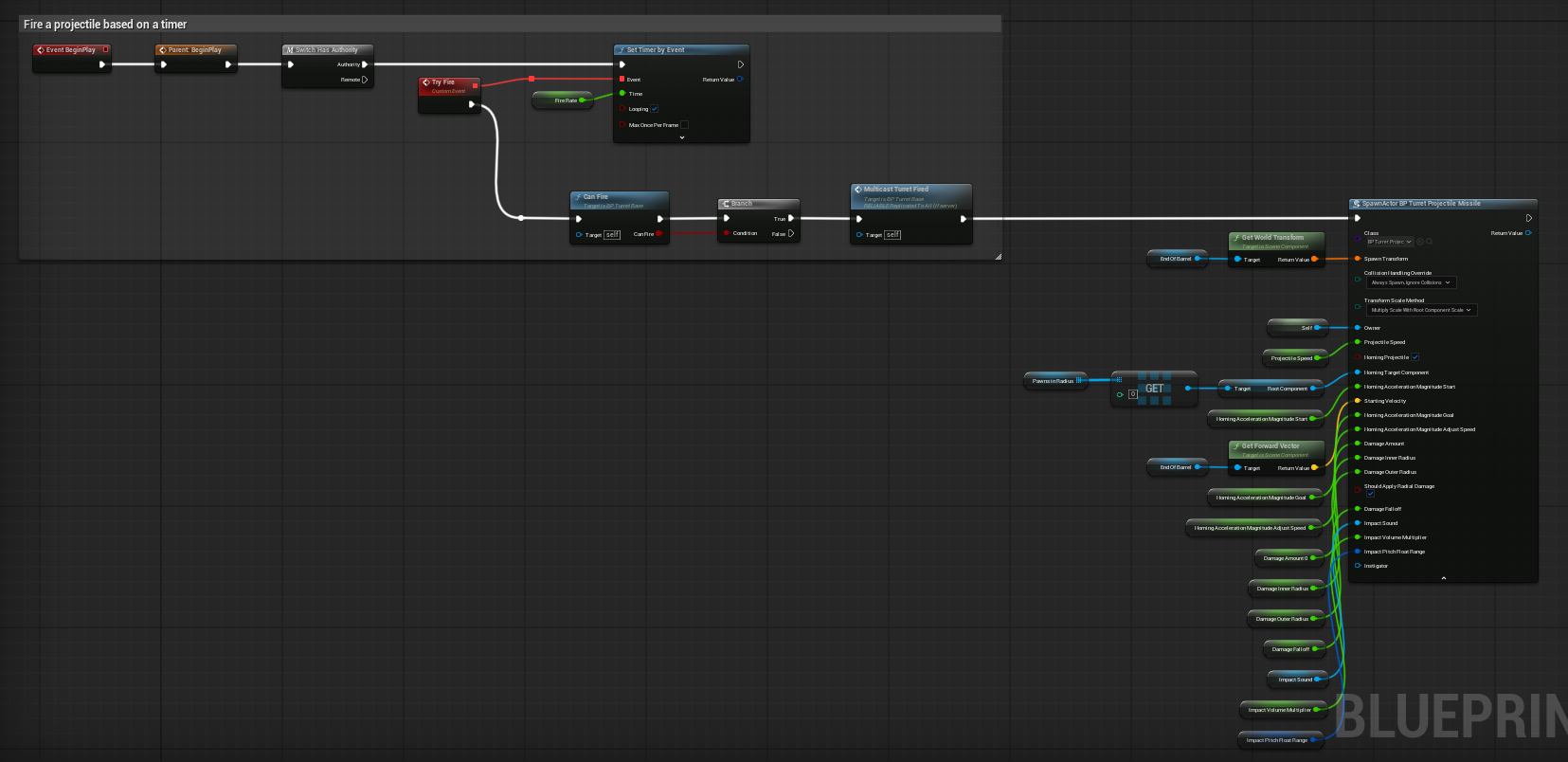
Projectile turret firing on a timer and spawning the missile projectile actor.
| Projectile spawn value | Description |
|---|---|
| Projectile Speed | Initial travel speed passed into the projectile. |
| Is Homing Projectile | Enables homing setup on the projectile actor. |
| Homing Target Component | Usually the root component of the selected target pawn. |
| Starting Velocity | Usually taken from the End Of Barrel forward vector. |
| Homing Acceleration Magnitude Start | Initial homing acceleration so the projectile does not instantly snap to the target. |
| Homing Acceleration Magnitude Goal | Final acceleration value the homing missile ramps toward. |
| Homing Acceleration Magnitude Adjust Speed | How quickly the projectile interpolates from start acceleration to goal acceleration. |
| Damage Amount | Base damage passed to the projectile. |
| Damage Inner / Outer Radius | Radial damage falloff radii. |
| Should Apply Radial Damage | Whether impact uses radial damage or direct damage. |
| Damage Falloff | Falloff value passed into radial damage. |
| Impact Sound / Impact Volume Multiplier / Impact Pitch Float Range | Impact audio configuration. |
Projectile Actor / Missile Setup
The projectile actor owns the behaviour that happens after it has been spawned. The missile example contains a static mesh, Niagara trail, ProjectileMovement component, and impact logic.
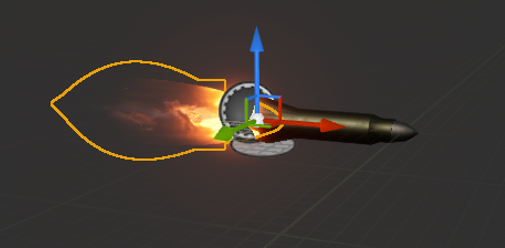
BP_Turret_Projectile_Missile visual setup with mesh and Niagara trail.
| Projectile actor behaviour | Description |
|---|---|
| Normal projectile initialise | Sets projectile velocity using Starting Velocity and Projectile Speed. |
| Homing projectile initialise | Sets Is Homing Projectile, assigns Homing Target Component, sets starting velocity, and applies the starting homing acceleration. |
| Acceleration ramp | On Tick, homing acceleration interpolates toward the goal value. This prevents the projectile from instantly snapping straight at the target. |
| Impact event | On StaticMesh overlap, Do Once prevents repeated impact processing. The projectile applies damage, spawns Niagara, spawns sound, hides itself, disables collision, and sets a short lifespan. |
| Radial damage | When Should Apply Radial Damage is true, Apply Radial Damage With Falloff is used. |
| Direct damage | When radial damage is false, the projectile tries to get an Attribute Manager on the hit actor and apply direct damage. |
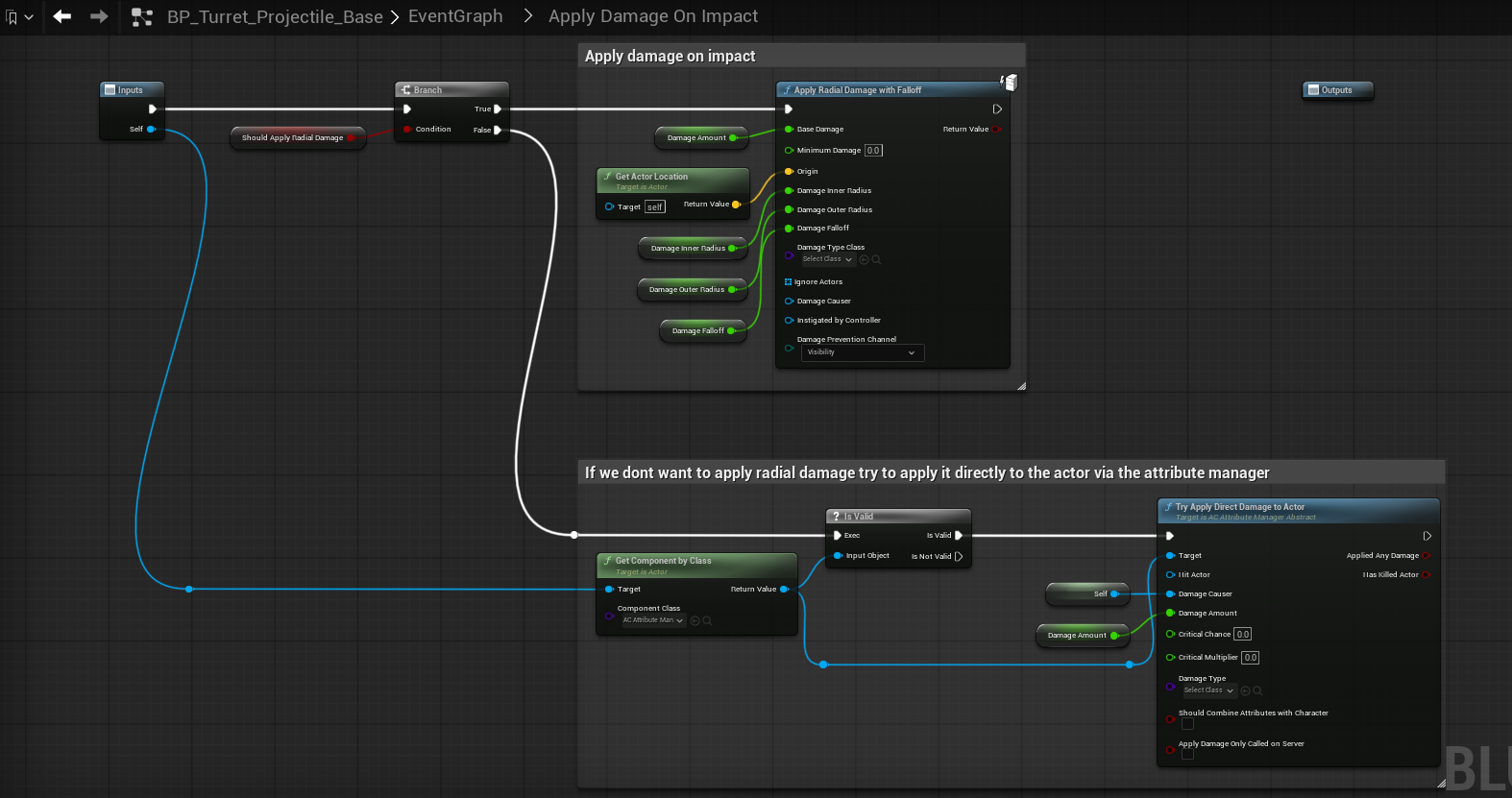
Projectile impact damage supports both radial damage and direct attribute damage.
Niagara and Audio
The system uses Niagara in several different ways: muzzle effects, continuous area streams, laser beams, impact effects, and projectile trails. Audio is similarly split between turret firing sounds and projectile impact sounds.
| Visual / audio use | How it is driven |
|---|---|
| Base muzzle effect | BP_Turret_Base can spawn a Niagara system at End Of Barrel when the turret fires. |
| Area stream effect | Area turrets use a Niagara component that activates while the turret can fire and deactivates when it cannot. |
| Laser beam effect | Laser turrets set a Niagara Vector3 variable named Beam End so the beam ends at the trace impact point or the trace end. |
| Projectile trail | Missile/projectile actors can use a Niagara component that auto-activates and follows the projectile mesh. |
| Projectile impact effect | Projectile actors spawn the configured Impact Niagara at the projectile transform on impact. |
| Fire sound | The turret audio component can play with a random pitch from a pitch range. Continuous sounds can be gated with Do Once and stopped when the firing/facing condition no longer applies. |
| Impact sound | Projectile impact sound is spawned at the actor transform using Impact Sound, Impact Volume Multiplier, and random pitch. |
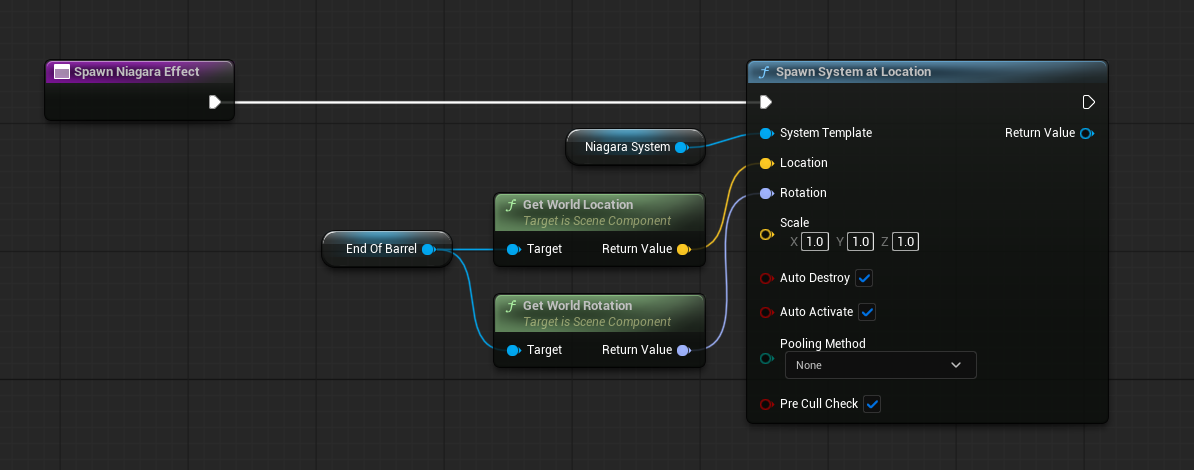
Base Niagara spawn from End Of Barrel.
The area examples show Niagara user parameters such as ConeAngle, FireSpawnRate or SpawnRate, Lifetime, and Velocity Speed. These parameters belong to the Niagara asset. If a different Niagara asset uses different parameter names, users should adjust the Niagara asset or Blueprint references accordingly.
Functions to Use
These are the functions you will most often call, override, or debug when extending turret behaviour.
| Function | Blueprint | Purpose |
|---|---|---|
| Can Fire | BP_Turret_Base and children | Returns whether the turret is allowed to fire. Parent checks resources, valid target, and base facing. Hitscan adds gun facing. |
| Try Fire | Turret children | Called by a timer. It normally checks Can Fire, multicasts the fired event, then performs the turret-specific fire behaviour. |
| Trace and Apply Damage | Hitscan / area / projectile | Applies damage using the firing model. Area overrides this to use DamageBox overlaps. Hitscan traces from End Of Barrel. Projectile applies damage on impact. |
| Start Looking At First Target | BP_Turret_Base | Starts target selection and rotation update logic when targets are available. |
| Sort Based On Distance | BP_Turret_Base | Sorts Pawns in Radius by squared distance so nearby targets are checked first. |
| Get Closest Visible Pawn | BP_Turret_Base | Finds the first visible pawn from the sorted target list. |
| Get Target Rotation Smooth Lerp | BP_Turret_Base | Calculates and interpolates the base rotation smoothly toward the predicted target position. |
| Get Target Rotation Constant Lerp | BP_Turret_Base | Calculates and interpolates the base rotation with constant interpolation. |
| Get Target Pitch Smooth Lerp | BP_Turret_Hitscan_Base | Calculates and interpolates the gun pitch smoothly toward the target. |
| Get Target Pitch Constant Lerp | BP_Turret_Hitscan_Base | Calculates and interpolates the gun pitch with constant interpolation. |
| Spawn Niagara Effect | BP_Turret_Base | Spawns a configured Niagara system at End Of Barrel. |
| Update Laser End Point | BP_Turret_Hitscan_Laser | Line traces forward and writes the laser beam end vector into the Niagara component. |
| Enable/Disable Laser | BP_Turret_Hitscan_Laser | Activates or deactivates the laser Niagara component using Do Once gates. |
| Initialize Object | Resource consumers | Initialises references needed by the resource consumer. Ammo consumers find the owner inventory. |
| Has Enough Resources | Resource consumers | Returns whether this resource consumer can provide resources for a shot. |
| Try Consume Resource | Resource consumers | Attempts to remove or consume the resource needed for one shot. |
Events and Multicast Flow
The turret system uses events to keep common firing behaviour and child firing behaviour separated. The parent can handle shared effects and resource consumption, while children perform their own damage or projectile logic.
| Event / flow | Purpose |
|---|---|
| Turret_Fired_Event | Local event bound to the turret fired dispatcher. It consumes resources, plays sound, and spawns visual effects. |
| Multicast_Turret_Fired | Network-facing fired event used so firing feedback can be seen by relevant clients. |
| On Connection Made | Used by AC_Connectable to build an external resource provider consumer when an ammo box or resource actor is connected. |
| On Health Zero Event | Used on connected external providers so the turret clears the external resource reference when the provider is destroyed. |
| DetectionSphere BeginOverlap / EndOverlap | Adds and removes candidate pawns from Pawns in Radius. |
| Projectile overlap impact | Projectile actor impact flow that applies damage, spawns effects/sound, hides the projectile, disables collision, and sets lifespan. |
Ammo and Resource Types
Ammo/resource selection is gameplay-tag driven. The ammo consumer does not need to know a specific item class. It only needs the Accepted Ammo gameplay tag. If the owner inventory has at least one item matching that tag, the turret can fire. When the turret fires, one matching item can be removed automatically by gameplay tag.
| Ammo/resource child | Accepted Ammo gameplay tag |
|---|---|
| BP_Turret_Resource_Consumer_Ammo_Fuel | Items.Resource.Liquid.Fuel |
| BP_Turret_Resource_Consumer_Ammo_Power | Items.Resource.Electricity |
| BP_Turret_Resource_Consumer_Ammo_Projectiles | Items.Equipment.Ammunition.Missile_ammo |
Because these are data-only children, users can make additional ammo types very quickly. A new bullet, rocket, battery, shell, crystal, or fuel type only needs a new gameplay tag and a data-only child with Accepted Ammo set to that tag.
External Resource Providers
The base turret can support an external resource provider through AC_Connectable. When a connection is made with a provider, the turret constructs a resource consumer object for that external provider and sets it as External Resource Provider. This external provider is checked before the turret local resource consumer.
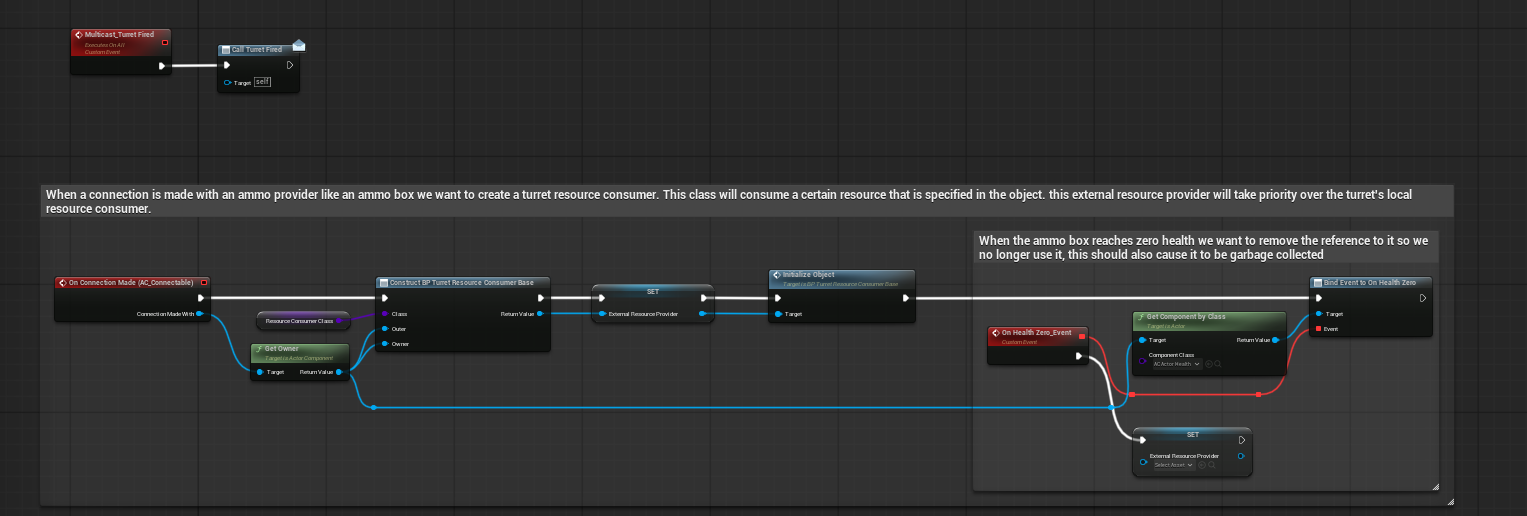
Connection flow creating and initialising an external resource provider consumer.
| External provider step | Description |
|---|---|
| Connection made | AC_Connectable reports that a compatible actor has connected. |
| Resource consumer constructed | The turret constructs the configured resource consumer class and assigns the connected actor as its owner/provider. |
| Object initialised | Initialize Object runs so the provider can cache any inventory or resource reference it needs. |
| Health zero binding | The provider health component is bound so the turret can clear the reference when the provider is destroyed. |
| Priority check | When firing, the turret attempts to consume from External Resource Provider first. If that fails or is invalid, it can use local Resource Consumer Reference. |
This makes it possible to support external ammo boxes, power supplies, fuel tanks, or other connected providers without changing the core turret firing logic.
Hooking into Other Systems
DefenceSystem_Modern is designed to interact with other Hyper systems without forcing them to own turret logic.
| System | Integration point |
|---|---|
| Hyper Attribute System | Damage is applied through the Attribute Manager when a target has one. This is used by area, hitscan, and direct projectile damage paths. |
| Unreal damage system | Hitscan includes a fallback Apply Damage path for actors that do not have an Attribute Manager. |
| Hyper Inventory System | Ammo resource consumers query and remove inventory items by gameplay tag. |
| AC_Connectable | Used for external resource providers such as ammo boxes or power/fuel supplies. |
| AC_Actor_Health | Used to clear connected resource providers when their health reaches zero. |
| Interaction / buildable framework | BP_Turret_Base inherits from BP_Interact_Location_Base. Placement and wider buildable rules should be handled by that wider framework documentation. |
| Niagara | Used for muzzle, stream, beam, impact, and projectile visuals. |
| Audio | Used for looping/continuous fire sounds and impact sounds. |
Common Tasks
Use these step-by-step procedures to extend the system without modifying shared parent logic. Each task starts with the intended outcome so you can confirm you are in the right place.
Add a New Turret
Outcome: You will end with a new child turret Blueprint that uses the correct firing model, consumes the intended resource, and plays the intended effects.
The safest way to add a new turret is to create a child from the base that already matches the damage model you need.
- Decide the firing model: area, hitscan, laser hitscan, or projectile.
- Create a child Blueprint from BP_Turret_Area_Base, BP_Turret_Hitscan_Base, BP_Turret_Hitscan_Laser, or the projectile turret setup.
- Rename the child clearly, for example BP_Turret_Hitscan_Railgun or BP_Turret_Area_AcidSprayer.
- Open the child Blueprint and adjust the visual mesh components, especially SM_Turret_Rotator, SM_Turret_Gun, and End Of Barrel alignment.
- Set Detection Sphere Radius, Fire Rate, Damage Amount, and any damage-specific settings such as DamageBox size or radial damage radii.
- Choose the Resource Consumer Class. Use Infinite for testing, Ammo for inventory resources, or a data-only ammo child for fuel, power, missiles, or your own tag.
- Assign Niagara and audio assets. For area turrets, configure the Niagara component. For projectile turrets, configure projectile impact and trail assets.
- Test the turret in the demo map against a visible target. Confirm it detects, rotates, consumes resources, plays effects, and applies damage.
- Only move shared logic into BP_Turret_Base if every turret type should inherit that change.
- For most users, creating a child Blueprint is enough. Avoid editing the parent base unless the goal is to change all existing turret children.
Create a New Ammo Type
Outcome: You will have a new gameplay tag and a data-only resource consumer child that enables the turret to fire by consuming that tag from inventory/providers.
A new ammo type is mainly a gameplay tag workflow. The ammo consumer already searches inventory by gameplay tag, so users do not need to write new firing code for each ammo type.
| Heavy rocket | Items.Equipment.Ammunition.Rocket_Heavy | BP_Turret_Resource_Consumer_Ammo_HeavyRocket |
| Battery cell | Items.Resource.Electricity.BatteryCell | BP_Turret_Resource_Consumer_Ammo_BatteryCell |
| Acid tank | Items.Resource.Liquid.Acid | BP_Turret_Resource_Consumer_Ammo_Acid |
| Magic crystal | Items.Resource.Crystal.Mana | BP_Turret_Resource_Consumer_Ammo_ManaCrystal |
Change a Turret Ammo Type
Outcome: The turret will only fire when the new ammo/resource tag is available, and it will consume one unit per shot via the assigned resource consumer.
To change what a turret consumes, change the resource consumer class or change the Accepted Ammo tag on a data-only child.
When to use: when a turret should consume a different gameplay tag or draw from a different provider style without changing fire logic.
- Open the turret child Blueprint you want to change.
- Find the Resource Consumer Class setting.
- Assign the consumer child that matches the desired ammo/resource type. For example, use BP_Turret_Resource_Consumer_Ammo_Projectiles for missile ammo.
- If no suitable consumer exists, create a new data-only child from BP_Turret_Resource_Consumer_Ammo and set Accepted Ammo to the desired tag.
- Compile and save the turret child.
- Place the correct item/resource in the turret inventory or connected provider inventory.
- Test firing and confirm one item/resource is consumed per shot.
- Do not hard-code item classes into the turret. The intended pattern is gameplay-tag based because it keeps the turret generic and makes new ammo types easy to add.
Change Niagara Effects
Outcome: The turret or projectile will use the new Niagara assets while still matching the Blueprint-driven user parameters (for example beam endpoints).
Niagara effects can be changed per turret child without changing the base system. The exact workflow depends on whether the effect is a component, a spawned muzzle effect, a laser beam, or an impact effect.
When to use: when you want different visuals (stream, beam, muzzle, impact, trail) while keeping existing firing/damage logic.
Change an area turret stream effect
- Open the area turret child, such as the flamethrower or gas blower child.
- Select the NiagaraSystem component.
- Change Niagara System Asset to the new Niagara asset.
- Check the Niagara user parameters. The demo examples use values such as ConeAngle, FireSpawnRate or SpawnRate, Lifetime, and Velocity Speed.
- Make sure Auto Activate is disabled if the Blueprint is meant to activate the stream only while the turret can fire.
- Adjust DamageBox size and position so the damage volume matches the visible stream.
- Compile and test the turret against a moving target.
Change a laser effect
- Open BP_Turret_Hitscan_Laser or its child.
- Select the laser Niagara component.
- Change the Niagara System Asset.
- Confirm the new Niagara asset has a Vector3 user parameter for the beam endpoint.
- Use the same parameter name as the Blueprint node. The shown setup writes to Beam End.
- If the Niagara asset uses a different parameter name, update the Set Niagara Variable node in Update Laser End Point.
- Test against a wall and a pawn to confirm the beam ends at the trace hit point.
Change a projectile trail or impact effect
- Open the projectile actor child, such as BP_Turret_Projectile_Missile.
- For the trail, select its NiagaraSystem component and change the Niagara System Asset.
- For impact effects, update the Impact Niagara variable passed into or stored on the projectile.
- Adjust any Niagara user parameters such as Duration, Fireball Scale, or Ribbon Length.
- Compile and test projectile spawn, flight, and impact.
Make a Power or Infinite Turret
Outcome: The turret will fire without consumable ammo (infinite) or will be ready to consume power via a dedicated resource consumer implementation.
The demo includes a power based turret idea where the turret uses a fake infinite resource. This is useful for showing a turret that is powered by an outside system without building that full power grid into the turret itself.
- Open the turret child that should behave as power based or unrestricted.
- Set Resource Consumer Class to BP_Turret_Resource_Consumer_Infinite if the turret should always be allowed to fire once target and facing checks pass.
- If the project has a real electricity item in inventory, use BP_Turret_Resource_Consumer_Ammo_Power instead so it checks Items.Resource.Electricity.
- If the project has a separate power grid system, create a new child of BP_Turret_Resource_Consumer_Base that queries that system in Has Enough Resources and consumes or reserves power in Try Consume Resource.
- Keep the turret firing code unchanged. Only the resource consumer should know where power comes from.
This keeps the power system optional. Projects can treat power as inventory items, a connected provider, a true grid, or an infinite test supply.
Balance Targeting and Damage
Outcome: You will be able to tune feel and effectiveness (range, fire rate, turn speed, damage shape) using exposed values instead of rewriting Blueprint logic.
Most turret tuning can be done with exposed values rather than changing Blueprint logic.
| Goal | Values to adjust |
|---|---|
| Turret reacts sooner to targets | Increase Detection Sphere Radius. |
| Turret fires more often | Lower Fire Rate. |
| Turret turns faster | Increase Look At Target Speed. |
| Turret fires with less perfect aiming | Increase Rotator Acceptance Range or Gun Acceptance Range. |
| Turret overshoots moving targets | Reduce Prediction Multiplier or increase the close-range dead zone by adjusting Prediction Multiplier Gain Range. |
| Projectile turns too aggressively | Lower Homing Acceleration Magnitude Goal or lower Adjust Speed. |
| Projectile feels too slow | Increase Projectile Speed. |
| Explosion is too large | Lower Damage Outer Radius. |
| Explosion damage is too strong near the centre | Lower Damage Amount or Damage Inner Radius. |
| Area stream damages too far away | Shorten or resize DamageBox and tune Niagara lifetime/velocity so visuals match damage. |
| Area damage does not line up with particles | Adjust DamageBoxPivot offset/rotation and Niagara Velocity Speed or Lifetime. |
| Sound is repetitive | Widen the Pitch Float Range for fire or impact sounds. |
Create a New Projectile
Outcome: You will end with a new projectile actor child and a turret that spawns it with the correct movement, damage, and impact effects.
A new projectile can be created by using the missile projectile as a starting point and changing its movement, mesh, damage, and effects.
- Create a child Blueprint from the projectile actor base or BP_Turret_Projectile_Missile if that is the closest starting point.
- Rename it clearly, for example BP_Turret_Projectile_Rocket_Fire or BP_Turret_Projectile_PoisonOrb.
- Replace the StaticMesh with the new projectile mesh.
- Update the NiagaraSystem component for the trail effect.
- Set projectile movement defaults such as speed and homing settings.
- Choose whether it should apply radial damage or direct damage on impact.
- Set Damage Amount, Damage Inner Radius, Damage Outer Radius, and Damage Falloff for radial projectiles.
- Set Impact Niagara and Impact Sound.
- Update the turret-side projectile spawn class to use the new projectile child.
- Test normal flight, homing flight, impact effects, damage, and cleanup after impact.
Example Flows (End-to-End)
Use these sequences to validate your understanding of the system, or to debug where a turret stops progressing (detection -> selection -> facing -> resources -> fire -> damage/effects).
Hitscan turret fires at a visible target
- Pawn enters DetectionSphere and passes any affiliation check.
- Pawn is added to Pawns in Radius.
- The target list is sorted by distance.
- Get Closest Visible Pawn confirms line of sight from End Of Barrel.
- Base rotator turns toward the target and hitscan gun pitch turns toward the target.
- Can Fire returns true when resources exist, a valid target exists, the base is facing, and the gun is facing.
- Try Fire runs, Multicast_Turret_Fired broadcasts, resources are consumed, sound/effects play, and Trace and Apply Damage traces forward.
- The hit actor receives attribute damage or standard Apply Damage fallback.
Area turret damages enemies in a cone/box
- Pawn enters DetectionSphere and the turret rotates toward it.
- Can Fire becomes true when the target is valid, the turret is facing, and resources exist.
- The area Niagara component activates.
- Trace and Apply Damage is overridden, so the turret does not use a single line trace.
- DamageBox gets overlapping actors.
- Each overlapping actor is checked for an Attribute Manager.
- Valid actors receive direct damage from the turret.
- When Can Fire becomes false, the continuous Niagara component is deactivated.
Projectile turret launches a homing missile
- Pawn enters DetectionSphere and becomes the closest visible target.
- Can Fire returns true after resource and facing checks.
- Try Fire multicasts the fired event and spawns BP_Turret_Projectile_Missile at End Of Barrel.
- The turret passes projectile speed, homing target component, starting velocity, damage settings, impact sound, and impact visuals to the projectile.
- The projectile starts with lower homing acceleration and ramps toward the goal acceleration.
- On impact, the projectile applies radial damage or direct damage depending on its setting.
- Impact Niagara and sound spawn, the projectile hides, disables collision, and cleans itself up with a short lifespan.
Turret uses external ammo provider
- A compatible provider connects through AC_Connectable.
- The turret constructs and initialises an external resource consumer for that provider.
- The provider health zero event is bound so the turret can clear the reference if the provider is destroyed.
- When firing, the turret tries to consume from the external provider first.
- If the external provider cannot consume or is invalid, the turret can fall back to the local resource consumer reference.
Troubleshooting
| Problem | Likely cause | Fix |
|---|---|---|
| Turret never fires | No valid target, not facing target, or no resources found. | Check DetectionSphere radius, Pawns in Radius, Has A Valid Target, Rotator Facing Target, Gun Facing Target for hitscan, and Resource Consumer Class. |
| Turret detects targets but does not shoot | Can Fire is failing one of its gates. | Print each Can Fire input: Resources Found, Rotator Facing Target, Has A Valid Target, and Gun Facing Target if hitscan. |
| Hitscan turret aims base but not barrel | SM_Turret_Gun or End Of Barrel alignment is wrong, or gun pitch function is not running. | Check Look At First Target override in BP_Turret_Hitscan_Base and verify SM_Turret_Gun rotates on pitch. |
| Laser beam does not end correctly | Niagara parameter name mismatch or trace is not hitting. | Confirm Update Laser End Point writes to the correct Niagara Vector3 variable, shown as Beam End. |
| Area turret visuals hit but damage misses | DamageBox does not line up with Niagara particles. | Move/scale DamageBox, adjust DamageBoxPivot, or tune Niagara Lifetime and Velocity Speed. |
| Projectile instantly turns too sharply | Homing acceleration starts or ramps too high. | Lower Homing Acceleration Magnitude Start or Adjust Speed. |
| Projectile does not home | Homing Projectile is false or Homing Target Component is not valid. | Make sure the spawn node passes Is Homing Projectile true and a valid target root component. |
| Ammo is not consumed | Resource consumer is Infinite or Accepted Ammo does not match inventory item tag. | Use an ammo consumer child and confirm the inventory item has the exact gameplay tag. |
| Turret says no resources even with ammo | Owner inventory reference is invalid or the ammo tag does not match. | Check Initialize Object on the ammo consumer and confirm AC_Inventory_Advanced exists on the owner. |
| External ammo box stops working after damage | Provider health zero cleared the external reference. | This is intended. Connect a valid provider again or check provider health setup. |
| Repeated impact damage from projectile | Overlap fires more than once or Do Once was bypassed. | Check the projectile impact Do Once and collision disable path. |
| Sound repeats too mechanically | Pitch range is too narrow. | Increase the fire or impact pitch float range. |