Description
Documentation | Discord | Overview | Video | Demo
Hyper Farming System v4
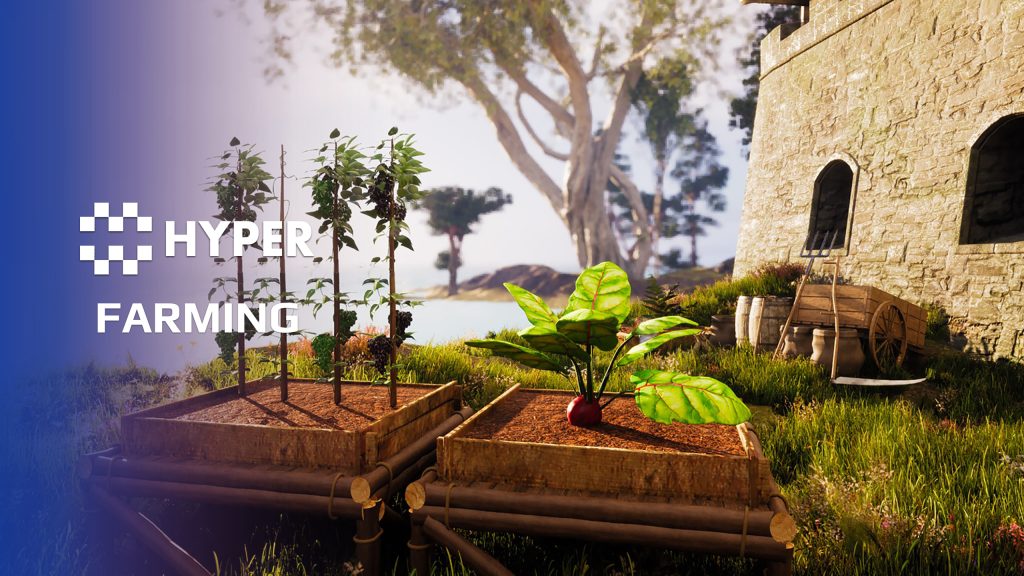
Give players crops worth looking after. Hyper Farming System connects planting, staged growth, watering, crop quality and harvesting, with configurable regrowth and seasonal requirements for multiplayer survival, adventure or farming games.
Key Features
Growth and harvest
- Growth stages: progress from seeds to a mature plant through configurable stage thresholds.
- Harvest styles: harvest the whole plant or pluck individual fruit and other yields.
- Regrowth: regenerate yield or return the crop to a configured growth stage.
- Quality: use Bronze, Silver and Gold quality chances, with fertilizer improving the chance of better crops.
- Yield integration: link the harvested yield and required tools to inventory items.
Care, conditions and decay
- Growth requirements: configure water, fertilizer, oxygen, UV and tilled-soil requirements.
- Regrowth requirements: set separate resource requirements for producing the next yield.
- Season rules: choose valid seasons and whether out-of-season plants stop growing or decay.
- Durability and health: configure damage, destruction, mature-crop decay and removal of dead plants.
- UV lamps: provide light where the upward UV check would otherwise be blocked.
- Sprinklers: use the sprinkler setup to support watering.
- Sickness state: use the existing state logic and define your own rules for applying or spreading sickness.
Crop authoring
- DataTable configuration: manage crop setup centrally, including the spreadsheet import workflow.
- Reusable plant types: bush, dense-leaved head, flowering head, long-stem, stake, tree, underground and vine patterns.
- Connected gameplay: inventory, equipment, interaction and building integrations connect the farming loop.
Included crops
Potato, beet, pumpkin, watermelon, cabbage, cauliflower, tomato, strawberry, blackberry, redberry, lemon, lime, lychee, kiwi, bell pepper, avocado, green beans, white grapes, purple grapes, pineapple, broccoli, corn, banana, orange, peach, pear, apple and pomegranate.
The reusable plant types can support other crops, but that does not mean every possible crop model is included. Use the overview above to see growth, harvesting and the connected gameplay.
Make crop care change the harvest
- Individual fruit, complete harvest: pluck berries or fruit one at a time. The plant enters its harvested state after the final yield has been removed.
- Quality with a gameplay result: Bronze, Silver and Gold chances can influence crop item values such as food value or durability. Fertilizer increases the chance of a better result.
- Recovery or crop loss: pause growth when requirements fail and configure how many days a crop can survive without them. Mature plants can decay, remain for manual removal or be destroyed automatically.
- Automated care: toggle sprinklers to water nearby crops, and use tagged UV lamps to satisfy the light requirement where an overhead obstruction blocks natural exposure.
Related resources
MST Pro | Explore all compatible Hyper systems | try the MST Pro demo | official store
57 reviews for Farming System
You must be logged in to post a review.
Frequently asked questions
Why Hyper?
The strongest public modular Unreal Engine framework available at this scale
Most studios keep tools like this internal. Hyper makes a serious technical foundation available to solo developers, indies, and teams.
Built from 75,000+ hours of Unreal Engine work
System design, Blueprint architecture, multiplayer patterns, documentation, testing, integration, iteration, and real production problem-solving.
Systems designed to work together
Inventory, crafting, equipment, interaction, UI, combat, attributes, multiplayer, AI, quests, dialogue, maps, progression, survival systems, environment tools, performance helpers, and more can all live inside one larger ecosystem.
Working systems with source
Hyper gives you functional systems, a modular structure and documentation, with source you can extend for your own game.
Architecture you can extend
Hyper is built around scalable architecture: gameplay tags, structured data, child Blueprints, clean overrides, reusable components, and clear project boundaries.
Start fast, grow cleanly
Build on the included systems, replace visuals, adjust data, create child Blueprints and connect features without rebuilding the same foundation from scratch.
Want to learn more about the Hyper ecosystem, architecture philosophy, workflows, and developer behind it? Read more here and get started (https://gamesbyhyper.com/docs/getting-started/start-here/).
How do I add this to my project?
This module is provided as a full project because it includes Gameplay Tags, collision settings, config settings and other project-level dependencies.
Use our free Integration Tool (https://gamesbyhyper.com/product/integration-tool/) to prepare the integration. It combines compatible Hyper projects and handles migration and the required project settings. Use matching Unreal Engine versions and compatible Hyper releases.
Your own character, GameMode or custom systems may still need to be connected. The Integration Tool walkthrough (https://gamesbyhyper.com/docs/getting-started/use-the-automatic-integration-tool/) explains the setup and what to check in the generated project.
Do I need to use other Hyper systems with this?
No. You can use your own systems.
Hyper modules are designed around interfaces, abstract classes, shared contracts and dynamic dispatch, so features are not tied to one specific implementation.
If a module demonstrates integration with our Inventory, Equipment, Interaction, Movement, NPC or another Hyper system, you can:
Use the included Hyper implementation.
Replace it with your own system.
Use our implementation as a reference for your own integration.
The supplied integration shows how the module connects to the rest of a game. You can connect your own implementation through the same interface, abstract class or integration point.
For example, Attribute Manager may demonstrate Equipment modifying attributes. That does not mean you must purchase our Equipment System. You can follow the same integration pattern with your own equipment system.
The module includes working gameplay and its integration points. Build on the supplied setup or connect your own systems where you want different behavior.
See how to adapt a module (https://gamesbyhyper.com/docs/getting-started/customize-modules/) and how the shared data and abstract classes work (https://gamesbyhyper.com/docs/project-foundations/datamanagement/).
Where should I put my own changes?
Keep your own Blueprints, UI and data in your project's folder, for example Content/MyProject. Use child Blueprints or replacement components for your custom logic where possible.
That keeps your changes separate when you update Hyper. If you edit the original framework files directly, you will need to merge those edits when updating. The folder structure guide (https://gamesbyhyper.com/docs/project-foundations/folder-structure/) explains where everything belongs.
Can crops have seasons, growth conditions and regrowth rules?
Yes. Configure growth stages, growing conditions, seasons, quality, harvesting, regrowth and decay through the crop data.
Are all crop examples mentioned in the plant-type list included?
No. The plant-type list gives examples of crops that can use each setup. The separate included-crops list tells you which crop assets come with the product. You can add your own.
Compatibility and file information
- Development platforms
- Linux, Windows, macOS
- Tested platforms
- Windows
Versions and compatibility
| Version | Release | Unreal Engine |
|---|---|---|
| V2V2 UE5.3, 5.4. Release: V2. | V2 | 5.3, 5.4 |
| V3V3 UE5.5, 5.6. Release: V3. | V3 | 5.5, 5.6 |
| V4V4 UE5.7, 5.8. Release: V4. | V4 | 5.7, 5.8 |
Implementation and interaction
- Modular / extensible
- Yes
- Multiplayer ready
- Yes
- UI components
- Yes
- Input methods
- Gamepad, Keyboard, Mouse
- AI gameplay features
- No
System setup
- Architecture: crop actors and character farming integration, driven by crop tables.
- Configuration: stage thresholds, yield type, regrowth, quality, requirements, seasonal behavior and decay.
- Integration: inventory items, equipment/tool checks, interaction and building integrations.
- Sickness scope: sickness states are implemented; global infection and selection rules are project-defined.
Compatibility
- Networking: replicated multiplayer support.
- Platform testing: Windows tested.
- Plugins: Common UI.
Release notes | Documentation | YouTube | Discord
Documentation, videos and Discord are public. Verified buyers can use the support forums.

Acquired with code casigus –
Review from FabUnreal farming usually means harvesting errors. Not here. Hypers system grows gameplay smoother than shader grass. It’s wholesome, efficient, and doesn’t require a restart every five minutes. You’ll feel like a proud farmer — of frames per second.
Xx-JayCook-xX –
Review from FabReally enjoyed implementing this system – added a good dynamic to my game with an extra layer. Very easy to customise this to however you like it, the support group is really good too – so if you do encounter any issues then they will help you out. To be honest I recommend anything Hyper related as the support is great and quality of the systems are fantastic
ironmanjr23 –
Review from FabWell documented asset with alot of helpful features.
Rodzilla4269 –
Review from FabI bought all your v2 assets other than menu. Please add me on discord Rodzilla4269#6995
beyawnko –
Review from Fabawesome system with great documentation and support so far!