
Lock System
Updated October 20, 2026
The Hyper Lock System is a modular Blueprint-driven framework for gating interaction until a valid unlock path is resolved. It covers the core lock component, item-based access control, alternate unlock actors, and the supplied medieval lockpick minigame.
For shared setup guidance, see the Migration Guide and Integration Guide. Use the System Atlas to look up functions, variables, events, components, and ownership references. Use this page for Lock System-specific setup, runtime behavior, extension points, and integration notes.
Example lockable door actor using the lock component on an interactable door Blueprint.
Related Videos
Version note: Some videos may have been recorded before V4. The same principles still apply, but asset names, component names, and folder locations may differ. Use this written documentation and the current V4 names as the source of truth.
Overview
In the sample content provided for this document, the system supports straightforward item-based access, a data-driven medieval lockpick minigame, and alternate unlocking through another interactable actor.
At a high level, the lock component sits on the actor that should be protected, such as a door, chest, or another interactable object. When the player attempts to interact, the lock resolves whether the action should pass through immediately, unlock by held item, open a lockpick flow, or stay blocked.
The system is intentionally split between a generic lock layer and a minigame layer. The lock component owns the authoritative locked state, the unlock checks, and the client/server flow. The lockpick actors then provide the actual user-facing challenge, controls, visuals, and completion callbacks. This keeps the core lock state reusable even when projects want more than one bypass method.
- Supports ordinary locked actors such as doors, chests, and other interactables.
- Supports unlock by item tag, which covers keys, keycards, quest items, and other held access items.
- Supports a data-driven medieval lockpick minigame with selectable difficulties.
- Supports alternate unlocking through another actor or interactable component.
- Supports optional item consumption, automatic re-locking, optional open-after-unlock behavior, and XP gain through a skill tag.
- Uses clear Blueprint entry points to connect the lock system to your interaction and inventory systems.
Adding the Lock System to a Locked Actor
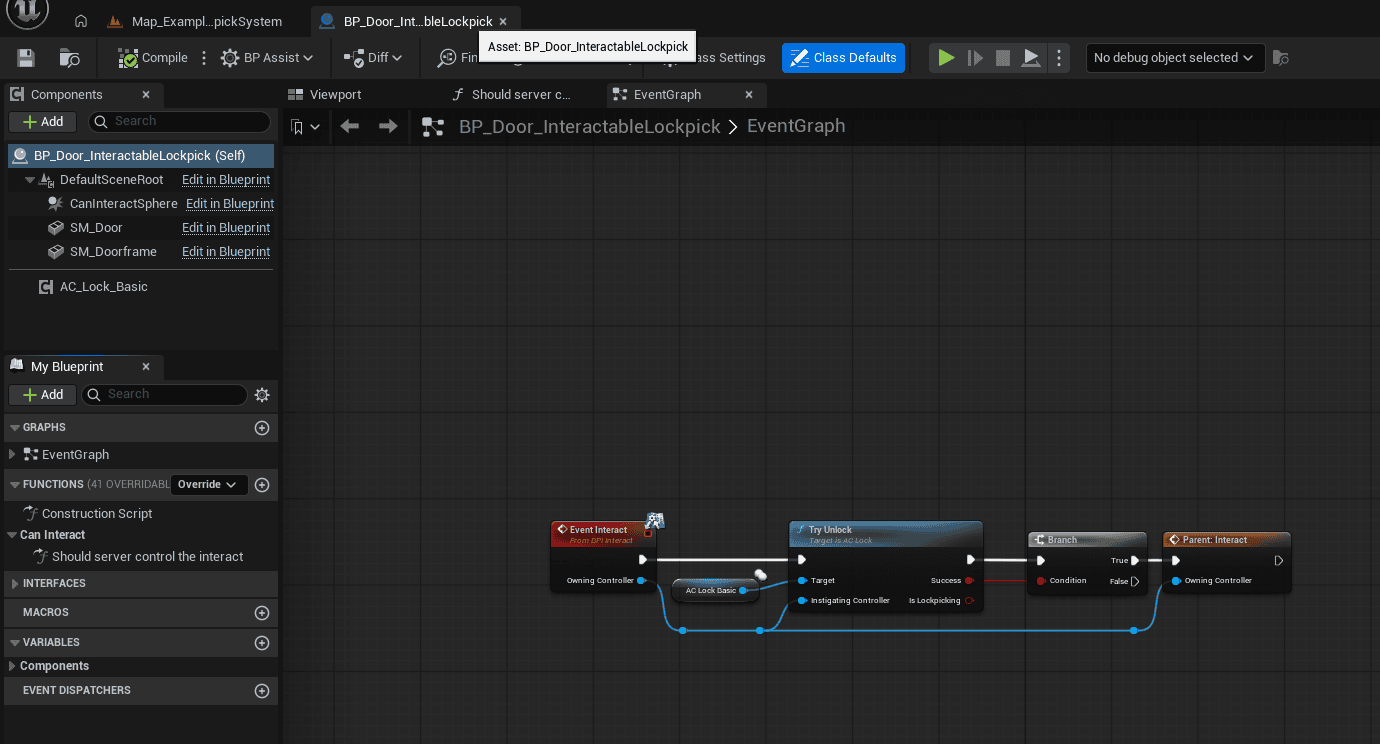
The example door Blueprint supplied for this documentation uses an AC_Lock_Basic component on the actor that should be protected. The door’s interact event routes through the lock first. If the lock resolves successfully, normal interaction continues into the parent interact behavior.
This is the recommended ownership model for the supplied lock assets: place the lock component directly on the actor that is supposed to stay blocked. That actor then becomes the owner of the locked state, the optional unlock sounds, the optional open-after-unlock behavior, and any follow-up re-lock logic.

Example door Blueprint with an AC_Lock_Basic component. The interact event calls Try Unlock before continuing into the normal interact flow.
Why place the lock component on the locked actor?
- The actor that is physically locked remains the single source of truth for whether access is allowed.
- The same component can be reused on doors, chests, panels, or other interactables without moving state into a separate manager.
- Interaction is easy to gate: call Try Unlock first, then only continue into the normal interact path if the result says the action succeeded.
- Replication is easier to reason about because the locked actor owns the replicated booleans that matter.
- Optional behavior such as open-after-unlock and auto-relock stays local to the actor that needs it.
Details Panel / Important Variables
The lock component contains runtime state, references, and settings. Use the configuration fields below to control item access and lockpicking behavior.
| Field | Description |
|---|---|
| Is Locked | Authoritative runtime boolean for whether the actor is currently blocked. If false, Try Unlock simply succeeds and the protected actor can continue into its normal interaction path. |
| Is Lockpicking | Runtime boolean used to prevent duplicate lockpick attempts and to drive replicated start/stop behavior for bypass animation and lockpicking audio. |
| Unlock With These Items | Gameplay tag container listing any items that can unlock the actor directly. This is the main field used for keys, keycards, or other held access items. |
| Destroy Used Unlock Item After Use | If enabled, one of the matching unlock items is removed after a successful item-based unlock. Useful for one-time keys or consumable access items. |
| Auto Lock After Unlock | If enabled, the component re-locks the actor after executing the unlock/open action. This is useful for access items that should grant passage without making the actor permanently unlocked. |
| Clear Ownership After Unlock | If enabled, ownership is cleared after the lockpick flow completes. This helps avoid stale actor ownership after client-created bypass flows. |
| Current Lockpick Actor | Runtime reference to the active minigame actor created for the current lockpick attempt. |
| Lockpicking Sound | Runtime audio component reference created while the player is lockpicking so it can be cleanly stopped and destroyed afterward. |
| Locksystem Controls UI | Widget reference used by the minigame base to display control prompts or supporting lock UI. |
| Configuration: Configure item access on the lock component. Configure the lockpick minigame through its assigned lock data asset. |
Structures and Enums Explained
The supplied medieval lockpick route is built around one custom difficulty structure and one difficulty enum. The minigame also uses a float range at runtime when generating the hidden solution window that the player is trying to find.
F_Lock_Medieval
F_Lock_Medieval is the difficulty-definition structure used by the medieval lock data asset. Each entry in the data asset’s Difficulty Settings array represents one authored difficulty row.
| Field | Description |
|---|---|
| Difficulty | Enum value identifying which authored difficulty this row represents. |
| Pick Range | The base width of the valid solve window. A larger value makes the correct pick position easier to find. |
| Tolerance | Extra tolerance added around the solve window when calculating how far the lock can be engaged before resistance or damage becomes severe. |
| Prong Damage | The amount of damage applied to the pick when the player forces the lock to its maximum permitted engagement at a bad angle. |
E_Lockpick_Difficulty_Type
This enum selects which authored difficulty row should be used for a given lock instance. The supplied enum contains four tiers.
| Enumerator | Intended Use | Practical Effect |
|---|---|---|
| Novice | Easiest tier | Widest pick range, widest tolerance, lowest pick damage. |
| Advanced | Mid-tier challenge | Narrower valid angle and stronger punishment for forcing the lock. |
| Expert | High challenge | Small solve range and more expensive mistakes. |
| Master | Hardest supplied tier | Tightest solve range and the highest pick damage. |
Runtime float range
The medieval minigame generates a hidden float range representing the live solve window. The player’s current prong position is continuously tested against this range and against tolerance-expanded versions of it. That makes the system easy to tune: the data asset defines authored difficulty values, while the minigame converts those values into a live solution and response curve.
Data Assets Explained
The medieval lockpick route is data-driven. The main configuration asset shown in the supplied content is DA_Lock_Data_Medieval. This asset inherits the generic lock settings used by the lock framework and adds medieval-specific difficulty settings.

DA_Lock_Data_Medieval, showing both the inherited default lock settings and the medieval-specific difficulty array.
DA_Lock_Data_Medieval
| Field | Description |
|---|---|
| Difficulty Settings | Array of F_Lock_Medieval rows. The minigame selects the row whose Difficulty enum matches the lock’s configured difficulty. |
| Lockpick Break Sound | Sound played when the pick breaks or is damaged to failure. |
| Lockpick Reset Delay | Delay used before the lockpick state is fully reset after completion or failure. |
| Lock Actor | The lockpick actor class that should be spawned for this data asset. In the supplied configuration this is BP_LockPick_Medieval_01. |
| Bypass | Gameplay tag representing the required bypass item. In the supplied configuration this is Items.Tool.Lockpick. |
| Bypass Animation | Looped animation played while the player is lockpicking. |
| Input Map | Enhanced Input mapping context used while the minigame is active. In the supplied configuration this is IM_Lockpick. |
| Skill | Gameplay tag used when awarding XP for successful lockpicking. In the supplied configuration this is Skill.Lockpicking. |
| Amount Of XP To Gain | How much XP should be added on success. |
| Unlock Sound | Sound used when the lock transitions into an unlocked/open state. |
| Locked Sound | Sound used when the actor is still locked and access is denied. |
| Lockpicking Sound | Looping lockpick sound played while the player is working the lock. |
Supplied medieval difficulty values
| Difficulty | Solve Window / Tolerance | Damage |
|---|---|---|
| Novice | Pick Range 0.10 / Tolerance 0.05 | 1.0 |
| Advanced | Pick Range 0.05 / Tolerance 0.025 | 2.0 |
| Expert | Pick Range 0.033333 / Tolerance 0.015 | 3.0 |
| Master | Pick Range 0.025 / Tolerance 0.0125 | 4.0 |
In practical terms, difficulty becomes harder in three ways at the same time: the valid angle gets narrower, the safe tolerance around that angle gets tighter, and forcing the cylinder while you are wrong becomes more punishing.
Functions to Use
Start with Try Unlock for normal interaction. Use the helper functions, replication handlers, and minigame functions when extending the system.
Core lock functions
| Field | Description |
|---|---|
| Try Unlock | Primary gameplay-facing entry point used by locked actors. It decides whether the attempt succeeds immediately, unlocks via held item, transitions into lockpicking, or fails. |
| Change Lock State | Sets the current lock state, optionally executes open-after-unlock behavior, and can re-lock the actor if Auto Lock After Unlock is enabled. |
| Event Server_TryUnlock | Server RPC wrapper used when the unlock request originates from client-owned interaction. |
| Server_ChangeLockState | Server RPC used to change state authoritatively from the lock or a helper component. |
Utility and validation functions
| Field | Description |
|---|---|
| Can Use Item To Unlock | Returns true when at least one unlock item tag has been configured. |
| Does the Instigator Has an Item to Auto Unlock | Searches the configured unlock tags, resolves the corresponding item, and checks whether the instigating controller has it in inventory. |
| Has Bypass Tool | Checks whether the instigating controller has the bypass tool required by the assigned lock data asset. |
| Create Lockpick Minigame | Spawns the client-side minigame actor, passes required setup data into it, and binds completion/cancel callbacks. |
Replication and state handlers
| Field | Description |
|---|---|
| OnRep_Is Locked | Runs on state replication and plays the correct unlocked or locked sound at the actor location. |
| OnRep_Is Lockpicking | Starts or stops the bypass animation depending on the replicated Is Lockpicking value. |
Minigame base functions
| Field | Description |
|---|---|
| Initialize Variables | Base setup hook called when a minigame instance is starting. Child minigames can override it to cache data before calling parent logic. |
| Set Controls | Disables conflicting player control and adds the lockpicking input mapping context. |
| Remove Controls | Removes the minigame mapping context and restores normal player input. |
| Generate Solution | Child-overridable hook for creating the hidden solution used by the minigame. |
| Create Widget | Builds the render-target and controls widgets used during the minigame. |
| Add Experience | Awards configured XP through the level manager using the configured skill tag. |
| Stop Lockpicking | Unified cleanup function that routes success or cancel, restores controls, removes widgets, unbinds events, and destroys the minigame actor. |
| Lockpicking Successful | Child-overridable success hook. In the medieval implementation, success is reached when the cylinder is fully engaged. |
Medieval lockpick helper functions
| Field | Description |
|---|---|
| Get Current Difficulty Settings | Finds the matching F_Lock_Medieval row in the data asset for the current difficulty enum. |
| Generate Solution | Creates the live solve range from the selected difficulty row and the player’s lockpicking level multiplier. |
| In Pick Range | Checks whether the current prong position is inside the exact solve range. |
| In Tolerance Range | Checks the broader tolerance-expanded range around the solve window. |
| In Min Tolerance Range / In Max Tolerance Range | Provides more precise range checks used when translating pick accuracy into lock resistance and engagement limits. |
| Engage Lock | Moves the cylinder toward success, clamps its maximum allowed engagement, and finishes the lock when full engagement is reached. |
| Set Prong Rotation | Converts the prong position into a visible hook rotation. |
| Set Cylinder Rotation | Converts the current engagement position into visible cylinder rotation. |
| Get Difference Between 2 points | Calculates a normalized distance between two values. This is useful when converting pick accuracy into resistance behavior. |
Events, Replication, and State Handling
The supplied assets do not expose a large public gameplay dispatcher list in the same way some manager-style systems do. Instead, the lock system relies on a small number of replicated booleans, server-authoritative RPCs, and minigame-bound completion/cancel events.
- The server owns the final locked state.
- Clients can request unlock attempts, but the authoritative resolution still happens through server-side state changes.
- Is Lockpicking replicates so the lock can start or stop the bypass animation consistently.
- The spawned minigame actor binds success and cancel events back into the lock component so the lock can finalize state, stop animation, and optionally clear ownership.
- OnRep_Is Locked plays the correct feedback sound at the actor location and respects the difference between normal lock feedback and auto-lock behavior.
| Networking note: Use Try Unlock and the lock data asset for normal integration. The supplied replication hooks already cover the main user-facing state changes. |
Unlock Methods Supported By the System
Unlock with items, keys, or keycards
The simplest unlock path is item-based. If Unlock With These Items contains one or more gameplay tags, the lock checks whether the instigating controller currently holds a matching item. This covers ordinary keys, keycards, quest access items, or any other inventory-backed access requirement.
- If the item exists and the player has it, the lock can unlock immediately.
- If Destroy Used Unlock Item After Use is enabled, one matching item is removed after a successful unlock.
- If Auto Lock After Unlock is enabled, the actor can re-lock after completing the open action, which is useful for held passes that should not permanently unlock the actor.
Unlock with a lockpick minigame
If the lock cannot be opened with a held access item, the lock can fall back to a lockpick route. The component verifies that the lock has a valid lock data asset, that the data asset defines a bypass item and lock actor, and that the player currently owns the required bypass item. If all checks pass, the lock creates the configured minigame on the client.
- A valid lock data asset decides which minigame actor to spawn.
- The bypass item tag decides which tool the player must hold or own to attempt lockpicking.
- The minigame base takes over controls and displays lock UI.
- The lock component remains the owner of the final success, cancellation, and unlock state.
Unlock via another interactable actor
The supplied AC_Unlock_ViaInteractable helper component allows another actor to unlock one or more locked actors. This is useful for levers, buttons, panels, trigger objects, remote releases, or scripted utility objects.
- The component stores an array of target locked interactables.
- It gets each target’s lock component and changes its lock state.
- Open After Unlock can trigger the target’s open behavior immediately after unlocking.
- Lock After Use can re-lock the target afterward.
- Force Unlock can route through the target lock’s own Try Unlock path before the direct state change is applied.
Themed access examples such as “hacking”
In the supplied demo context, “hacking” is better understood as a themed access interaction rather than a separate subsystem defined by the lock assets shown here. If a project wants a genuine hacking minigame, the current architecture already supports that direction: a new bypass minigame actor can be created and assigned through an appropriate lock data asset.
Hooking the Lock System Into Other Systems
The lock system is designed to integrate cleanly with other Hyper systems without re-documenting those systems inside the lock documentation.
Interaction system
The example door actor shows the intended integration pattern: the interact event calls Try Unlock first. If the result is a successful unlock rather than a still-blocked state, the normal interact path continues into the parent interact implementation.
Inventory or item ownership
Item-based unlocks depend on the ability to resolve gameplay tags into items and verify whether the instigating controller currently has those items. From the lock system’s perspective, this is intentionally generic. Keys, keycards, passes, and similar access items are all just held-item checks.
Skills and XP
The minigame base awards XP through the level manager using the Skill and Amount Of XP To Gain fields from the assigned lock data asset. This lets you tie successful bypass attempts into a progression system without hard-wiring XP logic into every door or chest.
UI, prompts, and audio
The supplied assets also show small UI and audio integration points. The minigame base creates a lock overlay and a lock-controls widget, while the medieval child can send informational prompts such as cancellation feedback. The lock component itself handles locked/unlocked/lockpicking sounds so you do not have to play those sounds manually on every protected actor.
How To: Build Common Setups
How to make a simple locked door that opens with a key or keycard item
- Add the lock component to the locked actor.
- Make sure the actor’s interact event routes through Try Unlock before continuing into the normal open/interact behavior.
- In Unlock With These Items, add the gameplay tag or tags that should count as valid access items.
- Decide whether the item should be consumed after use by enabling or disabling Destroy Used Unlock Item After Use.
- Decide whether the actor should remain unlocked or re-lock after opening by setting Auto Lock After Unlock.
- Test the actor once with the correct item and once without it.
How to make a lockpick-only door
- Add the lock component to the actor.
- Assign the correct lock data asset to the component.
- Do not rely on Unlock With These Items unless you want an alternate direct access route.
- Make sure the player can own the bypass item required by the data asset. In the supplied example this is Items.Tool.Lockpick.
- Choose the intended difficulty enum for the lock instance.
- Test the full flow: start lockpicking, cancel it, fail it, and complete it.
How to make a chest or another non-door interactable
- Place the lock component on the protected actor exactly the same way as a door.
- Route that actor’s interact event through Try Unlock.
- If the actor should not automatically open when the lock changes state, do not rely on open-after-unlock behavior.
- Keep the actor’s own open/loot/use logic inside its normal interaction path so the lock only acts as the gatekeeper.
How to unlock a door using another actor, such as a switch or button
- Add the AC_Unlock_ViaInteractable helper component to the switch, button, panel, or utility actor.
- Populate its Locked Interactable array with the target actors that should be affected.
- Decide whether to use Open After Unlock.
- Decide whether Lock After Use should re-lock the targets after the action.
- Use Force Unlock when you want the target lock to still resolve its own unlock path or side effects before the direct state change is applied.
- Call the helper actor’s interact or trigger logic and test each target.
How To: Tune the Medieval Lockpick
The medieval lockpick is deliberately tunable through a small set of variables. The easiest way to think about difficulty is to separate it into three questions: how easy it is to find the correct angle, how forgiving the lock feels when you are close, and how much punishment the pick takes when you force the wrong angle.
- Increase Pick Range if you want the solve angle to be easier to locate.
- Increase Tolerance if you want the cylinder to feel more forgiving around the correct angle.
- Increase Prong Damage if you want bad forcing attempts to destroy picks more quickly.
- Use Novice or larger Pick Range/Tolerance values for early-game or accessibility-friendly locks.
- Use Master or smaller Pick Range/Tolerance values when the goal is a high-risk bypass challenge rather than a light interaction gate.
The supplied Generate Solution logic also pulls a lockpicking level multiplier from the level manager. That means difficulty can scale not only from the authored row but also from player progression. If a project wants skill growth to matter more, this is one of the best places to expand.
| Tuning advice: When tuning, change only one axis at a time. A lock can feel unfair if Pick Range, Tolerance, and Prong Damage all become harsh at once. |
Extending the System with Your Own Lockpick Variant
The existing architecture is already set up for additional bypass minigames. You do not need to rewrite the core lock flow to support a new variant.
- Create a child of BP_Lock_Pick_Base.
- Override Initialize Variables to cache the data you need from the assigned lock asset.
- Override Generate Solution if your minigame uses a hidden solve state.
- Add your own input events and success logic.
- Call Stop Lockpicking with success true when the bypass is completed and with success false when cancelled or failed.
- Create an appropriate data asset that points to your new lock actor class and defines the right bypass item, input mapping, XP, and audio.
- Assign that data asset to locks that should use the new route.
This is the main reason the system is valuable as a framework instead of a one-off lockpick Blueprint: the authoritative lock state stays generic while the minigame presentation can vary per project or per content type.
Troubleshooting and Practical Notes
| Field | Description |
|---|---|
| The actor still opens without respecting the lock | Check that the actor’s interact event truly routes through Try Unlock before continuing into the normal parent interact flow. |
| The player cannot start lockpicking | Check that the lock has a valid lock data asset, that the data asset has a valid Lock Actor class, and that the player actually owns the required bypass item tag. |
| The lock starts twice or behaves inconsistently | Check Is Lockpicking and make sure the actor is not receiving duplicate interact calls. The supplied Try Unlock logic already prevents double starts when the flag is set. |
| The lockpick minigame appears but controls feel wrong | Check the assigned Input Map in the lock data asset and confirm that the minigame mapping context is being added and removed correctly. |
| The player never gains XP | Check that the level manager is available, that the Skill tag is set, and that Amount Of XP To Gain is non-zero. |
| The door unlocks but becomes permanently open when it should not | Review Open After Unlock and Auto Lock After Unlock separately. One controls whether the target opens immediately; the other controls whether it re-locks afterward. |
| A keycard-style door should only work while the item is held | Use the held-item unlock path rather than trying to build a separate keycard manager into the lock. From the lock’s perspective this is just an access item check. |
Example Flows
Item-based unlock
- The player interacts with a locked door.
- The door’s interact event calls Try Unlock on the lock component.
- The component sees that unlock item tags are configured.
- It checks whether the instigating controller has a matching item.
- If yes, the lock changes state to unlocked, optionally consumes the item, and continues into the protected actor’s normal interaction path.
Medieval lockpick success
- The player interacts with a locked actor without a direct access item.
- The lock checks for a valid lock data asset and for the required bypass item.
- The lock creates the medieval minigame actor on the client and marks the lock as lockpicking.
- The player rotates the prong, tests angles, and engages the cylinder.
- If the prong is close enough to the generated solve window, engagement progresses safely.
- When engagement reaches 1.0, the minigame reports success, the lock stops lockpicking, changes its locked state, and can optionally open the actor.
Medieval lockpick cancel or failure
- The player cancels or repeatedly forces the lock at a bad angle.
- The minigame sends cancellation or failure back into the lock flow.
- The lock stops bypass animation and cleans up the current minigame actor.
- Controls are restored, widgets are removed, and no unlock occurs unless success was reported.
Unlock via another interactable
- The player uses a lever, button, or utility actor that has AC_Unlock_ViaInteractable.
- The component loops over the configured target interactables.
- For each target it finds the lock component and changes its state.
- Depending on the helper settings, the target can open immediately and can also re-lock afterward.
Summary
The Hyper Lock System is most useful when understood as a reusable gatekeeper layer rather than as a single lockpick Blueprint. The core lock component owns the authoritative locked state, direct item checks, unlock state changes, audio feedback, and the transition into bypass flows. The minigame layer then handles the player-facing challenge, controls, widgets, and completion callbacks.
In the supplied content, the medieval lockpick route is fully data-driven through DA_Lock_Data_Medieval and the F_Lock_Medieval difficulty rows. Use it for an item-gated door or chest, or create additional bypass minigames through the BP_Lock_Pick_Base framework.
Add the lock component to the protected actor, route interaction through Try Unlock, and configure access items or a lock data asset. Test unlocking, cancellation, and re-locking with the settings your game uses.
| Responsibility boundary: This document intentionally focuses on the lock system itself. The interact system, inventory system, equipment system, and progression system each keep their own responsibilities. The lock layer only needs clean hooks into them. |