Description
Documentation | Discord | Overview | Video | Demo
Hyper Menu and Gamepad System v4
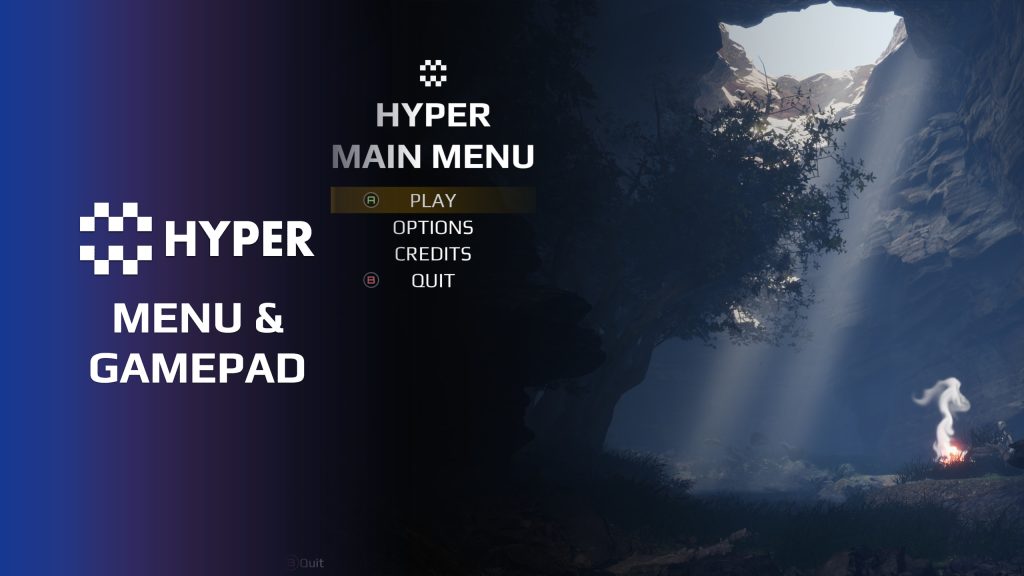
Build a menu around your game's choices. Hyper Menu and Gamepad System generates the main-menu buttons and play-selection cards from configuration on the PlayerController's menu component. Choose the entries, connect their screens and override individual button classes when an action needs its own behavior.
That configurable structure sits on CommonUI navigation for keyboard, mouse and controller, with automatic input-icon switching and adaptable settings screens. Change the menu content and presentation through the same setup as your game grows.
Key Features
A menu built from your configuration
- Generated button lists: define the main-menu entries on the controller component. The menu reads that list and creates the buttons in its shared layout.
- Labels and destination screens: give an entry its display text and linked activatable widget, keeping the destination screen connected to the menu navigation.
- Per-button overrides: use the standard button or supply a child button class for custom behavior. Play and Quit demonstrate actions with their own implementation.
- Play-selection cards: configure a separate list with a heading, subtitle, body text and image for each choice, plus its linked screen or custom play-button class.
- Project-specific flow: override the menu component's creation, New Game and Resume hooks when your project needs different behavior.
Menus and navigation
- Startup and in-game menus: use the supplied screens as the starting point for your game flow.
- CommonUI navigation: connect focus, activation and back/forward actions through the shared UI framework.
- Dynamic input switching: show the relevant prompts when the player changes between keyboard/mouse and gamepad.
- Contextual action bar: show the actions currently available on a screen using the configured CommonUI button prompts.
- Tabbed layouts and controls: use the supplied tabs, tooltips, sliders and confirmation dialogues.
Player settings
- Input configuration: adapt keyboard/mouse bindings and control sensitivity.
- Audio mixer: expose audio settings through the menu.
- Video settings: provide quality presets, automatic quality selection and colorblind options.
- Settings changes: support immediate previews or apply-confirmed changes, with cancel and reset-to-default behavior.
- Saved preferences: save and load user settings.
- Language placeholder: prepare the menu entry for localization. Language files are not included.
Make the menu fit your game
- Title and logo: override the menu title and logo, or hide the title text when your design calls for a different presentation.
- Background presentation: choose whether to add background music or video and assign the relevant media.
- Startup presentation: configure the startup widget and fade flow, including the startup effect tint and opacity.
How the configuration reaches the screen
The main-menu PlayerController owns the menu component. Its button arrays supply the menu content; the main widget builds the button list and passes each entry its text, destination and navigation references. A custom button class can change an individual action while the shared menu structure remains reusable.
Integration setup
Enable CommonUI, configure CommonGameViewportClient and assign the UI input data and controller brushes. UI navigation data is separate from gameplay input. The same conventions can support inventory, radial menus and interaction widgets.
Try the menu demo with a mouse and controller, then adapt the screens and settings to your project.
Related resources
MST Pro | Explore all compatible Hyper systems | try the MST Pro demo | official store
47 reviews for Menu and Gamepad System
You must be logged in to post a review.
Frequently asked questions
Why Hyper?
The strongest public modular Unreal Engine framework available at this scale
Most studios keep tools like this internal. Hyper makes a serious technical foundation available to solo developers, indies, and teams.
Built from 75,000+ hours of Unreal Engine work
System design, Blueprint architecture, multiplayer patterns, documentation, testing, integration, iteration, and real production problem-solving.
Systems designed to work together
Inventory, crafting, equipment, interaction, UI, combat, attributes, multiplayer, AI, quests, dialogue, maps, progression, survival systems, environment tools, performance helpers, and more can all live inside one larger ecosystem.
Working systems with source
Hyper gives you functional systems, a modular structure and documentation, with source you can extend for your own game.
Architecture you can extend
Hyper is built around scalable architecture: gameplay tags, structured data, child Blueprints, clean overrides, reusable components, and clear project boundaries.
Start fast, grow cleanly
Build on the included systems, replace visuals, adjust data, create child Blueprints and connect features without rebuilding the same foundation from scratch.
Want to learn more about the Hyper ecosystem, architecture philosophy, workflows, and developer behind it? Read more here and get started (https://gamesbyhyper.com/docs/getting-started/start-here/).
How do I add this to my project?
This module is provided as a full project because it includes Gameplay Tags, collision settings, config settings and other project-level dependencies.
Use our free Integration Tool (https://gamesbyhyper.com/product/integration-tool/) to prepare the integration. It combines compatible Hyper projects and handles migration and the required project settings. Use matching Unreal Engine versions and compatible Hyper releases.
Your own character, GameMode or custom systems may still need to be connected. The Integration Tool walkthrough (https://gamesbyhyper.com/docs/getting-started/use-the-automatic-integration-tool/) explains the setup and what to check in the generated project.
Do I need to use other Hyper systems with this?
No. You can use your own systems.
Hyper modules are designed around interfaces, abstract classes, shared contracts and dynamic dispatch, so features are not tied to one specific implementation.
If a module demonstrates integration with our Inventory, Equipment, Interaction, Movement, NPC or another Hyper system, you can:
Use the included Hyper implementation.
Replace it with your own system.
Use our implementation as a reference for your own integration.
The supplied integration shows how the module connects to the rest of a game. You can connect your own implementation through the same interface, abstract class or integration point.
For example, Attribute Manager may demonstrate Equipment modifying attributes. That does not mean you must purchase our Equipment System. You can follow the same integration pattern with your own equipment system.
The module includes working gameplay and its integration points. Build on the supplied setup or connect your own systems where you want different behavior.
See how to adapt a module (https://gamesbyhyper.com/docs/getting-started/customize-modules/) and how the shared data and abstract classes work (https://gamesbyhyper.com/docs/project-foundations/datamanagement/).
Where should I put my own changes?
Keep your own Blueprints, UI and data in your project's folder, for example Content/MyProject. Use child Blueprints or replacement components for your custom logic where possible.
That keeps your changes separate when you update Hyper. If you edit the original framework files directly, you will need to merge those edits when updating. The folder structure guide (https://gamesbyhyper.com/docs/project-foundations/folder-structure/) explains where everything belongs.
Does the menu switch between mouse and controller input?
Yes. The menus use CommonUI and support switching between keyboard, mouse and gamepad, with configurable input settings.
Are DLSS and translated language files included?
DLSS settings are optional and require their own dependency. The language setting is a placeholder; translated language files are not included.
Compatibility and file information
- Development platforms
- Linux, Windows, macOS
- Tested platforms
- Windows
Versions and compatibility
| Version | Release | Unreal Engine |
|---|---|---|
| V2V2 UE5.3, 5.4. Release: V2. | V2 | 5.3, 5.4 |
| V3V3 UE5.5, 5.6. Release: V3. | V3 | 5.5, 5.6 |
| V4V4 UE5.7, 5.8. Release: V4. | V4 | 5.7, 5.8 |
Implementation and interaction
- Modular / extensible
- Yes
- Multiplayer ready
- Yes
- UI components
- Yes
- Input methods
- Gamepad, Keyboard, Mouse
- AI gameplay features
- No
System setup
- Ownership: AC_PC_MainMenu on the main-menu PlayerController, with configuration inherited from AC_PC_MainMenu_Abstract.
- Menu data: MainMenuButtons and PlaySwitcherButtons arrays define labels, linked screens and optional button-class overrides.
- Generation: WBP_MainMenu_Main builds the home menu from those entries. Play selection generates its own cards.
- Extension: child button classes and component overrides for menu creation, New Game and Resume.
- Framework: Epic CommonUI with activatable widgets and input-action data.
- Project setup: CommonGameViewportClient, Common UI Input Data and platform controller-data mappings.
- Included interface: startup/in-game menus, confirmation dialogs and control/audio/video settings.
- Localization: language files are not supplied.
Compatibility
- Platform testing: Windows tested.
- Plugins: Common UI.
Release notes | Documentation | YouTube | Discord
Verified buyers can use the support forums.
Acquired with code casigus –
Review from FabEver made a menu in Unreal and watched it vanish into Widget oblivion? this system actually listens when you click things. It’s responsive, intuitive, and doesn’t randomly resize itself like Unreal’s UI does. It’s the kind of menu that makes you believe in order again.
WHYPHY710 –
Review from FabHyper games is the way to go for all your lazy dev needs, by the time I’m done I’ll have the pro version, and 23 modules🤣
Acquired with code Shad3ee –
Review from FabThe main menu works exactly as advertised. It’s a solid system, and the developer is very responsive to feedback and suggestions. Definitely worth it.
Cyberkada –
Review from FabNeeded a gamepad menu solution. This worked wonderfully