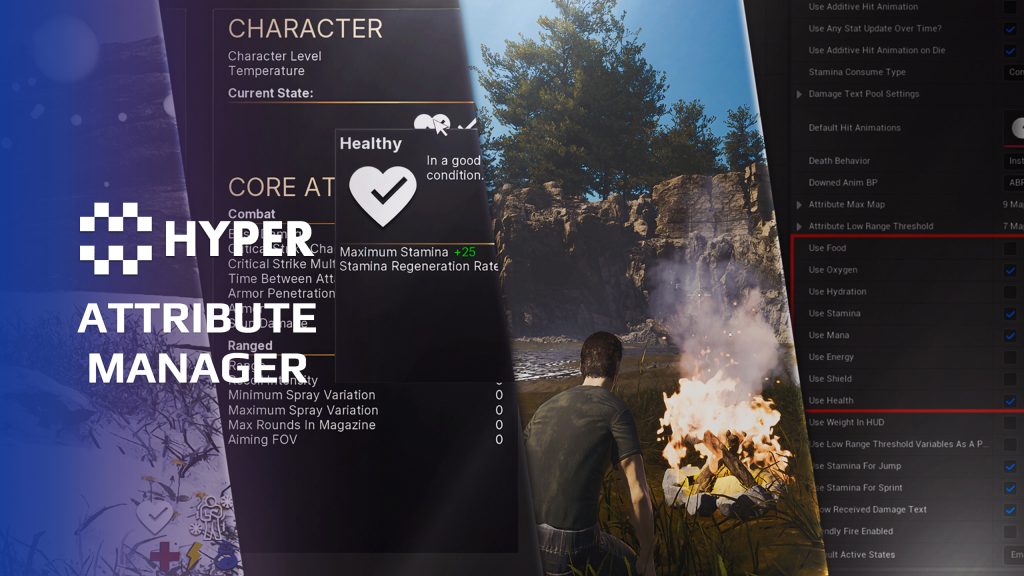
Description
Documentation | Discord | Overview | Video | Demo
Hyper Attribute Manager v4
Build the rules behind your character, from the stamina spent on a jump to the armor that keeps them alive. Hyper Attribute Manager brings multiplayer character resources, combat values, movement costs, shields, state effects and survival behavior into one Gameplay Tag-driven system.
Configure the resources your game needs, give equipment temporary bonuses and keep permanent progression separate. Use it for a survival character affected by hunger and cold, an RPG character with skills and equipment bonuses, or a shooter with health and stamina.
Key Features
Character values and modifiers
- Current attributes: manage Health, Stamina, Food, Hydration, Mana, Energy, Weight and Oxygen, with clamping, consumption and regeneration.
- Persistent configuration: define maximum values, rates, movement, generic and ranged combat values, survival settings and skill attributes.
- Permanent and temporary changes: use Base Value for lasting progression and Added Value for equipment or state-effect bonuses that should disappear when removed.
- Selective resources: disable attributes your game does not use. Disabled resources stop updating and triggering effects and are hidden from the HUD.
State effects and survival
- DataTable-driven states: configure conditions such as Sick, Healthy, Infection, Wounded, Poisoned and Drunk, including duration, recovery, damage and presentation.
- Automatic thresholds: trigger conditions such as Low Health and Starved when current values cross configured limits.
- Temperature and exposure: combine external temperature with each character's chill modifier. Clothing, Wet, Warming and On Fire can change the resulting temperature state and its effects.
- Spread and custom behavior: configure spread radius, chance and interval for effects such as infection or fire, or extend a state-effect actor for your own logic.
- Underwater oxygen: consume oxygen while submerged, regenerate it above water and apply damage when it runs out.
Movement, stamina and survival consequences
- Sprinting and jumping: spend stamina continuously while sprinting and per jump. Configure regeneration and connect the jump requirement to the movement flow.
- Fall damage: tune the minimum damaging fall, damage scaling and fatal fall threshold. Use equipment, skills or state effects to modify the result.
- Encumberment: connect carried weight to movement penalties, restricted sprinting, stamina recovery and heavy-breathing feedback.
- Hunger, thirst and fatigue: configure separate food, hydration and energy resources. Starvation and dehydration can damage health, while energy provides a value for sleep or fatigue mechanics.
Damage, shields and character reactions
- Point and radial damage: use the shared damage path for direct hits and area damage. Combine the attack with character and equipment attributes.
- Combat attributes: configure values such as damage, armor, melee damage, ranged damage and critical chance alongside the survival resources.
- Shields: absorb incoming damage through configurable shield factors and expose shield changes to the interface.
- Bone-based damage: configure damage multipliers for the hit body part.
- Hit and death reactions: connect hit direction, blocking, montage selection, blood feedback, damage numbers and death animation or ragdoll behavior.
- Downed and revive flow: use the downed state and server revive entry point in the character setup.
- Regeneration timing: configure resource recovery and delay health regeneration after taking damage.
Gameplay Tags, data and extension
Attributes and states have Gameplay Tag identities, so equipment, damage, progression and UI can refer to the same values. Current resources are separate from their limits and rates. Permanent upgrades change Base Value; temporary equipment and state effects change Added Value. Removing a helmet can therefore remove its bonus without undoing a permanent health upgrade.
Define state behavior in DT_StateEffects and use a custom state-effect actor when a condition needs more than data. The documented extension workflow covers new attribute tags, component values and player-stat widgets. Attribute-change and state-change events let other systems react without maintaining a second copy of the character stats.
Equipment and progression
- Item and equipment bonuses: assigned attributes can apply while an item is carried or equipped, then be removed with that item. A charm can add a passive bonus; armor can change health or protection.
- Gameplay events: react to attribute and state-effect changes from your own UI or gameplay logic. Skill attributes can connect to a level manager for action-based progression.
Supporting UI and nearby characters
- Attribute display: the player-stat UI presents current values and enabled resources. State effects can add screen, particle, animation and audio feedback.
- Pawns in Radius: use the supporting component to track nearby pawns or pawns in front of the character and maintain their attached information widgets. Configure the radius and forward trace length for the encounter UI.
Build a character's survival rules
A wet character can feel colder than another character standing in the same weather. Warm clothing can adjust that character's chill modifier, while a fire helps remove Wet. The same configuration approach lets you tune food consumption, recovery and the penalties that make sense for your game.
Connect Hyper Dynamic Weather & Sky when seasons, local weather and shelter should influence these character conditions. Weather provides the environmental temperature; Attribute Manager applies the character-specific modifiers and state effects.
Try the system
Use the demo and walkthroughs to explore the configuration. Attribute Manager is also included in MST Pro. Try the MST Pro demo, explore compatible Hyper systems or buy from our official store.
72 reviews for Attribute Manager
You must be logged in to post a review.
Frequently asked questions
Why Hyper?
The strongest public modular Unreal Engine framework available at this scale
Most studios keep tools like this internal. Hyper makes a serious technical foundation available to solo developers, indies, and teams.
Built from 75,000+ hours of Unreal Engine work
System design, Blueprint architecture, multiplayer patterns, documentation, testing, integration, iteration, and real production problem-solving.
Systems designed to work together
Inventory, crafting, equipment, interaction, UI, combat, attributes, multiplayer, AI, quests, dialogue, maps, progression, survival systems, environment tools, performance helpers, and more can all live inside one larger ecosystem.
Working systems with source
Hyper gives you functional systems, a modular structure and documentation, with source you can extend for your own game.
Architecture you can extend
Hyper is built around scalable architecture: gameplay tags, structured data, child Blueprints, clean overrides, reusable components, and clear project boundaries.
Start fast, grow cleanly
Build on the included systems, replace visuals, adjust data, create child Blueprints and connect features without rebuilding the same foundation from scratch.
Want to learn more about the Hyper ecosystem, architecture philosophy, workflows, and developer behind it? Read more here and get started (https://gamesbyhyper.com/docs/getting-started/start-here/).
How do I add this to my project?
This module is provided as a full project because it includes Gameplay Tags, collision settings, config settings and other project-level dependencies.
Use our free Integration Tool (https://gamesbyhyper.com/product/integration-tool/) to prepare the integration. It combines compatible Hyper projects and handles migration and the required project settings. Use matching Unreal Engine versions and compatible Hyper releases.
Your own character, GameMode or custom systems may still need to be connected. The Integration Tool walkthrough (https://gamesbyhyper.com/docs/getting-started/use-the-automatic-integration-tool/) explains the setup and what to check in the generated project.
Do I need to use other Hyper systems with this?
No. You can use your own systems.
Hyper modules are designed around interfaces, abstract classes, shared contracts and dynamic dispatch, so features are not tied to one specific implementation.
If a module demonstrates integration with our Inventory, Equipment, Interaction, Movement, NPC or another Hyper system, you can:
Use the included Hyper implementation.
Replace it with your own system.
Use our implementation as a reference for your own integration.
The supplied integration shows how the module connects to the rest of a game. You can connect your own implementation through the same interface, abstract class or integration point.
For example, Attribute Manager may demonstrate Equipment modifying attributes. That does not mean you must purchase our Equipment System. You can follow the same integration pattern with your own equipment system.
The module includes working gameplay and its integration points. Build on the supplied setup or connect your own systems where you want different behavior.
See how to adapt a module (https://gamesbyhyper.com/docs/getting-started/customize-modules/) and how the shared data and abstract classes work (https://gamesbyhyper.com/docs/project-foundations/datamanagement/).
Where should I put my own changes?
Keep your own Blueprints, UI and data in your project's folder, for example Content/MyProject. Use child Blueprints or replacement components for your custom logic where possible.
That keeps your changes separate when you update Hyper. If you edit the original framework files directly, you will need to merge those edits when updating. The folder structure guide (https://gamesbyhyper.com/docs/project-foundations/folder-structure/) explains where everything belongs.
Can I define my own attributes and status effects?
Yes. Attributes and state effects are data-driven. You can configure your own values, modifiers and effects, such as hunger, poison or temperature changes.
How can weather affect a character's condition?
The character's temperature state can take external temperature and conditions such as being wet, wearing clothing or standing near a fire into account. Connect your game's weather and environmental inputs to those values.
Compatibility and file information
- Development platforms
- Linux, Windows, macOS
- Tested platforms
- Windows
Versions and compatibility
| Version | Release | Unreal Engine |
|---|---|---|
| V2V2 UE5.3, 5.4. Release: V2. | V2 | 5.3, 5.4 |
| V3V3 UE5.5, 5.6. Release: V3. | V3 | 5.5, 5.6 |
| V4V4 UE5.7, 5.8. Release: V4. | V4 | 5.7, 5.8 |
Implementation and interaction
- Modular / extensible
- Yes
- Multiplayer ready
- Yes
- UI components
- Yes
- Input methods
- Gamepad, Keyboard, Mouse
- AI gameplay features
- No
System setup
- Architecture: AC_CH_Attribute_Manager owns character attributes and state effects, with events for value and state changes.
- Data model: non-persistent current values and persistent limits/rates. Persistent effective values combine Base Value and Added Value.
- Configuration: DT_StateEffects defines effects; Gameplay Tags identify attributes and states. DT_Items and DT_Equipment can assign attribute bonuses.
- Extension points: custom state-effect actors and new attributes, with corresponding player-stat UI updates.
- Integration: environment temperature, inventory weight, equipment modifiers and optional progression systems provide inputs to the character model.
Compatibility
- Networking: replicated multiplayer support.
- Platform testing: Windows tested.
- Plugins: Common UI.
Release notes | Documentation | YouTube | Discord
Documentation, videos and Discord are public. Verified buyers can use the support forums.
pridge7 –
Review from FabHealth, stamina, and stat management are well organized and easy to extend with custom attributes.
Free product casigus –
Review from FabManaging attributes in Unreal usually feels like herding cats. This system turns it into a symphony.
Free product garyw822 –
Review from Fabthis has been a great product its very simple to integrate into most games and the design is very complex to help with a vast array or attribute systems and a few other nice addons the inventory looks really nice as well very good product
Free product H445J0U3445 –
Review from FabI’ve been building a project on top of the GASP mover and recently switched over to the ragdoll pawn. I already had my own combat and health components in place, but they were completely dwarfed by Hyper Attribute Manager. This system covers health, stamina, survival stats, combat values, modifiers, and state effects in a way that is far more complete and scalable than what I had rolled myself. The integration tool made the switch surprisingly easy. I was able to hook it into the existing setup without tearing the project apart. It took the game to the next level. I’d recommend it for most projects that need a serious attribute and state system.
Free product P00tyC0 –
Review from FabOur studio has used it for the past 2 years, on several projects, of different genre types. It comes ready with more out of the box examples than you would really need for a single game. It is very easy to add to your character, integrate with the skill manager and make changes as needed. Very helpful team and community!
dtrox107 –
Review from FabThe state effect stuff (wet, sick, wounded, on fire, etc) all ties into the temperature system automatically, so I didn’t have to hand-wire a bunch of interactions myself. Datatable-driven setup means tweaking values doesn’t mean diving back into Blueprints every time. Took a bit to wrap my head around the persistent vs non-persistent attribute categories at first, but once it clicked it made sense. Good time saver overall, especially if you’re doing MMO/co-op stuff where replication is a pain to get right on your own.
Xx-JayCook-xX –
Review from FabIt literally adds all the elements needed for a survival game, sleep, hydration, food, injuries, different states. It’s so simple to add new ones that have different effects, you can create buffs from food, create limitations from injuries. It already comes with a load already – but if you want your own, just change a few things in a data table and it’s sorted. It even comes with some effects, like screen frosting over a bit if you start to freeze etc. All very easily customisable. Also, I just added a gameplay tag for fuel and you can attach it to a vehicle and you’ve got fuel for a car too. So it’s really good all round, highly recommend
Sirisys –
Review from FabI have experiemented with a TON of different Attribute systems looking for something that was extensibly built, attractive out of the box, well documented, and versatile. I wanted a module and spent a ton of money experiementiung with the majority of off the shelf systems available here at the marketplace, so i have pretty good grasp of what’s availalble. Hands down, without a doubt, Hyper Attribute Manager V2 is the most complete, most versatile, and best built Attribute Manager I’ve found by far. There are many good systems, but whenyou get under the hood and into the code of HyperGames Attribute Manager, it is SO CLEAN. The code is so soild and so elegant. Erik spends so much effort to not only write good code, but to also make it understandable, flow nicely, and be easy to modify. I am super impressed.Wind#2347
MEXpartan –
Review from FabI recently started integrating this asset into my game. I am so happy with my purchase. The project is a bit complex for a beginner like me. After a couple of hours of browsing and studying the project, I managed to start integrating it with on my game. I am so amazed by how complete the project is. Can’t wait to start customizing it to my needs. I only wish other things such as the inventory blueprints were not part of the asset, since now I will have to spend a couple of hours cleaning the Attribute Manager blueprint to remove all the extras that I really don’t need. In conclusion, 9/10.
P4uly_B –
Review from FabGAS has its benefits with its built in functionality, but also has a lot of draw backs. What Hyper has released here is a MUCH easier alternative to implement attributes. As far as i can see with respect to attributes, its got all the benefits of GAS (network replication, modularity, etc) with an added bonus of being incredibly easy to migrate into projects without having to use C++. If you are looking for a non C++ solution for attributes that’s capable, this one is an excellent investment. Cheers!
Jimmy Saenz –
Review from FabI’m loving how all the assets work together seamless and how they merge with each other this asset will save you a lot of time and make game prototyping super fast.Jimmy Saenz#4491
Veraxus –
Review from FabThis is such a clean and professional system. It provides enough that you can use it as-is or easily customize it to your own needs. I needed to extend the system to apply specific “injury” effects to specific limbs, and managed to get that working in one short afternoon just by following the existing patterns. Really, the whole project structure is very easy to read and follow, and well documented to boot. Integrating with the other V2 Hyper packs is almost effortless. The author is also very active and helpful on Discord. This really is one of the best packs on the Marketplace.