Description
Documentation | Discord | Videos | Demo
Hyper Skinning System v4
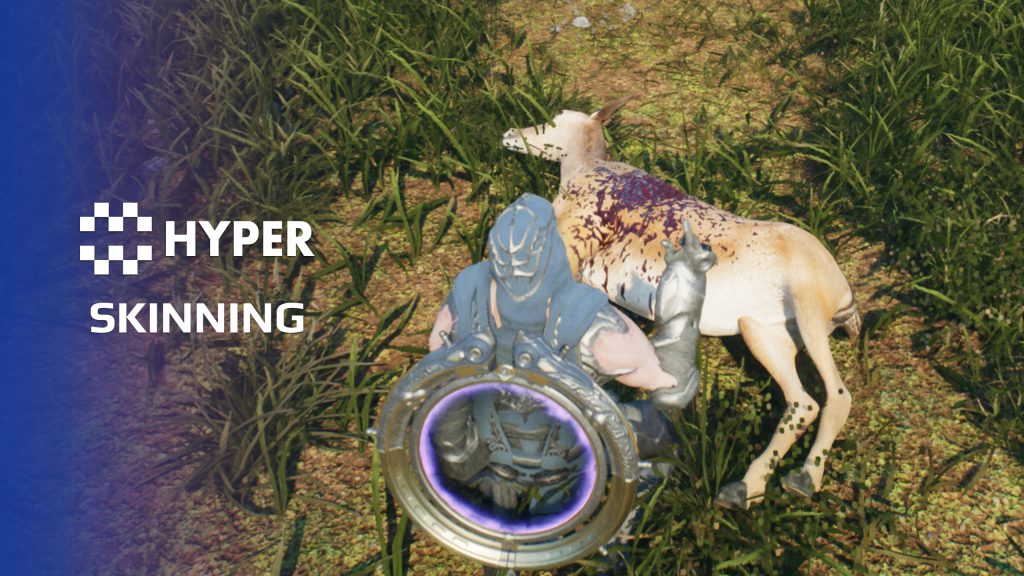
Make harvesting a fallen animal part of the survival loop. Hyper Skinning System connects a valid target, the right tool, a timed character action and the resulting loot, with animation and effects supporting the interaction.
Key Features
Harvesting rules
- Skinnable targets: configure which actors can be harvested and which loot row supplies their rewards.
- Tool requirements: accept tools through tags and use their attributes to influence skinning speed or output.
- Timed actions: control how long the interaction takes.
- Loot delivery: connect the completed action to inventory rewards.
Animation and feedback
- Character alignment: use Motion Warping to position the player for the action.
- Animation setup: configure the skinning montage and temporary tool presentation.
- Visual feedback: add Niagara effects and decals for the selected target.
- Audio: assign sounds that accompany the action.
- Multiplayer flow: keep the harvesting interaction connected to the replicated character setup.
Two components, one interaction
The skinning component belongs to the player. The skinnable component belongs to the target and describes its requirements and loot. Your interaction system starts the action, while the components handle the harvesting flow.
Better tools, better harvesting
- Automatic tool selection: the component searches for valid tagged items and chooses the strongest matching skinning attribute, so a better carried knife can improve the action without a separate manual equipment step.
- Tool-based progression: the selected tool modifies harvesting time and resource output. The supplied workflow rewards tool quality rather than requiring a separate skill check.
- Per-creature setup: configure the reward row, duration, allowed distance and body socket on each skinnable target. The player action remains reusable.
- Validated targets: the current flow checks tool availability, distance, the target being dead and whether it has already been skinned before starting the animation.
Use the example setup to add a new animal, tool requirement and reward table.
34 reviews for Skinning System
You must be logged in to post a review.
Frequently asked questions
Why Hyper?
The strongest public modular Unreal Engine framework available at this scale
Most studios keep tools like this internal. Hyper makes a serious technical foundation available to solo developers, indies, and teams.
Built from 75,000+ hours of Unreal Engine work
System design, Blueprint architecture, multiplayer patterns, documentation, testing, integration, iteration, and real production problem-solving.
Systems designed to work together
Inventory, crafting, equipment, interaction, UI, combat, attributes, multiplayer, AI, quests, dialogue, maps, progression, survival systems, environment tools, performance helpers, and more can all live inside one larger ecosystem.
Working systems with source
Hyper gives you functional systems, a modular structure and documentation, with source you can extend for your own game.
Architecture you can extend
Hyper is built around scalable architecture: gameplay tags, structured data, child Blueprints, clean overrides, reusable components, and clear project boundaries.
Start fast, grow cleanly
Build on the included systems, replace visuals, adjust data, create child Blueprints and connect features without rebuilding the same foundation from scratch.
Want to learn more about the Hyper ecosystem, architecture philosophy, workflows, and developer behind it? Read more here and get started (https://gamesbyhyper.com/docs/getting-started/start-here/).
How do I add this to my project?
This module is provided as a full project because it includes Gameplay Tags, collision settings, config settings and other project-level dependencies.
Use our free Integration Tool (https://gamesbyhyper.com/product/integration-tool/) to prepare the integration. It combines compatible Hyper projects and handles migration and the required project settings. Use matching Unreal Engine versions and compatible Hyper releases.
Your own character, GameMode or custom systems may still need to be connected. The Integration Tool walkthrough (https://gamesbyhyper.com/docs/getting-started/use-the-automatic-integration-tool/) explains the setup and what to check in the generated project.
Do I need to use other Hyper systems with this?
No. You can use your own systems.
Hyper modules are designed around interfaces, abstract classes, shared contracts and dynamic dispatch, so features are not tied to one specific implementation.
If a module demonstrates integration with our Inventory, Equipment, Interaction, Movement, NPC or another Hyper system, you can:
Use the included Hyper implementation.
Replace it with your own system.
Use our implementation as a reference for your own integration.
The supplied integration shows how the module connects to the rest of a game. You can connect your own implementation through the same interface, abstract class or integration point.
For example, Attribute Manager may demonstrate Equipment modifying attributes. That does not mean you must purchase our Equipment System. You can follow the same integration pattern with your own equipment system.
The module includes working gameplay and its integration points. Build on the supplied setup or connect your own systems where you want different behavior.
See how to adapt a module (https://gamesbyhyper.com/docs/getting-started/customize-modules/) and how the shared data and abstract classes work (https://gamesbyhyper.com/docs/project-foundations/datamanagement/).
Where should I put my own changes?
Keep your own Blueprints, UI and data in your project's folder, for example Content/MyProject. Use child Blueprints or replacement components for your custom logic where possible.
That keeps your changes separate when you update Hyper. If you edit the original framework files directly, you will need to merge those edits when updating. The folder structure guide (https://gamesbyhyper.com/docs/project-foundations/folder-structure/) explains where everything belongs.
Can different animals produce different resources?
Yes. Configure the loot for each creature, along with harvest times and tool requirements.
Does harvesting have an animated presentation?
Yes. The skinning flow supports animations, montages and particle effects for the harvesting action.
Compatibility and file information
- Development platforms
- Linux, Windows, macOS
- Tested platforms
- Windows
Versions and compatibility
| Version | Release | Unreal Engine |
|---|---|---|
| V4V4 UE5.7, 5.8. Release: V4. | V4 | 5.7, 5.8 |
Implementation and interaction
- Modular / extensible
- Yes
- Multiplayer ready
- Yes
- UI components
- Yes
- Input methods
- Gamepad, Keyboard, Mouse
- AI gameplay features
- No
System setup
- Components: AC_CH_Skinning on the player and AC_CH_Skinnable on the target.
- Configuration: loot row handles, valid tool tags and tool attribute references.
- Animation: Motion Warping alignment, montage and temporary tool actor setup.
- Presentation: configured Niagara effects, decals and sound assets.
Compatibility
- Networking: replicated multiplayer support.
- Platform testing: Windows tested.
- Plugins: Common UI.
Release notes | Documentation | YouTube | Discord
Documentation, videos and Discord are public. Verified buyers can use the support forums.
Acquired with code t_ibox –
Review from FabThis asset is truly exceptional and one of the systems I was looking forward to the most. Hyper Skinning System v4 provides a complete, well-designed, and highly professional solution with outstanding quality. I had been waiting for this asset for a while because it was not available in the MST Pro base, and I am really happy to finally have the opportunity to use it. The work behind this system is impressive, with excellent organization and great attention to detail. The system is powerful, flexible, and offers many possibilities to improve projects. You can clearly see the creator’s experience and dedication in the way this tool has been built. This is a high-quality asset that brings real value to development. Thank you for this amazing work, I highly recommend it to any developer looking for a reliable and professional solution!
NotTheFed –
Review from FabI have a LOT of Hyper’s kits.. and for a lot it is plug in play for the basics. I have MST PRO as the base framework, and just plug in those that are relevant for my game like Dialog, companion, advanced NPC, lockpicking, Skills, quests, traps, unlock (learn), world map, weathertime, Skinning, body decompose, Mesh to Actor swap, Admin console, with chat.. and so on. Simple to understand, and gets you started with most key parts of any game framework I highly recommend, not just for the quality of the kit.. but the excellent support on discord. The very detailed documentation.
Cursedsniper556 –
Review from Fabextremly smooth animations and extramly easy to use and has one of the best supports and community
Dalcon4 –
Review from FabThe Hyper Skinning System v4 enables players to harvest resources from defeated creatures through an interactive skinning mechanic. It spawns a temporary skinning knife actor, uses the AC_Skinnable component for configuration, and provides a complete workflow for resource extraction including required tools, skill checks, loot determination, and animation playback. The system covers the entire skinning workflow. It checks for required tools in the player’s inventory, validates skinning eligibility, plays skinning animations, applies skill-based yield modifiers, resolves loot from configurable drop tables, and transfers harvested resources to the player’s inventory. Timer-based skinning with progress feedback and interrupt handling is fully implemented. Making a creature skinnable requires just adding the AC_Skinnable component and configuring the loot table and required tool. The system handles the interaction prompt, tool validation, animation playback, and resource distribution automatically. The skinning knife actor spawns and despawns transparently, and the entire flow works without any custom Blueprint logic. The skinning experience feels tactile and rewarding. The animation timing is well-paced, the progress indicator is clear, and the loot reveal at completion is satisfying. The system handles interruptions (damage, movement) gracefully, and multiplayer replication ensures other players can see skinning in progress. Performance is efficient with no unnecessary The Skinning System connects to multiple MSTPro V4 modules. It requires the Actor Health system for death state detection, works alongside the Lootable Corpse system for combined harvest-and-loot flows, uses the Inventory System for tool checking and resource transfer, and feeds into the Reputation System where skinning certain creatures might affect faction standing. It adds meaningful post-combat resource gathering that deepens the survival experience.