Description
Documentation | Discord | Videos | Demo
Hyper Corpse Decomposition System v4
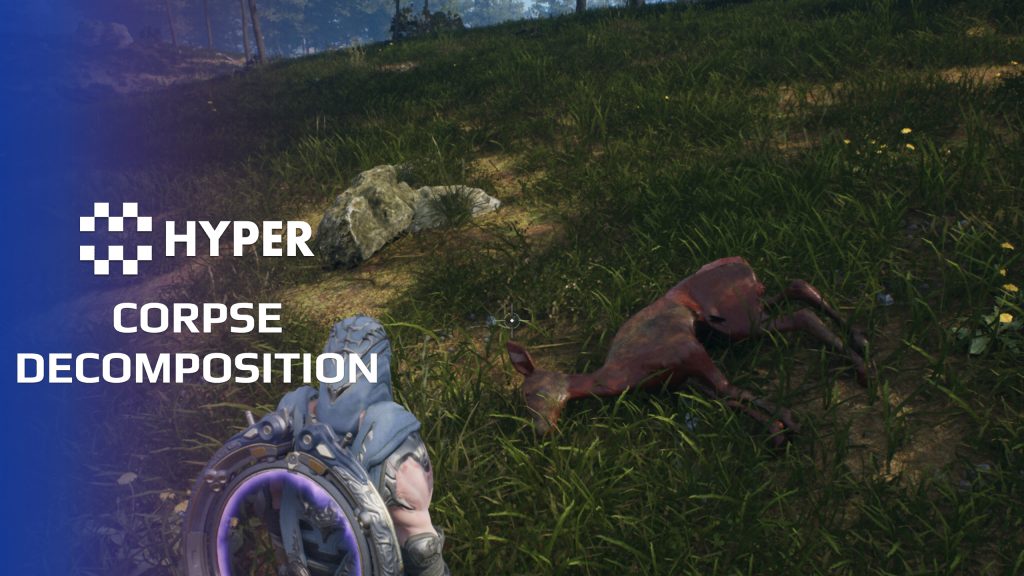
Let a body become part of the world after the fight ends. Hyper Corpse Decomposition gives corpses configurable decay stages, with gradual material changes, mesh swaps and stage-specific effects for humanoids or creatures.
Key Features
Staged decay
- Five-stage lifecycle: configure Fresh Kill, Bloat, Rotting, Decomposing and Skeleton stages.
- Per-stage duration: set duration ranges to control the pace and variation of decay.
- Material blending: drive decomposition through material parameters and reusable layers.
- Mesh transitions: swap the skeletal mesh or spawn a static representation for a later stage.
- Stage effects: assign Niagara effects and sound to the relevant stages.
Start and customize the process
- On-death start: bind decomposition to the Attribute Manager death event.
- Manual start: begin the process from your own gameplay event.
- Already-decayed actors: start at a selected stage for ambient corpses or world dressing.
- Material art direction: tune tint, roughness, tiling and noise, then adjust blood-mask breakup and surface push-back through the layer and blend instances.
- Creature-specific looks: reuse the same stages with different materials, meshes and timing.
Integration and materials
The actor-owned component resolves the target skeletal mesh and initializes its dynamic materials. Humanoid and deer material setups are included. Keep the corpse actor alive long enough for the process to run, and coordinate the final handoff or cleanup with your loot and death systems.
Use the stage mapping to tune the lifecycle, then adjust the material layers for your art style.
34 reviews for Corpse Decomposition System
You must be logged in to post a review.
Frequently asked questions
Why Hyper?
The strongest public modular Unreal Engine framework available at this scale
Most studios keep tools like this internal. Hyper makes a serious technical foundation available to solo developers, indies, and teams.
Built from 75,000+ hours of Unreal Engine work
System design, Blueprint architecture, multiplayer patterns, documentation, testing, integration, iteration, and real production problem-solving.
Systems designed to work together
Inventory, crafting, equipment, interaction, UI, combat, attributes, multiplayer, AI, quests, dialogue, maps, progression, survival systems, environment tools, performance helpers, and more can all live inside one larger ecosystem.
Working systems with source
Hyper gives you functional systems, a modular structure and documentation, with source you can extend for your own game.
Architecture you can extend
Hyper is built around scalable architecture: gameplay tags, structured data, child Blueprints, clean overrides, reusable components, and clear project boundaries.
Start fast, grow cleanly
Build on the included systems, replace visuals, adjust data, create child Blueprints and connect features without rebuilding the same foundation from scratch.
Want to learn more about the Hyper ecosystem, architecture philosophy, workflows, and developer behind it? Read more here and get started (https://gamesbyhyper.com/docs/getting-started/start-here/).
How do I add this to my project?
This module is provided as a full project because it includes Gameplay Tags, collision settings, config settings and other project-level dependencies.
Use our free Integration Tool (https://gamesbyhyper.com/product/integration-tool/) to prepare the integration. It combines compatible Hyper projects and handles migration and the required project settings. Use matching Unreal Engine versions and compatible Hyper releases.
Your own character, GameMode or custom systems may still need to be connected. The Integration Tool walkthrough (https://gamesbyhyper.com/docs/getting-started/use-the-automatic-integration-tool/) explains the setup and what to check in the generated project.
Do I need to use other Hyper systems with this?
No. You can use your own systems.
Hyper modules are designed around interfaces, abstract classes, shared contracts and dynamic dispatch, so features are not tied to one specific implementation.
If a module demonstrates integration with our Inventory, Equipment, Interaction, Movement, NPC or another Hyper system, you can:
Use the included Hyper implementation.
Replace it with your own system.
Use our implementation as a reference for your own integration.
The supplied integration shows how the module connects to the rest of a game. You can connect your own implementation through the same interface, abstract class or integration point.
For example, Attribute Manager may demonstrate Equipment modifying attributes. That does not mean you must purchase our Equipment System. You can follow the same integration pattern with your own equipment system.
The module includes working gameplay and its integration points. Build on the supplied setup or connect your own systems where you want different behavior.
See how to adapt a module (https://gamesbyhyper.com/docs/getting-started/customize-modules/) and how the shared data and abstract classes work (https://gamesbyhyper.com/docs/project-foundations/datamanagement/).
Where should I put my own changes?
Keep your own Blueprints, UI and data in your project's folder, for example Content/MyProject. Use child Blueprints or replacement components for your custom logic where possible.
That keeps your changes separate when you update Hyper. If you edit the original framework files directly, you will need to merge those edits when updating. The folder structure guide (https://gamesbyhyper.com/docs/project-foundations/folder-structure/) explains where everything belongs.
Can I change how a corpse decomposes?
Corpses move through configurable visual stages over time. You can change the mesh, material and effects at each stage, then clean up the actor.
Is decomposition synchronized in multiplayer?
Yes. The decomposition state is replicated so connected players see the same stage.
Compatibility and file information
- Development platforms
- Linux, Windows, macOS
- Tested platforms
- Windows
Versions and compatibility
| Version | Release | Unreal Engine |
|---|---|---|
| V4V4 UE5.7, 5.8. Release: V4. | V4 | 5.7, 5.8 |
Implementation and interaction
- Modular / extensible
- Yes
- Multiplayer ready
- Yes
- UI components
- Yes
- Input methods
- Gamepad, Keyboard, Mouse
- AI gameplay features
- No
System setup
- Architecture: actor-owned decomposition component with timed state progression and dynamic material instances.
- Configuration: E_Decay_State mapped to F_Decay_State_Details for duration, target amount, mesh/material changes, Niagara and sound.
- Start modes: Begin Play, death event, manual start or explicit starting stage.
- Materials: decomposition function, layer and blend instances control surface appearance and optional deformation.
- Lifecycle integration: coordinate actor persistence and cleanup with death, loot and corpse management.
Compatibility
- Networking: replicated multiplayer support.
- Platform testing: Windows tested.
- Plugins: Common UI.
Release notes | Documentation | YouTube | Discord
Documentation, videos and Discord are public. Verified buyers can use the support forums.
Acquired with code t_ibox –
Review from FabVery good asset, truly impressive in terms of quality and realism. The corpse decomposition system is very well crafted, with clean and progressive visual effects that greatly enhance in-game immersion. The result feels believable and creates a strong atmosphere. The details are carefully designed and the overall system is consistent, showing serious work and strong attention to quality. The documentation is clear, well-structured, and makes the system easy to understand. The customer support is also very responsive and professional, which is highly appreciated. This is an asset that brings real visual and gameplay value. Very satisfied, highly recommended. ⭐⭐⭐⭐⭐
Dalcon4 –
Review from FabThe Hyper Corpse Decomposition System v4 simulates realistic biological decay over time, transforming defeated enemies from fresh kills through progressive decomposition stages with visual material changes, particle effects like swarming flies, and environmental interaction. Instead of bodies simply vanishing, they undergo a believable degradation process that adds immersion to any survival or RPG game. The system is surprisingly detailed. It supports multiple configurable decomposition stages, each with its own material parameters, particle effects, mesh deformation, and timing. The decay rate can be influenced by environmental factors, and each stage transition is smooth and convincing. The system also handles cleanup, eventually removing the actor when decomposition completes to maintain performance. Setup is clean and modular. Add the Decomposition Component to any actor, configure your stage definitions (materials, particles, timings), and the system runs autonomously after death. The Easy Material Function mentioned in the documentation makes visual setup accessible even to developers without shader experience. Default presets are provided that look great immediately. The visual progression from fresh to decomposed is convincing and well-paced. Material transitions are smooth, particle effects like flies appear at appropriate stages, and the overall effect significantly enhances environmental storytelling. The system manages its own performance by reducing visual complexity as decomposition progresses and cleaning up completed corpses.
NotTheFed –
Review from FabI have a LOT of Hyper’s kits.. and for a lot it is plug in play for the basics. I have MST PRO as the base framework, and just plug in those that are relevant for my game like Dialog, companion, advanced NPC, lockpicking, Skills, quests, traps, unlock (learn), world map, weathertime, Skinning, body decompose, Mesh to Actor swap, Admin console, with chat.. and so on. Simple to understand, and gets you started with most key parts of any game framework I highly recommend, not just for the quality of the kit.. but the excellent support on discord. The very detailed documentation.
scallipus –
Review from FabWorks really well… Allows for multiple decomposition stages which can use different meshes and / or materials… Multiplayer ready is a nice touch. Quite straight forward to integrate! Just like a lot of other gamesbyhyper V4 products, this is one of the best examples of clean, scalable, and well commented game ready code. Comes with an example map that goes through explaining how to use it. Example characters etc so you can see how to implement it on your own characters. The discord community built for supporting the hyper products is one of the best I have had the pleasure of being a part of, with lots of involvement with the gamesbyhyper team and the very many devs who use the hyper systems. It rings true that you truely get what you pay for and this is a first class product. So much so that I have spent the last 3 years using and modifying various gamesbyhyper systems to suit my own games design goals and make my own personal game dev dreams become reality.