Description
Documentation | Discord | Overview | Video | Demo
Hyper Mesh to Icon Creator v4
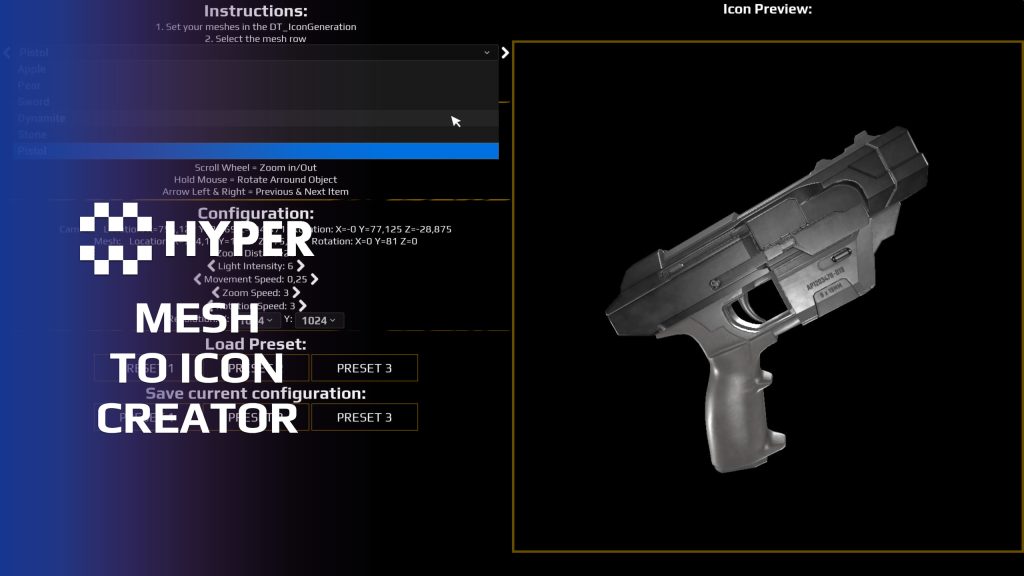
Create inventory icons from the meshes already in your project. Hyper Mesh to Icon Creator lets you frame, light and render static or skeletal meshes, with transparency and reusable capture settings.
Key Features
Capture and presentation
- Static or skeletal meshes: generate icons for either mesh type.
- Framing controls: position, zoom and rotate the item before capture. Choose orthographic or perspective framing and adjust the field of view.
- Lighting and background: adjust light intensity and specular scale as well as the background to suit your interface.
- Transparent icons: use alpha output with borders, glows or background colors in the supplied widget.
Reusable workflow
- Item-table selection: read available meshes from DT_Items.
- Quick mesh switching: use the controls to move between items.
- Saved configurations: reuse your setup for later icon generation.
- Example map: open Map_Icon_Creator and follow the startup instructions.
Assign one mesh type per item row. If both static and skeletal meshes are assigned, the static mesh takes priority. Use the walkthrough above to create a consistent set of icons for your inventory or vendor UI.
Related resources
MST Pro | Explore all compatible Hyper systems | try the MST Pro demo | official store
72 reviews for Mesh to Icon Creator
You must be logged in to post a review.
Frequently asked questions
Why Hyper?
The strongest public modular Unreal Engine framework available at this scale
Most studios keep tools like this internal. Hyper makes a serious technical foundation available to solo developers, indies, and teams.
Built from 75,000+ hours of Unreal Engine work
System design, Blueprint architecture, multiplayer patterns, documentation, testing, integration, iteration, and real production problem-solving.
Systems designed to work together
Inventory, crafting, equipment, interaction, UI, combat, attributes, multiplayer, AI, quests, dialogue, maps, progression, survival systems, environment tools, performance helpers, and more can all live inside one larger ecosystem.
Working systems with source
Hyper gives you functional systems, a modular structure and documentation, with source you can extend for your own game.
Architecture you can extend
Hyper is built around scalable architecture: gameplay tags, structured data, child Blueprints, clean overrides, reusable components, and clear project boundaries.
Start fast, grow cleanly
Build on the included systems, replace visuals, adjust data, create child Blueprints and connect features without rebuilding the same foundation from scratch.
Want to learn more about the Hyper ecosystem, architecture philosophy, workflows, and developer behind it? Read more here and get started (https://gamesbyhyper.com/docs/getting-started/start-here/).
Can I use this in my own Unreal project?
Yes. Use the supplied example project to try the setup, then follow the product documentation (https://gamesbyhyper.com/docs/ui/icon-creator/) for your own project. Use a supported Unreal Engine version and keep the required engine plugins enabled.
Do I need to use the rest of the Hyper ecosystem?
You can use this product in your own project. Other Hyper systems mentioned as optional integrations are separate additions; use the parts that fit your workflow.
Where should I put my own changes?
Keep your own Blueprints, UI and data in your project's folder, for example Content/MyProject. Use child Blueprints or replacement components for your custom logic where possible.
That keeps your changes separate when you update Hyper. If you edit the original framework files directly, you will need to merge those edits when updating. The folder structure guide (https://gamesbyhyper.com/docs/project-foundations/folder-structure/) explains where everything belongs.
Can I generate icons from skeletal meshes too?
It can create icon textures from static and skeletal meshes, with configurable lighting, background, rotation and transparency.
Can I reuse an icon setup across multiple items?
Yes. Use a DataTable to configure the meshes and save your setup so you can reuse it for more icons.
Compatibility and file information
- Development platforms
- Linux, Windows, macOS
- Tested platforms
- Windows
Versions and compatibility
| Version | Release | Unreal Engine |
|---|---|---|
| V2V2 UE5.3, 5.4. Release: V2. | V2 | 5.3, 5.4 |
| V3V3 UE5.5, 5.6. Release: V3. | V3 | 5.5, 5.6 |
| V4V4 UE5.7, 5.8. Release: V4. | V4 | 5.7, 5.8 |
Implementation and interaction
- Modular / extensible
- Yes
- Multiplayer ready
- Yes
- UI components
- Yes
- Input methods
- Gamepad, Keyboard, Mouse
- AI gameplay features
- No
System setup
- Workflow: mesh capture through the Icon Creator map and item-table input.
- Data source: DT_Items with a static or skeletal mesh reference.
- Controls: Enhanced Input for the supplied interaction and framing controls.
- Output handling: icon textures with alpha configuration and reusable saved capture settings.
Compatibility
- Platform testing: Windows tested.
- Plugins: Common UI.
Release notes | Documentation | YouTube | Discord
Documentation, videos and Discord are public. Verified buyers can use the support forums.

Acquired with code warchild911 –
Review from FabAfter spending so much time with external software I found this! So much more easier and faster!
warchild911 –
Review from FabAfter spending so much time with external software I found this! So much more easier and faster!
pridge7 –
Review from FabA huge time saver for generating clean inventory icons straight from meshes.
xSgtSalty –
Review from FabGreat way to save time and have a standard format for your icons, much faster then using photoshop
Xx-JayCook-xX –
Review from FabA simple mesh to icon creator – easy to use and the results are good. Not too much needed to say about the functionality, they have made it easy to use and haven’t overcomplicated the system! Would recommend
Goldenflame2 –
Review from FabLove the icon creator! It does what it needs to do, you can just load in your assets, put your entries in a datatable, and select them with an easy switcher/dropdown. That’s it!
MrIllDuckYouUp –
Review from FabI use this for creating every icon for any custom equipment I add to my char, game etc. Super lightweight and easy to use!
realmalden420 –
Review from FabI’ll continue to buy more assets like these. Very straight to the point and extremely helpful in the long run.
Acquired with code casigus –
Review from Fabintrusctions tell me to look for DT_IconGeneration AND its just not there in my project or in any of hyper folder. I missed out on the sale because of another hyper broken product and missed out on some great opportunities to expand my libary, and now here we are with another one of your tools missing a core part of the system to even work. IM getting sick of this.
ERuts • 2 months ago Publisher This review is factually misleading and not representative of the product itself. The product is not broken and works correctly. The documentation clearly explains the setup process, including adding your own meshes: https://gamesbyhyper.com/docs/ui/icon-creator/#adding-your-own-meshes The review mainly focuses on frustration about missing sales rather than actual product functionality. The reviewer also claims there are “other broken tools,” but we have not received reports about other broken products from this user. Historically, legitimate bug reports are resolved very quickly. This tool is also extremely simple to use: Select item → Press Play → Generate icons. Because of this, the review appears inaccurate, emotionally driven, and not relevant to the actual product quality or functionality.
casigus –
Review from FabEver tried making icons in Unreal and ended up with 400 screenshots named “Untitled”? This tool saves your sanity. It’s fast, clean, and doesn’t require Photoshop therapy.
This review is factually misleading and not representative of the product itself.The product is not broken and works correctly. The documentation clearly explains the setup process, including adding your own meshes: https://gamesbyhyper.com/docs/ui/icon-creator/#adding-your-own-meshesThe review mainly focuses on frustration about missing sales rather than actual product functionality.The reviewer also claims there are “other broken tools,” but we have not received reports about other broken products from this user. Historically, legitimate bug reports are resolved very quickly.This tool is also extremely simple to use: Select item → Press Play → Generate icons.Because of this, the review appears inaccurate, emotionally driven, and not relevant to the actual product quality or functionality.
scallipus –
Review from FabAllows you to position your meshes etc and is fairly easy to use. Creates icons directly ready to be used in your game. Just like the other hyper products, this is a really good example of clean, well commented code that works great.
ckgKIND –
Review from FabAnother great product to add to the hyper collection! Thanks bud!
Se7master –
Review from FabHere’s the main problem with this tool – it makes icons with transparent backgrounds in a really weird way. It uses inverted opacity, which means you either have to mess around with your widget’s code to get it to look right, or you have to use a material for the icons instead of just a regular image. What really bugs me is that there’s no mention of this anywhere on the product page, the documentation barely talks about it either. You only find out about this after you’ve bought the tool, which is pretty annoying.
Hey, an update: by default the opacity is set correctly now since the version that has been released at the beginning of 2025!I agree, before this update it needed an extra step which was annoying. I did mention it everywhere though in the documentation, videos, product page description, technical description and in the first image to show of the product.Hope you have a great day!Eric
Rodzilla4269 –
Review from FabI bought all your v2 assets other than menu. Please add me on discord Rodzilla4269#6995