Description
Documentation | Discord | How to add Auto Landscape, Forests, Biomes, Ditches and Paths | Cave Generation | Props Spawner | Spline Toolkit | Demo
Hyper Environment Building Toolkit v4
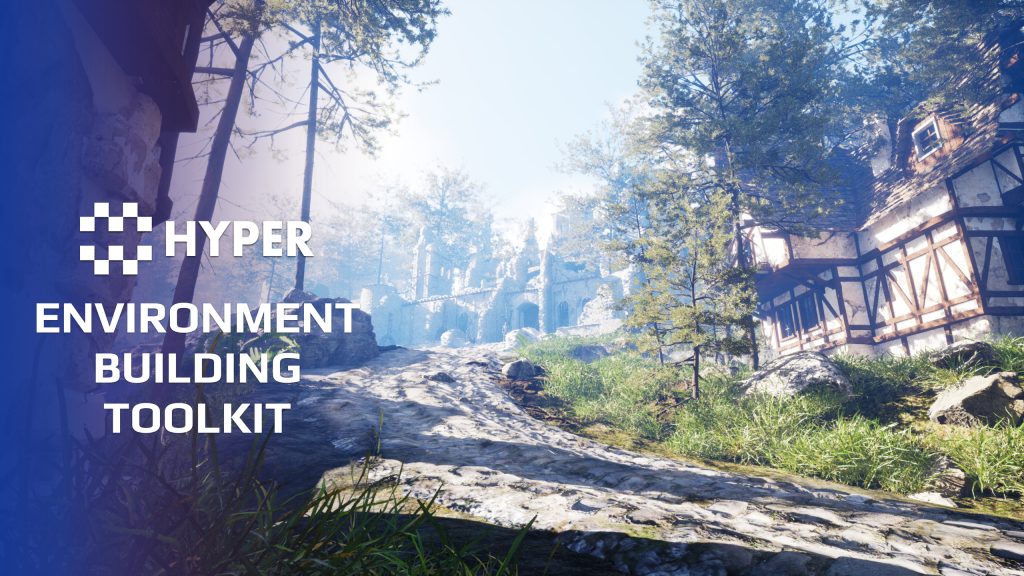
Build an outdoor landscape, dress its forests and paths, then lead the player into a cave you have designed. Hyper Environment Building Toolkit combines terrain materials, biome placement, modular caves, props and spline tools in one environment-authoring collection.
Key Features
Terrain and biomes
- Auto Landscape: apply configurable landscape materials according to terrain rules.
- PCG forests: populate large areas with configured forest content.
- Biome data: organize vegetation and environmental variety through Data Assets.
- Biome transitions: control how neighboring environments blend.
- Ditches and river features: use the dedicated PCG ditch workflow where the terrain needs these features.
Caves and underground spaces
- Modular construction: assemble rooms, entrances, end caps and spline-based tunnels.
- Authored layouts: place the cave structure manually to control the route and composition.
- PCG dressing: populate floor and ceiling areas with the configured objects.
- Atmosphere: use the cave lighting and atmosphere placement tools.
Props, splines and placement control
- Props spawner: dress an area with rocks, ruins, foliage or debris through the configured generation tools.
- Physics placement: use physics-based randomization where a settled pile or natural arrangement helps.
- Spline structures: build fences, walls and other repeated structures along authored paths.
- PCG and mesh splines: choose the appropriate spline workflow for the structure.
- Exclusion zones: keep generated content away from areas that need to remain clear.
One environment, several focused tools
Use the landscape material for terrain appearance, biome tools for distribution and splines for authored routes or structures. Build the cave layout yourself, then use procedural dressing for its smaller details. Each tool remains configurable for the scene you are creating.
Keep the broad layout and fine detail under control
- Define the terrain language: use slope, height and physical-surface rules in the landscape material, with optional RVT blending where your mesh materials support it.
- Author distinct regions: box or spline biomes, edge falloff, overlap priorities and class-selective exclusions help forests meet paths and clearings deliberately.
- Choose the right spline tool: deform a continuous wall along a curve or place independent fence pieces through PCG without bending their meshes.
- Dress different scales: use weighted prop collections across an area, line spawners along edges and physics settling for small piles.
- Build the underground route yourself: connect cave rooms, tunnel splines, caps and stairs, then add procedural floor/roof detail and lighting.
Watch the linked examples to choose the workflow for your first area.
Related resources
MST Pro | Explore all compatible systems | buy directly from our store
55 reviews for Environment Building Toolkit
You must be logged in to post a review.
Frequently asked questions
Why Hyper?
The strongest public modular Unreal Engine framework available at this scale
Most studios keep tools like this internal. Hyper makes a serious technical foundation available to solo developers, indies, and teams.
Built from 75,000+ hours of Unreal Engine work
System design, Blueprint architecture, multiplayer patterns, documentation, testing, integration, iteration, and real production problem-solving.
Systems designed to work together
Inventory, crafting, equipment, interaction, UI, combat, attributes, multiplayer, AI, quests, dialogue, maps, progression, survival systems, environment tools, performance helpers, and more can all live inside one larger ecosystem.
Working systems with source
Hyper gives you functional systems, a modular structure and documentation, with source you can extend for your own game.
Architecture you can extend
Hyper is built around scalable architecture: gameplay tags, structured data, child Blueprints, clean overrides, reusable components, and clear project boundaries.
Start fast, grow cleanly
Build on the included systems, replace visuals, adjust data, create child Blueprints and connect features without rebuilding the same foundation from scratch.
Want to learn more about the Hyper ecosystem, architecture philosophy, workflows, and developer behind it? Read more here and get started (https://gamesbyhyper.com/docs/getting-started/start-here/).
Can I use this in my own Unreal project?
Yes. Use the supplied example project to try the setup, then follow the product documentation (https://gamesbyhyper.com/docs/) for your own project. Use a supported Unreal Engine version and keep the required engine plugins enabled.
Do I need to use the rest of the Hyper ecosystem?
You can use this product in your own project. Other Hyper systems mentioned as optional integrations are separate additions; use the parts that fit your workflow.
Where should I put my own changes?
Keep your own Blueprints, UI and data in your project's folder, for example Content/MyProject. Use child Blueprints or replacement components for your custom logic where possible.
That keeps your changes separate when you update Hyper. If you edit the original framework files directly, you will need to merge those edits when updating. The folder structure guide (https://gamesbyhyper.com/docs/project-foundations/folder-structure/) explains where everything belongs.
Does cave generation create a complete layout automatically?
You build the cave layout using modular pieces and spline-based tunnels. PCG dresses the floors and ceilings. The toolkit does not automatically generate the tunnel layout.
Which world-building workflows are included?
The toolkit combines auto-landscape materials, PCG forests and biomes, ditches and paths, cave construction, prop spawning and spline tools.
Compatibility and file information
- Development platforms
- Linux, Windows, macOS
- Tested platforms
- Windows
Versions and compatibility
| Version | Release | Unreal Engine |
|---|---|---|
| V3V3 UE5.5, 5.6. Release: V3. | V3 | 5.5, 5.6 |
| V4V4 UE5.7, 5.8. Release: V4. | V4 | 5.7, 5.8 |
Implementation and interaction
- Modular / extensible
- Yes
- Multiplayer ready
- Yes
- UI components
- Yes
- Input methods
- Gamepad, Keyboard, Mouse
- AI gameplay features
- No
System setup
- Authoring: landscape material, PCG biome/forest, ditch, prop and spline workflows.
- Caves: manually assembled modular geometry with procedural dressing support.
- Configuration: Data Assets, material parameters, spline settings and exclusion volumes.
- Scope: environment-authoring tools; terrain sculpting and gameplay replication are not inferred from the material or PCG setup.
Compatibility
- Platform testing: Windows tested.
- Plugins: PCG for procedural generation; Common UI where used by the supplied example.
Release notes | Documentation | YouTube | Discord
Documentation, videos and Discord are public. Verified buyers can use the support forums.

WWS – Lantianer –
Review from FabThis is a massive environment toolkit that offers a huge number of tools and features to get started with environment creation. I really like that it’s built around PCG, which feels like the right and future-proof approach going forward. For the price, you get an impressive amount of content and functionality. Overall, I’ve been very happy with it. One thing I particularly appreciate is that it pushed me to finally dive deeper into PCG. I had been hesitant to learn it and was still relying on Unreal’s older procedural tools, which feel quite outdated and limited by comparison. This toolkit made the learning process much easier and helped me become more comfortable with modern workflows. My only critique is that I’d love to see further expansion of the biome generation systems. Creating more complex and believable ecosystems can be a bit challenging. For example, I tried building a dense rainforest and couldn’t quite achieve the results I was aiming for. That said, everything is well documented, and if you’re more experienced with PCG than I am, extending the system yourself should be very achievable. Overall, an excellent toolkit and easy to recommend.
Acquired with code wolfey91 –
Review from FabThe Environment Building Toolkit is easily one of the most useful Hyper products I’ve bought. It’s incredibly powerful, with tools for creating forests, landscapes, paths, caves, biomes and complete environments. It plugs brilliantly into other Hyper systems using the Integration Tool as expected, making it ideal for building a much larger framework. It’s also extremely useful as a standalone toolkit because of how versatile and modular everything is. It’s a fantastic product that gives you a genuinely strong foundation for creating detailed custom worlds.
Fimbulverk –
Review from FabTLDR; You can not DIY a proper DeWalt drill at home, go to Home Depot and buy a real one. First of all, my experience with unreal engine is only 1 month old. And honestly i thought i had so much knowledge allready, PCG and Blueprints, they are just connect four , right ? right.. NOPE. So i made my first PCG blueprint and ran it, i crashed… troubleshoot for a few days.. lose some hair… sanity…. THEN BY SOME MIRACLE i spotted the Auto Landscape material on sale, and i grabbed that. IT WORKED PERFECTLY. Now ofc , i where so overjoyed i had to check out what more this creator had , and oh boy. when i found this pack, i first thought ” uuugh quite the steep price for someone new to this world” But i could not have been more wrong. not only is it cheaper to get all of these things in a bundle than seperate, BUT THEY ALL MAKE TOTAL SENSE TOGETHER
Xx-JayCook-xX –
Review from FabI ran out of words for the title, but it’s very very good and with the use of the great PCG and auto material you’re 99% of the way there for having an eye catching world. Of course these more to a playable world than it looking good, but it has features like the cave system etc to add some depth and exploration. It’s really easy to use. it has a feautre that allows you to scatter props and also use splines so you can set up a scene really really quickly. I really recommend this is if you want to create your own personalised world/ map/ level. It’s really easily customisable too as it’s all done through data assets so you can have different biomes etc if you’re making a larger world
juggaloassian666 –
Review from FabI’m 100% beginner as of feb 2026 with no prior unreal experience and very little knowledge of coding learned from over a decade ago. Only regret I have was not buying this b4 I picked up the cave pack. As the cave pack is included. Super easy to use, lots of great tools, like every other hyper system I’ve experienced so far 10/10
QuickkBee –
Review from FabGreat introduction to PCG. Well-architected. It did though have some code quality issues and bugs that the devs I’m sure could have caught with some more testing/review. I shared the bugs in the discord and the devs probably fixed it in the latest release (it’s been a while). I had some more advanced functionality in mind so I ended up rewriting everything but the original implementation taught me very well and I enjoyed learning from it.
ERuts • 6 months ago Publisher Tnx! Yes thank you again for reporting those. We indeed implemented the extra connections in the data assets and improvements you suggested. Thank you again and have a great day, Eric