Description
Documentation | Discord | Demo
Hyper Auto Landscape Material v4
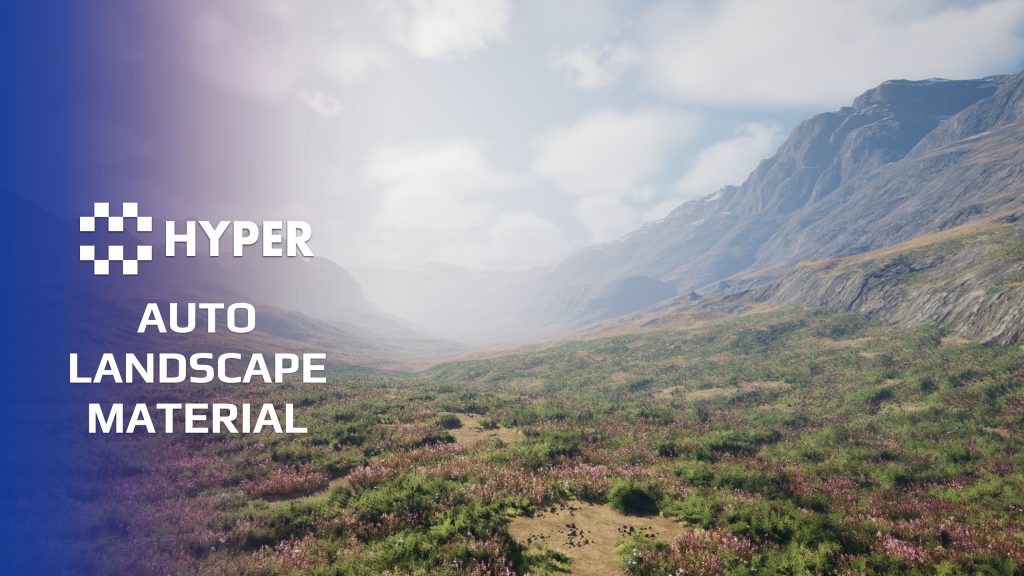
Build a consistent landscape surface without painting every slope and height band by hand. Hyper Auto Landscape Material uses configurable rules for terrain textures, grass, open areas and material transitions in Unreal Engine 5.
Start with a landscape preset, then tune the material instance for your environment. Control slope detection, texture overrides, snow and foliage openings, with optional Runtime Virtual Texture blending and physical surface output for gameplay systems.
Key Features
Rule-based landscape surfaces
- Automatic material placement: use configurable rules to drive terrain coverage, with optional custom paint layers where you need manual control.
- Slopes and secondary slopes: adjust slope detection and transitions to distinguish steep rock faces from flatter terrain.
- Height-driven appearance: configure beach placement, snow bands and other altitude-based material changes.
- Texture controls: change textures and material-instance settings to fit your own landscape style.
Grass, openings and detail
- Landscape grass and foliage: control grass bands, foliage areas and open or rocky patches.
- Open-spots masks: define bare areas and rock placement within those openings.
- RVT blending: use optional Runtime Virtual Textures to blend compatible meshes with the landscape.
- Tessellation settings: use the landscape tessellation options where your project needs extra surface detail.
Connections to your world
- Physical surface output: provide physical material channels for footsteps, traces and other surface-dependent effects.
- Weather integration: connect the Dynamic Weather workflow for snow, puddles and wind-related changes when that system is part of your project.
- PCG workflows: use the material and surface rules alongside Hyper's procedural environment tools for consistent world dressing.
From a landscape to a coherent environment
Create or import your landscape, assign a Hyper material preset and adjust its textures and settings. Add custom paint layers for specific areas, then enable RVT if you need mesh-to-terrain blending. This gives forests, props, paths and gameplay actors a consistent surface foundation.
Supporting setup
- Material presets: start with existing configurations and adapt their exposed values for your map.
- Optional RVT setup: the documentation explains the color and height volumes, landscape assignments and an example rock-blending workflow.
- Surface rules: assign physical materials to painted layers so dependent gameplay or PCG filters can identify the terrain correctly.
Explore the demo, then follow the landscape setup documentation to bring the material into your own map.
20 reviews for Hyper Auto Landscape Material
You must be logged in to post a review.
Frequently asked questions
Why Hyper?
The strongest public modular Unreal Engine framework available at this scale
Most studios keep tools like this internal. Hyper makes a serious technical foundation available to solo developers, indies, and teams.
Built from 75,000+ hours of Unreal Engine work
System design, Blueprint architecture, multiplayer patterns, documentation, testing, integration, iteration, and real production problem-solving.
Systems designed to work together
Inventory, crafting, equipment, interaction, UI, combat, attributes, multiplayer, AI, quests, dialogue, maps, progression, survival systems, environment tools, performance helpers, and more can all live inside one larger ecosystem.
Working systems with source
Hyper gives you functional systems, a modular structure and documentation, with source you can extend for your own game.
Architecture you can extend
Hyper is built around scalable architecture: gameplay tags, structured data, child Blueprints, clean overrides, reusable components, and clear project boundaries.
Start fast, grow cleanly
Build on the included systems, replace visuals, adjust data, create child Blueprints and connect features without rebuilding the same foundation from scratch.
Want to learn more about the Hyper ecosystem, architecture philosophy, workflows, and developer behind it? Read more here and get started (https://gamesbyhyper.com/docs/getting-started/start-here/).
Can I use this in my own Unreal project?
Yes. Use the supplied example project to try the setup, then follow the product documentation (https://gamesbyhyper.com/docs/environment-building/auto-landscape/) for your own project. Use a supported Unreal Engine version and keep the required engine plugins enabled.
Do I need to use the rest of the Hyper ecosystem?
You can use this product in your own project. Other Hyper systems mentioned as optional integrations are separate additions; use the parts that fit your workflow.
Where should I put my own changes?
Keep your own Blueprints, UI and data in your project's folder, for example Content/MyProject. Use child Blueprints or replacement components for your custom logic where possible.
That keeps your changes separate when you update Hyper. If you edit the original framework files directly, you will need to merge those edits when updating. The folder structure guide (https://gamesbyhyper.com/docs/project-foundations/folder-structure/) explains where everything belongs.
Can I control landscape features through material instances?
Yes. Material instances expose controls for slope detection, foliage openings, texture overrides and height-driven workflows.
Does Auto Landscape support Runtime Virtual Textures?
Yes. Auto Landscape includes Runtime Virtual Texture support and explicit texture override rules for high-detail blending.
Is this the original UE4 landscape material?
No. Auto Landscape Material V4 is the newer rule-based system. The original Advanced Automatic Landscape Material remains a separate product.
Compatibility and file information
- Development platforms
- Linux, Windows, macOS
- Tested platforms
- Windows
Versions and compatibility
| Version | Release | Unreal Engine |
|---|---|---|
| V315Hyper Auto Landscape Material v3 55. Release: v315. | v315 | 5.5, 5.6 |
| V405Hyper Auto Landscape Material v4 57. Release: v405. | v405 | 5.7, 5.8 |
Implementation and interaction
- Code framework
- Blueprint
- Modular / extensible
- Yes
- Multiplayer ready
- Yes
- UI components
- Yes
- Input methods
- Gamepad, Keyboard, Mouse
- AI gameplay features
- No
System setup
- Architecture: landscape materials and configurable material-instance presets, with optional landscape paint layers.
- Configuration: textures, slope and height rules, grass/opening settings, snow and physical material output.
- RVT workflow: optional color and height RVTs require virtual-texture project setup and compatible mesh materials.
- Integrations: physical surfaces for gameplay effects and PCG filtering; weather-driven material changes when Dynamic Weather is present.
Compatibility
- Platform testing: Windows tested.
- Plugins: PCG.
Release notes | Documentation | YouTube | Discord
Documentation, videos and Discord are public. Verified buyers can use the support forums.

Acquired with code casigus –
Review from FabPainting terrain in Unreal feels like finger-painting with a chainsaw. This system makes it feel like art again. Auto materials that actually auto imagine that!
Acquired with code saintlol63 –
Review from Fabasset bad organisation, other with be more efficient
Gmesrine –
Review from Fabgood as always i never regret buying stuff from hyper
2knew –
Review from FabBought it, checked out the demo levels. Performance seems decent. Started to modify things for my use, figured to check the documentation for any notes/warnings/possible walkthroughs for modifying it for common use cases.. ..You know, documentation. As of Jan 2026 there is a very generic/not asset-specific PDF in the project folder. It links out to the author’s website where you can drill down to asset specific documentation which for this asset is: “Documentation in Progress Based on community requests, we’re restructuring all our documentation. This page is under active development. Last updated: October 22, 2025” TL;DR – This asset looks to be very good. If you expect documentation, you might want to reconsider purchasing it.