Description
Documentation | Discord | How to add Auto Landscape, Forests, Biomes, Ditches and Paths | Demo
Hyper Procedural Biome Generator v4
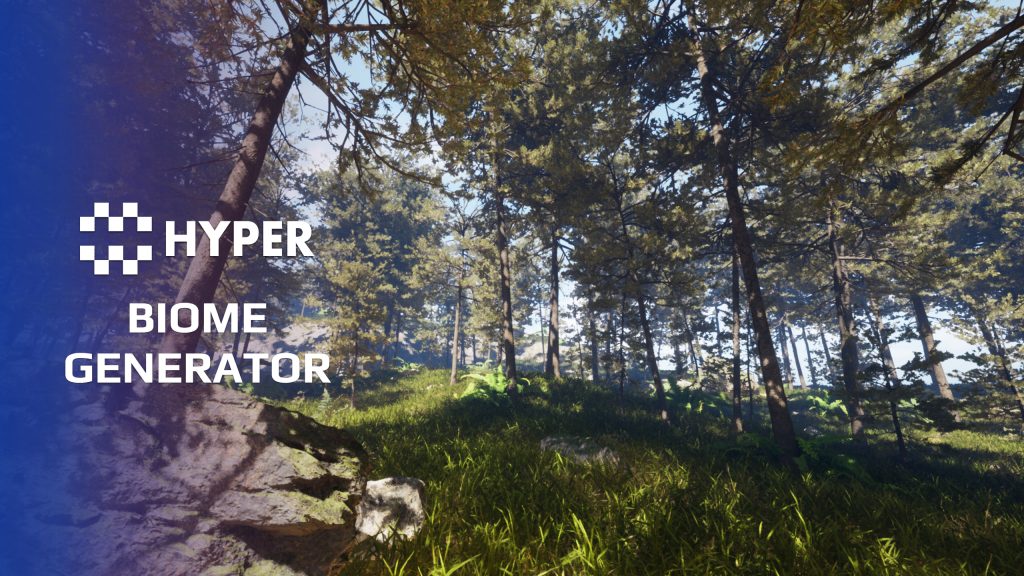
Build a forest as a landscape, not a collection of individually placed trees. Hyper Procedural Biome Generator uses data-driven box and spline biomes to populate large environments, with controls for density, boundaries, overlapping regions and the paths players will follow.
Swap a biome definition, tune its edge falloff and keep roads or important gameplay areas clear. World Partition and non-partitioned workflows, ditch generation and landscape path tools let you develop the environment around your level design.
Key Features
Biome authoring
- Data Asset definitions: swap a complete biome configuration from one asset.
- Box and spline areas: use box volumes for broad coverage or spline boundaries for more deliberately shaped regions.
- Density and spacing: adjust per-biome generation settings and the distance between spawned content.
- Edge falloff: use spline edge sampling and distance fade to control density around the boundary.
Overlaps and clear space
- Neighboring biomes: configure blending and priority where biome areas overlap.
- Exclusion shapes: use boxes, splines and landscape splines to reserve space.
- Selective exclusions: exclude a specific class, such as trees, while retaining other content in the same area.
- World scale: work with World Partition or a non-partitioned map.
Routes and terrain features
- Ditch splines: shape a walkable trench through the landscape deformation workflow, with PCG content excluded from the carved area.
- Landscape paths: choose path presets, including desolation styles, and keep the route clear through automatic PCG exclusion.
- Forest biomes: start from pine, dense and sparse forest setups.
- Biome overlap: inspect the included scenes to see biome blending and edge sampling together.
Choose a biome, replace its content where needed and use the documented controls to shape the environment around your game.
You must be logged in to post a review.
Frequently asked questions
Why Hyper?
The strongest public modular Unreal Engine framework available at this scale
Most studios keep tools like this internal. Hyper makes a serious technical foundation available to solo developers, indies, and teams.
Built from 75,000+ hours of Unreal Engine work
System design, Blueprint architecture, multiplayer patterns, documentation, testing, integration, iteration, and real production problem-solving.
Systems designed to work together
Inventory, crafting, equipment, interaction, UI, combat, attributes, multiplayer, AI, quests, dialogue, maps, progression, survival systems, environment tools, performance helpers, and more can all live inside one larger ecosystem.
Working systems with source
Hyper gives you functional systems, a modular structure and documentation, with source you can extend for your own game.
Architecture you can extend
Hyper is built around scalable architecture: gameplay tags, structured data, child Blueprints, clean overrides, reusable components, and clear project boundaries.
Start fast, grow cleanly
Build on the included systems, replace visuals, adjust data, create child Blueprints and connect features without rebuilding the same foundation from scratch.
Want to learn more about the Hyper ecosystem, architecture philosophy, workflows, and developer behind it? Read more here and get started (https://gamesbyhyper.com/docs/getting-started/start-here/).
Can I use this in my own Unreal project?
Yes. Use the supplied example project to try the setup, then follow the product documentation (https://gamesbyhyper.com/docs/environment-building/biome-generator/) for your own project. Use a supported Unreal Engine version and keep the required engine plugins enabled.
Do I need to use the rest of the Hyper ecosystem?
You can use this product in your own project. Other Hyper systems mentioned as optional integrations are separate additions; use the parts that fit your workflow.
Where should I put my own changes?
Keep your own Blueprints, UI and data in your project's folder, for example Content/MyProject. Use child Blueprints or replacement components for your custom logic where possible.
That keeps your changes separate when you update Hyper. If you edit the original framework files directly, you will need to merge those edits when updating. The folder structure guide (https://gamesbyhyper.com/docs/project-foundations/folder-structure/) explains where everything belongs.
Does it work with World Partition?
Yes. It supports both World Partition and non-World Partition workflows.
Can I exclude roads or selected objects from generation?
Yes. Use boxes, splines or landscape splines to define exclusions. You can exclude only certain classes, such as trees, while allowing other content.
Compatibility and file information
- Development platforms
- Linux, Windows, macOS
- Tested platforms
- Windows
Versions and compatibility
| Version | Release | Unreal Engine |
|---|---|---|
| V3V3 UE5.5, 5.6. Release: V3. | V3 | 5.5, 5.6 |
| V4V4 UE5.7, 5.8. Release: V4. | V4 | 5.7, 5.8 |
Implementation and interaction
- Modular / extensible
- Yes
- Multiplayer ready
- Yes
- UI components
- Yes
- Input methods
- Gamepad, Keyboard, Mouse
- AI gameplay features
- No
System setup
- Authoring: data-asset-driven box and spline biomes with generation settings.
- Placement: density, spacing, edge sampling, overlap priority and class-selective exclusions.
- World workflows: World Partition and non-partitioned maps.
- Included tools: ditch and landscape-path workflows with PCG exclusion, plus example maps.
Compatibility
- Platform testing: Windows tested.
- Plugins: PCG for procedural generation; Common UI where used by the supplied example.
Release notes | Documentation | YouTube | Discord
Documentation, videos and Discord are public. Verified buyers can use the support forums.
15 reviews for Hyper Procedural Biome Generator
There are no reviews yet.