Description
Documentation | Discord | Session walkthrough | Video | Demo
Hyper Online Multiplayer Framework v4
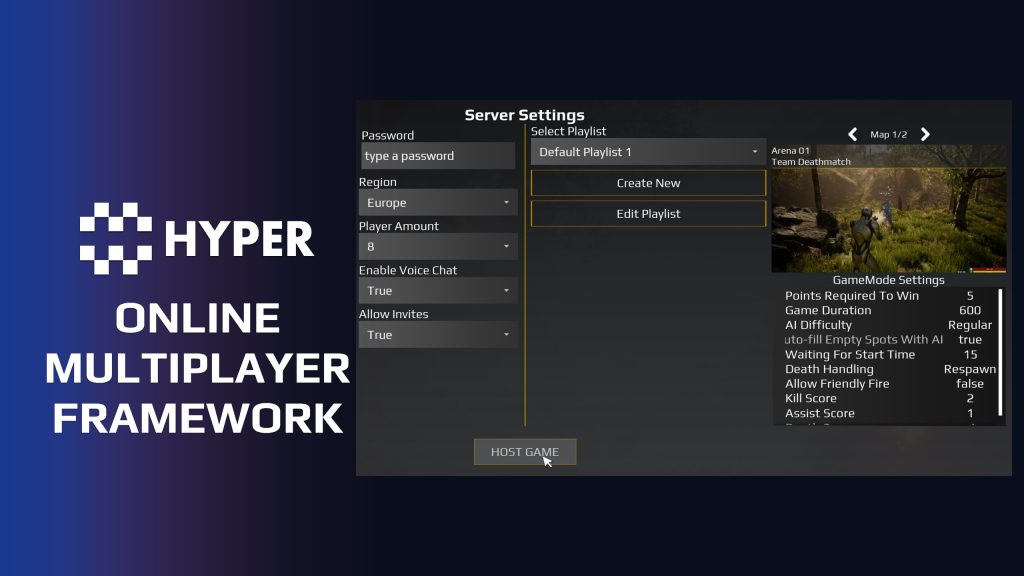
Build the multiplayer flow around your game: host a session, browse available games, gather players in a lobby, start a match, and move to the next map or game in a playlist. Online Multiplayer Framework (OMF) brings these steps together in a modular Blueprint framework with menu and lobby UI, player tracking, optional teams and scores, and configurable game settings.
What You Get
- Menu-to-game flow: hosting, server browsing, joining, lobby transitions, leaving, and session cleanup.
- Single-game or playlist hosting: run one persistent game or rotate through a sequence of maps and game types.
- Per-game settings: configure rule values for each playlist entry and distribute them to your gameplay logic.
- Player, team, and score management: track connected players and configure the optional team and score systems.
- Saved session configuration: retain selected playlists, active game setup, and configured settings.
- Blueprint customization: extend the supplied menus, settings, and session flow for your own project.
Steam, EOS, and Crossplay With Hyper Online Integration
For current UE 5.8 projects, connect OMF to Steam, Epic Online Services, or EOS + Steam crossplay using our separate Hyper Online Integration (HOI) plugin.
OMF handles your game's menus, lobby flow, playlists, teams, settings, and match transitions. HOI handles platform login and online session operations. The current OMF release supplies the HOI integration components. The HOI plugin is a separate product and is not included with OMF.
HOI provides one setup hub for your platform details and provider profile. The same OMF integration components work with its Steam, EOS, and crossplay profiles. Crossplay uses a shared EOS session pool, with matching EOS product, deployment, and session settings across the participating builds.
Start with the OMF and HOI setup guide, then follow the HOI documentation for platform configuration and testing. OMF can also use Unreal's default local subsystem for LAN and direct IP workflows.
Customize It for Your Game
OMF provides the session framework and settings UI. You supply the gameplay rules that use those settings. For example, a Bomb Timer setting needs your own bomb gameplay logic, and a playlist entry needs a game mode implemented in your project.
Use OMF in your own project or alongside MST Pro and other Hyper systems. Follow the OMF integration instructions for the required GameMode, GameState, PlayerController, and GameInstance setup. Try the demo to review the supplied flow and UI before choosing it for your game.
56 reviews for Online Multiplayer Framework
You must be logged in to post a review.
Frequently asked questions
Why Hyper?
The strongest public modular Unreal Engine framework available at this scale
Most studios keep tools like this internal. Hyper makes a serious technical foundation available to solo developers, indies, and teams.
Built from 75,000+ hours of Unreal Engine work
System design, Blueprint architecture, multiplayer patterns, documentation, testing, integration, iteration, and real production problem-solving.
Systems designed to work together
Inventory, crafting, equipment, interaction, UI, combat, attributes, multiplayer, AI, quests, dialogue, maps, progression, survival systems, environment tools, performance helpers, and more can all live inside one larger ecosystem.
Working systems with source
Hyper gives you functional systems, a modular structure and documentation, with source you can extend for your own game.
Architecture you can extend
Hyper is built around scalable architecture: gameplay tags, structured data, child Blueprints, clean overrides, reusable components, and clear project boundaries.
Start fast, grow cleanly
Build on the included systems, replace visuals, adjust data, create child Blueprints and connect features without rebuilding the same foundation from scratch.
Want to learn more about the Hyper ecosystem, architecture philosophy, workflows, and developer behind it? Read more here and get started (https://gamesbyhyper.com/docs/getting-started/start-here/).
How do I add this to my project?
This module is provided as a full project because it includes Gameplay Tags, collision settings, config settings and other project-level dependencies.
Use our free Integration Tool (https://gamesbyhyper.com/product/integration-tool/) to prepare the integration. It combines compatible Hyper projects and handles migration and the required project settings. Use matching Unreal Engine versions and compatible Hyper releases.
Your own character, GameMode or custom systems may still need to be connected. The Integration Tool walkthrough (https://gamesbyhyper.com/docs/getting-started/use-the-automatic-integration-tool/) explains the setup and what to check in the generated project.
Do I need to use other Hyper systems with this?
No. You can use your own systems.
Hyper modules are designed around interfaces, abstract classes, shared contracts and dynamic dispatch, so features are not tied to one specific implementation.
If a module demonstrates integration with our Inventory, Equipment, Interaction, Movement, NPC or another Hyper system, you can:
Use the included Hyper implementation.
Replace it with your own system.
Use our implementation as a reference for your own integration.
The supplied integration shows how the module connects to the rest of a game. You can connect your own implementation through the same interface, abstract class or integration point.
For example, Attribute Manager may demonstrate Equipment modifying attributes. That does not mean you must purchase our Equipment System. You can follow the same integration pattern with your own equipment system.
The module includes working gameplay and its integration points. Build on the supplied setup or connect your own systems where you want different behavior.
See how to adapt a module (https://gamesbyhyper.com/docs/getting-started/customize-modules/) and how the shared data and abstract classes work (https://gamesbyhyper.com/docs/project-foundations/datamanagement/).
Where should I put my own changes?
Keep your own Blueprints, UI and data in your project's folder, for example Content/MyProject. Use child Blueprints or replacement components for your custom logic where possible.
That keeps your changes separate when you update Hyper. If you edit the original framework files directly, you will need to merge those edits when updating. The folder structure guide (https://gamesbyhyper.com/docs/project-foundations/folder-structure/) explains where everything belongs.
How are OMF and Hyper Online Integration different?
OMF handles the menus, lobby, playlists, teams and match flow. The separate Hyper Online Integration plugin (https://gamesbyhyper.com/product/online-integration/) handles Steam, EOS and crossplay services. OMF can also use Unreal's default local subsystem for LAN and direct IP workflows.
Do the menu's game settings include complete game modes?
No. OMF provides the session flow and settings. You connect those settings to your game rules, such as a bomb timer, score limit or the conditions for ending a match.
Compatibility and file information
- Development platforms
- Linux, Windows, macOS
Versions and compatibility
| Version | Release | Unreal Engine |
|---|---|---|
| V3V3 UE5.5, 5.6. Release: V3. | V3 | 5.5, 5.6 |
| V4V4 UE5.7, 5.8. Release: V4. | V4 | 5.7, 5.8 |
Implementation and interaction
- Modular / extensible
- Yes
- Multiplayer ready
- Yes
- UI components
- Yes
- Input methods
- Gamepad, Keyboard, Mouse
- AI gameplay features
- No
Framework setup
- Blueprint framework: host, search, join, leave, lobby transitions, playlists and cleanup, with menu/lobby UI. Requires Common UI.
- Players and settings: connected-player tracking, optional teams/scores, single-game/playlist modes, per-entry settings, saved session config, Gameplay Tags and data assets.
- Integration: GameState manages sessions; PlayerController requests them. Configure GameMode and GameInstance for your maps and provider.
- LAN/direct IP: Unreal's default Online Subsystem.
- Steam/EOS/crossplay: requires the separate Hyper Online Integration plugin. OMF supplies HOI components; the current HOI build targets UE 5.8/Win64. Match releases to your engine.
- Provider setup: supply Steam/Epic application details. Crossplay clients must share the EOS product, deployment and session bucket.
Your project implements game modes and rules. HOI voice, achievements and commerce need separate setup; they are not complete gameplay systems in OMF. Test your packaged builds and follow the instructions for your release.
OMF setup and HOI integration | Provider setup | Discord and buyer support
WWS – Lantianer –
Review from FabA solid framework for multiplayer projects and an excellent addition to the Hyper ecosystem. I really like that hosting, server browsing, and lobbies are all included in one solution, which saves a lot of development time. It integrates very well with the other Hyper modules and has been a great fit for the multiplayer survival game I’m working on. What I especially appreciate about Hyper’s products is the long-term support behind them. When I first saw their ambitious roadmap, I was skeptical, as I’ve seen many developers make big promises only to abandon their assets or take years to deliver meaningful updates. I’m happy to say that Eric and the Hyper team have consistently delivered, kept their modules updated, and continued expanding the ecosystem. It’s not just this module I recommend, but also the team behind it, the growing ecosystem of compatible modules, and the community that has formed around it.
xSgtSalty –
Review from FabDefinitely recommend to any coop/multiplayer game. I don’t even have to spend countless hours solving coop issues.
Acquired with code wolfey91 –
Review from FabThe Online Multiplayer Framework is exceptional value when you consider how long these systems would take to build properly from scratch. It provides a huge foundation covering sessions, lobbies, server browsers, teams, player data, scoring, chat and multiplayer flow. Even if you customise everything for your own game, having these systems already built gives you an enormous head start in my opnion. It also integrates cleanly with other Hyper products in the eco system, made even simpler by the Integration Tool, allowing you to build a much more complete framework which a plus. For me, the sheer amount of development time this saves is the main reason I wanted it and easily justifies the price delighted with this as a foundation, another excellent Hyper product.
Acquired with code t_ibox –
Review from FabHyper Online Multiplayer Framework v4 is without a doubt one of the best starting points for building a multiplayer game in Unreal Engine. This asset provides a strong, professional, and well-designed foundation for developers who want to create ambitious projects without starting from scratch. The framework structure is clean, modern, and very well organized. The use of Common UI provides excellent controller support and creates a smooth, polished user experience. Combined with other Hyper assets, it becomes a complete ecosystem and a powerful foundation for building advanced game systems. What I really appreciate is the entire Hyper asset ecosystem. The different systems integrate beautifully together and share a common approach, allowing developers to expand their projects step by step depending on their needs. Whether it is menus, multiplayer management, player interactions, or additional systems like NPCs, quests, skills, world maps, and admin tools, everything is designed to work together efficiently. I use multiple Hyper assets in my projects, and the quality is always impressive. These tools save a huge amount of development time while keeping a clean, professional, and easily customizable foundation. The detailed documentation and Discord support are also major strengths. You can clearly see that every asset was created with passion and with the goal of helping developers create better games. In my opinion, Hyper Online Multiplayer Framework v4 is an essential investment for any serious multiplayer project. A professional-quality foundation that I highly recommend!
realmalden420 –
Review from FabAs always all of the assets plugs into each other nicely and is very user friendly. I’ve bought a bunch of these assets and ill continue to buy more! You can tell all of them were made with love hahaha thanks again!
TattieB0Jangle –
Review from FabGood product 4/5 the documents could be doing with an update, but the support is there via discord very helpful other than that it works well even more so with other hyper products.
Dr Rank –
Review from FabIf you’re building a multiplayer game in unreal this is such a fantastic base to build on, combined with their main menu asset you get a solid foundation built using common ui so game controllers just work. You can then plug and play with more assets of theirs as you as and when you need/want, all of which slot together and utilise the same common ui setup where necessary. They have so many fantastic assets, some of which I’ve already bought and incorporated, massively speeding up my development time with a professional, production ready and easy to tweak system to truely elevate your game. Highly recommended!
NotTheFed –
Review from FabI have a LOT of Hyper’s kits.. and for a lot it is plug in play for the basics. I have MST PRO as the base framework, and just plug in those that are relevant for my game like Dialog, companion, advanced NPC, lockpicking, Skills, quests, traps, unlock (learn), world map, weathertime, Skinning, body decompose, Mesh to Actor swap, Admin console, with chat.. and so on. Simple to understand, and gets you started with most key parts of any game framework I highly recommend, not just for the quality of the kit.. but the excellent support on discord. The very detailed documentation.
QuickkBee –
Review from FabDecent start but quite a few bugs and rough edges.
ERuts • 3 months ago Publisher If there are any bugs please report them. There are no open or known bugs for this system at the moment and there have not been major ones since launch. Many of our clients use this is production without problems. Have a great day, Eric