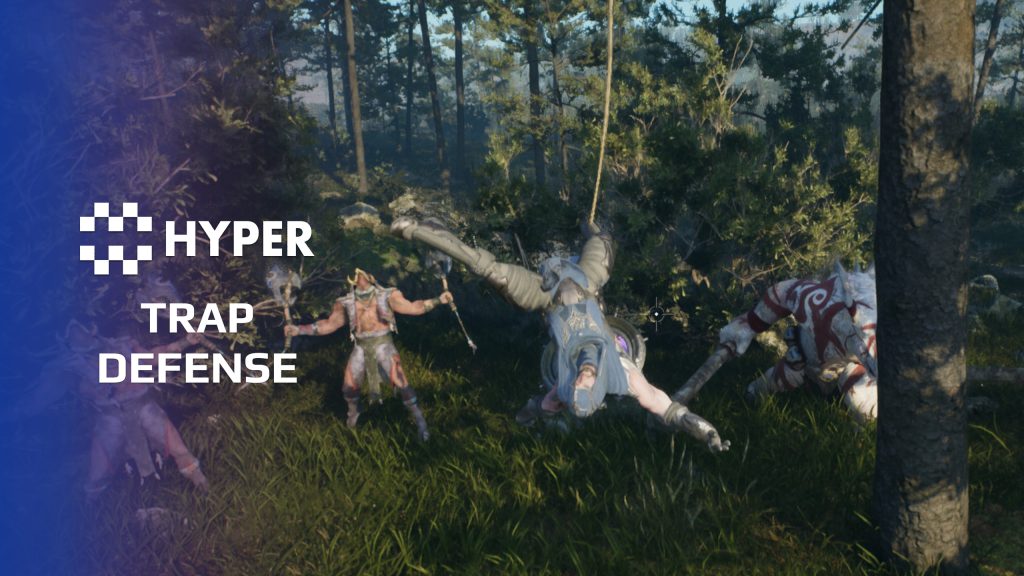
Description
Documentation | Discord | Videos | Demo
Hyper Trap Defense System v4
Turn a doorway, corridor or base perimeter into an active defense. Hyper Trap Defense combines mechanical traps, triggers and configurable damage with rearming rules and audiovisual feedback.
Key Features
Included traps
- Spike traps: ground and wall spikes, static spikes and a spiked spinner.
- Swinging and closing traps: flyswatter jaws, double flyswatters and a log cleaver.
- Capture and drop traps: rope snares and trapdoors.
- Boulders: a separate physical trap for rolling hazards.
Triggers and trap behavior
- Trigger devices: connect pressure plates, tripwires and levers to trap actions.
- Weight-sensitive plates: configure the carried inventory weight required to activate a pressure plate.
- Activation states: manage armed, activated and reset behavior through the trap manager.
- Damage: configure the trap response and damage applied to affected actors.
- Reset rules: choose how the trap returns to service.
- Resources and feedback: configure resource use, sounds and effects for the action.
Supporting structure
The shared trap manager handles activation, affected actors and reset behavior. Trap actors build on the buildable base used by the traps, which provides a place to connect health and linked mechanisms. Each trap then adds its own motion and presentation.
Control who triggers a trap and what happens next
- Player and AI filters: allow player-controlled pawns, AI-controlled pawns or both to activate a trap.
- State-specific resource costs: require and consume configured inventory items when a trap moves into a selected state, such as arming.
- Automatic rearming: set an arm delay and allowed state transitions to control how a trap returns to service.
- Capture and release: track trapped actors, restrict character movement where required and control when they may release themselves.
- Effects beyond the damage hit: apply configured trap effects when an actor enters a trigger or takes damage. Area and single-target paths share the manager.
Choose a trap and pair it with the trigger that suits your encounter.
31 reviews for Trap Defense System
You must be logged in to post a review.
Frequently asked questions
Why Hyper?
The strongest public modular Unreal Engine framework available at this scale
Most studios keep tools like this internal. Hyper makes a serious technical foundation available to solo developers, indies, and teams.
Built from 75,000+ hours of Unreal Engine work
System design, Blueprint architecture, multiplayer patterns, documentation, testing, integration, iteration, and real production problem-solving.
Systems designed to work together
Inventory, crafting, equipment, interaction, UI, combat, attributes, multiplayer, AI, quests, dialogue, maps, progression, survival systems, environment tools, performance helpers, and more can all live inside one larger ecosystem.
Working systems with source
Hyper gives you functional systems, a modular structure and documentation, with source you can extend for your own game.
Architecture you can extend
Hyper is built around scalable architecture: gameplay tags, structured data, child Blueprints, clean overrides, reusable components, and clear project boundaries.
Start fast, grow cleanly
Build on the included systems, replace visuals, adjust data, create child Blueprints and connect features without rebuilding the same foundation from scratch.
Want to learn more about the Hyper ecosystem, architecture philosophy, workflows, and developer behind it? Read more here and get started (https://gamesbyhyper.com/docs/getting-started/start-here/).
How do I add this to my project?
This module is provided as a full project because it includes Gameplay Tags, collision settings, config settings and other project-level dependencies.
Use our free Integration Tool (https://gamesbyhyper.com/product/integration-tool/) to prepare the integration. It combines compatible Hyper projects and handles migration and the required project settings. Use matching Unreal Engine versions and compatible Hyper releases.
Your own character, GameMode or custom systems may still need to be connected. The Integration Tool walkthrough (https://gamesbyhyper.com/docs/getting-started/use-the-automatic-integration-tool/) explains the setup and what to check in the generated project.
Do I need to use other Hyper systems with this?
No. You can use your own systems.
Hyper modules are designed around interfaces, abstract classes, shared contracts and dynamic dispatch, so features are not tied to one specific implementation.
If a module demonstrates integration with our Inventory, Equipment, Interaction, Movement, NPC or another Hyper system, you can:
Use the included Hyper implementation.
Replace it with your own system.
Use our implementation as a reference for your own integration.
The supplied integration shows how the module connects to the rest of a game. You can connect your own implementation through the same interface, abstract class or integration point.
For example, Attribute Manager may demonstrate Equipment modifying attributes. That does not mean you must purchase our Equipment System. You can follow the same integration pattern with your own equipment system.
The module includes working gameplay and its integration points. Build on the supplied setup or connect your own systems where you want different behavior.
See how to adapt a module (https://gamesbyhyper.com/docs/getting-started/customize-modules/) and how the shared data and abstract classes work (https://gamesbyhyper.com/docs/project-foundations/datamanagement/).
Where should I put my own changes?
Keep your own Blueprints, UI and data in your project's folder, for example Content/MyProject. Use child Blueprints or replacement components for your custom logic where possible.
That keeps your changes separate when you update Hyper. If you edit the original framework files directly, you will need to merge those edits when updating. The folder structure guide (https://gamesbyhyper.com/docs/project-foundations/folder-structure/) explains where everything belongs.
What types of traps are described?
The included traps cover rolling balls, spikes, pits and snares, with lever, handle and sensor triggers.
Can traps be rearmed?
Yes. Rearming is part of the mechanical-trap flow.
Compatibility and file information
- Development platforms
- Linux, Windows, macOS
- Tested platforms
- Windows
Versions and compatibility
| Version | Release | Unreal Engine |
|---|---|---|
| V4V4 UE5.7, 5.8. Release: V4. | V4 | 5.7, 5.8 |
Implementation and interaction
- Modular / extensible
- Yes
- Multiplayer ready
- Yes
- UI components
- Yes
- Input methods
- Gamepad, Keyboard, Mouse
- AI gameplay features
- No
System setup
- Core: AC_TrapManager and BP_Trap_Base.
- State: activation, trapped actors, damage, reset and resource handling.
- World integration: buildable-base actors with health and connection support.
- Physics: boulder traps use a separate physical actor setup.
Compatibility
- Networking: replicated multiplayer support.
- Platform testing: Windows tested.
- Plugins: Common UI.
Release notes | Documentation | YouTube | Discord
Documentation, videos and Discord are public. Verified buyers can use the support forums.


Acquired with code t_ibox –
Review from FabAn excellent asset with a really impressive trap defense system. The design is very well thought out and offers many possibilities for creating diverse and engaging gameplay mechanics. The quality of the system, the organization of the features, and the flexibility of the asset show a lot of professional work. It allows developers to easily add traps, interactions, and defense elements to their projects without having to build everything from scratch. I especially appreciate the structure of the system and the attention to detail, which makes the integration much easier and more efficient. This asset can greatly improve the gameplay experience by adding richer and more immersive defense mechanics. Great work from the creator. A solid, well-made asset that I highly recommend for developers looking to add an advanced trap system to their project.
Dalcon4 –
Review from FabThe Hyper Trap Defense System v4 provides a comprehensive toolkit for creating placeable traps that detect, trigger, and affect actors in configurable ways. From bear traps and spike pits to tripwire explosives and pressure plates, this system enables rich environmental defense gameplay with full multiplayer replication. The trap system is remarkably versatile. It supports multiple trigger types (pressure, proximity, tripwire, timed), configurable damage patterns (instant, over-time, area-of-effect), status effects, visual and audio feedback, arming and disarming mechanics, trap detection and disabling by skilled players, and ammunition-based traps that can be reloaded. Every aspect is data-driven and configurable.