Description
The Ones Before
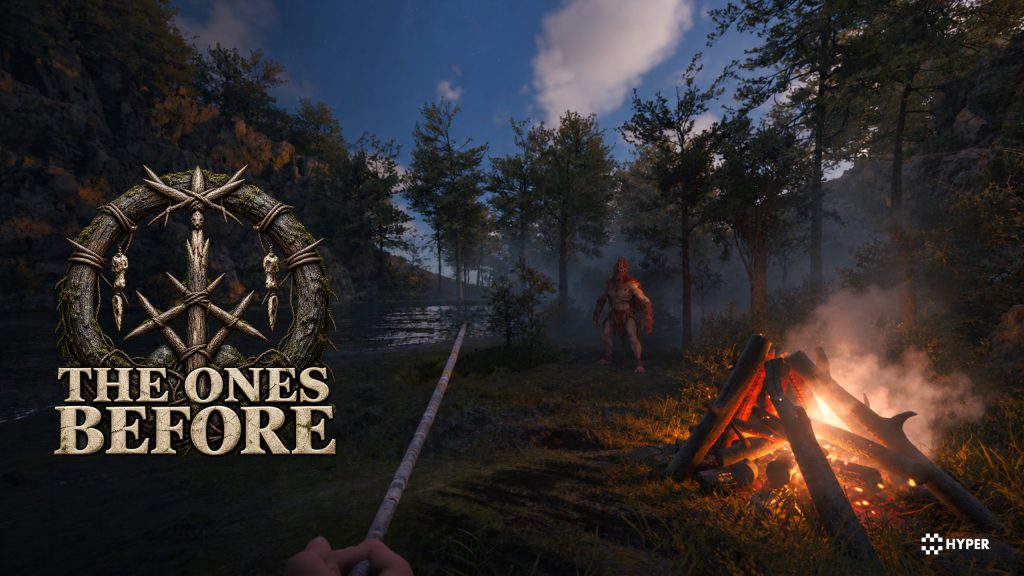
A trip into the caves starts with what you prepare at camp. The Ones Before is a co-op survival foundation built around that journey: gather food and materials, build shelter, equip the group and head out together. Bring discoveries back to camp and prepare for the next expedition.
First-person survival, the open-layout inventory, building book and saving already work together in one editable Unreal Engine project. Use the connected world and caves to develop your own survival rules, encounters and reasons for players to explore together.
Build with it. Learn from it.
Each Foundation includes new features and Foundation-specific gameplay, UI and content, brought together in a complete, editable Unreal Engine project. Study the Blueprints, data and project structure to learn how we built the experience, then adapt it for your own game.
Build with it. Learn from it.
Each Foundation includes new features and Foundation-specific gameplay, UI and content, brought together in a complete, editable Unreal Engine project. Study the Blueprints, data and project structure to learn how we built the experience, then adapt it for your own game.
Foundations by Hyper | Documentation | Discord | Watch the trailer on YouTube | Watch the Foundations trailer
Survival and gathering
- Character needs: Survival attributes and effects for hunger, starvation, thirst, dehydration, fire and being downed.
- Food and materials: Farming, fishing and skinning complement interactive trees and other world objects. Recipes include cooked meat, cooked fish, rope, a hatchet, spears, a torch and bandages.
- Expedition equipment: Tools, weapons, a handheld survival lighter and swimming support travel beyond the camp.
- Open-layout inventory: Organize carried items and craft through the survival inventory, with dedicated first-person inventory crafting.
- Recovery: Lootable corpses and saved player/world state connect a failed expedition to the next attempt.
- Equipment configurations: The editable equipment data covers the pistol, hatchet, wooden and stone spears, torch, lighter and Molotov, plus enemy-specific claws, maul, spear and staff setups.
Shelter, construction and defenses
- Building book: Plan and place structures through the dedicated building-book interface.
- Camp building: Campfire, bonfire, sleeping bag, tent, cabin, a water well and a small farm plot provide a starting settlement.
- Carrying and storage: Log carrying includes first-person presentation. Separate log, stick and stone holders organize gathered resources.
- Defensive building: Buildable defenses include a defensive wall and gate, ground spikes, tripwire, fly-swatter trap and log-cleaver trap.
- Supply loot: Separate supply and defense crate loot lists let you configure what players find.
Caves, exploration and discovery
- Inspection and codex: The inspection system and databank present notes, photographs and discoveries. Included records cover expedition notes, settlement worklists and cave caches.
- Guidance: Building-book, cave-access and equipment guides introduce the survival mechanics.
- Story presentation: Sequences, world dialogue, visual-novel scenes, subtitles and an introductory movie support authored moments.
- World structure: A World Partition survival world, two cave level instances and Hyper's own bunker connect the exploration spaces, with teleport support and level-instance management.
Shape the survival world
- Landscape and forests: The world uses Hyper Auto Landscape materials and PCG forest generation, with editable vegetation presets.
- Biomes and atmosphere: Global and regional biome settings work with weather and the day/night cycle. Forest and tundra transition data provide starting configurations.
- Interactive vegetation: Mesh-to-actor swap configurations connect selected trees and saplings to world interactions.
- World atmosphere: Shared time, day/night, weather, footsteps, character voice and exploration/battle music.
Wildlife, enemies and NPC behavior
- Deer wildlife: Buck, antlered-buck and doe configurations populate the woodland wildlife areas through the NPC population manager.
- Enemy roster: Scout, Watcher, Stalker, Shellback and Thrall Shaman configurations are included, alongside Dark Tank, Green Stalker, Orange Sprinter and Red Ravager Teuthisian variants in the caves.
- NPC behavior: StateTree routines, perception, combat configuration and population management connect the creatures to the survival world.
- Survival raids: The included wave spawner and editable Coastal Patrols wave set use Scout, Watcher and night-torch Scout raid variants. Wave definitions and the co-op spawn method control the encounters.
Characters and movement
- Character options: Standard and first-person Mover setups, dedicated equipment camera and visuals, movement and traversal.
- GASP locomotion: Hyper-adapted Game Animation Sample Project locomotion is integrated with the character, equipment and gameplay systems.
- First-person aiming: HyperFPS procedural aiming and sight alignment, with dedicated first-person arms and equipment.
- MetaHuman compatible: Use your own characters through visual overrides. Setup guide.
Menus, HUD and feedback
- UI management: The UI manager creates the in-game HUD and menus, manages menu visibility and focus, and connects Common UI widgets to the foundation interface.
- Interface: Menus, HUD, interaction outlines, information prompts and input prompts connect the systems to the player.
- Survival panels: The inventory and crafting screens, building book, databank, inspection records and guidance prompts provide the interfaces for camp building and exploration.
- Loading and rendering: Hyper Loading Screen provides loading screens, progress feedback and gameplay tips. Hyper PSO Precaching prepares configured rendering pipelines to help reduce first-use hitches.
Online play and saved progress
- Online sessions: Hyper Online Integration connects hosting, server browsing, joining, lobby and map travel. Configure Steam, Epic Online Services or shared EOS sessions with Steam identity for PC crossplay using your own provider settings. A Null/LAN profile supports local development.
- Player communication: In-game text chat. Hyper Online Integration also provides voice features that you can configure for your project.
- Persistence: Hyper Global Save System saves configured player and world state, with a main menu and online lobby for returning to the project.
Included Hyper plugins
- Hyper Automation: Replicated conveyors, production, routing, fluids, power and host adapters.
- Hyper Global Save System: Blueprint save/load with actor persistence for streaming levels and World Partition.
- Hyper Loading Screen: Animated loading widgets, map profiles, progress and interactive previews.
- Hyper Online Integration: Hyper online providers and platforms, including Steam and Epic Online Services.
- Hyper PSO Precaching: PSO preparation and reference preloading to reduce first-use hitches.
- Hyper Water: Reusable coastal water actors with swimming physics.
- HyperFPS: Procedural aiming, sight alignment, sway, recoil and arm IK for first-person weapons.
- Hyper Instance Optimizer: Optional cook-time spatial mesh batching with inspectable optimization reports.
- HyperAIStudio: Optional editor tools for AI coding agents, Blueprint context and project-readiness checks.
Already own Hyper products? Check your personal offers on our website.
Frequently asked questions
Is everything I see included?
Yes, including the survival world, caves, gameplay systems, UI and other game content shown on this page and in our videos. The exception is the Leartes bunker showcase art. You receive The Ones Before as an editable Unreal Engine project, with its survival, construction, inventory, world systems, main menu, online lobby and configurable data.
The Cold War Underground Bunker by Leartes Studios (https://cosmos.leartesstudios.com/environments/cold-war-underground-bunker) shown in some showcase footage is not included. The supplied world includes Hyper's own bunker instead. You can use the foundation without purchasing the Leartes pack, or license it separately through the creator link if you want to use that art.
Is this a finished game?
No. This is an editable game-development foundation with working, connected systems and playable content. It gives you a substantial starting point for building your own game. It is not a finished retail game with a complete campaign, final balancing and every detail polished for release.
The supplied project and any playable demo let you explore the systems in context: how interactions connect, how the gameplay is configured and where you can extend it. Learn from that setup, change the world and art direction, and develop the story or gameplay you want to create. We provide the foundation; you shape the game and bring it to release.
Can I publish a game built with this foundation on Steam?
Yes. With the appropriate license, you can use the foundation to develop and commercially release your own game, including on Steam. Follow the license that applies to your purchase, the terms for any separately licensed content you add and your chosen store's requirements.
We ask you to build on the foundation rather than upload the supplied project or demo unchanged. Give the game your own identity: adapt the art style and environment, develop your own story or gameplay, and test and polish the experience for your players. The project is here to support your creative idea and help you turn it into a game of your own.
For Fab purchases, the Fab Standard License (https://www.fab.com/eula?lang=en) permits commercial use in your game, but not resale or redistribution of the underlying asset as a standalone product.
Which license should I choose?
Individual is for emerging creators. Professional is for studios and enterprises. Both include the editable Foundation project, documentation, verified Discord access, product support and bug fixes.
Our Professional offer adds the Hyper Integration Service (https://gamesbyhyper.com/product/hyper-integration-service-module-bundle-setup/), team verification, a studio tag and priority support. You can also request a project showcase and release announcement through our channels. See the service page for integration scope and request details.
On Fab, the tiers are called Personal and Professional. On our website, they are Individual, Studio and Enterprise, with the Professional benefits applying to Studio and Enterprise. Choose the tier that matches the store's eligibility rules. Fab Personal and Professional grant the same usage rights.
I already own Hyper products. Do I have to pay full price?
Not necessarily. We offer existing Hyper customers personal deals based on the products they already own. Sign in to Personal Offers in your account (https://gamesbyhyper.com/my-account/my-library/?library_tab=personal-offers#personal-offers) to see what is available to you. These offers are handled through our website.
See the Foundations by Hyper overview (https://gamesbyhyper.com/foundations/) for the full foundation range and more information.
Can I add Games by Hyper modules to this foundation?
Yes, with compatible versions. The foundation already combines its systems into one experience, so adding modules is optional. We recommend this work for intermediate to advanced Unreal Engine users.
Use the same Unreal Engine version and matching Hyper generation. Our free Integration Tool (https://gamesbyhyper.com/product/integration-tool/) and integration guide (https://gamesbyhyper.com/docs/getting-started/use-the-automatic-integration-tool/) help with compatible Hyper projects.
Extend selected logic or features carefully. Foundations contain their own gameplay code, UI, DataTables and settings. Importing a module can overwrite those files, so seamless integration is not guaranteed. Work in a separate copy, review conflicts and merge the changes you need before testing the result.
Explore optional modules on the Games by Hyper website (https://gamesbyhyper.com/shop/) or our Fab store (https://www.fab.com/sellers/Games%20By%20Hyper).
Can I reuse foundation features in another project?
Yes, within the applicable product license. Shared Hyper systems use the modular framework, while foundation-specific features can depend on that foundation's character, UI, data and game flow. Extracting those features may require manual integration.
Use matching Unreal Engine and Hyper versions, keep a backup and follow the integration guide (https://gamesbyhyper.com/docs/getting-started/use-the-automatic-integration-tool/). We recommend this work for intermediate to advanced users.
What hardware do you recommend for development?
For working with our larger projects in Unreal Editor, we recommend 64 GB RAM, a recent-generation CPU, a fast SSD with ample free space and a capable NVIDIA GeForce RTX 30, 40 or 50 series graphics card. GPU performance tier and available VRAM matter as well as the generation.
This is our development recommendation for large projects. Requirements for your packaged game depend on its content, resolution, graphics settings and target platform. Smaller maps and individual Hyper modules can have much lighter requirements.
How is the performance?
Hyper's gameplay systems are designed for efficient execution with low overhead. The complete world still determines the workload: scene complexity, textures, dynamic lighting and shadows, weather effects, loaded World Partition regions and the number of active AI characters all affect performance. Large AI populations and busy multiplayer scenes also need CPU and networking budgets.
A large world running in Unreal Editor can be demanding even when the gameplay code is efficient. Measure a packaged build on your target hardware after startup preparation has finished. Editor frame rates and first-launch compilation are not representative of steady gameplay, and we do not promise a fixed frame rate for every project or computer.
Why is the project large, and why can the first launch take a long time?
The supplied meshes, textures, animations and other source content take storage space. Unreal also needs room for derived-data caches, build files and packaged output, so allow more free SSD space than the download size alone.
On first launch, Unreal may compile shaders, generate derived asset data and compile project or plugin code when required. Loading a large map adds more work. Give that preparation time to finish before judging performance. Later launches can reuse cached data, although engine, content or configuration changes can require new preparation.
How should I work with a large World Partition map?
Load the region you are working on rather than the entire world. In the World Partition editor, select the area you need and use Load Region from Selection. Keep unrelated regions unloaded, and use a smaller test map for focused system work when available.
Loading the whole world and playing inside Unreal Editor increases memory and rendering demands. A packaged game uses its configured runtime streaming and has a different workload. Test that build separately with the intended lighting, shadows, weather, AI population and graphics settings.
Does this foundation use GASP locomotion?
Yes. It includes a Hyper-adapted version of Epic Games' Game Animation Sample Project (GASP). We have adapted its locomotion to the foundation's character, equipment and gameplay systems, so it is already part of the supplied project.
Was Hyper made with AI?
No. Our team designed and built Hyper's core framework and gameplay architecture. The wider ecosystem represents 75,000+ hours of development, integration, multiplayer engineering, testing and documentation over years of work.
Hyper is the market leader in publicly available modular Unreal Engine frameworks. Its value is in the systems working together: shared data, consistent interfaces, multiplayer behavior and connected gameplay systems. Generating individual features with AI does not automatically produce that complete, tested architecture.
A small amount of replaceable example art, such as icons and meshes, was created with AI. Other art is made by us, commissioned from artists or sourced under CC0 from projects such as Poly Haven (https://polyhaven.com/) and ambientCG (https://ambientcg.com/).
Can I use Hyper with AI assistants?
Yes. Hyper is an exceptionally valuable framework for AI-assisted Unreal Engine development. Its generic, modular architecture is a particular strength: shared interfaces, consistent data structures and reusable components give an assistant a clear way to understand how the systems fit together. The same patterns recur across the framework, so an assistant can use that context when extending features, tracing bugs or adding your own gameplay.
You start with the hard part already connected. Gameplay, UI, multiplayer and persistence have an existing structure. AI can work within that foundation instead of generating isolated features that you still need to combine. That makes Hyper more valuable in an AI workflow: you bring the game ideas, and both you and your assistant build on the same coherent, editable core.
Our Hyper AI Integration Studio (https://gamesbyhyper.com/product/hyper-ai-integration-studio/) helps assistants inspect Unreal projects and work with Hyper-specific project knowledge and context. We use it internally for debugging and development too. It is an optional separate download; see the Studio guide (https://gamesbyhyper.com/docs/project-foundations/hyper-ai-studio/) for setup.
AI development assistance does not grant permission to train or fine-tune models on proprietary Hyper content, or to create or share training datasets from it. Use provider settings and terms that keep your project content out of model training. See the AI-use terms (https://gamesbyhyper.com/terms-of-use/#ai-training) and your applicable product license.
Can I use MetaHumans or my own characters?
Yes. Hyper is MetaHuman compatible through its visual override workflow. You can use your own character appearance while retaining the connected gameplay character.
Assign your MetaHuman or custom character assets, set up the animation Blueprint and configure retargeting or Copy Pose From Mesh for your skeleton. MetaHumans also need their Epic-provided setup logic. Follow the character and MetaHuman visual override guide (https://gamesbyhyper.com/docs/getting-started/set-up-your-own-character/) for the steps and reference setup.
Which Unreal Engine and Hyper version should I use?
For new Hyper framework projects, we recommend V5 on Unreal Engine 5.8. The framework generations correspond to these engine versions:
V5: Unreal Engine 5.8.
V4: Download under Unreal Engine 5.7. V4 projects also work on Unreal Engine 5.8 after switching the project version. C++ plugins must be compiled for UE 5.8.
V3: Unreal Engine 5.5 and 5.6.
V2: earlier Unreal Engine 5 releases, through 5.4.
V1: Unreal Engine 4.
This is the framework's version history, not a promise that every foundation is available for every older engine. Check the supported versions on the release you download. Modules must match the project's Unreal Engine version and Hyper generation; independent plugins have their own compatibility requirements.
Is this foundation bug-free, and how do I report an issue?
No. We cannot guarantee that a framework of this size will be completely bug-free. We investigate reproducible technical problems in the supplied project and prioritize fixes by their impact.
A bug stops advertised functionality from working as intended, such as a broken interaction, an unusable UI control or saved progress failing to load. Preferences about the story, pacing, visual transitions or scenery placement are usually design feedback. If a transition fails or scenery blocks gameplay, report the technical problem.
Check the issue in an unmodified copy on a supported engine version and review existing reports. Use the official bug-report form in our Discord (https://discord.gg/gbycyH4C9B), including the foundation name, Hyper and Unreal Engine versions, reproduction steps and relevant logs or screenshots. See our support guidelines and bug-report process (https://gamesbyhyper.com/docs/) for details. Reports help us improve the foundations; a specific fix date or a completely bug-free result cannot be guaranteed.
Where can I find foundation information, setup guides and support?
Start with the Foundations by Hyper overview (https://gamesbyhyper.com/foundations/) for the range and general foundation information. Use the getting-started guide (https://gamesbyhyper.com/docs/getting-started/start-here/) and system documentation (https://gamesbyhyper.com/docs/) for setup. Join the Games by Hyper Discord (https://discord.gg/gbycyH4C9B) for product questions and the developer community.
Will foundation features also be available as standalone Hyper modules?
Yes, where they make sense as independent products. We plan to keep expanding the Games by Hyper store (https://gamesbyhyper.com/shop/) with reusable systems and packages, giving you the option to buy individual parts instead of a complete foundation.
In The Ones Before, carrying a log connects first-person animations, the open-layout inventory, buildable placement, placement previews and the building book. We do not plan to sell that log-carrying flow as a separate module. It is part of the survival experience, with those systems already working together.
A foundation gives you the connected gameplay, including the specific logic that brings its systems together. That integration is part of its value. Games by Hyper focuses on reusable technical modules, and we announce new standalone products separately as they are ready.
How is my personal offer calculated?
Sign in with the account linked to your purchases. Relevant verified Hyper products determine your ownership discount. Larger systems count more. Smaller paid systems build up together towards higher offers, with a shared limit. Templates and overlapping systems count once. The maximum is 40%, or 30% for The Ones Before and Industry Zero. While the pre-order bonus is available, it adds an extra 10% pre-order discount, up to 50% or 40% in total. Open the calculation beside your price to see what has been recognized.
Will my ownership discount remain after pre-order?
Yes. Your ownership discount remains available in your account after pre-order, so you can plan your purchase. The extra 10-point pre-order bonus is temporary and ends when that Foundation leaves pre-order or the launch offer is ended. No end date has been announced. New qualifying purchases can update your ownership discount.
How does my personal offer work during a sale?
We automatically apply the better of your personal price, an eligible complete-collection price and the current public price for each Foundation. These offers are compared, not added together. Other coupons cannot be combined. Your ownership discount is not reduced because you originally bought a qualifying Hyper product during a sale.
Compatibility and file information
- Development platforms
- Windows
- Distribution method
- Complete project
- Target platforms
- Windows
Versions and compatibility
| Version | Release | Unreal Engine |
|---|---|---|
| V5Co-op Survival Foundation project files. Release: 5.0 (2026-10-30). Download not available yet. | 5.0 | 5.8 |
Implementation and interaction
- Code framework
- Blueprint, C++
- Blueprints
- 1,610
- C++ classes
- 482
- Modular / extensible
- Yes
- Multiplayer ready
- Yes
- UI components
- Yes
- Input methods
- Keyboard, Mouse
Game template
- Sample levels
- Yes
- Customizable game systems
- Yes
- Included art assets
- Yes
Included assets (estimated)
- Static meshes
- 642
- Skeletal meshes
- 68
- Materials
- 359
- Material instances
- 623
- Textures
- 3,220
- Animation sequences
- 1,347
- Animation montages
- 160
Asset counts are estimates and may change with product updates. Supplied demo and example content is included. Separate parts and variants count individually; mesh counts are assets, not placed objects.
Rendering and audio
- Global illumination
- Lumen
- Reflections
- Lumen
- Graphics API
- DirectX 12
- Nanite
- Yes
- MetaSounds
- Yes
Asset specifications
- Meshes: 642 static meshes and 68 skeletal meshes.
- Materials: 359 materials and 623 material instances.
- Textures: 3220 texture assets.
- Animation: 1347 animation sequences and 160 montages.
Counts are approximate and may change with updates. Includes supplied playable content. Parts and variants count separately; meshes count assets, not placed objects.
Setup notes
- Rendering: Lumen global illumination; Lumen reflections; DirectX 12.
- Includes Nanite-enabled static meshes. Nanite documentation.
- Uses MetaSounds. MetaSounds documentation.
- Additional engine plugins: Chooser, CommonUI, GameplayStateTree, MotionWarping, Mover, MoverExamples, Mutable, PCG, PCGGeometryScriptInterop, PoseSearch, SmartObjects, StateTree, Water. Enabled in the supplied .uproject.
- Optional plugins: FSR.
- Setup: Use the matching engine for bundled C++ plugins, or rebuild with a C++ toolchain. Configure your own Steam/EOS app and credentials for provider sessions. Null/LAN supports local development.
- MetaHuman compatible: Custom characters via visual overrides. Setup guide.