Description
Documentation | Discord | Video | Demo
Hyper Dialogue System v4
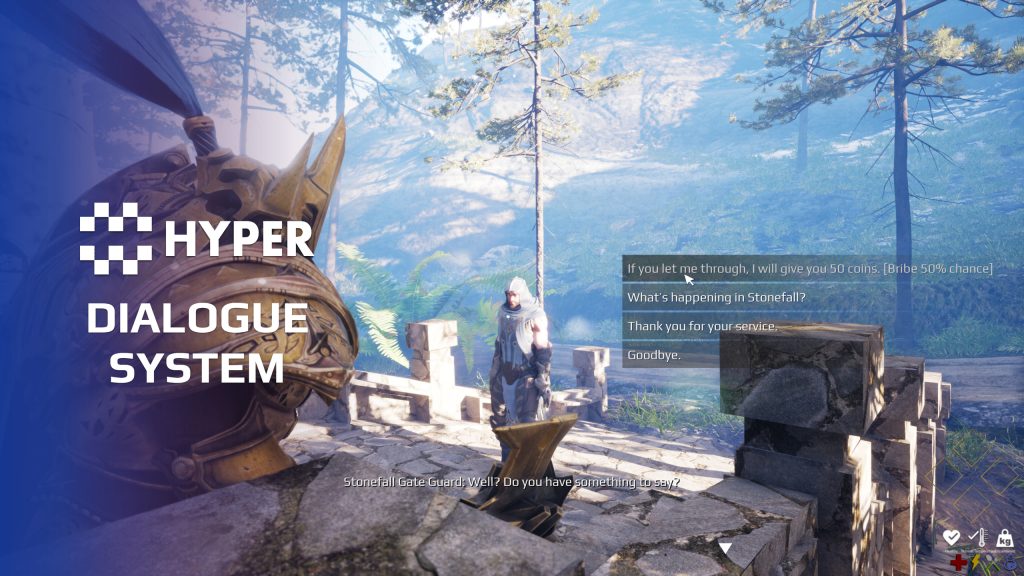
Let conversations respond to what the player has done and lead into what happens next. Hyper Dialogue System combines branching dialogue, conditional choices, voice lines and gameplay events in a data-driven authoring workflow.
Key Features
Conversations and choices
- Fixed and branching conversations: write scripted sentences and connect them through choices or follow-up lines.
- Conditional options: check requirements, quest state or NPC/player memories before offering a choice.
- Choice consequences: trigger rewards, quests or other configured events after a sentence or selection.
- Dynamic follow-ups: use sentence resolvers when the next line depends on runtime logic.
- Multiple speakers: support conversations involving more than one NPC.
Voice and presentation
- Recorded audio: connect spoken lines to subtitles and speaker profiles.
- Gibberish profiles: use paced simulated speech for stylized characters or placeholder voice.
- Dialogue styles: configure portraits, speaker labels, typewriter behavior and camera presentation.
- Playback control: choose manual or automatic continuation and configure skipping.
- Sequences: connect Level Sequences to conversation moments.
World dialogue and authoring
- Proximity lines: let NPCs greet or react as the player approaches.
- Event-driven lines: play world dialogue in response to gameplay.
- Reusable data: author dialogue, sentences and options through structured tables and data assets.
- Memory integration: let remembered actions influence later conversations.
Working setup
NPC and player dialogue components connect interaction to the conversation interface. World dialogue uses its own actor component for lines spoken during play. Dialogue style, transition and voice assets keep presentation separate from the written conversation.
The current authoring workflow uses DataTables. Follow the linked walkthrough to build and connect your first conversation.
Choices with consequences
- Timed decisions: show a countdown and use a configured default or silent response when the player does not choose in time.
- Visible or hidden requirements: hide unavailable choices or leave them disabled. Conditions can check inventory, skills, quests, reputation or memories.
- Trades and handoffs: consume configured requirements when a dialogue choice represents giving an item or paying a cost.
- Uncertain outcomes: resolver logic can choose follow-up lines from chance, stats or other runtime values, for situations such as a bribe succeeding or failing.
- Reusable voice libraries: map predefined sentence categories to speaker profiles, subtitles, audio and optional montages, then reuse them across conversations and reactions.
- Cinematic timing: configure whether a conversation waits for a Level Sequence to end, freezes at its end or hides the player for the scene.
Related resources
55 reviews for Dialogue System
You must be logged in to post a review.
Frequently asked questions
Why Hyper?
The strongest public modular Unreal Engine framework available at this scale
Most studios keep tools like this internal. Hyper makes a serious technical foundation available to solo developers, indies, and teams.
Built from 75,000+ hours of Unreal Engine work
System design, Blueprint architecture, multiplayer patterns, documentation, testing, integration, iteration, and real production problem-solving.
Systems designed to work together
Inventory, crafting, equipment, interaction, UI, combat, attributes, multiplayer, AI, quests, dialogue, maps, progression, survival systems, environment tools, performance helpers, and more can all live inside one larger ecosystem.
Working systems with source
Hyper gives you functional systems, a modular structure and documentation, with source you can extend for your own game.
Architecture you can extend
Hyper is built around scalable architecture: gameplay tags, structured data, child Blueprints, clean overrides, reusable components, and clear project boundaries.
Start fast, grow cleanly
Build on the included systems, replace visuals, adjust data, create child Blueprints and connect features without rebuilding the same foundation from scratch.
Want to learn more about the Hyper ecosystem, architecture philosophy, workflows, and developer behind it? Read more here and get started (https://gamesbyhyper.com/docs/getting-started/start-here/).
How do I add this to my project?
This module is provided as a full project because it includes Gameplay Tags, collision settings, config settings and other project-level dependencies.
Use our free Integration Tool (https://gamesbyhyper.com/product/integration-tool/) to prepare the integration. It combines compatible Hyper projects and handles migration and the required project settings. Use matching Unreal Engine versions and compatible Hyper releases.
Your own character, GameMode or custom systems may still need to be connected. The Integration Tool walkthrough (https://gamesbyhyper.com/docs/getting-started/use-the-automatic-integration-tool/) explains the setup and what to check in the generated project.
Do I need to use other Hyper systems with this?
No. You can use your own systems.
Hyper modules are designed around interfaces, abstract classes, shared contracts and dynamic dispatch, so features are not tied to one specific implementation.
If a module demonstrates integration with our Inventory, Equipment, Interaction, Movement, NPC or another Hyper system, you can:
Use the included Hyper implementation.
Replace it with your own system.
Use our implementation as a reference for your own integration.
The supplied integration shows how the module connects to the rest of a game. You can connect your own implementation through the same interface, abstract class or integration point.
For example, Attribute Manager may demonstrate Equipment modifying attributes. That does not mean you must purchase our Equipment System. You can follow the same integration pattern with your own equipment system.
The module includes working gameplay and its integration points. Build on the supplied setup or connect your own systems where you want different behavior.
See how to adapt a module (https://gamesbyhyper.com/docs/getting-started/customize-modules/) and how the shared data and abstract classes work (https://gamesbyhyper.com/docs/project-foundations/datamanagement/).
Where should I put my own changes?
Keep your own Blueprints, UI and data in your project's folder, for example Content/MyProject. Use child Blueprints or replacement components for your custom logic where possible.
That keeps your changes separate when you update Hyper. If you edit the original framework files directly, you will need to merge those edits when updating. The folder structure guide (https://gamesbyhyper.com/docs/project-foundations/folder-structure/) explains where everything belongs.
Does this include a visual dialogue graph editor?
Dialogues are configured through DataTables. The current workflow is easy to import and export, and the documentation walks through creating your own conversations.
Can dialogue choices trigger gameplay actions?
Yes. Dialogue choices can trigger quests, rewards and world events. You can also vary the conversation based on what the NPC remembers about the player.
Compatibility and file information
- Development platforms
- Linux, Windows, macOS
- Tested platforms
- Windows
Versions and compatibility
| Version | Release | Unreal Engine |
|---|---|---|
| V3V3 UE5.5, 5.6. Release: V3. | V3 | 5.5, 5.6 |
| V4V4 UE5.7, 5.8. Release: V4. | V4 | 5.7, 5.8 |
Implementation and interaction
- Modular / extensible
- Yes
- Multiplayer ready
- Yes
- UI components
- Yes
- Input methods
- Gamepad, Keyboard, Mouse
- AI gameplay features
- No
System setup
- Data model: dialogue and sentence identifiers, choices, requirements, event triggers and resolver settings.
- Components: NPC/player dialogue components and a world-dialogue component.
- Presentation: style, transition, voice and gibberish data assets with optional Level Sequence playback.
- Authoring: DataTables and structured data. A dedicated visual dialogue editor and direct Articy integration are not included.
Compatibility
- Networking: replicated multiplayer support.
- Platform testing: Windows tested.
- Plugins: Common UI.
Release notes | Documentation | YouTube | Discord
Documentation, videos and Discord are public. Verified buyers can use the support forums.


theblondebondOO –
Review from FabThis is a very thought out and crafted system that is not only easy to follow but also build upon as it marrys up with many of the other exsisting / up and coming systems. Absolutly love these modules
Acquired with code t_ibox –
Review from FabVery good asset, truly high quality and well thought out. The system is clean, well structured, and runs very smoothly. The result is consistent and brings real immersion to gameplay, with polished and progressive effects that make the overall experience believable. It also includes a very good dialogue system, well designed and easy to use, which further enhances the overall experience and makes interactions much more alive. You can clearly tell there is serious work behind this system, with strong attention to detail and overall quality. Users seem generally very satisfied, especially regarding stability and final output quality. A great asset that I highly recommend without hesitation ⭐⭐⭐⭐⭐
Xx-JayCook-xX –
Review from FabLike most if not all of the Hyper systems I have used, it is data driven which means it’s very easy to customise without it being difficult to find or breaking anything else. It’s very effective and would highly recommend to anyone needing a dialogue system. The only thing I had to do was add in some functionality that stopped enemies from attacking me during the dialogue – but it was literally a few nodes and took less than 5 minutes (I even think this functionality was added in an update recently?). Overall an incredibly good system and would recommend to anyway, experienced or beginners. It’s done to a high quality so it’s an absolute time saver!
MrIllDuckYouUp –
Review from FabWorks really well with other hyper modules and probably on it’s own as well. Easy to set up and the example map shows you about everything you need to know to get started. Also like the extra feature where you can trigger a sequence in the dialogoue.
NotTheFed –
Review from FabI have a LOT of Hyper’s kits.. and for a lot it is plug in play for the basics. I have MST PRO as the base framework, and just plug in those that are relevant for my game like Dialog, companion, advanced NPC, lockpicking, Skills, quests, traps, unlock (learn), world map, weathertime, Skinning, body decompose, Mesh to Actor swap, Admin console, with chat.. and so on. Simple to understand, and gets you started with most key parts of any game framework I highly recommend, not just for the quality of the kit.. but the excellent support on discord. The very detailed documentation.
maziol91 –
Review from FabI spent a long time preparing to properly evaluate Hypers products, as I had previously worked with many other systems available on the Unreal Engine Marketplace. As an Environment Artist who is also developing their own game, I frequently encountered common production challenges — especially issues related to integrating systems from different creators and dealing with inconsistent architectures. The result? Too often, it led to restarting projects from scratch. It was only after using systems from Games by Hyper that things truly changed. They allowed me to break out of that cycle and finally focus on what actually matters — building the game as a cohesive experience, instead of constantly fighting technical fires. Hyper Dialogue System stands out for: a well-thought-out architecture and clean structure, a high level of optimization, seamless integration with other systems from the same developer, and a stable foundation that gives real control over the project — even when adding custom code. From my perspective, this is one of the best investments for anyone aiming to build even a more complex game in UE5. Special recognition also goes to Eric and his team — their approach to development is outstanding. The system is continuously updated, and new features are implemented based on real user feedback. This level of commitment is rare. That said, it’s important to note: this is not a plug-and-play solution for everyone. To fully take advantage of this and other Hyper systems, at least an intermediate level of Unreal Engine 5 knowledge is required. The system won’t solve every production problem, but it can accelerate your development process by light-years.
xSgtSalty –
Review from FabEasy integration and works perfectly. Modules like these give us indie developers the ability to keep working on the important parts of our game projects.
JDLTorre –
Review from FabThis is an awesome system I have been integrating various voices with it as its so easy to use great job Hyper!