Description
Documentation | Discord | Videos | Demo
Hyper Region Manager v4
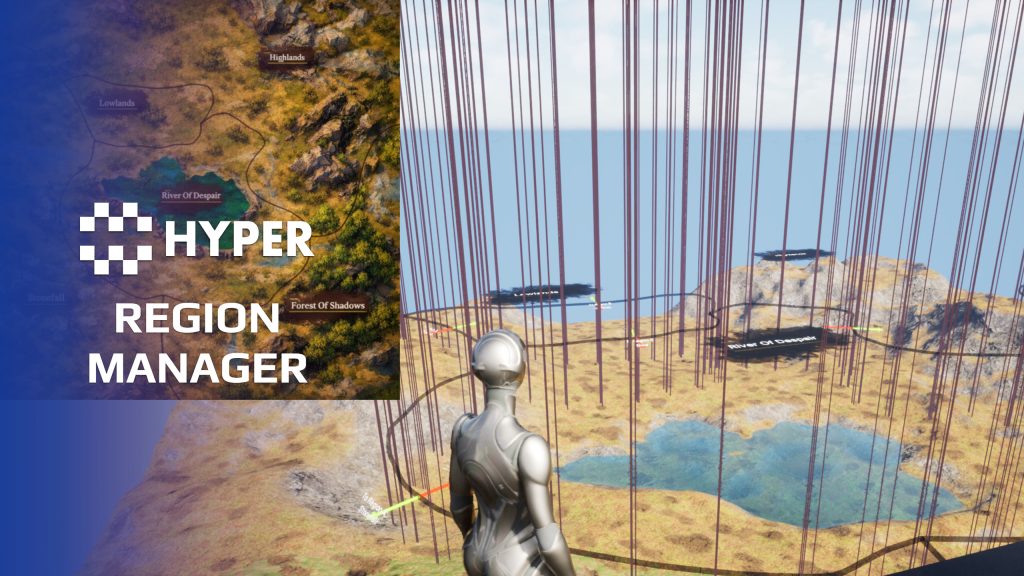
Give your world recognizable regions and let gameplay respond when a player crosses a border. Hyper Region Manager uses authored spline borders to identify the current region and notify the systems that care about the change.
Key Features
Region authoring
- Spline borders: draw the boundary between two regions.
- Two-sided assignment: assign Region A and Region B to each border.
- Region data: keep names and region information in structured data.
- Visual helpers: use border direction and region-label presentation while building the map.
Runtime changes and presentation
- Initial region: resolve the player's region when play begins.
- Crossing detection: update current and previous region on a border crossing.
- Region discovery: keep a Known Regions collection as the player enters new areas, ready for your discovery or map logic.
- Arrival and departure prompts: choose separately for each region whether to show an entered or exited message.
- Region-change events: connect changes to music, weather, difficulty or your own zone rules.
- Map preparation: reuse border and region-name data for map-capture workflows.
Working setup
The PlayerController region listener maintains the player's region state. Border actors generate overlap boxes along their splines. Each crossing should have an unambiguous border; the system is designed around one current region per player.
Define a small pair of neighboring regions first, then connect the change event to your world behavior.
31 reviews for Region Manager
You must be logged in to post a review.
Frequently asked questions
Why Hyper?
The strongest public modular Unreal Engine framework available at this scale
Most studios keep tools like this internal. Hyper makes a serious technical foundation available to solo developers, indies, and teams.
Built from 75,000+ hours of Unreal Engine work
System design, Blueprint architecture, multiplayer patterns, documentation, testing, integration, iteration, and real production problem-solving.
Systems designed to work together
Inventory, crafting, equipment, interaction, UI, combat, attributes, multiplayer, AI, quests, dialogue, maps, progression, survival systems, environment tools, performance helpers, and more can all live inside one larger ecosystem.
Working systems with source
Hyper gives you functional systems, a modular structure and documentation, with source you can extend for your own game.
Architecture you can extend
Hyper is built around scalable architecture: gameplay tags, structured data, child Blueprints, clean overrides, reusable components, and clear project boundaries.
Start fast, grow cleanly
Build on the included systems, replace visuals, adjust data, create child Blueprints and connect features without rebuilding the same foundation from scratch.
Want to learn more about the Hyper ecosystem, architecture philosophy, workflows, and developer behind it? Read more here and get started (https://gamesbyhyper.com/docs/getting-started/start-here/).
How do I add this to my project?
This module is provided as a full project because it includes Gameplay Tags, collision settings, config settings and other project-level dependencies.
Use our free Integration Tool (https://gamesbyhyper.com/product/integration-tool/) to prepare the integration. It combines compatible Hyper projects and handles migration and the required project settings. Use matching Unreal Engine versions and compatible Hyper releases.
Your own character, GameMode or custom systems may still need to be connected. The Integration Tool walkthrough (https://gamesbyhyper.com/docs/getting-started/use-the-automatic-integration-tool/) explains the setup and what to check in the generated project.
Do I need to use other Hyper systems with this?
No. You can use your own systems.
Hyper modules are designed around interfaces, abstract classes, shared contracts and dynamic dispatch, so features are not tied to one specific implementation.
If a module demonstrates integration with our Inventory, Equipment, Interaction, Movement, NPC or another Hyper system, you can:
Use the included Hyper implementation.
Replace it with your own system.
Use our implementation as a reference for your own integration.
The supplied integration shows how the module connects to the rest of a game. You can connect your own implementation through the same interface, abstract class or integration point.
For example, Attribute Manager may demonstrate Equipment modifying attributes. That does not mean you must purchase our Equipment System. You can follow the same integration pattern with your own equipment system.
The module includes working gameplay and its integration points. Build on the supplied setup or connect your own systems where you want different behavior.
See how to adapt a module (https://gamesbyhyper.com/docs/getting-started/customize-modules/) and how the shared data and abstract classes work (https://gamesbyhyper.com/docs/project-foundations/datamanagement/).
Where should I put my own changes?
Keep your own Blueprints, UI and data in your project's folder, for example Content/MyProject. Use child Blueprints or replacement components for your custom logic where possible.
That keeps your changes separate when you update Hyper. If you edit the original framework files directly, you will need to merge those edits when updating. The folder structure guide (https://gamesbyhyper.com/docs/project-foundations/folder-structure/) explains where everything belongs.
Can entering a region trigger gameplay changes?
Yes. Region enter and exit events can trigger your own biome, weather, difficulty or PvP-zone logic.
How do I define regions?
Draw the region boundaries in the editor, then use the visual debugging to check them.
Compatibility and file information
- Development platforms
- Linux, Windows, macOS
- Tested platforms
- Windows
Versions and compatibility
| Version | Release | Unreal Engine |
|---|---|---|
| V4V4 UE5.7, 5.8. Release: V4. | V4 | 5.7, 5.8 |
Implementation and interaction
- Modular / extensible
- Yes
- Multiplayer ready
- Yes
- UI components
- Yes
- Input methods
- Gamepad, Keyboard, Mouse
- AI gameplay features
- No
System setup
- Runtime: AC_PC_RegionListener on the PlayerController.
- World actors: BP_Region_Border with A/B region assignment and spline-generated overlaps.
- Data: region details and a region DataTable.
- Helpers: optional region-name display and map-texture preparation actors.
Compatibility
- Networking: replicated multiplayer support.
- Platform testing: Windows tested.
- Plugins: Common UI.
Release notes | Documentation | YouTube | Discord
Documentation, videos and Discord are public. Verified buyers can use the support forums.
Acquired with code t_ibox –
Review from FabHyper Region Manager v4 is clearly one of the most impressive assets I have used. It is an extremely complete, professional, and well-designed system that gives real structure and meaning to a game world. The ability to easily create regions directly on the map is amazing. Whether it is cities, PVP zones, safe areas, faction territories, or different biomes, the system provides incredible flexibility and allows developers to give each area of the world its own identity. I especially appreciate the overlapping region management, priority system, customizable rules, and enter/exit events. Everything is designed to give developers full control without having to build complex systems from scratch. The visual indicators, player tracking, and minimap integration add another level of quality and make the gameplay experience much more immersive. The built-in debug tools are also extremely useful for quickly checking regions and adjusting configurations during development. Performance is another major strength. The system remains clean, efficient, and perfectly suited for large worlds with many regions. You can clearly see the amount of experience, effort, and attention to detail that went into creating this asset. In my opinion, Hyper Region Manager v4 is an essential tool for any project looking to build a rich, organized, and dynamic world. This is a high-quality asset that brings incredible value to a project. Outstanding work, highly recommended!
Dalcon4 –
Review from FabThe Hyper Region Manager v4 enables developers to define and manage distinct game zones by drawing borders directly on the map. It creates regions like cities, PVP zones, safe areas, faction territories, and biomes, each with configurable rules, visual indicators, and gameplay effects. It is the spatial organization layer that gives structure and meaning to your game world. The system is feature-rich and thorough. It supports polygon-based region drawing, overlapping regions with priority resolution, dynamic region creation and modification at runtime, region-specific gameplay rules (PVP toggles, building permissions, weather effects), visual border indicators, minimap integration, and player tracking with enter/exit events. Nested and overlapping regions are handled correctly through configurable priority hierarchies. Defining regions is visual and intuitive. Draw borders directly in the editor viewport, assign region types and rules, and the system handles all detection and enforcement automatically. The exposed settings for each region type are comprehensive yet well-organized. The built-in debug visualization makes it easy to verify region coverage and overlap behavior during development. Region detection is fast and reliable. Player zone tracking updates efficiently with minimal overhead, and enter/exit events fire precisely at region boundaries. The system scales to support large worlds with hundreds of regions without performance degradation. Visual indicators render cleanly, and the minimap integration provides clear spatial awareness to players.