Description
Documentation | Discord | Videos | Demo
Hyper Guide & Tutorial System v4
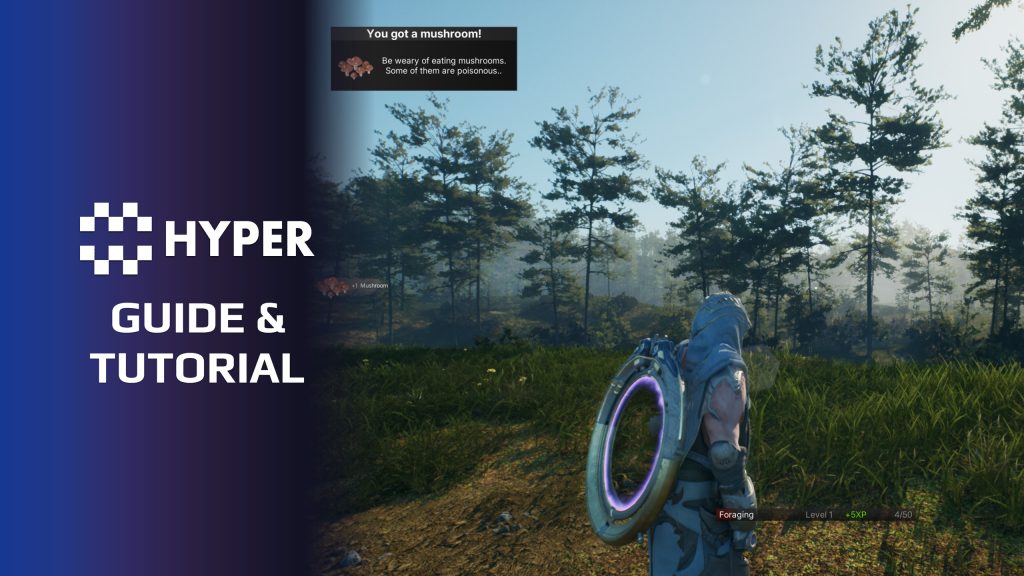
Explain a mechanic when the player encounters it. Hyper Guide & Tutorial System turns gameplay events into contextual guidance, from a short discovery prompt to a confirmation box with supporting media.
Key Features
Contextual triggers
- Gameplay events: connect guides to attributes, interaction, equipment, levels, quests or a placed trigger.
- Only once: show an introduction the first time its trigger occurs.
- Every time or periodically: repeat reminders immediately or after a configured delay.
- Tag-based lookup: match normalized trigger tags to guide prompt rows.
Guide presentation
- Confirmation boxes: show guidance that the player dismisses explicitly.
- Non-intrusive popups: queue brief prompts through the Information Prompt Manager.
- Images and video: include supporting media. An assigned image takes priority over video.
- Object highlights: call a trigger interface on configured widgets or actors.
- Player-local UI: each player receives their own guidance in a multiplayer session.
Building a tutorial
The controller guide component listens for events and reads the guide table. It manages trigger frequency and presentation, rather than enforcing a complete linear tutorial. Combine it with quests when you need ordered objectives and tutorial progression.
Start with one important player action and add the guidance that makes it easier to understand.
30 reviews for Guide & Tutorial System
You must be logged in to post a review.
Frequently asked questions
Why Hyper?
The strongest public modular Unreal Engine framework available at this scale
Most studios keep tools like this internal. Hyper makes a serious technical foundation available to solo developers, indies, and teams.
Built from 75,000+ hours of Unreal Engine work
System design, Blueprint architecture, multiplayer patterns, documentation, testing, integration, iteration, and real production problem-solving.
Systems designed to work together
Inventory, crafting, equipment, interaction, UI, combat, attributes, multiplayer, AI, quests, dialogue, maps, progression, survival systems, environment tools, performance helpers, and more can all live inside one larger ecosystem.
Working systems with source
Hyper gives you functional systems, a modular structure and documentation, with source you can extend for your own game.
Architecture you can extend
Hyper is built around scalable architecture: gameplay tags, structured data, child Blueprints, clean overrides, reusable components, and clear project boundaries.
Start fast, grow cleanly
Build on the included systems, replace visuals, adjust data, create child Blueprints and connect features without rebuilding the same foundation from scratch.
Want to learn more about the Hyper ecosystem, architecture philosophy, workflows, and developer behind it? Read more here and get started (https://gamesbyhyper.com/docs/getting-started/start-here/).
How do I add this to my project?
This module is provided as a full project because it includes Gameplay Tags, collision settings, config settings and other project-level dependencies.
Use our free Integration Tool (https://gamesbyhyper.com/product/integration-tool/) to prepare the integration. It combines compatible Hyper projects and handles migration and the required project settings. Use matching Unreal Engine versions and compatible Hyper releases.
Your own character, GameMode or custom systems may still need to be connected. The Integration Tool walkthrough (https://gamesbyhyper.com/docs/getting-started/use-the-automatic-integration-tool/) explains the setup and what to check in the generated project.
Do I need to use other Hyper systems with this?
No. You can use your own systems.
Hyper modules are designed around interfaces, abstract classes, shared contracts and dynamic dispatch, so features are not tied to one specific implementation.
If a module demonstrates integration with our Inventory, Equipment, Interaction, Movement, NPC or another Hyper system, you can:
Use the included Hyper implementation.
Replace it with your own system.
Use our implementation as a reference for your own integration.
The supplied integration shows how the module connects to the rest of a game. You can connect your own implementation through the same interface, abstract class or integration point.
For example, Attribute Manager may demonstrate Equipment modifying attributes. That does not mean you must purchase our Equipment System. You can follow the same integration pattern with your own equipment system.
The module includes working gameplay and its integration points. Build on the supplied setup or connect your own systems where you want different behavior.
See how to adapt a module (https://gamesbyhyper.com/docs/getting-started/customize-modules/) and how the shared data and abstract classes work (https://gamesbyhyper.com/docs/project-foundations/datamanagement/).
Where should I put my own changes?
Keep your own Blueprints, UI and data in your project's folder, for example Content/MyProject. Use child Blueprints or replacement components for your custom logic where possible.
That keeps your changes separate when you update Hyper. If you edit the original framework files directly, you will need to merge those edits when updating. The folder structure guide (https://gamesbyhyper.com/docs/project-foundations/folder-structure/) explains where everything belongs.
Can hints respond to the player's current situation?
Yes. Hints can respond to player actions and conditions such as health, inventory or location. Use those conditions to show help when it is relevant.
Can I define my own hint rules?
Yes. Add your own hint rules and connect them to your game's actions and tutorial flow.
Compatibility and file information
- Development platforms
- Linux, Windows, macOS
- Tested platforms
- Windows
Versions and compatibility
| Version | Release | Unreal Engine |
|---|---|---|
| V4V4 UE5.7, 5.8. Release: V4. | V4 | 5.7, 5.8 |
Implementation and interaction
- Modular / extensible
- Yes
- Multiplayer ready
- Yes
- UI components
- Yes
- Input methods
- Gamepad, Keyboard, Mouse
- AI gameplay features
- No
System setup
- Component: AC_PC_Guide on the PlayerController.
- Authoring: Guide Prompt DataTable keyed by Gameplay Tag.
- Trigger policies: Only Once, Every Time and Periodically, with retrigger delay.
- UI behavior: local-only guide widgets; non-intrusive prompts use a queue.
- Sequencing: Quest System integration supports ordered tutorial objectives.
Compatibility
- Platform testing: Windows tested.
- Plugins: Common UI.
Release notes | Documentation | YouTube | Discord
Documentation, videos and Discord are public. Verified buyers can use the support forums.

Dalcon4 –
Review from FabEvery game needs to teach its players something, and the Guide System turns what’s usually a bespoke, throwaway tutorial pipeline into a reusable, designer-friendly tool. Contextual prompts, objective markers, step-by-step flows, optional hints, and skippable tutorials — all driven by data, all stylable to match your game’s aesthetic. What sets it apart is the respect it shows for the player: no overbearing hand-holding, no intrusive popups at the worst moments. Guides fire when they’re relevant and fade when they’re not. The result is an onboarding system that feels handcrafted for your game even though you barely had to write a line of code. For any project with a learning curve, this saves weeks of design-engineer ping-pong.