
Guide System
Updated May 25, 2026
The Guide System shows player-specific guidance at the moment a gameplay event occurs. Guides are driven by Gameplay Tags and authored in a Guide Prompt Data Table.
For shared setup guidance, see the Migration Guide and Integration Guide. Use the System Atlas to look up functions, variables, events, components, and ownership references. Use this page for Guide System-specific trigger, data table, UI, and queue behavior.
The system is local per player and multiplayer-safe: each player sees only their own guides. It is not a full linear tutorial sequence, but it can support an advanced tutorial experience when combined with the Quest System.
What It Does
- Shows confirmation-style guides or non-intrusive pop-ups.
- Normalizes static and dynamic triggers into Gameplay Tags.
- Looks up matching guide prompt rows in a data table.
- Supports Only Once, Every Time, and Periodically trigger behavior.
- Can call an object trigger interface to highlight widgets or actors.
- Queues non-intrusive pop-ups through the Information Prompt Manager.
Trigger Flow
- A trigger occurs, such as an overlap, quest event, attribute event, interaction, equipment change, or level change.
- The trigger is converted into a Gameplay Tag.
- The Guide System checks whether a guide prompt row exists for that tag.
- The system checks whether the guide can execute based on trigger type, previous execution, current confirmation UI, and periodic delay.
- The system creates a confirmation guide or queues a non-intrusive pop-up.
- If the guide is Only Once, the tag is recorded as triggered.
Static and Dynamic Triggers
| Trigger Type | Examples | Conversion |
|---|---|---|
| Static Events | Overlap boxes, quest system triggers. | Emit a known guide Gameplay Tag directly. |
| Dynamic Events | Attributes, interaction, equipment, level changes. | Convert event-specific data into the Gameplay Tag used by the Guide Prompt row. |
Guide Prompt Data
| Field | Purpose |
|---|---|
| ID | Gameplay Tag key that matches the trigger tag. |
| Guide Type Filter | Optional enum filter for static event types such as crafting, interacting, delivering items, or leveling. |
| Title | Short headline. |
| Body | Rich text description. See UMG Rich Text. |
| Video | Auto-play looping media. Ignored if Image is present. |
| Image | Static image. Takes priority over Video if both are set. |
| Guide Type | Confirmation Box or Non-Intrusive Pop-Up. |
| Trigger Type | Only Once, Every Time, or Periodically. |
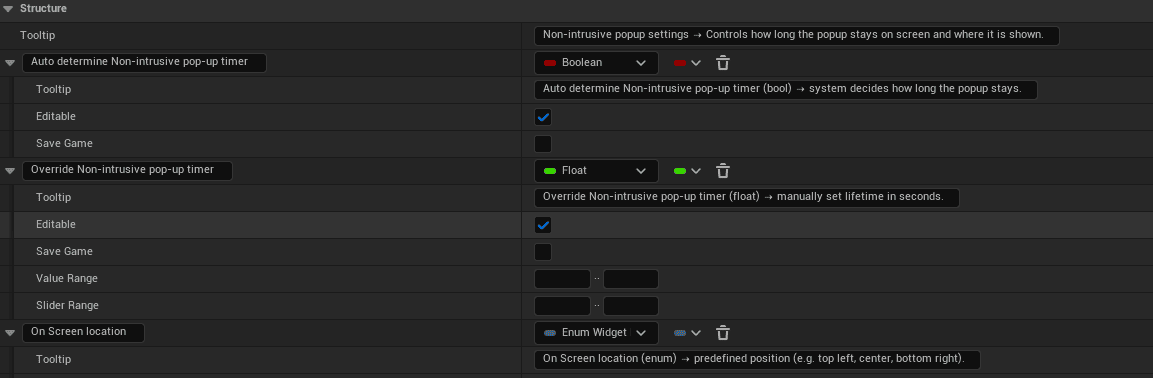
| Non-Intrusive Pop-Up Settings | Timer behavior, override duration, and screen location. |
| Object Trigger Settings | Tags, widgets, and actors that receive the guide trigger interface call. |
| Periodic Retriggerable Delay | Minimum time between retriggers for Periodically guides. |
Component Placement
Place AC_PC_Guide on the Player Controller. It binds event listeners on BeginPlay for attributes, interaction, equipment, level, static triggers, and quest signals. UI is local-only and does not replicate.
Blueprint Surface
| Variable / Function | Purpose |
|---|---|
| Triggered Only Once Guides | Array or set of Gameplay Tags that have already fired. |
| Guide Prompt lookup | Optional map from Gameplay Tag to Guide Prompt row for fast lookup. |
| Current confirmation widget | Tracks whether a confirmation guide is already open. |
| Non-intrusive queue | Stores pending pop-ups. |
| Periodic timestamp map | Tracks last trigger time per Gameplay Tag. |
| TryTriggerGuide | Main entry point for guide triggering. |
| DoesTriggerExist | Checks whether the tag has a guide row. |
| CanGuideBeExecuted | Applies Only Once, confirmation, and periodic checks. |
| CreateConfirmationBoxGuide | Creates modal guide UI. |
| QueueNonIntrusivePopup | Adds a pop-up request to the queue. |
Guide UI Behavior
Non-intrusive pop-ups anchor to the configured screen location and dismiss automatically using the determined or overridden timer. Multiple pop-ups are shown sequentially from the queue. If Image is present, Video is not played.
Confirmation boxes are modal. In single player, the game can pause while the confirmation is visible. Additional confirmation guides are blocked until the current confirmation is dismissed.
Object Trigger Interface
Create a Blueprint Interface with a function such as OnGuideTrigger that receives a Gameplay Tag. When a guide row lists object trigger settings, call that interface on the configured widgets and actors. Those targets compare the tag and run their response, such as a highlight, glow, or tooltip.
Authoring Steps
- Create or update a Guide Prompt row.
- Set the ID Gameplay Tag, title, body, and media.
- Set Guide Type and Trigger Type.
- If Trigger Type is Periodically, set Periodic Retriggerable Delay.
- Optionally set Guide Type Filter.
- Configure non-intrusive timer and screen location if applicable.
- Add object trigger tags and targets if a UI glow or highlight is needed.
- Make sure the gameplay event emits the matching tag.
- Test in PIE.