Description
Documentation | Discord | Cave Generation | Demo
Hyper Cave Building Toolkit v4
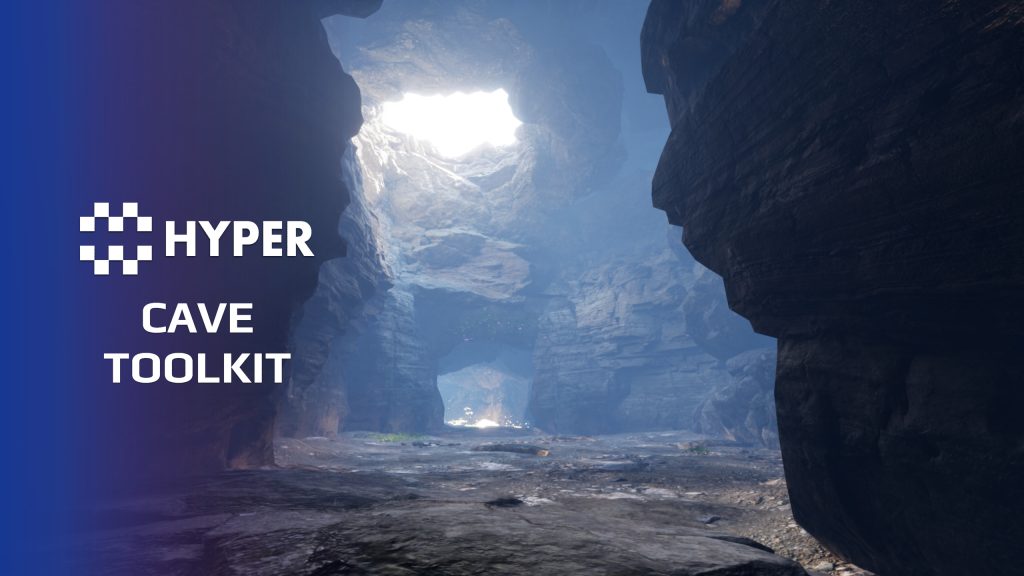
Create caves quickly while keeping control over their layout. Hyper Cave Building Toolkit combines modular meshes, combined-mesh prefabs and configurable Blueprint pieces, so you can build anything from a small grotto to a connected underground route.
Shape tunnels with splines, connect rooms and stairs, then use PCG dressing for floor and roof detail. You author the route and connections with editor controls; this is not an automatic tunnel-layout generator.
Key Features
Build the cave layout
- Modular building blocks: work with tunnels, caps, rooms, stairs, floors and roofs in a mix of individual meshes, combined meshes and Blueprint pieces.
- Size variants: use small, medium and large tunnels and rooms to establish different spaces and transitions.
- Spline-driven tunnels: route passages through your level and adjust their sections and connections.
- Connection tools: add rooms, splines or caps at connection points, and connect stairs where the layout calls for a change in height.
Dress and refine the space
- Floor and roof PCG: place rocks, foliage and smaller debris through separate procedural dressing paths.
- Room light shafts: tune the room godray brightness and use its sun-alignment behavior for shafts of light inside the cave.
- Lighting helpers: use room and tunnel controls for wall and roof lights as part of the cave setup.
- Flexible authoring: use combined meshes for quick layouts and Blueprint pieces where you want more adjustable sections.
Example cave and supporting workflow
- Large example map: study a connected cave to see how the pieces, dressing and lighting work together.
- Editor controls: adjust connection points, room proportions, spline sections and selected light classes without placing every detail separately.
- Environment integration: the documentation covers adapting the cave examples to your landscape and checking entrances, collision seams, lighting transitions and player traversal.
From a route to a playable space
Block out the main route with rooms and tunnels, add the required connections, then tune the dressing and lighting. Test the space with your character before adding encounters or other gameplay. This keeps the cave layout under your control while the tools handle repetitive placement work.
Explore the demo and cave walkthrough above to see the authoring workflow in practice.
19 reviews for Hyper Cave Building Toolkit
You must be logged in to post a review.
Frequently asked questions
Why Hyper?
The strongest public modular Unreal Engine framework available at this scale
Most studios keep tools like this internal. Hyper makes a serious technical foundation available to solo developers, indies, and teams.
Built from 75,000+ hours of Unreal Engine work
System design, Blueprint architecture, multiplayer patterns, documentation, testing, integration, iteration, and real production problem-solving.
Systems designed to work together
Inventory, crafting, equipment, interaction, UI, combat, attributes, multiplayer, AI, quests, dialogue, maps, progression, survival systems, environment tools, performance helpers, and more can all live inside one larger ecosystem.
Working systems with source
Hyper gives you functional systems, a modular structure and documentation, with source you can extend for your own game.
Architecture you can extend
Hyper is built around scalable architecture: gameplay tags, structured data, child Blueprints, clean overrides, reusable components, and clear project boundaries.
Start fast, grow cleanly
Build on the included systems, replace visuals, adjust data, create child Blueprints and connect features without rebuilding the same foundation from scratch.
Want to learn more about the Hyper ecosystem, architecture philosophy, workflows, and developer behind it? Read more here and get started (https://gamesbyhyper.com/docs/getting-started/start-here/).
Can I use this in my own Unreal project?
Yes. Use the supplied example project to try the setup, then follow the product documentation (https://gamesbyhyper.com/docs/environment-building/cave/) for your own project. Use a supported Unreal Engine version and keep the required engine plugins enabled.
Do I need to use the rest of the Hyper ecosystem?
You can use this product in your own project. Other Hyper systems mentioned as optional integrations are separate additions; use the parts that fit your workflow.
Where should I put my own changes?
Keep your own Blueprints, UI and data in your project's folder, for example Content/MyProject. Use child Blueprints or replacement components for your custom logic where possible.
That keeps your changes separate when you update Hyper. If you edit the original framework files directly, you will need to merge those edits when updating. The folder structure guide (https://gamesbyhyper.com/docs/project-foundations/folder-structure/) explains where everything belongs.
Does this automatically generate a complete cave network?
You lay out the cave yourself using modular pieces and spline-driven tunnels. PCG helps dress the floors and ceilings with rocks, foliage and debris. It does not generate the tunnel layout automatically.
What building pieces can I work with?
The toolkit has modular meshes, combined pieces and Blueprint pieces for tunnels, rooms, stairs, floors and roofs. The example cave shows how to connect and dress them.
Compatibility and file information
- Development platforms
- Linux, Windows, macOS
- Tested platforms
- Windows
Versions and compatibility
| Version | Release | Unreal Engine |
|---|---|---|
| V3V3 UE5.5, 5.6. Release: V3. | V3 | 5.5, 5.6 |
| V4V4 UE5.7, 5.8. Release: V4. | V4 | 5.7, 5.8 |
Implementation and interaction
- Modular / extensible
- Yes
- Multiplayer ready
- Yes
- UI components
- Yes
- Input methods
- Gamepad, Keyboard, Mouse
- AI gameplay features
- No
System setup
- Architecture: modular meshes, combined-mesh prefabs and Blueprint room, cap and spline-tunnel actors.
- Authoring controls: connection-point tools, size/proportion settings, spline section generation and light placement helpers.
- Dressing: Unreal PCG components for ground and roof detail. PCG is needed for those procedural dressing workflows.
- Layout scope: hand-authored cave routes with assisted construction. No automatic tunnel-layout generation.
- Example content: large cave map, modular tunnels/rooms/caps/stairs and floor/roof building blocks.
Compatibility
- Platform testing: Windows tested.
- Plugins: Common UI.
Release notes | Documentation | YouTube | Discord
Documentation, videos and Discord are public. Verified buyers can use the support forums.
casigus –
Review from FabIf you’ve ever tried making caves in Unreal and ended up with geometry that looks like a sad croissant, this toolkit is your salvation. It’s like Eric took one look at Unreal’s landscape tools and said, “No, we’re doing this properly.” The caves generate smoother than Unreal’s frame rate after a fresh restart, and the workflow feels like cheating but the good kind.
juggaloassian666 –
Review from FabI’m 100% beginner as of feb 2026 with no prior unreal experience and very little knowledge of coding learned from over a decade ago. This was exactly what I was looking for. And can’t stress that it doesn’t get much simpler than this. Setup ur entrance Drop a spline or pre made corridor, pop a pre made room or even make your own onto the end and bam u got a cave 👍