Description
Documentation | Discord | Video | Video | In-Depth Guide | Demo
Hyper Outliner and Symbol System v4
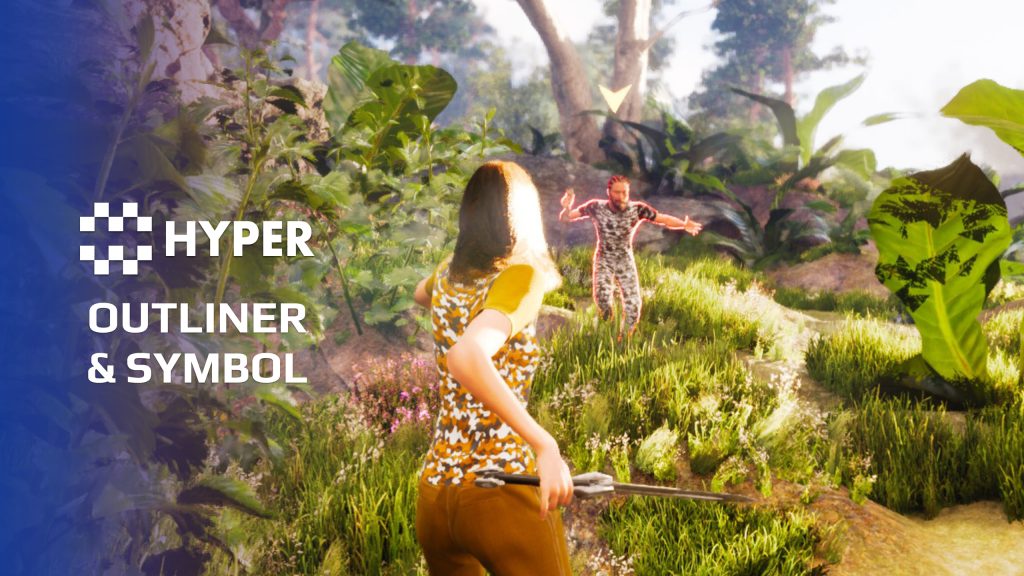
Help players recognize the object they can use, the target they selected or the objective they should follow. Hyper Outliner and Symbol System combines configurable actor outlines with attached world symbols.
Key Features
Actor outlines
- Event-driven highlights: enable or disable an outline from interaction or other gameplay events.
- Three color roles: configure primary, secondary and tertiary colors.
- Component helpers: manage one or several actors through the outliner functions.
- Depth/stencil setup: use custom depth stencil values on the relevant mesh or sprite.
World symbols
- Attached markers: place a visible symbol on an actor for a quest, interaction or other state.
- Mesh and colors: choose the symbol appearance for the role it represents.
- Motion settings: configure rotation, vertical movement and play rate.
Character integration
Enable Custom Depth-Stencil Pass with stencil support, then use the supplied character to follow a camera trace into the outline function. Adjust the three outline colors in the supplied post-process material instance.
Connect the highlight to the interaction or selection state your player needs to understand.
Related resources
MST Pro | Explore all compatible Hyper systems | try the MST Pro demo | official store
114 reviews for Outliner and Symbol System
You must be logged in to post a review.
Frequently asked questions
Why Hyper?
The strongest public modular Unreal Engine framework available at this scale
Most studios keep tools like this internal. Hyper makes a serious technical foundation available to solo developers, indies, and teams.
Built from 75,000+ hours of Unreal Engine work
System design, Blueprint architecture, multiplayer patterns, documentation, testing, integration, iteration, and real production problem-solving.
Systems designed to work together
Inventory, crafting, equipment, interaction, UI, combat, attributes, multiplayer, AI, quests, dialogue, maps, progression, survival systems, environment tools, performance helpers, and more can all live inside one larger ecosystem.
Working systems with source
Hyper gives you functional systems, a modular structure and documentation, with source you can extend for your own game.
Architecture you can extend
Hyper is built around scalable architecture: gameplay tags, structured data, child Blueprints, clean overrides, reusable components, and clear project boundaries.
Start fast, grow cleanly
Build on the included systems, replace visuals, adjust data, create child Blueprints and connect features without rebuilding the same foundation from scratch.
Want to learn more about the Hyper ecosystem, architecture philosophy, workflows, and developer behind it? Read more here and get started (https://gamesbyhyper.com/docs/getting-started/start-here/).
How do I add this to my project?
This module is provided as a full project because it includes Gameplay Tags, collision settings, config settings and other project-level dependencies.
Use our free Integration Tool (https://gamesbyhyper.com/product/integration-tool/) to prepare the integration. It combines compatible Hyper projects and handles migration and the required project settings. Use matching Unreal Engine versions and compatible Hyper releases.
Your own character, GameMode or custom systems may still need to be connected. The Integration Tool walkthrough (https://gamesbyhyper.com/docs/getting-started/use-the-automatic-integration-tool/) explains the setup and what to check in the generated project.
Do I need to use other Hyper systems with this?
No. You can use your own systems.
Hyper modules are designed around interfaces, abstract classes, shared contracts and dynamic dispatch, so features are not tied to one specific implementation.
If a module demonstrates integration with our Inventory, Equipment, Interaction, Movement, NPC or another Hyper system, you can:
Use the included Hyper implementation.
Replace it with your own system.
Use our implementation as a reference for your own integration.
The supplied integration shows how the module connects to the rest of a game. You can connect your own implementation through the same interface, abstract class or integration point.
For example, Attribute Manager may demonstrate Equipment modifying attributes. That does not mean you must purchase our Equipment System. You can follow the same integration pattern with your own equipment system.
The module includes working gameplay and its integration points. Build on the supplied setup or connect your own systems where you want different behavior.
See how to adapt a module (https://gamesbyhyper.com/docs/getting-started/customize-modules/) and how the shared data and abstract classes work (https://gamesbyhyper.com/docs/project-foundations/datamanagement/).
Where should I put my own changes?
Keep your own Blueprints, UI and data in your project's folder, for example Content/MyProject. Use child Blueprints or replacement components for your custom logic where possible.
That keeps your changes separate when you update Hyper. If you edit the original framework files directly, you will need to merge those edits when updating. The folder structure guide (https://gamesbyhyper.com/docs/project-foundations/folder-structure/) explains where everything belongs.
Can I highlight actors that are not inventory items?
Yes. Use it to highlight interactable actors, enemies or objectives, and attach symbols to actors where needed.
Can I change the symbols and outline styles?
Yes. Configure the outline and symbol appearance, including color, rotation and movement.
Compatibility and file information
- Development platforms
- Linux, Windows, macOS
- Tested platforms
- Windows
Versions and compatibility
| Version | Release | Unreal Engine |
|---|---|---|
| V2V2 UE5.3, 5.4. Release: V2. | V2 | 5.3, 5.4 |
| V3V3 UE5.5, 5.6. Release: V3. | V3 | 5.5, 5.6 |
| V4V4 UE5.7, 5.8. Release: V4. | V4 | 5.7, 5.8 |
Implementation and interaction
- Modular / extensible
- Yes
- Multiplayer ready
- Yes
- UI components
- Yes
- Input methods
- Gamepad, Keyboard, Mouse
- AI gameplay features
- No
System setup
- Architecture: outliner component functions write custom depth stencil values to actor visuals.
- Requirement: Custom Depth-Stencil Pass enabled with stencil support.
- Appearance: PP_MI_Outliner_SceneDepth exposes primary, secondary and tertiary colors.
- Presentation: local outline/symbol feedback can be driven by your gameplay state.
Compatibility
- Platform testing: Windows tested.
- Plugins: Common UI.
Release notes | Documentation | YouTube | Discord
Documentation, videos and Discord are public. Verified buyers can use the support forums.
pridge7 –
Review from FabObject highlighting and interaction symbols look sharp and help players spot what they can use.
K1W1_LEGEND –
Review from FabNeed to highlight items or NPCs in your game, this outliner system makes it easy to do just that. Good purchase if you own other hyper assets.
Atl3m –
Review from FabOne less star bec of left over that don’t need to be in here like the foot steps and the other parts not related to the outliner, was Abit of cleanup to get a clean outliner component. This also can be added as a asset and not a project, also symbols need to be attached to the mesh and not to the root. it’s just annoying having to work extra cleaning up and migrating it over . But all in all when all migrating and cleanup was done it’s a great outliner.
dng_phm_david –
Review from FabSimple to set up and use. It really works well. Love the character outlining!
Jimmy Saenz –
Review from FabI’m loving how all the assets work together seamless and how they merge with each other this asset will save you a lot of time and make game prototyping super fast.Jimmy Saenz#4491
P4uly_B –
Review from FabWas able to download this and get it working in minutes. no fussing around. this is how marketplace assets should be. plug and play.
Senladar –
Review from FabWell documented and super easy to hook up, literally took me 5 minutes to link into my interaction system perfectly. Even learned some blueprint tricks from reading them!
UNIT23 –
Review from FabWell done, fast Discord, and solid project. Only why it requires a 800mb download size is a bit puzzling. Would appreciate a how to get to the minimal file size version.
AnonymousPR787 –
Review from FabHyper your products are awesome!!!
iTz-_-Anonymous-_-PR#4749
Thepinnacle0317 –
Review from FabThis is a great system that can greatly be built upon and allows for fast setup to outline anything you want and can also be used to make some cool special abilities.
ThirstyThursten –
Review from FabYet another Amazing asset from Hyper, this new asset will be great for any type of project! Get yours today!Outline anything with absolute ease!
Snowfang –
Review from Fabif your going for a less realisitic game and want to really hit home on that game feel or even use this as a base for some extendable detailed scanning system its definitely worth it very easy to make and use and even easier to edit or latch onto other systems i recommend this esepcially so for the price!Snowie#9039
LadySagitar –
Review from FabI love that your products are so easy to use and customize. I greatly appreciate it!
LadySagitar#6268
Sebastian_OK –
Review from FabThe wait was worth it.With many options and user friendly.
Senash Kasigal#2174