Description
Documentation | Discord | Videos | Demo
Hyper Radial Menu v4
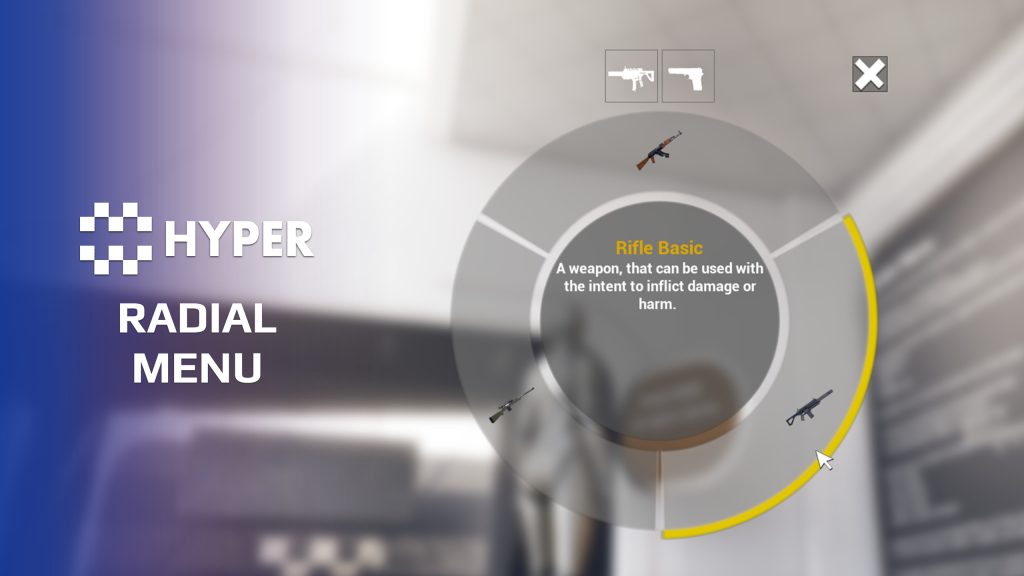
Use the same selection interface for building pieces, emotes, items or commands. Hyper Radial Menu turns structured category and option data into a reusable menu with mouse and gamepad controls.
Key Features
Menu structure
- Categories and submenus: organize larger selections into manageable groups.
- Dynamic entries: populate the menu with the choices available in the current context.
- Icons and text: present each option with its own visual and description.
Input and integration
- Mouse and gamepad: support radial selection through either input method.
- Selection behavior: configure the opening category, gamepad selection key and whether the menu closes on selection or key release.
- Requirement text: show the selected option's requirements alongside its title and description.
- Transitions: use the supplied animations when opening and navigating the menu.
- Reusable selection flow: connect a selected option to your own item, action or command logic.
- Hyper integrations: Building and Emote systems use the shared radial-menu framework.
Start with a small set of options, connect the selection callback to your game action and adjust the presentation to match your UI.
32 reviews for Radial Menu
You must be logged in to post a review.
Frequently asked questions
Why Hyper?
The strongest public modular Unreal Engine framework available at this scale
Most studios keep tools like this internal. Hyper makes a serious technical foundation available to solo developers, indies, and teams.
Built from 75,000+ hours of Unreal Engine work
System design, Blueprint architecture, multiplayer patterns, documentation, testing, integration, iteration, and real production problem-solving.
Systems designed to work together
Inventory, crafting, equipment, interaction, UI, combat, attributes, multiplayer, AI, quests, dialogue, maps, progression, survival systems, environment tools, performance helpers, and more can all live inside one larger ecosystem.
Working systems with source
Hyper gives you functional systems, a modular structure and documentation, with source you can extend for your own game.
Architecture you can extend
Hyper is built around scalable architecture: gameplay tags, structured data, child Blueprints, clean overrides, reusable components, and clear project boundaries.
Start fast, grow cleanly
Build on the included systems, replace visuals, adjust data, create child Blueprints and connect features without rebuilding the same foundation from scratch.
Want to learn more about the Hyper ecosystem, architecture philosophy, workflows, and developer behind it? Read more here and get started (https://gamesbyhyper.com/docs/getting-started/start-here/).
How do I add this to my project?
This module is provided as a full project because it includes Gameplay Tags, collision settings, config settings and other project-level dependencies.
Use our free Integration Tool (https://gamesbyhyper.com/product/integration-tool/) to prepare the integration. It combines compatible Hyper projects and handles migration and the required project settings. Use matching Unreal Engine versions and compatible Hyper releases.
Your own character, GameMode or custom systems may still need to be connected. The Integration Tool walkthrough (https://gamesbyhyper.com/docs/getting-started/use-the-automatic-integration-tool/) explains the setup and what to check in the generated project.
Do I need to use other Hyper systems with this?
No. You can use your own systems.
Hyper modules are designed around interfaces, abstract classes, shared contracts and dynamic dispatch, so features are not tied to one specific implementation.
If a module demonstrates integration with our Inventory, Equipment, Interaction, Movement, NPC or another Hyper system, you can:
Use the included Hyper implementation.
Replace it with your own system.
Use our implementation as a reference for your own integration.
The supplied integration shows how the module connects to the rest of a game. You can connect your own implementation through the same interface, abstract class or integration point.
For example, Attribute Manager may demonstrate Equipment modifying attributes. That does not mean you must purchase our Equipment System. You can follow the same integration pattern with your own equipment system.
The module includes working gameplay and its integration points. Build on the supplied setup or connect your own systems where you want different behavior.
See how to adapt a module (https://gamesbyhyper.com/docs/getting-started/customize-modules/) and how the shared data and abstract classes work (https://gamesbyhyper.com/docs/project-foundations/datamanagement/).
Where should I put my own changes?
Keep your own Blueprints, UI and data in your project's folder, for example Content/MyProject. Use child Blueprints or replacement components for your custom logic where possible.
That keeps your changes separate when you update Hyper. If you edit the original framework files directly, you will need to merge those edits when updating. The folder structure guide (https://gamesbyhyper.com/docs/project-foundations/folder-structure/) explains where everything belongs.
Is the menu limited to building selection?
No. It is a generic selection menu. Use it for items, emotes, buildings, commands or another selection mechanic, with nested categories where needed.
Can it be controlled with a mouse or gamepad?
Yes. The radial menu supports both mouse and gamepad selection.
Compatibility and file information
- Development platforms
- Linux, Windows, macOS
- Tested platforms
- Windows
Versions and compatibility
| Version | Release | Unreal Engine |
|---|---|---|
| V4V4 UE5.7, 5.8. Release: V4. | V4 | 5.7, 5.8 |
Implementation and interaction
- Modular / extensible
- Yes
- Multiplayer ready
- Yes
- UI components
- Yes
- Input methods
- Gamepad, Keyboard, Mouse
- AI gameplay features
- No
System setup
- Architecture: generic radial-menu widgets populated from category and segment data.
- Input: mouse and gamepad selection.
- Integration: selection and abort/close callbacks connect the widget to the owning gameplay system.
- Scope: local selection UI. Replication belongs to the gameplay action invoked by the selection.
Compatibility
- Platform testing: Windows tested.
- Plugins: Common UI.
Release notes | Documentation | YouTube | Discord
Documentation, videos and Discord are public. Verified buyers can use the support forums.
Dalcon4 –
Review from FabThe Hyper Generic Radial Menu v4 is a versatile, data-driven UI solution for quick-access selection of items, emotes, buildings, commands, or any categorized content. Fully customizable with support for nested sub-menus, dynamic icons, and real-time content updates, this is the same radial menu system used natively by the Hyper Building and Emote systems, now available as a standalone module. The radial menu covers every use case imaginable. It supports unlimited segments, nested sub-categories, icon customization, tooltips, key bindings, and gamepad input. The data-driven design means you can populate it with any content type without modifying the underlying system. It even handles edge cases like too many items gracefully through pagination and sub-menu drilling.