Description
Documentation | Discord | Video | Video | Demo
Hyper Console Command Manager v4
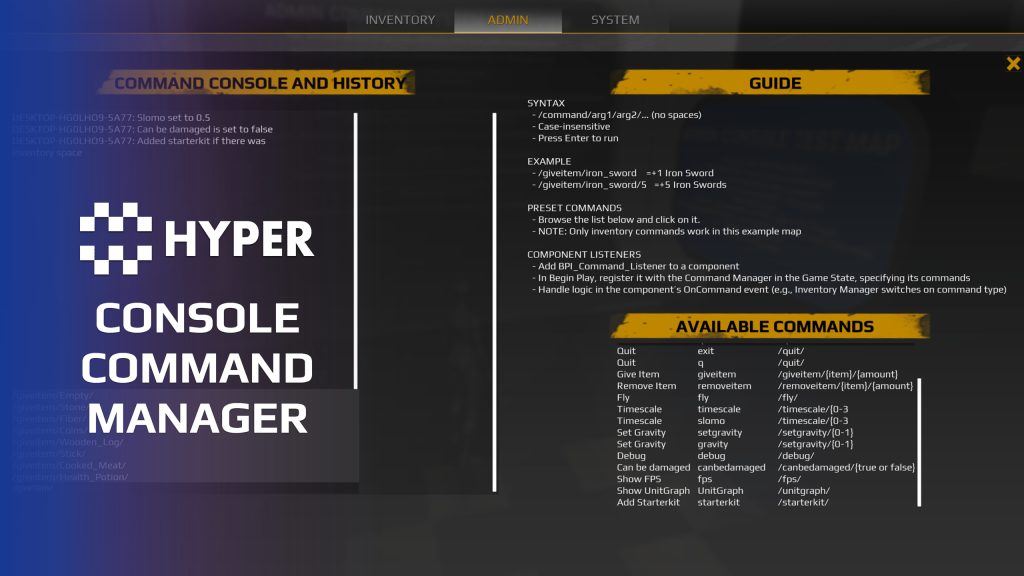
Give developers, admins and players a consistent way to trigger game actions through text commands. Hyper Console Command Manager turns chat input into server-side gameplay events, with command aliases, parameter conversion and input assistance.
Key Features
Command definitions
- DataTable configuration: define command aliases, help text, event tags and parameter rules in DT_Commands.
- Configurable syntax: choose the command prefix and delimiter. A slash prefix with space-separated parameters is a common setup.
- Aliases: let short and long command names trigger the same event.
- Optional parameters: set a minimum parameter count when your command handler can supply defaults.
Input and feedback
- Chat entry: submit commands through the chat box.
- History: use the up/down controls to revisit earlier input.
- Autocomplete: suggest command names and configured parameter values, with Tab completion.
- Feedback: return results and useful failure messages to the player.
Server execution and extension
- Server-authoritative flow: the controller communicator passes submitted text to the GameState command manager.
- Parameter resolvers: convert strings into values such as floats, booleans or Gameplay Tags.
- Event dispatch: route the resolved values to the configured Event Manager listener.
- Custom commands: add a table row, connect its event and supply custom resolvers where needed.
Practical examples
Use commands such as /giveitem Sword 5 to connect text input to inventory actions. The same structure can support healing, weather changes or chat categories when you provide the corresponding event handler and permission rules.
The current implementation uses Event Manager dispatch. Follow the documentation above for the command row and resolver setup.
39 reviews for Console Command Manager
You must be logged in to post a review.
Frequently asked questions
Why Hyper?
The strongest public modular Unreal Engine framework available at this scale
Most studios keep tools like this internal. Hyper makes a serious technical foundation available to solo developers, indies, and teams.
Built from 75,000+ hours of Unreal Engine work
System design, Blueprint architecture, multiplayer patterns, documentation, testing, integration, iteration, and real production problem-solving.
Systems designed to work together
Inventory, crafting, equipment, interaction, UI, combat, attributes, multiplayer, AI, quests, dialogue, maps, progression, survival systems, environment tools, performance helpers, and more can all live inside one larger ecosystem.
Working systems with source
Hyper gives you functional systems, a modular structure and documentation, with source you can extend for your own game.
Architecture you can extend
Hyper is built around scalable architecture: gameplay tags, structured data, child Blueprints, clean overrides, reusable components, and clear project boundaries.
Start fast, grow cleanly
Build on the included systems, replace visuals, adjust data, create child Blueprints and connect features without rebuilding the same foundation from scratch.
Want to learn more about the Hyper ecosystem, architecture philosophy, workflows, and developer behind it? Read more here and get started (https://gamesbyhyper.com/docs/getting-started/start-here/).
How do I add this to my project?
This module is provided as a full project because it includes Gameplay Tags, collision settings, config settings and other project-level dependencies.
Use our free Integration Tool (https://gamesbyhyper.com/product/integration-tool/) to prepare the integration. It combines compatible Hyper projects and handles migration and the required project settings. Use matching Unreal Engine versions and compatible Hyper releases.
Your own character, GameMode or custom systems may still need to be connected. The Integration Tool walkthrough (https://gamesbyhyper.com/docs/getting-started/use-the-automatic-integration-tool/) explains the setup and what to check in the generated project.
Do I need to use other Hyper systems with this?
No. You can use your own systems.
Hyper modules are designed around interfaces, abstract classes, shared contracts and dynamic dispatch, so features are not tied to one specific implementation.
If a module demonstrates integration with our Inventory, Equipment, Interaction, Movement, NPC or another Hyper system, you can:
Use the included Hyper implementation.
Replace it with your own system.
Use our implementation as a reference for your own integration.
The supplied integration shows how the module connects to the rest of a game. You can connect your own implementation through the same interface, abstract class or integration point.
For example, Attribute Manager may demonstrate Equipment modifying attributes. That does not mean you must purchase our Equipment System. You can follow the same integration pattern with your own equipment system.
The module includes working gameplay and its integration points. Build on the supplied setup or connect your own systems where you want different behavior.
See how to adapt a module (https://gamesbyhyper.com/docs/getting-started/customize-modules/) and how the shared data and abstract classes work (https://gamesbyhyper.com/docs/project-foundations/datamanagement/).
Where should I put my own changes?
Keep your own Blueprints, UI and data in your project's folder, for example Content/MyProject. Use child Blueprints or replacement components for your custom logic where possible.
That keeps your changes separate when you update Hyper. If you edit the original framework files directly, you will need to merge those edits when updating. The folder structure guide (https://gamesbyhyper.com/docs/project-foundations/folder-structure/) explains where everything belongs.
Can I add commands without writing C++?
Yes. Add the command to the Commands DataTable and handle it in a registered Blueprint command listener. The manager parses the text and passes the command and arguments to your logic.
Does this work in packaged builds as well as PIE?
Yes. The command interface is designed for PIE and packaged builds.
Compatibility and file information
- Development platforms
- Linux, Windows, macOS
- Tested platforms
- Windows
Versions and compatibility
| Version | Release | Unreal Engine |
|---|---|---|
| V3V3 UE5.5, 5.6. Release: V3. | V3 | 5.5, 5.6 |
| V4V4 UE5.7, 5.8. Release: V4. | V4 | 5.7, 5.8 |
Implementation and interaction
- Modular / extensible
- Yes
- Multiplayer ready
- Yes
- UI components
- Yes
- Input methods
- Gamepad, Keyboard, Mouse
- AI gameplay features
- No
System setup
- Architecture: PlayerController RPC communicator, GameState parser/manager, parameter resolvers and Event Manager dispatch.
- Configuration: DT_Commands defines aliases, event tag, format, autocomplete, minimum parameter count and resolver order.
- Syntax: configurable prefix and delimiter. Display placeholders do not define parsing rules.
- Extension points: command rows, event listeners and BP_CommandString_Resolver_Abstract subclasses.
Compatibility
- Networking: replicated multiplayer support.
- Platform testing: Windows tested.
- Plugins: Common UI.
Release notes | Documentation | YouTube | Discord
Documentation, videos and Discord are public. Verified buyers can use the support forums.
WWS – Lantianer –
Review from FabI absolutely love this command manager. The system is well organized, cleanly written, and thoroughly documented, making it easy to understand and work with. I had actually started building something similar myself, but it would have taken a lot of time to reach this level of quality and flexibility. What makes it even better is how easy it is to extend. Adding your own commands and custom logic is straightforward, which makes it a great foundation for all kinds of projects. For me, this was one of those assets that got released at exactly the right time. What I especially appreciate about Hyper’s products is the long-term support behind them. When I first saw their ambitious roadmap, I was skeptical, as I’ve seen many developers make big promises only to abandon their assets or take years to deliver meaningful updates. I’m happy to say that Eric and the Hyper team have consistently delivered, kept their modules updated, and continued expanding the ecosystem. It’s not just this module I recommend, but also the team behind it, the growing ecosystem of compatible modules, and the community that has formed around it.
NotTheFed –
Review from FabI have a LOT of Hyper’s kits.. and for a lot it is plug in play for the basics. I have MST PRO as the base framework, and just plug in those that are relevant for my game like Dialog, companion, advanced NPC, lockpicking, Skills, quests, traps, unlock (learn), world map, weathertime, Skinning, body decompose, Mesh to Actor swap, Admin console, with chat.. and so on. Simple to understand, and gets you started with most key parts of any game framework I highly recommend, not just for the quality of the kit.. but the excellent support on discord. The very detailed documentation.