Description
Documentation | Discord | Videos | Demo
Hyper Weapon Attachment & Loadout System v4
Let players tune their weapons for the next fight. Hyper Weapon Attachment & Loadout System supports both attachments carried as inventory items and predefined shooter loadouts, with configurable equipment rules, stat changes and visual presentation.
Key Features
Attachments
- Weapon parts: configure scopes, muzzles, grips, magazines and your own attachment types.
- Compatibility: define which attachments a weapon accepts.
- Gameplay effects: apply the configured attribute changes, including effects on recoil or damage.
- Real attachment actors: give parts their own meshes and behavior.
- Presentation data: configure icons, animations, sounds and effects through the relevant data.
Selection and loadouts
- Inventory workflow: equip compatible attachments owned by the player.
- Shooter workflow: select a predefined loadout independently of survival inventory ownership.
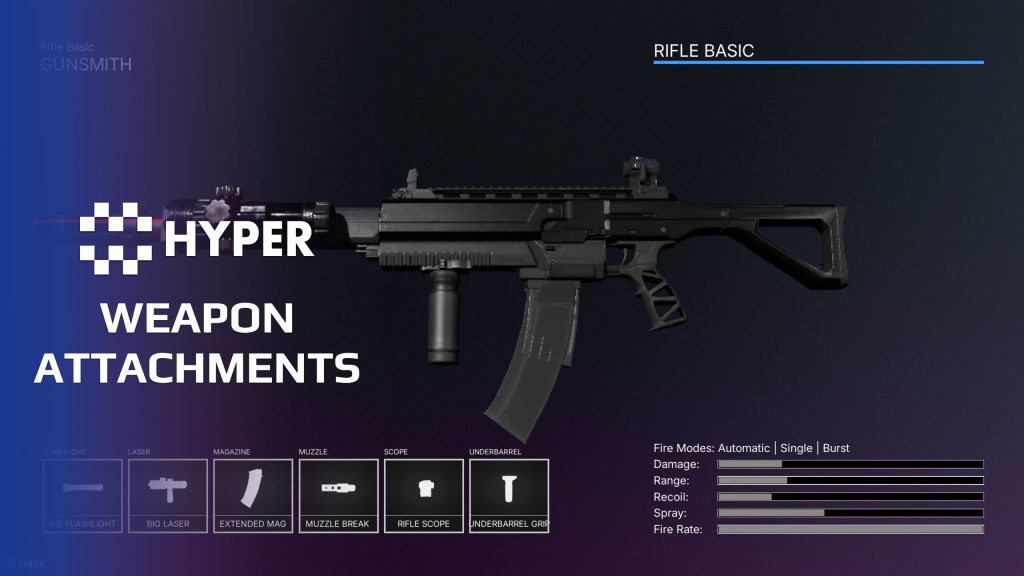
- Weapon preview: show the selected equipment and attachment combination in the interface.
- Saved loadouts: use the save-backed manager to retain configured selections.
- Multiplayer equip flow: route equipment changes through the server while the client presents the selection UI.
Supporting systems and UI
Attachment definitions describe each part, equipment data defines compatible choices and the manager connects those rules to the selection interface. Logical attachment state is kept separate from the visual actors mounted on the weapon.
Loadout detail and attachment behavior
- Named equipment sets: the loadout data includes primary weapon, secondary weapon, lethal and tactical item slots. Configure the maximum number of saved loadouts.
- Apply now or after respawn: choose when a selection becomes active, including the first-selection respawn behavior and a pending loadout for the next spawn.
- Attachment categories: organize scopes, stocks, underbarrel parts, muzzles, magazines, flashlights and lasers through the attachment type data.
- Animated or instant changes: use equip and unequip montages where the change belongs in gameplay, or take the instant path for the appropriate menu flow.
- Functional attachments: the flashlight child actor aligns its spotlight with the player aim trace. Extend attachment actors when a part needs behavior beyond a mesh or stat change.
- Separate rules from presentation: accepted-attachment lists control compatibility, the manager applies the change and the visual actor handles its mesh and owner cleanup.
Choose the inventory or loadout workflow, then configure the weapons and parts your game needs.
34 reviews for Weapon Attachment & Loadout System
You must be logged in to post a review.
Frequently asked questions
Why Hyper?
The strongest public modular Unreal Engine framework available at this scale
Most studios keep tools like this internal. Hyper makes a serious technical foundation available to solo developers, indies, and teams.
Built from 75,000+ hours of Unreal Engine work
System design, Blueprint architecture, multiplayer patterns, documentation, testing, integration, iteration, and real production problem-solving.
Systems designed to work together
Inventory, crafting, equipment, interaction, UI, combat, attributes, multiplayer, AI, quests, dialogue, maps, progression, survival systems, environment tools, performance helpers, and more can all live inside one larger ecosystem.
Working systems with source
Hyper gives you functional systems, a modular structure and documentation, with source you can extend for your own game.
Architecture you can extend
Hyper is built around scalable architecture: gameplay tags, structured data, child Blueprints, clean overrides, reusable components, and clear project boundaries.
Start fast, grow cleanly
Build on the included systems, replace visuals, adjust data, create child Blueprints and connect features without rebuilding the same foundation from scratch.
Want to learn more about the Hyper ecosystem, architecture philosophy, workflows, and developer behind it? Read more here and get started (https://gamesbyhyper.com/docs/getting-started/start-here/).
How do I add this to my project?
This module is provided as a full project because it includes Gameplay Tags, collision settings, config settings and other project-level dependencies.
Use our free Integration Tool (https://gamesbyhyper.com/product/integration-tool/) to prepare the integration. It combines compatible Hyper projects and handles migration and the required project settings. Use matching Unreal Engine versions and compatible Hyper releases.
Your own character, GameMode or custom systems may still need to be connected. The Integration Tool walkthrough (https://gamesbyhyper.com/docs/getting-started/use-the-automatic-integration-tool/) explains the setup and what to check in the generated project.
Do I need to use other Hyper systems with this?
No. You can use your own systems.
Hyper modules are designed around interfaces, abstract classes, shared contracts and dynamic dispatch, so features are not tied to one specific implementation.
If a module demonstrates integration with our Inventory, Equipment, Interaction, Movement, NPC or another Hyper system, you can:
Use the included Hyper implementation.
Replace it with your own system.
Use our implementation as a reference for your own integration.
The supplied integration shows how the module connects to the rest of a game. You can connect your own implementation through the same interface, abstract class or integration point.
For example, Attribute Manager may demonstrate Equipment modifying attributes. That does not mean you must purchase our Equipment System. You can follow the same integration pattern with your own equipment system.
The module includes working gameplay and its integration points. Build on the supplied setup or connect your own systems where you want different behavior.
See how to adapt a module (https://gamesbyhyper.com/docs/getting-started/customize-modules/) and how the shared data and abstract classes work (https://gamesbyhyper.com/docs/project-foundations/datamanagement/).
Where should I put my own changes?
Keep your own Blueprints, UI and data in your project's folder, for example Content/MyProject. Use child Blueprints or replacement components for your custom logic where possible.
That keeps your changes separate when you update Hyper. If you edit the original framework files directly, you will need to merge those edits when updating. The folder structure guide (https://gamesbyhyper.com/docs/project-foundations/folder-structure/) explains where everything belongs.
Do attachments affect gameplay as well as appearance?
Yes. Attachments can change weapon attributes, sounds and effects as well as the model shown in the loadout preview.
Can it connect to inventory and combat?
Yes. The supplied integration connects attachment storage and selection to Hyper Inventory and weapon behavior to Hyper Combat. Use those integration points with the systems in your own game.
Compatibility and file information
- Development platforms
- Linux, Windows, macOS
- Tested platforms
- Windows
Versions and compatibility
| Version | Release | Unreal Engine |
|---|---|---|
| V4V4 UE5.7, 5.8. Release: V4. | V4 | 5.7, 5.8 |
Implementation and interaction
- Modular / extensible
- Yes
- Multiplayer ready
- Yes
- UI components
- Yes
- Input methods
- Gamepad, Keyboard, Mouse
- AI gameplay features
- No
System setup
- Runtime: AC_PC_AttachmentManager with attachment actor base classes.
- Data: attachment definitions and equipment compatibility settings.
- Authority: server-authoritative equip changes with client selection UI.
- Persistence: loadout manager connects saved selections to the equipment setup.
Compatibility
- Networking: replicated multiplayer support.
- Platform testing: Windows tested.
- Plugins: Common UI.
Release notes | Documentation | YouTube | Discord
Documentation, videos and Discord are public. Verified buyers can use the support forums.

Acquired with code t_ibox –
Review from FabHyper Weapon Attachment & Loadout System v4 is an exceptional asset that delivers an impressive level of weapon customization. It is a complete, professional, and highly polished system for projects looking to create an advanced weapon experience. The attachment management is extremely well designed: scopes, silencers, grips, magazines, and other modifications can be added easily with instant visual feedback and real changes to weapon statistics. The system provides the same feeling of deep customization found in high-quality tactical games. I especially appreciate the well-structured approach with sockets, compatibility rules, dynamic stats, and loadout saving. The real-time 3D preview system is a fantastic feature that greatly improves the user experience by allowing players to instantly see their changes. The integration is clean and efficient, making it easy to add new weapons and attachments without rebuilding everything from scratch. The system is flexible, powerful, and designed to grow with your project. Like the other Hyper assets, the quality of the work, the documentation, and the Discord support truly make a difference. This is a tool that saves a huge amount of development time while providing a strong and professional foundation. In my opinion, this is one of the best weapon customization systems available. Outstanding work, highly recommended for any developer looking to create a complete and immersive equipment system!
Dalcon4 –
Review from FabThe Hyper Weapon Attachment & Loadout System v4 is a comprehensive weapon customization framework that allows players to swap scopes, silencers, underbarrel grips, magazines, and other attachments with immediate visual and statistical effects. Featuring a full loadout menu with real-time 3D model previews, it delivers the deep weapon modification experience found in top-tier tactical shooters. This system is exceptionally complete. It supports unlimited attachment slots per weapon, socket-based visual attachment with proper transforms, real-time stat modification (damage, accuracy, recoil, etc.), sound modifier support (silencers), visual effect changes, attachment compatibility rules, preset loadout saving and loading, and a full 3D preview system that shows changes as they are made. Setting up weapon attachments is well-structured. Define attachment slots on your weapon data, create attachment entries in data tables, and the system handles socket attachment, stat calculation, and preview rendering automatically. The loadout UI is pre-built and fully customizable, with the 3D preview system providing immediate visual feedback for every change. The data-driven approach means adding new weapons and attachments requires no coding. The attachment system is responsive and visually impressive. Swapping attachments in the loadout menu is instant, with the 3D preview updating in real time. Stat changes are clearly displayed, and the visual attachment on the weapon model is precise and convincing. In gameplay, attachments affect weapon behavior noticeably and consistently. Multiplayer replication ensures all players see correct weapon configurations.
NotTheFed –
Review from FabI have a LOT of Hyper’s kits.. and for a lot it is plug in play for the basics. I have MST PRO as the base framework, and just plug in those that are relevant for my game like Dialog, companion, advanced NPC, lockpicking, Skills, quests, traps, unlock (learn), world map, weathertime, Skinning, body decompose, Mesh to Actor swap, Admin console, with chat.. and so on. Simple to understand, and gets you started with most key parts of any game framework I highly recommend, not just for the quality of the kit.. but the excellent support on discord. The very detailed documentation.