
Permission manager #
Buyer-facing setup and usage guide for Hyper's Blueprint permission framework.
This document explains the system from a practical integration point of view: what the permission model is, how the major components work together, and how to configure roles, teams, and restricted world interactions in your own project.
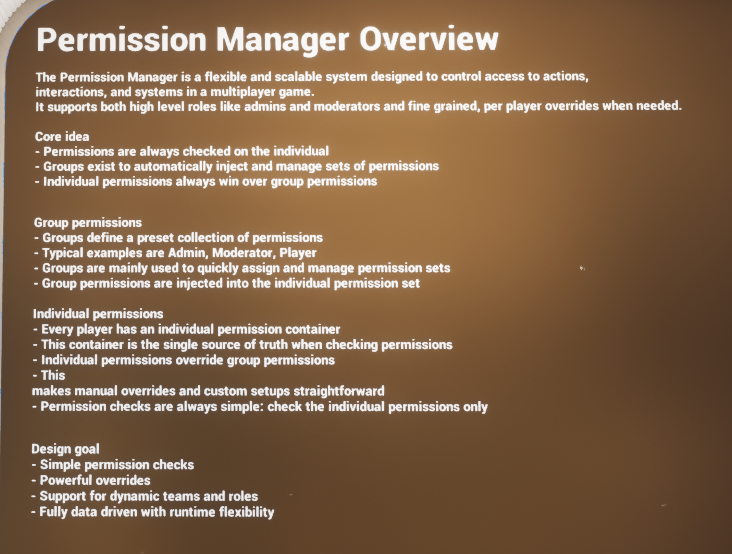
Permission Manager overview from the demo level.
- Centralized player permission data with separate global and team scopes.
- Reusable role presets driven by DataTables and inheritance.
- Per-player overrides for edge cases and live administration.
- World-facing permission checker for restricted interactions.
Introduction #
The Permission Manager is a flexible, scalable Blueprint system for controlling access to gameplay actions, world interactions, and team-specific features. It supports two independent scopes of permission: global permissions that apply to the entire session, and team permissions that only apply inside a named team, guild, party, squad, or similar social structure.
At its core, the system keeps permission checks simple by always resolving against the individual player. Group presets exist to speed up setup and runtime management, but checks still end at the player level. This makes it easy to support broad role presets such as Admin, Moderator, Leader, Rookie, or Member while still allowing direct per-player overrides whenever a project needs something more specific.
The provided implementation is also network-aware. The central permission manager stores and updates player permission data, the player-facing component exposes convenient checks and management requests, and a lightweight checker component can be placed on world actors or interactables so doors, stations, buildings, chests, and information panels can all ask the same permission questions in a consistent way.
- Supports both broad administrative roles and granular per-player overrides.
- Separates global permissions from team-scoped permissions.
- Uses DataTables for reusable permission group presets.
- Allows group inheritance so larger roles can build on smaller roles.
- Provides a world-facing permission checker for doors, interactables, and team-owned actors.
- Includes client-side feedback hooks so players can be notified when permissions or groups change.
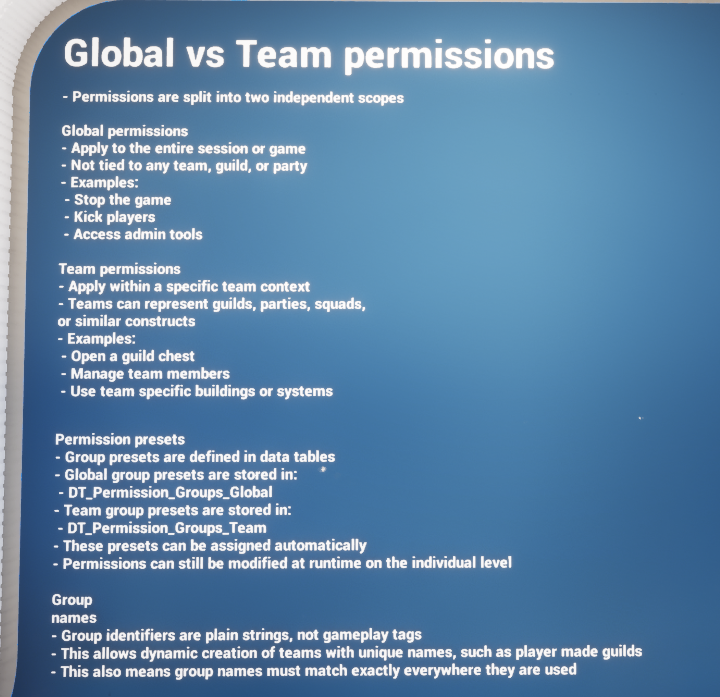
Global and team permissions are treated as two separate scopes.
Core Permission Model #
Individual container as the source of truth #
The most important design idea in this system is that permission checks always resolve on the individual player. Group presets do not replace that; they feed into it. This keeps gameplay checks straightforward: when a door, chest, UI panel, or management action asks whether a player is allowed, the answer ultimately comes from that player’s current permission data.
This model is especially helpful when a project has mostly standard roles but still needs exceptions. A player can inherit a typical preset such as Admin or Leader and still receive direct adjustments without redesigning the whole role structure.
Global vs team scope #
Global permissions are session-wide and are not attached to any single team. They are best used for administrative powers, moderator tools, universal debug or support actions, or project-wide access such as stopping the game, opening privileged menus, or bypassing broad restrictions.
Team permissions sit inside a named team context. They are the right choice for guild ranks, settlement management, parties, clans, squads, player-made factions, or any system where the same role name may exist separately in more than one team. A player might be a Leader in one guild, a Rookie in another, and have no team permissions elsewhere.
Groups and inheritance #
Permission groups are reusable presets stored in DataTables. Each group has a name, an optional inheritance list, and a collection of permissions. Inheritance lets you build larger roles on top of smaller ones. For example, a team Leader can inherit Admin, and Admin can inherit Rookie. That means each larger role automatically brings forward the capabilities of the smaller roles beneath it.
The provided examples show this clearly: the global table includes rows such as Newcomer and Admin, while the team table includes Rookie, Admin, and Leader. This makes it very easy to create hierarchical role ladders without duplicating every single permission tag in every row.
- Global group names are plain strings rather than gameplay tags.
- Team group names are also plain strings, which makes dynamic team naming easier.
- Because names are plain strings, spelling and naming consistency matter.
- Inheritance is ideal for roles that should accumulate capability over time.
Main Components #
The live permission workflow in the provided implementation is split across three main Blueprint components. Together they cover authoritative storage, player-facing checks and management requests, and world-level access control.
|
Component |
Role in the system |
Typical use |
|
AC_GS_PermissionManager |
Central permission authority that stores player permission data, reads default group tables, updates global and team scopes, and broadcasts runtime changes. |
Used whenever permissions or groups are added, removed, initialized, or modified. |
|
AC_PC_Permission |
Player-facing access layer that exposes permission checks, management requests, and client-side information prompts. |
Used by UI, player-driven actions, and any local gameplay logic that needs to ask or request permission changes. |
|
AC_Permission_Checker |
World-facing checker component that lives on interactables or actors requiring access control. |
Used on doors, chests, buildings, control panels, restricted interactions, and other permission-gated world objects. |
AC_GS_PermissionManager #
This is the heart of the system. It initializes runtime permission data, builds a fast player-permission lookup map, caches default group definitions from the global and team DataTables, and processes the authoritative add/remove/change operations for permissions and groups. It also contains the helper functions used to answer questions such as whether a player has a global permission, belongs to a global group, has a specific team permission, or belongs to a team group.
Because it owns the authoritative data and runtime updates, this is the component that other systems ultimately rely on when real permission state changes need to happen.
AC_PC_Permission #
This component is the practical gameplay-facing wrapper. It exposes functions such as Has Global Permissions, Has Global Group, Has Team Permissions, Has Team Group, Can Manage Global Members, Can Manage Team Members, and Can Manage Information. It also forwards server requests for adding and removing permissions or groups, and for changing a team group’s permission set at runtime.
In the provided implementation, AC_PC_Permission also binds on the owning client to change events so the player can receive information prompts when permissions or groups change. This is useful feedback for admin tools, guild management menus, and debugging flows in multiplayer.
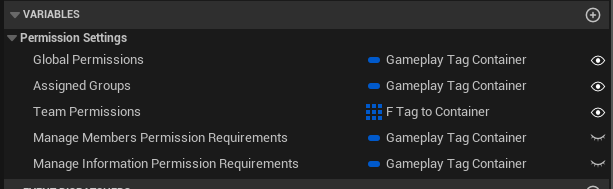
AC_PC_Permission exposes direct permission containers plus requirements used to govern management actions.
AC_Permission_Checker #
This is the plug-in component for the world. Instead of every door or interactable reinventing permission logic, AC_Permission_Checker lets the actor declare what it needs. The checker can evaluate required global permissions, global groups, team permissions, and team groups. It can also be configured so only one valid requirement is enough, or so every specified requirement must pass.
A key option in the checker is the ability to fall back from a team permission check to the same global permission. This is useful for designs where global admin rights should still pass a team-restricted check.
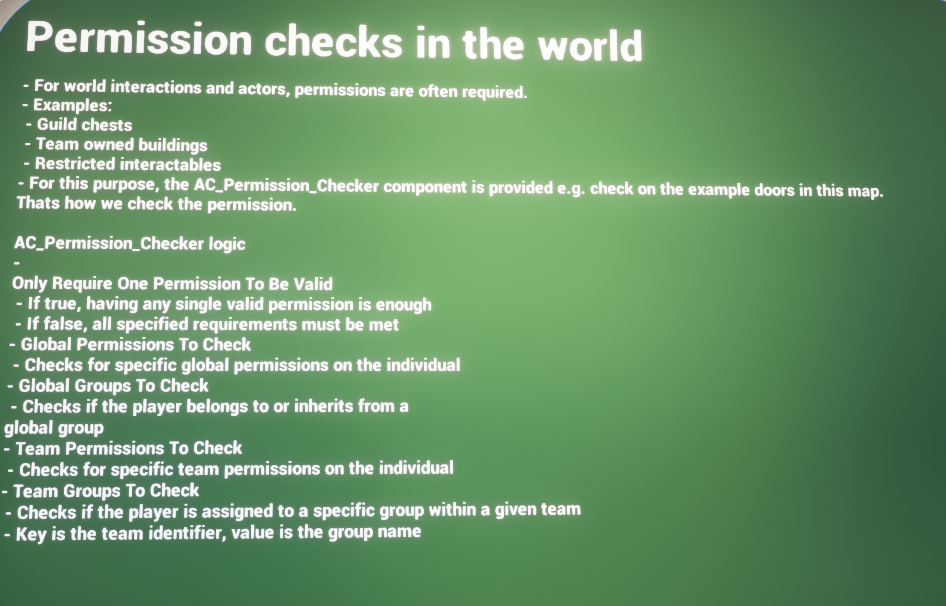
World actors can use AC_Permission_Checker to gate interactions, buildings, or restricted systems.
Details Panel / Important Variables #
The buyer-facing setup of this system is driven primarily through a small number of well-chosen variables rather than a long list of bespoke one-off settings. The most important ones sit on the player-facing permission component and on the world-facing checker.
AC_PC_Permission #
|
Field |
Purpose |
|
Global Permissions |
Direct global permissions stored on the player-facing side. These are the session-wide permissions currently associated with the individual. |
|
Assigned Groups |
The global groups currently assigned to the player. These are role-style presets such as Admin or Moderator. |
|
Team Permissions |
Team-scoped permission data held per team context. This is how the player can have different permission sets for different guilds, clans, or parties. |
|
Manage Members Permission Requirements |
Gameplay tag container used when checking whether the current player is allowed to manage other members. |
|
Manage Information Permission Requirements |
Gameplay tag container used when checking whether the player is allowed to manage team information or mutate a team group’s permission set. |
AC_Permission_Checker #
|
Field |
Purpose |
|
Only Require One Permission To Be Valid |
If enabled, any one successful requirement is enough for the check to pass. If disabled, every supplied requirement must be valid. |
|
Check For Global Permission On Team Check |
Allows a team permission requirement to fall back to the same global permission if the team-specific check fails. |
|
Global Permissions To Check |
List of global permission tags that may grant access. |
|
Global Groups To Check |
List of global group names that may grant access. |
|
Team Permissions To Check |
Map of team name to permission-tag container. Used when the actor should only respond to specific team-scoped capabilities. |
|
Team Groups To Check |
Map of team name to group name. Used when access should be tied to a team role such as Leader or Admin. |
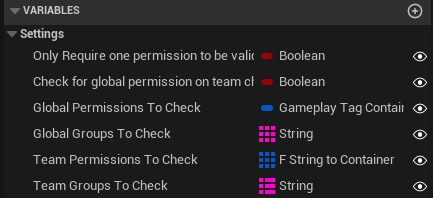
AC_Permission_Checker declares what the world actor expects before interaction is allowed.
Structures Explained #
The system relies on a compact set of data structures. They are straightforward, but together they define how permissions are stored, how groups are described, and how team-scoped permission data is represented.
F_Permission_Data #
A simple reusable container for permissions and groups.
|
Field |
Description |
|
Groups |
String array of group names attached to the permission data set. |
|
Permissions |
Gameplay tag container containing the permissions granted in that scope. |
F_Permission_Group #
Defines a reusable permission preset row for a global or team role.
|
Field |
Description |
|
Group Name |
The plain-text name of the role or preset. |
|
Group Inheritance |
String array of parent groups this group should inherit from. |
|
Permissions |
Gameplay tag container granted by the group itself. |
F_Player_Permissions #
Represents the permission state for a single player across both global and team scopes.
|
Field |
Description |
|
Playername |
The unique player identifier used by the runtime permission map. |
|
Global Permissions |
The player’s current global F_Permission_Data. |
|
Team Permissions |
Array of team-scoped entries so the same player can hold different roles in different teams. |
F_Team_Permission_Data #
Stores permission information for one specific team on a player.
|
Field |
Description |
|
Team Name |
Name of the relevant team, guild, clan, or party. |
|
Groups |
String array of team groups currently assigned to the player within that team. |
|
Permissions |
Gameplay tag container representing the player’s direct team permissions inside that team. |
F_Team_Permission_Group #
Stores the group definitions available within a specific team context.
|
Field |
Description |
|
Team Name |
The team that owns this set of group definitions. |
|
Permission Groups |
Array of F_Permission_Group entries available for that team. |
Data Tables Explained #
The system is intentionally data-driven. Rather than hardcoding every role in Blueprint, default group presets are stored in DataTables and read into runtime structures. This makes the permission model much easier to expand, tune, and rebalance.
DT_Permission_Groups_Global #
This table stores reusable global roles. These roles are not attached to one team; they apply at the whole-session level. The sample rows show how a Newcomer role can provide basic access while an Admin role can inherit the Newcomer role and then add broader capabilities on top.
- Use this table for project-wide roles such as Admin, Moderator, Support, Tester, or Newcomer.
- Each row uses F_Permission_Group, so inheritance and permissions are defined in the same format as other groups.
- Global groups are useful whenever access should not depend on a specific guild or team context.
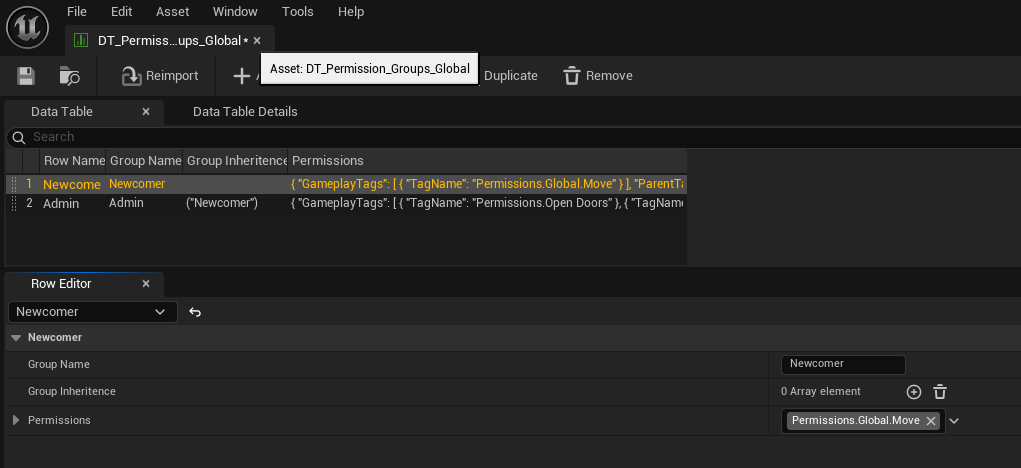
Example rows from the global permission group table.
DT_Permission_Groups_Team #
This table stores reusable team roles. These are the presets that can be assigned inside named teams. The provided examples show a typical rank ladder: Rookie at the bottom, Admin in the middle, and Leader inheriting Admin so the top role automatically keeps all lower capabilities.
- Use this table for guild roles, settlement roles, clan ranks, party leadership, or any player-created team structure.
- Because team names are supplied separately at runtime, the same role definitions can be reused across many teams.
- This table is also the basis for live team-group management, because the system can inject a preset and still modify the player or the group definition at runtime.
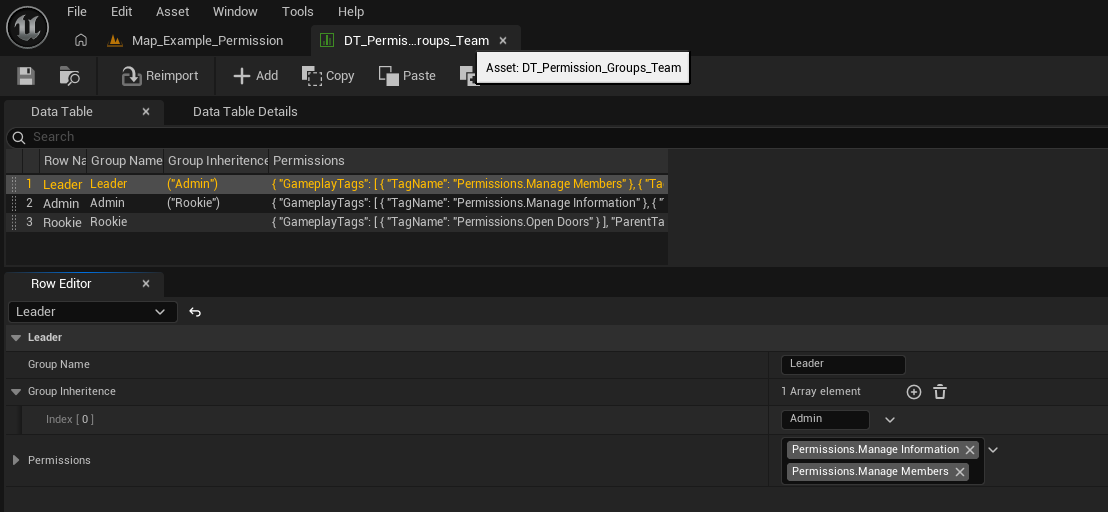
Example rows from the team permission group table.
Permission Checks in the World #
The world-facing side of the system is designed so that interactions can declare what they require and then reuse the same check logic everywhere. This prevents each actor from building its own special-case permission graph.
The permission checker can evaluate four types of requirements: specific global permissions, specific global groups, specific team permissions, and specific team groups. A designer can use just one of these, or combine them, depending on how the actor should behave.
- A guild chest might require a team group such as Leader or Admin.
- A management board might require a team permission such as Permissions.ManageInformation.
- A project-wide debug panel might require a global permission rather than a team permission.
- A world object can allow one valid permission to pass, or require all listed conditions to be true.
This component is especially useful because it keeps permission checks readable. Instead of writing large custom graphs on every actor, the actor simply declares what it cares about and the checker performs the evaluation.
Functions / Workflows to Use #
Although the underlying manager contains many utility and maintenance functions, the main buyer-facing workflows are easy to understand. Most day-to-day use falls into one of three categories: checking whether the local player is allowed, changing another player’s role or permissions, or configuring world actors to query those checks.
|
Workflow |
Main entry point(s) |
Use case |
|
Check global access |
Has Global Permissions / Has Global Group |
Use when the action should apply regardless of team context. |
|
Check team access |
Has Team Permissions / Has Team Group |
Use when the action only matters inside a named team. |
|
Manage global membership |
Can Manage Global Members + add/remove global group or permission events |
Use for admin tools or moderator flows affecting project-wide roles. |
|
Manage team membership |
Can Manage Team Members + add/remove team group or permission events |
Use for guild or clan role management. |
|
Manage team role capabilities |
Can Manage Information + change permission for team group event |
Use when a team role itself should be edited at runtime. |
|
Gate a world actor |
AC_Permission_Checker |
Use when a door, chest, station, or interactable should only work for approved users. |
Runtime feedback and change events #
AC_PC_Permission binds to permission and group change events on the owning client. The sample implementation uses these callbacks to generate information prompts when a global permission changes, a global group changes, a team permission changes, or a team group changes. This makes the system easier to understand in live gameplay and is especially helpful during moderation, testing, or guild-management flows.
Fast lookup and scalable storage #
The central manager initializes a player-permissions map so the system does not have to loop over the full player array every time it needs an index. This is an implementation detail, but it matters for buyers because it shows the system is designed to scale more cleanly than a purely array-scanning setup.
How To: Common Setup Tasks #
How to create a new global role #
- Open DT_Permission_Groups_Global.
- Add a new row and give it a clear plain-text Group Name such as Moderator, Builder, or Support.
- Fill the Permissions container with the global gameplay tags that role should grant.
- Add any parent roles into Group Inheritance if this role should build on top of an existing role.
- Save the table, then assign the group to players through the global group workflow.
How to create a new team role #
- Open DT_Permission_Groups_Team.
- Add a row for the role name, such as Recruit, Officer, Banker, or Leader.
- Fill the permission container with the team-scoped tags that role should grant.
- Use Group Inheritance when the role should include lower ranks automatically.
- Assign that row to a player inside a specific team context when the team is created or when the rank changes.
How to give a player a direct permission override #
- Use the add/remove global permission flow for session-wide overrides.
- Use the add/remove team permission flow for team-only overrides.
- Choose this route when one player needs a special exception without redefining the full group preset.
- Because checks resolve on the individual player, this is the cleanest way to handle unusual edge cases.
How to restrict a door, chest, or station #
- Add AC_Permission_Checker to the world actor.
- Decide whether the actor should care about global permissions, global groups, team permissions, or team groups.
- Populate the relevant checker fields with the required permission tags or group names.
- Enable Only Require One Permission To Be Valid if any one listed requirement should be enough.
- Leave it disabled if every supplied requirement must pass before interaction is allowed.
How to allow global admins through a team-locked interaction #
- Configure the actor primarily with team permission checks.
- Enable Check For Global Permission On Team Check on AC_Permission_Checker.
- This lets the checker try the equivalent global permission if the team-specific permission is not present.
- It is a useful pattern when developers or admins should still pass a team-restricted system.
How to let officers manage members but not edit the role definitions #
- Set the Manage Members Permission Requirements to the tag or tags officers should have.
- Keep Manage Information Permission Requirements more restrictive, so only higher ranks can edit team information or role capabilities.
- This cleanly separates member administration from deeper team-governance tools.
How to change what a team role can do at runtime #
- Use the change-permission-for-team-group workflow exposed through AC_PC_Permission.
- Gate that action with Can Manage Information so only approved users can modify the role definition.
- This is useful for live guild governance, election systems, or admin-driven support workflows.
- Because the system stores runtime group definitions per team context, changes can be team-specific rather than global.
How to work with dynamic team names #
- Pass team identifiers as strings consistently wherever they are used.
- Because group names and team names are plain strings, exact matching matters.
- This design is particularly useful for player-created guilds or runtime-generated teams where gameplay-tag authoring would be too rigid.
Example Flows #
New player joins the game #
A new player can begin with a simple global starter role such as Newcomer. That role grants the baseline permissions intended for all players. If the project later wants to elevate the player to moderator, admin, or another support role, it can add a broader global group without redesigning the rest of the system.
Player creates or joins a guild #
When a player becomes part of a named team, the system can assign a team role such as Rookie, Admin, or Leader inside that team context. The exact same role definitions can then be reused across many teams while still allowing each player to have different ranks in different groups.
Guild leader edits member access #
If the leader has the required member-management permission, they can add or remove team groups and direct team permissions for other members. If they also have the higher information-management permission, they can go a step further and alter what a team role itself is allowed to do.
Restricted world interaction #
A guild chest, settlement board, or management terminal can ask for a team group such as Leader or a team permission such as ManageInformation. The same object can optionally allow global administrators to pass via the fallback rule, making support and moderation easier in live multiplayer sessions.
Summary #
The Permission Manager is built around a clean idea: define reusable permission groups, keep the individual player as the final source of truth, and separate project-wide authority from team-scoped authority. From a buyer point of view, that gives the system a strong balance between structure and flexibility.
Global groups make it easy to define broad roles such as Admin or Moderator. Team groups make it easy to define guild, clan, or settlement ranks. Direct individual permissions make exceptions straightforward. AC_Permission_Checker brings all of that into the world so actors can ask permission questions without custom one-off graphs. Together, those pieces make the system practical for social games, multiplayer sandboxes, survival projects, role-based admin tools, and any design where access control needs to stay readable as the project grows.