
Background Music System
Updated May 25, 2026
The Background Music System controls ambient, regional, time-of-day, default, and battle music playlists. It is driven by DT_BackgroundMusic_Playlist and the AC_PC_BackgroundMusicSystem component on the player controller.
For shared setup guidance, see the Migration Guide and Integration Guide. Use the System Atlas to look up functions, variables, events, components, and ownership references. Use this page for music playlist setup and runtime behavior.
Related setup: Change Background Music and Battle Music.
Related Videos
Version note: Some videos may have been recorded before V4. Concepts still apply, but asset names, component names, and folder locations may differ. Treat this written documentation as the source of truth.
Manage your theme-based background and battle music walkthrough Play
Setup
The basic setup flow now lives in Change Background Music and Battle Music. In short, the system runs from AC_PC_BackgroundMusicSystem on the player controller and uses the playlist data described below.
Playlist Types
The system supports multiple playlist behaviors:
- Time-based playlists: Select tracks by in-game time, such as morning, evening, or night.
- Regional playlists: Change music when the player enters defined regions or biomes.
- Default playlist: Fallback music when no more specific condition applies.
- Battle music: Combat playlist that overrides ambient or regional music and fades in during battle.
Add a Playlist
Open DT_BackgroundMusic_Playlist.


The table uses the F_BackgroundMusic struct.
| Field | Purpose |
|---|---|
| Is Region Specific | When true, the entry only plays in the regions listed under Regions This Can Play In. |
| Regions This Can Play In | Gameplay Tag Container for region or biome tags such as Region.Forest, Region.Village, or Region.Desert. |
| Is Part of Day Specific | When true, the system chooses music from Music Per Part of Day. |
| Music Per Part of Day | Map from E_PartOfDay to a background music entry, such as Morning, Evening, or Night music. |
| Non Time Specific Music | Fallback Sound Cue or Sound Wave when time-specific logic is not used. |
For an ambient playlist that should play regardless of region or time of day, create a row with region-specific and part-of-day-specific logic disabled, then assign the desired non-time-specific music.

Use a Playlist
Open AC_PC_BackgroundMusicSystem on the player controller.

In the Details panel, find Default Playlists. Under Default Playlist to Play, select the row you created in DT_BackgroundMusic_Playlist.

The selected row becomes the default playlist. To change battle music, repeat the same process under Default Playlist to Play For Battle.

Battle Music
Battle music is an event-driven example that overrides the normal time-based or region-based playlist. Place the provided battle music Blueprint in the desired map areas to trigger combat music.
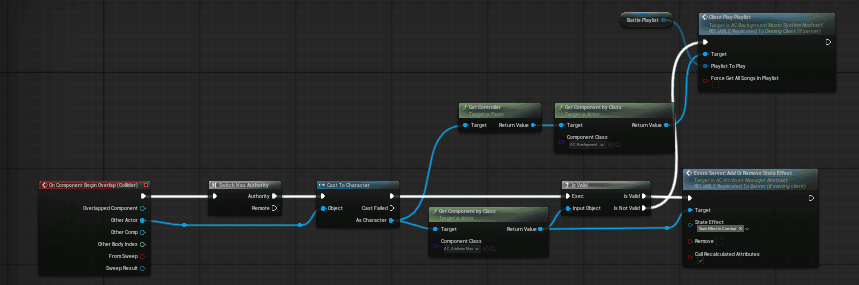
Runtime flow:
- Run an authority check so multiplayer logic executes consistently on the server.
- Confirm the overlapping actor is a valid character.
- Get the character’s Attribute Component through the component/interface path used by the project.
- Apply the In Combat state effect through Server_AddOrRemoveStatusEffect.
- Get the Background Music System component.
- Call Play Playlist with the battle music playlist.
- Fade smoothly from the current ambient or regional music into combat music.
The In Combat state effect can also be referenced by other systems, such as AI aggression or HUD indicators.