
Mineable Rocks
Updated May 25, 2026
The Mineable Rocks system provides two rock-harvesting workflows: stable staged static-mesh rocks and more dramatic Chaos-based rocks.
For shared setup guidance, see the Migration Guide and Integration Guide. Use the System Atlas to look up functions, variables, events, components, and ownership references. Use this page for Mineable Rocks-specific setup and tuning.
Related Videos
Some videos may have been recorded before V4. The same principles still apply, but asset names, component names, and folder locations may differ. Treat the current written documentation and V4 names as the source of truth.
Mineable Rocks Walkthrough Play
Rock Types
| Type | Best For | Notes |
|---|---|---|
| Staged Rocks | Predictable static-mesh harvesting. | Select a mesh in the configuration and tune stages. It has fewer visual effects but is stable. |
| Chaos-Based Rocks | More dramatic destructible visuals. | Requires more setup and is less predictable because it depends on Chaos behavior. |
Both rock types derive from the same parent class, which handles shared respawn logic. A supermaster class spawns the actual staged or Chaos-based rock only when hit by equipment that meets the requirements, keeping heavy rock logic out of the world until it is needed.
Material-Based Rocks
Material-based rocks first validate the damage source. The source must be equipment, and the accepted equipment type must be valid before damage can be applied.

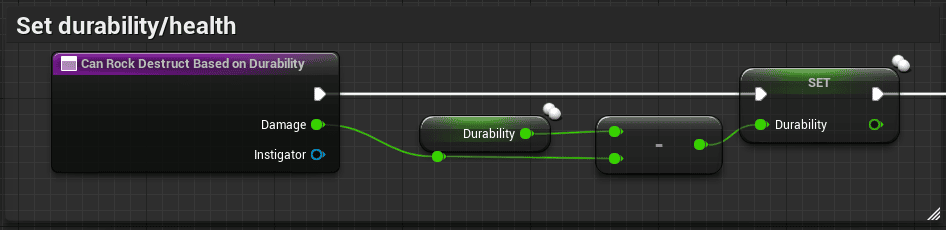
The rock’s durability changes based on the damage value from the equipment.
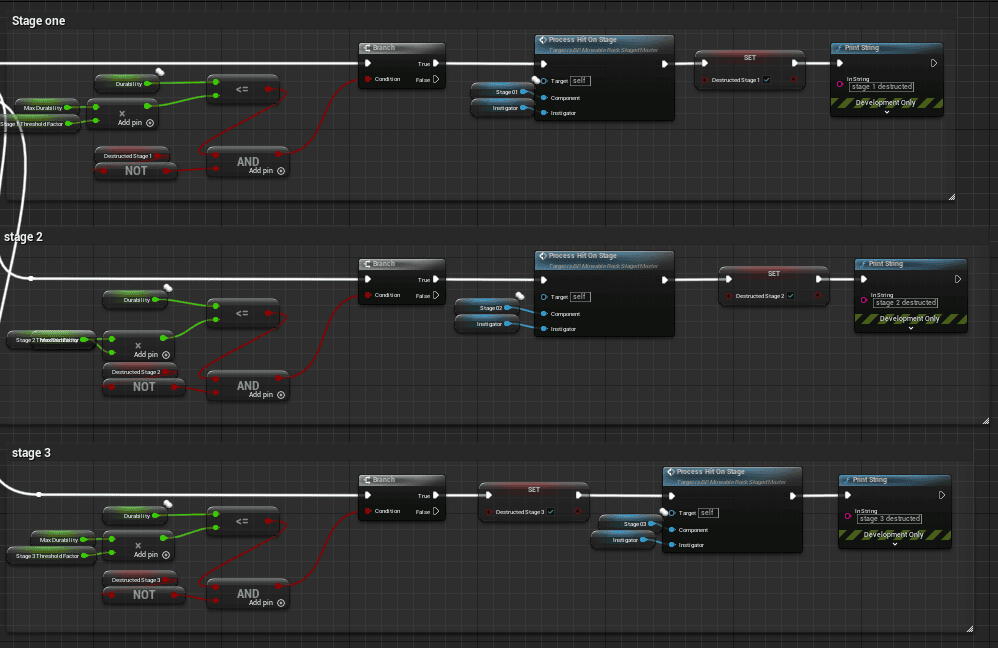
After damage is applied, the system checks whether enough damage has been dealt to advance to the next stage. When the final stage is destroyed, the selected ores are spawned.
Chaos Rocks
Chaos rocks use the same equipment validation as material-based rocks, but apply damage differently. When hit, the system spawns a Chaos WeaponImpact Blueprint. That sphere destroys the required segment for Chaos rocks.

When the rock breaks, the system destroys the relevant Chaos rock components.

Actor Foliage and PCG
Rocks can be placed with actor foliage, the foliage tool, a procedural foliage volume, or PCG.

For large worlds, PCG is recommended, especially with the advanced Biome generator and Mesh To Actor Swap system.
Add a New Staged Rock
- Create a child of the master configuration or duplicate an existing configuration.
- Select the static mesh in the class defaults.
- Tune the class defaults for the rock’s behavior.
- Test the rock in-game.


Add a New Chaos-Based Rock
Chaos rocks are more advanced. Use this path only when you are comfortable configuring Chaos geometry collections.
- Create a child of the master configuration or duplicate an existing one.
- Set up the class defaults.
- Create and assign the geometry collection.
- Test and tune the result.


Tune Chaos Breakage
If a Chaos rock breaks too quickly or too slowly, tune the mass requirement and force multiplier.
- Open the master Blueprint and enable Print Mass.
- Open the child config for the rock being hit.
- Check Mass Required To Be Chopped Down.
- Hit the destructible object and read the printed mass.
- Use the printed value as a starting point and adjust the mass threshold.
- Adjust the force multiplier if the rock breaks all at once or does not break at all.


