Skip to content
Games by Hyper
Sign Up / Login
Games by Hyper

Generic

  • QuickStart
  • Support
  • Purchase Options
  • Roadmap
  • FAQ
  • Learning
  • For Professional Studios

Templates

  • Template Logic and flexibility

Shared Infrastructure

  • Gameplay Tags
  • Datamanagement
  • Folder Structure

Item Management

  • Inventory
  • Jigsaw Inventory
  • List Inventory
  • Respawn Actor Manager
  • Hotbar
  • Crafting
  • Item Allocator
  • Vendor
  • Icon Creator
  • Interactive Foliage
  • Inspection System

Interaction and Feedback

  • Interaction System
  • Outliner System

UI

  • Main Menu
  • HUD
  • Information Prompt

Locomotion

  • Animation Framework
  • Extended Movement Component
  • Leader Posing
  • Custom-Skeletal-Meshes

Combat

  • Attribute Manager
  • Team Affiliation
  • Equipment Manager
  • Ragdoll System
  • Ability System
  • Target Locking
  • Weapon Attachment System
  • Limb System
  • Combat-framework

Construction and Survival Mechanics

  • Building System
  • Mineable Rocks
  • Tree Cutting
  • Farming System
  • Fishing System
  • Swimming System

Game Management

  • Global Save System
  • Respawn System
  • Session Manager
  • Game Mode System
  • Spectate System
  • Player Manager
  • Team Manager
  • Score Manager
  • Guild Manager
  • Party Manager

Multiplayer

  • Online Multiplayer Framework
  • Replication Subsystem
  • Chat System
  • Console Command Manager

AI

  • Basic AI
  • NPC Behavior System
  • Perception System
  • Companion System

Exploration and Narrative

  • Dialogue System
  • Memory System
  • Quest Manager
  • Map System
  • Teleport System
  • Guide System
  • Event Manager
  • Visual Novel System
  • Dungeon Adventure Kit
  • Region Manager

Progression and Leveling

  • Level Manager
  • Unlock System
  • Reputation System

Security and Control Systems

  • Drone System
  • Lock System
  • Security System
  • Defense System
  • Defense System – Modern
  • Defense System – Primitive

Character and Player Systems

  • Character Creator
  • Class System
  • Mount System
  • First Person

Environmental Control and Immersion

  • Time and Day Night Cycle management
  • Weather System
  • Background Music System
  • Footstep System

Environment Building

  • Mesh to Actor Swap System
  • Auto Landscape
  • Cave
  • Deform
  • Ditch
  • Exclusion
  • Forest
  • Forest-Basic
  • Lake
  • Level Instances
  • Mesh
  • Path
  • Props
  • Spline
  • Village
View Categories
  • Home
  • Docs
  • Extended Movement Component

Extended Movement Component

2 min read

Extended Movement Component #

Extended Movement Component #

The Extended Movement Component encapsulates input handling, movement, and animation for the character. This allows you to attach the component to any humanoid character and instantly take advantage of those features.


Basic vs Advanced #

There are two versions of the Extended Movement Component currently available (depending on which framework version you have), one Basic and one Advanced. Both still make use of UE's Character Movement (CharMoveComp) that is included with all Character blueprints, so it does not replace that, but extends it.

Extended Movement Basic #

This builds on an abstract class that defines the fundamental structure and expectations of the class. This version is not intended to be game-ready, but provides the bare minimum of functionality to demonstrate how such a component should work.

This implements the following movement features:

  • Moving left/right and forward/backward
  • Jumping

It also implements the following camera features:

  • Third Person camera
  • First Person camera (limited basic support)
  • Seamless blending between changing camera modes

Extended Movement Advanced #

This inherits from the basic component and adds the following features:

  • Crouching
  • Speed control (walk / run / sprint)
  • Jetpack
  • Ragdoll recovery (standing up)
  • Dodging

Movement Input #

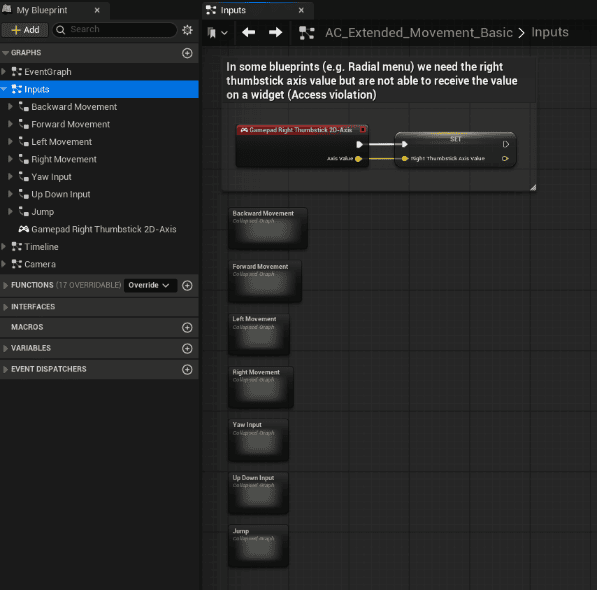
Input is handled using UE's Enhanced Input System. Since we use a component-driven architecture for modularity, all the movement input logic can be found in its own graph within the component class. To keep things organized, each type of input is also collapsed into it's own graph.


Camera Input #

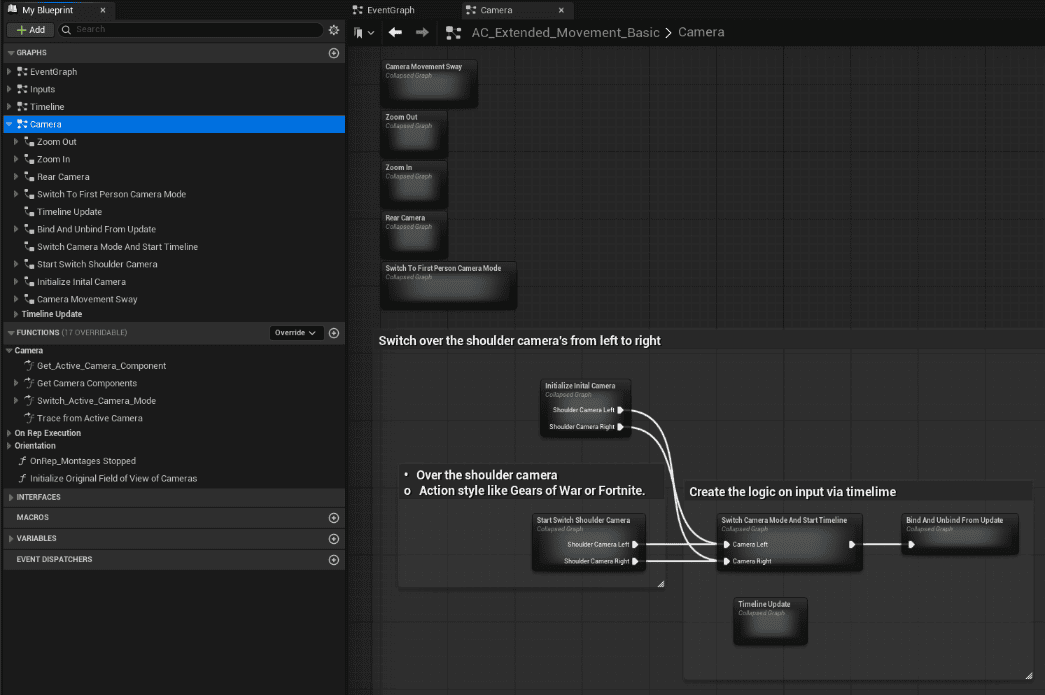
Likewise, camera movement (looking, zooming, etc) also has it's own graph, with various features being neatly organized into collapsed graphs.


A Note About Timelines #

Native Timeline nodes in Unreal Engine can behave unreliably inside Actor Components since they depend on the component’s tick state and world context. To ensure consistent timeline behavior (like camera transitions) the Basic blueprint includes its own custom timeline implementation. Please be aware of this if extending or building your own components.

What are your Feelings
Still stuck? How can we help?

How can we help?

Table of Contents
  • Extended Movement Component
    • Extended Movement Component
    • Basic vs Advanced
      • Extended Movement Basic
      • Extended Movement Advanced
    • Movement Input
    • Camera Input
    • A Note About Timelines

© 2025 Games by Hyper

X Reddit Patreon Discord Linkedin YouTube

Review Cart

No products in the cart.

We noticed you're visiting from Netherlands. We've updated our prices to Euro for your shopping convenience. Use United States (US) dollar instead. Dismiss

  • Hyper Bundle Configurator
  • Shop
    • Game Templates
    • Courses
    • Loyalty Store
    • Survival Modules
    • RPG Modules
    • Environment Building
    • Browse All
  • My account
  • Become a Member
  • Cart
  • Get Help
    • FAQ
    • Upgrade your Game Template
    • Documentation
  • About Hyper
  • News & Updates