Skip to content
Games by Hyper
Sign Up / Login
Games by Hyper

Generic

  • QuickStart
  • Support
  • Purchase Options
  • Roadmap
  • FAQ
  • Learning
  • For Professional Studios

Templates

  • Template Logic and flexibility

Shared Infrastructure

  • Gameplay Tags
  • Datamanagement
  • Folder Structure

Item Management

  • Inventory
  • Jigsaw Inventory
  • List Inventory
  • Respawn Actor Manager
  • Hotbar
  • Crafting
  • Item Allocator
  • Vendor
  • Icon Creator
  • Interactive Foliage
  • Inspection System

Interaction and Feedback

  • Interaction System
  • Outliner System

UI

  • Main Menu
  • HUD
  • Information Prompt

Locomotion

  • Animation Framework
  • Extended Movement Component
  • Leader Posing
  • Custom-Skeletal-Meshes

Combat

  • Attribute Manager
  • Team Affiliation
  • Equipment Manager
  • Ragdoll System
  • Ability System
  • Target Locking
  • Weapon Attachment System
  • Limb System
  • Combat-framework

Construction and Survival Mechanics

  • Building System
  • Mineable Rocks
  • Tree Cutting
  • Farming System
  • Fishing System
  • Swimming System

Game Management

  • Global Save System
  • Respawn System
  • Session Manager
  • Game Mode System
  • Spectate System
  • Player Manager
  • Team Manager
  • Score Manager
  • Guild Manager
  • Party Manager

Multiplayer

  • Online Multiplayer Framework
  • Replication Subsystem
  • Chat System
  • Console Command Manager

AI

  • Basic AI
  • NPC Behavior System
  • Perception System
  • Companion System

Exploration and Narrative

  • Dialogue System
  • Memory System
  • Quest Manager
  • Map System
  • Teleport System
  • Guide System
  • Event Manager
  • Visual Novel System
  • Dungeon Adventure Kit
  • Region Manager

Progression and Leveling

  • Level Manager
  • Unlock System
  • Reputation System

Security and Control Systems

  • Drone System
  • Lock System
  • Security System
  • Defense System
  • Defense System – Modern
  • Defense System – Primitive

Character and Player Systems

  • Character Creator
  • Class System
  • Mount System
  • First Person

Environmental Control and Immersion

  • Time and Day Night Cycle management
  • Weather System
  • Background Music System
  • Footstep System

Environment Building

  • Mesh to Actor Swap System
  • Auto Landscape
  • Cave
  • Deform
  • Ditch
  • Exclusion
  • Forest
  • Forest-Basic
  • Lake
  • Level Instances
  • Mesh
  • Path
  • Props
  • Spline
  • Village
View Categories
  • Home
  • Docs
  • Memory System

Memory System

8 min read

Memory System #

The Memory System allows characters, quests, and the world itself to remember past events and decisions.
It acts as a lightweight data-driven layer of persistent state, storing facts and experiences as Gameplay Tags (“memories”) that can be checked or modified by any system in the game.

Each actor with a Memory Component maintains its own memory record — a personalized history of what that character or system knows.
Memories can be added, removed, or queried dynamically at runtime, allowing gameplay, dialogue, and world logic to evolve based on what’s happened before.

Videos #

I am already using the memory management system in the dialogue system. I am showing in this video arround 7:12 how the memory management is being used to drive different types of dialogues. The same principles can be used for any simular system. E.g. we also use it in questing.

Play


Memory Structures #


Struct memory context #

The Memory Context struct defines the conditions under which a memory must or must not exist for certain gameplay elements — such as dialogue lines, quest stages, or NPC reactions — to trigger.
It acts as a lightweight, tag-based requirement checker, allowing for contextual and reactive storytelling.

Has these memories #

Type: Gameplay Tag Container

Defines which memories must exist for this action or dialogue to be valid.
If the actor (NPC or player) has all of the listed memory tags stored in their memory component, the associated event or dialogue can proceed.

Purpose:
Ensures that only characters or players who have experienced specific events, conversations, or states can unlock or trigger certain responses.

Examples:
  • Memory.Dialogue.HelpedVillager → Enables special gratitude dialogue from that NPC.
  • Memory.Quest.Completed.BanditCamp → Unlocks a new conversation acknowledging your victory.
  • Memory.Trait.KnownMerchant → Allows trading dialogue to appear.

Cannot Have These Memories #

Type: Gameplay Tag Container

Specifies which memories must not exist for this to be allowed.
If any of the listed memory tags are found in the actor’s memory component, the event, dialogue, or quest stage will be blocked or skipped.

Purpose:
Prevents repetition, conflicting logic, or inappropriate narrative triggers once a memory has already occurred.

Examples:
  • Memory.Dialogue.GoodbyeSaid → Prevents an NPC from repeating their farewell line.
  • Memory.Quest.Failed.Tutorial → Stops the system from offering the quest again.
  • Memory.Relationship.Betrayed → Blocks friendly conversation options.


Struct memory map marker #

The Memory Map Marker struct defines a link between a remembered event and a map or world marker that should appear (or disappear) based on memory conditions.
It bridges your Memory System and World Map UI, allowing memories — such as discovered locations, completed objectives, or past encounters — to dynamically affect what the player sees on their map.

Marker Tag #

Type: Gameplay Tag

Defines the unique identifier for the map marker linked to this memory.
The tag allows the system to easily check whether a marker should be shown, hidden, or modified based on the player’s stored memories.

Purpose:
Connects gameplay events (e.g., quest completions or discoveries) to visual map markers through a standardized tag system.

Examples:
  • Marker.Discovered.ForestCave → Unlocks the cave icon after discovering it.
  • Marker.Quest.BanditCamp → Displays a quest marker when a related memory exists.
  • Marker.Story.PastEvent → Reveals a story-related landmark after completing dialogue.

Map Element #

Type: Struct Map Element

The Map Element defines the visual, positional, and functional data of a map marker.
It’s a highly modular structure that supports multiple marker types — from simple discovery icons to full-featured travel points and world beacons — all controlled through the same system.

This struct acts as the foundation for how locations, NPCs, and events appear on the map and compass.


Example integrations of the memory system #

We use the memory system on multiple spots already. E.g. the Dialogue and Quest system. Nevertheless, it can be basically used everywhere since it is system agnostic.


Dialogue System #

The Dialogue System uses the Memory Component to create dynamic, context-aware conversations.
Memories allow NPCs and players to remember past choices, events, and interactions — enabling dialogue to adapt naturally over time.

This system ensures that the world reacts consistently to what the player and NPCs have experienced.

How Memories Are Used #

Dialogue Conditions (Struct_Option_Dialogue_Condition & Struct_Memory_Context) #

Before any dialogue option or sentence is displayed, the system checks memory requirements:

  • Has These Memories → The actor must already possess these memory tags to unlock a line or choice.
  • Cannot Have These Memories → The actor must not have these memories for the dialogue to appear.

This allows conversations to branch logically — characters acknowledge completed quests, betrayals, or friendships only when appropriate.

Example:
  • HasTheseMemories: Memory.Quest.Completed.RebuildVillage → Unlocks new friendly dialogue.
  • CannotHaveTheseMemories: Memory.Dialogue.BetrayedNPC → Blocks all cooperative responses.

Dialogue Outcomes (Struct_Dialogue_EventTriggers) #

When a player selects or completes a dialogue line, the system can add or remove memory tags as outcomes.
This means the dialogue itself can write new memories into the system, influencing future interactions.

Example:
  • Completing a persuasion line may add Memory.Dialogue.HelpedVillager.
  • Choosing an aggressive response may add Memory.Relationship.Hostile.

Later conversations with that same NPC — or even other NPCs connected to them — will detect those memories and adjust responses automatically.

Memory-Conditioned Predefined Sentences #

Some Predefined Sentences (such as greetings, reactions, or idle chatter) also use memory conditions.
These ensure NPCs only say certain lines once specific memories exist or are missing.

Example:
  • After the player saves an NPC, their idle line changes from “Can anyone help us?” to “You saved us — thank you again!”
    → Triggered because Memory.Dialogue.SavedByPlayer now exists.

This approach prevents repetitive or contradictory lines and gives the sense that NPCs truly remember previous events.

Player and NPC Memory Separation #

Both the Player and NPCs can have their own Memory Components, allowing for asymmetric memory states.

  • NPCs remember what they experienced (“You lied to me”).
  • The player remembers what they’ve done (“I spared the bandits”).
  • Dialogue checks each participant’s memories individually, enabling one-sided recollections, misunderstandings, or hidden information.

Under options on an index is where you will find all memory variables.


Quest System and memory management #

The Quest System uses the Memory Component to record player achievements, quest outcomes, and world-changing events.
By granting memories as quest rewards, the system allows completed objectives to have lasting narrative and gameplay effects beyond simple experience or items.

Memory as a Reward Type #

Location: Stage Rewards → Reward Type: Memory

When a quest stage or entire quest is completed, a Memory Tag can be granted as a reward instead of (or alongside) tangible rewards like gold or XP.
This adds a persistent “record” of what the player has accomplished, which other systems can later detect.

Example:
  • RewardType: Memory
  • Reward: Memory.Saved.NPCMan

This creates a permanent memory entry on the player (or their community) indicating that the NPC was rescued.

Purpose and Benefits #

Using Memory as a reward allows quests to communicate outcomes to other systems — enabling complex world reactivity without hard-coded logic.

After receiving a memory, other gameplay elements can check for it, such as:

  • Dialogue branches that acknowledge the quest’s completion.
  • NPCs changing behavior or attitude toward the player.
  • Map markers being revealed or removed.
  • New quests being unlocked based on remembered history.
Example Flow:
  • Player completes “Save the Lost Villager.”
  • The quest grants Memory.Saved.NPCMan.
  • Dialogue system detects this memory → Villager now greets the player gratefully.
  • Community morale increases or a new quest becomes available.


Adding/ removing memories #


Adding and Removing Memories – Concept Overview #

The Memory System is designed to let the world react dynamically to what happens — whether it’s through dialogue, quests, or world interactions.
Adding or removing memories is how the game remembers that something has happened or forgets when circumstances change.

Each system — combat, quests, exploration, dialogue — can update memories at runtime through Blueprint events like overlaps, triggers, or bindings.

Example 1 – Event Binding (Damage Memory Trigger) #

This method uses event binding to detect when something happens dynamically, such as an actor taking damage.

When an actor (for example, an NPC) is damaged:

  • The system checks who caused the damage (e.g., the player).
  • If it was the player, a memory tag like Memory.AttackedByPlayer is added to that NPC or their faction.

This means that the game “remembers” the interaction — the NPC can later react differently in dialogue (“You attacked me once already”) or in behavior (becoming hostile, fearful, etc.).

Conceptually:
Event bindings are reactive — they let the Memory System listen for events and record them as memories.
They’re ideal for things that happen organically during gameplay, such as combat, theft, discovery, or injuries.

When making your own bindings in AC_Memory, make sure to put your binding on “Bind all event listeners”

Example 2 – Overlap Trigger (Zone Memory Trigger) #

This second example shows a spatial trigger — an area in the world (like a collision sphere or trigger box) that adds or removes a memory when the player enters or leaves it.

For instance:

  • Entering a restricted zone could add Memory.InRestrictedArea.
  • Leaving it could remove that memory again.

Or it could be used to remember that the player has discovered a new landmark, started a tutorial, or entered a safe zone.

Conceptually:
Overlap triggers are proactive — they let you design world interactions that mark key discoveries, states, or transitions.
They’re especially useful for exploration, tutorials, or environmental storytelling.


Important functions #

Add Memory #

What it does: Persists a memory (Gameplay Tag) on the target’s Memory Component.
Use it for: Marking outcomes/events (saved NPC, discovered location, attacked by player, completed tutorial).
Notes / patterns:

  • Treats tags as idempotent (adding the same tag twice is fine).
  • Pair with timers if you need temporary state (“InCombat”, “RecentlyAte”).
  • Good entry point from dialogue outcomes, quest rewards, overlaps, or event bindings.
Example tags:
Memory.Saved.Blacksmith, Memory.Discovered.ForestCave, Memory.Dialogue.PromiseMade

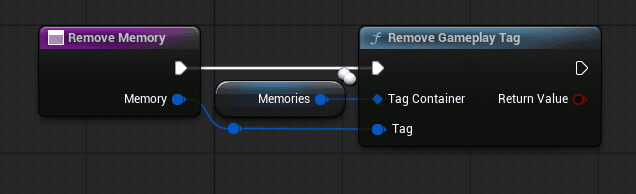
Remove Memory #

What it does: Deletes a memory (Gameplay Tag) from the component.
Use it for: Clearing temporary or mutually exclusive states (leaving zone, ending combat, finishing tutorial stage).
Notes / patterns:

  • Use to “toggle” states (enter/exit restricted area).
  • Useful for resetting repeatable content.
Example tags:
Memory.InRestrictedArea, Memory.InCombat, Memory.Tutorial.Active

Has Memory #

What it does: Quick boolean check: does the component contain this tag (or one of its parents, if you use hierarchical checks)?
Use it for: Lightweight gates in UI, AI, dialogue, quests, and map logic.
Notes / patterns:

  • Ideal for cheap decisions (show/hide option, enable/disable action).
  • Keep checks local and frequent; avoid long dependency chains.

Common gates:
Show greeting variant if Has Memory: Memory.Dialogue.HelpedVillager
Unlock vendor discount if Has Memory: Memory.Rep.Trusted

Matches Memory Context #

What it does: Validates a full Memory Context (two containers):

  • Has These Memories (must all exist)
  • Cannot Have These Memories (none may exist)
    Returns true only if both conditions are satisfied.
    Use it for: Branching logic in dialogue options, quest availability, map marker visibility, scripted sequences.
    Notes / patterns:
  • Prefer this over manual multi-checks; it keeps authoring consistent.
  • Great for data-driven conditions in DataTables/DataAssets.

What are your Feelings
Still stuck? How can we help?

How can we help?

Table of Contents
  • Memory System
    • Videos
    • Memory Structures
    • Struct memory context
      • Has these memories
      • Cannot Have These Memories
    • Struct memory map marker
      • Marker Tag
      • Map Element
    • Example integrations of the memory system
    • Dialogue System
      • How Memories Are Used
      • Dialogue Conditions (Struct_Option_Dialogue_Condition & Struct_Memory_Context)
      • Dialogue Outcomes (Struct_Dialogue_EventTriggers)
      • Memory-Conditioned Predefined Sentences
      • Player and NPC Memory Separation
    • Quest System and memory management
      • Memory as a Reward Type
      • Purpose and Benefits
    • Adding/ removing memories
    • Adding and Removing Memories - Concept Overview
      • Example 1 - Event Binding (Damage Memory Trigger)
      • Example 2 - Overlap Trigger (Zone Memory Trigger)
    • Important functions
      • Add Memory
      • Remove Memory
      • Has Memory
      • Matches Memory Context

© 2025 Games by Hyper

X Reddit Patreon Discord Linkedin YouTube

Review Cart

No products in the cart.

We noticed you're visiting from Netherlands. We've updated our prices to Euro for your shopping convenience. Use United States (US) dollar instead. Dismiss

  • Hyper Bundle Configurator
  • Shop
    • Game Templates
    • Courses
    • Loyalty Store
    • Survival Modules
    • RPG Modules
    • Environment Building
    • Browse All
  • My account
  • Become a Member
  • Cart
  • Get Help
    • FAQ
    • Upgrade your Game Template
    • Documentation
  • About Hyper
  • News & Updates