Skip to content
Games by Hyper
Sign Up / Login
Games by Hyper

Generic

  • QuickStart
  • Support
  • Purchase Options
  • Roadmap
  • FAQ
  • Learning
  • For Professional Studios

Templates

  • Template Logic and flexibility

Shared Infrastructure

  • Gameplay Tags
  • Datamanagement
  • Folder Structure

Item Management

  • Inventory
  • Jigsaw Inventory
  • List Inventory
  • Respawn Actor Manager
  • Hotbar
  • Crafting
  • Item Allocator
  • Vendor
  • Icon Creator
  • Interactive Foliage
  • Inspection System

Interaction and Feedback

  • Interaction System
  • Outliner System

UI

  • Main Menu
  • HUD
  • Information Prompt

Locomotion

  • Animation Framework
  • Extended Movement Component
  • Leader Posing
  • Custom-Skeletal-Meshes

Combat

  • Attribute Manager
  • Team Affiliation
  • Equipment Manager
  • Ragdoll System
  • Ability System
  • Target Locking
  • Weapon Attachment System
  • Limb System
  • Combat-framework

Construction and Survival Mechanics

  • Building System
  • Mineable Rocks
  • Tree Cutting
  • Farming System
  • Fishing System
  • Swimming System

Game Management

  • Global Save System
  • Respawn System
  • Session Manager
  • Game Mode System
  • Spectate System
  • Player Manager
  • Team Manager
  • Score Manager
  • Guild Manager
  • Party Manager

Multiplayer

  • Online Multiplayer Framework
  • Replication Subsystem
  • Chat System
  • Console Command Manager

AI

  • Basic AI
  • NPC Behavior System
  • Perception System
  • Companion System

Exploration and Narrative

  • Dialogue System
  • Memory System
  • Quest Manager
  • Map System
  • Teleport System
  • Guide System
  • Event Manager
  • Visual Novel System
  • Dungeon Adventure Kit
  • Region Manager

Progression and Leveling

  • Level Manager
  • Unlock System
  • Reputation System

Security and Control Systems

  • Drone System
  • Lock System
  • Security System
  • Defense System
  • Defense System – Modern
  • Defense System – Primitive

Character and Player Systems

  • Character Creator
  • Class System
  • Mount System
  • First Person

Environmental Control and Immersion

  • Time and Day Night Cycle management
  • Weather System
  • Background Music System
  • Footstep System

Environment Building

  • Mesh to Actor Swap System
  • Auto Landscape
  • Cave
  • Deform
  • Ditch
  • Exclusion
  • Forest
  • Forest-Basic
  • Lake
  • Level Instances
  • Mesh
  • Path
  • Props
  • Spline
  • Village
View Categories
  • Home
  • Docs
  • Game Mode System

Game Mode System

23 min read

Game Mode System #

  • Overview
  • Prerequisites
    • Session Manager Required
    • Related Systems
  • Core Concepts
    • What Is the Game Mode System?
    • How It Works
    • Arena-Based vs Open-World
  • AC_SessionManager_Arena_Base
    • Component Location
    • Inheritance from SessionManager
    • Core Functionality
  • Game Loop
    • Game Loop Phases
    • Waiting for Start Phase
    • Main Game Phase
    • Game End Phase
    • Round-Based Games
  • Game Settings
    • Arena-Specific Settings
    • DA_GameMode_Defaults
    • Configurable Settings
  • Player Management
    • Player Freezing
    • Minimum Players to Start
    • Player Ready State
  • Multi-Game Type Support
    • BPI_GameplayTags Interface
    • Actor Filtering by Game Type
    • Setting Up Multi-Type Maps
  • Win Conditions
    • Win Requirements
    • Scoring Integration
    • Score Types
  • Round System
    • Round-Based Games
    • Round Winner Determination
    • Score Accumulation
  • AI Support
    • Fill Lobby with AI
    • AI Spawning
    • AI Replacement
    • Team Balancing
  • Implemented Game Modes
    • Overview of Implementations
    • Team Deathmatch
    • Search and Destroy
    • Free for All
    • Domination
    • Capture the Flag
    • Battle Royale
  • Template Game Modes
    • Zombies Template
    • Extraction Template
  • Game Mode Components
    • Component Structure
    • Creating Custom Game Modes
  • How To Guides
    • Setting Up a Game Mode
    • Configuring Game Settings
    • Creating Multi-Type Maps
    • Implementing Custom Game Mode
  • OVERVIEW

This documentation explains the Game Mode System, which provides arena-based game mode functionality built on top of the Session Manager, including game loops, win conditions, rounds, AI support, and multiple implemented game types.

What Is the Game Mode System?:

The Game Mode System extends the Session Manager to create complete game loops for arena-based shooters (and other game types). It handles waiting phases, game timers, win conditions, round systems, and includes fully implemented game modes like Team Deathmatch, Search and Destroy, and more.

Key Features:

  • ✅ Built on Session Manager: Inherits and extends Session Manager functionality
  • ✅ Complete Game Loop: Waiting → Playing → Game End → Next Round/Game
  • ✅ Player Freezing: Freeze players during waiting phase (configurable)
  • ✅ Multi-Game Type Maps: Support multiple game types in one level
  • ✅ Round System: Round-based games with round winners
  • ✅ Win Conditions: Time limits, score requirements, objectives
  • ✅ AI Support: Fill lobby with AI, automatic team balancing
  • ✅ 6 Implemented Modes: Team Deathmatch, Search & Destroy, Free for All, Domination, Capture the Flag, Battle Royale
  • ✅ Template Modes: Zombies and Extraction templates (for custom implementation)
  • ✅ Score Integration: Works with Score Manager and Team Manager
  • ✅ DA_GameMode_Defaults: Data assets defining default settings per game type

Use Cases:

  • Arena-based shooters (Call of Duty-style)
  • Round-based competitive games
  • Battle royale games
  • Team-based objective games
  • Open-world game modes (with adaptation)

Prerequisites #

Session Manager Required #

Important: The Game Mode System requires the Session Manager.

Read Session Manager documentation first:

  • Game Mode System inherits from Session Manager
  • Session Manager handles session hosting, lobbies, playlists
  • Game Mode System extends with game loop logic

Without Session Manager:

  • Cannot host sessions
  • Cannot use playlists
  • Cannot use game mode features

Setup order:

  1. Set up Session Manager (see Session Manager documentation)
  2. Set up Game Mode System (this documentation)

What Session Manager Provides:

Session Manager handles:

  • Hosting sessions
  • Server browser
  • Playlists
  • Session settings
  • Game settings
  • Lobby system

Game Mode System adds:

  • Game loop (waiting, playing, ending)
  • Win conditions
  • Round system
  • Player freezing
  • AI spawning
  • Game-specific logic

Related Systems #

Systems Used by Game Mode:

Score Manager (separate documentation):

Handles:

  • Player scores
  • Team scores
  • Kill/assist/death tracking
  • Scoreboard
  • Win-based vs aggregate scoring

Game Mode System integrates with Score Manager for win conditions.

See Score Manager documentation for details.

Team Manager (separate documentation):

Handles:

  • Team assignment
  • Team balancing
  • Team composition
  • AI team assignment

Game Mode System uses Team Manager for team-based modes.

See Team Manager documentation for details.

Player Manager (separate documentation):

Handles:

  • Player state
  • Player data
  • Player tracking

Game Mode System integrates with Player Manager.

See Player Manager documentation for details.


Core concepts #

What Is the Game Mode System? #

The Game Mode System is an extension of the Session Manager that provides complete game loop functionality for arena-based games.

Key Differences from Session Manager:

Session Manager:

  • Hosts sessions
  • Manages playlists
  • Handles level transitions
  • Generic session management

Game Mode System (extends Session Manager):

  • Adds game loop (waiting → playing → end)
  • Adds win condition checking
  • Adds round system
  • Adds player freezing
  • Adds AI spawning
  • Adds game-specific logic (bomb planting, flag capturing, etc.)

How It Works #

Game Mode Flow:

  1. Session Manager hosts session
  2. Loads game level
  3. Game Mode System takes over:
 Phase 1 - Waiting for Start:
 - Wait for minimum players (game setting)
 - Countdown timer (game setting: Waiting for Start Time)
 - Freeze players (optional, game setting)
 - Players spawn at spawn points

 Phase 2 - Main Game:
 - Unfreeze players (if frozen)
 - Main game timer starts (game setting: Main Loop Time)
 - Players play game
 - Score tracked
 - Win condition checked (score requirement or time limit)

 Phase 3 - Game/Round End:
 - Game/Round ends (win condition met or time up)
 - If round-based: Next round or game over
 - If not round-based: Game over

 Phase 4 - After Game:
 - Session Manager handles:
 - Next game in playlist
 - Return to lobby
 - Disband session
 - (See Session Manager documentation)
Example – Team Deathmatch:

Session hosted with Team Deathmatch playlist:

  1. Level loads: Map_Shipment
  2. Waiting Phase:
 - Wait for 2 players minimum (setting)
 - 10 second countdown (Waiting for Start Time)
 - Players frozen at spawn points
  1. Main Game:
 - Players unfrozen
 - 10 minute timer starts (Main Loop Time)
 - Players kill each other
 - Score tracked (aggregate scoring)
 - Win condition: 50 kills (game setting)
  1. Game End:
 - Team reaches 50 kills OR time expires
 - Winner determined
 - Scoreboard shown
  1. Next Game:
 - Session Manager loads next game in playlist
 - Or return to lobby
 - Or disband

Arena-Based vs Open-World #

Arena-Based Focus:

Game Mode System designed for arena-based shooters:

  • Match-based gameplay
  • Clear start and end
  • Spawn points
  • Time limits
  • Score/objective goals
Examples:
  • Team Deathmatch
  • Search and Destroy
  • Domination
  • Capture the Flag

Open-World Adaptation:

Can be adapted for open-world games:

  • Persistent sessions (long/no time limit)
  • Objective-based instead of score-based
  • No player freezing
  • Custom win conditions
Examples:
  • Survival games (like Ark)
  • Battle royale (shrinking zone)
  • Extraction shooters

Requires custom implementation/modification.

4 AC_SESSIONMANAGER_ARENA_BASE

Component Name: AC_SessionManager_Arena_Base

Location: GameState

Component Location #

Where to Add:

Component: AC_SessionManager_Arena_Base

Location: GameState blueprint

Why GameState:

  • Server-authoritative
  • Persists across level transitions
  • Accessible to all players
  • Manages global game state

Relationship to Session Manager:

GameState has:

  • AC_SessionManager_Base (base session functionality)
  • AC_SessionManager_Arena_Base (game mode functionality)

AC_SessionManager_Arena_Base inherits from AC_SessionManager_Base.

Extends session management with game loop logic.

Inheritance from SessionManager #

Inheritance Structure:

AC_SessionManager_Base

 ↓ (inherits)

AC_SessionManager_Arena_Base

 ↓ (inherits)

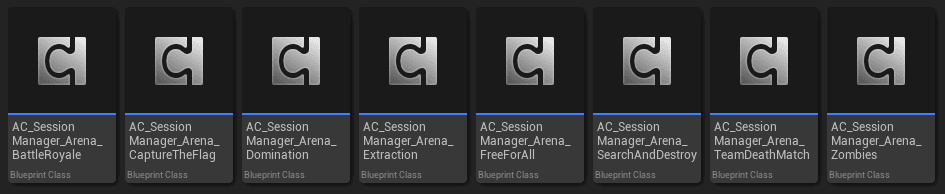
AC_SessionManager_Arena_TeamDeathmatch

AC_SessionManager_Arena_SearchAndDestroy

AC_SessionManager_Arena_FreeForAll

AC_SessionManager_Arena_Domination

AC_SessionManager_Arena_CaptureTheFlag

AC_SessionManager_Arena_BattleRoyale

AC_SessionManager_Arena_Zombies (template)

AC_SessionManager_Arena_Extraction (template)

What Gets Inherited:

From Session Manager:

  • Session hosting
  • Level transitions
  • Playlist management
  • Session settings
  • Game settings

From AC_SessionManager_Arena_Base:

  • Game loop phases
  • Player freezing
  • Win condition checking
  • Round system
  • AI spawning

What Gets Overridden:

AC_SessionManager_Arena_Base overrides:

  • Game start logic
  • Game end logic
  • Level transition logic

Specific game modes override:

  • Win condition checking
  • Score calculation
  • Game-specific logic (bomb planting, flag capturing, etc.)

Core Functionality #

What AC_SessionManager_Arena_Base Provides:

Game Loop Management:

  • Waiting for start phase
  • Main game phase
  • Game end phase
  • Round management

Player Management:

  • Player freezing during waiting
  • Minimum players check
  • Player ready state

AI Management:

  • AI spawning
  • AI team assignment
  • AI replacement when players join

Win Condition:

  • Score checking
  • Time limit checking
  • Round winner determination

Actor Filtering:

  • Remove irrelevant actors based on game type
  • BPI_GameplayTags interface checking

Game loop #

Game Loop Phases #

Four Main Phases:

Phase 1: Waiting for Start

  • Duration: Waiting for Start Time (game setting)
  • Conditions: Minimum players joined (game setting)
  • Player State: Frozen (optional, game setting)
  • Timer: Countdown to game start

Phase 2: Main Game

  • Duration: Main Loop Time (game setting)
  • Player State: Playing
  • Score: Tracked
  • Win Check: Continuous (score requirement or time limit)

Phase 3: Game/Round End

  • Trigger: Win condition met or time expired
  • Actions: Determine winner, show scoreboard
  • Round Check: If round-based, next round or game over

Phase 4: After Game

  • Handled by: Session Manager
  • Options: Next game, return to lobby, or disband
  • See: Session Manager documentation

Waiting for Start Phase #

Purpose: Allow players to join and prepare before game starts.

Phase Behavior:

  1. Level loads
  2. Players spawn at spawn points
  3. Check minimum players (game setting: Minimum Players to Start)
 - If not met: Wait for more players
 - If met: Start countdown
  1. Countdown timer (game setting: Waiting for Start Time)
 - Example: 10 seconds
 - Display countdown to players
  1. Player freezing (optional, game setting: Freeze Players)
 - If enabled: Players cannot move/shoot
 - If disabled: Players can move freely (e.g., Battle Royale spawn island)
  1. Timer expires → Transition to Main Game Phase
Example – Call of Duty Style:

Settings:

  • Minimum Players to Start: 2
  • Waiting for Start Time: 10 seconds
  • Freeze Players: True

Behavior:

  1. Level loads
  2. Player 1 joins → Wait for more players
  3. Player 2 joins → Minimum met, start countdown
  4. 10 second countdown shown
  5. Players frozen at spawn points
  6. Countdown reaches 0 → Unfreeze, start game
Example – Battle Royale Style:

Settings:

  • Minimum Players to Start: 10
  • Waiting for Start Time: 30 seconds
  • Freeze Players: False

Behavior:

  1. Level loads (spawn island)
  2. Players join, can move freely on island
  3. Once 10 players joined: 30 second countdown
  4. Players can explore spawn island during countdown
  5. Countdown reaches 0 → Transport to game map, start game

Main Game Phase #

Purpose: Active gameplay phase.

Phase Behavior:

  1. Players unfrozen (if frozen)
  2. Main game timer starts (game setting: Main Loop Time)
 - Example: 10 minutes
  1. Players play game:
 - Kill, capture objectives, plant bombs, etc.
 - Scores tracked (see Score Manager documentation)
  1. Continuous win condition check:
 - Check if score requirement met (game setting)
 - Check if time limit reached
  1. When win condition met → Transition to Game End Phase

Win Condition Examples:

Team Deathmatch:

  • Win Requirement: 50 kills
  • Time Limit: 10 minutes
  • Win if: Team reaches 50 kills OR time expires (highest score wins)

Search and Destroy:

  • Win Requirement: 6 rounds won
  • Time per Round: 2 minutes
  • Win if: Team wins 6 rounds

Domination:

  • Win Requirement: 200 points
  • Time Limit: 15 minutes
  • Win if: Team reaches 200 points OR time expires

Game End Phase #

Purpose: Determine winner and transition.

Phase Behavior:

  1. Game/Round ends (win condition met)
  2. Determine winner:
 - Highest score
 - Objective completed
 - Round winner
  1. Show scoreboard (see Score Manager documentation)
  2. If round-based game:
 - Check if more rounds needed
 - If yes: Reset for next round
 - If no: Game over
  1. If not round-based:
 - Game over
  1. Transition handled by Session Manager:
 - Next game in playlist
 - Return to lobby
 - Disband session

Round-Based Games #

What Are Round-Based Games:

Games with multiple rounds, each round has a winner.

Team with most rounds won is game winner.

Examples:
  • Search and Destroy: First to 6 rounds
  • Gun Game: Multiple rounds
  • Elimination modes

Round Flow:

Game Setting: Round-Based = True

Game Setting: Rounds to Win = 6

Round 1:

  1. Waiting for start phase
  2. Main game phase (1 round)
  3. Round ends (objective or time)
  4. Round winner determined
  5. Round score updated (Team A: 1, Team B: 0)

Round 2:

  1. Players respawn
  2. Main game phase (1 round)
  3. Round ends
  4. Round winner determined
  5. Round score updated (Team A: 2, Team B: 0)

Continue until:

  • Team A reaches 6 rounds → Team A wins game
  • OR all rounds played → Highest score wins

Round Winner:

Each round:

  • Team with highest points wins round (automatic)
  • Round score incremented for winner
  • Check if Rounds to Win reached
  • If not: Next round
  • If yes: Game over

Score Handling:

Per Round:

  • Player scores tracked
  • Team scores calculated
  • Round winner based on team score
  • Scores may reset per round (game-specific)

For Game:

  • Round wins tracked separately
  • Final winner based on round wins

Game settings #

Arena-Specific Settings #

Game Mode Settings (in addition to Session Manager settings):

All are Struct_GameSetting entries (see Session Manager documentation):

Waiting for Start Time (Number):

  • How long to wait before game starts
  • Configurable

Main Loop Time (Number):

  • How long main game phase lasts
  • Configurable

Minimum Players to Start (Number):

  • Minimum players needed to start countdown
  • Configurable

Freeze Players (Boolean):

  • Freeze players during waiting phase?
  • Configurable

Round-Based (Boolean):

  • Is this a round-based game?
  • Configurable

Rounds to Win (Number):

  • How many rounds to win game
  • Configurable
  • Only used if Round-Based = True

Fill Lobby with AI (Boolean):

  • Spawn AI to fill lobby?
  • Configurable

(Plus game type specific settings – see below)

DA_GameMode_Defaults #

Data Asset Structure:

Data Assets: DA_GameMode_Defaults_[GameType]

Examples:
  • DA_GameMode_Defaults_TeamDeathmatch
  • DA_GameMode_Defaults_SearchAndDestroy
  • DA_GameMode_Defaults_Domination
  • DA_GameMode_Defaults_CaptureTheFlag
  • DA_GameMode_Defaults_FreeForAll
  • DA_GameMode_Defaults_BattleRoyale
  • DA_GameMode_Defaults_Zombies
  • DA_GameMode_Defaults_Extraction

What Data Assets Contain:

Default settings for each game type:

Scoring Settings:

  • Kill Score: 100
  • Assist Score: 50
  • Death Score: 0 (or -10 for penalty)
  • Objective Score: Varies per game type
 - Capture Score (Domination/CTF)
 - Plant/Defuse Score (Search and Destroy)
 - Control Point Score (Domination)

Game Settings:

  • Default Waiting Time
  • Default Main Loop Time
  • Default Round settings
  • Default Win requirements

These serve as defaults when creating new playlists.

Users can override in game settings.

Configurable Settings #

Per Game Type Settings:

Team Deathmatch:

  • Kills to Win: 50
  • Time Limit: 10 minutes
  • Kill Score: 100
  • Assist Score: 50
  • Death Score: -10

Search and Destroy:

  • Round-Based: True
  • Rounds to Win: 6
  • Round Time Limit: 2 minutes
  • Plant Score: 200
  • Defuse Score: 200
  • Kill Score: 100

Domination:

  • Points to Win: 200
  • Time Limit: 15 minutes
  • Capture Score: 100
  • Control Score: 10 points per second
  • Kill Score: 50

Capture the Flag:

  • Captures to Win: 3
  • Time Limit: 10 minutes
  • Capture Score: 500
  • Return Score: 100
  • Kill Score: 50

Battle Royale:

  • Players: 100
  • Freeze Players: False (spawn island)
  • Zone Shrink Timing: Custom
  • Last Team Standing Wins

Player management #

Player Freezing #

What Is Player Freezing:

During waiting phase, prevent players from:

  • Moving
  • Shooting
  • Using abilities
  • Interacting

Purpose:

  • Fair start (everyone starts at same time)
  • Prevent early kills
  • Allow players to prepare

Configuration:

Game Setting: Freeze Players (Boolean)

If True:

  • Players frozen during waiting phase
  • Unfrozen when main game starts

If False:

  • Players can move during waiting
  • Useful for spawn island scenarios (Battle Royale)
  • Useful for open-world modes

Minimum Players to Start #

Purpose: Ensure enough players before starting game.

How It Works:

Game Setting: Minimum Players to Start

Behavior:

  1. Level loads
  2. Check player count
  3. If count < minimum:
 - Wait for more players
 - Show "Waiting for players..." message
  1. If count >= minimum:
 - Start countdown (Waiting for Start Time)
 - Proceed to game start
Examples:

Team Deathmatch:

  • Minimum Players: 2
  • Need at least 1 player per team

Battle Royale:

  • Minimum Players: 20
  • Need enough for meaningful game

Free for All:

  • Minimum Players: 3
  • Need multiple competitors

Player Ready State #

Ready Logic:

Players do NOT manually mark ready.

As soon as player joins:

  • Player is considered “ready”
  • Counts toward minimum players
  • Can participate when game starts

No “ready up” button needed.


8 multi-game type support #

BPI_GameplayTags Interface #

What Is BPI_GameplayTags:

Interface name: BPI_GameplayTags

Purpose: Tag actors with game type they belong to

Allows multiple game types in one level

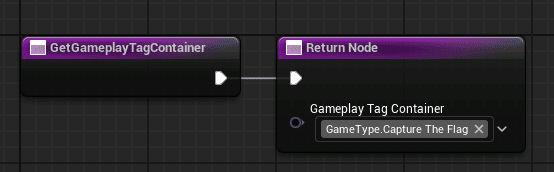
Interface Function:

Interface has function that returns gameplay tag container.

Example Implementation:

Actor implements BPI_GameplayTags

Function: GetGameplayTags() → Returns Gameplay Tag Container

Returns tags like:

  • GameType.CaptureTheFlag
  • GameType.SearchAndDestroy
  • GameType.Domination

Actor Filtering by Game Type #

How Filtering Works:

When level loads:

  1. Game Mode System checks current game type
 - Example: Playing Domination
  1. Query all actors with BPI_GameplayTags interface
  2. For each actor:
 - Call GetGameplayTags()
 - Check if tag matches current game type
 - If matches: Keep actor (don't destroy)
 - If doesn't match: Destroy actor
  1. Only relevant actors remain in level
Example:

Map has:

  • 3 Capture the Flag flags (tagged: GameType.CaptureTheFlag)
  • 2 Search and Destroy bombs (tagged: GameType.SearchAndDestroy)
  • 5 Domination control points (tagged: GameType.Domination)

Playing Domination:

  1. System checks all actors
  2. Destroys CTF flags (wrong game type)
  3. Destroys S&D bombs (wrong game type)
  4. Keeps domination points (correct game type)
  5. Players only see domination objectives

Actors Without Interface:

Static meshes, environment, etc.:

  • No BPI_GameplayTags interface
  • Not destroyed
  • Always present in level

Only game-specific actors need interface.

Setting Up Multi-Type Maps #

Step 1 – Create Actors for Each Game Type: #

In level:

  • Place CTF flags
  • Place S&D bombs
  • Place Domination points
  • Place any game-specific actors

Step 2 – Add Interface to Actors: #

For each game-specific actor:

  1. Open actor blueprint
  2. Add interface: BPI_GameplayTags
  3. Implement GetGameplayTags() function
  4. Return appropriate tag container

Step 3 – Configure Tags: #

CTF Flag Actor:

  • GetGameplayTags() returns: GameType.CaptureTheFlag

S&D Bomb Actor:

  • GetGameplayTags() returns: GameType.SearchAndDestroy

Domination Point Actor:

  • GetGameplayTags() returns: GameType.Domination

Step 4 – Play: #

When hosting session:

  • Select game type: Domination
  • Load level
  • Game Mode System filters actors
  • Only Domination points visible

Win conditions #

Win Requirements #

How Win Requirements Work:

Game ends when:

  • Score requirement met (game setting)
  • OR time limit reached (game setting)

Winner:

  • Team/Player with highest score
  • Or team that completed objective

Win Requirement Settings:

Configured in game settings (DA_GameMode_Defaults):

Team Deathmatch:

  • Kills to Win: 50
  • Time Limit: 10 minutes
  • Win: First to 50 kills OR highest at 10 min

Search and Destroy:

  • Rounds to Win: 6
  • Round Time: 2 minutes
  • Win: First to 6 rounds

Domination:

  • Points to Win: 200
  • Time Limit: 15 minutes
  • Win: First to 200 points OR highest at 15 min

Scoring Integration #

Score Manager Integration:

For detailed scoring information, see Score Manager documentation.

Brief Overview:

Game Mode System integrates with Score Manager:

Score Tracking:

  • Kills, deaths, assists tracked
  • Objective scores tracked
  • Team scores calculated

Score Usage:

  • Win condition checking
  • Round winner determination
  • Final winner determination

Settings:

  • Kill Score, Assist Score, etc. in DA_GameMode_Defaults
  • Used by Score Manager to calculate points

Score Types #

Two Scoring Types (brief explanation, see Score Manager docs):

Aggregate Scoring:

Used by: Team Deathmatch, Free for All

How it works:

  • Add up all player scores
  • Team score = sum of player scores
  • Win based on total team score
Example:

Team A:

  • Player 1: 2000 points (20 kills × 100)
  • Player 2: 1500 points (15 kills × 100)
  • Team Total: 3500 points

Team B:

  • Player 1: 1800 points
  • Player 2: 1600 points
  • Team Total: 3400 points

Team A wins (higher total)

Win-Based Scoring:

Used by: Domination, Search and Destroy, Capture the Flag

How it works:

  • Game mode adds points directly to team
  • Not based on individual player scores
  • Objective-based scoring
Example – Domination:
  • Team captures point: +100 points to team
  • Team controls point: +10 points/second to team
  • Individual kills shown on scoreboard but don't add to team score
  • Win based on team's objective points
Note: Full scoring details in Score Manager documentation.

Round system #

Round-Based Games #

What Are Round-Based Games:

Games with multiple rounds:

  • Each round has winner
  • Round wins tracked
  • Team with most round wins is game winner

Round Settings:

Game Setting: Round-Based (Boolean)

  • Enable/disable round system

Game Setting: Rounds to Win (Number)

  • How many rounds needed to win game
  • Example: 6 rounds (first to 6 wins)

Round-Based Game Types:

Implemented:

  • Search and Destroy (round-based)

Can be used for:

  • Gun Game
  • Elimination modes
  • Best-of-X matches

Round Winner Determination #

How Round Winner Is Determined:

Automatic determination:

  1. Round ends (time limit or objective)
  2. Check team scores
  3. Team with highest score wins round
  4. Increment round win counter for winning team
  5. Check if Rounds to Win reached:
 - If yes: Game over, that team wins
 - If no: Start next round
Example – Search and Destroy:

Settings:

  • Round-Based: True
  • Rounds to Win: 6
  • Round Time: 2 minutes

Round 1:

  • Team A plants bomb and detonates → Team A wins round
  • Score: Team A: 1, Team B: 0

Round 2:

  • Team B defuses bomb → Team B wins round
  • Score: Team A: 1, Team B: 1

Continue until:

  • Team A: 6, Team B: 4 → Team A wins game (reached 6 first)

Score Accumulation #

Score Per Round:

Depends on game mode implementation:

Option 1 – Reset Each Round:

  • Player scores reset each round
  • Only round wins matter
  • Used by: Search and Destroy

Option 2 – Accumulate:

  • Player scores accumulate across rounds
  • Used for: Some custom modes

Game mode specific implementation.


Ai support #

Fill Lobby with AI #

What Is Fill Lobby with AI:

Game Setting: Fill Lobby with AI (Boolean)

If enabled:

  • AI bots spawned to fill empty player slots
  • Teams balanced automatically
  • AI replaced when real players join

Use Cases:

Testing:

  • Test game modes solo
  • AI opponents for practice

Low Population:

  • Fill empty slots
  • Keep games active even with few players

Mixed Play:

  • Combine AI and real players

AI Spawning #

How AI Spawning Works:

Logic in: AC_SessionManager_Arena_Base

When game starts:

  1. Check Fill Lobby with AI setting
  2. If enabled:
 - Check current player count
 - Check max players (session setting)
 - Calculate empty slots
 - Spawn AI to fill slots
  1. AI assigned to teams (via Team Manager)
Example:

Settings:

  • Max Players: 16
  • Fill Lobby with AI: True
  • Current Players: 4

AI Spawning:

  1. Empty slots: 16 – 4 = 12
  2. Spawn 12 AI bots
  3. Total in game: 4 players + 12 AI = 16
  4. Teams balanced: 8 per team (mix of players and AI)

AI Replacement #

How AI Replacement Works:

When real player joins:

  1. Player joins session
  2. Check if lobby full (at max players)
  3. If full with AI:
 - Remove one AI from a team
 - Add player to that team
 - Total count stays same
  1. If not full:
 - Add player to team
 - Keep existing AI
Example:

Current state:

  • 4 players
  • 12 AI
  • Total: 16 (max)

Player 5 joins:

  1. Lobby is full (16/16)
  2. Remove 1 AI from a team
  3. Add Player 5 to that team
  4. New state: 5 players, 11 AI (still 16 total)

Result:

  • Real players never blocked by AI
  • AI fills gaps but doesn't prevent joins

Team Balancing #

Team Balancing (handled by Team Manager):

For details, see Team Manager documentation.

Brief Overview:

When AI spawned:

  • Team Manager balances teams automatically
  • Distributes AI evenly across teams
  • Considers player count per team
Example:
  • Team A: 3 players
  • Team B: 1 player
  • Spawn 12 AI
  • Team Manager assigns: 5 AI to Team A, 7 AI to Team B
  • Result: Team A: 8 total, Team B: 8 total (balanced)

Implemented game modes #

Overview of Implementations #

Fully Implemented Game Modes:

6 Complete Implementations:

  1. Team Deathmatch
  2. Search and Destroy
  3. Free for All
  4. Domination
  5. Capture the Flag
  6. Battle Royale

Purpose:

  • Showcase system capabilities
  • Provide working examples
  • Full game loop implementations
  • Can be used as-is or as reference

Component Structure:

Each game mode is a child component:

AC_SessionManager_Arena_TeamDeathmatch

AC_SessionManager_Arena_SearchAndDestroy

AC_SessionManager_Arena_FreeForAll

AC_SessionManager_Arena_Domination

AC_SessionManager_Arena_CaptureTheFlag

AC_SessionManager_Arena_BattleRoyale

All inherit from: AC_SessionManager_Arena_Base

Add on GameState (replace base component with specific one)

Team Deathmatch #

Component: AC_SessionManager_Arena_TeamDeathmatch

Game Type: Team-based elimination

Objective: Reach kill limit or have highest score when time expires

Features:

  • Team-based (2+ teams)
  • Respawn enabled
  • Aggregate scoring (player kills add to team score)
  • Win condition: Kill limit or time limit

Default Settings (DA_GameMode_Defaults_TeamDeathmatch):

  • Kills to Win: 50
  • Time Limit: 10 minutes
  • Kill Score: 100
  • Assist Score: 50
  • Death Score: -10
  • Round-Based: False

Game Loop:

  1. Waiting phase (10 seconds)
  2. Main game (10 minutes or until 50 kills)
  3. Win: Team with 50 kills OR highest score at time limit
  4. Game over

Search and Destroy #

Component: AC_SessionManager_Arena_SearchAndDestroy

Game Type: Round-based objective mode

Objective: Attacking team plants and detonates bomb, defending team prevents or defuses

Features:

  • Round-based (first to 6 rounds)
  • No respawn during round
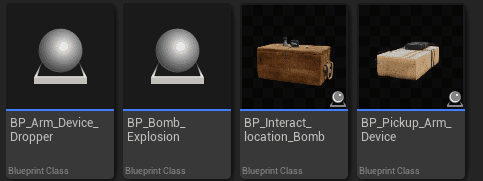
  • Bomb planting/defusing mechanics
  • Win-based scoring
  • Actors: Bomb sites, bombs

Default Settings (DA_GameMode_Defaults_SearchAndDestroy):

  • Round-Based: True
  • Rounds to Win: 6
  • Round Time: 2 minutes
  • Plant Score: 200
  • Defuse Score: 200
  • Kill Score: 100
  • Elimination Score: 500 (wipe enemy team)

Game Loop:

  1. Waiting phase (10 seconds)
  2. Round 1:
 - 2 minute timer
 - Attackers try to plant bomb
 - Defenders try to prevent/defuse
 - Round ends: Bomb detonates OR defused OR time expires OR team eliminated
 - Round winner determined
  1. Next round (reset positions, respawn players)
  2. Repeat until team wins 6 rounds
  3. Game over

Full Implementation:

Includes:

  • Bomb actor blueprint
  • Plant interaction
  • Defuse interaction
  • Timer mechanics
  • Round win logic
  • Team switching (attackers/defenders swap)

Free for All #

Component: AC_SessionManager_Arena_FreeForAll

Game Type: Individual elimination

Objective: Reach kill limit or have highest score when time expires

Features:

  • No teams (every player for themselves)
  • Respawn enabled
  • Individual scoring
  • Win condition: Kill limit or time limit

Default Settings (DA_GameMode_Defaults_FreeForAll):

  • Kills to Win: 30
  • Time Limit: 10 minutes
  • Kill Score: 100
  • Death Score: -10
  • Round-Based: False

Game Loop:

  1. Waiting phase
  2. Main game
  3. Win: Player with 30 kills OR highest score at time limit
  4. Game over

Domination #

Component: AC_SessionManager_Arena_Domination

Game Type: Team-based control point mode

Objective: Control points to earn points, first to point limit wins

Features:

  • Team-based
  • Multiple control points
  • Win-based scoring (control points award team points)
  • Respawn enabled
  • Actors: Control point actors (implement BPI_GameplayTags)

Default Settings (DA_GameMode_Defaults_Domination):

  • Points to Win: 200
  • Time Limit: 15 minutes
  • Capture Score: 100 (capture point)
  • Control Score: 10 points per second per point controlled
  • Kill Score: 50 (shown on scoreboard, doesn't add to team score)

Game Loop:

  1. Waiting phase
  2. Main game:
 - Teams capture control points
 - Controlling team earns points continuously
 - Win: 200 points OR highest at time limit
  1. Game over

Full Implementation:

Includes:

  • Control point actors
  • Capture mechanics
  • Point tracking
  • Visual indicators (team colors on points)
  • Score accumulation

Capture the Flag #

Component: AC_SessionManager_Arena_CaptureTheFlag

Game Type: Team-based flag capture mode

Objective: Capture enemy flag and return to base, first to capture limit wins

Features:

  • Team-based (2 teams)
  • Flag mechanics (pick up, carry, drop, return)
  • Win-based scoring
  • Respawn enabled
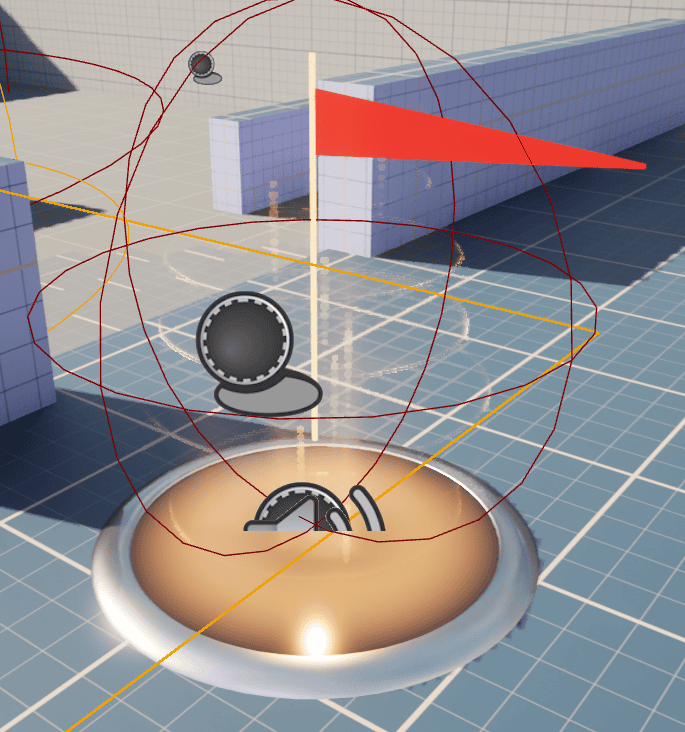
  • Actors: Flag actors (implement BPI_GameplayTags)

Default Settings (DA_GameMode_Defaults_CaptureTheFlag):

  • Captures to Win: 3
  • Time Limit: 10 minutes
  • Capture Score: 500 (successful capture)
  • Return Score: 100 (return own flag)
  • Kill Score: 50

Game Loop:

  1. Waiting phase
  2. Main game:
 - Take enemy flag
 - Return to own base while own flag is home
 - Score capture
 - Win: 3 captures OR most captures at time limit
  1. Game over

Full Implementation:

Includes:

  • Flag actors
  • Pick up/drop mechanics
  • Carrier tracking
  • Flag return mechanics
  • Base capture zones
  • Visual indicators (flag carrier, flag status)

Battle Royale #

Component: AC_SessionManager_Arena_BattleRoyale

Game Type: Last team/player standing

Objective: Survive, be last team alive

Features:

  • Large player count
  • No respawn
  • Shrinking play zone
  • Spawn island (no player freezing)
  • Looting system integration
  • Team or solo

Default Settings (DA_GameMode_Defaults_BattleRoyale):

  • Max Players: 100
  • Freeze Players: False (spawn island)
  • Waiting for Start Time: 60 seconds
  • Zone Shrink Start: 5 minutes
  • Zone Shrink Intervals: Custom
  • Last Team Standing Wins

Game Loop:

  1. Waiting phase:
 - Spawn island
 - Players can move freely (not frozen)
 - 60 second wait
  1. Main game:
 - Transport to map
 - Zone starts shrinking
 - Players eliminated (no respawn)
 - Last team/player standing
  1. Game over: Winner determined

Full Implementation:

Includes:

  • Spawn island mechanics
  • Zone shrinking logic
  • Damage outside zone
  • Elimination tracking
  • Winner determination

Template game modes #

Zombies Template #

Component: AC_SessionManager_Arena_Zombies

Status: Template (not fully implemented)

Purpose: Base for creating zombies game mode

What's Included:

Component structure:

  • Inherits from AC_SessionManager_Arena_Base
  • Empty implementation
  • Ready for custom logic

You implement:

  • Wave system
  • Zombie spawning
  • Point system
  • Weapon purchasing
  • Win/loss conditions
  • Round progression

How to Use:

  1. Add AC_SessionManager_Arena_Zombies to GameState
  2. Implement your zombies logic
  3. Override game loop functions
  4. Create zombie actors
  5. Implement wave system
  6. Test and iterate

Extraction Template #

Component: AC_SessionManager_Arena_Extraction

Status: Template (not fully implemented)

Purpose: Base for creating extraction shooter game mode

What's Included:

Component structure:

  • Inherits from AC_SessionManager_Arena_Base
  • Empty implementation
  • Ready for custom logic

You implement:

  • Loot system
  • Extraction points
  • Raid timer
  • Death consequences (lose loot)
  • Extraction mechanics
  • Win conditions

How to Use:

  1. Add AC_SessionManager_Arena_Extraction to GameState
  2. Implement extraction logic
  3. Create extraction point actors
  4. Implement loot persistence
  5. Create raid mechanics
  6. Test and iterate

Game mode components #

Component Structure #

Adding Game Mode Component:

On GameState:

  1. Remove base session manager (if present)
  2. Add specific game mode component:
 - AC_SessionManager_Arena_TeamDeathmatch
 - AC_SessionManager_Arena_SearchAndDestroy
 - AC_SessionManager_Arena_Domination
 - Etc.
  1. Configure settings
  2. Save

Component handles:

  • All Session Manager functionality (inherited)
  • All Arena base functionality (inherited)
  • Game-specific logic (implemented in component)

One Component Per GameState:

Only add ONE game mode component:

  • Not: TeamDeathmatch + Domination
  • Instead: Choose one per game mode

For multiple game types:

  • Use playlists (Session Manager)
  • Each game in playlist loads different level
  • Each level can have different game mode component

Creating Custom Game Modes #

Step 1 – Create Component: #

  1. Create new blueprint component
  2. Parent class: AC_SessionManager_Arena_Base
  3. Name: AC_SessionManager_Arena_YourMode

Step 2 – Implement Game Logic: #

Override functions:

  • Game start logic
  • Win condition checking
  • Scoring logic
  • Game-specific mechanics

Implement:

  • Custom actors (objectives, items, etc.)
  • Custom win conditions
  • Custom scoring
  • Custom UI elements

Step 3 – Create Data Asset: #

Create: DA_GameMode_Defaults_YourMode

Define:

  • Default settings
  • Scoring values
  • Time limits
  • Win requirements

Step 4 – Test: #

  1. Add component to GameState
  2. Create playlist with your game mode
  3. Host session
  4. Test game loop
  5. Iterate

How to guides #

Setting Up a Game Mode #

Step 1 – Add Component to GameState: #

  1. Open GameState blueprint
  2. Add component: AC_SessionManager_Arena_[GameType]
 - Example: AC_SessionManager_Arena_TeamDeathmatch
  1. Remove any other session manager components
  2. Save GameState

Step 2 – Configure Session Manager: #

Follow Session Manager documentation:

  1. Create playlist
  2. Add games to playlist
  3. Configure session settings
  4. Save configuration

Step 3 – Test: #

  1. Host session
  2. Select playlist with your game mode
  3. Load level
  4. Verify game loop works:
 - Waiting phase
 - Main game
 - Win condition
 - Game end

Configuring Game Settings #

Step 1 – Open Game Settings: #

In game menu (or editor):

  1. Navigate to game settings
  2. Select game type (Team Deathmatch, etc.)
  3. View available settings

Step 2 – Adjust Settings: #

Arena Settings:

  • Waiting for Start Time: 10 seconds
  • Main Loop Time: 10 minutes
  • Minimum Players to Start: 2
  • Freeze Players: True
  • Fill Lobby with AI: True

Game Type Settings:

  • Kills to Win: 50 (Team Deathmatch)
  • Rounds to Win: 6 (Search and Destroy)
  • Points to Win: 200 (Domination)

Step 3 – Save: #

Settings saved to BP_Safe_Session_Configuration (see Session Manager docs)

Creating Multi-Type Maps #

Step 1 – Design Level: #

Plan which game types to support:

  • Team Deathmatch (spawn points only)
  • Domination (spawn points + control points)
  • Capture the Flag (spawn points + flags)

Step 2 – Place Game-Specific Actors: #

In level:

  1. Place actors for each game type:
 - Domination control points
 - CTF flags
 - S&D bomb sites
  1. Place spawn points for all game types

Step 3 – Add BPI_GameplayTags Interface: #

For each game-specific actor:

  1. Open actor blueprint
  2. Implement interface: BPI_GameplayTags
  3. Implement GetGameplayTags() function
  4. Return appropriate tag:
 - GameType.Domination (for control points)
 - GameType.CaptureTheFlag (for flags)
 - GameType.SearchAndDestroy (for bomb sites)
  1. Save actor

Step 4 – Test Each Game Type: #

  1. Create playlist with Domination
  2. Host session
  3. Load level
  4. Verify: Only domination points visible
  5. Create playlist with CTF
  6. Host session
  7. Load level
  8. Verify: Only flags visible

Game Mode System automatically filters actors.

Implementing Custom Game Mode #

Step 1 – Create Component: #

  1. Navigate to Session Manager folder
  2. Create blueprint component
  3. Parent: AC_SessionManager_Arena_Base
  4. Name: AC_SessionManager_Arena_MyMode
  5. Save

Step 2 – Create Data Asset: #

  1. Create data asset: DA_GameMode_Defaults_MyMode
  2. Define default settings:
 - Waiting Time: 10
 - Main Loop Time: 15
 - Win Requirement: 100 points
 - Custom settings for your mode
  1. Save

Step 3 – Implement Logic: #

In AC_SessionManager_Arena_MyMode:

Override functions:

  • OnGameStart()
 - Custom initialization
 - Spawn custom actors

  • CheckWinCondition()
 - Custom win logic
 - Return winner when condition met

  • OnGameEnd()
 - Cleanup
 - Custom end logic

Add custom functions:

  • Handle custom mechanics
  • Update custom scores
  • Custom interactions

Step 4 – Create Custom Actors: #

If needed:

  1. Create objective actors
  2. Implement BPI_GameplayTags
  3. Add gameplay logic
  4. Link to game mode component

Step 5 – Test: #

  1. Add component to GameState
  2. Create test level
  3. Create playlist with your mode
  4. Host session
  5. Test full game loop
  6. Iterate on logic
  • —

END OF DOCUMENTATION

Summary:

The Game Mode System extends Session Manager with complete game loop functionality:

Core Features:

  • Built on Session Manager: Inherits session hosting, playlists, settings
  • AC_SessionManager_Arena_Base (GameState): Base component with game loop logic
  • Game Loop: Waiting → Playing → End → Next Round/Game
  • Player Freezing: Configurable freezing during waiting phase
  • Multi-Type Maps: BPI_GameplayTags interface for actor filtering
  • Round System: Round-based games with round winner tracking
  • AI Support: Fill lobby with AI, automatic balancing, replacement when players join
  • Win Conditions: Score requirements, time limits, objectives
  • DA_GameMode_Defaults: Data assets with default settings per game type

Implemented Game Modes:

  • Team Deathmatch (aggregate scoring, kill limit)
  • Search and Destroy (round-based, bomb planting/defusing)
  • Free for All (individual, kill limit)
  • Domination (control points, win-based scoring)
  • Capture the Flag (flag mechanics, capture limit)
  • Battle Royale (large player count, shrinking zone, last standing)

Templates: Zombies and Extraction (components ready for custom implementation)

Integration: Score Manager, Team Manager, Player Manager (see respective documentation)

Build complete arena-based game modes with rounds, objectives, and full game loops!

What are your Feelings
Still stuck? How can we help?

How can we help?

Table of Contents
  • Game Mode System
    • Prerequisites
      • Session Manager Required
      • Related Systems
    • Core concepts
      • What Is the Game Mode System?
      • How It Works
      • Arena-Based vs Open-World
      • Component Location
      • Inheritance from SessionManager
      • Core Functionality
    • Game loop
      • Game Loop Phases
      • Waiting for Start Phase
      • Main Game Phase
      • Game End Phase
      • Round-Based Games
    • Game settings
      • Arena-Specific Settings
      • DA_GameMode_Defaults
      • Configurable Settings
    • Player management
      • Player Freezing
      • Minimum Players to Start
      • Player Ready State
    • 8 multi-game type support
      • BPI_GameplayTags Interface
      • Actor Filtering by Game Type
      • Setting Up Multi-Type Maps
      • Step 1 - Create Actors for Each Game Type:
      • Step 2 - Add Interface to Actors:
      • Step 3 - Configure Tags:
      • Step 4 - Play:
    • Win conditions
      • Win Requirements
      • Scoring Integration
      • Score Types
    • Round system
      • Round-Based Games
      • Round Winner Determination
      • Score Accumulation
    • Ai support
      • Fill Lobby with AI
      • AI Spawning
      • AI Replacement
      • Team Balancing
    • Implemented game modes
      • Overview of Implementations
      • Team Deathmatch
      • Search and Destroy
      • Free for All
      • Domination
      • Capture the Flag
      • Battle Royale
    • Template game modes
      • Zombies Template
      • Extraction Template
    • Game mode components
      • Component Structure
      • Creating Custom Game Modes
      • Step 1 - Create Component:
      • Step 2 - Implement Game Logic:
      • Step 3 - Create Data Asset:
      • Step 4 - Test:
    • How to guides
      • Setting Up a Game Mode
      • Step 1 - Add Component to GameState:
      • Step 2 - Configure Session Manager:
      • Step 3 - Test:
      • Configuring Game Settings
      • Step 1 - Open Game Settings:
      • Step 2 - Adjust Settings:
      • Step 3 - Save:
      • Creating Multi-Type Maps
      • Step 1 - Design Level:
      • Step 2 - Place Game-Specific Actors:
      • Step 3 - Add BPI_GameplayTags Interface:
      • Step 4 - Test Each Game Type:
      • Implementing Custom Game Mode
      • Step 1 - Create Component:
      • Step 2 - Create Data Asset:
      • Step 3 - Implement Logic:
      • Step 4 - Create Custom Actors:
      • Step 5 - Test:

© 2025 Games by Hyper

X Reddit Patreon Discord Linkedin YouTube

Review Cart

No products in the cart.

We noticed you're visiting from Netherlands. We've updated our prices to Euro for your shopping convenience. Use United States (US) dollar instead. Dismiss

  • Hyper Bundle Configurator
  • Shop
    • Game Templates
    • Courses
    • Loyalty Store
    • Survival Modules
    • RPG Modules
    • Environment Building
    • Browse All
  • My account
  • Become a Member
  • Cart
  • Get Help
    • FAQ
    • Upgrade your Game Template
    • Documentation
  • About Hyper
  • News & Updates