
Ragdoll System
Updated May 25, 2026
The Ragdoll System provides a reusable component-driven workflow for putting a character into ragdoll and recovering back to animation. The setup is based largely on Epic’s ragdoll recovery tutorial, with project-specific component usage and recovery hooks layered on top.
Related Videos
Version note: Some videos may have been recorded before V4. The same principles still apply, but asset names, component names, and folder locations may differ. Use this written documentation and the current V4 names as the source of truth.
For shared setup guidance, see the Migration Guide and Integration Guide. Use the System Atlas to look up functions, variables, events, components, and ownership references. Use this page for Ragdoll System-specific setup, runtime behavior, extension points, and integration notes.
Integration
Components
The migration order does not matter as long as the required project settings and plugins are configured correctly. For shared migration and setup context, use the linked ecosystem guides above.
To integrate the system into a custom character, add the required ragdoll components to that character.
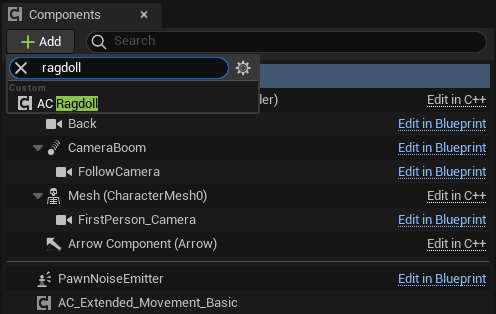
Core Principles of the Ragdoll System
- The ragdoll system is largely based on Epic’s tutorial: Ragdolling and how to recover from it.
- Get the ragdoll component from the actor and call Server To Ragdoll.
- Server To Ragdoll must be called from the actor you want to ragdoll, through the owning client.

When setting the ragdoll root bone, choose a bone one step away from the root bone when possible. If the character should recover through a get-up animation, make sure the related checkbox is enabled.

Get-up animation support depends on both the physics asset and the animation Blueprint being configured correctly.
- The physics asset should have a small kinematic capsule body at the root bone.
- The animation Blueprint should include states for ragdoll and get up, plus a state alias for transitioning to ragdoll.
- The get-up animation should include a notify that calls To Animation Final. This re-enables character movement.


