
Reputation System
Updated October 20, 2026
Overview
The Reputation System tracks how factions and individual NPCs respond to the player. It is built around a player-controller reputation component, data tables for authored reputation definitions, and gameplay-tag actions that can be triggered from combat, quests, dialogue, interaction, or custom Blueprint logic.
For shared setup guidance, see the Migration Guide and Integration Guide. Use the System Atlas to look up functions, variables, events, components, and ownership references. Use this page for Reputation System-specific setup, runtime behavior, extension points, and integration notes.
Use this system when your game needs persistent faction standing, personal NPC relationships, reputation stages, stage requirements, rewards, perks, or UI feedback for reputation changes.
- Tracks faction reputation and NPC/acquaintance reputation separately.
- Uses data tables for reputation actions, factions, NPC entries, stage ranges, colors, gates, rewards, and perks.
- Supports relation spillover, so changing one reputation entry can also affect linked factions or NPCs when configured.
- Exposes functions and dispatchers for UI, quests, dialogue, combat, interaction, and other gameplay systems.

Faction and reputation UI examples from the supplied demo content. Use these as orientation for what the data tables and runtime component eventually drive in game.
How to Think About Reputation
The system becomes much easier to use when you separate three ideas: broad faction standing, personal NPC standing, and relations between reputation entries.
Faction Reputation
Faction reputation is broad group reputation. Use it for groups such as factions, teams, guilds, kingdoms, settlements, alignments, enemy groups, or any social category that should affect more than one actor.
- Good for global standing such as friendly, neutral, hostile, honored, or custom stages.
- Good for access rules, faction vendors, guard reactions, settlement permissions, and quest branches.
- Stored in DT_Reputation_Factions.
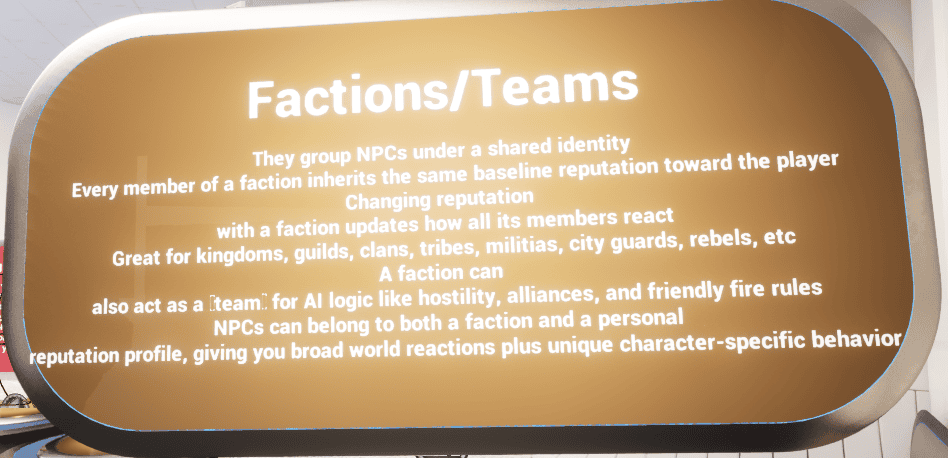
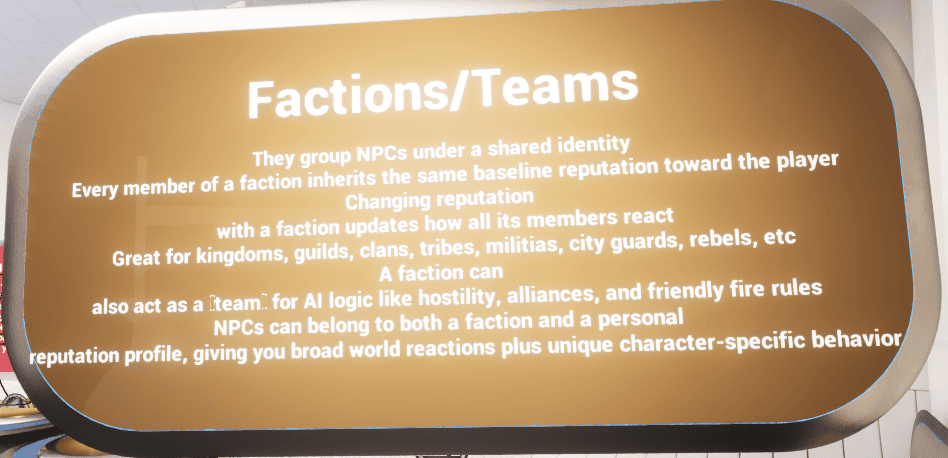
Demo explanation board for faction/team reputation. This belongs with Faction Reputation: it explains broad group standing and how NPCs can belong to a shared identity.
NPC Reputation
NPC reputation is personal reputation for a specific character. Use it when one named NPC should remember the player differently from the wider faction or group.
- Good for named vendors, companions, quest givers, village elders, rivals, or story characters.
- Can still relate back to a wider faction when configured through relations.
- Stored in DT_Reputation_NPC.
Relations
Relations connect reputation entries. When configured, changing one reputation entry can also influence linked entries. This is useful when helping one person should affect a faction, or attacking one faction should influence another.
Image needed: add a real relation-focused screenshot or diagram here, for example an NPC row with a relation pointing to a faction row, or a small diagram that shows reputation spillover from NPC to faction.
Stages, Gates, Rewards, and Perks
Stages turn raw reputation values into readable progression. Gates add extra requirements, rewards fire follow-up effects, and perks store values other systems can query.
- Use stages for readable progression labels and ranges.
- Use gates when reputation should not progress from points alone.
- Use rewards when reaching a stage should trigger follow-up gameplay.
- Use perks when another system needs a queryable unlock, tag, value, or bonus.

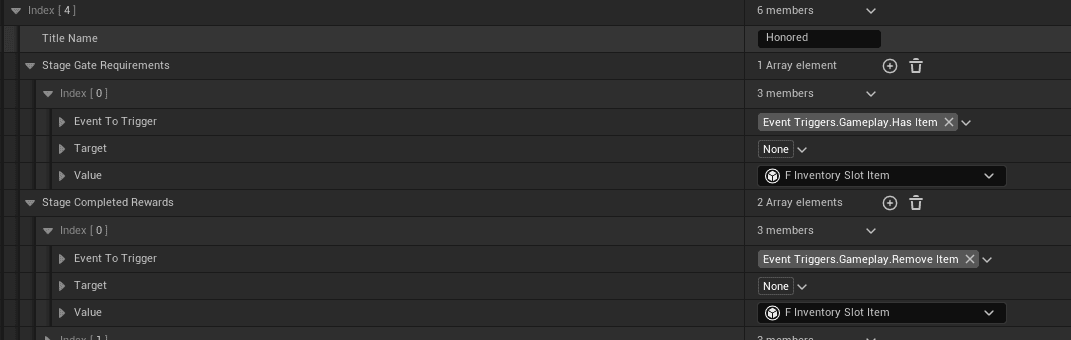
Example stage setup with requirements, rewards, and perk data. This is the part to inspect when stage progression or unlock behavior is not clear.
Before You Start
The live gameplay component is AC_PC_Reputation. The abstract parent, AC_PC_Reputation_Abstract, contains shared definitions such as variables, dispatchers, and callable functions. In normal gameplay setup, use the concrete AC_PC_Reputation component.
For project paths and ownership context, use the System Atlas.
- Main component: AC_PC_Reputation
- Abstract definition component: AC_PC_Reputation_Abstract
- Action table: DT_Reputation_Actions
- Faction table: DT_Reputation_Factions
- NPC/acquaintance table: DT_Reputation_NPC
- Example map: Map_Example_ReputationSystem
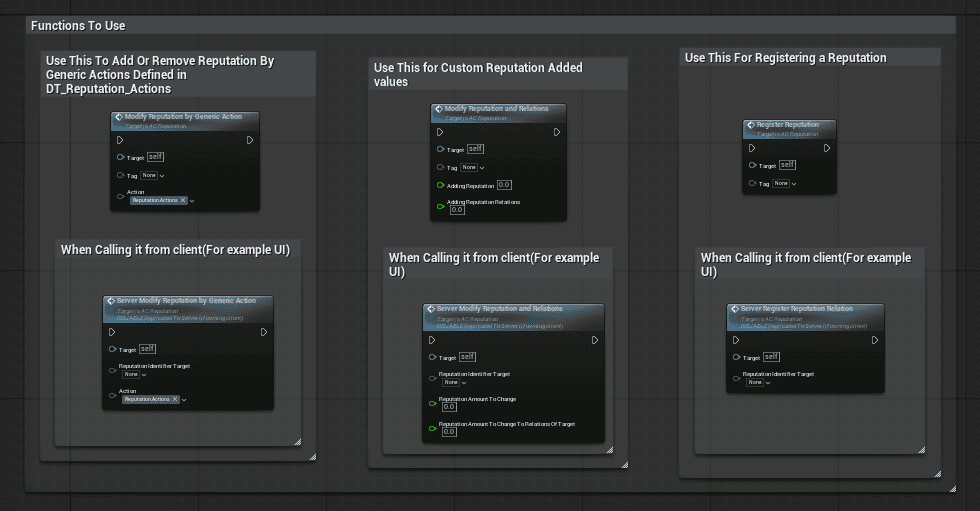
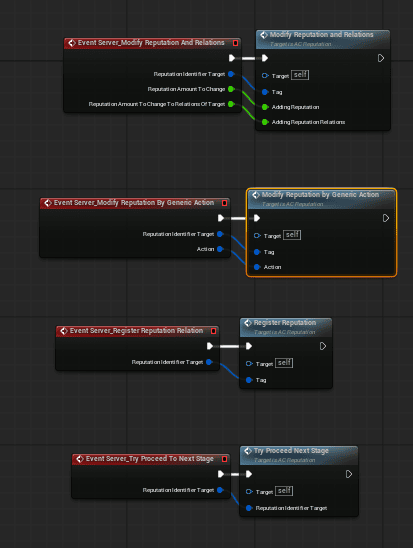
Core gameplay-facing functions and server wrapper examples exposed by the reputation component. Use the linked project foundation docs for folder ownership and shared setup context.
Helpful External References
These links explain Unreal concepts used by this system. They are not specific to Hyper, but they help customers understand why the setup uses tags and data tables.
Unreal Engine Gameplay Tags: https://dev.epicgames.com/documentation/en-us/unreal-engine/using-gameplay-tags-in-unreal-engine?application_version=5.6
Unreal Engine Data Driven Gameplay Elements / Data Tables: https://dev.epicgames.com/documentation/en-us/unreal-engine/data-driven-gameplay-elements-in-unreal-engine
Core Workflow
Most reputation work follows the same high-level flow: define the data, register the reputation entry when the player should know about it, modify the value from gameplay, then let UI or other systems respond through functions and dispatchers.
- Create or edit rows in DT_Reputation_Factions, DT_Reputation_NPC, or DT_Reputation_Actions.
- Add AC_PC_Reputation to the Player Controller setup that owns the player-specific reputation state.
- Register a faction or NPC reputation entry when it should become visible or active for the player.
- Modify reputation through a predefined action or a custom reputation change.
- Use the exposed functions and dispatchers to update UI, check stage progress, unlock perks, or let other systems react.
Setup
Add Reputation to the Player Controller
The reputation component belongs on the Player Controller because reputation discovery and progress are player-specific. This gives UI, interaction, quest, dialogue, and combat logic one consistent place to query or change the current player reputation state.
- Open the Player Controller Blueprint used by your project or template.
- Add AC_PC_Reputation as an actor component.
- Configure initial known factions or initial known NPC entries if the player should start with visible reputation data.
- Use the demo Player Controller or Map_Example_ReputationSystem as a reference when you need to compare setup.
- Play in editor and confirm the reputation UI or debug/test actors can access the component.
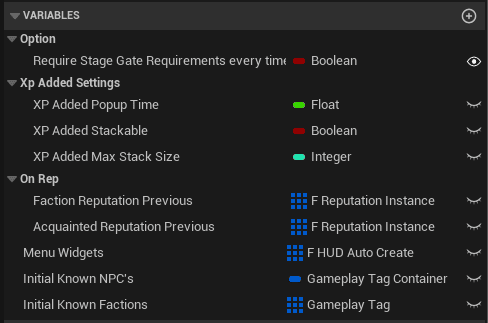
Important AC_PC_Reputation variables and setup fields in the Details panel, including initial known reputation entries and popup/UI related settings.
How To Guides
Add a Faction
Use faction rows for broad reputation that should affect a group, team, guild, kingdom, settlement, or social alignment rather than one specific person.
- Open DT_Reputation_Factions.
- Add a new row.
- Set the reputation tag, for example TeamAffiliation.Order, TeamAffiliation.Balance, or TeamAffiliation.Chaos if those tags match your project setup.
- Fill in the display name, description, icon, and UI colors used by the reputation UI.
- Set the base reputation value.
- Add stages to define the reputation ladder. Each stage should have a clear title and reputation range.
- Add stage gate requirements, completion rewards, or perks only when the stage needs extra progression logic.
- Add relations only when this faction should influence, or be influenced by, another faction or NPC entry.
- Save the table and register the faction when the player should discover it.
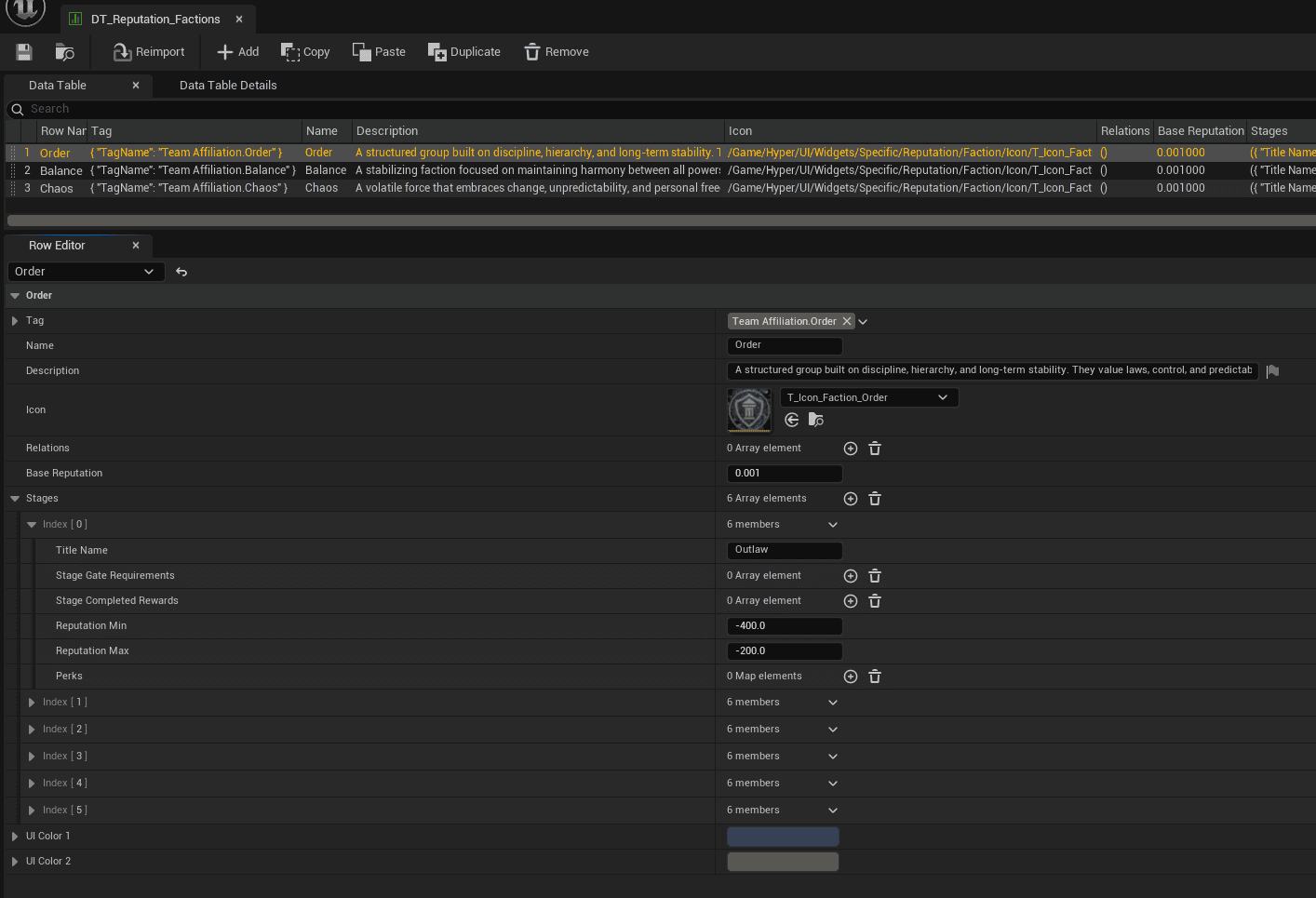
DT_Reputation_Factions. Use this table for broad group reputation. The row uses the shared reputation identifier structure, so factions and NPC reputation entries stay consistent.
Add an NPC Reputation Entry
Use NPC rows when one specific character should react differently from their broader faction, team, or social group.
- Open DT_Reputation_NPC.
- Add a new row.
- Set the NPC reputation tag, for example NPC.ID.Villager.Male.Blacksmith if that tag exists in your project.
- Fill in the display name, description, and icon used by UI.
- Set base reputation and the stage ladder.
- Add relations if this NPC should also influence a wider faction or be influenced by one.
- Add stage gate requirements only when progression needs more than reaching the reputation value.
- Save the table and call Register Reputation when the player first meets the NPC or when gameplay should reveal them.

DT_Reputation_NPC. Use this table for personal/acquaintance reputation, such as named vendors, companions, quest givers, or important story characters.
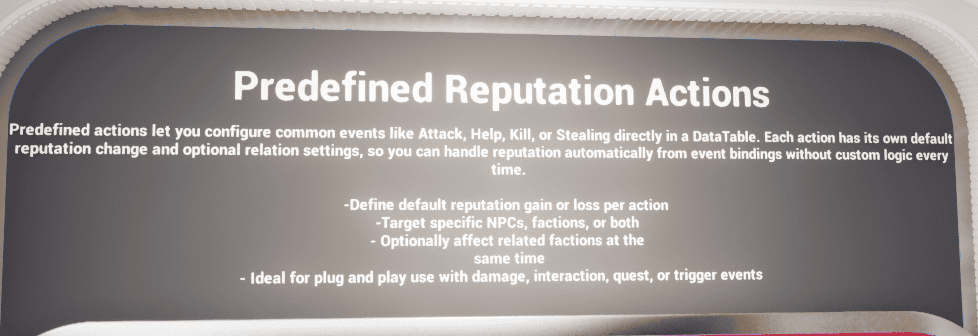
Add a Predefined Reputation Action
Use predefined actions for gameplay events that should always produce the same default consequence, such as attacking, helping, stealing, killing, bribing, or another repeated game action.
- Open DT_Reputation_Actions.
- Add a new row.
- Set the Gameplay Tag for the action, for example Reputation.Actions.Bribe if that tag exists in your project.
- Fill in the action consequence data, including the direct reputation change value.
- Enable relation changes only when linked reputation entries should also be affected.
- Save the table.
- From gameplay, call Modify Reputation By Generic Action or the matching server wrapper and pass the target reputation identifier plus the action tag.
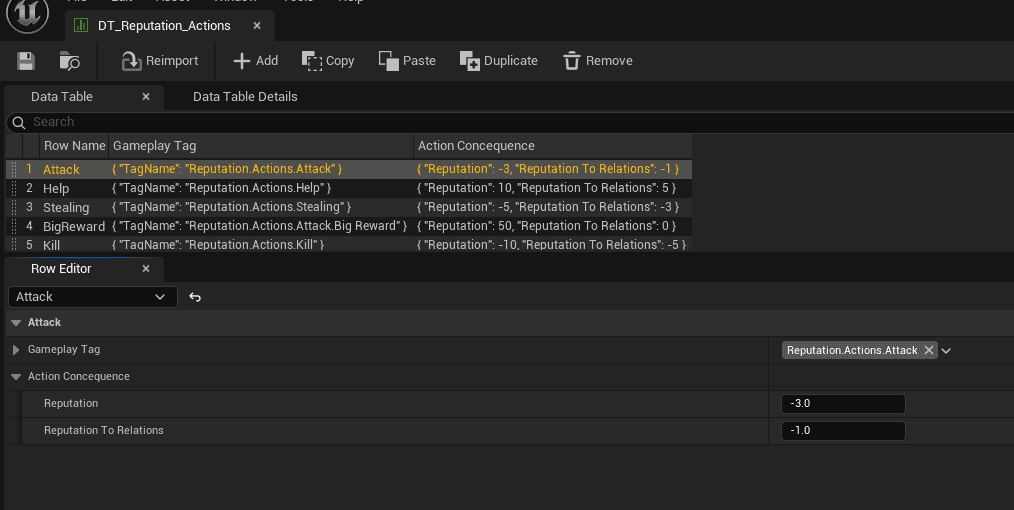
DT_Reputation_Actions. This table turns repeated gameplay tags into reusable reputation consequences, so gameplay systems do not need to hardcode every value.
Blueprint usage example for applying a predefined reputation action. Use this path when the same gameplay event should always produce the same default consequence.
Apply a Custom Reputation Change
Use a custom modifier when the amount is specific to a quest, dialogue choice, scripted moment, or special interaction and should not be stored as a reusable predefined action.
- Get the player reputation component, usually AC_PC_Reputation on the Player Controller.
- Choose the target faction or NPC reputation identifier.
- Call the custom reputation modification function used by your gameplay flow, such as Modify Reputation And Relations when relation spillover should be considered.
- Use the server wrapper when the request starts from a client-owned source.
- Let dispatchers or UI widgets respond to the resulting reputation change instead of manually duplicating UI update logic.

Custom modifier example. Use custom changes for unique quest, dialogue, or scripted outcomes where a reusable action row would be too rigid.
Add Stage Requirements, Rewards, or Perks
Stages are useful when reputation should unlock something meaningful, not just display a number. Use this section when a reputation stage needs extra requirements, follow-up rewards, or perks that other systems can query.
Stage setup: Open the relevant row in DT_Reputation_Factions or DT_Reputation_NPC, expand the Stages array, and open the stage you want to edit.
- Set the reputation range for the stage.
- Add Stage Gate Requirements if the player must satisfy extra conditions before progressing.
- Add Stage Completed Rewards if reaching or completing the stage should trigger follow-up effects.
- Locate the Perks field when the stage should unlock values for other systems.
- Add a new map entry in Perks.
- Set the perk key to the Gameplay Tag that identifies the unlock.
- Fill in the value payload using the field type that best fits the perk.
Perk value types: Use Bool Value for true/false unlocks, Float Value for numbers such as discounts or bonuses, String Value for labels or text-based values, and Tag Value for linking the perk to other gameplay-tag-driven systems.
Leave unused value fields empty/default unless your project needs them.
Register Reputation During Gameplay
Registering a reputation entry marks it as known/discovered for the player. This is useful when a player meets an NPC, discovers a faction, enters a new region, or reaches a quest moment where a relationship should become visible.
- Decide whether the target is a faction entry or an NPC/acquaintance entry.
- Make sure the row exists in DT_Reputation_Factions or DT_Reputation_NPC.
- Call Register Reputation when the entry should become active for the player.
- Use initial known entries only for reputation that should be visible at game start.
- Use the server wrapper when the registration is requested from client-owned UI or interaction logic.
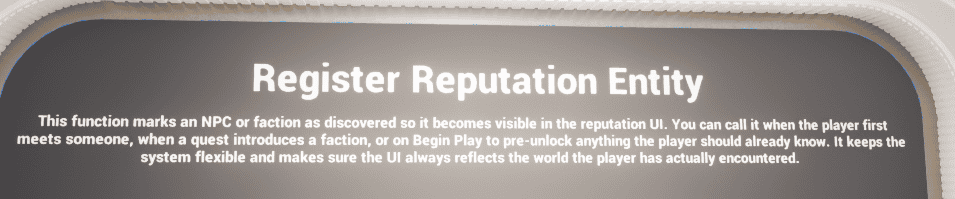
Register Reputation example. Registration controls when a faction or NPC reputation entry becomes known to the player.
Integrating With Other Systems
Reputation should usually be changed by the system that owns the gameplay event, while AC_PC_Reputation remains the central place that stores and processes reputation state.
- Combat can trigger predefined actions such as Attack or Kill.
- Quest or dialogue logic can apply custom reputation changes or register new factions/NPCs.
- Interaction actors can register a new NPC, apply a predefined action, or call a custom modifier when the player helps, steals, trades, talks, or completes a scripted action.
- UI should query the component and listen to dispatchers instead of maintaining separate reputation state.
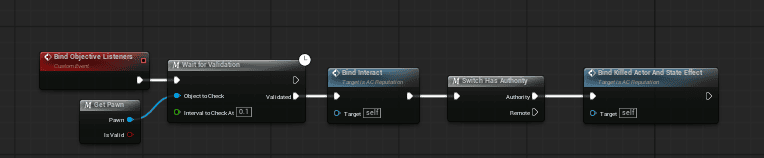
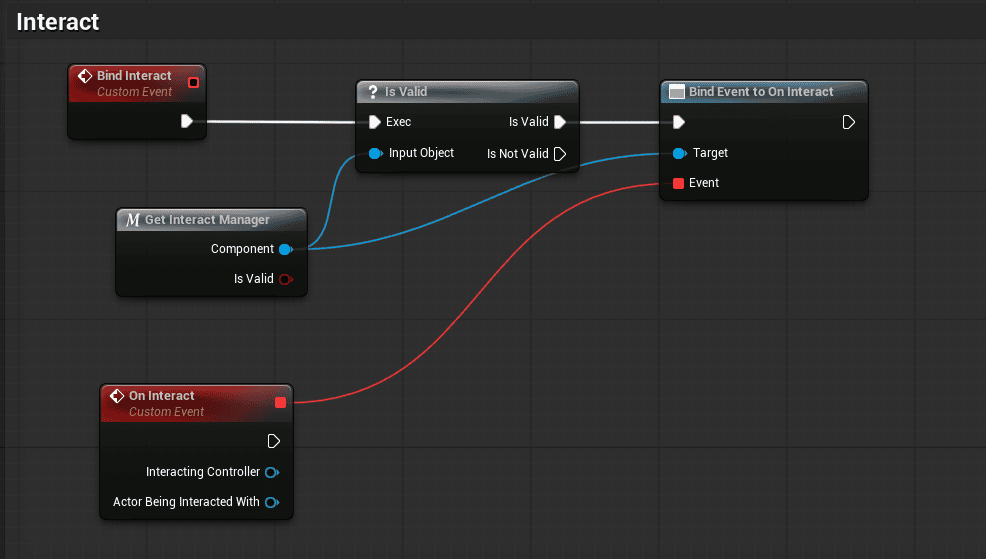
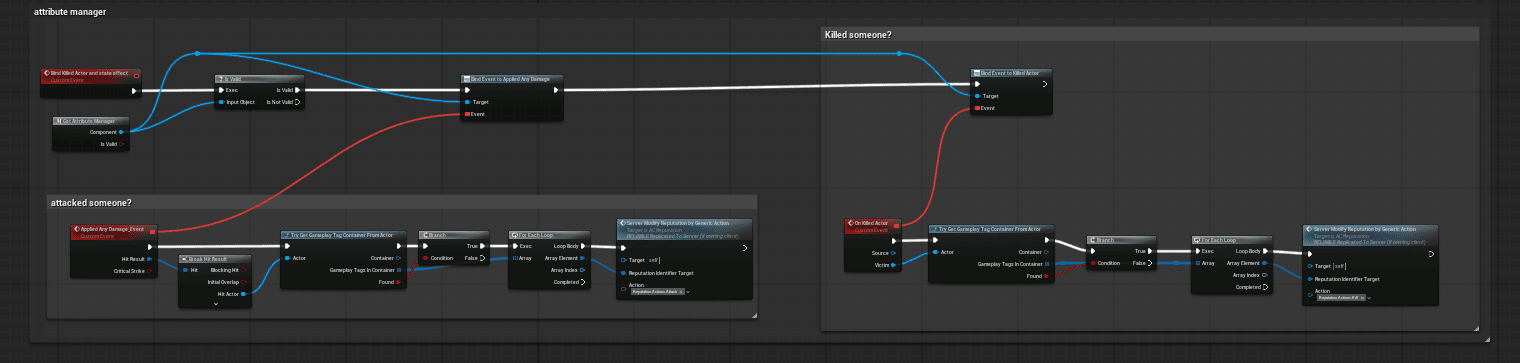
Example listener and event-binding setups from the supplied reputation demo content. These show how external gameplay events can route into the reputation component.
Example Flows
Attacking a Villager
- Combat or damage logic identifies that the player attacked a valid target.
- The target or its tags determine which faction or NPC reputation entry should be affected.
- The gameplay event sends Reputation.Actions.Attack through Modify Reputation By Generic Action.
- DT_Reputation_Actions supplies the configured negative reputation value and optional relation spillover.
- The live F_Reputation_Instance updates, the current stage is re-evaluated, and dispatchers can update UI or other systems.
Helping a Faction or NPC
- An interaction, quest, or scripted reward calls Modify Reputation By Generic Action with a positive tag such as Help or BigReward, or uses Modify Reputation And Relations with a custom amount.
- AC_PC_Reputation updates the matching faction or NPC profile.
- If the new value crosses into a higher range, the component checks whether the next stage is available and whether any gate requirements must also pass.
- If the stage becomes valid, the component can proceed and fire the new-stage dispatcher.
Honored Stage With a Gate Requirement
- The player reaches the required numerical reputation range for the Honored stage.
- The stage still checks its gate requirement event, such as whether the player has a required item.
- Once valid, Try Proceed Next Stage can advance the stage.
- The Stage Completed Rewards can then fire, such as removing the required item, and the new stage can be broadcast to UI or quest logic.
These flows show the intended strength of the system: one shared reputation component, a clean tag-based API, reusable data tables, and gameplay integration through standard event hooks instead of one-off hardcoded logic.
Useful Checks
Use these checks if reputation changes, stage transitions, or rewards are not working as expected.
- If reputation does not appear, confirm the entry is registered or included in the initial known faction/NPC lists.
- If a predefined action does nothing, confirm the action Gameplay Tag exists in DT_Reputation_Actions and that the gameplay call passes the same tag.
- If stage progress looks wrong, check the stage reputation ranges in the faction or NPC row.
- If a stage should not unlock immediately, check whether Stage Gate Requirements are configured and whether Check Stage Requirements By Tag returns the expected result.
- If UI does not update, confirm the UI is reading from AC_PC_Reputation and listening to the relevant reputation change or new stage dispatchers.
- If a client-side button or interaction requests a change, use the server wrapper path instead of only changing local client state.
Reference
This section gives the practical map of the system. For project-level folder ownership and shared setup context, use the linked project foundation docs.
Data Tables
Use this table as the practical map. The project foundation docs contain the shared setup and folder ownership context.
| Asset | Purpose | When You Care |
| DT_Reputation_Factions | Broad faction/team/alignment reputation definitions. | Adding groups such as guilds, kingdoms, settlements, enemy factions, or social alignments. |
| DT_Reputation_NPC | Personal NPC/acquaintance reputation definitions. | Giving a named character relationship state separate from their wider faction. |
| DT_Reputation_Actions | Reusable gameplay-tag actions and consequences. | Repeated events such as Attack, Help, Steal, Kill, or Bribe should apply consistent values. |
| F_Reputation_Identifier | Authored profile data shared by faction and NPC rows. | Editing display data, stages, relations, rewards, and perks. |
| F_Reputation_Instance | Runtime/discovered reputation state for the player. | UI or logic needs current value, current stage, or discovered entries. |
| F_Reputation_Relation | Optional link between reputation entries. | One faction/NPC should influence another entry. |
| F_Reputation_Stage | One stage in the reputation ladder. | Configuring ranges, gates, rewards, or perks. |
DT_Reputation_Actions: Stores reusable gameplay-tag actions and the reputation consequences they apply.
DT_Reputation_Factions: Stores broad faction/team/alignment reputation definitions.
DT_Reputation_NPC: Stores personal NPC/acquaintance reputation definitions.
Core Structs
F_Action_Concequence: Defines the direct consequence of a predefined reputation action. Note: the asset name uses the current project spelling.
F_Reputation_GameplayTag_Concequence: Maps a gameplay tag to a predefined reputation consequence. Note: the asset name uses the current project spelling.
F_Reputation_Relation: Links reputation entries so one change can affect another configured entry.
F_Reputation_Stage: Defines a reputation stage, its value range, optional requirements, rewards, and perks.
F_Reputation_Identifier: Defines authored reputation data used by faction and NPC data-table rows.
F_Reputation_Instance: Stores live runtime state for a discovered reputation entry.
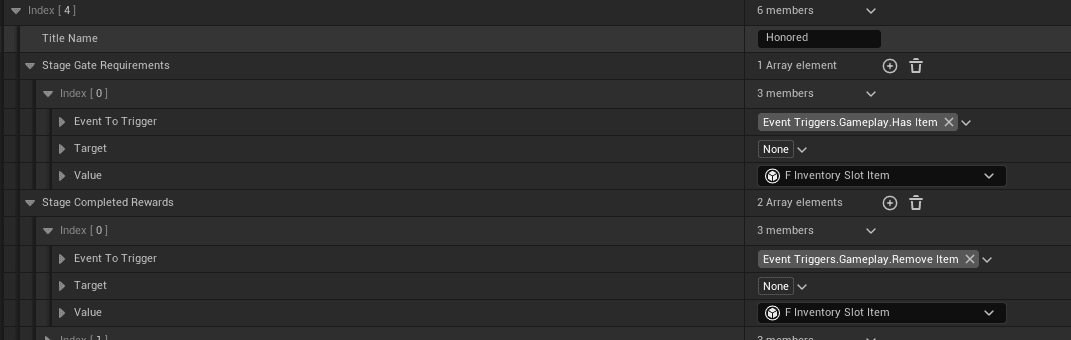
F_Reputation_Stage reference screenshot. Use this when you need to understand what each stage can contain.
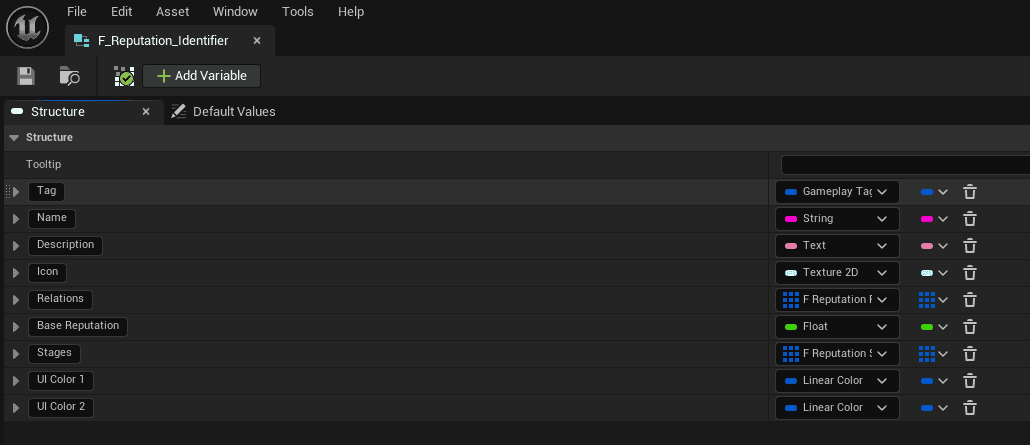
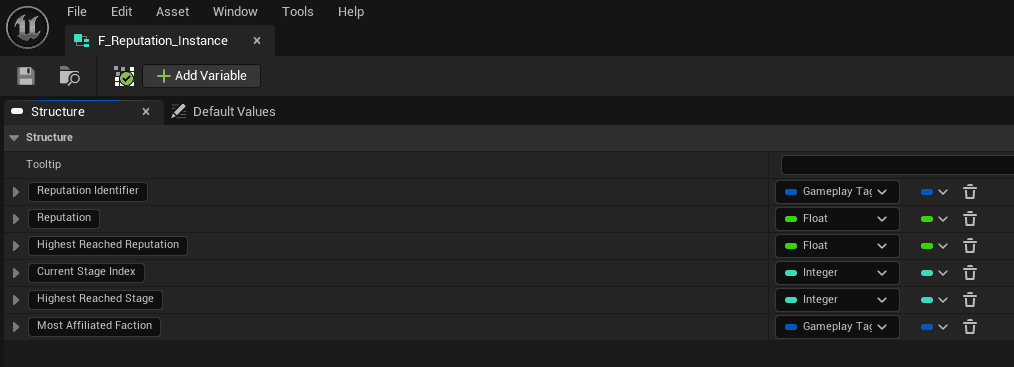
Identifier and runtime instance reference screenshots. The identifier defines authored data; the instance stores discovered runtime state.
Core Functions
These are the functions most customers should understand first. Use the current project assets for exact pins, metadata, and less common helpers.
| Function | Use |
| Register Reputation | Marks a faction or NPC entry as discovered so it can become visible and available in the reputation system/UI. |
| Modify Reputation By Generic Action | Applies a predefined action from DT_Reputation_Actions. Fastest path for repeated gameplay events. |
| Modify Reputation And Relations | Applies a custom direct reputation change and can account for configured relation spillover. |
| Try Proceed Next Stage | Attempts to advance stage progression once value and gate requirements are satisfied. |
| Get Reputation Instance By Tag | Finds the current runtime reputation instance for a known faction/NPC tag. |
| Get Reputation Stage From Reputation Value | Resolves which configured stage a reputation value belongs to. |
| Check Stage Requirements By Tag | Checks extra gate requirements before stage progression. |
| Get Unlocked Perks By Tag | Lets other systems query perks unlocked by reputation progression. |

Function overview screenshot. Use the current project assets when you need exact function metadata or additional helper functions.
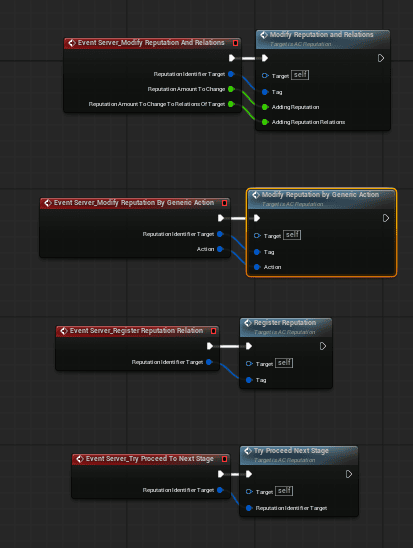
Server wrapper examples. Use these when a client-owned UI or interaction needs to request a reputation change safely.
Event Dispatchers
Bind UI and gameplay listeners to dispatchers when possible. This avoids polling and keeps other systems from storing duplicate reputation state.
| Dispatcher | Use |
| On New Faction / On New Acquaintence | Called when a new faction or personal NPC reputation entry is first discovered. |
| On Faction Reputation Changed / On Acquaintence Reputation Changed | Use for UI cards, popups, loyalty changes, or reactive gameplay when reputation values change. |
| On Faction Stage Up Available / On Acquaintence Stage Up Available | Signals that the next stage is available once requirements have been satisfied. |
| On Faction New Stage / On Acquaintence New Stage | Broadcast when a reputation entry enters a new stage. |
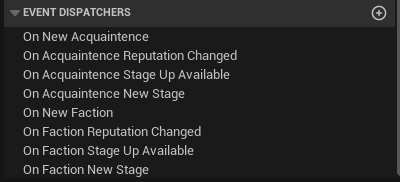
Dispatcher reference screenshot. These events are the preferred way for UI and gameplay listeners to react to reputation changes.