Skip to content
Games by Hyper
Sign Up / Login
Games by Hyper

Generic

  • QuickStart
  • Support
  • Purchase Options
  • Roadmap
  • FAQ
  • Learning
  • For Professional Studios

Templates

  • Template Logic and flexibility

Shared Infrastructure

  • Gameplay Tags
  • Datamanagement
  • Folder Structure

Item Management

  • Inventory
  • Jigsaw Inventory
  • List Inventory
  • Respawn Actor Manager
  • Hotbar
  • Crafting
  • Item Allocator
  • Vendor
  • Icon Creator
  • Interactive Foliage
  • Inspection System

Interaction and Feedback

  • Interaction System
  • Outliner System

UI

  • Main Menu
  • HUD
  • Information Prompt

Locomotion

  • Animation Framework
  • Extended Movement Component
  • Leader Posing
  • Custom-Skeletal-Meshes

Combat

  • Attribute Manager
  • Team Affiliation
  • Equipment Manager
  • Ragdoll System
  • Ability System
  • Target Locking
  • Weapon Attachment System
  • Limb System
  • Combat-framework

Construction and Survival Mechanics

  • Building System
  • Mineable Rocks
  • Tree Cutting
  • Farming System
  • Fishing System
  • Swimming System

Game Management

  • Global Save System
  • Respawn System
  • Session Manager
  • Game Mode System
  • Spectate System
  • Player Manager
  • Team Manager
  • Score Manager
  • Guild Manager
  • Party Manager

Multiplayer

  • Online Multiplayer Framework
  • Replication Subsystem
  • Chat System
  • Console Command Manager

AI

  • Basic AI
  • NPC Behavior System
  • Perception System
  • Companion System

Exploration and Narrative

  • Dialogue System
  • Memory System
  • Quest Manager
  • Map System
  • Teleport System
  • Guide System
  • Event Manager
  • Visual Novel System
  • Dungeon Adventure Kit
  • Region Manager

Progression and Leveling

  • Level Manager
  • Unlock System
  • Reputation System

Security and Control Systems

  • Drone System
  • Lock System
  • Security System
  • Defense System
  • Defense System – Modern
  • Defense System – Primitive

Character and Player Systems

  • Character Creator
  • Class System
  • Mount System
  • First Person

Environmental Control and Immersion

  • Time and Day Night Cycle management
  • Weather System
  • Background Music System
  • Footstep System

Environment Building

  • Mesh to Actor Swap System
  • Auto Landscape
  • Cave
  • Deform
  • Ditch
  • Exclusion
  • Forest
  • Forest-Basic
  • Lake
  • Level Instances
  • Mesh
  • Path
  • Props
  • Spline
  • Village
View Categories
  • Home
  • Docs
  • Player Manager

Player Manager

27 min read

Player Manager #

  • Overview
  • Prerequisites
    • Session Manager Required
    • Related Systems
  • Core Concepts
    • What Is the Player Manager?
    • How It Works
    • Central Player Hub
  • AC_PlayerManager
    • Component Location
    • Component Order Requirement
    • Core Functionality
  • AC_PlayerCommunicator
    • Component Location
    • Core Functionality
    • Scoreboard Widget
  • Player Tracking
    • Connected Players List
    • Player Data Storage
    • Player Name Retrieval
  • Player Management Features
    • Joining and Leaving
    • Kicking Players
    • Banning Players
    • Timing Out Players
    • Freezing Players
    • AFK Detection
  • Event Dispatchers
    • Overview of Events
    • Player Joined/Dropped Events
    • Player Died Events
    • Player Killed Events
    • Player Status Events
    • Event Binding Pattern
  • Utility Functions
    • Player Retrieval Functions
    • Player Status Functions
    • Player Action Functions
  • Scoreboard System
    • Scoreboard Widget
    • Team Manager Requirement
    • Scoreboard Data
    • Opening the Scoreboard
    • Real-Time Updates
  • Kick Popup System
    • How Kick Popup Works
    • Game Instance Communication
    • Display Logic
  • Integration with Other Systems
    • Team Manager Integration
    • Score Manager Integration
    • Game Mode System Integration
    • Level Manager Integration
  • Permissions and Authority
    • Host-Only Actions
    • Implementation Required
  • How To Guides
    • Setting Up Player Manager
    • Binding to Player Events
    • Implementing Kick/Ban UI
    • Using Utility Functions
  • OVERVIEW

This documentation explains the Player Manager System, which provides centralized management for all player-related functionality including tracking connected players, handling join/leave events, kicking/banning/timeout, player freezing, and a scoreboard UI.

What Is the Player Manager?:

The Player Manager is a central hub component on the GameState that tracks all connected players and provides events, utilities, and management functions for player-related actions. It works alongside the Player Communicator component on PlayerController to provide UI elements like the scoreboard.

Key Features:

  • ✅ Central Player Hub: One location for all player-related data and actions
  • ✅ Connected Players List: Tracks all players currently in session
  • ✅ Join/Leave Events: Event dispatchers for player connection changes
  • ✅ Player Actions: Kick, ban, timeout, freeze players
  • ✅ Event Broadcasting: Broadcasts player events (died, killed, joined, etc.)
  • ✅ Scoreboard UI: Team-based scoreboard showing stats
  • ✅ Kick Popup: Automatic popup when kicked from session
  • ✅ Utility Functions: Helper functions for common player queries
  • ✅ Integration Ready: Works with Team Manager, Score Manager, Game Mode System

Use Cases:

  • Track all connected players in session
  • Kick/ban disruptive players
  • Freeze players during game phases
  • Display scoreboard with player stats
  • Bind to player events (deaths, kills, joins)
  • Query player data (get all players, get banned players, etc.)

Prerequisites #

Session Manager Required #

Important: Player Manager requires Session Manager.

Read Session Manager documentation first:

  • Player Manager works within sessions
  • Session Manager handles hosting and joining
  • Player Manager tracks players in those sessions

Without Session Manager:

  • Cannot host sessions with players
  • Cannot use player tracking
  • Cannot use player management features

Setup order:

  1. Set up Session Manager (see Session Manager documentation)
  2. Set up Player Manager (this documentation)

Related Systems #

Systems That Integrate with Player Manager:

Team Manager (separate documentation):

Relationship:

  • Team Manager binds to Player Manager events
  • Team Manager assigns players to teams when they join
  • Scoreboard requires Team Manager to display

Player Manager provides:

  • Player joined/dropped events
  • Connected players list

Team Manager uses:

  • Bind to join events to assign teams
  • Bind to drop events to remove from teams

Score Manager (separate documentation):

Relationship:

  • Score Manager depends on Player Manager
  • Score Manager tracks player scores

Player Manager provides:

  • Player died events
  • Player killed events
  • Player tracking

Score Manager uses:

  • Track kills/deaths/assists per player
  • Update scores based on player actions

Game Mode System (separate documentation):

Relationship:

  • Game Mode System uses Player Manager for player freezing

Player Manager provides:

  • FreezePlayer() / UnfreezePlayer() functions
  • Player joined/dropped events

Game Mode System uses:

  • Freeze players during waiting phase
  • Track minimum players for game start

Level Manager (optional, separate system):

If present:

  • Provides player level/progression data
  • Displayed in scoreboard

If not present:

  • Scoreboard shows level as 0 or 1

Core concepts #

What Is the Player Manager? #

The Player Manager is a centralized system for managing all player-related functionality in multiplayer sessions.

Why Centralized Player Management?:

Without Player Manager:

  • Each system tracks players separately
  • Duplicate join/leave logic
  • No central event broadcasting
  • Hard to query all players

With Player Manager:

  • One source of truth for players
  • Single join/leave event system
  • Broadcast player events to all systems
  • Easy utility functions for queries

How It Works #

Player Lifecycle:

  1. Player Joins Session:
 - Session Manager handles connection
 - Player Manager adds to connected players list
 - Player Manager broadcasts "Player Joined" event
 - Other systems bind to event (Team Manager assigns team, etc.)
  1. Player In Session:
 - Player Manager tracks player state
 - Broadcasts player events (died, killed, etc.)
 - Provides utility functions (get player data, etc.)
 - Scoreboard shows player stats
  1. Player Actions:
 - Host can kick/ban/timeout players
 - Game Mode can freeze/unfreeze players
 - Player Manager executes actions
 - Broadcasts status events
  1. Player Leaves Session:
 - Player disconnects or gets kicked
 - Player Manager removes from connected players list
 - Player Manager broadcasts "Player Dropped" event
 - Other systems bind to event (Team Manager removes from team, etc.)
Example Flow:

New player “Player123” joins Team Deathmatch session:

  1. Player connects to session
  2. Player Manager:
 - Adds "Player123" to connected players list
 - Broadcasts "Player Joined" event
  1. Team Manager:
 - Listens to "Player Joined" event
 - Assigns Player123 to Team A
  1. Player Communicator:
 - Creates scoreboard widget (if Team Manager present)
 - Shows Player123 in Team A list
  1. During game:
 - Player123 gets a kill
 - Player Manager broadcasts "Player Killed Player" event
 - Score Manager updates Player123's score
 - Scoreboard updates in real-time
  1. Player123 disconnects:
 - Player Manager broadcasts "Player Dropped" event
 - Team Manager removes Player123 from Team A
 - Scoreboard updates

Central Player Hub #

What Player Manager Provides:

Data:

  • List of connected players
  • List of banned players
  • Player name retrieval
  • Player state access

Events:

  • Player joined/dropped
  • Player died/killed
  • Player kicked/banned/timed out
  • Player rejoined
  • Player AFK (placeholder)

Actions:

  • Kick player
  • Ban player
  • Timeout player
  • Freeze/unfreeze player

Utilities:

  • Get all players
  • Get banned players
  • Get AFK players (placeholder)
  • Get frozen players
  • Query player status

UI:

  • Scoreboard (via Player Communicator)
  • Kick popup (via Player Communicator)

4 AC_PLAYERMANAGER

Component Name: AC_PlayerManager

Location: GameState

Component Location #

Where to Add:

Component: AC_PlayerManager

Location: GameState blueprint

Why GameState:

  • Server-authoritative
  • Accessible to all players
  • Persists across level transitions
  • Manages global player state

Component Order Requirement #

CRITICAL: Must Be Bottom-Most Component:

Component Order in GameState:

  1. Other components (Session Manager, Team Manager, Score Manager, etc.)
  2. …
  3. AC_PlayerManager (MUST BE LAST/BOTTOM)

Why Bottom-Most:

  • Other components need to bind to Player Manager events
  • Binding must happen before Player Manager initializes
  • Player Manager fires “Player Joined” events on initialization
  • If Player Manager initializes first, other components miss initial events
Example Correct Order:

Components List:

  • AC_SessionManager
  • AC_TeamManager
  • AC_ScoreManager
  • AC_PlayerManager ← BOTTOM-MOST
Example Wrong Order:

Components List:

  • AC_PlayerManager ← TOO HIGH
  • AC_SessionManager
  • AC_TeamManager ← Can't bind to events in time!

How to Ensure Bottom-Most:

In GameState Blueprint:

  1. Open Components panel
  2. Drag AC_PlayerManager to bottom of list
  3. Verify it's below all other custom components
  4. Save

Initialization Order:

  • Unreal initializes components top-to-bottom
  • AC_PlayerManager initializes last
  • All other components already bound to events
  • Player Manager fires events, all systems receive them

Core Functionality #

What AC_PlayerManager Provides:

Player Tracking:

  • List of connected players (player names)
  • List of banned players (player names)
  • Player join/drop detection
  • Player rejoin detection

Player Management:

  • Kick player from session
  • Ban player from session (session-based or persistent)
  • Timeout player (temporary ban with minutes)
  • Freeze/unfreeze player (movement restriction)

Event Broadcasting:

  • Player joined/dropped
  • Player died
  • Player killed actor
  • Player killed player
  • Player rejoined
  • Player kicked/banned/timed out
  • Player AFK (placeholder for implementation)

Utility Functions:

  • GetAllPlayers()
  • GetBannedPlayers()
  • GetAFKPlayers() (placeholder)
  • GetFrozenPlayers()
  • KickPlayer()
  • BanPlayer()
  • TimeoutPlayer()
  • FreezePlayer()
  • UnfreezePlayer()

5 AC_PLAYERCOMMUNICATOR

Component Name: AC_PlayerCommunicator

Location: PlayerController

Component Location #

Where to Add:

Component: AC_PlayerCommunicator

Location: PlayerController blueprint

Why PlayerController:

  • Per-player component
  • Handles player-specific UI
  • Client-side widget creation
  • Receives kick/ban notifications

Core Functionality #

What AC_PlayerCommunicator Provides:

UI Management:

  • Creates scoreboard widget (if Team Manager present)
  • Shows kick popup (if kicked from session)
  • Handles scoreboard input (P key to open/close)

Communication:

  • Interfaces with Game Instance for kick popup data
  • Receives player status updates from Player Manager
  • Updates scoreboard in real-time

Scoreboard:

  • Only created if Team Manager component exists
  • Shows all players on teams
  • Real-time stat updates
  • Opens with P key
  • Auto-opens at game end (if using Game Mode System)

Scoreboard Widget #

Scoreboard Creation:

When Player Communicator initializes:

  1. Check if Team Manager exists on GameState
  2. If Team Manager present:
 - Create scoreboard widget
 - Add to viewport (hidden initially)
 - Bind to player input (P key)
  1. If Team Manager NOT present:
 - Do NOT create scoreboard
 - No scoreboard functionality

Why Team Manager Required:

Scoreboard displays players by team:

  • Team A players
  • Team B players
  • etc.

Without Team Manager:

  • Players not assigned to teams
  • Cannot separate into team sections
  • Scoreboard doesn't make sense

Solution:

  • Either use Team Manager (for team-based games)
  • Or implement custom scoreboard (for non-team games)

Player tracking #

Connected Players List #

How Connected Players Are Tracked:

Data Structure:

  • Array of strings
  • Each string is a player name

Storage:

  • In AC_PlayerManager component on GameState
  • Server-authoritative
  • Replicated to all clients

Player Name:

  • Retrieved from PlayerState->GetPlayerName()
  • This is the Steam or Epic Online Services display name
  • Example: “Player123”, “JohnDoe”, “xXx_Sniper_xXx”

List Management:

When player joins:

  1. Player connects to session
  2. PlayerState created
  3. Player Manager retrieves player name from PlayerState
  4. Add player name to connected players list
  5. Broadcast “Player Joined” event

When player leaves:

  1. Player disconnects or gets kicked
  2. Player Manager removes player name from list
  3. Broadcast “Player Dropped” event

Player Data Storage #

What Player Manager Stores:

Connected Players:

  • Array of strings (player names)
  • Currently connected players
  • Updated on join/drop

Banned Players:

  • Array of strings (player names)
  • Players banned from session
  • Persistent if using Save Game system
  • Session-based otherwise

Timeout Data:

  • Linked to integer (minutes timed out)
  • Temporary ban duration
  • Per player
Note:
  • Player Manager only stores names and ban status
  • Other player data stored in:
 - PlayerState (health, score, etc.)
 - Score Manager (kills/deaths/assists)
 - Team Manager (team assignment)

Player Name Retrieval #

Getting Player Names:

Source: PlayerState->GetPlayerName()

This returns:

  • Steam display name (if using Steam)
  • Epic Online Services display name (if using EOS)
  • Default player name (if offline/local)
Examples:
  • “Player123”
  • “JohnDoe”
  • “xXx_Sniper_xXx”
  • “ProGamer2024”

Used for:

  • Connected players list
  • Banned players list
  • Scoreboard display
  • Kick popup messages

Player management features #

Joining and Leaving #

Player Joining:

Automatic Process:

  1. Player connects to session (handled by Session Manager)
  2. PlayerState created
  3. Player Manager detects new PlayerState
  4. Retrieve player name from PlayerState
  5. Add to connected players list
  6. Check if player is banned:
 - If banned: Kick immediately
 - If not banned: Allow join
  1. Broadcast “Player Joined” event
  2. Other systems respond:
 - Team Manager assigns team
 - Score Manager initializes score
 - etc.

Player Leaving:

Automatic Process:

  1. Player disconnects (voluntary or network issue)
 OR
 Player kicked by host
  1. Player Manager detects PlayerState removed
  2. Remove player name from connected players list
  3. Broadcast “Player Dropped” event
  4. Other systems respond:
 - Team Manager removes from team
 - Score Manager saves final score
 - etc.

Player Rejoining:

When player reconnects to same session:

  1. Player was previously in session
  2. Player disconnected
  3. Player reconnects
  4. Player Manager detects rejoin (same player name as before)
  5. Broadcast “Player Rejoined” event
  6. Systems can handle differently:
 - Restore previous team assignment
 - Restore previous score
 - etc.

Kicking Players #

What Is Kicking:

Kicking:

  • Remove player from session immediately
  • Player sent back to main menu
  • Kick popup shown to kicked player
  • Can rejoin if not banned

How to Kick:

Function: KickPlayer(PlayerName)

Process:

  1. Host calls KickPlayer(“Player123”)
  2. Player Manager:
 - Finds PlayerState with that name
 - Disconnects player from session
 - Sends kick data to Game Instance
  1. Kicked player:
 - Disconnected from session
 - Sent to main menu
 - Player Communicator checks Game Instance for kick data
 - Shows kick popup
  1. Other players:
 - Player Manager broadcasts "Player Kicked" event
 - Systems respond (remove from team, etc.)

Banning Players #

What Is Banning:

Banning:

  • Kick player from session
  • Prevent from rejoining this session
  • Can be session-based or persistent

Ban Types:

Session-Based Ban (default):

Duration: Current session only

How it works:

  1. Player banned from session
  2. Cannot rejoin this session
  3. If session ends and new session starts:
 - Ban does NOT carry over
 - Player can join new session

Use case:

  • Temporary removal from current game
  • Ban doesn't follow player to other sessions

Persistent Ban (with Save Game System):

Duration: Across server restarts

How it works:

  1. Player banned from session
  2. Ban saved to Save Game (BP_Safe_Session_Configuration)
  3. If server restarts:
 - Load banned players list from save
 - Player still banned
  1. Player banned until manually unbanned

Use case:

  • Permanent removal from your servers
  • Ban survives server restarts

Setup:

  • Use Save Game System (see Session Manager documentation)
  • Banned players saved automatically

How to Ban:

Function: BanPlayer(PlayerName)

Process:

  1. Host calls BanPlayer(“Player123”)
  2. Player Manager:
 - Adds "Player123" to banned players list
 - Kicks player from session (same as KickPlayer)
 - If Save Game System enabled: Save banned list
  1. Banned player:
 - Cannot rejoin session
 - If tries to join: Auto-kicked on connect
  1. Other players:
 - Player Manager broadcasts "Player Banned" event

Timing Out Players #

What Is Timeout:

Timeout:

  • Temporary ban with duration
  • Kick player for X minutes
  • After timeout expires: Can rejoin

Duration:

  • Specified in minutes (integer)
  • Example: Timeout for 5 minutes

How Timeout Works:

Function: TimeoutPlayer(PlayerName, Minutes)

Process:

  1. Host calls TimeoutPlayer(“Player123”, 5)
  2. Player Manager:
 - Kicks player from session
 - Stores timeout duration (5 minutes)
 - Starts timeout timer
  1. Timed out player:
 - Cannot rejoin for 5 minutes
 - If tries to join: Auto-kicked with "Timed out" message
  1. After 5 minutes:
 - Timeout expires
 - Player can rejoin session
  1. Other players:
 - Player Manager broadcasts "Player Timed Out" event
Note on Temporary Bans:

“Temporary bans” are NOT a separate feature.

Use timeout instead:

  • Timeout = temporary ban with duration
  • Ban = permanent (session-based or persistent)

No “temp ban for 1 day” feature.

Only timeout for X minutes.

Freezing Players #

What Is Freezing:

Freezing:

  • Prevent player from moving
  • Prevent player from shooting
  • Prevent player from interacting
  • Used during game phases (waiting, etc.)

How Freezing Works:

Functions:

  • FreezePlayer(PlayerName)
  • UnfreezePlayer(PlayerName)

Process:

  1. Game Mode System calls FreezePlayer(“Player123”)
  2. Player Manager:
 - Finds PlayerController for that player
 - Disables input
 - Player cannot move/shoot/interact
  1. Game Mode System calls UnfreezePlayer(“Player123”)
  2. Player Manager:
 - Enables input
 - Player can move/shoot/interact again

Use case:

  • Game Mode System freezes all players during waiting phase
  • Game Mode System unfreezes when game starts
  • See Game Mode System documentation

Same as Game Mode System Freeze:

Game Mode System “Freeze Players” setting:

  • Uses Player Manager's FreezePlayer() function
  • Not separate freezing logic
  • Player Manager handles actual freezing

Game Mode System just calls:

  • FreezePlayer() for all players (waiting phase)
  • UnfreezePlayer() for all players (game start)

AFK Detection #

AFK System Status:

Current State: Placeholder (not implemented)

What Exists:

  • Code structure for AFK detection
  • Event dispatcher for “Player AFK”
  • GetAFKPlayers() utility function

What's NOT Implemented:

  • Automatic AFK detection
  • Input tracking
  • AFK timeout

Purpose:

  • Provided for users to implement themselves
  • Framework exists, logic needs custom implementation

If You Want AFK Detection:

  1. Implement input tracking per player
  2. Set AFK threshold (e.g., 60 seconds no input)
  3. Call Player Manager's AFK event when threshold met
  4. Use GetAFKPlayers() to query AFK players
  5. Optionally kick AFK players

Event dispatchers #

Overview of Events #

Player Joined/Dropped Events

Player Joined Event:

Event: OnPlayerJoined

When Fired:

  • New player connects to session
  • Player added to connected players list

Data Provided:

  • Player name (string)
  • PlayerState reference
  • PlayerController reference

Use Cases:

  • Team Manager: Assign player to team
  • Score Manager: Initialize player score
  • Custom systems: Welcome message, spawn logic, etc.
Example Binding:

In Team Manager:

  1. BeginPlay: Bind to Player Manager's OnPlayerJoined
  2. When event fires:
 - Get player name from event
 - Assign to team
 - Broadcast team assignment

Player Dropped Event:

Event: OnPlayerDropped

When Fired:

  • Player disconnects from session
  • Player removed from connected players list

Data Provided:

  • Player name (string)

Use Cases:

  • Team Manager: Remove from team
  • Score Manager: Save final score
  • Custom systems: Log disconnect, notify other players, etc.
Example Binding:

In Team Manager:

  1. BeginPlay: Bind to Player Manager's OnPlayerDropped
  2. When event fires:
 - Get player name from event
 - Remove from team
 - Rebalance teams

Player Rejoined Event:

Event: OnPlayerRejoined

When Fired:

  • Player reconnects to session they were previously in

Data Provided:

  • Player name (string)
  • PlayerState reference
  • PlayerController reference

Use Cases:

  • Restore previous team
  • Restore previous score
  • Notify other players of return

Difference from Player Joined:

  • Player Joined: First time joining this session
  • Player Rejoined: Was in session before, now back

Player Died Events #

Player Died Event:

Event: OnPlayerDied

When Fired:

  • Any player dies (from any cause)

Data Provided:

  • Player name (string)
  • PlayerState reference
  • Damage info (optional)

Use Cases:

  • Score Manager: Update death count
  • Game Mode: Check respawn logic
  • Custom systems: Death effects, notifications, etc.

How It Works:

  1. Individual player's Attribute Component has OnDeath event
  2. Player Manager binds to all players' OnDeath events
  3. When any player dies:
 - Player's OnDeath fires
 - Player Manager re-broadcasts as OnPlayerDied
 - All systems listening to Player Manager receive event

Player Killed Events #

Player Killed Actor Event:

Event: OnPlayerKilledActor

When Fired:

  • Any player kills any actor (NPCs, destructibles, enemies, etc.)

Data Provided:

  • Killer player name (string)
  • Killed actor reference
  • Damage info (optional)

Use Cases:

  • Track AI kills
  • Track destructible kills
  • Quest systems
  • Achievement systems

Difference from Player Killed Player:

  • Killed Actor: Any actor (NPCs, destructibles, players, etc.)
  • Killed Player: Specifically other players

Player Killed Player Event:

Event: OnPlayerKilledPlayer

When Fired:

  • Any player kills another player (PvP kill)

Data Provided:

  • Killer player name (string)
  • Victim player name (string)
  • Weapon/damage info (optional)

Use Cases:

  • Score Manager: Update kill count for killer, death count for victim
  • Scoreboard: Update stats
  • Kill feed: Show “Player1 killed Player2”

How It Works:

  1. Individual player's Attribute Component has OnKill event
  2. Player Manager binds to all players' OnKill events
  3. When any player kills another:
 - Killer's OnKill fires
 - Player Manager re-broadcasts as OnPlayerKilledPlayer
 - All systems receive event with killer and victim info

Player Status Events #

Player Kicked Event:

Event: OnPlayerKicked

When Fired:

  • Host kicks player from session

Data Provided:

  • Kicked player name (string)
  • Kick reason (optional)

Use Cases:

  • Log kick events
  • Notify other players
  • Team rebalancing

Player Banned Event:

Event: OnPlayerBanned

When Fired:

  • Host bans player from session

Data Provided:

  • Banned player name (string)
  • Ban reason (optional)

Use Cases:

  • Log ban events
  • Notify other players
  • Update banned players UI

Player Timed Out Event:

Event: OnPlayerTimedOut

When Fired:

  • Host times out player

Data Provided:

  • Timed out player name (string)
  • Timeout duration (minutes)

Use Cases:

  • Log timeout events
  • Notify other players
  • Show timeout expiration timer

Player AFK Event:

Event: OnPlayerAFK

When Fired:

  • When you implement AFK detection (placeholder)

Data Provided:

  • AFK player name (string)

Use Cases:

  • Auto-kick AFK players
  • Move AFK players to spectator
  • Notify other players
Note: You must implement AFK detection logic yourself.

Event Binding Pattern #

How Player Manager Broadcasts Events:

System Architecture:

Individual Player Events:

  • Each player has Attribute Component
  • Attribute Component has events:
 - OnDeath (when this player dies)
 - OnKill (when this player kills something)

Player Manager Binding:

  1. Player Manager binds to ALL players' Attribute Component events
  2. When any player's event fires:
 - Player Manager receives notification
 - Player Manager re-broadcasts as "Any Player" event
 - Example: Player1's OnDeath → Player Manager's OnPlayerDied
  1. All systems bind to Player Manager's “Any Player” events
  2. All systems notified when ANY player does something
Benefits:
  • Systems don't bind to individual players
  • Systems only bind to Player Manager once
  • Automatic support for new players joining
  • Central event hub
Example Flow:

Scenario: Player “John” kills Player “Jane”

  1. John's Attribute Component:
 - OnKill event fires
 - Parameters: Victim = Jane
  1. Player Manager (bound to John's OnKill):
 - Receives OnKill event
 - Re-broadcasts as OnPlayerKilledPlayer
 - Parameters: Killer = John, Victim = Jane
  1. Score Manager (bound to Player Manager's OnPlayerKilledPlayer):
 - Receives event
 - Increments John's kill count
 - Increments Jane's death count
  1. Scoreboard (listening to Score Manager):
 - Updates John's kills: 5 → 6
 - Updates Jane's deaths: 2 → 3

All automatically, no manual per-player binding needed.


Utility functions #

Player Retrieval Functions #

GetAllPlayers:

Function: GetAllPlayers()

Returns: Array of player names (strings)

Description:

  • Returns all currently connected players
  • Includes human players only (not AI)
Example:

AllPlayers = PlayerManager->GetAllPlayers()

// Returns: [“Player1”, “Player2”, “Player3”]

Use Cases:

  • Iterate over all players
  • Display player list
  • Broadcast message to all players

GetBannedPlayers:

Function: GetBannedPlayers()

Returns: Array of banned player names (strings)

Description:

  • Returns all players currently banned from session
  • Includes session-based and persistent bans
Example:

BannedPlayers = PlayerManager->GetBannedPlayers()

// Returns: [“Cheater123”, “Toxic456”]

Use Cases:

  • Display banned players list
  • Check if player is banned
  • Unban players

GetAFKPlayers (Placeholder):

Function: GetAFKPlayers()

Returns: Array of AFK player names (strings)

Description:

  • Placeholder for custom AFK implementation
  • You must implement AFK detection yourself
Example:

AFKPlayers = PlayerManager->GetAFKPlayers()

// Returns: [] (empty until you implement AFK logic)

Use Cases:

  • Once implemented: Get all AFK players
  • Auto-kick AFK players
  • Move to spectator

GetFrozenPlayers:

Function: GetFrozenPlayers()

Returns: Array of frozen player names (strings)

Description:

  • Returns all players currently frozen
  • Frozen players cannot move/shoot/interact
Example:

FrozenPlayers = PlayerManager->GetFrozenPlayers()

// Returns: [“Player1”, “Player2”] (during waiting phase)

Use Cases:

  • Check who is frozen
  • Display frozen status
  • Debug freezing issues

Player Status Functions #

IsPlayerBanned:

Function: IsPlayerBanned(PlayerName)

Parameters: Player name (string)

Returns: Boolean (true if banned, false if not)

Description:

  • Check if specific player is banned
Example:

IsBanned = PlayerManager->IsPlayerBanned(“Player123”)

// Returns: true or false

Use Cases:

  • Verify ban status
  • Prevent banned players from joining
  • Display ban status in UI

IsPlayerFrozen:

Function: IsPlayerFrozen(PlayerName)

Parameters: Player name (string)

Returns: Boolean (true if frozen, false if not)

Description:

  • Check if specific player is frozen
Example:

IsFrozen = PlayerManager->IsPlayerFrozen(“Player123”)

// Returns: true or false

Use Cases:

  • Verify freeze status
  • Display frozen indicator
  • Debug freezing

IsPlayerConnected:

Function: IsPlayerConnected(PlayerName)

Parameters: Player name (string)

Returns: Boolean (true if connected, false if not)

Description:

  • Check if specific player is currently in session
Example:

IsConnected = PlayerManager->IsPlayerConnected(“Player123”)

// Returns: true or false

Use Cases:

  • Verify player is online
  • Check before sending messages
  • Validate player references

Player Action Functions #

KickPlayer:

Function: KickPlayer(PlayerName)

Parameters: Player name (string)

Returns: void

Description:

  • Kick player from session
  • Player sent to main menu
  • Kick popup shown
  • Can rejoin if not banned
Example:

PlayerManager->KickPlayer(“Player123”)

Use Cases:

  • Remove disruptive players
  • Enforce server rules
  • Make room for other players

BanPlayer:

Function: BanPlayer(PlayerName)

Parameters: Player name (string)

Returns: void

Description:

  • Kick player from session
  • Add to banned players list
  • Cannot rejoin this session
  • Persistent if using Save Game System
Example:

PlayerManager->BanPlayer(“Cheater123”)

Use Cases:

  • Permanently remove cheaters
  • Block toxic players
  • Enforce permanent bans

UnbanPlayer:

Function: UnbanPlayer(PlayerName)

Parameters: Player name (string)

Returns: void

Description:

  • Remove player from banned players list
  • Player can now join session
Example:

PlayerManager->UnbanPlayer(“Player123”)

Use Cases:

  • Forgive banned players
  • Remove accidental bans
  • Clear ban list

TimeoutPlayer:

Function: TimeoutPlayer(PlayerName, Minutes)

Parameters:

  • Player name (string)
  • Duration in minutes (integer)

Returns: void

Description:

  • Kick player temporarily
  • Cannot rejoin for X minutes
  • Auto-expires after duration
Example:

PlayerManager->TimeoutPlayer(“Player123”, 5)

// Player can rejoin after 5 minutes

Use Cases:

  • Temporary punishment
  • Cool-down period
  • Non-permanent removal

FreezePlayer:

Function: FreezePlayer(PlayerName)

Parameters: Player name (string)

Returns: void

Description:

  • Freeze player (cannot move/shoot/interact)
  • Used by Game Mode System
Example:

PlayerManager->FreezePlayer(“Player123”)

Use Cases:

  • Waiting phases
  • Cutscenes
  • Admin control

UnfreezePlayer:

Function: UnfreezePlayer(PlayerName)

Parameters: Player name (string)

Returns: void

Description:

  • Unfreeze player (restore movement/input)
Example:

PlayerManager->UnfreezePlayer(“Player123”)

Use Cases:

  • Game start
  • End of waiting phase
  • Restore player control

Scoreboard system #

Scoreboard Widget #

Scoreboard Overview:

Purpose:

  • Display all players in session
  • Show player stats (level, name, score, K/D/A, ping)
  • Organized by teams
  • Real-time updates

Creation:

  • Created by AC_PlayerCommunicator (on PlayerController)
  • Only created if Team Manager exists
  • Automatically added to viewport

Opening:

  • Press P key to open/close
  • Auto-opens at game end (if using Game Mode System)

Updates:

  • Real-time (updates continuously while open)
  • Shows current stats

Team Manager Requirement #

Why Team Manager Required:

Scoreboard Structure:

  • Divided into team sections
  • Team A players
  • Team B players
  • etc.

Without Team Manager:

  • Players not assigned to teams
  • Cannot organize by teams
  • Scoreboard doesn't make sense

Solution:

If you have Team Manager:

  • Scoreboard created automatically
  • Shows team-organized player list

If you DON'T have Team Manager:

  • Scoreboard NOT created
  • No scoreboard functionality
  • Implement custom scoreboard if needed (non-team games)

Scoreboard Data #

Scoreboard Columns:

For each player in session:

Level:

  • From Level Manager (if present)
  • Shows player progression level
  • If Level Manager NOT present: Shows 0 or 1

Name:

  • From PlayerState->GetPlayerName()
  • Steam or Epic Online Services display name
  • Example: “Player123”, “ProGamer”

Score:

  • From Score Manager
  • Total score for this game
  • Example: 2500

Kills:

  • From Score Manager
  • Total kills this game
  • Example: 25

Deaths:

  • From Score Manager
  • Total deaths this game
  • Example: 10

Assists:

  • From Score Manager
  • Total assists this game
  • Example: 8

Ping:

  • From PlayerState
  • Network latency in milliseconds
  • Example: 45ms

Your Own Row:

Highlighting:

  • Your own player row is highlighted differently
  • Different color/background
  • Easy to find yourself

Purpose:

  • Quick identification
  • Focus on your own stats
  • Compare to others

Team Organization:

Scoreboard Layout:

Team A:

┌────────────────────────────────────────┐
│ Level | Name | Score | K | D | A | Ping │
├────────────────────────────────────────┤
│ 5 | Player1 | 2500 | 25| 10| 8 | 45 │ ← Your row (highlighted)
│ 3 | Player2 | 1800 | 18| 12| 5 | 60 │
│ 7 | Player3 | 3000 | 30| 5 | 10| 30 │
└────────────────────────────────────────┘

Team B:

┌────────────────────────────────────────┐
│ Level | Name | Score | K | D | A | Ping │
├────────────────────────────────────────┤
│ 4 | Player4 | 2200 | 22| 11| 7 | 50 │
│ 6 | Player5 | 2800 | 28| 8 | 9 | 40 │
│ 2 | Player6 | 1500 | 15| 15| 3 | 70 │
└────────────────────────────────────────┘

Only shows players currently on teams.

Opening the Scoreboard #

Input Binding:

Default Key: P

How to Open:

  1. Press P key
  2. Scoreboard appears (full screen or overlay)
  3. Shows all players and stats
  4. Press P again to close

Alternative:

  • Can rebind to different key in settings
  • Common alternatives: Tab, Backspace

Auto-Open at Game End:

If using Game Mode System:

When game ends:

  1. Game Mode System detects win condition met
  2. Automatically opens scoreboard
  3. Shows final stats
  4. Players can see results
  5. Transition to next game/lobby

Manual close:

  • Press P to close
  • Or wait for automatic transition

Real-Time Updates #

How Real-Time Updates Work:

While scoreboard is open:

  1. Score Manager updates player stats:
 - Player gets kill → Kill count incremented
 - Player dies → Death count incremented
 - Player gets assist → Assist count incremented
  1. Scoreboard widget bound to Score Manager events:
 - Detects stat changes
 - Updates display immediately
  1. Player sees:
 - Real-time stat updates
 - No need to close/reopen scoreboard
 - Always current data
Example:
  • Open scoreboard: You have 10 kills
  • Get a kill while scoreboard open
  • Scoreboard updates: You have 11 kills
  • Instant update, no refresh needed

Kick popup system #

How Kick Popup Works #

Purpose:

When player gets kicked:

  • Player disconnected from session
  • Player sent back to main menu
  • Show popup explaining why kicked

Without popup:

  • Player confused why they're at main menu
  • No explanation
  • Poor user experience

With popup:

  • Clear message: “You were kicked from the session”
  • Optional reason: “Kicked by host” or custom message
  • Better user experience

Game Instance Communication #

Communication Flow:

Using an interface to communicate with Game Instance:

  1. Player Gets Kicked:
 - Server: PlayerManager->KickPlayer("Player123")
 - Player123's client receives kick command
  1. Kick Data Sent to Game Instance:
 - Interface used to send data to Game Instance
 - Data includes: Kick reason, timestamp, etc.
 - Game Instance stores kick data
  1. Player Disconnects:
 - Player sent to main menu
 - Player Communicator component destroyed (was on PlayerController)
  1. Main Menu Loads:
 - New Player Communicator created (new PlayerController)
 - Player Communicator checks Game Instance for kick data
 - If kick data found: Show kick popup
 - If no kick data: Normal main menu
  1. Kick Popup Shown:
 - Widget displays: "You were kicked from the session"
 - Optional reason displayed
 - Player can dismiss popup

Interface Details:

  • Interface used to communicate between systems and Game Instance
  • Allows data to persist across level transitions
  • Game Instance survives player disconnect

Display Logic #

When Kick Popup Shows:

Player Communicator BeginPlay:

  1. Check Game Instance for kick data (via interface)
  2. If kick data exists:
 - Retrieve kick reason
 - Create kick popup widget
 - Display popup
 - Clear kick data from Game Instance
  1. If no kick data:
 - Normal initialization
 - No popup

Only shows ONCE:

  • After displaying, kick data cleared
  • If player returns to main menu again: No popup
  • Only shows immediately after kick

Integration with other systems #

Team Manager Integration #

How They Work Together:

Player Manager Provides:

  • OnPlayerJoined event
  • OnPlayerDropped event
  • Connected players list

Team Manager Uses:

  1. Binds to OnPlayerJoined:
 - When player joins, assign to team
 - Balance teams
  1. Binds to OnPlayerDropped:
 - When player leaves, remove from team
 - Rebalance teams if needed
  1. Uses connected players list:
 - Verify player still connected
 - Update team rosters

Direction:

  • Team Manager depends on Player Manager
  • Player Manager does NOT depend on Team Manager
  • Exception: Scoreboard requires Team Manager

Initialization Order:

Components List (GameState):

  1. AC_SessionManager
  2. AC_TeamManager ← Binds to Player Manager events
  3. AC_ScoreManager
  4. AC_PlayerManager ← BOTTOM (fires events after others bind)

Team Manager BeginPlay:

  • Bind to Player Manager's OnPlayerJoined
  • Bind to Player Manager's OnPlayerDropped
  • Ready to handle events

Player Manager BeginPlay:

  • Initialize connected players list
  • Fire OnPlayerJoined for existing players
  • Team Manager receives events and assigns teams

Score Manager Integration #

How They Work Together:

Player Manager Provides:

  • OnPlayerDied event
  • OnPlayerKilled event
  • OnPlayerKilledPlayer event
  • Connected players list

Score Manager Uses:

  1. Binds to OnPlayerDied:
 - Increment death count for player
  1. Binds to OnPlayerKilled:
 - Track kills of any actor (NPCs, etc.)
  1. Binds to OnPlayerKilledPlayer:
 - Increment kill count for killer
 - Increment death count for victim
 - Check for assists
 - Update scoreboard
  1. Uses connected players list:
 - Initialize scores for new players
 - Clear scores for dropped players

Direction:

  • Score Manager depends on Player Manager
  • Player Manager does NOT depend on Score Manager
Example Flow:

Player “John” kills Player “Jane”:

  1. John's Attribute Component:
 - OnKill event fires
  1. Player Manager:
 - Receives OnKill
 - Broadcasts OnPlayerKilledPlayer(John, Jane)
  1. Score Manager:
 - Receives OnPlayerKilledPlayer
 - John's kills: 10 → 11
 - Jane's deaths: 5 → 6
 - Check assists (other players damaged Jane)
 - Update scoreboard
  1. Scoreboard:
 - Real-time update
 - John's kills updated
 - Jane's deaths updated

Game Mode System Integration #

How They Work Together:

Player Manager Provides:

  • FreezePlayer() function
  • UnfreezePlayer() function
  • OnPlayerJoined event
  • Connected players list

Game Mode System Uses:

  1. Calls FreezePlayer():
 - During waiting phase
 - Freeze all players
  1. Calls UnfreezePlayer():
 - When game starts
 - Unfreeze all players
  1. Binds to OnPlayerJoined:
 - Check minimum players to start
 - Start countdown when enough players
  1. Uses connected players list:
 - Count players for minimum check

Direction:

  • Game Mode System depends on Player Manager
  • Player Manager does NOT depend on Game Mode System
Example – Waiting Phase:

Game Mode System game loop:

  1. Waiting Phase Starts:
 - Get all players from Player Manager
 - For each player: PlayerManager->FreezePlayer()
 - All players frozen
  1. Countdown Timer:
 - Wait for Waiting for Start Time (10 seconds)
  1. Game Starts:
 - Get all players from Player Manager
 - For each player: PlayerManager->UnfreezePlayer()
 - All players can move

Player Manager handles the actual input disable/enable.

Level Manager Integration #

How They Work Together (if Level Manager present):

Player Manager Provides:

  • Scoreboard widget

Level Manager Provides:

  • Player level/progression data

Integration:

  1. Scoreboard queries Level Manager for player levels
  2. Scoreboard displays level in Level column
  3. Real-time updates when player levels up

If Level Manager NOT Present:

  • Scoreboard shows level as 0 or 1
  • No progression system
  • Static level display

Permissions and authority #

Host-Only Actions #

What Requires Host Authority:

Host-Only Functions:

  • KickPlayer()
  • BanPlayer()
  • UnbanPlayer()
  • TimeoutPlayer()

Why Host-Only:

  • Prevent abuse
  • Only server/host can remove players
  • Clients cannot kick each other

Implementation Required #

Current State:

Player Manager provides:

  • Functions for kick/ban/timeout
  • Events for kick/ban/timeout
  • Banned players list management

Player Manager does NOT provide:

  • UI for kick/ban buttons
  • Permission system (admin roles)
  • Vote kick system
  • In-game kick menu

You Must Implement:

  1. UI for host to kick/ban players:
 - Kick button next to player names
 - Ban option
 - Timeout option with duration input
  1. Permission System (optional):
 - Admin roles
 - Moderator roles
 - Who can kick/ban
  1. Vote Kick (optional):
 - Players vote to kick someone
 - Threshold (e.g., 51% vote yes)
 - Auto-kick when threshold met
Example Implementation:
  1. Create admin menu widget
  2. List all players (PlayerManager->GetAllPlayers())
  3. Add kick button per player
  4. On click: PlayerManager->KickPlayer(PlayerName)
  5. On ban click: PlayerManager->BanPlayer(PlayerName)

How to guides #

Setting Up Player Manager #

Step 1 – Add Components: #

On GameState:

  1. Open GameState blueprint
  2. Add all other components first:
 - AC_SessionManager
 - AC_TeamManager
 - AC_ScoreManager
 - etc.
  1. Add AC_PlayerManager LAST (bottom-most)
  2. Verify AC_PlayerManager is at bottom of components list
  3. Save GameState

On PlayerController:

  1. Open PlayerController blueprint
  2. Add component: AC_PlayerCommunicator
  3. Save PlayerController

Step 2 – Verify Component Order: #

In GameState Components panel:

  • Correct Order:
  • AC_SessionManager
  • AC_TeamManager
  • AC_ScoreManager
  • AC_PlayerManager ← BOTTOM

✗ Wrong Order:

  • AC_PlayerManager ← TOO HIGH
  • AC_SessionManager
  • AC_TeamManager ← Can't bind events!

Step 3 – Test: #

  1. Host session
  2. Join with second player
  3. Verify:
 - Player Manager detects join
 - Team Manager assigns team
 - Scoreboard shows both players
  1. Player 2 leaves
  2. Verify:
 - Player Manager detects drop
 - Team Manager removes from team
 - Scoreboard updates

Binding to Player Events #

Example – Team Manager Binding:

In Team Manager Component BeginPlay:

  1. Get Player Manager Reference:
 PlayerManager = GetOwner()->FindComponentByClass(AC_PlayerManager)
  1. Bind to Events:
 PlayerManager->OnPlayerJoined.AddDynamic(this, &ThisClass::HandlePlayerJoined)
 PlayerManager->OnPlayerDropped.AddDynamic(this, &ThisClass::HandlePlayerDropped)
  1. Implement Event Handlers:
 void HandlePlayerJoined(FString PlayerName, APlayerState* PlayerState)
 {
 // Assign player to team
 AssignPlayerToTeam(PlayerName);
 }

 void HandlePlayerDropped(FString PlayerName)
 {
 // Remove player from team
 RemovePlayerFromTeam(PlayerName);
 }
Example – Custom System Binding:

In Custom Component BeginPlay:

  1. Get Player Manager:
 PlayerManager = GetGameState()->FindComponentByClass(AC_PlayerManager)
  1. Bind to Death Event:
 PlayerManager->OnPlayerDied.AddDynamic(this, &ThisClass::HandlePlayerDeath)
  1. Implement Handler:
 void HandlePlayerDeath(FString PlayerName, APlayerState* PlayerState)
 {
 // Log death
 UE_LOG(LogTemp, Log, TEXT("%s died!"), *PlayerName);

 // Show death message
 ShowDeathMessage(PlayerName);

 // Custom logic...
 }

Implementing Kick/Ban UI #

Step 1 – Create Admin Menu Widget: #

  1. Create widget: WBP_AdminMenu
  2. Add player list:
 - Text blocks for player names
 - Buttons: Kick, Ban, Timeout
  1. Layout:
 ┌─────────────────────────┐
 │ Player List │
 ├─────────────────────────┤
 │ Player1 [Kick] [Ban] │
 │ Player2 [Kick] [Ban] │
 │ Player3 [Kick] [Ban] │
 └─────────────────────────┘

Step 2 – Populate Player List: #

In WBP_AdminMenu:

On Widget Constructed:

  1. Get Player Manager reference
  2. Get all players:
 AllPlayers = PlayerManager->GetAllPlayers()
  1. For each player:
 - Create player row widget
 - Set player name
 - Bind kick button
 - Bind ban button
  1. Add to list

Step 3 – Implement Kick Button: #

On Kick Button Clicked:

  1. Get player name from this row
  2. Get Player Manager reference
  3. Call kick function:
 PlayerManager->KickPlayer(PlayerName)
  1. Remove row from list
  2. Show confirmation message

Step 4 – Implement Ban Button: #

On Ban Button Clicked:

  1. Get player name from this row
  2. Get Player Manager reference
  3. Call ban function:
 PlayerManager->BanPlayer(PlayerName)
  1. Remove row from list
  2. Add to banned players list
  3. Show confirmation message

Step 5 – Add Timeout Option: #

Add timeout button with duration input:

  1. Add input field: Timeout minutes
  2. Add timeout button
  3. On timeout button clicked:
 - Get player name
 - Get timeout duration from input
 - PlayerManager->TimeoutPlayer(PlayerName, Duration)
 - Show confirmation with expiration time

Using Utility Functions #

Example – Get All Players and Display:

In Custom Widget/Component:

void DisplayAllPlayers()

{

 // Get Player Manager
 PlayerManager = GetGameState()->FindComponentByClass(AC_PlayerManager);

 // Get all players
 TArray AllPlayers = PlayerManager->GetAllPlayers();

 // Display each player
 for (FString PlayerName : AllPlayers)
 {
 AddPlayerToList(PlayerName);
 }

}

Example – Check If Player Is Banned:

Before allowing player join:

void OnPlayerAttemptJoin(FString PlayerName)

{

 // Get Player Manager
 PlayerManager = GetGameState()->FindComponentByClass(AC_PlayerManager);

 // Check if banned
 if (PlayerManager->IsPlayerBanned(PlayerName))
 {
 // Reject join
 RejectPlayer("You are banned from this session");
 return;
 }

 // Allow join
 AllowPlayerJoin(PlayerName);

}

Example – Freeze All Players:

In Game Mode System waiting phase:

void FreezeAllPlayers()

{

 // Get Player Manager
 PlayerManager = GetGameState()->FindComponentByClass(AC_PlayerManager);

 // Get all players
 TArray AllPlayers = PlayerManager->GetAllPlayers();

 // Freeze each player
 for (FString PlayerName : AllPlayers)
 {
 PlayerManager->FreezePlayer(PlayerName);
 }

}

void UnfreezeAllPlayers()

{

 // Get all players
 TArray AllPlayers = PlayerManager->GetAllPlayers();

 // Unfreeze each player
 for (FString PlayerName : AllPlayers)
 {
 PlayerManager->UnfreezePlayer(PlayerName);
 }

}

Example – Display Banned Players:

In Admin Menu:

void RefreshBannedPlayersList()

{

 // Get Player Manager
 PlayerManager = GetGameState()->FindComponentByClass(AC_PlayerManager);

 // Get banned players
 TArray BannedPlayers = PlayerManager->GetBannedPlayers();

 // Clear list
 ClearBannedList();

 // Add each banned player
 for (FString PlayerName : BannedPlayers)
 {
 AddBannedPlayerRow(PlayerName);
 }

}

// Unban button

void OnUnbanClicked(FString PlayerName)

{

 PlayerManager->UnbanPlayer(PlayerName);
 RefreshBannedPlayersList(); // Refresh list

}

  • —

END OF DOCUMENTATION

Summary:

The Player Manager System provides centralized player management:

Core Components:

  • AC_PlayerManager (GameState, MUST be bottom-most component): Tracks players, events, actions
  • AC_PlayerCommunicator (PlayerController): Creates scoreboard, shows kick popup

Key Features:

  • Player Tracking: Connected players list (names from PlayerState)
  • Join/Leave: Automatic detection, events for other systems to bind
  • Player Actions: Kick, ban (session-based or persistent), timeout (minutes), freeze
  • Event Dispatchers: Joined, dropped, rejoined, died, killed actor, killed player, kicked, banned, timed out, AFK (placeholder)
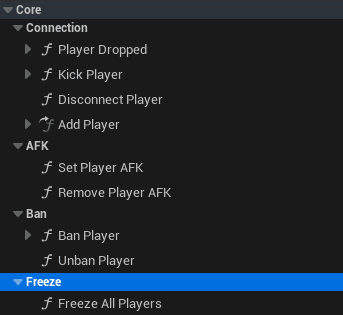
  • Utility Functions: GetAllPlayers, GetBannedPlayers, GetAFKPlayers (placeholder), GetFrozenPlayers, KickPlayer, BanPlayer, TimeoutPlayer, FreezePlayer, UnfreezePlayer
  • Scoreboard: Shows level (from Level Manager), name, score, K/D/A, ping; organized by teams; requires Team Manager; opens with P key; real-time updates
  • Kick Popup: Via Game Instance interface, shown when kicked

Integration: Team Manager and Score Manager depend on Player Manager (bind to events); Game Mode System uses freeze functions; must be bottom-most component for proper event binding order.

Implementation Required: Kick/ban UI, permission system, vote kick (logic exists, UI needed).

One central hub for all player management!

What are your Feelings
Still stuck? How can we help?

How can we help?

Table of Contents
  • Player Manager
    • Prerequisites
      • Session Manager Required
      • Related Systems
    • Core concepts
      • What Is the Player Manager?
      • How It Works
      • Central Player Hub
      • Component Location
      • Component Order Requirement
      • Core Functionality
      • Component Location
      • Core Functionality
      • Scoreboard Widget
    • Player tracking
      • Connected Players List
      • Player Data Storage
      • Player Name Retrieval
    • Player management features
      • Joining and Leaving
      • Kicking Players
      • Banning Players
      • Timing Out Players
      • Freezing Players
      • AFK Detection
    • Event dispatchers
      • Overview of Events
      • Player Died Events
      • Player Killed Events
      • Player Status Events
      • Event Binding Pattern
    • Utility functions
      • Player Retrieval Functions
      • Player Status Functions
      • Player Action Functions
    • Scoreboard system
      • Scoreboard Widget
      • Team Manager Requirement
      • Scoreboard Data
      • Opening the Scoreboard
      • Real-Time Updates
    • Kick popup system
      • How Kick Popup Works
      • Game Instance Communication
      • Display Logic
    • Integration with other systems
      • Team Manager Integration
      • Score Manager Integration
      • Game Mode System Integration
      • Level Manager Integration
    • Permissions and authority
      • Host-Only Actions
      • Implementation Required
    • How to guides
      • Setting Up Player Manager
      • Step 1 - Add Components:
      • Step 2 - Verify Component Order:
      • Step 3 - Test:
      • Binding to Player Events
      • Implementing Kick/Ban UI
      • Step 1 - Create Admin Menu Widget:
      • Step 2 - Populate Player List:
      • Step 3 - Implement Kick Button:
      • Step 4 - Implement Ban Button:
      • Step 5 - Add Timeout Option:
      • Using Utility Functions

© 2025 Games by Hyper

X Reddit Patreon Discord Linkedin YouTube

Review Cart

No products in the cart.

We noticed you're visiting from Netherlands. We've updated our prices to Euro for your shopping convenience. Use United States (US) dollar instead. Dismiss

  • Hyper Bundle Configurator
  • Shop
    • Game Templates
    • Courses
    • Loyalty Store
    • Survival Modules
    • RPG Modules
    • Environment Building
    • Browse All
  • My account
  • Become a Member
  • Cart
  • Get Help
    • FAQ
    • Upgrade your Game Template
    • Documentation
  • About Hyper
  • News & Updates