
Reputation system #
Contents
Introduction #
The Reputation System is a modular, gameplay-tag-driven framework that tracks how factions and individual NPCs feel about the player. It is built entirely in Blueprint and is driven by DataTables, making it easy to extend without rewriting core logic.
At a high level, the system supports both broad faction standing and personal NPC standing. Each reputation profile can contain multiple stages, optional stage gate requirements, optional stage completion rewards, and optional perks. Actions can modify reputation directly through a custom amount or indirectly through predefined action tags stored in DT_Reputation_Actions.
Because the system is tag-based, it scales well across different game types. A faction can represent a kingdom, guild, tribe, militia, cult, city guard, or even an abstract team used by AI logic. An NPC can also have their own separate personal reputation profile, allowing world-level reactions and character-specific reactions to exist at the same time.
- Tracks faction and NPC reputation independently using the same underlying data structure.
- Supports multiple reputation stages such as Enemy, Neutral, Friendly, Honored, or any custom progression ladder.
- Uses predefined gameplay-tag actions for quick integration with quests, combat, interaction, and world events.
- Allows optional relation spillover so changing one reputation can influence linked factions or NPCs automatically.
- Includes utility getters for stage progress, current stage, unlocked perks, formatted UI text, and most affiliated faction.
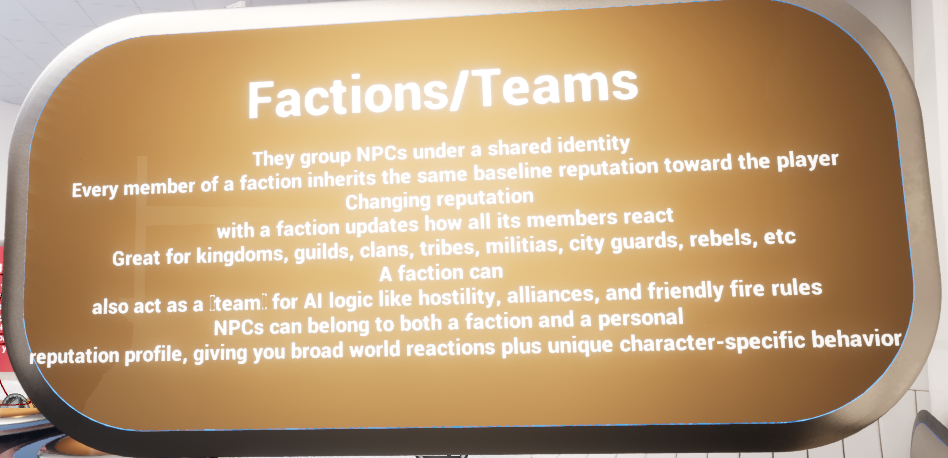
Faction and team style usage in the demo environment.
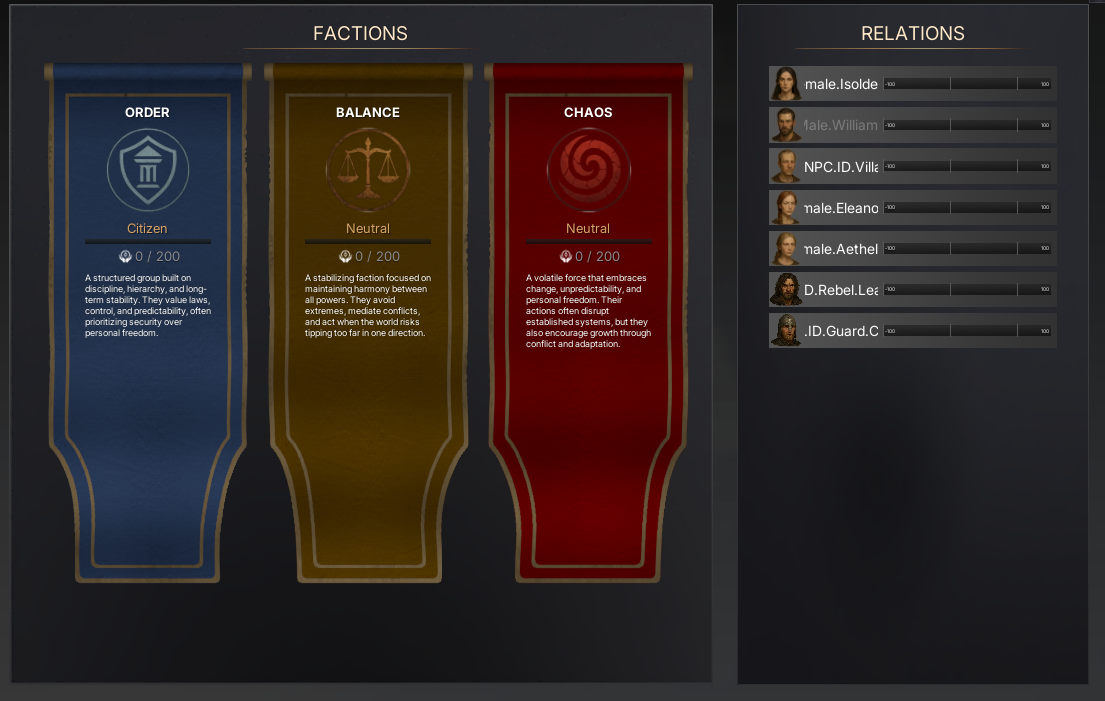
Example faction UI showing separate progress cards and stage titles.
Adding Reputation to the Player Controller #
The live implementation of the system is split into two components:
- AC_Reputation_Abstract – contains the variables, dispatchers, and function definitions but no actual gameplay logic.
- AC_Reputation – contains the concrete implementation and is the component that should be used in-game.
AC_Reputation should be added to the Player Controller. This makes the system a player-owned manager for discovered reputation entries, current values, stage progression, UI updates, and client/server reputation requests.
Once attached, the component acts as the main public API for the rest of the project. Other systems do not need to know how faction or NPC reputation is stored internally; they only need to call the exposed reputation functions or bind to the dispatchers.
Why place it on the Player Controller? #
- The player controller is a natural owner for player-specific discovery state, reputation progress, and replicated player-facing UI data.
- It avoids duplicating reputation state across multiple NPCs or world actors.
- UI widgets and interaction systems can call into one consistent component regardless of which actor triggered the reputation change.
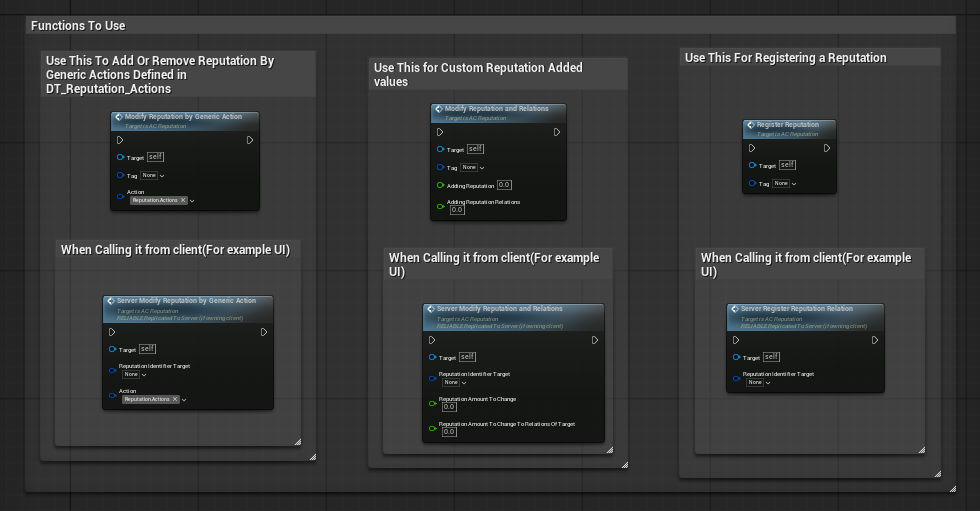
The main gameplay-facing functions exposed by AC_Reputation.
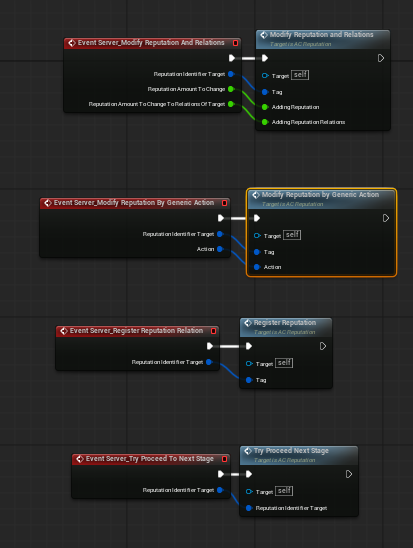
Server wrappers forward client-side requests into the live implementation.
Details Panel / Important Variables #
The component exposes a small set of important configuration and runtime variables. Some are player-facing settings, while others are runtime caches used to detect state changes and broadcast the correct events.
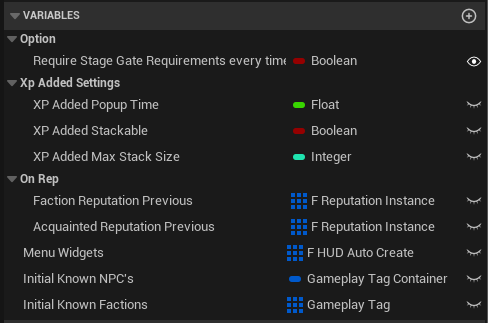
|
Field |
Description |
|
Require Stage Gate Requirements every time |
Controls whether stage gate requirements are rechecked each time stage progression is evaluated. Useful when stage gates depend on changing gameplay state such as inventory, quest state, or temporary conditions. |
|
XP Added Popup Time |
How long reputation-added popup feedback should remain visible on screen. |
|
XP Added Stackable |
Controls whether multiple popup messages can stack together instead of replacing each other. |
|
XP Added Max Stack Size |
Limits how many popup entries can be stacked at once. |
|
Faction Reputation Previous |
Cached previous faction reputation instance data used to compare old vs new state during replication or UI refresh. |
|
Acquainted Reputation Previous |
Cached previous NPC/acquaintance reputation instance data used for change detection and event broadcasting. |
|
Menu Widgets |
Widget class reference used by the reputation UI/menu flow. |
|
Initial Known NPC's |
Gameplay Tag container used to define personal NPC reputation entries that should start discovered for the player. |
|
Initial Known Factions |
Gameplay Tags for factions that should already be visible or known when gameplay begins. |
Structures Explained #
The system is built around a small group of reusable structs. These structs define how actions convert into reputation changes, how factions and NPC profiles are described, how live progress is stored, and how stage progression is configured.
F_Action_Consequence #
This struct defines the direct result of a reputation action. It is the payload used by predefined action rows and determines how much the target reputation changes and how strongly linked relations should also be affected.
|
Field |
Description |
|
Reputation |
Float. The direct amount added to or removed from the target reputation. |
|
Reputation To Relations |
Float. Optional spillover amount applied to linked relations. This allows one entity to influence related entities automatically. |
F_Reputation_GameplayTag_Consequence #
This struct maps a gameplay tag to a predefined action consequence. It is the bridge between a gameplay event tag such as Reputation.Actions.Attack and the amount of reputation change that should happen when that action is triggered.
|
Field |
Description |
|
Gameplay Tag |
Gameplay Tag identifier used to request the action. |
|
Action Consequence |
F_Action_Consequence payload that defines the reputation and relation impact of that action. |
F_Reputation_Relation #
This struct represents a linked relationship between one reputation entity and another. It is used inside faction and NPC rows so that changing one reputation can affect a related tag as well.
|
Field |
Description |
|
Tag |
Gameplay Tag for the linked reputation entity, such as a faction or team affiliation. |
|
Relation |
Float strength or weighting used by the relation system. |
F_Reputation_Stage #
This struct defines a single stage within a reputation ladder. Each stage occupies a reputation range and can optionally contain gate requirements, completion rewards, and perk values.
|
Field |
Description |
|
Title Name |
Display name of the stage, such as Enemy, Rookie, Initiate, Friendly, or Honored. |
|
Stage Gate Requirements |
Array of event-style requirement entries that must be satisfied before the player is allowed to proceed into the stage. |
|
Stage Completed Rewards |
Array of event-style reward entries executed when the stage is completed or advanced into. |
|
Reputation Min |
Lower bound of the stage range. |
|
Reputation Max |
Upper bound of the stage range. |
|
Perks |
Gameplay Tag -> Generic Value map for perks or stage-specific unlock values. |
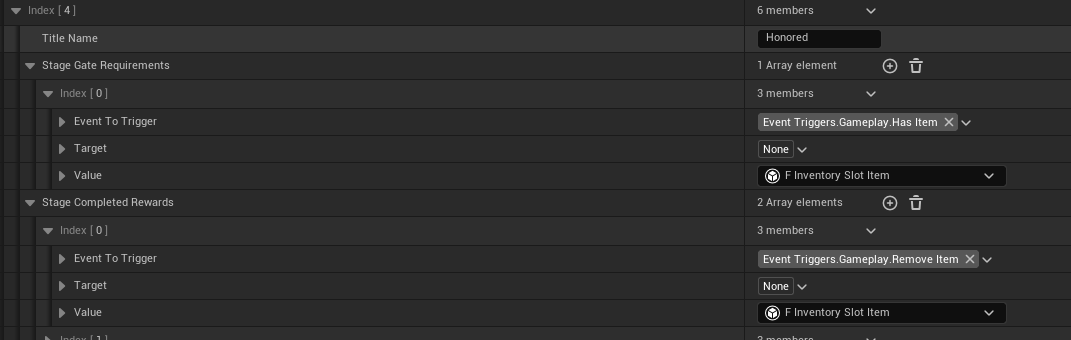
Example of a populated stage gate requirement and stage completed reward.
F_Reputation_Identifier #
This is the main data definition struct used by both DT_Reputation_Factions and DT_Reputation_NPC. It describes a reputation profile and all of the content needed to present and progress it.
|
Field |
Description |
|
Tag |
Gameplay Tag identifier for the faction or NPC profile. |
|
Name |
Display name shown in UI or used for data organization. |
|
Description |
Written description of the faction or character. |
|
Icon |
Texture2D used by the UI. |
|
Relations |
Array of F_Reputation_Relation entries. |
|
Base Reputation |
Starting value before any gameplay changes occur. |
|
Stages |
Array of F_Reputation_Stage entries defining the full progression ladder. |
|
UI Color 1 / UI Color 2 |
Primary and secondary colors used for menus, cards, bars, or thematic presentation. |
F_Reputation_Instance #
This struct stores the live runtime state of a discovered reputation entry for the player. While F_Reputation_Identifier defines what a reputation profile is, F_Reputation_Instance stores how far the player has progressed in it.
|
Field |
Description |
|
Reputation Identifier |
Gameplay Tag pointing back to the profile definition. |
|
Reputation |
Current live reputation value. |
|
Highest Reached Reputation |
Highest reputation value the player has ever reached with this entry. |
|
Current Stage Index |
Current stage within the stage array. |
|
Highest Reached Stage |
Highest stage index ever reached. |
|
Most Affiliated Faction |
Gameplay Tag used when the system needs to determine the player's dominant or most aligned faction. |
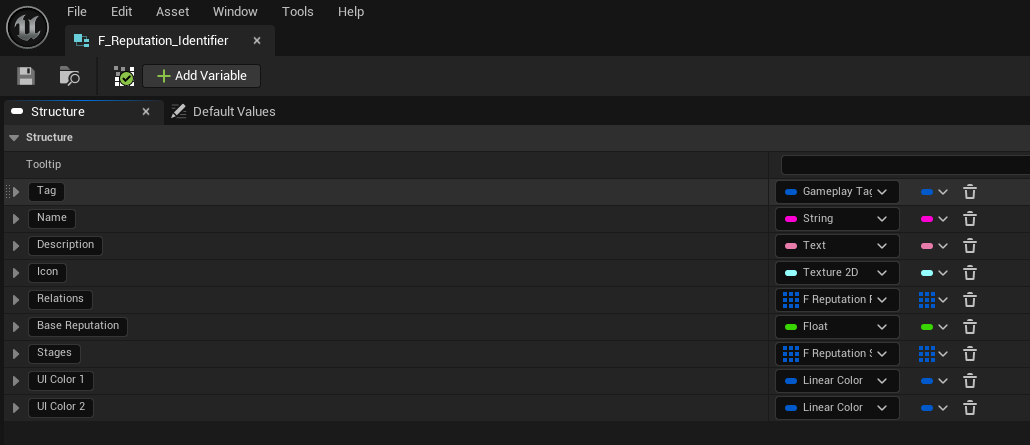
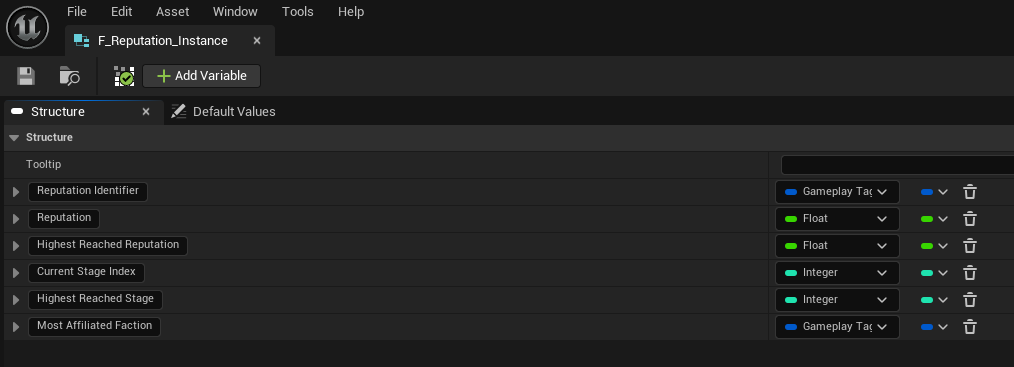
Data Tables Explained #
The reputation system is intentionally data-table driven. Designers can define new factions, NPCs, actions, ranges, colors, gates, and rewards without modifying core logic. The same core component then reads the data at runtime and exposes the results through utility functions and dispatchers.
DT_Reputation_Actions #
DT_Reputation_Actions stores predefined gameplay actions that can be triggered quickly from combat, interaction, quest, or scripted events. Instead of manually entering a custom reputation amount each time, other systems can pass a single gameplay tag and let the table provide the configured result.
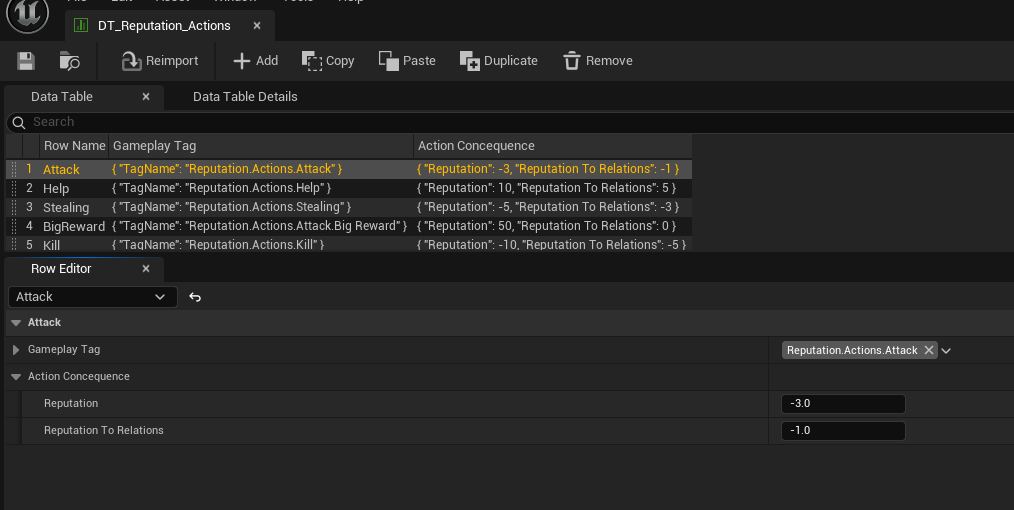
- Attack = direct reputation loss and optional relation loss.
- Help = direct reputation gain and optional relation gain.
- Stealing = reputation loss and relation loss.
- BigReward = large positive reputation value with no relation spillover in the shown sample.
- Kill = large negative reputation value with negative relation spillover.
This table is ideal when the game already produces reliable gameplay tags such as Reputation.Actions.Attack, Reputation.Actions.Help, or Reputation.Actions.Kill. The reputation system can then remain generic while the table decides the numbers.
DT_Reputation_Factions #
DT_Reputation_Factions defines broad faction, team, or alignment profiles. These rows usually represent the groups that influence global world reactions, access control, vendor behavior, allegiance, hostility, or high-level AI rules.
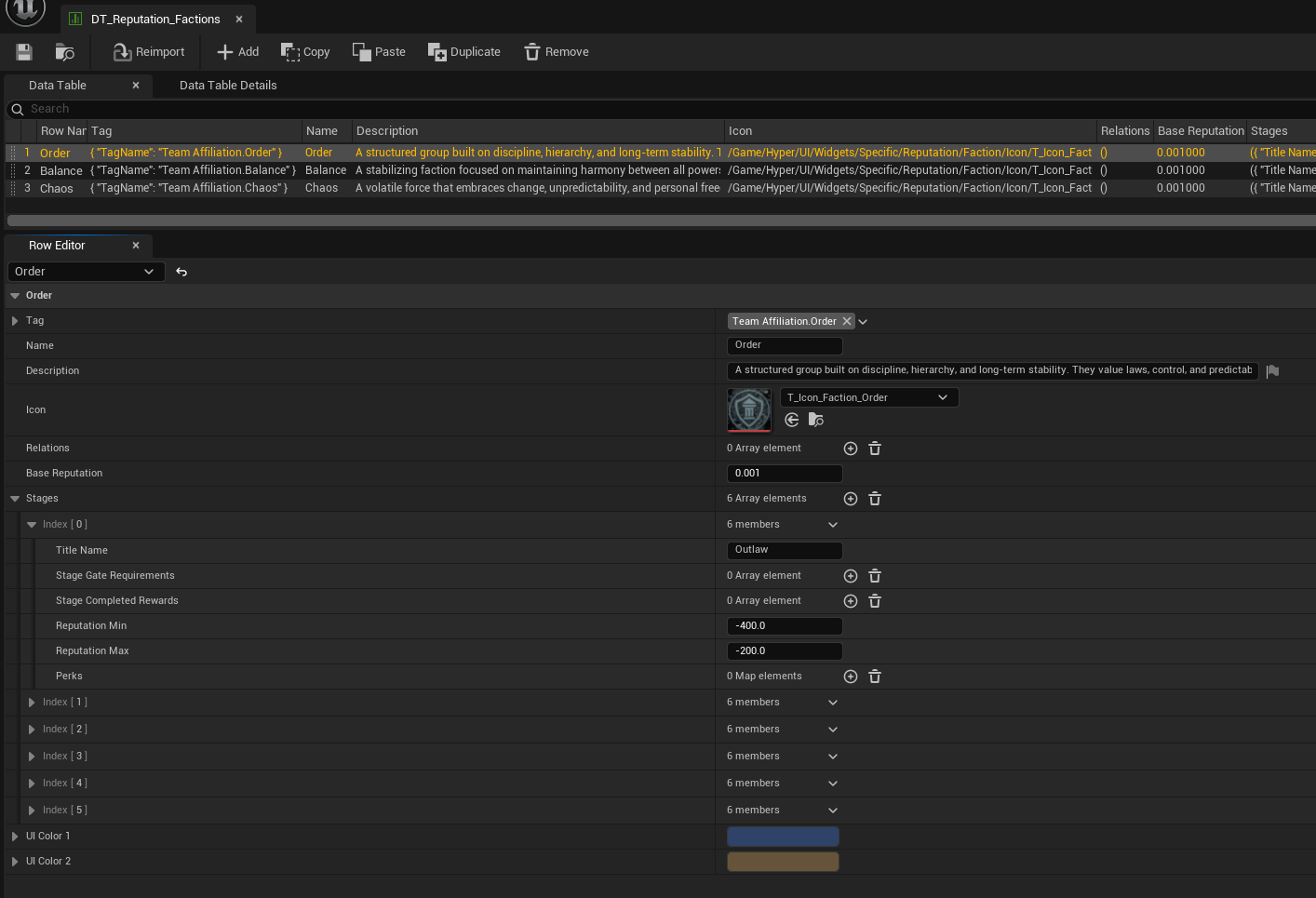
- Rows use the F_Reputation_Identifier structure.
- The sample shows faction tags such as TeamAffiliation.Order, TeamAffiliation.Balance, and TeamAffiliation.Chaos.
- Each faction can define its own icon, description, stage ladder, base reputation, and UI colors.
- Relations can be left empty or used when the designer wants cross-faction influence.
DT_Reputation_NPC #
DT_Reputation_NPC defines personal NPC reputation profiles. These are ideal when the player needs a relationship with a specific named character that can differ from their wider faction standing.
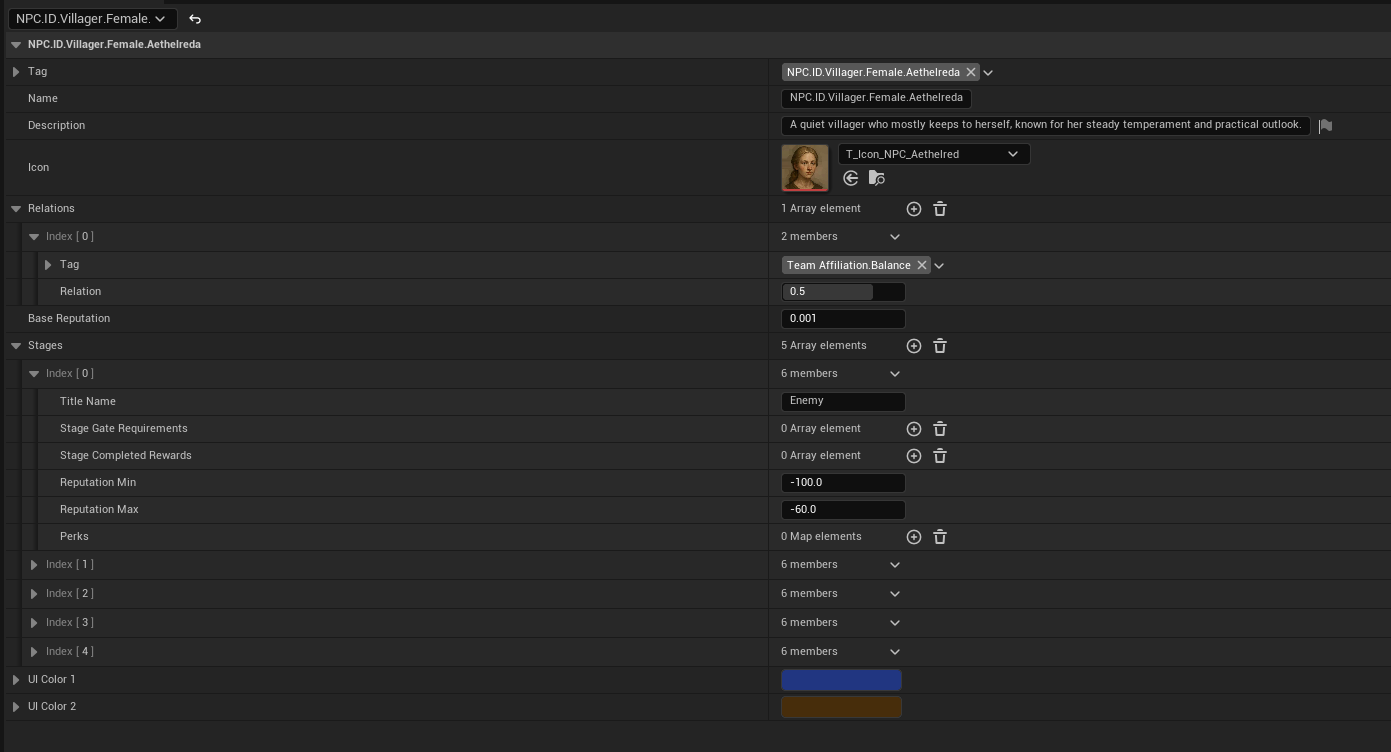
- Rows use the same F_Reputation_Identifier structure as factions.
- This makes NPC and faction reputation consistent from a systems point of view.
- An NPC row can still include faction relations, allowing personal reputation to influence a larger faction if desired.
- This is a strong fit for vendors, guards, quest givers, companions, village elders, or unique story characters.
Because factions and NPCs share the same schema, the same UI, formatting helpers, stage logic, and registration flow can be reused for both.
Functions to Use #
The system exposes a set of public functions intended for gameplay use, UI queries, formatting, and replication handling. The most important public entry points are the ones used to register entities and modify reputation.
Core modification functions #
|
Field |
Description |
|
Register Reputation |
Marks a faction or NPC as discovered so it becomes visible and available within the reputation system/UI. Use this when the player first meets a character, discovers a faction, or should already know an entry at game start. |
|
Modify Reputation By Generic Action |
Applies a predefined reputation action using a gameplay tag from DT_Reputation_Actions. This is the quickest way to hook the system into combat, quest, and interaction events. |
|
Modify Reputation and Relations |
Applies a custom direct reputation amount and an optional relation spillover value. Use this when you do not want to rely on a predefined action row. |
|
Try Proceed Next Stage |
Attempts to advance stage progression once the reputation range and any gate requirements are satisfied. |
Utility / progression functions #
- Get Stage Gate Requirements By Tag
- Check Stage Requirements By Tag
- Get Reputation Progress Of Stage
- Get Reputation Progress Of Stage Percentage
- Get Reputation Stage From Reputation Value
- Get Most Affiliated Faction
- Get Reputation Instance By Tag
- Get Reputation Progress Total Percentage
- Get Unlocked Perks By Instance
- Get Unlocked Perks By Tag
- Get Formatted Requirement Text
- Get Formatted Requirement Text By Tag
- Get Formatted Perks Text
These helpers are primarily used by UI, menus, quest logic, and gameplay conditions. They allow other systems to ask questions about reputation progress without needing to know how stages, instances, or tables are stored internally.
Replication / change handling #
- OnRep_Faction Reputation
- OnRep_Acquainted Reputation
- OnRep_Faction Reputation Execution
- OnRep_Acquainted Reputation Execution
These functions support network-safe reputation updates and ensure the component can compare previous state against replicated state before broadcasting the correct faction or acquaintance events to UI and other listeners.
Client to server wrappers #
When the request originates from a client-owned source such as UI, the component exposes server wrappers that forward the request into the same core functions. This keeps gameplay behavior consistent no matter where the request came from.
- Server_Modify Reputation By Generic Action
- Server_Modify Reputation And Relations
- Server_Register Reputation Relation
- Server_Try Proceed To Next Stage
Event Dispatchers #
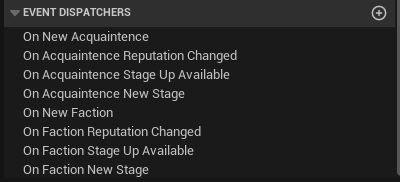
The component broadcasts a clear set of dispatchers whenever a new reputation entry is discovered, a value changes, a stage-up opportunity becomes available, or a new stage is reached. These dispatchers are the preferred way for UI and other systems to react without hard-wiring themselves into the component internals.
|
Dispatcher |
Inputs |
Use |
|
On New Acquaintence |
F_Reputation_Instance |
Called when a new NPC/personal reputation entry is first discovered. |
|
On Acquaintence Reputation Changed |
F_Reputation_Instance, Float Changed Amount |
Use for UI updates, feedback, notifications, or reactive logic when personal reputation changes. |
|
On Acquaintence Stage Up Available |
Gameplay Tag Identifier |
Signals that the next stage is available once requirements have been satisfied. |
|
On Acquaintence New Stage |
Gameplay Tag Identifier, F_Reputation_Stage |
Broadcast when a new personal NPC stage is reached. |
|
On New Faction |
F_Reputation_Instance |
Called when a new faction profile is first discovered. |
|
On Faction Reputation Changed |
F_Reputation_Instance, Float Changed Amount |
Use for faction UI cards, popups, loyalty changes, or world-state reactions. |
|
On Faction Stage Up Available |
Gameplay Tag Faction Identifier |
Signals that a faction is ready to proceed to the next stage. |
|
On Faction New Stage |
Gameplay Tag Faction Identifier, F_Reputation_Stage |
Broadcast when a faction enters a new stage. |
Factions, Npcs, and Relations #
One of the strongest parts of this system is that it supports both broad and personal reputation at the same time. Factions allow a whole group to inherit shared reactions, while NPC rows provide individual personality and relationship tracking.
Factions / teams #
Factions or teams group NPCs under a shared identity. Every member of the faction can inherit the same baseline reputation toward the player. Changing reputation with the faction then updates how the wider group reacts, which is ideal for guards, militias, cults, kingdoms, traders, rebels, or larger social blocs.
NPC / acquaintance reputation #
NPC rows add the personal layer. This lets the player be friendly with one villager while still being disliked by the surrounding faction, or be accepted by a faction but still distrusted by a specific important character.
Relations #
Relations link one reputation entity to another with a weight/value. This supports chain reactions where changing one reputation can influence related entries. For example, helping a villager may slightly improve the player's standing with that villager's faction, or attacking a faction member may make related groups less tolerant.
Because relations are tag-based, they remain flexible and can be used for strict faction politics, soft social alignment, or even abstract team influence used only by AI logic.
Stage Progression and Requirements #
Every reputation profile can contain a ladder of named stages. Each stage owns a reputation range, and can optionally define gate requirements, completion rewards, and perks. This means the player does not only gain or lose a number – they move through explicit reputational states that gameplay can react to.
A stage can be locked behind extra requirements even when the reputation number is already high enough. This is useful when reputation should represent trust plus proof, such as requiring a badge, item, quest completion, offering, or story flag before the next tier is awarded.
- Reputation ranges determine which stage the current value belongs to.
- Stage Gate Requirements define additional checks that must pass before progression is allowed.
- Stage Completed Rewards can fire follow-up event triggers such as removing an item, granting access, or updating another system.
- Perks store stage-specific values or unlock information for other systems to query.
In the shown sample, the Honored stage uses a gameplay event requirement that checks for a required item, and the completion reward removes an item when the stage is completed. This demonstrates how the stage system can hook into inventory or any other gameplay event-driven system.
Predefined Actions and Custom Modifiers #
The system supports two main ways of changing reputation.
1) Predefined actions #
Predefined actions are the fastest and cleanest path when the same gameplay event will happen repeatedly. A combat, interaction, or quest system can simply send a tag such as Reputation.Actions.Attack and let DT_Reputation_Actions decide how much reputation and relation change should occur.
2) Custom modifiers #
Custom modifiers are useful when the change amount is not standardized. A quest reward, dialogue result, or unique scripted moment may want to directly add a hand-authored amount of reputation and a separate relation spillover amount. In that case, Modify Reputation and Relations gives the designer full control.
Registering Reputation #
Registering a reputation entry marks it as discovered. This is important because the player should not necessarily see every faction or NPC in the reputation UI from the start. The system can reveal entries naturally as the world is explored.
- Call Register Reputation when the player first meets an NPC.
- Call it when a quest introduces a new faction.
- Use Initial Known NPC's and Initial Known Factions for entries that should already be unlocked at game start.
- Use the server wrapper when discovery is requested from a client-owned source such as UI.
Hooking Reputation Into Other Systems #
The reputation component is designed to be bound into other systems rather than forcing those systems to own reputation logic themselves. This keeps the project modular and makes reputation a shared service instead of a hard dependency.
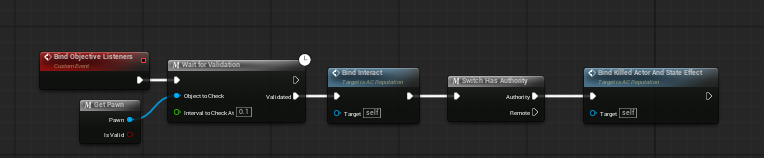
Example listener setup that binds reputation into other gameplay systems.
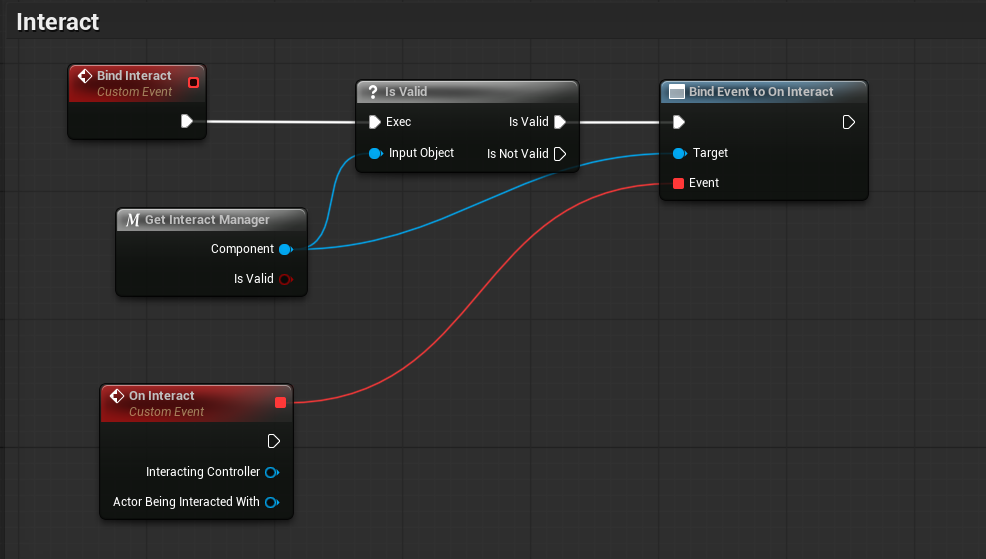
Interaction events can be routed into the reputation system through event binding.
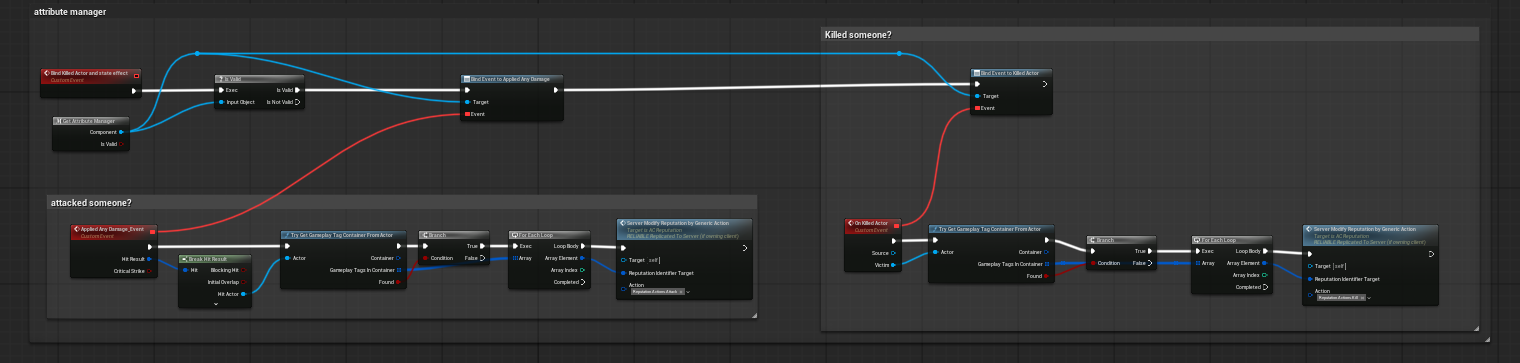
Combat-related events can be converted into predefined actions such as Attack or Kill.
- Interaction systems can trigger registration or custom reputation changes when the player talks, trades, helps, or steals.
- Combat systems can convert damage and kill events into predefined action tags.
- Quest systems can award custom amounts or stage rewards directly.
- UI can query progress, current stage, perks, and formatted text through utility getters.
Adding Your Own Faction #
Add a new faction row (step-by-step)
- 1. Open DT_Reputation_Factions.
- 2. Click Add to create a new row.
- 3. Set the Tag. Example: TeamAffiliation.MerchantsGuild.
- 4. Fill in Name, Description, and Icon.
- 5. Set Base Reputation to the starting value you want players to begin at.
- 6. Add any Relations if this faction should influence or be influenced by other factions or NPC entries.
- 7. Expand Stages and add the reputation ladder. Give each stage a Title Name and set Reputation Min / Reputation Max.
- 8. Optionally add Stage Gate Requirements, Stage Completed Rewards, and Perks for stages that need extra progression logic.
- 9. Set UI Color 1 and UI Color 2 so the faction presents clearly in the menu.
- 10. Save the row and register the faction when the player should discover it.
Use faction rows for any reputation that should affect a wider social or AI group rather than just one person.
Adding Your Own Npc #
Add a new NPC row (step-by-step)
- 1. Open DT_Reputation_NPC.
- 2. Add a new row.
- 3. Set the Tag. Example: NPC.ID.Villager.Male.Blacksmith.
- 4. Fill in Name, Description, and Icon for UI presentation.
- 5. Add Relations if this NPC should also influence a wider faction such as TeamAffiliation.Order or TeamAffiliation.Balance.
- 6. Define Base Reputation and the full stage ladder.
- 7. Add stage gate requirements when the player must do more than just reach the number.
- 8. Save the row and call Register Reputation when the player first meets the NPC or when the game should reveal them.
Use NPC rows when you want a specific named character to respond to the player differently from their wider faction or social group.
Adding Your Own Action #
Add a new predefined action row (step-by-step)
- 1. Open DT_Reputation_Actions.
- 2. Add a new row.
- 3. Set the Gameplay Tag. Example: Reputation.Actions.Bribe.
- 4. Expand Action Consequence.
- 5. Set Reputation to the direct gain or loss you want on the target entity.
- 6. Set Reputation To Relations if linked entities should also be affected.
- 7. Save the table.
- 8. Call Modify Reputation By Generic Action (or its server wrapper) and pass the target identifier plus your new action tag.
Predefined action rows are best when the same event should always produce the same default consequence. This keeps combat, dialogue, quest, and interaction Blueprints very clean.
Adding Your Own Perks #
- Open DT_Reputation_Factions or DT_Reputation_NPC.
- Select the row you want to edit.
- Expand the Stages array.
- Open the stage you want to modify.
- Locate the Perks field.
- Add a new map entry.
- Set the perk key to the Gameplay Tag that identifies the unlock.
- Fill in the value payload using the field type that best fits the perk:
- use Bool Value for true/false unlocks
- use Float Value for numbers such as discounts or bonuses
- use String Value for labels or text-based values
- use Tag Value for linking the perk to other gameplay-tag-driven systems
- Leave unused value fields empty/default unless your project needs them.
Example Flows #
Attacking a villager #
- Combat or damage logic identifies that the player attacked a valid target.
- The target or its tags are used to determine which reputation entry should be affected.
- The system sends Reputation.Actions.Attack through Modify Reputation By Generic Action.
- DT_Reputation_Actions supplies the configured negative reputation and relation spillover.
- The live F_Reputation_Instance updates, the current stage is re-evaluated, and change dispatchers can update UI or other systems.
Helping a faction or NPC #
- An interaction, quest, or scripted reward calls Modify Reputation By Generic Action with a positive tag such as Help or BigReward, or uses Modify Reputation and Relations with a custom amount.
- The system updates the matching faction or NPC profile.
- If the new value crosses into a higher range, the component checks whether the next stage is available and whether any gate requirements must also pass.
- If the stage becomes valid, the component can proceed and fire the new stage dispatcher.
Honored stage with a gate requirement #
- The player reaches the required numerical reputation range for the Honored stage.
- The stage still checks its gate requirement event, such as whether the player has a required item.
- Once valid, Try Proceed Next Stage can advance the stage.
- The stage completed reward then fires, such as removing the required item, and the new stage can be broadcast to UI or quest logic.
These flows show the intended strength of the system: one shared reputation component, a clean tag-based API, reusable data tables, and gameplay integration through standard event hooks rather than one-off hardcoded logic.
Summary #
The Reputation System is designed to be practical for designers and scalable for projects. Factions, NPCs, stages, requirements, rewards, relations, UI presentation, and event-driven updates are all handled through a consistent Blueprint and DataTable workflow. Once AC_Reputation is placed on the Player Controller, the rest of the project can treat reputation as a reusable service and drive it through tags, custom values, or stage logic as needed.