
The Routine-Driven NPC Framework is a modular NPC framework for Unreal Engine focused on simulating living worlds at scale.
It provides a unified solution for managing NPC population, daily routines, perception, and combat through a data-driven architecture built on Unreal Engine State Trees, Data Tables, Data Assets, AI Perception, and Smart Objects.
The framework is designed for:
- AAA-style RPGs
- Survival and sandbox games
- Open-world and adventure games
- Simulation-heavy worlds with large NPC counts
It supports both humanoid and non-humanoid NPCs through a single shared system.
Key Features
- Unified NPC framework for humanoids and creatures
- Time-based routine system with smart object integration
- Scalable population management for large worlds
- Context-aware perception with team and attitude logic
- Modular combat system driven by perception outcomes
- Fully data-driven configuration using Unreal Engine assets
- Designed for professional production
Scope and Extensibility
This framework is intentionally designed as an extensible foundation rather than a closed, plug-and-play solution (eventhough the base is plug-and play), providing the core architectural layers required for complex NPC systems while allowing studios and developers to adapt, extend, and specialize behavior, animation, and interaction logic to fit the specific needs of their game.
Core Design Principles #
The framework is built around four core pillars.
Each pillar solves a specific problem and is intentionally isolated.
Population
Controls which NPCs exist in the world.
- Automatic and manual population workflows
- Scalable spawn and despawn logic
- Supports ambient, authored, and simulation-driven NPCs
- Independent of behavior, routines, and combat
Routine
Controls what NPCs do over time.
- Time-based schedules
- Task-driven execution via State Trees
- Smart Object resolution through gameplay tags
- Shared routines across different NPC types
Perception
Controls how NPCs interpret the world.
- Sight and hearing based on AI Perception
- Team affiliation and actor identification
- Attitude-driven reactions (neutral, hostile, afraid, etc.)
- Escalation through awareness states
Combat
Controls how NPCs engage when hostile.
- Combat styles defined per NPC
- Behavior driven by perception outcomes
- Supports humanoid and creature combat
- Clean entry and exit back into routines
Architectural Intent
- Behavior is data-defined, not hardcoded
- NPC logic scales from small scenes to open worlds
- Designed to match expectations of modern AAA NPC systems
Design Philosophy
- NPCs are reactive systems, not scripted sequences
- World simulation comes from overlap of simple systems
- Designers work in data, tables, and assets
- Programmers extend capabilities, not content
- Debuggability and observability are first-class concerns
Pillar 1: Population #
Purpose #
The Population system defines which NPCs exist in the world, where they exist, and when they are active.
It provides a scalable foundation for managing NPC presence across large worlds without embedding any behavior, perception, or combat logic.
Population Manager #
NPC population is controlled through a Population Manager actor placed in the level.
The Population Manager defines a bounded population area and manages NPC lifecycle within that area.
Key responsibilities:
- Spawning and despawning NPCs
- Enforcing minimum and maximum population counts
- Managing activation and deactivation based on player presence
- Handling respawn rules
The Population Manager does not control how NPCs behave.
It only determines whether NPCs exist and are active.
What the Population System Does Not Handle #
The Population system does not define:
- Routines
- Tasks
- Perception
- Combat
- Decision-making
Those concerns are handled by the other pillars and are assigned per NPC.
Population Workflows #
The Population Manager supports two complementary workflows.
Automatic Population
NPCs are spawned automatically inside the population area.
Configuration includes:
- NPC class to spawn
- Minimum and maximum amount in the region
- Respawn rules and delays
- Optional respawn conditions (for example, only when the player is not present)
This workflow is intended for:
- Wildlife
- Ambient town NPCs
- Enemy camps
- Large-scale world simulation
Assigned NPC Population
Manually placed NPCs can be assigned to a Population Manager.
In this workflow:
- NPCs are placed by the level designer
- The Population Manager takes over activation and lifecycle control
- No spawning logic is applied
This workflow is intended for:
- Authored locations
- Vendors and guards
- Narrative or handcrafted spaces
Both workflows can be used together in the same level.
NPC Classes and Archetypes #
The Population Manager does not spawn behavior directly.
It spawns NPC configuration Blueprints, which are typically children of a shared NPC base class.
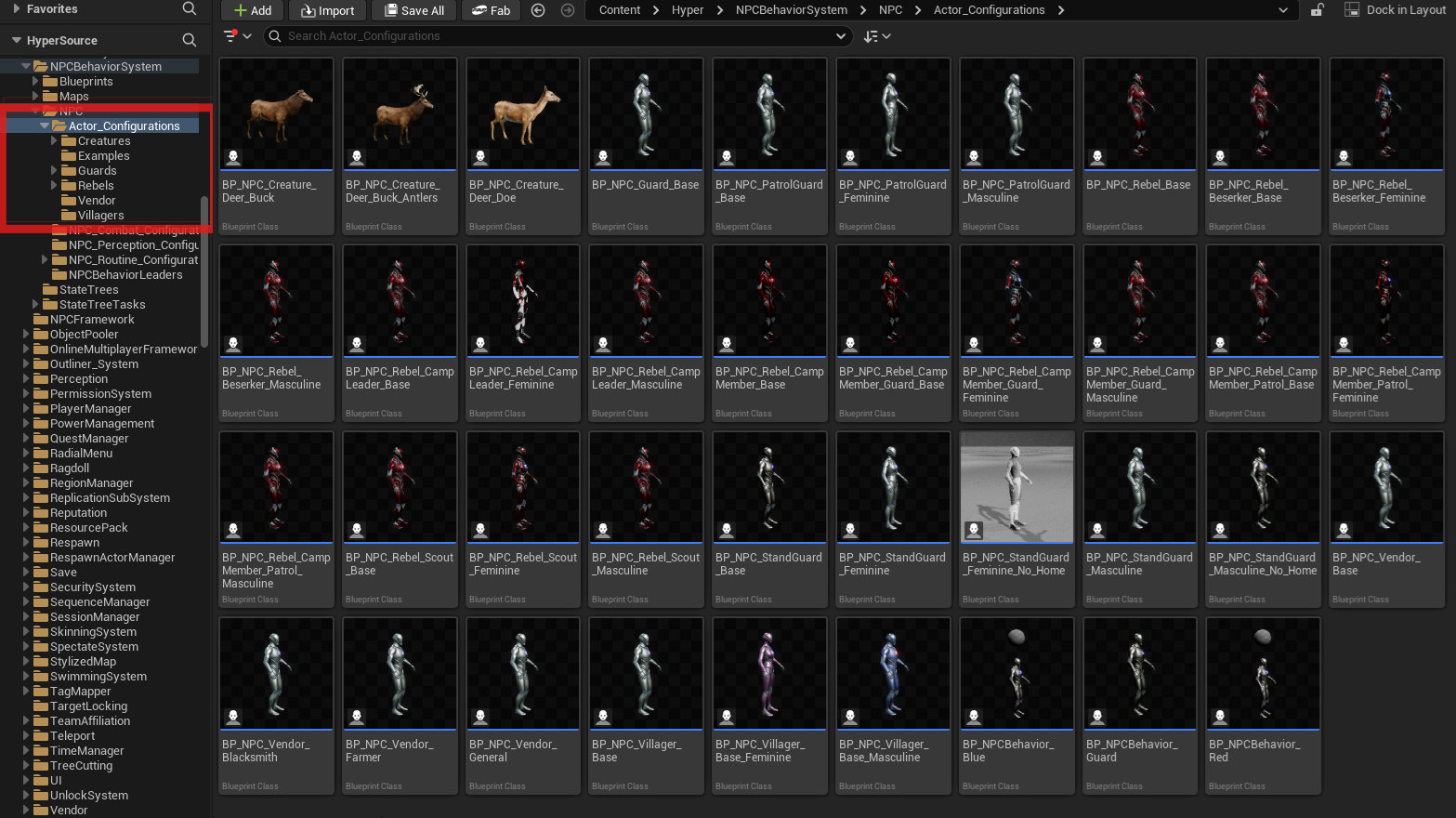
These NPC Blueprints define:
- Visual representation
- Assigned NPC behavior component
- Linked routine, perception, and combat data
- Villagers
- Guards
- Rebels
- Vendors
- Creatures
The Population system treats all of these identically.
Supported NPC Types #
- Humanoid NPCs
- Non-humanoid NPCs (creatures)
Both types use the same population logic and can coexist within the same population area.
Performance and Control #
The Population Manager includes built-in support for:
- Distance-based activation and deactivation
- Delayed AI disabling
- Forced load and unload for debugging and testing
This allows large populations to exist logically without all NPCs being active at the same time.
Using the Population Manager #
This section describes how to set up and debug a Population Manager in a level.
Placing a Population Manager
- Drag a Population Manager actor into the level.
- Position it where the NPC population should be managed.
- Adjust the box extents to define the population area.
The box defines the spatial bounds in which NPCs are considered part of this population.
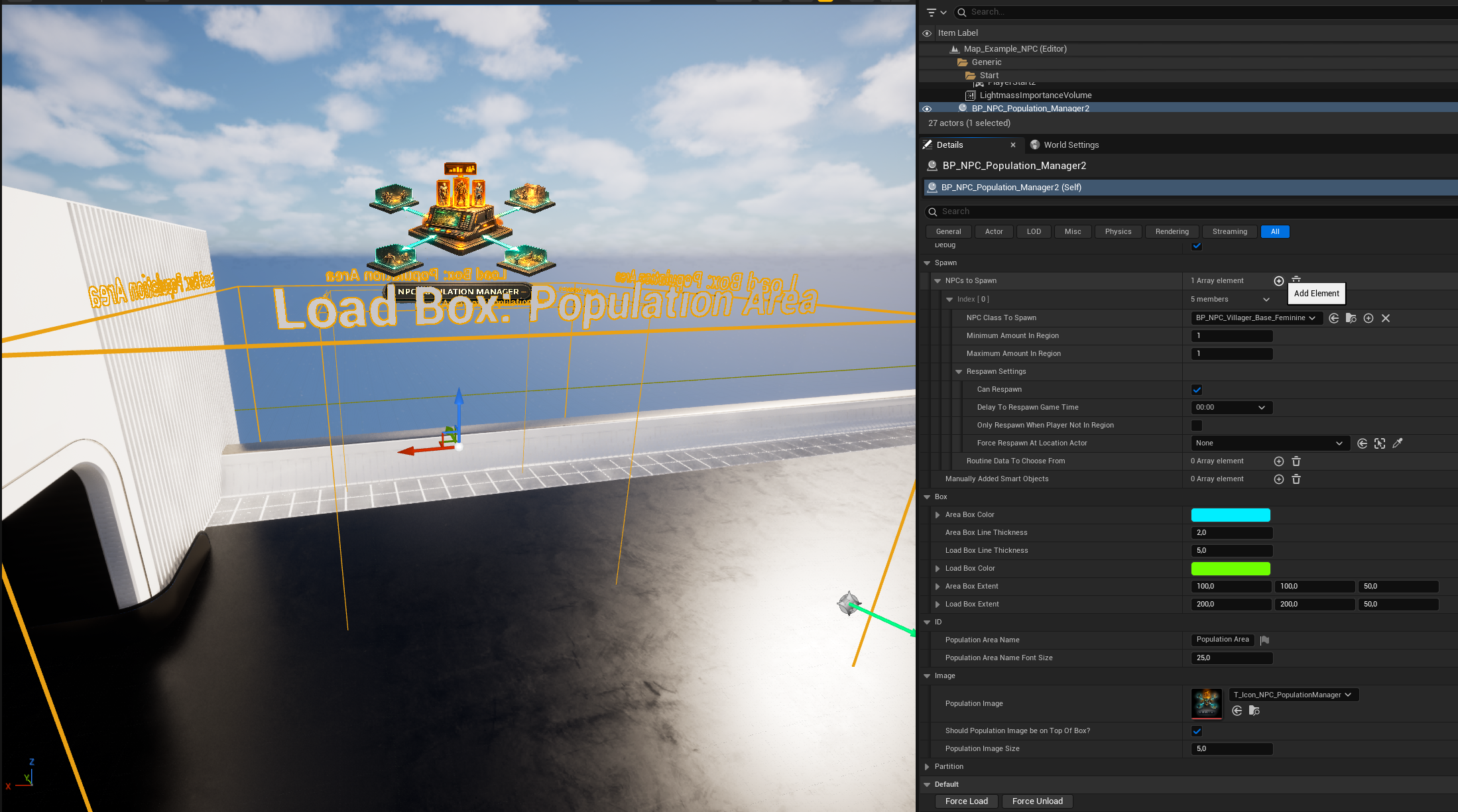
Configuring NPCs to Spawn
In the Population Manager details panel:
- Add one or more entries under NPCs to Spawn
- For each entry, configure:
- NPC Class to Spawn
- Minimum amount in region
- Maximum amount in region
The NPC Class is typically a child of the shared NPC base class and already contains its own routine, perception, and combat configuration.
The Population Manager does not override NPC behavior.
Respawn Configuration
Optional respawn behavior can be enabled per NPC entry.
Available options include:
- Enable or disable respawning
- Respawn delay
- Only respawn when the player is not inside the population area
- Forced respawn at a specific location (optional)
This allows fine control over persistent or regenerating populations.
Assigned NPCs
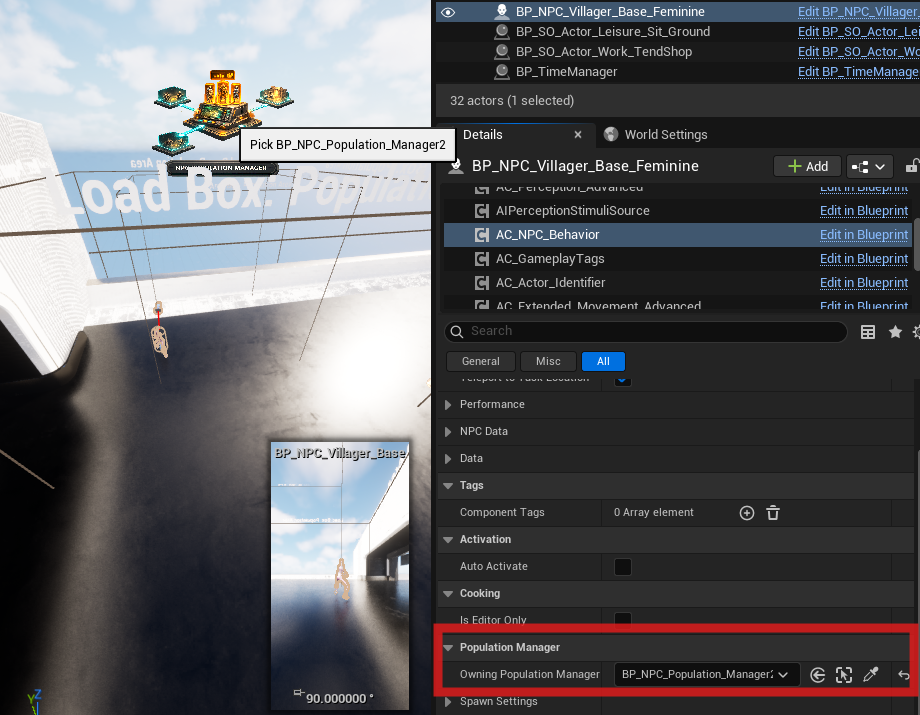
Instead of spawning NPCs automatically, you can assign NPCs that are already placed in the world.
Workflow:
- Place NPCs manually in the level
- Assign them to the Population Manager
- The Population Manager takes control of their activation and lifecycle
No spawning logic is applied in this mode. You can assign the population manager on the AC_NPC_Behaviour like in the screenshot below:
Debug and Visualization
For debugging and authoring purposes, the Population Manager includes several debug features.
- Debug Mode
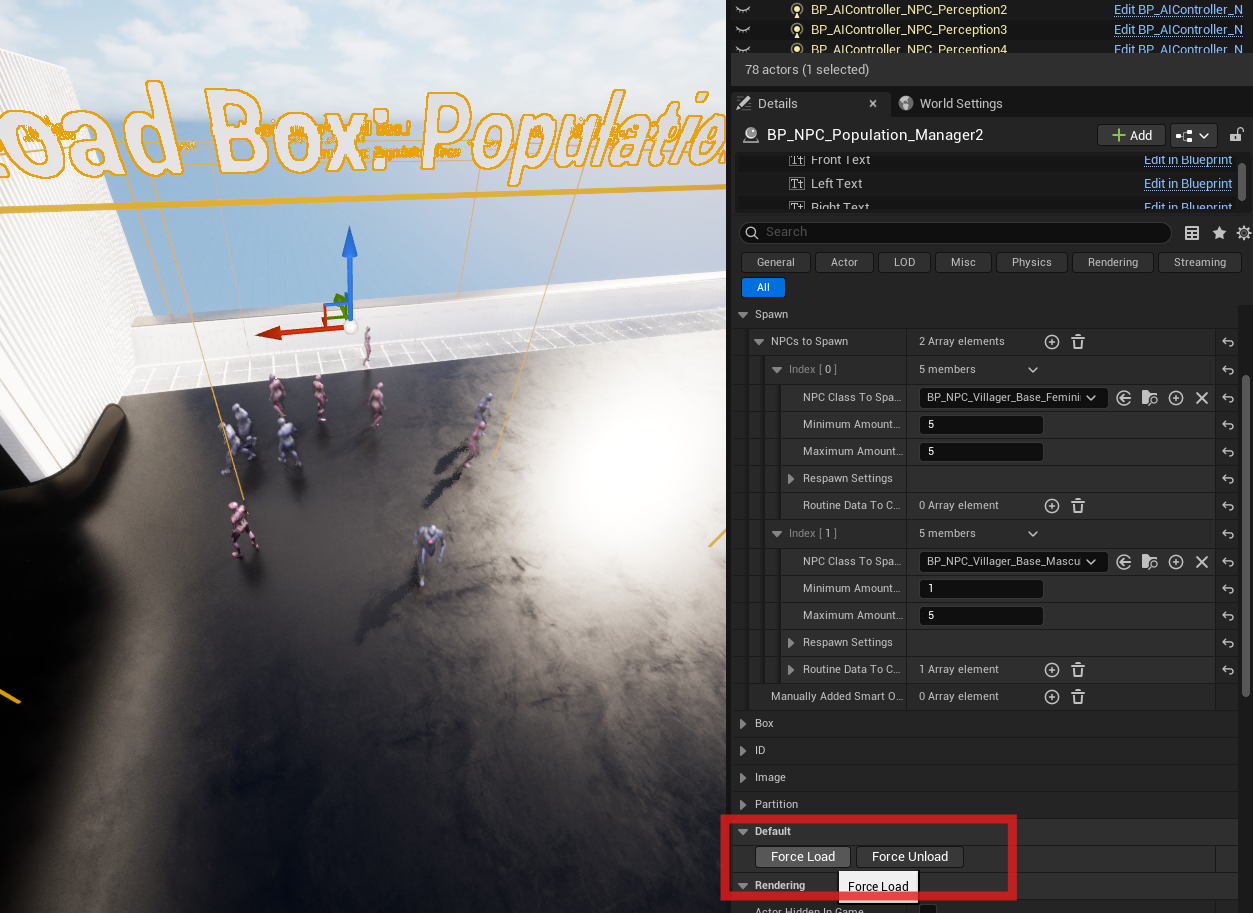
When enabled, the population area and related debug visuals are shown in-game instead of being hidden. - Force Load
Forces the population to load immediately, regardless of player position. - Force Unload
Forces the population to unload immediately.
These buttons can be used while simulating in the editor.
Editor Simulation Workflow
While simulating in the editor (Ctrl + S):
- Use Force Load and Force Unload to test population behavior
- Observe spawn and despawn behavior without possessing a character
- Validate box extents, counts, and respawn rules quickly
This workflow is intended to speed up iteration and debugging during development.
Pillar 2: Routine System #
Core Principle: Time-Driven, Location-Agnostic Behavior #
The Routine System is built around one central idea:
NPCs decide what to do based on time and data, and where to do it based on the world.
Routines express intent (patrol, work, socialize, sleep).
The world provides opportunities (patrol splines, shops, sitting spots) through tagged placeables.
This separation ensures:
- Routines are reusable across towns, regions, and levels
- Level layouts can change without rewriting NPC logic
- NPCs behave consistently in large, living worlds
This design is fundamental to AAA RPGs and simulation-heavy games.
Purpose
The Routine System defines daily NPC behavior using:
- Time-based scheduling
- Data-driven task selection
- Dynamic world target resolution
It allows hundreds of NPCs to share behavior logic while still reacting correctly to their environment.
Core Dependencies #
- BP_TimeManager
- Must be placed in the level
- Controls in-game time, day/night, and optional seasonal variation
- GameState Time Component
- Receives time updates from the Time Manager
- Broadcasts time changes via an interval dispatcher
- Interval-Based Evaluation
- Example: routine evaluation every 30 in-game minutes
- Keeps logic performant and deterministic
- Is set in the time manager
- AC_NPC_Behavior
- Owns all routine logic (State tree)
- Subscribes to time events
- Selects and executes routines per NPC
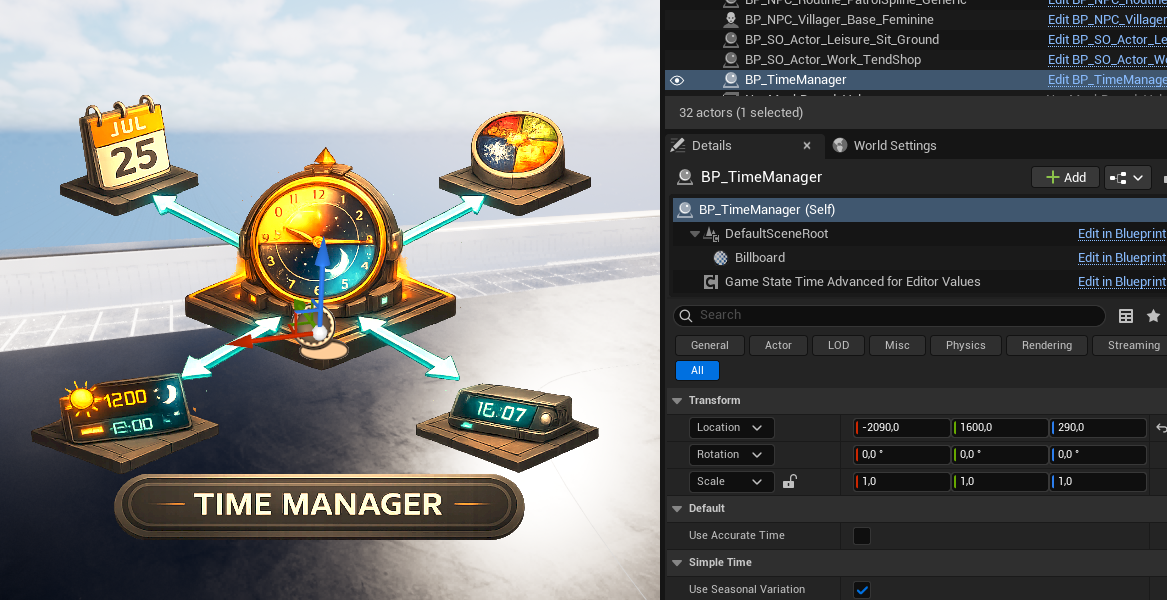
Time Manager actor in the level
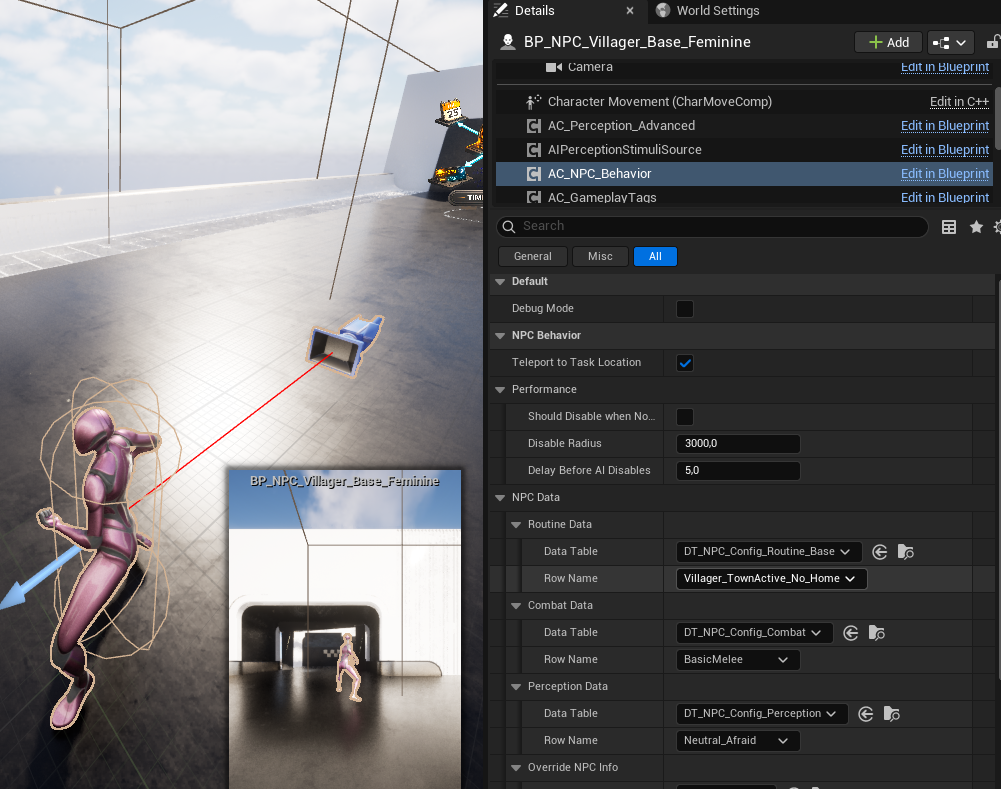
AC_NPC_Behavior showing assigned routine data.
Routine Configuration (Data Tables) #
Routines are defined using Data Tables.
Primary table:
- DT_NPC_Config_Routine_Base
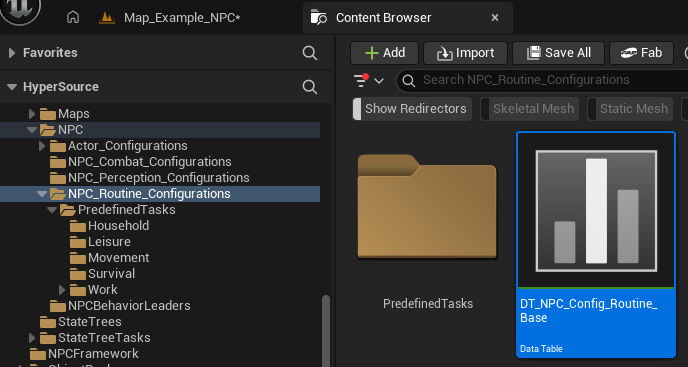
Each row represents a routine profile, typically per archetype:
- Villager
- Guard
- Rebel
- Vendor
- Wildlife
- Custom archetypes
Projects may:
- Use one shared table
- Split routines across multiple tables per archetype
The framework does not enforce structure.
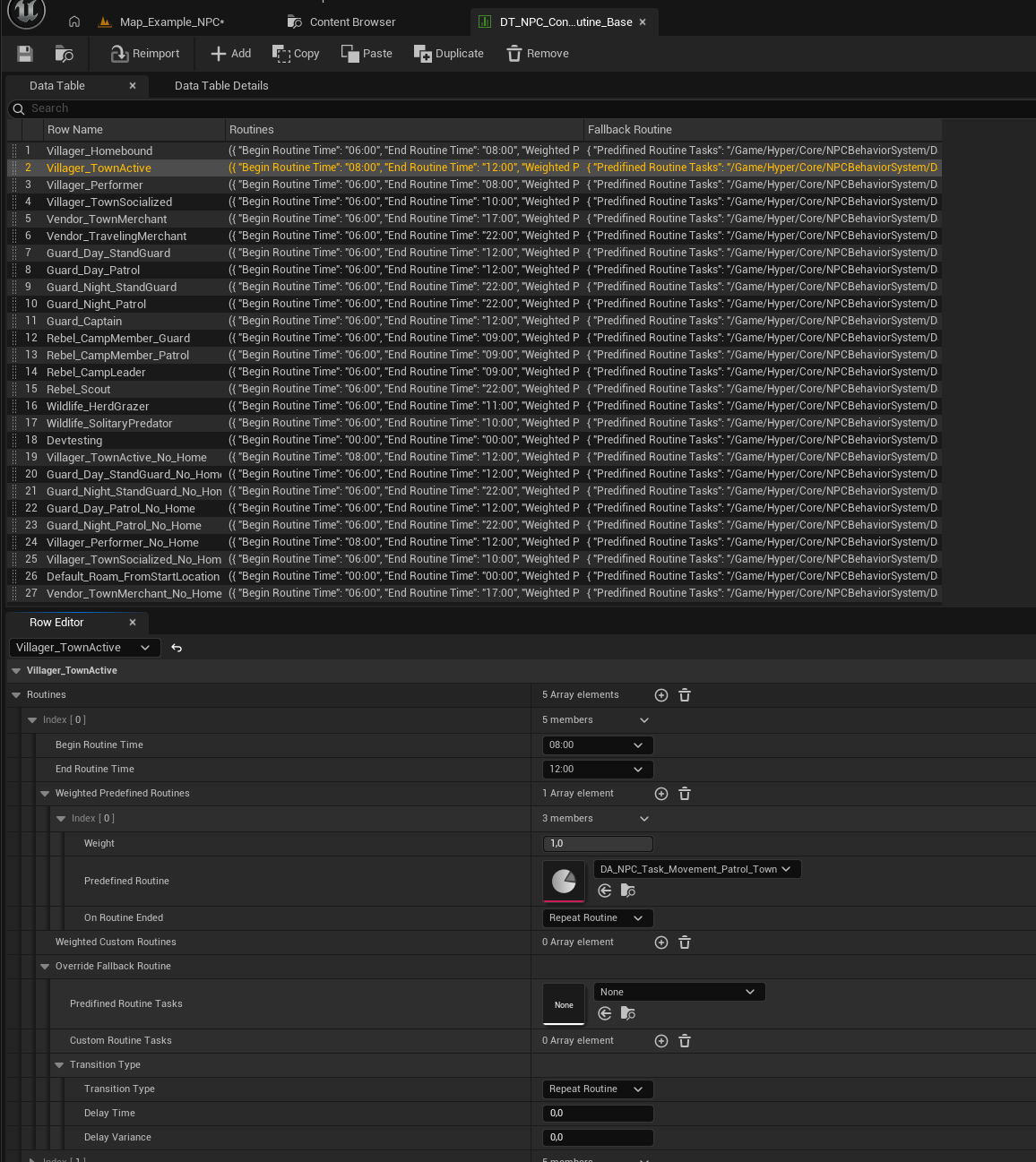
Routine Data Table overview showing multiple archetype rows.
Time Slots and Routine Selection #
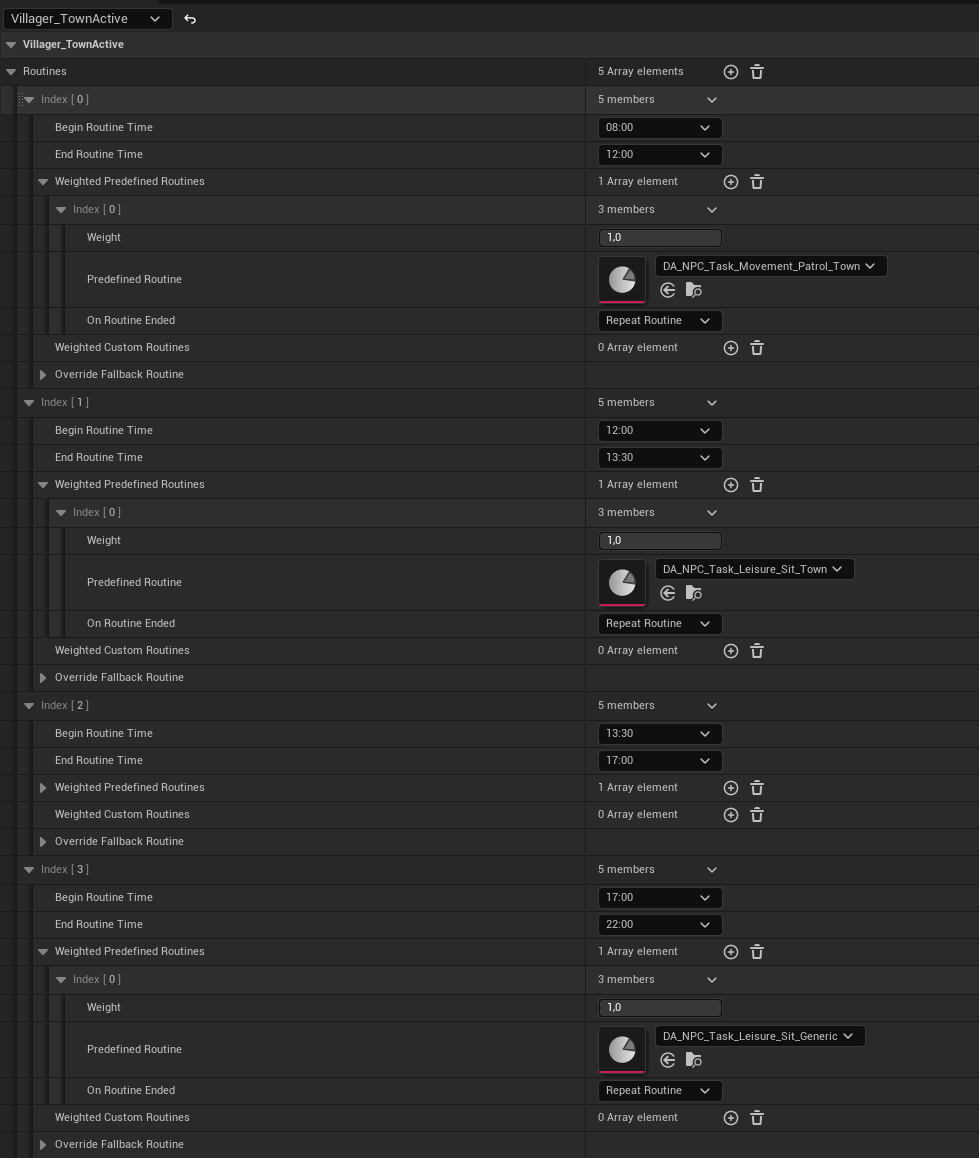
Each routine profile contains one or more time slots.
Each time slot defines:
- Begin Time
- End Time
- One or more Weighted Predefined Tasks
- Optional Fallback Routine
Runtime flow:
- Current in-game time is evaluated
- Matching time slot is selected
- A predefined task is chosen using weights
- Execution begins
This enables natural daily schedules without scripting.
Expanded routine row showing multiple time slots and weighted tasks.
Predefined Routine Tasks (Data Assets) #
Behavior logic is defined in Data Assets (DA_NPC_Task_*).
These assets describe how a task is performed, not where.
- Patrol
- Sit
- Sleep
- Work
- Socialize
- Roam
- Gather
- Eat
- Drink
Tasks are grouped by category:
- Movement
- Leisure
- Household
- Work
- Survival
This prevents duplication and allows routines to stay generic and reusable.
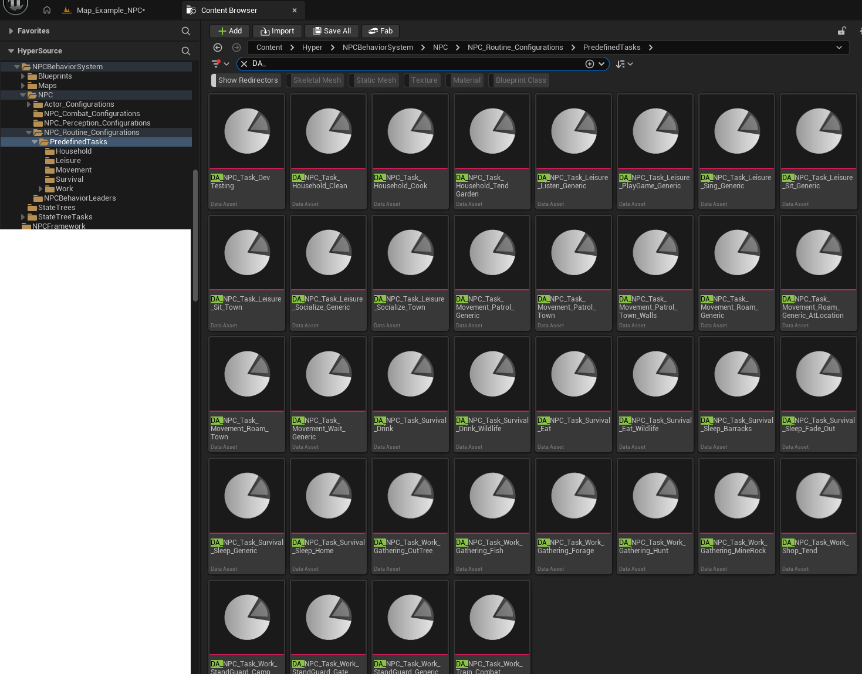
Library of predefined routine task Data Assets.
Tag-Based Target Resolution
When executing a task, the system resolves a world target using three gameplay tag dimensions:
- Routine Task Tag
Defines the action
Example: NPC.Task.Movement.Patrol - Routine Target Tag
Defines the required target type
Example: NPC.Target.Town, NPC.Target.Generic.SittingSpot - NPC Identifier Tag
Defines who may use the target
Example: Guard, Villager, Vendor, or none (generic)
Resolution order:
- Gather all matching targets
- Prioritize targets matching the NPC Identifier
- Fall back to generic targets
- Respect occupancy limits
- Execute fallback routine if no target resolves
This allows:
- Guard-only patrols on walls or gates
- Vendor-only shop interactions
- Shared generic town behavior
- No per-town routine duplication
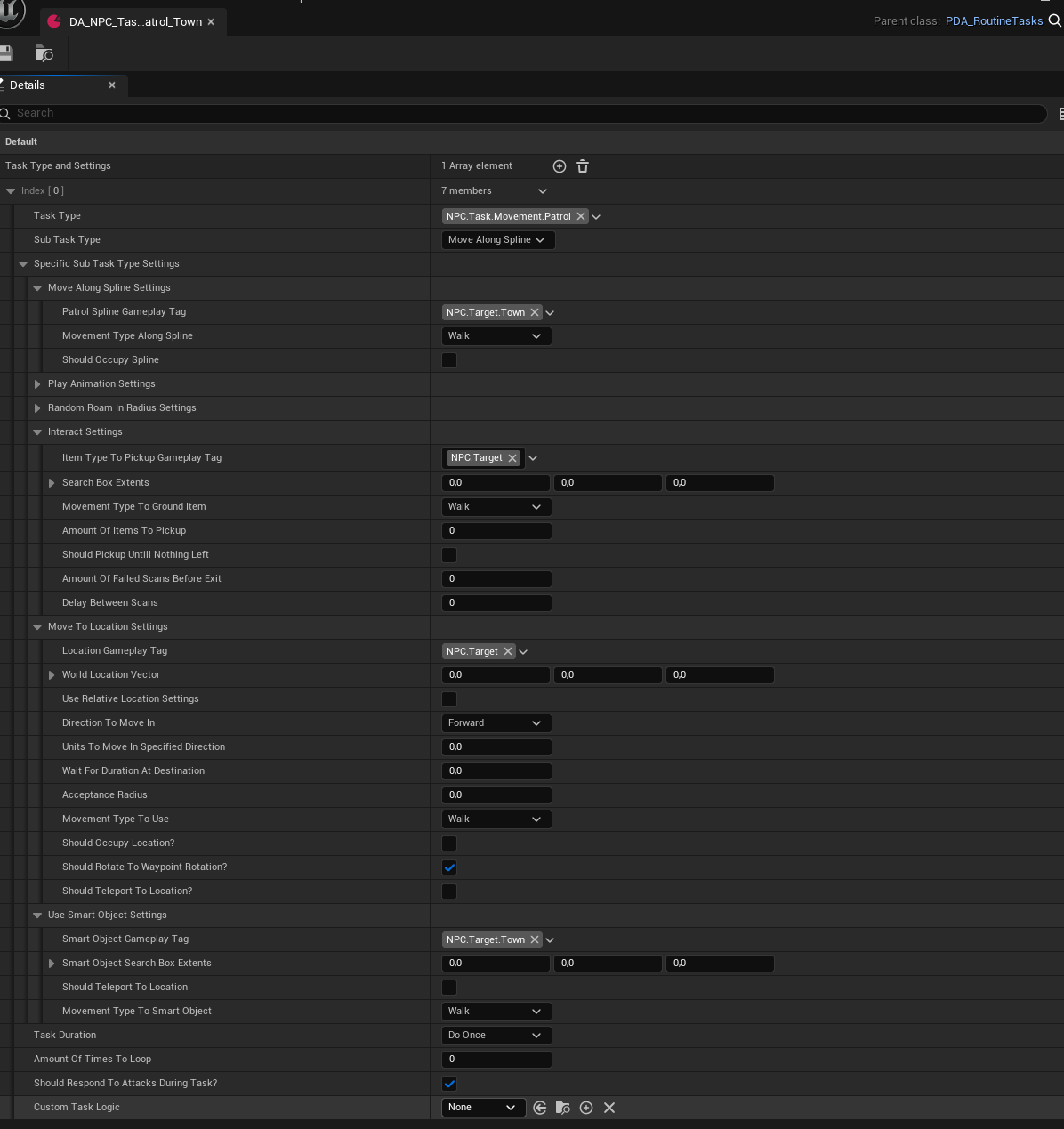
Routine task Data Asset showing task, target, and identifier tags.
Routine Placeables (World Setup) #
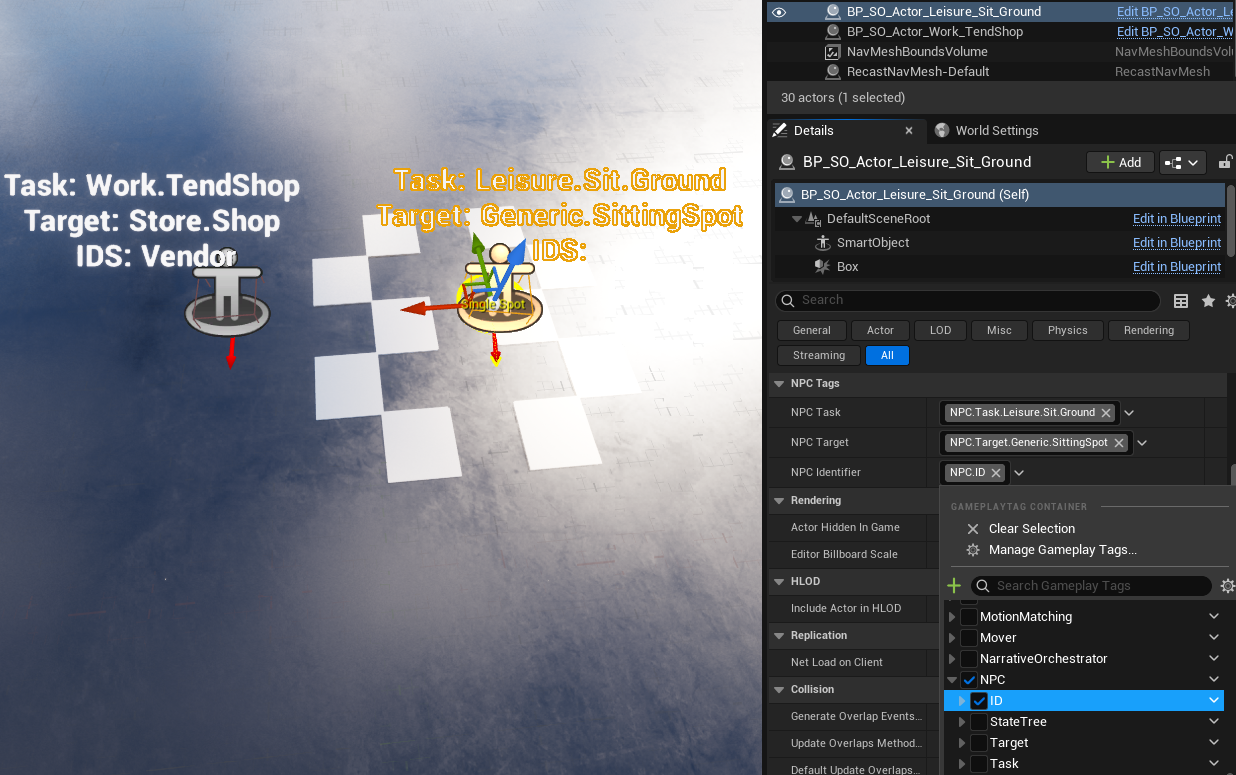
World targets are provided through Routine Placeables.
These are drag-and-drop actors that already define:
- NPC Task tag
- NPC Target tag
- Optional NPC Identifier tag
- Optional occupancy limits
Two execution models are supported:
- Behavior Objects
- Lightweight logic
- Simple state changes
- Example: Tend Shop (toggle availability)
- Interaction Objects (State Trees)
- Complex, multi-step behavior
- Example: Socializing, group interactions
This leverages Unreal Engine’s Smart Object and State Tree systems while extending them for routine-driven AI.
Placed routine placeables with debug text showing Task, Target, and ID.
Spline-Based Routines (Patrols) #
Some behaviors require movement along a path rather than interaction at a point.
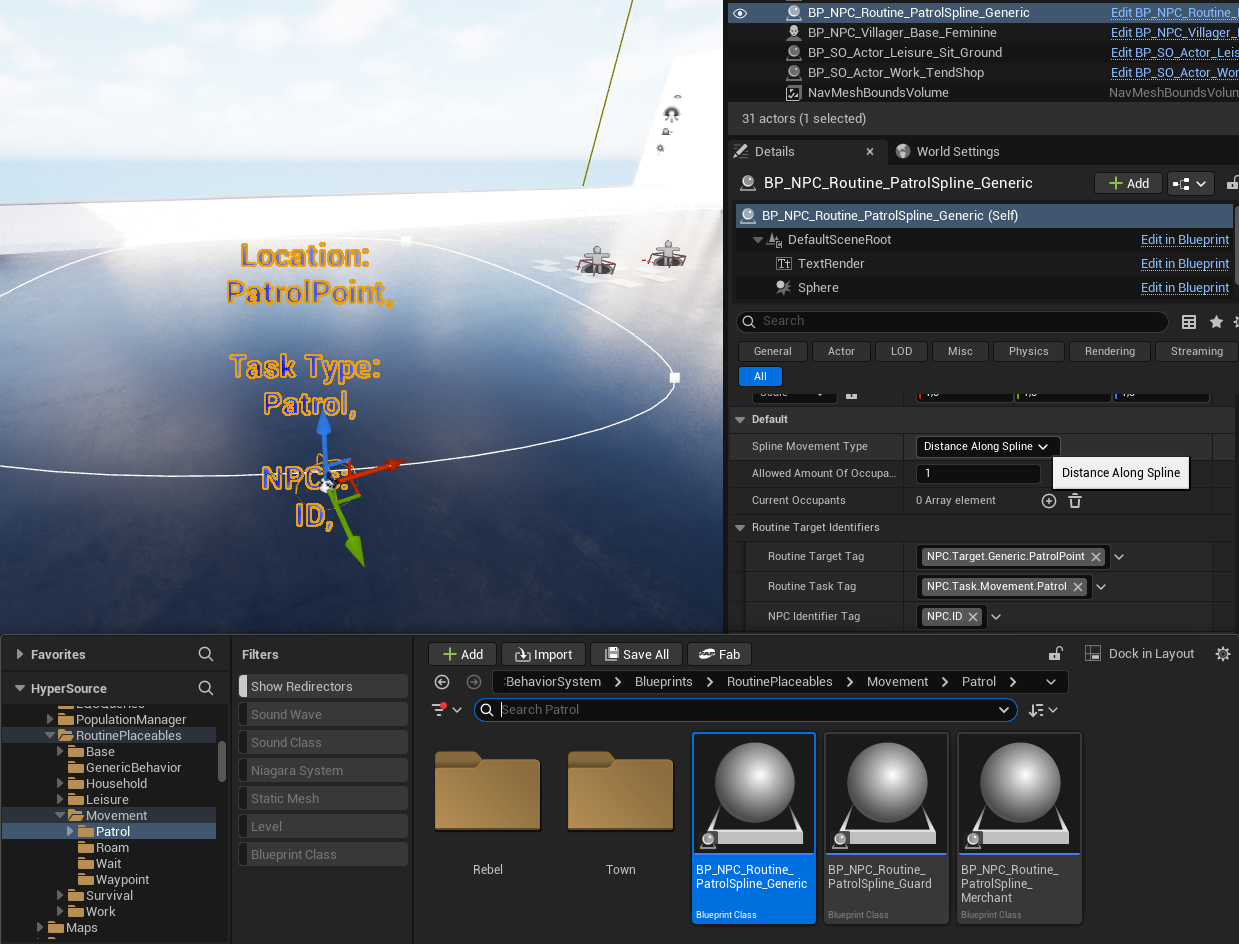
Patrol splines are:
- Not Smart Objects
- Custom routine actors
They support:
- Nearest-point-on-spline resolution
- Occupancy limits
- Task, target, and identifier tags
This enables shared or exclusive patrol routes without conflicts.
Patrol spline actor with debug info and occupancy settings.
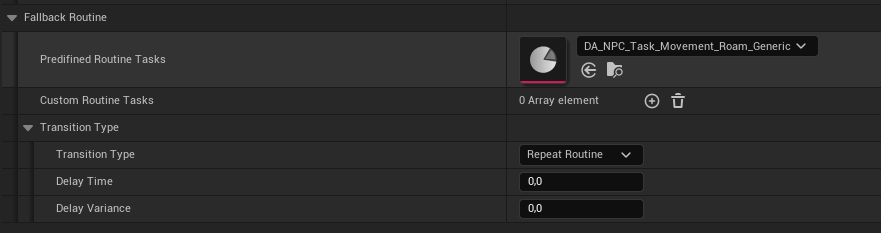
Fallback Routines #
If a task cannot resolve a valid target:
- A fallback routine is executed
Fallbacks can be defined:
- Per time slot
- Per routine profile
- As a global default
NPCs never stall or fail silently.
Interaction Objects vs Behavior Objects #
The Routine System builds directly on Unreal Engine Smart Objects and Gameplay Behavior, and distinguishes between two execution models. (read more)
This distinction is intentional and critical.
Behavior Objects (Gameplay Behavior)
Behavior Objects are used for simple, localized logic.
Characteristics:
- Lightweight
- Data-driven
- No complex state progression
- Typically execute instantly or toggle state
Typical use cases:
- Tend Shop
- Enable Vendor Mode
- Sit Idle
- Simple work or leisure actions
In these cases:
- The Routine resolves a target
- The Behavior Object is executed
- Minimal logic is applied
- Control immediately returns to the NPC
This keeps common actions cheap and scalable.
Interaction Objects (State Tree Driven)
Interaction Objects are used for complex, multi-step behavior.
Characteristics:
- Execute a State Tree
- Support branching, waiting, looping, and coordination
- Can involve multiple participants
- Maintain internal state while occupied
Typical use cases:
- Socializing
- Group interactions
- Complex leisure activities
- Multi-phase work behavior
In these cases:
- The Routine resolves a target
- The Interaction Object takes control
- A State Tree is executed on the object
- NPC behavior is driven by the interaction logic
This enables rich, emergent behavior without bloating NPC logic.
How This Is Used in the Framework
The framework supports both models transparently.
- Routine Tasks do not care whether a target is:
- a Behavior Object, or
- an Interaction Object
- Resolution is entirely tag-based
- Execution is delegated to the target type
This allows designers to:
- Swap simple behavior for complex interaction
- Upgrade interactions without changing routines
- Mix lightweight and heavyweight logic in the same system
Predefined and Ready to Use
The framework already includes:
- Predefined Behavior Objects
- Predefined Interaction Objects
- Preconfigured tags for tasks, targets, and identifiers
Designers can:
- Drag-and-drop these into the world
- Assign routines
- Extend or replace logic as needed
No custom Smart Object setup is required to get started.
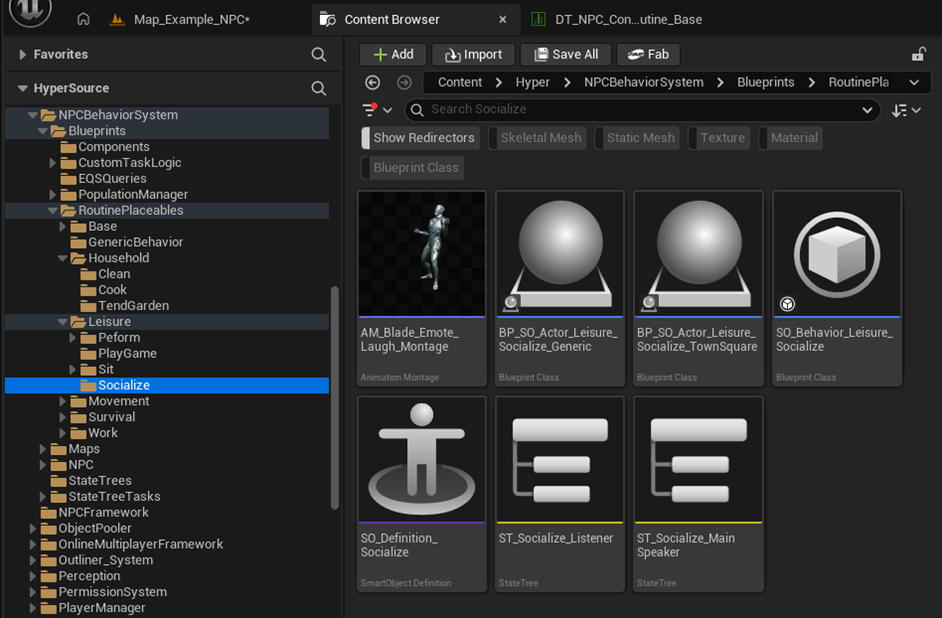
screenshot showing Socialize assets, including:
- Behavior Object
- Smart Object Definition
- State Tree assets
Why This Matters
This separation:
- Aligns with Unreal Engine’s intended Smart Object architecture
- Keeps NPC logic lean
- Enables complex world interaction without hard dependencies
- Scales cleanly to large NPC populations
It is a core reason this system works well for AAA-style worlds.
How to Set Up a Routine (Concise Flow) #
- Make sure all dependencies are met first like:
- Place BP_TimeManager in the level
- Ensure the GameState has the Time component
- Create or select a routine row in DT_NPC_Config_Routine_Base
- Define time slots and assign predefined task Data Assets
- Assign the routine row on AC_NPC_Behavior
- Place matching Routine Placeables or patrol splines in the world
- Tags resolve targets automatically at runtime
Pillar 3: Perception #
Core Principle: Sense + Context + Threat #
Perception is not just “can I see/hear something”.
This framework combines:
- Sensing (Sight, Hearing, Stealth)
- Social context (team affiliations, relationship overrides)
- Threat evaluation (one active threat, highest wins)
- Reaction routing (lightweight reactions in perception, complex behavior in State Trees)
Result: believable awareness, escalation, and group response.
What This System Does
- Detects the player and other actors via Sight and Hearing
- Supports stealth and visibility modifiers, including obscured vision volumes
- Converts gameplay actions into Perception Action Events e.g.:
- equipping items
- using equipment
- dealing damage
- stealing items
- killing actors
- sound events
- Evaluates these events into a single threat state
- only the highest threat value is reacted to
- lower threats are ignored while a higher threat is active
- Broadcasts and propagates alertness to nearby NPCs
- Drives reactions through:
- Perception Data Table configuration
- Alertness Sensitivity Data Assets
- State Trees for complex behavior
Key Runtime Flow #
- NPC has AC_Perception and AC_NPC_Behavior
- Other systems raise gameplay actions
- e.g. equipment manager triggers “equipped item”
- AC_Perception receives the action and converts it into a Perception Action Event (Gameplay Tag)
- Perception calculates a Threat Value
- sensitivity profile
- relationship overrides (friendly/enemy)
- event-specific multipliers
- Perception selects the highest threat event as the active one
- Perception triggers lightweight immediate logic
- voice lines
- simple local response
- Perception broadcasts the resolved event to nearby NPCs (alert propagation)
- AC_NPC_Behavior receives the perception event and forwards it into State Tree inputs
- State Trees handle the long-running response
- investigate
- flee
- alert
- combat escalation
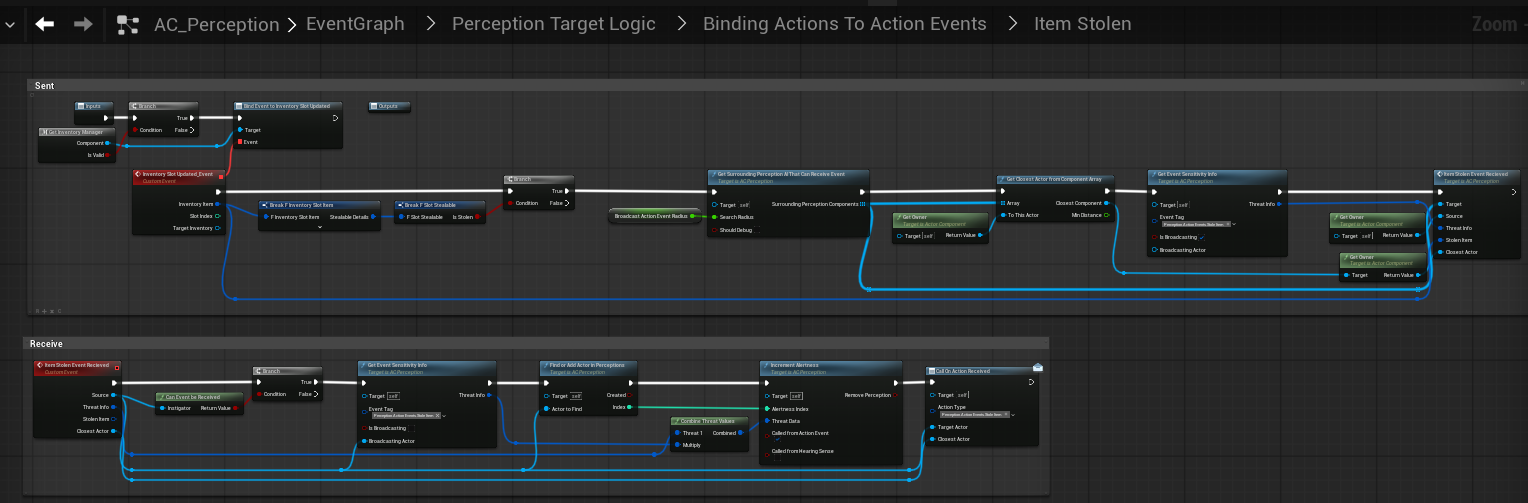
Blueprint graph showing Sending vs Receiving perception events.
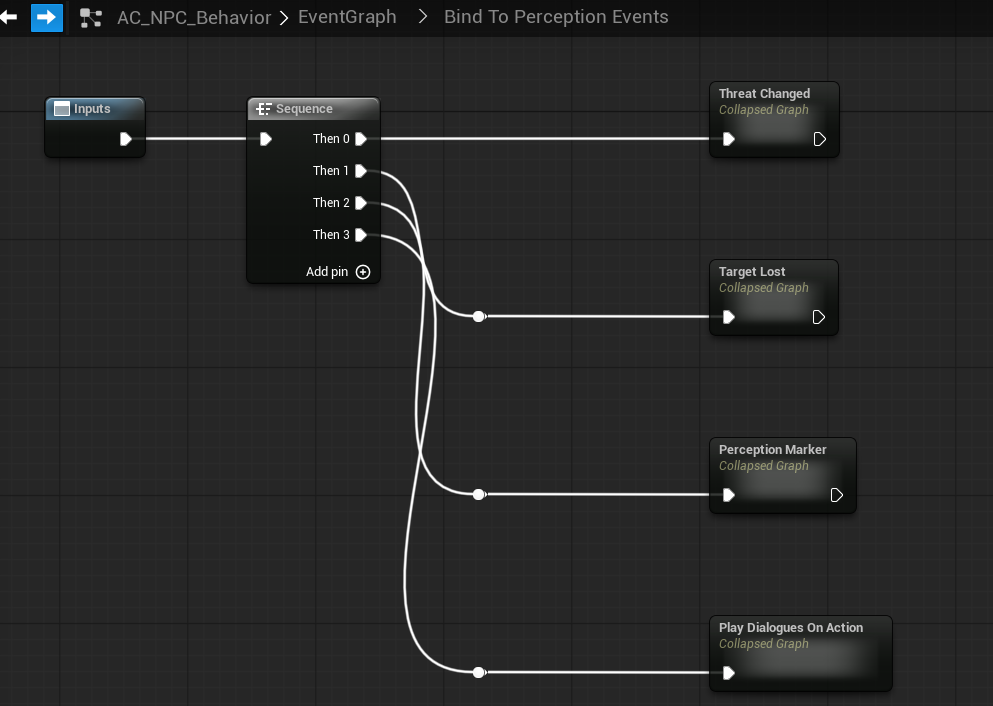
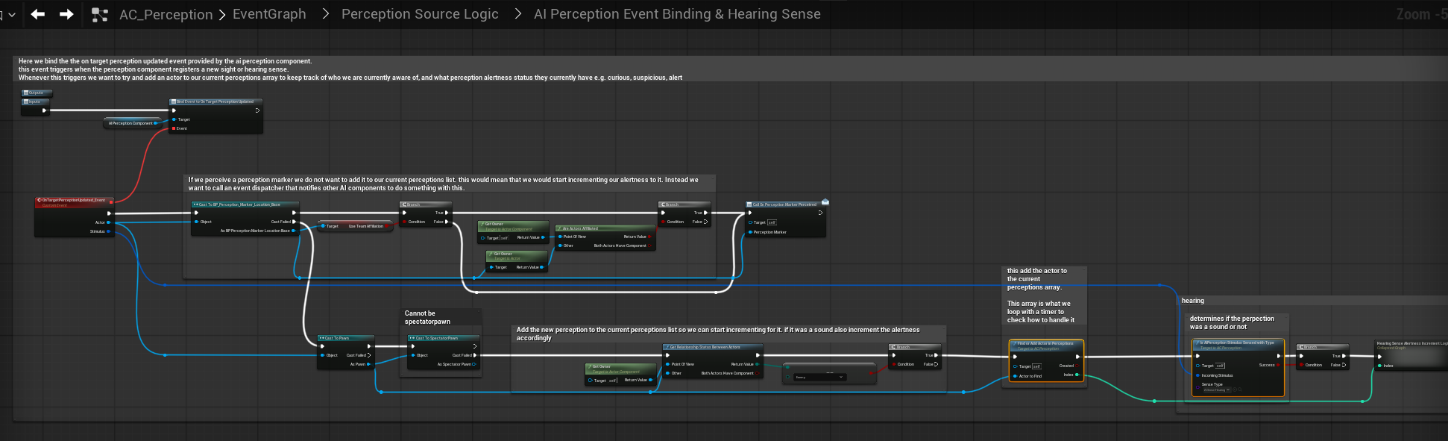
We bind and listen to perception events in our NPC component
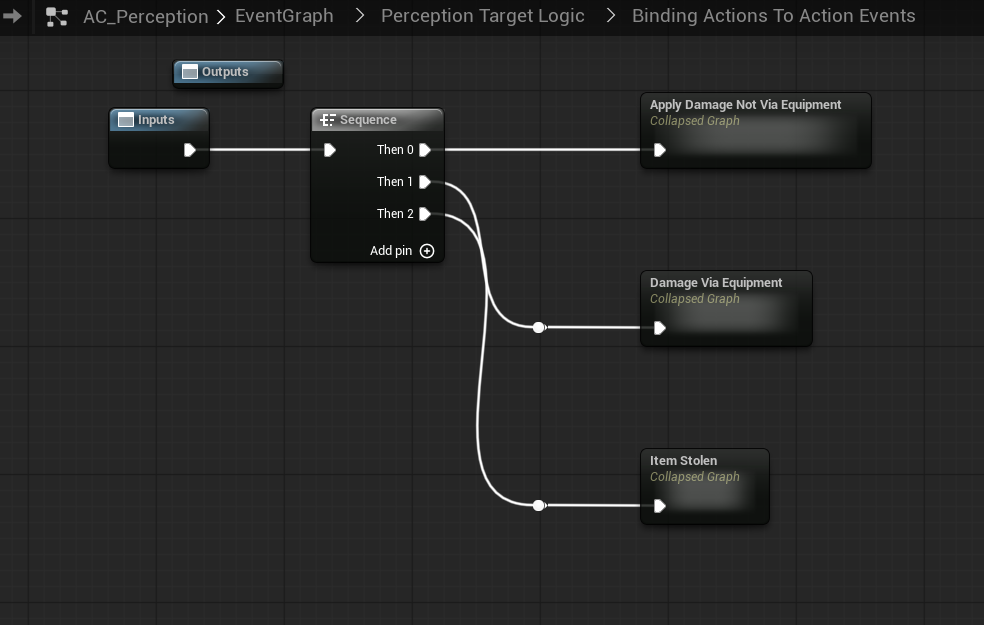
We handle perception events e.g. dealing damage in the perception component
Components on NPCs #
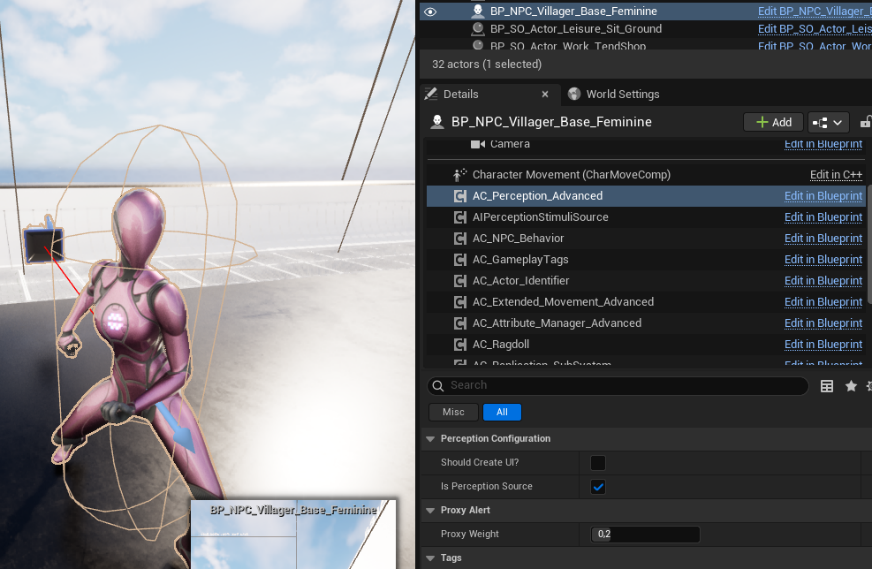
AC_Perception
Responsible for:
- sensing (sight/hearing)
- interpreting action events
- threat evaluation
- alert propagation
- voice line selection / single-speaker selection
NPC details panel showing AC_Perception component.
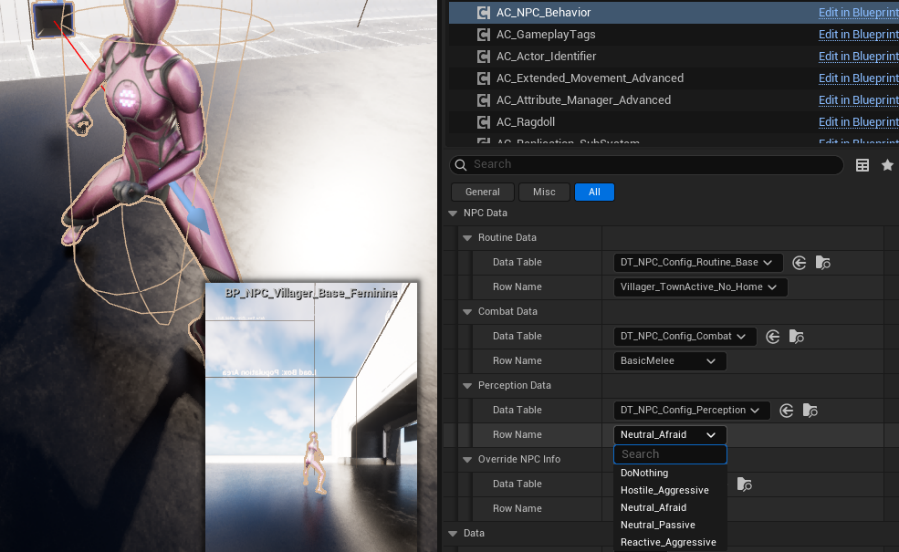
AC_NPC_Behavior
Responsible for:
- binding to perception events
- translating perception updates into State Tree triggers and state changes
- routing into behavior logic (routine vs alerted vs combat states)
NPC details panel showing AC_NPC_Behavior and Perception binding graph.
Social Context (Teams and Relationships)
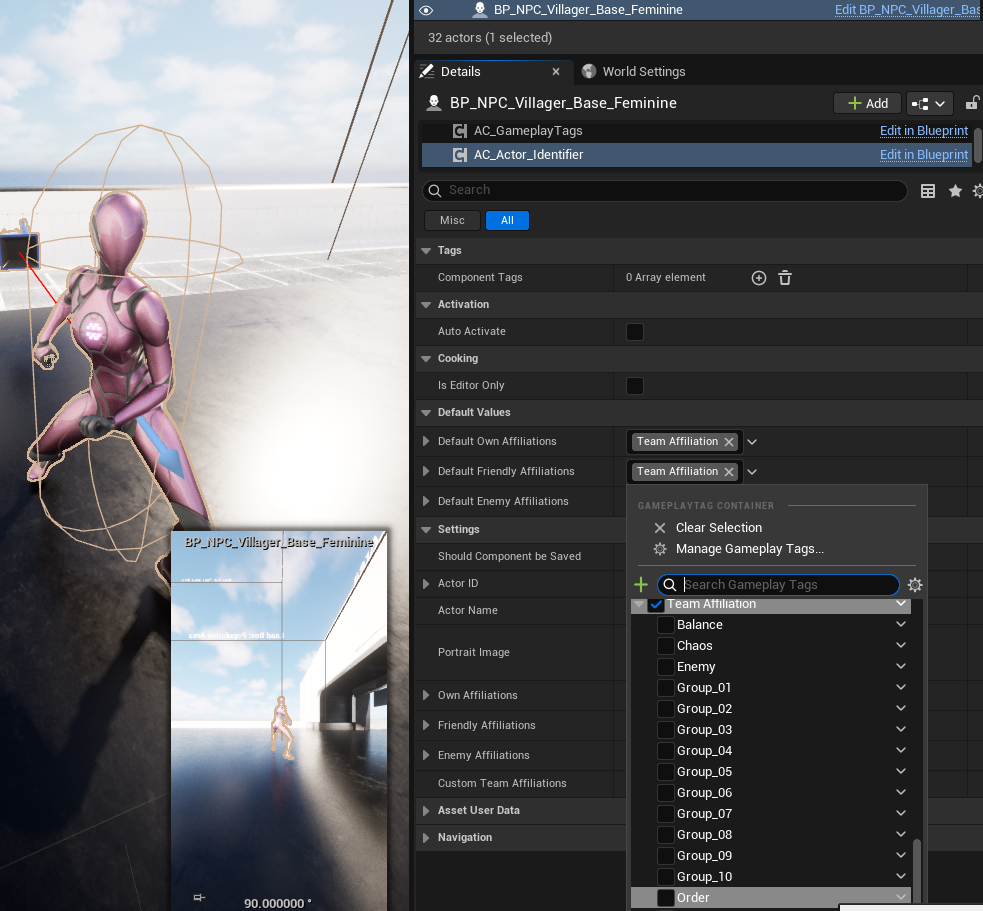
Perception reactions are influenced by team affiliations on the actor.
This is handled via:
- AC_Actor_Identifier
- own affiliations
- friendly affiliations
- enemy affiliations
- custom team tags
Perception uses these affiliations to evaluate:
- Friendly vs Neutral vs Enemy context
- Relationship overrides inside sensitivity profiles
This is how guards can be neutral by default but still escalate based on actions.
Actor Identifier component showing Team Affiliation tags.
Perception Configuration (Data Table) #
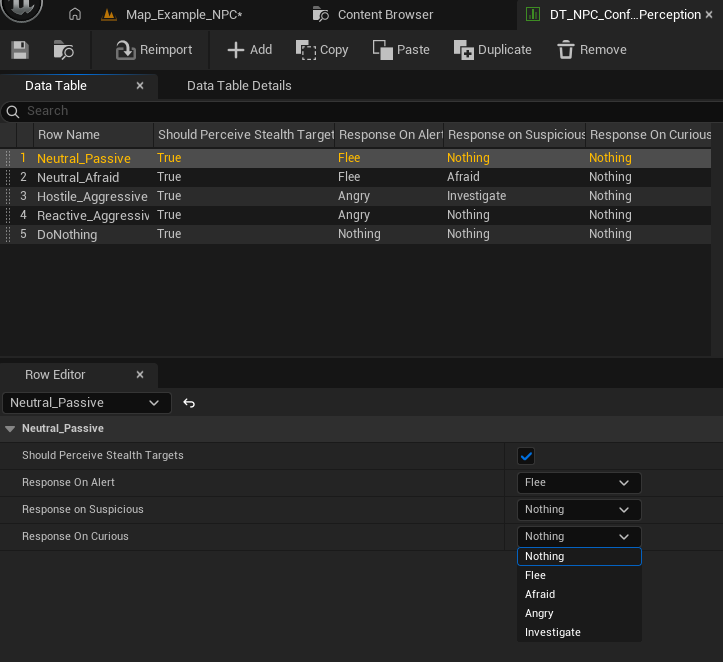
Each NPC assigns a Perception row on AC_NPC_Behavior.
- DT_NPC_Config_Perception
Each row defines high-level reaction defaults:
- Should Perceive Stealth Targets
- Response on Curious
- Response on Suspicious
- Response on Alert
Response examples:
- Nothing
- Investigate
- Afraid
- Angry
- Flee
These are not “combat styles”, they are reaction intents that State Trees interpret.
Perception Data Table with rows like Neutral_Passive, Neutral_Afraid, Hostile_Aggressive, Reactive_Aggressive.
Alertness Sensitivity Profiles (Data Assets) #
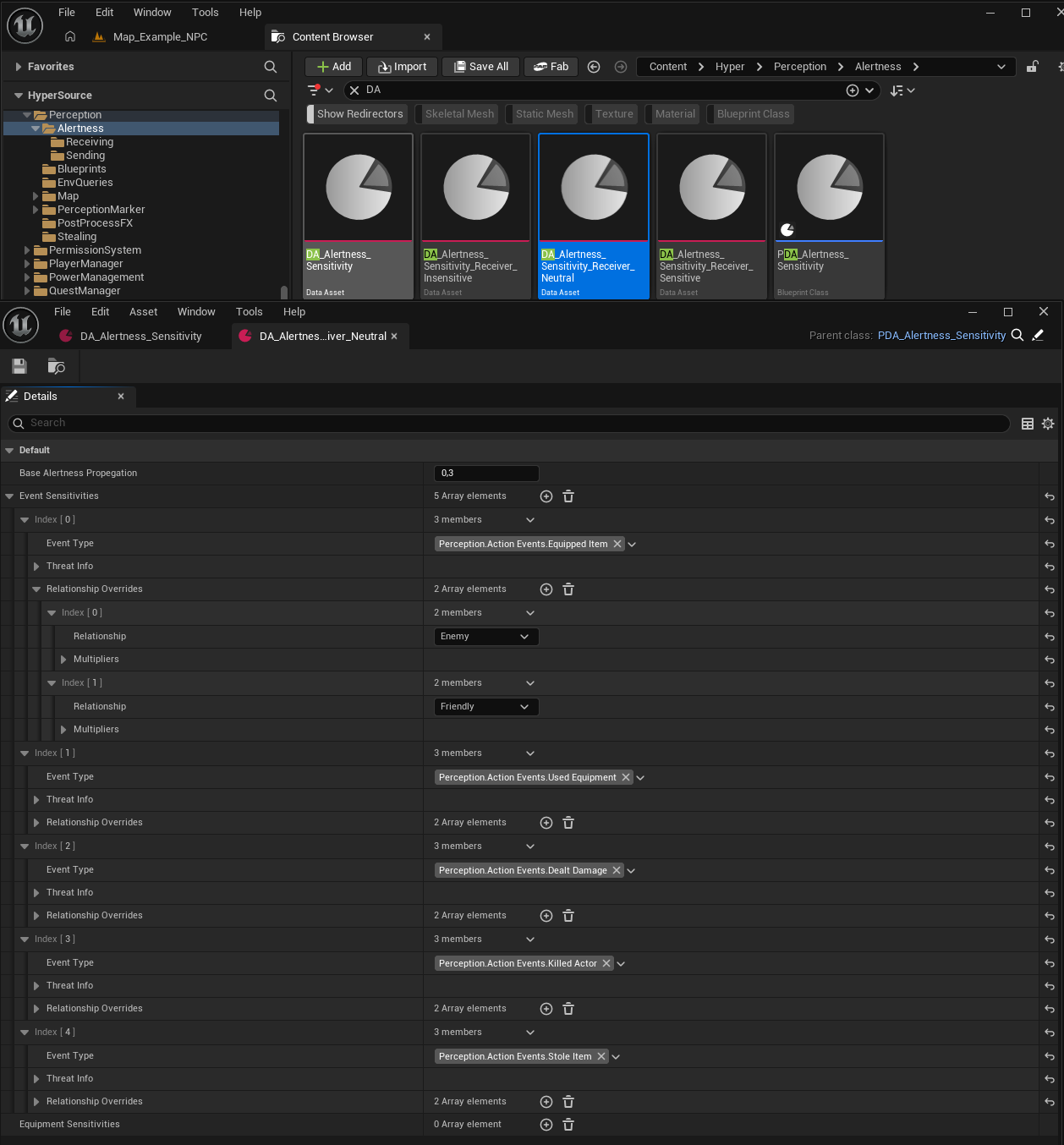
Perception uses sensitivity data assets to convert actions into threat.
You have (at least) two slots:
- Broadcast Sensitivity
- Receiving Sensitivity
This allows:
- different behavior for “who starts the alert” vs “who receives the alert”
- faction-specific tuning without changing the core system
Inside a sensitivity asset you define:
- Base alertness propagation
- A list of event sensitivities by event type (Gameplay Tags)
- Equipped Item
- Used Equipment
- Dealt Damage
- Killed Actor
- Stole Item
- Sound
- Optional relationship overrides
- e.g. treat “Enemy” actions as higher threat than “Friendly”
Alertness sensitivity Data Assets list + an opened asset showing event sensitivities and relationship overrides.
Sight vs Hearing (Split) #
- The system relies on Unreal Engine’s AI Perception Component for both sight and hearing, bound at the AI Controller level.
- All incoming perception stimuli are intercepted by AC_Perception, which acts as a translation and filtering layer before any NPC logic is executed.
Sight
- Sight stimuli can immediately escalate alertness, depending on:
- Line of sight validation
- Team affiliation and relationship
- Current alertness state
- Obscure Vision Volumes are respected:
- If active, visual stimuli are blocked or downgraded and will not escalate alertness directly.
- Valid sight perception can push an NPC directly into higher alertness states (e.g. Suspicious or Alert).
Hearing
- Hearing stimuli never escalate directly to full alert.
- Instead, sound incrementally increases alertness over time.
- Hearing is processed as a weaker stimulus and typically results in Curious or Suspicious states, unless reinforced by additional stimuli.
Common Rules
- All perception events are converted into internal alertness updates.
- When multiple stimuli occur, the system evaluates threat levels and only reacts to the highest active threat.
- Lower-threat perception events are ignored while a higher threat is active.
This keeps perception readable, deterministic, and scalable for large crowds without chaotic reactions.
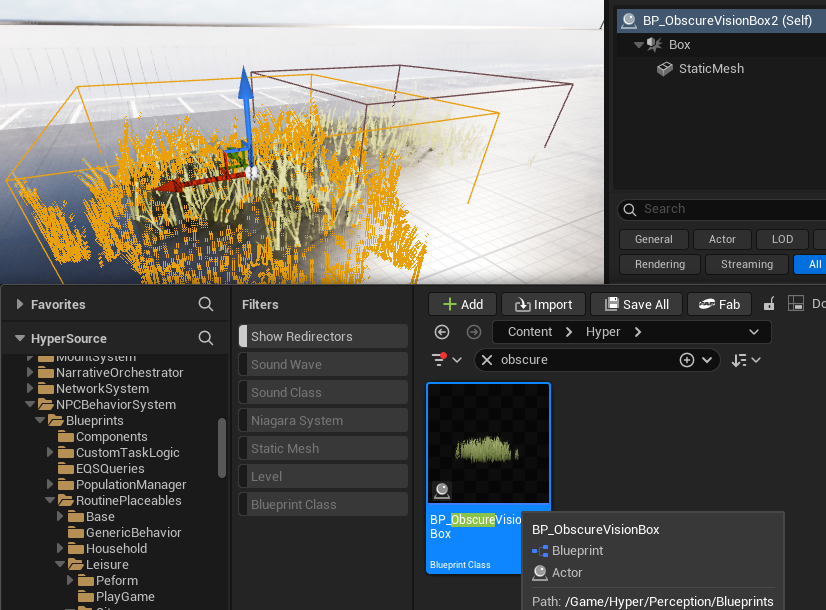
Obscured Vision Volumes #
The framework includes obscured vision boxes that block or reduce visibility.
Purpose:
- prevent unrealistic line-of-sight detection through cover
- support stealth areas (bushes, shadows, corners)
- allow level design to control visibility without rewriting AI logic
They integrate into the perception visibility checks so “can see target” is not purely distance + angle.
Investigation Logic #
Investigation is the bridge state between passive and combat.
Typical flow:
- hear sound or detect suspicious action
- mark stimulus location
- move to investigate
- escalate if confirmation occurs
- de-escalate if no further evidence is found
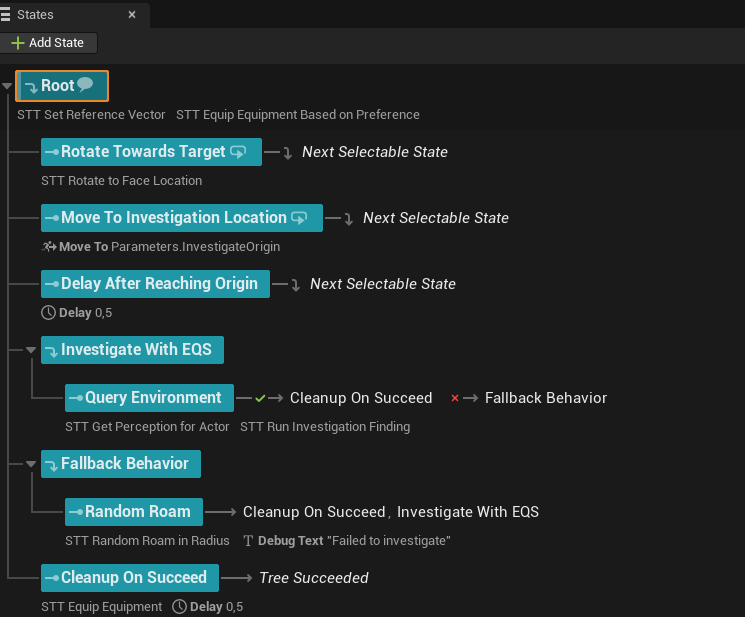
This is handled as:
- Perception produces the stimulus and threat
- State Trees execute investigation behavior
We handle responses on threat events in the AC_NPC_Behaviour and sent it to the state tree
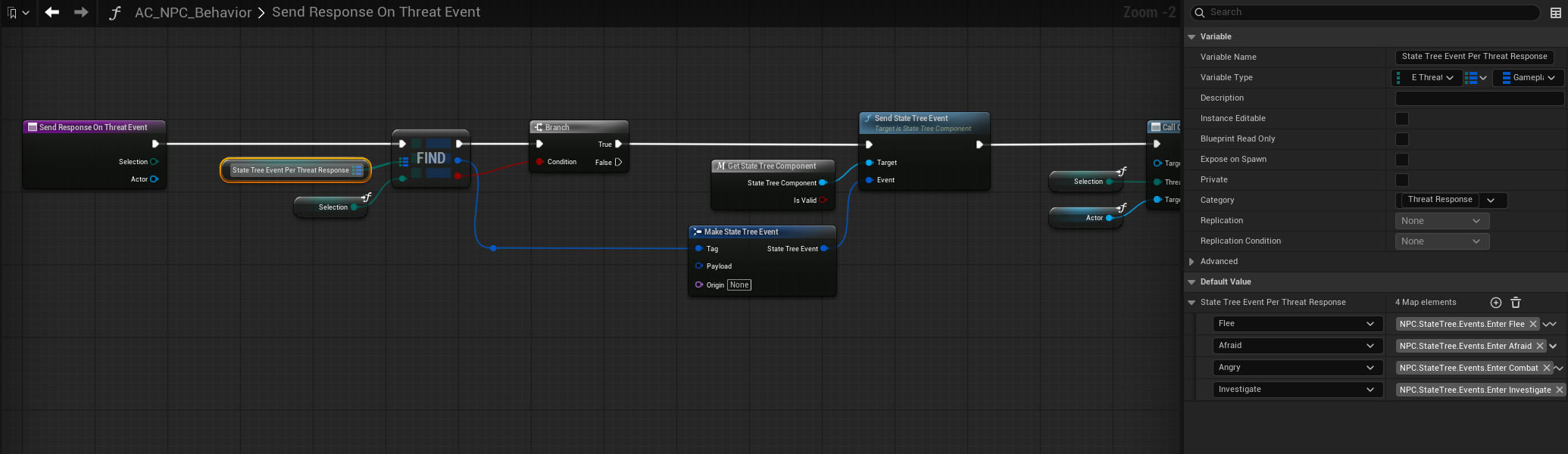
That event is handled in the state tree:
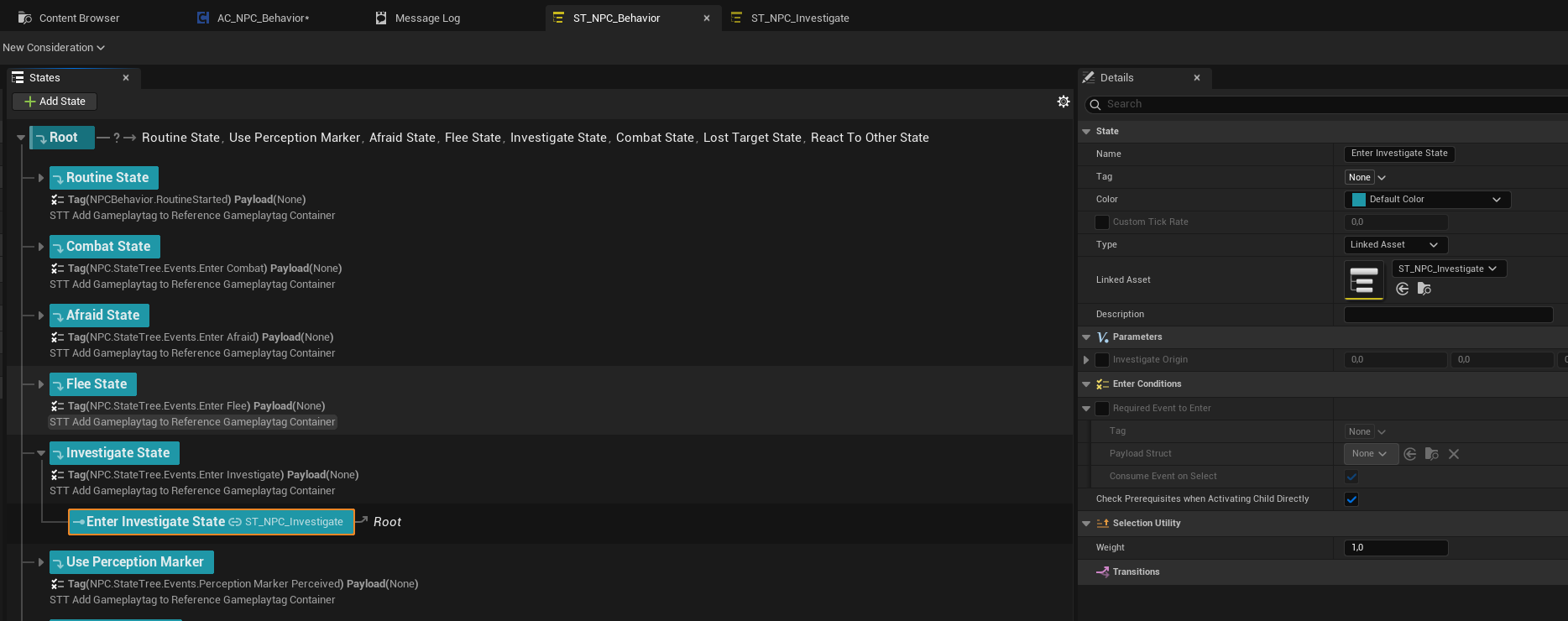
And that state is going to run its own state tree:
Alerting Other NPCs #
Alerting Other NPCs (Alert Proxy System)
Alert propagation is handled through a shared Alert Proxy, rather than directly notifying nearby NPCs. This creates a single, authoritative alert source that multiple NPCs can react to consistently.
Core Concept
- An Alert Proxy represents an active high-priority threat in the world.
- NPCs do not alert each other directly.
- Instead, they join or leave a shared proxy tied to the perceived target.
How It Works
- A perception event results in a valid threat with a calculated threat value.
- The system selects the current highest-priority target.
- An Alert Proxy is:
- Reused if one already exists for that target, or
- Spawned and attached to the target actor if none exists.
- The NPC joins the Alert Proxy with an influence weight.
- Other NPCs perceiving the same situation:
- Join the same proxy instead of creating new alerts.
- If a higher-priority threat appears:
- The proxy updates to reflect the new primary target.
- When NPCs lose perception or interest:
- They are removed from the proxy.
- If no NPCs remain, the proxy is destroyed.
Influence Weights
- Each NPC contributes a weighted influence to the proxy.
- This allows:
- Guards to outweigh civilians
- Leaders or elites to dominate alert priority
- Group behavior naturally stabilizes around the most important threat.
Why This Approach
- Prevents alert spam and duplicated reactions
- Ensures all NPCs focus on the same threat
- Makes target switching deterministic and predictable
- Scales cleanly in dense crowds and combat scenarios
- Integrates naturally with combat systems that require a single primary target
Result
- Coordinated group awareness
- Stable alert focus
- Clean escalation and de-escalation
- AAA-style crowd alert behavior
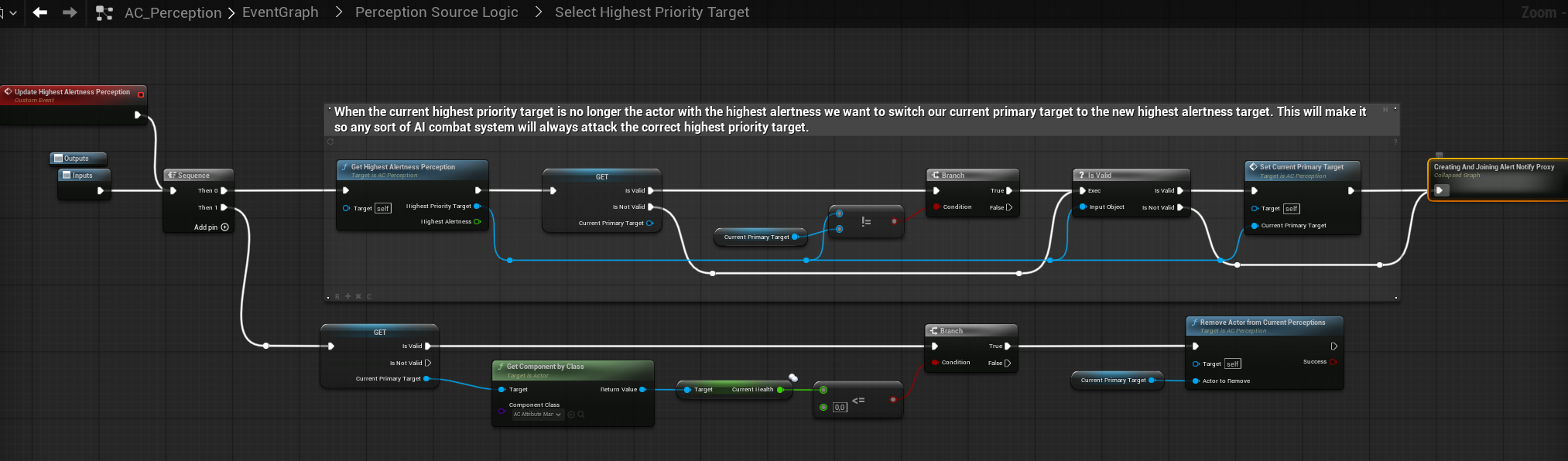
Where to Find This Logic
- Component: AC_Perception
- Graph: Perception Source Logic
- Function Group:
- Select Highest Priority Target
- Create / Join Alert Notify Proxy
- Responsibilities:
- Highest-threat target selection
- Alert Proxy creation and lifecycle
- NPC join and leave logic using influence weights
Threat & Awareness UI #
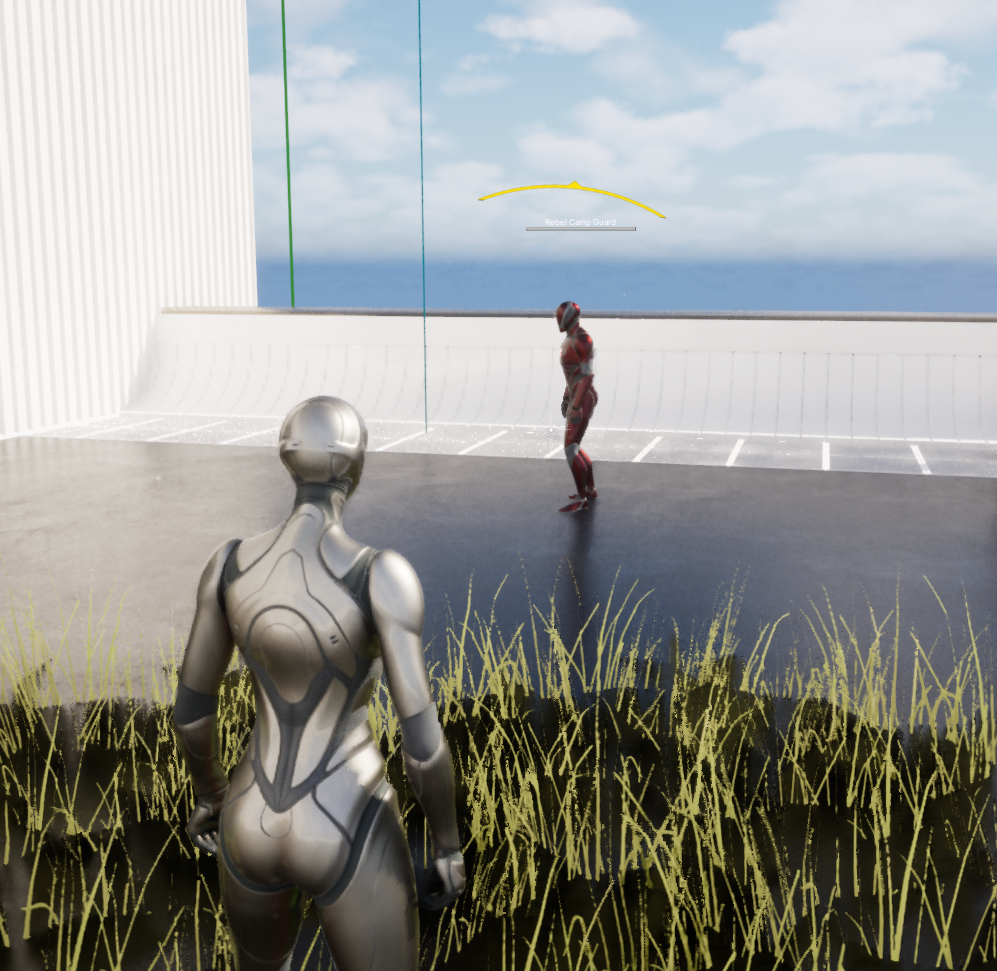
The framework exposes NPC perception state directly through a lightweight awareness UI.
Awareness States
- Neutral (None)
- Curious (white)
- Suspicious (Yellow/Orange)
- Alert (Red)
The displayed state always reflects the highest active threat level resolved by the perception system.
Behavior
- Driven directly by AC_Perception
- No UI-side logic or interpretation
- Lower threat states are ignored while a higher one is active
The UI is a direct visualization of the NPC’s internal perception state, not a gameplay abstraction.
Pillar 4: Combat #
Core Principle #
The Combat System is a fully data-driven execution layer that determines how an NPC fights once a target has been selected by Perception.
- Perception decides who the target is
- Combat decides how the NPC engages that target
- No combat logic is embedded in Perception
- No archetype logic is hardcoded in State Trees
This separation allows the same combat system to scale from villagers to elite enemies, bosses, and creatures using configuration only. As seen in games like Zelda, Elder Scrolls, Assasins Creed, etc. etc.

Combat Architecture Overview #
The Combat System is composed of four layers:
- Combat Configuration (Data Table)
- Combat Style (Data Assets)
- Weapon & Ability Resolution
- Combat State Tree Execution
Each layer is independent and replaceable.
Combat Configuration (DT_NPC_Config_Combat) #
Each NPC selects a Combat Config row via AC_NPC_Behavior.
This row defines:
- Which combat style logic the NPC uses
- How aggressive, skilled, or defensive the NPC behaves
- Which weapon sets and abilities are available
Key responsibilities
- High-level combat tuning per archetype
- Difficulty scaling without touching logic
- Clean reuse across humanoids and creatures
Typical use
- Villagers → UntrainedFighter
- Guards → DefensiveShield / MixedCombatant
- Rebels → AggressiveBerserker
- Creatures → Creature_Melee / Creature_Pouncer
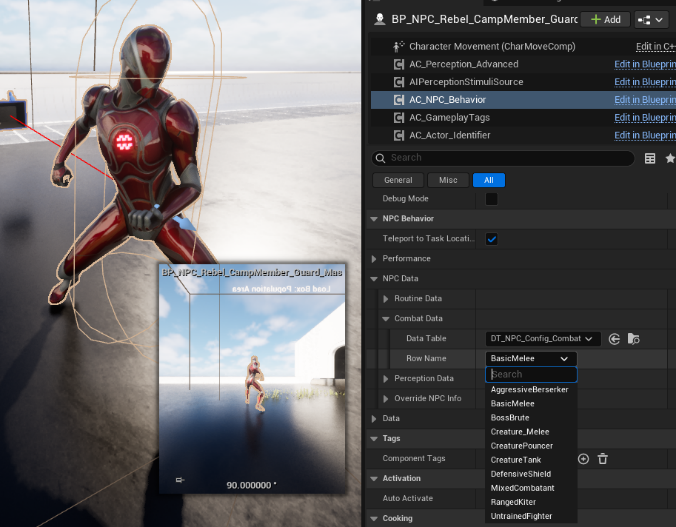
NPC selecting Combat Config on AC_NPC_Behavior
Combat Style Data Assets (PDA_CombatStyle) #
Combat Styles define decision rules, not execution.
They answer:
- Which combat style to use at which range
- Which weapons or abilities are allowed
- How movement, distance, and pressure are handled
Supported features
- Range-based style switching
- Melee when close
- Ranged when far
- Weapon selection with probabilities
- Ammo handling
- Ability slots
- Distance maintenance logic
- Conditional behavior:
- On taking damage
- On low health
- On target distance changes
Combat Styles are reusable building blocks and can be shared across dozens of NPCs.
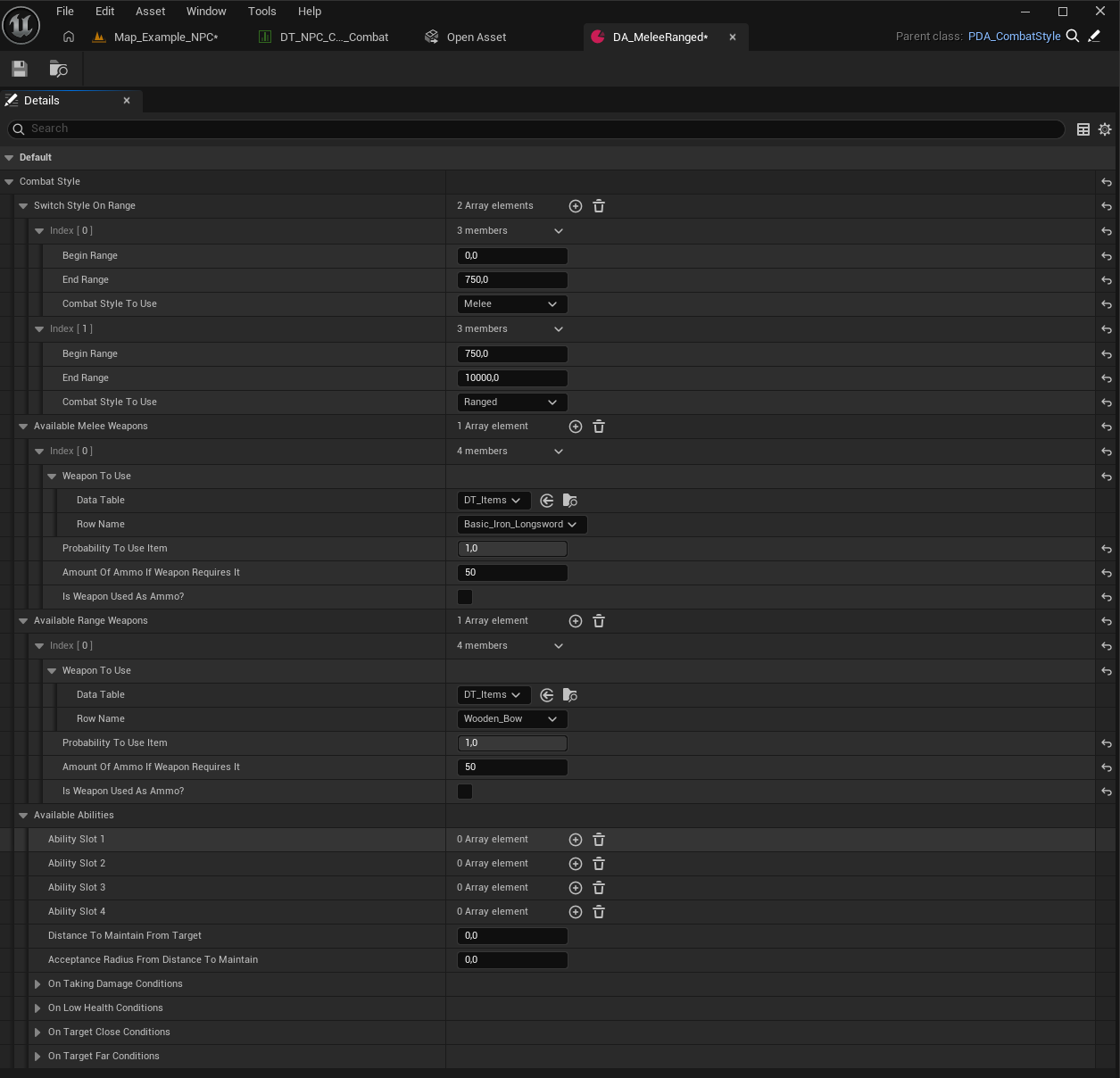
PDA_CombatStyle with range switching and weapon sets
Weapon and Ability Resolution #
Weapons and abilities are resolved dynamically based on:
- Combat Style rules
- Current target distance
- Available inventory
- Probability weights
This allows:
- The same NPC to switch between melee and ranged mid-fight
- Creatures to use animation-based attacks instead of items
- Designers to rebalance combat without touching State Trees
No weapon logic lives inside the State Tree itself.
Combat State Tree Execution (ST_NPC_Combat) #
The Combat State Tree is responsible for execution only.
It:
- Reads the resolved Combat Style
- Enters the appropriate combat state
- Applies movement, aiming, equipment, and behavior
Typical states
- None
- Melee
- Ranged
- Combat Override
- Fallback
Each state:
- Equips the correct weapon or ability
- Applies movement modifiers
- Enables strafing, aiming, blocking, dodging
- Loops until conditions change
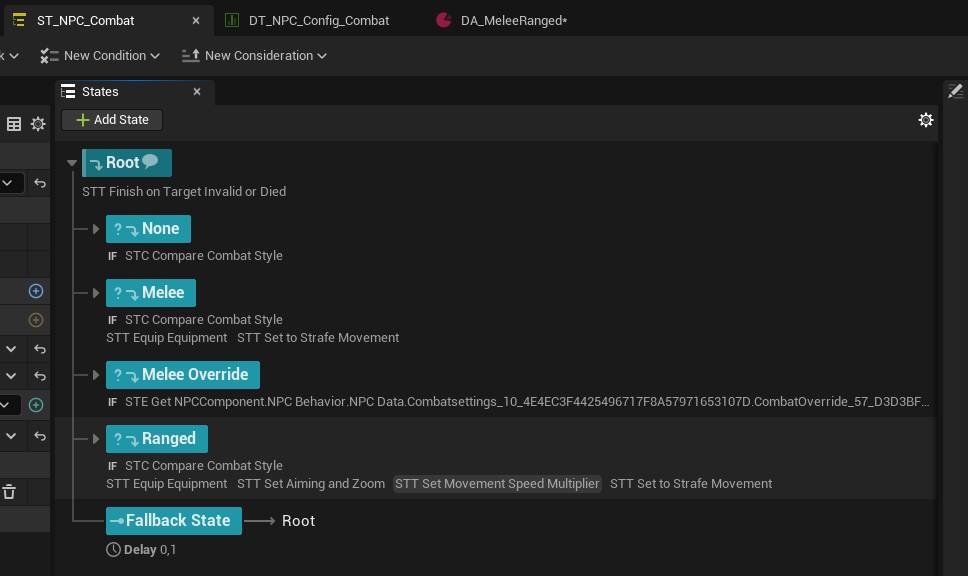
ST_NPC_Combat showing Melee and Ranged states
Target Handling and Priority #
- Combat always operates on the current highest-priority target
- Target selection is handled entirely by Perception
- Combat never decides who to attack
- If the target changes, combat adapts automatically
This ensures:
- Correct focus switching in group fights
- Stable behavior under chaotic perception events
- Clean multiplayer behavior
Why This Scales #
This system enables:
- Assassin’s Creed-style enemy variety
- Kingdom Come-style grounded combat
- Red Dead-style role-based enemies
- Creature combat without special cases
All without:
- Duplicated State Trees
- Hardcoded archetypes
- Combat logic spread across components
Combat configuration lives in data, not code.