
Lootable corpse system #
Technical documentation for Hyper
Blueprint implementation based on supplied AC_Lootable_Corpse and BP_Lootable_Corpse evidence
Document purpose #
This document explains the Lootable Corpse system as supplied in the example implementation. It is written as buyer-facing technical documentation: what the system does, how the two Blueprints are split, how the spawn and interaction flow works, and what a buyer is most likely to want to customise.
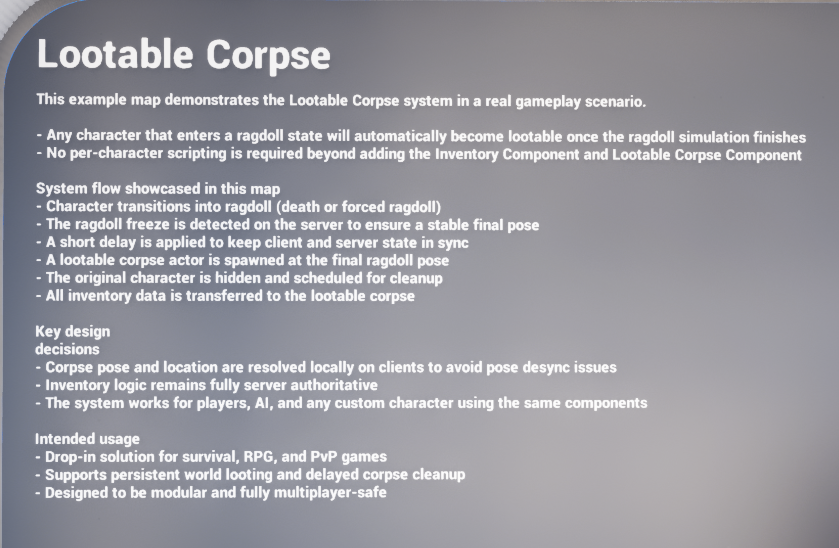
Figure 1. Example map overview panel describing the intended gameplay behaviour of the Lootable Corpse system.
Introduction #
The Lootable Corpse system is a compact, multiplayer-aware Blueprint setup that turns a ragdolled character into a world loot container once the ragdoll has settled. The implementation shown here is intentionally split into two responsibilities: a character-side component that detects the ragdoll freeze and spawns the corpse actor, and a dedicated corpse actor that presents the final pose, holds the copied inventory, and exposes the interaction behaviour.
In practice, this means the owning character does not need bespoke death-to-loot scripting every time. As long as the required components are present and the owner can provide the expected ragdoll integration, the component can listen for the ragdoll freeze, resolve the final mesh to use, spawn the corpse actor, and hand off the inventory data.
|
Design intent The supplied demo notes describe the system as suitable for survival, RPG, and PvP use cases. The key design trade-off is that pose and location are allowed to resolve locally on clients to avoid ragdoll pose desync issues, while the actual inventory logic remains server-authoritative. |
Adding Lootable Corpse to a Character #
The implementation documented here uses only two system-owned Blueprint assets: AC_Lootable_Corpse and BP_Lootable_Corpse. AC_Lootable_Corpse is added to the character that can ragdoll. BP_Lootable_Corpse is the spawned world actor that players interact with after the ragdoll settles.
|
Asset |
Role |
Notes |
|
AC_Lootable_Corpse |
Character-side controller |
Binds to ragdoll freeze, resolves mesh choice, spawns the corpse actor, sets corpse lifespan, and performs the handoff back to the original owner. |
|
BP_Lootable_Corpse |
World corpse actor |
Displays the corpse pose, receives the copied inventory, exposes the loot interaction, and handles save/load conversion behaviour. |
|
Owner character requirements |
Integration dependency |
Character needs the Lootable Corpse component, a compatible inventory component, and a ragdoll source that the component can bind to via Get Ragdoll / ragdoll frozen event. |
In the supplied example, AC_Lootable_Corpse is attached directly to the example character Blueprint. The other components visible on the example character are part of other systems and are out of scope for this document.
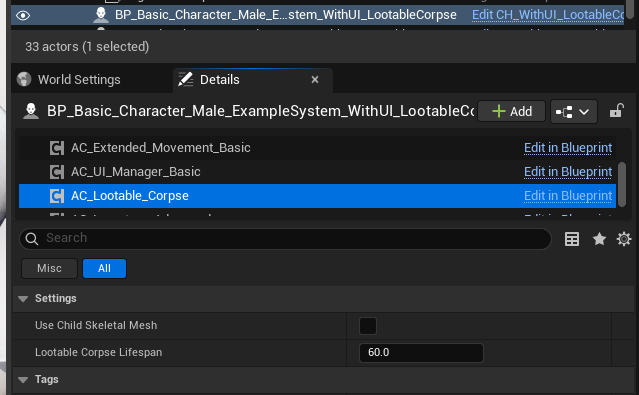
Figure 2. Example character setup showing AC_Lootable_Corpse attached to the character and exposing its core settings in the Details panel.
Required integration pieces
- A compatible inventory component on the owner character so the corpse can copy the live item state into the spawned corpse actor.
- A ragdoll source or ragdoll component that exposes the frozen/settled event the component binds to on Begin Play.
- A skeletal mesh to copy. The system can use the character mesh directly, a child skeletal mesh, or an optional visual override path when configured.
Details Panel / Important Variables #
The Lootable Corpse implementation is intentionally light on exposed variables. Most of the behaviour is driven by the event flow rather than a large settings surface. The two important buyer-facing variables live on AC_Lootable_Corpse.
|
Variable |
Type |
Purpose |
Buyer guidance |
|
Use Child Skeletal Mesh |
Boolean |
Changes the mesh-selection logic so the component uses a child skeletal mesh instead of the main character mesh. |
Enable this when the visible corpse mesh is not the owner's main mesh component, for example when presentation lives on a child actor or specialised child mesh. |
|
Lootable Corpse Lifespan |
Float |
Sets the lifespan applied to the spawned corpse actor. |
Increase this for slower cleanup or persistent-feeling worlds. Reduce it for performance-heavy scenarios or fast PvP cleanup. |
System Scope and Asset Roles #
No dedicated structs or data tables were provided as part of the documented Lootable Corpse implementation. The core flow is driven directly by the two Blueprint assets plus integration with the project's existing inventory and ragdoll systems. This is useful from a buyer perspective because the setup is easy to reason about: most of the work is understanding the event flow, not filling out large data definitions.
|
Scope boundary The parent of BP_Lootable_Corpse and unrelated example-character components are intentionally out of scope. Where BP_Lootable_Corpse overrides parent interaction behaviour, this document describes only the child overrides and the corpse-specific logic they add. |
AC_LOOTABLE_CORPSE Explained #
AC_Lootable_Corpse is the system's entry point on the living character. It contains a very small surface area: three Event Graph entries and two helper functions. Its job is to wait until the ragdoll has stabilised, choose the right mesh, spawn BP_Lootable_Corpse, and then begin handing off responsibility to the spawned corpse actor.
|
Item |
Type |
Purpose |
|
Event Begin Play |
Event Graph |
Runs on the authority path and binds the component to the ragdoll frozen event so the corpse spawn only happens once the ragdoll snapshot is ready. |
|
Ragdoll_Freezed_Event |
Custom Event |
Executes after the ragdoll freeze signal, waits a short delay, resolves the mesh to use, and spawns BP_Lootable_Corpse with the owner and inventory references. |
|
Lootable_Corpse_Initialized_Event |
Custom Event |
Receives the spawned corpse's initialization callback so the original actor can be scheduled for cleanup. |
|
Find Skeletal Mesh To Use |
Function |
Returns the main character mesh or the first child skeletal mesh depending on the Use Child Skeletal Mesh setting. |
|
Try Get Visual Override Mesh |
Function |
Looks for a child actor component tagged VisualOverride and, if found, extracts a skeletal mesh component from it. |
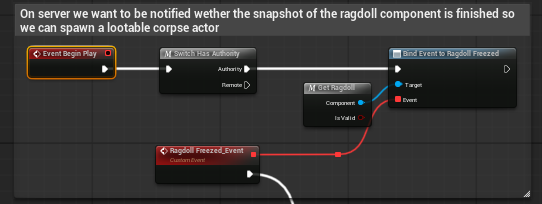
Figure 3. AC_Lootable_Corpse Begin Play binding to the ragdoll frozen event on the authority path.
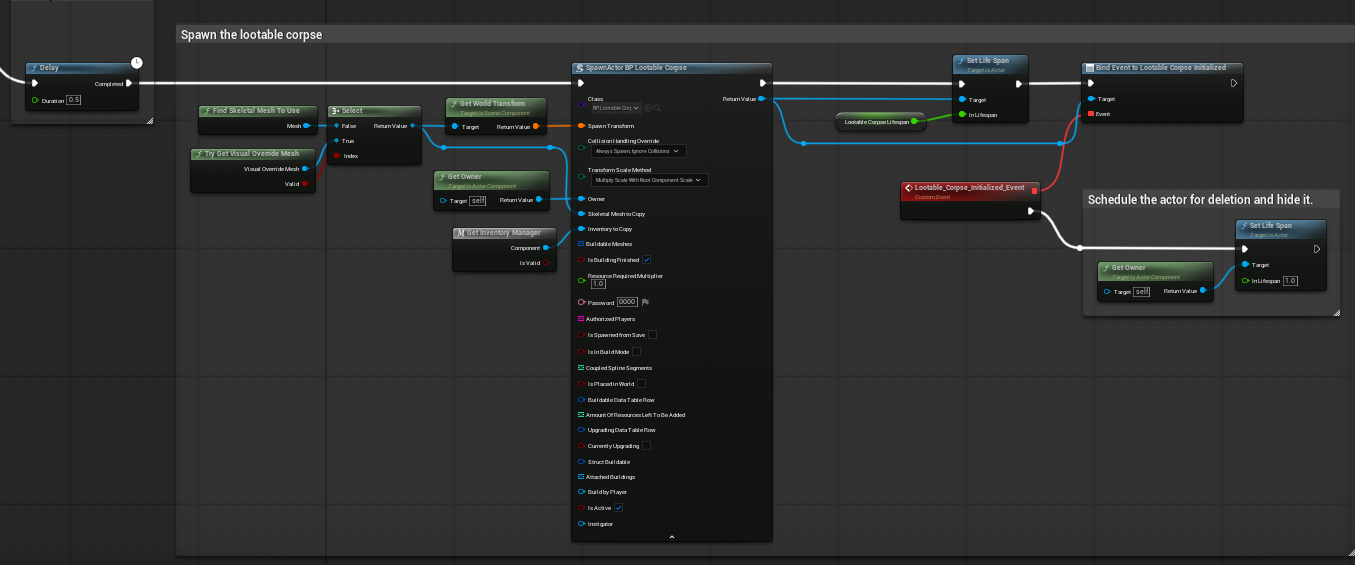
Figure 4. AC_Lootable_Corpse corpse-spawn flow after ragdoll freeze.
Important behaviour in AC_Lootable_Corpse #
- The component binds on Begin Play only on authority. This keeps the actual spawn trigger controlled from the server-side path.
- A short delay is inserted after the ragdoll frozen event. The supplied note explains that this is mandatory so the final pose is stable and the server and client are less likely to disagree about the currently active ragdoll animation state.
- When spawning BP_Lootable_Corpse, the component passes the resolved skeletal mesh, the owner, and the inventory reference that should be copied into the corpse.
- The component applies the configured corpse lifespan and listens for the corpse-initialized callback before cleaning up the original owner path.
Mesh selection helpers #
The helper functions are small but important because they decide which visual source becomes the corpse.
- Find Skeletal Mesh To Use: if Use Child Skeletal Mesh is false, the function returns the standard character mesh. If true, it enumerates children of the character mesh and returns the first skeletal mesh child it finds.
- Try Get Visual Override Mesh: the function searches the owner for child actor components tagged VisualOverride. If one exists, it attempts to pull a skeletal mesh component from the first valid child actor, giving buyers an optional override path without rewriting the rest of the system.
BP_LOOTABLE_CORPSE Explained #
BP_Lootable_Corpse is the world-facing corpse actor. It is the actor the player interacts with once the original character has transitioned into a lootable world object. Based on the supplied graphs, it performs four main jobs: interaction rules, corpse visual setup, inventory transfer into its own inventory component, and save/load-time conversion when loaded with remaining items.
|
Blueprint area |
What it does |
Why it matters |
|
Can Interact override |
Combines parent interaction validity with the local Inventory Invalid flag. |
Prevents players from interacting with a corpse that did not receive a valid inventory handoff. |
|
Get Relative Interact Text Location |
Offsets the prompt using the poseable mesh transform rather than the actor origin. |
Keeps the interaction UI positioned above the visible corpse mesh instead of over an empty actor pivot. |
|
Get Interact Text / Animation |
Returns loot-focused prompt data and the configured interaction montage. |
Gives the corpse a clear, dedicated player interaction identity. |
|
Begin Play flow |
Resolves the inventory component, handles remote placement, copies or builds the corpse pose, validates the inventory source, and transfers items. |
This is the core initialization path that turns the spawn parameters into a working corpse actor. |
|
On Load flow |
After a short delay, checks whether inventory still contains items and converts the corpse into a loot bag if needed. |
Supports persistence workflows without leaving invalid corpse actors behind after load. |
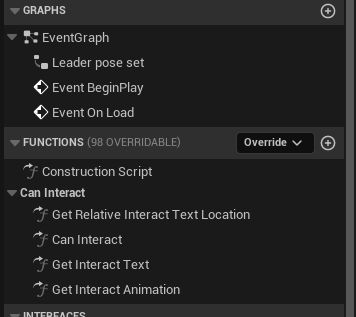
Figure 5. BP_Lootable_Corpse Blueprint surface showing the interaction overrides and the main event entries supplied in the documentation pack.
Interaction overrides #

Figure 6. Can Interact override combining the parent result with the local Inventory Invalid flag.
The corpse actor keeps its interaction logic intentionally simple. It inherits base interaction support from its parent, then adds only the corpse-specific restrictions and presentation.
- Can Interact returns true only when the parent interaction path says the actor is valid and Inventory Invalid is false.
- Get Relative Interact Text Location calculates the prompt location from the poseable mesh so the prompt appears above the corpse body rather than the actor origin.
- Get Interact Text returns Loot as the primary interaction label.
- Get Interact Animation returns the montage used when the player performs the corpse interaction.
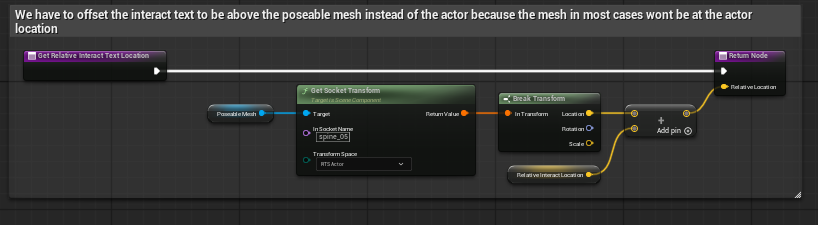
Figure 7. Get Relative Interact Text Location using the poseable mesh transform and an offset.
Begin Play responsibilities #
The supplied Begin Play graph is the most important part of BP_Lootable_Corpse because it completes the transition from a spawn request into a usable world actor.
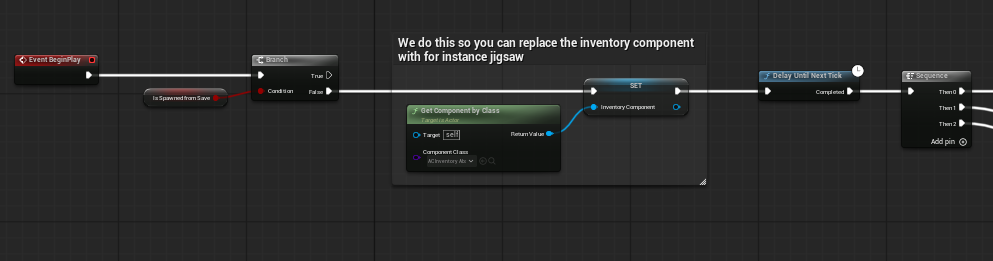
Figure 8. Early Begin Play setup: inventory component resolution and transition into the main initialization sequence.
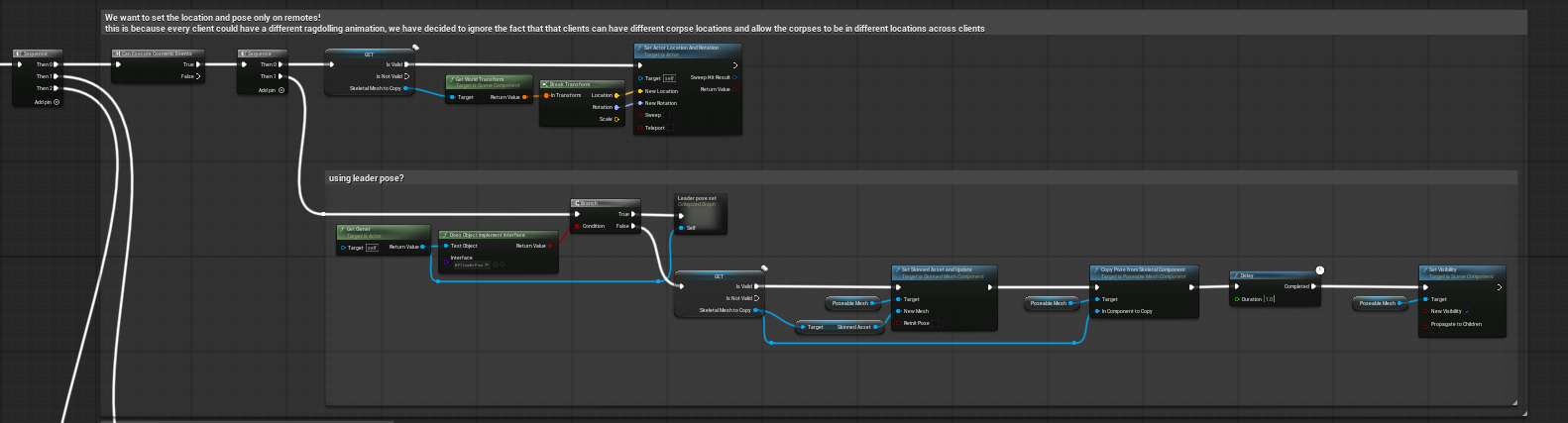
Figure 9. Begin Play corpse placement and pose-setup path, including the leader-pose / pose-copy handling.
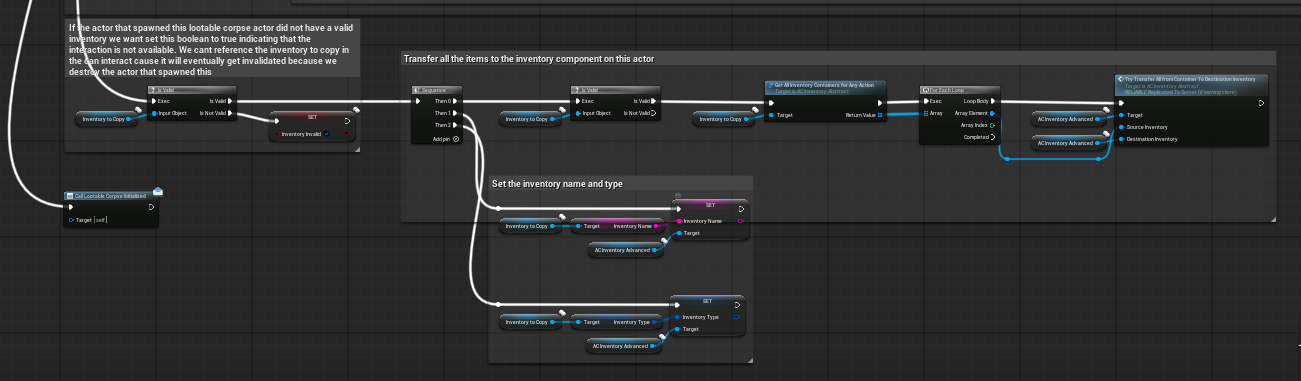
Figure 10. Begin Play inventory validation and transfer into the corpse inventory component.
- The corpse resolves and stores its inventory component on Begin Play, which makes the inventory implementation easier to swap later.
- For remote contexts, the actor sets its location and rotation from the copied mesh transform. The supplied note explicitly accepts that client-side ragdoll outcomes may differ, so different clients may perceive slightly different corpse locations.
- The actor then builds the corpse visual state. Depending on the integration path, it either follows a leader-pose style route or copies pose data onto the poseable mesh.
- If the source inventory reference is invalid, the corpse marks itself as Inventory Invalid so it cannot be looted.
- If the source inventory is valid, the actor copies the inventory name and inventory type, gathers source containers, and transfers the items into its own inventory component.
- Once initialized, the corpse notifies the spawning side so the original owner can be cleaned up on the old path.
Spawn Flow #
- 1. A character enters ragdoll and the owning Lootable Corpse component waits for the ragdoll frozen/settled signal.
- 2. On the server-side path, AC_Lootable_Corpse receives the frozen event and waits briefly so the pose is stable.
- 3. The component selects the correct mesh source, optionally considering child skeletal meshes or a visual override mesh.
- 4. BP_Lootable_Corpse is spawned and receives the owner reference, the skeletal mesh source, and the inventory reference to copy.
- 5. The corpse actor initializes its pose, copies the inventory metadata and items, and becomes interactable if the handoff succeeded.
- 6. After the corpse-initialized callback, the original character path can be hidden/cleaned up and the corpse remains for the configured lifespan.
|
Why the delay exists The documentation screenshots include an explicit note that the short post-freeze delay is mandatory. Without it, the server may snapshot the corpse before the same final pose is active on the client, which can produce incorrect corpse visuals or timing issues during the handoff. |
Interaction and Save / Load Behaviour #
Interaction behaviour #
From the player's point of view, the corpse behaves like a specialised lootable interactable. The prompt appears above the body, the text is focused purely on looting, and the interaction can be blocked automatically if the inventory handoff failed.
Save / load behaviour #
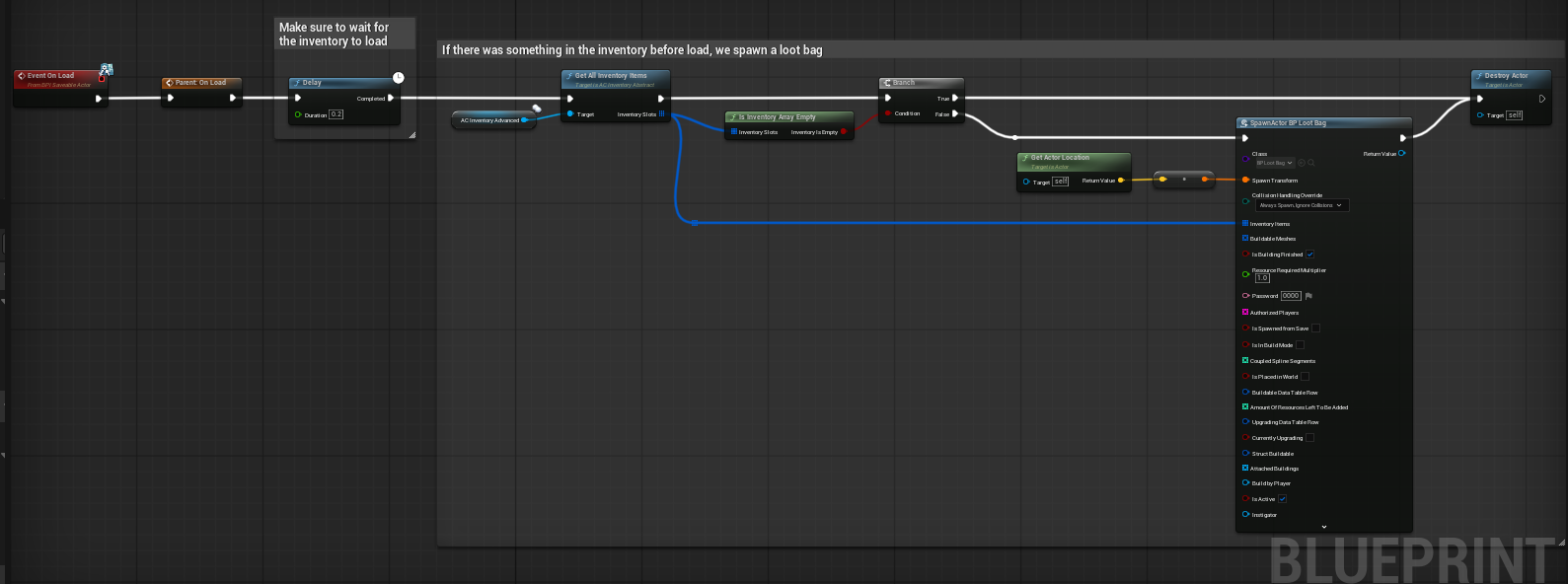
Figure 11. Event On Load behaviour converting the corpse into a loot bag when a loaded corpse still contains items.
The supplied On Load flow waits briefly for the inventory to finish loading, checks the inventory array, and if items are present it spawns a loot bag and destroys the corpse actor. This is a useful persistence rule because it lets the system move loaded loot into a simpler world representation instead of rebuilding a full corpse interaction state forever.
- Delay briefly on load so the inventory has time to restore its item state.
- Read all inventory items from the corpse inventory component.
- If the inventory is not empty, spawn BP_Loot_Bag at the corpse location and pass the inventory list into that new actor.
- Destroy the corpse actor after the loot bag has been created.
Hooking Into Other Systems #
Although the Lootable Corpse implementation is small, it sits between several other systems. Buyers should think of it as a handoff layer between death/ragdoll, visual corpse presentation, and inventory interaction.
|
System |
Integration point |
Practical note |
|
Ragdoll system |
AC_Lootable_Corpse binds to the owner's ragdoll frozen event on Begin Play. |
Your custom character must expose a compatible ragdoll component or access function. The exact source asset was not part of the supplied evidence pack, but the binding requirement is clear in the AC graph. |
|
Inventory system |
The component passes Inventory To Copy into BP_Lootable_Corpse, which then copies metadata and items into its own inventory component. |
This is the main system dependency. If your project uses a different inventory implementation, this is the seam you customise. |
|
Interaction system |
BP_Lootable_Corpse overrides base interaction functions from its parent. |
The parent remains out of scope, but buyers can safely change the corpse-specific interaction text, prompt placement, and montage in the child. |
|
Save / load flow |
BP_Lootable_Corpse On Load can convert a loaded corpse with items into a loot bag. |
Useful for persistence-heavy projects that do not want every saved corpse to remain a full corpse actor forever. |
How To's / Common Buyer Customisations #
A buyer usually does not want to rewrite the whole system. They want to adapt it: swap the mesh source, change cleanup timing, point it at a different inventory component, or alter what the player sees. The sections below focus on the most realistic and useful customisations.
How to add the system to a new character #
- 1. Add AC_Lootable_Corpse to the character Blueprint that can enter ragdoll.
- 2. Ensure the character also has the inventory component your project expects the corpse to copy from.
- 3. Confirm the character can expose the ragdoll source used by Get Ragdoll and that the frozen/settled event is fired correctly.
- 4. Set Lootable Corpse Lifespan to the cleanup window you want for your game.
- 5. Test a death/ragdoll event in multiplayer and verify the corpse spawns after the ragdoll has settled rather than immediately on death.
How to use a child skeletal mesh instead of the main character mesh #
Enable Use Child Skeletal Mesh on AC_Lootable_Corpse. The mesh-selection helper then enumerates the children of the main character mesh and returns the first skeletal mesh child it finds. This is useful when your visible presentation is not the primary mesh component.
How to use a visual override mesh #
The override path is driven by the tag VisualOverride. If your character uses a separate child actor for the visible corpse presentation, tag that child actor component with VisualOverride and make sure the child actor contains a skeletal mesh component that can be extracted. AC_Lootable_Corpse will try this path when resolving the final source mesh.
How to change corpse cleanup time #
Change Lootable Corpse Lifespan on AC_Lootable_Corpse. Higher values keep corpses in the world for longer and feel more persistent. Lower values help reduce world clutter, especially in PvP or horde-heavy modes.
How to change the interact text or animation #
Edit the Get Interact Text and Get Interact Animation overrides in BP_Lootable_Corpse. This is the cleanest place to change the prompt from Loot to Search, Harvest, Examine, or any project-specific label, and to swap the interaction montage to match the animation set used in your game.
How to keep corpses instead of converting them into loot bags on load #
Modify or remove the Event On Load logic in BP_Lootable_Corpse. Right now, the supplied implementation converts a loaded corpse with remaining items into BP_Loot_Bag and destroys the corpse actor. If your project wants corpses to persist exactly as corpses across save/load, this is the event you should rewrite.
How to extend post-spawn initialization #
Use the corpse-initialized moment as your extension point. The spawn flow already binds a callback from the spawned corpse back to the spawning component. This is a good place to add project-specific logic such as blood decals, quest state updates, corpse tagging, analytics, or faction consequences without disturbing the core handoff sequence.
Example Flows #
Standard death to lootable corpse #
- A character dies and enters ragdoll.
- The ragdoll eventually freezes and AC_Lootable_Corpse receives the event.
- After the short stabilisation delay, the component resolves the correct source mesh and spawns BP_Lootable_Corpse.
- The corpse actor copies the inventory state, becomes interactable, and the original actor path is cleaned up.
- A player approaches, sees the Loot prompt above the body, interacts, and opens the corpse inventory.
Character with a separate visible child mesh #
- The character uses a separate child skeletal mesh or child actor for its visible presentation.
- Use Child Skeletal Mesh is enabled, or a VisualOverride-tagged child actor is provided.
- When the corpse spawns, the helper function selects the visible child path rather than the default character mesh.
- The resulting corpse matches the intended presentation instead of defaulting to the wrong mesh component.
Loaded corpse converts into a loot bag #
- A saved game is loaded and a corpse actor restores into the world.
- On Load waits briefly for the inventory data to finish restoring.
- The corpse finds that items still exist in its inventory.
- It spawns a loot bag and destroys itself, leaving the player with a simpler persistent loot representation.
Summary #
The Lootable Corpse system is small, focused, and practical. AC_Lootable_Corpse handles the transition from ragdoll into corpse. BP_Lootable_Corpse handles the world-facing result: visual pose, copied inventory, interaction rules, and load-time conversion behaviour. Because the system is concentrated into two assets and a small number of exposed settings, it is easy for buyers to integrate quickly and then adapt in the places that matter most: mesh selection, inventory handoff, interaction presentation, cleanup timing, and persistence rules.