
Level instance manager #
Technical documentation based on the supplied Blueprint manager, structs, demo trigger, and example level flow.
|
Scope: This document describes the Level Instance Manager implementation and demo usage shown in the supplied screenshots. It focuses on the Blueprint behavior visible in the manager, listener flow, trigger actor, and example village swap setup. |
CONTENTS
Introduction #
The Level Instance Manager is a Blueprint-driven world streaming system used to dynamically load, unload, and swap level instances during gameplay. The supplied demo shows it being used for staged world-state transitions, such as replacing an intact village with a destroyed version when a trigger fires.
Instead of rebuilding every world state directly into one persistent map, the system packages those states as modular level instances and loads only the version required at that moment. This makes narrative transitions cleaner, keeps demo flows reusable, and also helps control what content is streamed for each player.
- Supports dynamic world swaps driven by gameplay triggers, quest stages, or event tags.
- Tracks loaded streaming instances at runtime so they can be matched and unloaded later.
- Provides multiplayer-aware filtering so updates can be sent to everyone or only selected controllers.
- Caches required load instructions so late-joining clients can catch up with the current streamed world state.
- Fits both direct trigger-driven setups and event-listener driven integrations.
|
Overview board from the supplied demo level. |
Demo flow board summarising quest-driven and trigger-driven world changes. |
Core Asset Overview #
The central implementation asset shown in the supplied screenshots is AC_GS_LevelInstanceManager. This manager owns the runtime load/unload logic, stores the live instance references, registers itself as a listener when using the event-manager path, and exposes the core Blueprint functions used by the rest of the demo.
|
Area |
Purpose in the implementation |
|
Manager Blueprint |
Owns the streamed level instance lifecycle: load, unload, caching for late join, and live tracking. |
|
EventGraph / BeginPlay |
Registers the manager as a listener and replays cached level-instance loads when a client joins. |
|
On Event |
Receives gameplay-tagged environment events and routes them into the manager functions. |
|
Demo Trigger Actor |
Provides a gameplay-facing overlap example that calls the manager’s multicast wrappers. |
|
Struct Payloads |
Encapsulate all data needed to perform a load or unload request without hardcoding values in every graph. |
|
EventGraph section showing unload and load entry points plus the direct manager call. |
BeginPlay setup showing listener registration and late-join replay from cached load instructions. |
This arrangement keeps the manager as the single source of truth for streamed instances. Other actors only need to build the right payload and call the manager, rather than owning separate streaming logic themselves.
Details Panel / Important Variables #
Two runtime variables are visible in the supplied manager Blueprint and they explain most of the system’s state handling. Together they let the manager separate what should be active for players from what is currently loaded in memory and can be unloaded by reference.
|
Level Instances To Load is stored as an array of F_Load_Level_Instance. |
Loaded Level Instances is stored as a map of Level Streaming Dynamic to Soft World Reference. |
|
Variable |
Type |
Role in the system |
|
Level Instances To Load |
Array |
Server-side cache of load instructions that should also be applied for relevant clients. The BeginPlay flow iterates this array so a joining client can recreate already-active streamed content. |
|
Loaded Level Instances |
Map |
Runtime lookup of every currently loaded streaming instance paired with its source level reference. This map is used when unloading so the manager can find the correct loaded instance and remove it safely. |
|
Why the separation matters: The array represents desired world state for client catch-up, while the map represents the actual loaded runtime objects currently owned by the manager. |
Structures Explained #
The manager uses two compact data structs. One describes how to load a level instance, and the other describes how to unload one. This keeps the manager API clean and makes the same payload usable across direct calls, event-listener routing, and multicast wrappers.
|
F_Load_Level_Instance as supplied in the implementation. |
F_Unload_Level_Instance as supplied in the implementation. |
|
F_Load_Level_Instance field |
Description |
|
Level |
Soft world reference for the level instance asset to be streamed in. |
|
Location |
World-space location used when spawning the streamed instance. |
|
Rotation |
World rotation applied to the streamed instance. |
|
Optional Level Name Override |
Optional explicit instance name used when a custom streamed level name is required. |
|
Optional Level Streaming Class |
Optional streaming class override for the loaded instance. |
|
Load As Temp Package |
Boolean option forwarded into the load request for temporary package behaviour. |
|
Spawn For Everyone |
If true, the update is considered valid for all relevant clients. |
|
Spawn For These Controllers |
Optional controller filter used when the load should only be processed for selected players. |
|
F_Unload_Level_Instance field |
Description |
|
Level |
Soft world reference identifying which loaded level instance should be removed. |
|
Unload For Everyone |
If true, the unload request should be processed for all relevant clients. |
|
Unload For These Controllers |
Optional controller filter used when only specific players should process the unload. |
Functions to Use #
The supplied manager implementation exposes a small but practical function set. These functions cover player filtering, load/unload execution, runtime cleanup, local actor lookup, and event-driven routing.
|
Function |
Purpose |
|
Should Update |
Evaluates whether the current local player should process a load or unload request. It returns true when the update is marked for everyone or when the local player controller exists in the supplied controller array. |
|
Load Level Instance |
Optionally stores the load request for later clients, evaluates the visibility rules through Should Update, then loads the level by object reference and adds the resulting streaming instance to the runtime map. |
|
Unload Level Instance |
Checks whether the local player should process the request, removes the matching cached instruction if needed, finds the corresponding loaded instance in the runtime map, and removes it. |
|
Remove Level From Instances To Load |
Scans the cached load-instruction array and removes an entry by matching its soft world reference. |
|
Get all actors from class from level instance |
Collects actors of a given class and returns only the actors that belong to the supplied streamed level instance. |
|
Should Update filters requests using the Everyone flag or selected controllers. |
Load Level Instance stores the request, checks visibility, loads by reference, and tracks the result. |
|
Unload Level Instance removes cached instructions, finds the loaded instance, and removes it. |
Utility flow used to find actors that belong to a streamed level instance. |
Event Listener / Replication Flow #
The manager supports both direct function calls and event-driven routing. On BeginPlay, the manager can register itself with the Game State Event Manager and listen for environment load or unload tags. When those tagged events fire, the Event Listener interface routes the payload into the manager’s load or unload functions.
|
BeginPlay registers the manager as a listener and replays cached loads for joining clients. |
On Event switches on gameplay tags and converts the event payload into load or unload calls. |
|
Replication element |
Observed behaviour |
|
Multicast_LoadLevelInstance |
Reliable multicast wrapper that accepts F_Load_Level_Instance plus a SkipServer boolean. Used to forward a load request across the network without duplicating execution where SkipServer is enabled. |
|
Multicast_UnloadLevelInstance |
Reliable multicast wrapper that accepts F_Unload_Level_Instance and forwards the unload request across the network. |
|
Late-join catch-up |
The BeginPlay replay loop iterates the cached Level Instances To Load array so a joining client can stream in instances already considered active for other players. |
|
Event-driven path |
The interface-based On Event function allows quest logic, world events, or other gameplay-tag-driven systems to request streamed world changes without directly wiring into every manager graph. |
|
Multicast_LoadLevelInstance is configured as a reliable multicast. |
Multicast_UnloadLevelInstance is configured as a reliable multicast. |
Trigger Box / Demo Actor Setup #
The supplied demo also includes a trigger-box actor that shows how a gameplay overlap can drive the manager. This actor is the user-facing example most developers will understand first, because it turns the abstract manager functions into a practical in-level workflow.
|
Exposed variables on the demo trigger actor. |

|
Overlap entry flow: validate player-controlled pawn, authority, controller, manager, and trigger state. |
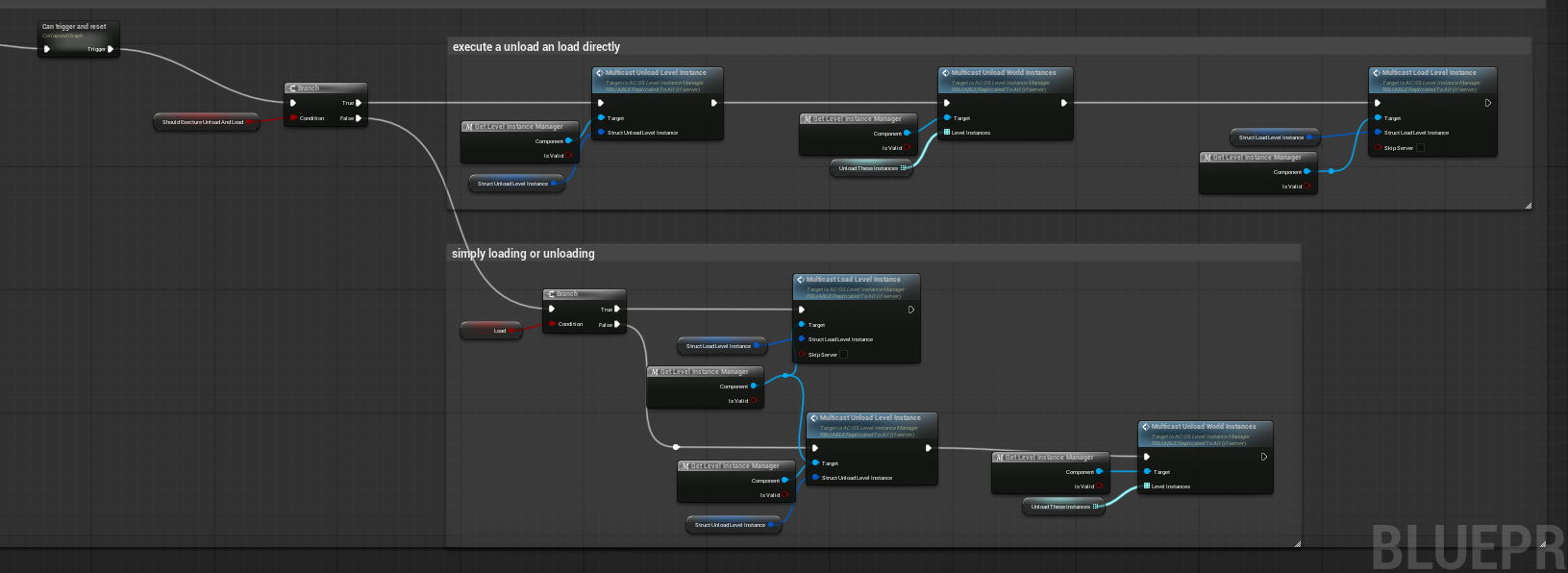
The trigger supports swap mode and simple load-only or unload-only paths.
|
Trigger field |
Purpose |
|
Triggers To Allow On Overlap |
Controls which triggers are currently allowed to execute. Used by the Can trigger and reset logic to prevent accidental repeated execution. |
|
Allow Trigger At Start |
Sets whether the trigger begins in an active state. |
|
Unload These Instances |
List of level instances that should be force-unloaded before loading a replacement. In the sample, this is used to remove an already-placed village instance. |
|
Should Execute Unload And Load |
Enables swap mode so the trigger performs an unload path and then immediately loads the replacement instance. |
|
Load |
When not using swap mode, decides whether the trigger is a load-only trigger or an unload-only trigger. |
|
Struct Load Level Instance |
Payload used for the load call. |
|
Struct Unload Level Instance |
Payload used for the unload call. |
Example Flow – Village Swap Using Overlap Triggers #
The clearest supplied use case is the intact-to-destroyed village example. A pre-existing village instance is already in the world, the player overlaps a trigger, the original instance is unloaded, and the replacement version is streamed into the same gameplay space.
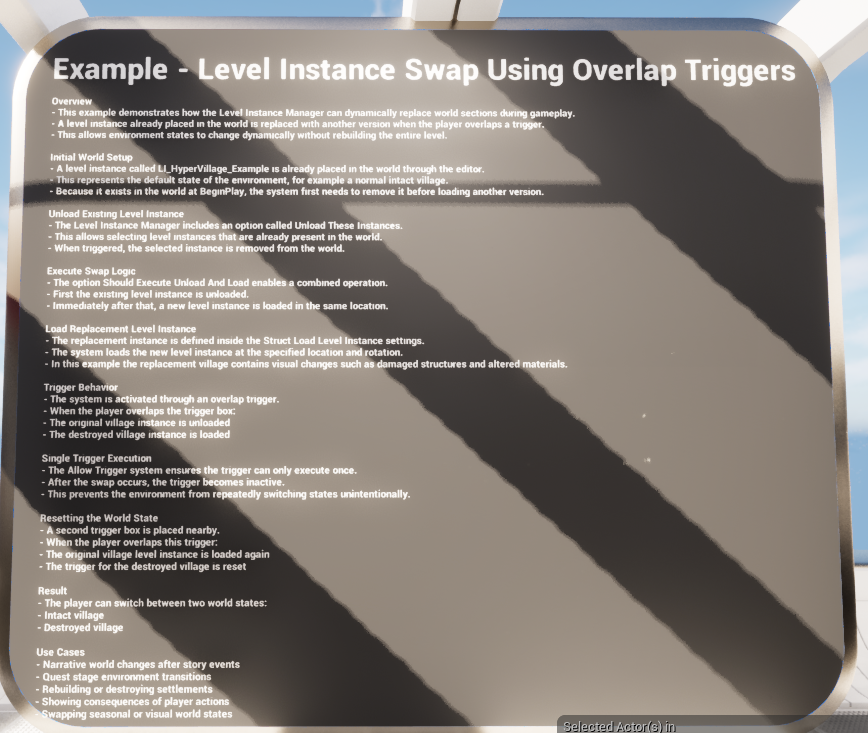
Demo board describing the intact-village to destroyed-village swap example.
|
Destroyed-village trigger sign. |
Restore-village trigger sign. |
|
Placed trigger setting |
Observed value / meaning |
|
Unload These Instances |
LI_HyperVillage_Example is listed so the already-present level instance can be removed first. |
|
Should Execute Unload And Load |
Enabled – this trigger runs in swap mode. |
|
Load |
Enabled – after unloading, the trigger proceeds into the load path. |
|
Struct Load Level Instance |
Configured with a specific transform and set to Load As Temp Package and Spawn For Everyone. |
|
Struct Unload Level Instance |
Configured to Unload For Everyone. |
|
Allow Trigger At Start |
Enabled – the trigger can execute immediately at the start of play. |
Setup Notes / Summary #
From the supplied implementation, the intended workflow is straightforward: build a load or unload payload, send it into the manager either directly or through the event-listener path, and let the manager own the streamed instance lifecycle.
|
Recommended setup sequence |
Why it matters |
|
1. Define the level payloads |
Create F_Load_Level_Instance and F_Unload_Level_Instance values so the manager has all required transform, targeting, and player-filter data. |
|
2. Call the manager through the right path |
Use direct Blueprint calls for simple setups, multicast wrappers for replicated gameplay actions, or the Event Listener path when the project already uses gameplay-tagged environment events. |
|
3. Cache active world-state loads where required |
The manager’s Level Instances To Load array supports the late-join replay behaviour shown on BeginPlay. |
|
4. Use the trigger actor for localised gameplay examples |
The demo trigger is a clean example for overlap-driven world swaps, loads, and unloads. |
|
5. Track reversibility deliberately |
If a world state can be be restored later, pair the swap trigger with a matching restore trigger and corresponding load/unload payloads. |
Overall, the Level Instance Manager is a clean modular Blueprint utility for streaming world-state changes in and out of play. Its biggest strengths in the supplied implementation are: reusable payload structs, centralised instance tracking, reliable multicast wrappers, late-join replay support, and a practical demo trigger that shows how to turn the system into an easy-to-configure gameplay tool.
|
Best fit use cases: Quest-stage environment swaps, reversible story consequences, modular village or settlement variants, staged gameplay spaces, and multiplayer scenarios where streamed world state must stay consistent for joining players. |