
Skip to content
Games by Hyper
Sign Up / Login
Games by Hyper

Generic

  • QuickStart
  • Support
  • Purchase Options
  • Roadmap
  • FAQ
  • Learning
  • For Professional Studios

Templates

  • Template Logic and flexibility

Shared Infrastructure

  • Gameplay Tags
  • Datamanagement
  • Folder Structure
  • Object Pooler

Item Management

  • Inventory
  • Jigsaw Inventory
  • List Inventory
  • Respawn Actor Manager
  • Hotbar
  • Crafting
  • Item Allocator
  • Vendor
  • Icon Creator
  • Interactive Foliage

Interaction and Feedback

  • Interaction System
  • Outliner System

UI

  • Main Menu
  • HUD
  • Information Prompt

Locomotion

  • Animation Framework
  • Extended Movement Component
  • Leader Posing
  • Custom-Skeletal-Meshes

Combat

  • Attribute Manager
  • Team Affiliation
  • Equipment Manager
  • Ragdoll System
  • Ability System
  • Target Locking
  • Weapon Attachment System
  • Combat-framework
  • Actor Health
  • Lootable Corpse

Construction and Survival Mechanics

  • Building System
  • Mineable Rocks
  • Tree Cutting
  • Farming System
  • Fishing System
  • Swimming System
  • Bury Storage
  • Skinning System

Game Management

  • Global Save System
  • Respawn System
  • Session Manager
  • Game Mode System
  • Spectate System
  • Player Manager
  • Team Manager
  • Score Manager
  • Permission Manager
  • Level Instance Manager

Multiplayer

  • Online Multiplayer Framework
  • Replication Subsystem
  • Chat System
  • Console Command Manager

AI

  • Routine Driven NPC Framework
  • Perception System

Exploration and Narrative

  • Dialogue System
  • Memory System
  • Quest Manager
  • Map System
  • Teleport System
  • Guide System
  • Event Manager
  • Visual Novel System
  • Region Manager
  • Inspection System
  • Sequence Manager

Progression and Leveling

  • Level Manager
  • Unlock System
  • Reputation System

Character and Player Systems

  • Mount System
  • Emote System

Environmental Control and Immersion

  • Time and Day Night Cycle management
  • Weather System
  • Background Music System
  • Footstep System

Environment Building

  • Mesh to Actor Swap System
  • Forest-Basic
  • Level Instances
View Categories
  • Home
  • Docs
  • Vendor

Vendor

1 min read

Read the inventory documentation first to understand the container system. Also read the item allocator since vendors use the AC_ItemAllocator component for inventory management.

Vendor Component #

AC_Vendor #

The AC_Vendor component handles all trading functionality. Add this component to any actor to make it a vendor.
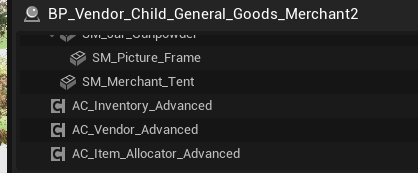
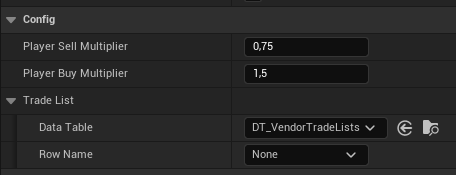
Key Settings:

  • Trade List: Data table containing items for sale (uses same structure as Item Allocator loot tables)
  • Buy Multiplier: Percentage of item value the vendor pays when buying from player
  • Sell Multiplier: Percentage of item value the vendor charges when selling to player
  • Not Interested Categories: Array of category enum values the vendor won’t purchase
  • Currency Item: Reference to the currency item in DT_Items
Currency Counting

When counting player currency:

  • Get all items with currency type
  • For each currency item stack, multiply amount by base value
  • Return total currency value

Price Calculation #

Prices are calculated using base values and multipliers.

Base Price Calculation

Price = Base Value * Multiplier * Quantity

Where:

  • Base Value: From DT_Items
  • Multiplier: Buy or sell multiplier from AC_Vendor
  • Quantity: Number of items

How-To Guides #

How to Create a Basic Vendor #

Step 1: Create Vendor Actor

  • Create a new Blueprint actor (e.g., BP_Vendor_General)
  • Add a static mesh for the vendor (NPC, shop stall, etc.)

Step 2: Add Components

  • Add AC_Inventory component
  • Add AC_ItemAllocator component
  • Add AC_Vendor component

Step 3: Create Trade List

  • In Content Browser, right-click → Create Data Table
  • Choose the loot/trade table struct
  • Name it DT_TradeList_General
  • Add items you want the vendor to sell

Step 4: Configure Trade List Items

For each item in the trade list:

  • Add a row with the item name
  • Set Item Row reference (select from DT_Items)
  • Configure Loot Table Info:
    • Chance of spawning in vendor inventory: 0.0 to 1.0 (1.0 = always in stock)
    • Minimal Amount to restock / Maximum Amount to restock: Initial stock quantity
    • Maximum Stock: Upper limit

Step 5: Assign Trade List to Vendor

  • Select the vendor actor
  • Find AC_Vendor component
  • Set Trade List to your created data table

Step 6: Configure Buy/Sell Multipliers

In the AC_Vendor component:

  • Set Buy Multiplier (e.g., 0.5)
  • Set Sell Multiplier (e.g., 1.0)

Step 7: Configure Not Interested Categories (Optional)

In the AC_Vendor component:

  • Add category enum values for item types vendor won’t buy
  • Example: General store leaves this empty (buys everything)
  • Example: Weapon vendor adds Consumables category

Step 8: Configure Restocking (Optional)

In the AC_ItemAllocator component:

  • Enable Has Reallocation if desired
  • Set Reallocation Time

How to Configure Pricing #

Step 1: Set Base Item Values – In DT_Items, set appropriate base values for each item considering item power and progression.

Step 2: Set Vendor Multipliers – Determine buy/sell multipliers:

Typical Setup:

  • Buy Multiplier: 0.5 (vendors pay half value)
  • Sell Multiplier: 1.0 (vendors charge full value)

Player-Friendly Setup:

  • Buy Multiplier: 0.7
  • Sell Multiplier: 1.0

Challenging Setup:

  • Buy Multiplier: 0.3
  • Sell Multiplier: 1.5
What are your Feelings
Still stuck? How can we help?

How can we help?

Table of Contents
  • Vendor Component
    • AC_Vendor
    • Price Calculation
  • How-To Guides
    • How to Create a Basic Vendor
    • How to Configure Pricing

© 2026 Games by Hyper

X Reddit Patreon Discord Linkedin YouTube

Review Cart

No products in the cart.

We noticed you're visiting from Netherlands. We've updated our prices to Euro for your shopping convenience. Use United States (US) dollar instead. Dismiss

  • Hyper Bundle Configurator
  • Shop
    • Game Templates
    • Courses
    • Loyalty Store
    • Survival Modules
    • RPG Modules
    • Environment Building
  • My account
  • Become a Member
  • Cart
  • Get Help
    • FAQ
    • Upgrade your Game Template
    • Documentation
  • About Hyper
  • News & Updates