
Object pool system #
Technical documentation for the Hyper Unreal Engine object pooling workflow
The Object Pool System is a Blueprint-driven reuse framework that lives on the GameState and manages short-lived pooled actors such as explosions, damage texts, and other repeat-spawn effects. Instead of repeatedly spawning and destroying new actors, the system pre-creates actor instances, keeps them in inactive and active arrays, and cycles them back into reuse when finished.
- Pre-warms one or more pools at BeginPlay using F_ObjectPool_Settings entries.
- Stores each actor class in a dedicated active/inactive runtime pool.
- Supports dedicated-server, listen-server, and client-specific creation rules.
- Can expand when demand exceeds the initial pre-warmed size.
- Lets child actors return themselves through a shared completion dispatcher.
- Accepts an Instanced Struct payload for per-activation setup.
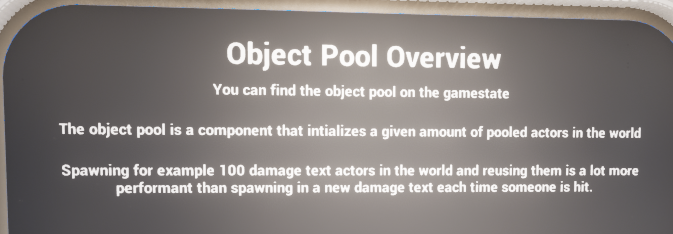
Demo-level overview of the object pool system and its intended performance use case.
Introduction #
The supplied implementation is centered around AC_GS_ObjectPool, an Actor Component intended to be attached to the GameState. It is responsible for creating pools, spawning pooled actor instances up front, handing out an available actor when gameplay requests one, and moving actors back into the inactive pool once they have finished.
At a high level, the pool manager uses a map keyed by pooled actor class. Each key stores an F_PooledActor_Array containing two arrays: inactive actors ready to reuse and active actors currently in play. This gives the system a clean separation between actors that are available and actors that are live in the world.
This is most valuable for actors that are created frequently and have a short lifetime, such as Niagara bursts, damage numbers, impact effects, projectiles, or other temporary world actors.
- Reduces repeated allocation/destruction cost for high-frequency actors.
- Keeps a single shared pool manager available at GameState level.
- Supports both pre-initialized pools and on-demand expansion.
- Uses a shared pooled actor base class so children can implement their own visual behavior.
Adding the Object Pool to the Gamestate #
The live manager should be added to the GameState as AC_GS_ObjectPool. The demo information prompt explicitly points users to the GameState as the place to find the system, and the component name reflects this intended ownership.
AC_GS_ObjectPool asset.
Placing the object pool on the GameState makes sense because the pool is world-level runtime infrastructure rather than actor-specific logic. Any system that needs pooled temporary actors can query or reference the same shared manager without duplicating pools across multiple actors.
Why place it on the GameState? #
- The GameState provides a single authoritative owner for shared runtime systems.
- Multiple gameplay systems can reuse the same object pools without maintaining their own copies.
- Pool lifetime naturally matches the level/session lifetime rather than an individual actor.
- It is a clean place to hold world-facing effects such as explosions, damage texts, and projectile pools.
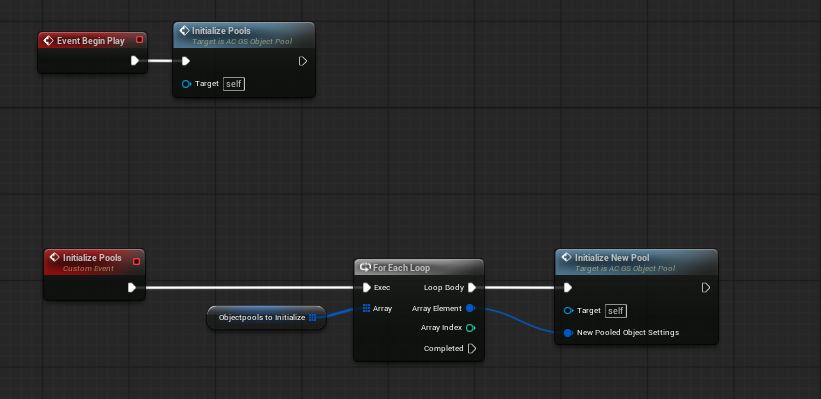
BeginPlay initialization loops through predefined settings and creates each requested pool.
Details Panel / Important Variables #
The component is intentionally small in terms of stored state. Most behavior is driven by the initialization settings array and the runtime pool map.
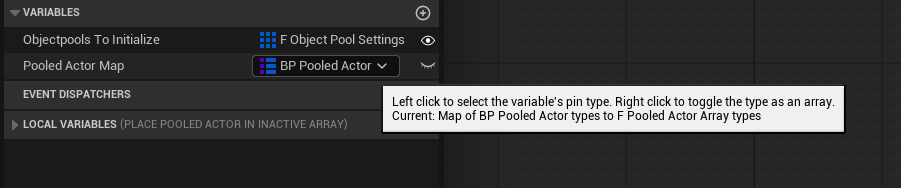
Main variables on AC_GS_ObjectPool.
|
Field |
Description |
|
Objectpools To Initialize |
Startup pool settings array. Each entry defines a pooled class, pre-warm amount, lifetime, and which runtime targets may build that pool. |
|
Pooled Actor Map |
Runtime map of pooled actor class -> F_PooledActor_Array, used to track inactive and active instances. |
Structures Explained #
The provided object pool system is built around two core structs. Together they define both the setup-time configuration for a pool and the runtime storage layout for active/inactive actor instances.
F_ObjectPool_Settings #
F_ObjectPool_Settings defines a single pool configuration. Add entries of this type to Objectpools To Initialize when the GameState pool manager should pre-build that actor class at BeginPlay.
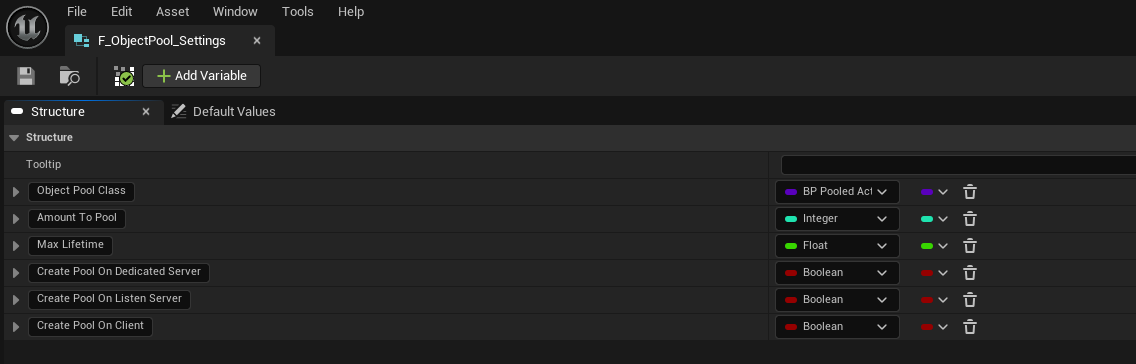
F_ObjectPool_Settings structure.
|
Field |
Description |
|
Object Pool Class |
Pooled actor class to spawn and manage. Typically a child of BP_PooledActor. |
|
Amount To Pool |
Number of actors to pre-create when the pool is initialized. |
|
Max Lifetime |
Default lifetime pushed into spawned pooled actors for automatic expiry/return. |
|
Create Pool On Dedicated Server |
Allows this pool to be created on dedicated-server instances. |
|
Create Pool On Listen Server |
Allows this pool to be created on listen-server/authority instances. |
|
Create Pool On Client |
Allows this pool to be created on client instances for local visual pools. |
F_PooledActor_Array #
F_PooledActor_Array is the runtime container used inside Pooled Actor Map. Each map entry stores one instance of this struct per pooled actor class.
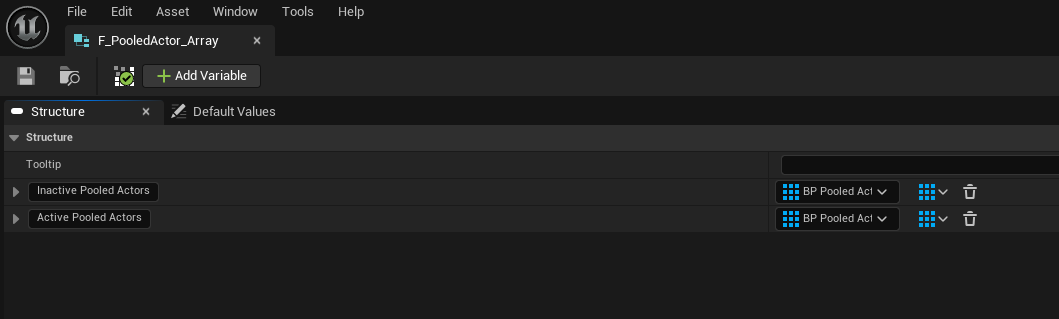
F_PooledActor_Array structure.
|
Field |
Description |
|
Inactive Pooled Actors |
Actors currently available to hand out. |
|
Active Pooled Actors |
Actors that have been taken from the pool and are currently in use. |
No separate DataTables were shown in the supplied implementation. In this version, the pool is configured directly through component variables and Blueprint structs.
Functions to Use #
AC_GS_ObjectPool exposes a small public function set that covers initialization, actor retrieval, activation, and return flow.
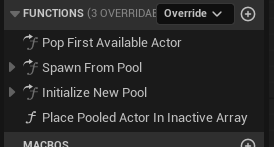
Core function list on AC_GS_ObjectPool.
|
Function |
Purpose |
|
Initialize Pools |
Loops through every F_ObjectPool_Settings entry in Objectpools To Initialize. |
|
Initialize New Pool |
Builds a single pool for a settings entry if allowed and not already present. |
|
Pop First Available Actor |
Returns an inactive actor from the requested pool and expands the pool if needed. |
|
Spawn From Pool |
Retrieves an actor, applies transform/payload, marks it active, binds return handling, and returns the actor. |
|
Place Pooled Actor In Inactive Array |
Moves a finished actor back from Active into Inactive. |
Initialize Pools #
Initialize Pools is called from BeginPlay on AC_GS_ObjectPool. It loops through Objectpools To Initialize and passes each settings entry into Initialize New Pool.
Initialize Pools iterates the startup array and forwards each settings entry to Initialize New Pool.
Initialize New Pool #
Initialize New Pool first checks whether the current runtime should create the pool at all. If the current machine passes the dedicated/listen/client rules and the class is not already present in Pooled Actor Map, the function loops Amount To Pool times, spawns the requested actor class, assigns its lifetime, and stores the resulting actors in the inactive array.
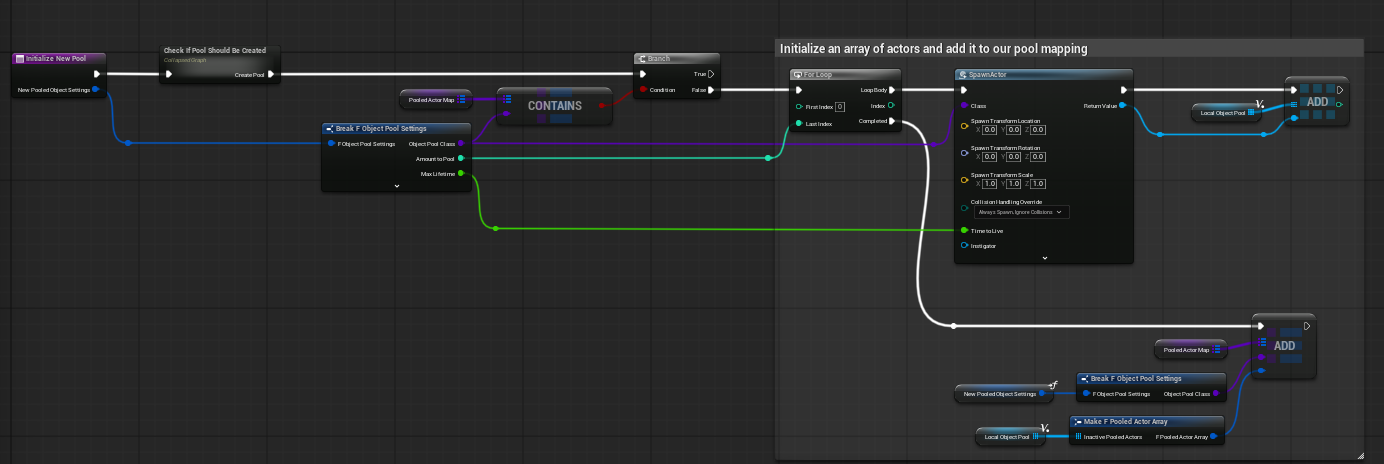
Initialize New Pool builds the inactive array and stores it in the class-keyed map.
This is also where Max Lifetime from F_ObjectPool_Settings is pushed into the spawned pooled actor.
Check If Pool Should Be Created #
Inside Initialize New Pool, the helper graph Check If Pool Should Be Created evaluates the current runtime context against the three booleans in F_ObjectPool_Settings.
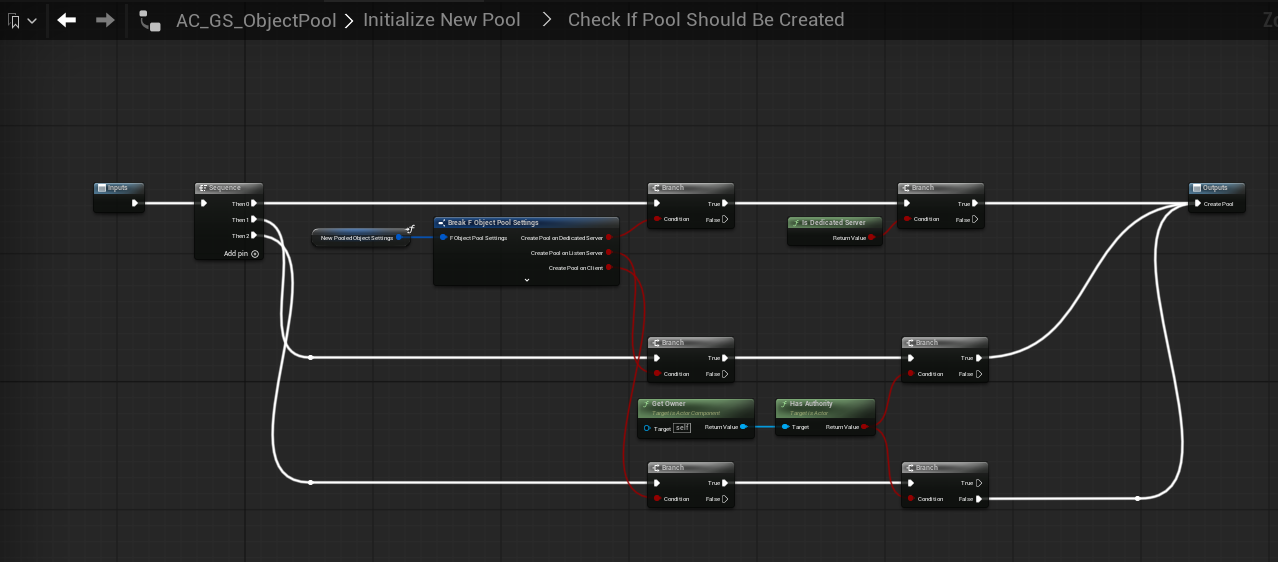
Runtime checks gate pool creation by dedicated server, listen server, and client rules.
- Dedicated-server pools only pass when the settings allow dedicated-server creation and the runtime is actually a dedicated server.
- Listen-server/authority pools are gated through owner authority checks.
- Client-side pools are separately supported so visual-only pools can exist without forcing every pool to be server-owned.
Pop First Available Actor #
Pop First Available Actor looks up the requested class inside Pooled Actor Map. If the class exists and the inactive array contains actors, it takes the last inactive entry, removes it from that inactive array, writes the updated array back into the map, and returns the actor.
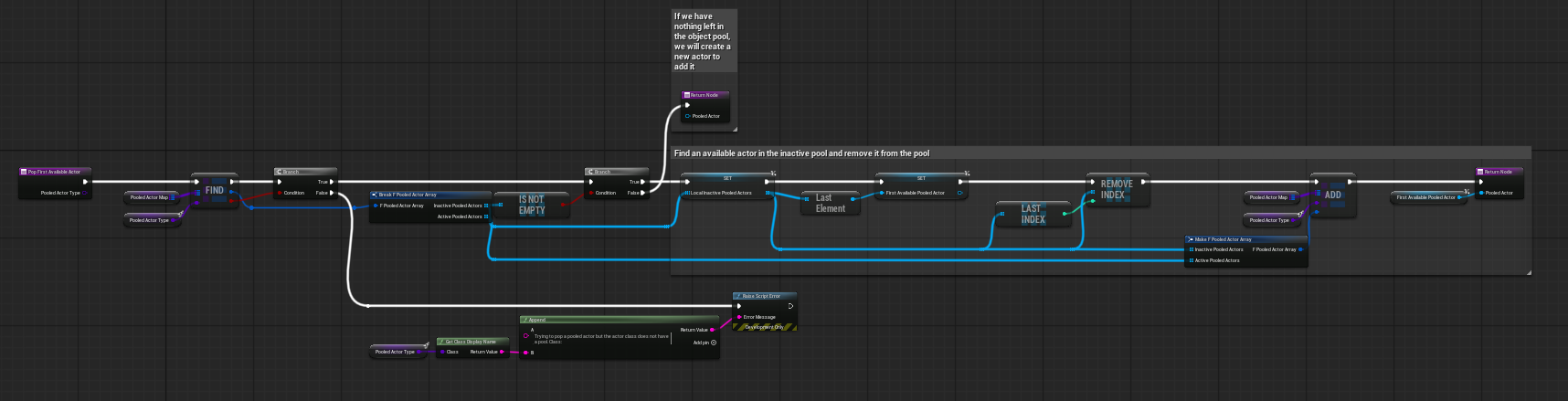
Pop First Available Actor removes an entry from the inactive array and returns it to the caller.
The graph also includes runtime expansion behavior. When the pool exists but no inactive actors remain, the system can create an additional actor instead of failing the request. If the class does not have a pool at all, the graph raises a script error so missing setup is caught early.
Spawn From Pool #
Spawn From Pool is the main public function other systems should call. Its inputs are the pooled actor type, the spawn transform, and a Payload input whose type is an Instanced Struct. It outputs the pooled actor reference that was activated.
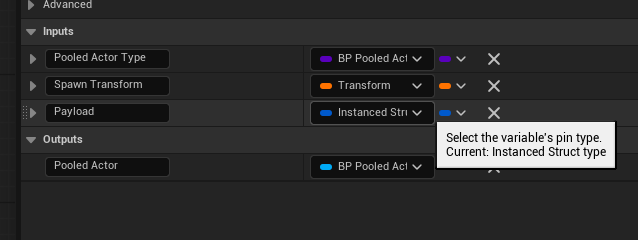
Spawn From Pool signature.
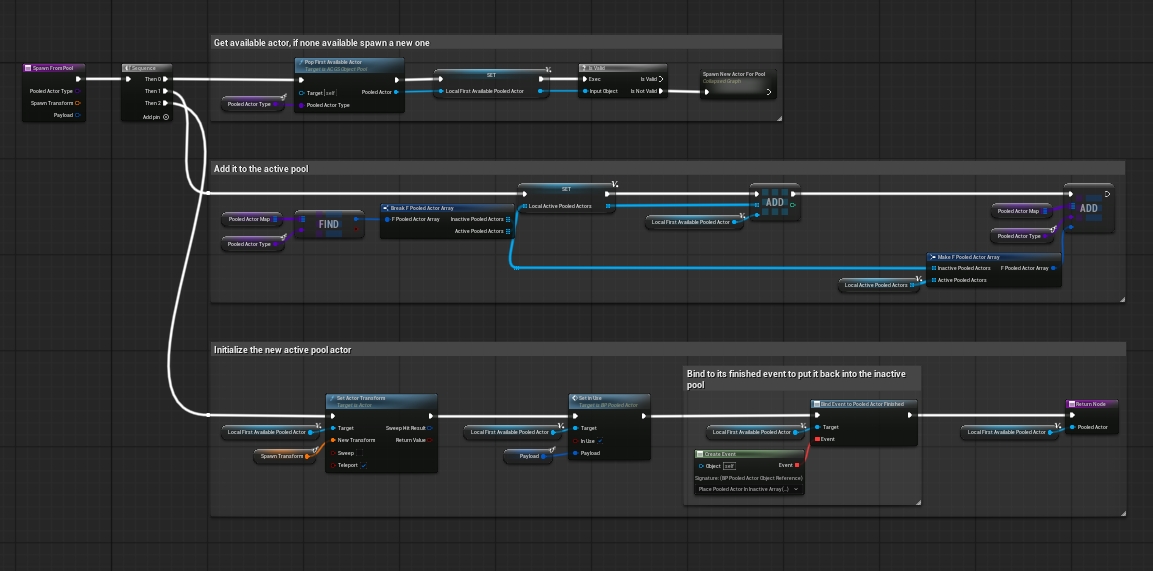
Spawn From Pool retrieves an actor, marks it active, initializes it, and binds the finished event.
- Requests an available actor from the pool, spawning one if necessary.
- Adds that actor to the active array for its class.
- Applies the requested transform.
- Calls Set In Use so the actor can enable itself and interpret any payload.
- Binds the actor's finished dispatcher so the manager can reclaim it.
Place Pooled Actor In Inactive Array #
Place Pooled Actor In Inactive Array is the return-side housekeeping function. When a pooled actor finishes, this function unbinds finished-event bindings for that actor, removes it from the active array, adds it back into the inactive array, and writes the updated struct back into the map.
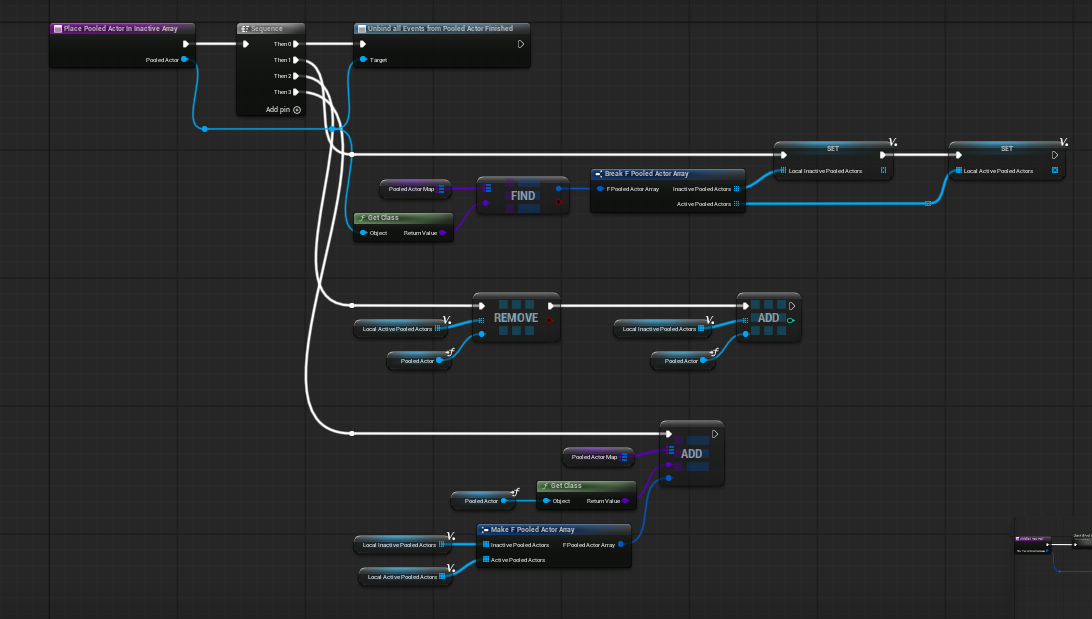
Returned actors are removed from Active and pushed back into Inactive for reuse.
Pooled Actor Base #
The reusable actor-side contract is provided by the shared pooled actor base, referenced in the screenshots as BP_PooledAct / BP_PooledActor. Pool manager logic never needs to know the exact visual implementation of each child actor; it only needs that child to follow the base lifecycle and dispatch its completion back to the manager.
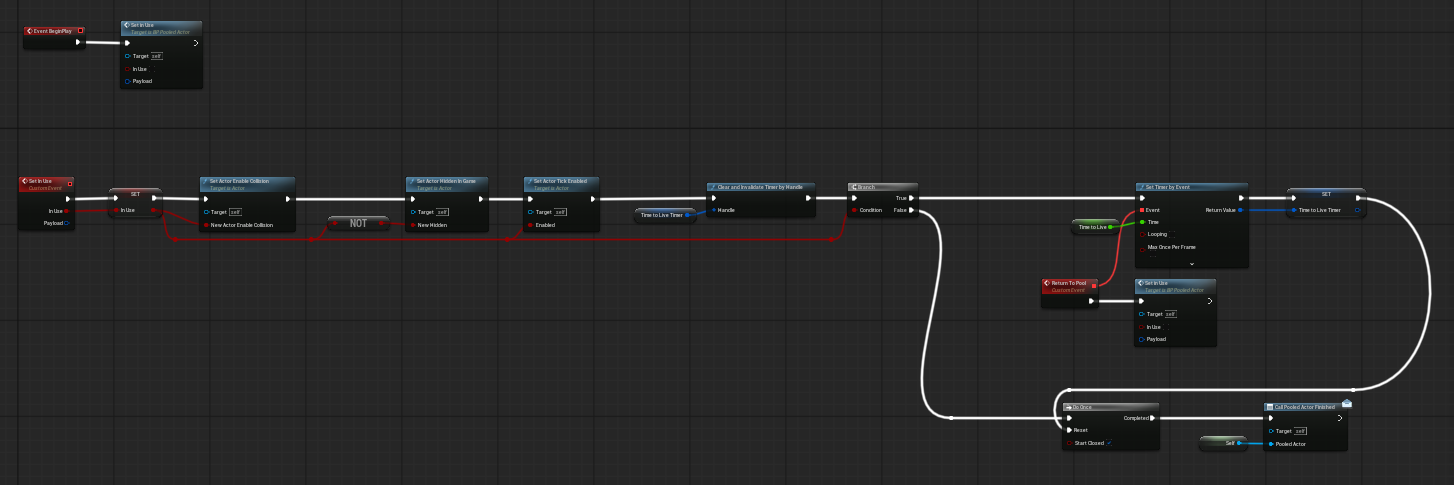
Base pooled actor lifecycle graph.
Important Variables #
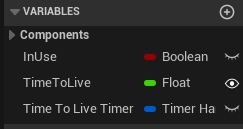
Base pooled actor variables.
|
Field |
Description |
|
InUse |
Tracks whether the actor is currently active in the world. |
|
TimeToLive |
How long the actor should stay active before automatically returning to the pool. |
|
Time To Live Timer |
Timer handle used to schedule automatic return when TimeToLive is greater than zero. |
Set In Use Lifecycle #
BeginPlay on the base actor immediately routes into Set In Use with InUse = false so the actor starts in its inactive state. Set In Use is the core shared lifecycle function used both when the manager activates the actor and when the actor later returns itself to the pool.
- Stores the current InUse state.
- Enables or disables collision to match active/inactive state.
- Hides or unhides the actor in game.
- Enables or disables ticking.
- Clears any previous lifetime timer so stale timers do not fire after reuse.
- Starts a new timer to Return To Pool when the actor is active and TimeToLive is valid.
- On deactivation, raises the completion dispatcher so the pool manager can reclaim the actor.
Event Dispatcher #
The base pooled actor uses a multicast dispatcher to notify the manager that it has finished and can be moved back into the inactive list.
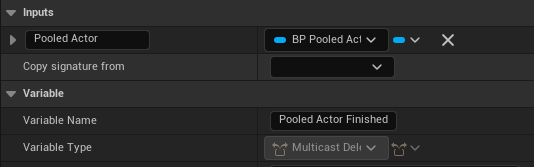
Pooled Actor Finished dispatcher signature.
|
Dispatcher |
Inputs |
Use |
|
Pooled Actor Finished |
Pooled Actor (BP_PooledAct reference) |
Raised when the actor finishes and is ready to be reclaimed by AC_GS_ObjectPool. |
Return To Pool #
Return To Pool is the actor-side exit point. Child pooled actors can call it directly when they know they are finished, or they can rely on the automatic TimeToLive timer. Either way, the actor is funneled back through the same deactivation path so the pool manager always sees a consistent completion event.
Payloads and Custom Initialization #
Spawn From Pool accepts a Payload input of type Instanced Struct. This is an important extensibility point because it lets callers pass structured, per-activation data without hardcoding AC_GS_ObjectPool to a single payload schema.
- The manager stays generic and forwards the payload into Set In Use.
- Child pooled actors can decide whether they need payload data at all.
- Different pooled actor types can interpret different payload structs while still using the same pool manager.
- If a pooled actor does not need custom activation data, the payload can remain empty/default.
This makes the system flexible enough for simple Niagara bursts, floating text actors, or more advanced pooled actors that require setup context each time they are reactivated.
Child Example: Niagara Explosion / Fire Actor #
The provided child example is a simple Niagara-based pooled actor. It shows the intended minimal override pattern for child classes: let the base class manage visibility/collision/timer state, then layer actor-specific presentation logic on top.
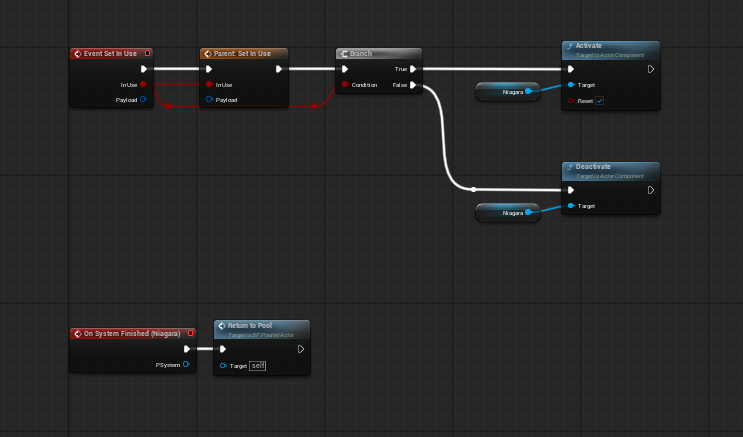
Example child pooled actor overriding Event Set In Use and returning itself when Niagara finishes.
- Override Event Set In Use on the child actor.
- Call Parent: Set In Use first so the base lifecycle still runs.
- Use the active/inactive state to activate or deactivate the Niagara component.
- Bind the Niagara On System Finished event to Return To Pool so the actor gives itself back automatically.
Creating Your Own Pooled Actor #
To add a new pooled actor type, create a child blueprint from the base pooled actor and make that child responsible only for its own presentation and custom setup. The manager should continue to own pool creation, availability, and recycling.
|
Step |
What to do |
Why it matters |
|
1 |
Create a child blueprint from the pooled actor base. |
Gives the child the shared lifecycle and finished dispatcher. |
|
2 |
Add the components the actor needs. |
The child owns presentation while the pool manager stays generic. |
|
3 |
Override Event Set In Use and call Parent first. |
Preserves shared collision, hidden-in-game, ticking, and timer behavior. |
|
4 |
When active, reset visuals and apply any payload. |
Each reuse should feel like a fresh spawn. |
|
5 |
When finished, call Return To Pool or rely on TimeToLive. |
Otherwise the actor never re-enters the inactive array. |
|
6 |
Add an F_ObjectPool_Settings entry or call Initialize New Pool. |
The pool manager must know about the class before it can be requested. |
|
7 |
Call Spawn From Pool with class, transform, and payload. |
This is the public activation entry point other systems should use. |
For more complex child actors, the safest approach is to treat Set In Use as the activation hook and Return To Pool as the shutdown hook. Avoid embedding pool ownership logic into the child itself; let the child only decide how it behaves when active and when it is done.
Example Flows #
Explosions from Pool #
In the explosion demo, the pool already exists on the GameState. Gameplay requests the pooled explosion actor at a transform, the actor is activated, Niagara plays, and On System Finished routes back into Return To Pool. This is the cleanest self-return pattern for visual effects.
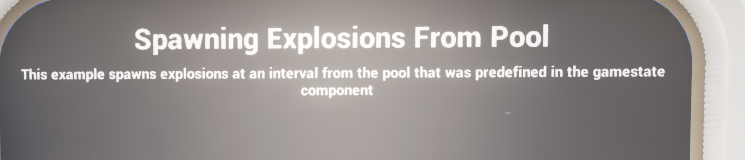
Demo prompt describing explosion spawning from a predefined pool.
Damage Texts from Pool #
The damage-text example demonstrates a setup where the pool is initialized on BeginPlay and then repeatedly consumed during play. This is a strong fit for floating text or combat feedback where the same actor type may be requested constantly.
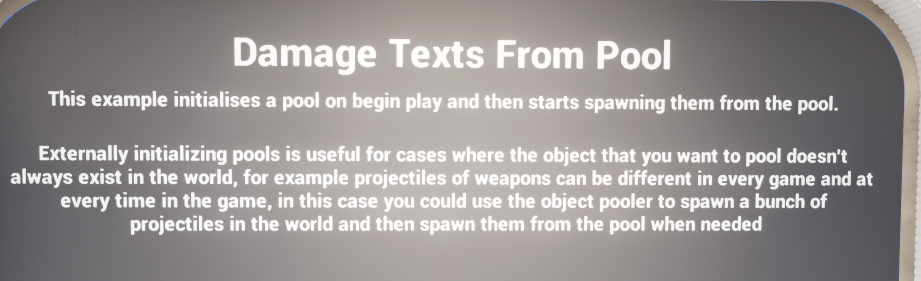
Demo prompt describing damage texts being pre-initialized and reused from the pool.
Overloaded Pool Expansion #
The overloaded demo shows what happens when requests temporarily exceed the initial pool size. Rather than hard failing, the pool can create additional actors when demand is too high. That makes the system more forgiving during combat spikes or stress cases while still preserving reuse behavior afterward.
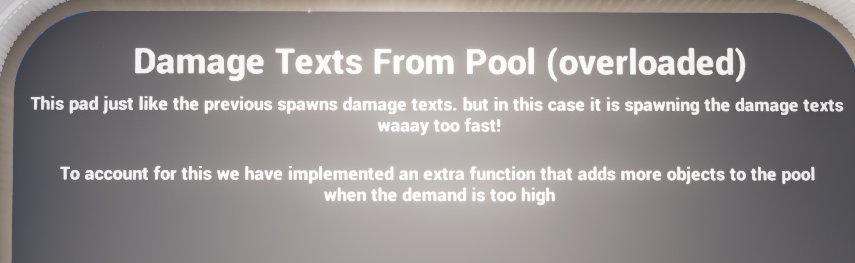
Demo prompt showing runtime expansion when the demand exceeds the pre-warmed pool size.
Summary #
The Object Pool System is a compact but practical Blueprint framework for reusing short-lived actors from a shared GameState component. AC_GS_ObjectPool handles setup, availability, activation, binding, and return-to-inactive management, while the pooled actor base handles local actor state such as visibility, collision, ticking, timers, and completion dispatch.
The combination of F_ObjectPool_Settings, F_PooledActor_Array, the class-keyed pool map, and the shared pooled actor base gives the system a clean separation of responsibilities. Pool creation rules are runtime-aware, actors can self-return, and the system can grow when demand exceeds the initial size.
In practice, the intended workflow is straightforward: add AC_GS_ObjectPool to the GameState, define one or more F_ObjectPool_Settings entries, create children from the base pooled actor for the actor types you want to reuse, and call Spawn From Pool whenever gameplay needs one.