Custom-Skeletal-Meshes #
Custom Skeletal Meshes #
Every project has it's own characters, so there are several ways to incorporate your own skeletal meshes (SKM) into Hyper's systems.
Hyper frameworks use UE5's “Leader Pose” features that enable live animation retargeting.
Changing Your Skeletal Mesh #
If you are using any of the three MST projects (Starter, Plus, or Pro), using your own SKM is simple.
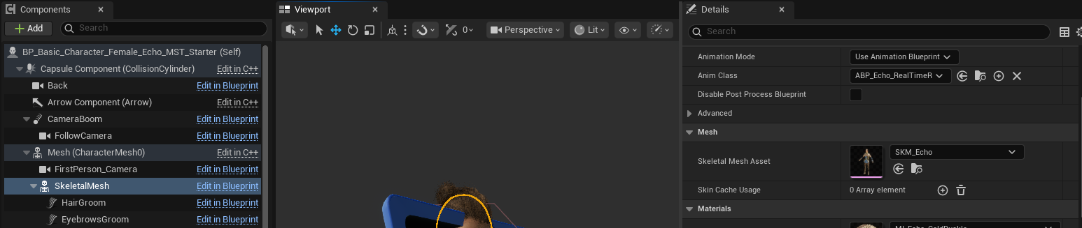
- Select the child SkeletalMesh from your Character Blueprint Components (left).
- Choose a new “Skeletal Mesh Asset” in the details panel (right).
Note that the free Echo character is used as the child mesh by default, and Echo includes custom grooms for eyebrows and hair. Depending on your own SKM needs, you may want to remove or replace those grooms.
How It Works #
This method is implemented by using a custom Animation Blueprint (e.g. ABP_Echo_RealTimeRetarget) that is attached to the child SKM in the Character Blueprint. This Animation Blueprint is very light-weight, making use of the "Copy Pose From Mesh" node to allow the child to copy animations directly from it's parent in the Character Blueprint.
Multi-Mesh Characters #
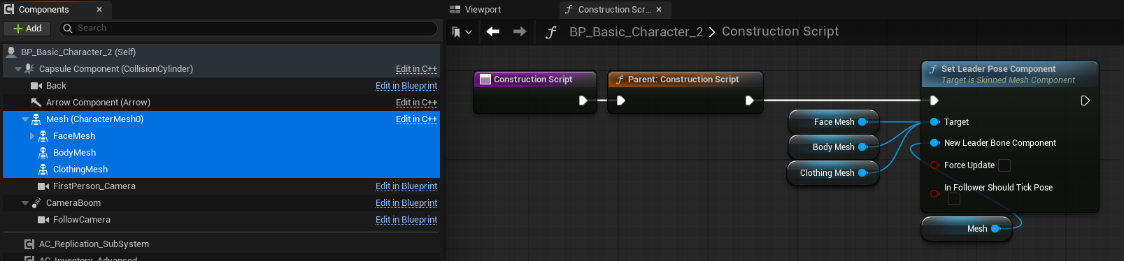
If you have modular or multi-mesh characters, simply make sure that every child SKM is assigned the same ABP and they should work seamlessly together.
Alternate Leader Pose Technique #
If you are working from scratch, you can quickly add Leader Posing via your Character Blueprint's construction script without needing a separate ABP. This is a matter of preference, and you should decide which approach to use based on your own workflows.
To start, simply add a child SkeletalMesh component below the default character mesh, then select it's custom “Skeletal Mesh Asset” in details.
To enable leader posing for child meshes…
- Ensure that your child SkeletalMesh(es) do NOT have an animation blueprint assigned.
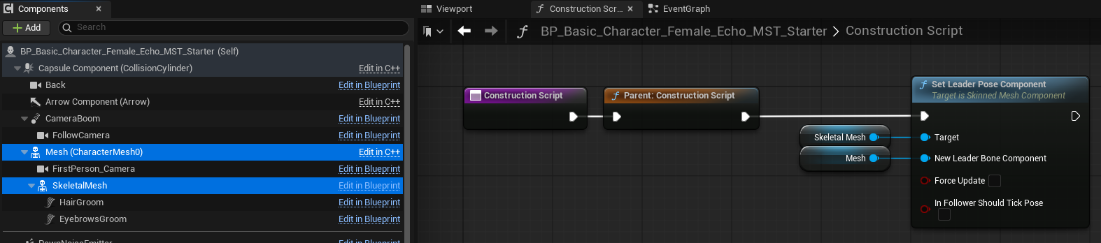
- Open the Construction Script for your Character Blueprint.
- Add a “Set Leader Pose Component” node
- Connect your child skeletal mesh to the “Target” input
- Connect your parent skeletal mesh to the “New Leader Bone Component” input
- Recompile, and you should see your new mesh running the parents animations.
You can also use this technique for multi-mesh characters, as shown below.