
Companion System
Updated May 23, 2026
User Guide and Technical Documentation
For shared setup guidance, see the Migration Guide and Integration Guide. Use the System Atlas to look up functions, variables, events, components, and ownership references. Use this page for Companion System-specific setup, runtime behavior, extension points, and integration notes.
This document explains the Hyper Companion System, how the core assets fit together, and how to extend the system for your own project.
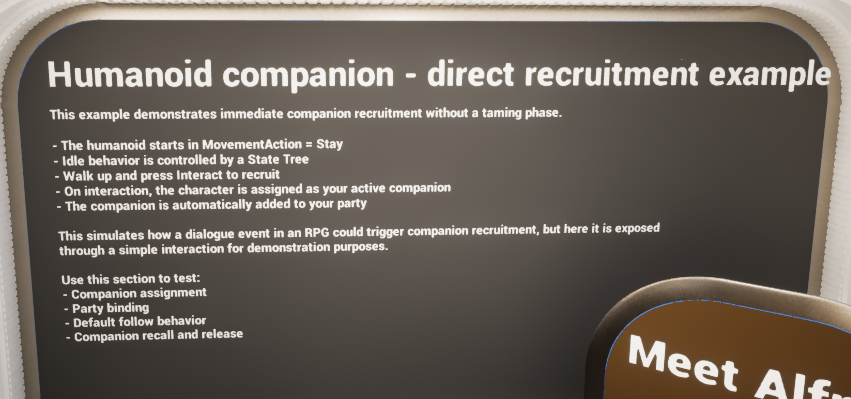
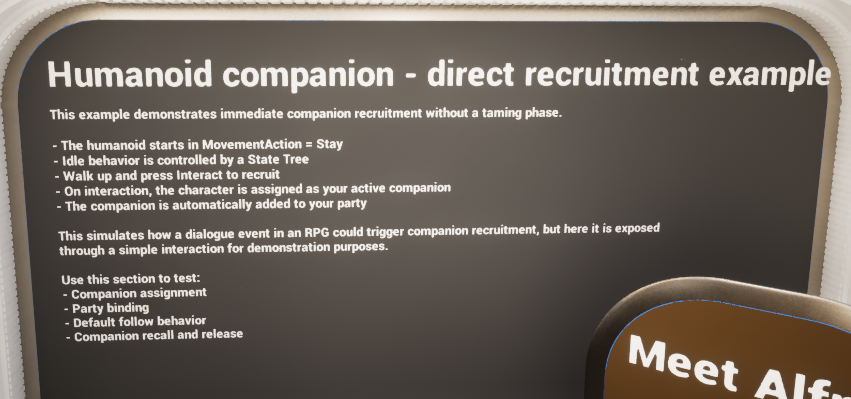
Humanoid direct recruitment example shown in the demo world.
Overview
The Companion System is a modular Blueprint-driven framework for recruiting, taming, controlling, storing, deploying, and recalling companions. It supports both direct recruitment flows and creature taming flows, then unifies both outcomes under one shared companion runtime.
In the supplied demo, the system showcases two main use cases. The first is a humanoid companion that can be recruited immediately through interaction. The second is a creature taming flow where the player feeds required food over time until taming completes. Once either path succeeds, the companion can be managed through the same radial menu, storage, and party systems.
At a high level, the system is split across a runtime companion component on the companion actor, a player-controller companion manager for interaction and radial menu logic, and storage / party components for deployed and inactive companion handling. DataTables drive the action list and per-companion setup, while requirement Blueprints gate actions such as ownership checks, taming checks, or equipment checks.
- Supports direct recruitment for humanoids without a taming phase.
- Supports creature taming with food requirements, progress over time, and optional unconscious-state gating.
- Uses a radial menu to surface valid companion actions in categories.
- Supports active party deployment, retrieval, storage, and slot-based management.
- Allows action requirements to be added as reusable Blueprint checks.
Integrates with save data by storing inactive companions as serialized data where a save system is available.
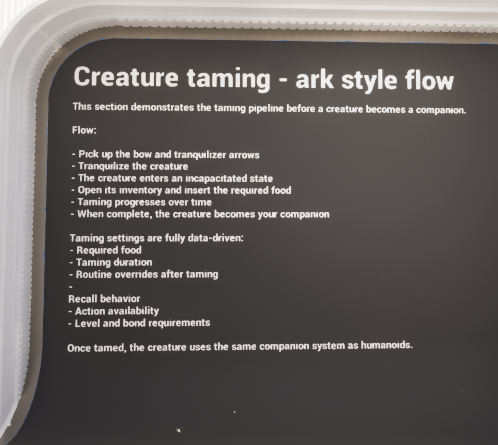
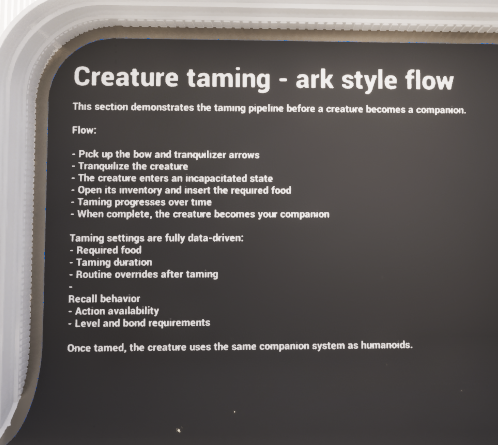
Creature taming example area shown in the demo world.
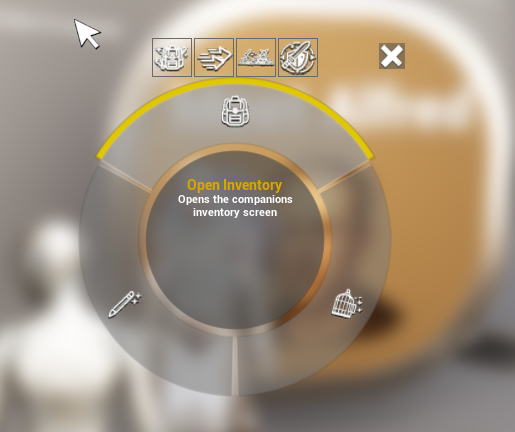
Example of the companion radial menu after recruiting or taming a companion.
Adding the Companion System to the Project
The live implementation is intentionally split between several assets. This keeps runtime companion state, player-owned UI / interaction logic, and slot-based storage responsibilities separated instead of forcing everything into a single Blueprint.
Core asset placement
| Asset | Where it goes | Purpose |
|---|---|---|
| AC_CH_Companion | Place on the companion actor / pawn / character. | Owns live companion state such as taming, owner binding, unlocked actions, food / hydration handling, recall logic, and runtime interaction checks. |
| AC_PC_Companion_Manager | Place on the Player Controller. | Builds the radial menu, validates actions, opens name-change UI, displays failure prompts, and routes selected actions back into the live companion. |
| AC_PC_Companion_Storage | Place on the Player Controller or storage owner used for inactive companion data. | Provides generic storage helpers such as move, transfer, add, remove, swap, find-empty-slot, replication-change execution, and slot updates. |
| AC_PC_Companion_Storage_Party | Place on the Player Controller. | Manages active deployed companions, stored-to-active deployment, active-to-stored retrieval, the party overlay widget, selection logic, and party input handling. |
| BP_Companion_Base | Use as the base interactable companion actor. | Provides the shared interaction entry point, override widget, and server-authoritative interaction behavior. |
| BP_Companion_Humanoid | Use for humanoid recruit examples or as a starting point for humanoid companions. | Adds the direct-recruit ownership flow and gender-based animation layer setup used in the demo. |
| BP_Action_Requirement_* | Create under the ActionRequirements folder. | Reusable requirement checks attached to actions so the radial menu can hide or fail actions cleanly. |
Why is it split this way?
The companion actor should own its own taming, owner, and action availability state.
The player controller is the correct place for player-local UI such as the radial menu, prompts, overlay visibility, and input mapping.
Slot-based storage and active-party deployment have very different concerns from on-actor taming logic, so they are separated into their own components.
Requirement Blueprints stay reusable because the action system only asks for a true / false result plus optional fail text.
| User guide note |
|---|
| The demo map intentionally hides the party overlay until the player walks into the final section. The board in the map explains that this was done to avoid confusion while testing despawn / spawn behavior without persistence. To keep the party list visible all the time, remove the controller-side logic that hides it on begin play. |
Details Panel / Important Variables
Because the companion system is split across several assets, the most important exposed variables are spread across runtime, manager, and storage components. The table below focuses on the fields most likely to matter during setup or debugging.
| Asset | Field | Description |
|---|---|---|
| AC_CH_Companion | Companion Data / Companion Row / Companion ID | The cached DataTable row and unique identity used for runtime behavior, persistence, and storage lookups. |
| AC_CH_Companion | Owning Player | The player name / identifier that marks who owns the companion. This is what the system uses to decide whether a companion is already tamed. |
| AC_CH_Companion | Current Controller Interacting | Tracks whether someone is currently interacting with the companion so overlapping interact attempts can be blocked. |
| AC_CH_Companion | Current Tame Progress / Is Being Tamed | Runtime taming state used while food is being consumed and progress is moving up or decaying. |
| AC_CH_Companion | Needs These Resources / Food Items to Consume / Hydration Items to Consume | Used by the automatic consume logic when attributes fall beneath the configured threshold. |
| AC_CH_Companion | Level Manager / Inventory Component / NPC Component / Attribute Manager / Perception Component | Cached external component references used for action unlocks, taming food, state effects, AI routine changes, and combat alertness. |
| AC_PC_Companion_Manager | Current Companion In Radius | The companion currently being interacted with or prepared for radial menu actions. |
| AC_PC_Companion_Manager | Companion Action Category Mapping | Maps action category gameplay tags into display names and icons for the radial menu. |
| AC_PC_Companion_Manager | Information Prompt | Used to display failure text or success notifications such as taming complete. |
| AC_PC_Companion_Storage | Stored Companions | Inactive slot-based companion data, including saved actor data, saved component data, and UI attribute info. |
| AC_PC_Companion_Storage | Previous Stored Companions | Used during replication comparisons to detect which slots changed. |
| AC_PC_Companion_Storage_Party | Active Companions | Tracks currently deployed companions and associates them to their stored slot index. |
| AC_PC_Companion_Storage_Party | Party Overlay Widget / Party Interaction Enabled | Controls whether the on-screen party UI is visible and currently accepting input. |
| AC_PC_Companion_Storage_Party | Current Selected Index / Previous Selected Index | Used to move selection through party slots and update the slot highlight. |
Structures Explained
The companion system relies on a group of reusable structs for companion definitions, action definitions, taming settings, UI data, and inactive save-friendly companion records. Together, these define what a companion can do, how it is tamed, how it is stored, and how it is presented to the player.
F_Companion
This is the main per-row companion definition struct used by DT_Companions. It gathers the core data needed to describe how a companion behaves before and after ownership.
| Field | Description |
|---|---|
| Taming Settings | F_Companion_Taming payload that defines whether the companion can be tamed, how progress is gained, and what food is accepted. |
| Recall Settings | F_Companion_Recall_Settings payload that defines how recall behaves, especially range and cooldown. |
| Override Routine When Tamed | A DataTable row handle used to switch the companion to a different NPC routine once it belongs to the player. |
| Actions | F_Companion_Action_Settings payload that defines which action tags unlock at which level or skill stage, plus any per-action extra requirement overrides. |
| Bond Activities | Array of F_Companion_Bond_Activities entries used to describe activity-based bond progression hooks. |
F_Companion_Action
This struct defines a single radial-menu action entry. DT_Companion_Actions uses it to describe how the action should appear and what requirements gate it.
| Field | Description |
|---|---|
| Action Tag | Gameplay Tag used as the canonical identifier for the action. |
| Category | Gameplay Tag used to group the action into a radial menu category. |
| Show In UI | Boolean that controls whether the action should appear in the radial menu when valid. |
| Action Name | Display name used on the radial segment. |
| Action Description | Help text shown for the action inside the radial menu. |
| Action Icon | Texture used by the radial menu. |
| Requirements | Array of F_Requirement_Options entries that must pass before the action is available. |
F_Inactive_Companion
This struct stores a companion after it has been retrieved from the world. It is the storage-friendly representation used by party / storage systems.
| Field | Description |
|---|---|
| Companion ID | Unique Guid used to match an inactive slot entry back to a live actor. |
| Companion Class | Class used when the system needs to spawn the companion again. |
| Saved Actor Data | Serialized actor save data used when a save system is connected. |
| Saved Component Data | Serialized component-level save data used for restoration. |
| UI Attributes | F_Companion_Attribute_Info payload used to draw the party or storage UI without needing the live actor. |
F_Companion_Action_Settings
This struct wraps action availability rules for a companion row.
| Field | Description |
|---|---|
| Unlocked Actions | Array of F_Companion_Action_Unlock entries that state which action tags become available at which level or skill tag. |
| Extra Action Requirements | Map of Action Tag -> F_Action_Requirement_Array, used to add or override action-specific requirements for this companion. |
F_Companion_Action_Unlock
This struct defines one unlock rule for one or more action tags.
| Field | Description |
|---|---|
| Skill Tag | Gameplay Tag representing the progression bucket being checked, such as character level. |
| Level | The minimum level / stage value required. |
| Unlocked Actions | The action tag or action tags granted when the requirement is met. |
F_Companion_Bond_Activities
This struct allows bond-related activity data to be authored per companion.
| Field | Description |
|---|---|
| Activity Type | Gameplay Tag naming the activity. |
| Increase Per Activity | Map of sub-tag -> float values describing how much bond is awarded for one completed activity. |
| Cooldown | How frequently the activity can meaningfully award bond. |
| Increase Per Second | Map of sub-tag -> float values for activities that should accumulate over time instead of per completion. |
F_Companion_Recall_Settings
This struct defines basic recall behavior for a companion.
| Field | Description |
|---|---|
| Range | Maximum distance for recall checks. |
| Cooldown | Minimum time before recall can be used again. |
F_Companion_Taming
This struct defines the taming behavior for a companion row.
| Field | Description |
|---|---|
| Can Be Tamed | Whether the companion supports the taming flow at all. |
| Needs To Be Unconscious To Tame | Whether the taming flow should only begin once the required unconscious state is present. |
| Time To Be Tamed | How long one tame interval takes. |
| Required Tame Progress | How much total progress must be earned before the companion becomes owned. |
| Tame Progress Decay Per Second | How quickly progress decays while taming is not being actively advanced. |
| Food Taming | Array of accepted food entries, including row handle and value data used to evaluate the item. |
| Amount Attempt Taming Increase | How much progress one valid taming attempt adds. |
F_Requirement_Options
This struct wraps a single action requirement check.
| Field | Description |
|---|---|
| Hide In UI If Not Met | If true, the action can be omitted from the radial menu instead of shown and failing. |
| Invert | Reverses the result of the requirement. |
| Requirement | A Blueprint requirement class / asset that actually performs the runtime check. |
F_Companion_Attribute_Info
This struct stores lightweight display data for UI.
| Field | Description |
|---|---|
| Actor Name | Name shown for the companion in UI. |
| Portrait Image | Portrait texture used by the slot UI. |
| Current Health | Current health value used by party / storage displays. |
| Max Health | Maximum health value used by party / storage displays. |
| Character Level | Level shown in UI. |
F_Action_Requirement_Array
This is a small wrapper struct used when a map needs to store multiple requirement entries against a single action tag.
| Field | Description |
|---|---|
| Requirements | Array of F_Requirement_Options entries. |
F_Category_Info
This struct describes a radial-menu category display entry.
| Field | Description |
|---|---|
| Category Name | Display name shown for the category. |
| Category Icon | Texture shown for the category. |
Data Tables Explained
The companion system is data-table driven. Designers define the action catalogue in one table and per-companion behavior in another. This keeps setup flexible and makes the same runtime logic usable for humanoids, creatures, and future companion types.
DT_Companion_Actions
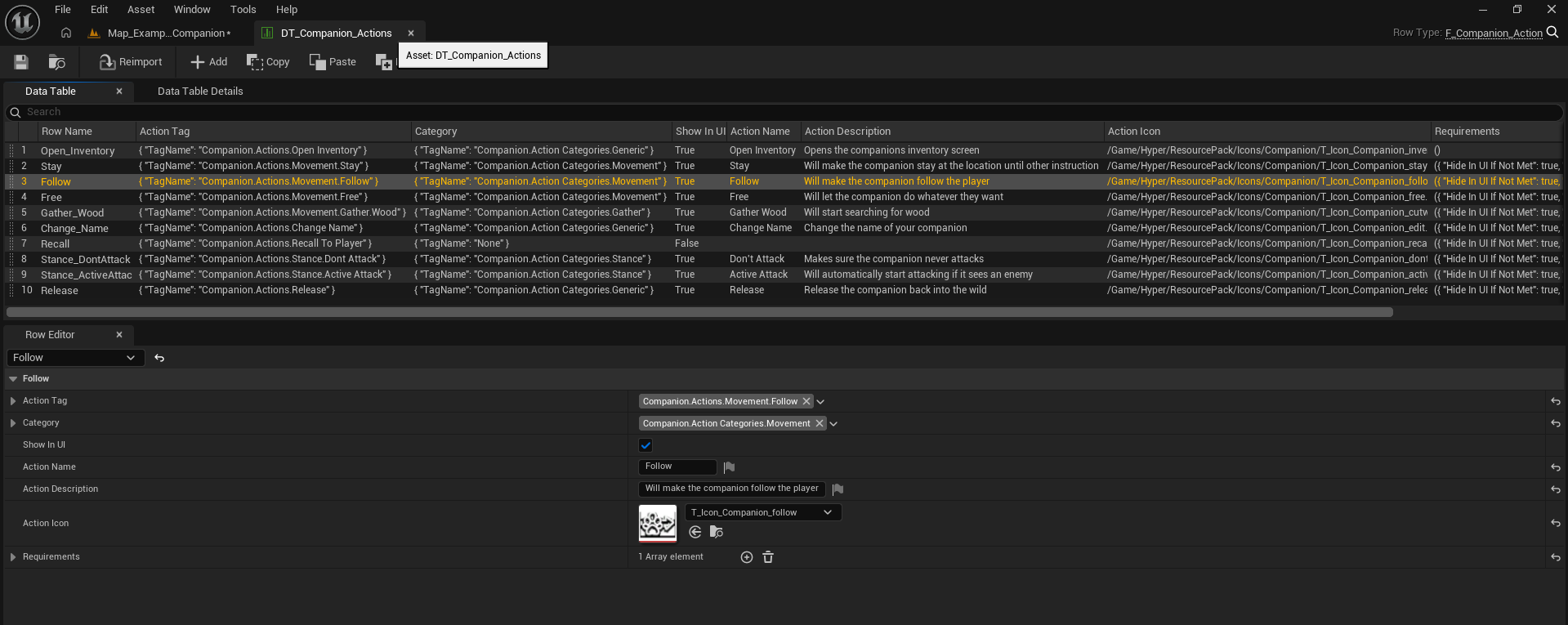
DT_Companion_Actions stores one row per companion action. Each row uses F_Companion_Action and decides what the radial menu shows, which category the action belongs to, and which requirement assets must pass.
Open Inventory – opens the companion inventory screen.
Stay – keeps the companion in place until another instruction is given.
Follow – makes the companion follow the player.
Free – removes the stay/follow binding and lets the companion do what it wants.
Gather Wood – example task action used in the demo and gated by a hatchet requirement.
Change Name – opens the rename flow.
Recall To Player – used by recall logic and not normally shown in UI in the sample setup.
Don’t Attack – disables proactive attacks.
Active Attack – allows the companion to attack when it sees an enemy.
Release – removes the companion from player ownership and returns it to a wild / non-owned state.
The category tags shown in the demo are organized into groups such as Generic, Movement, Gather, and Stance / Combat. The radial menu manager reads the category tag, matches it to a display mapping, and then builds radial segments only for actions that are currently valid.
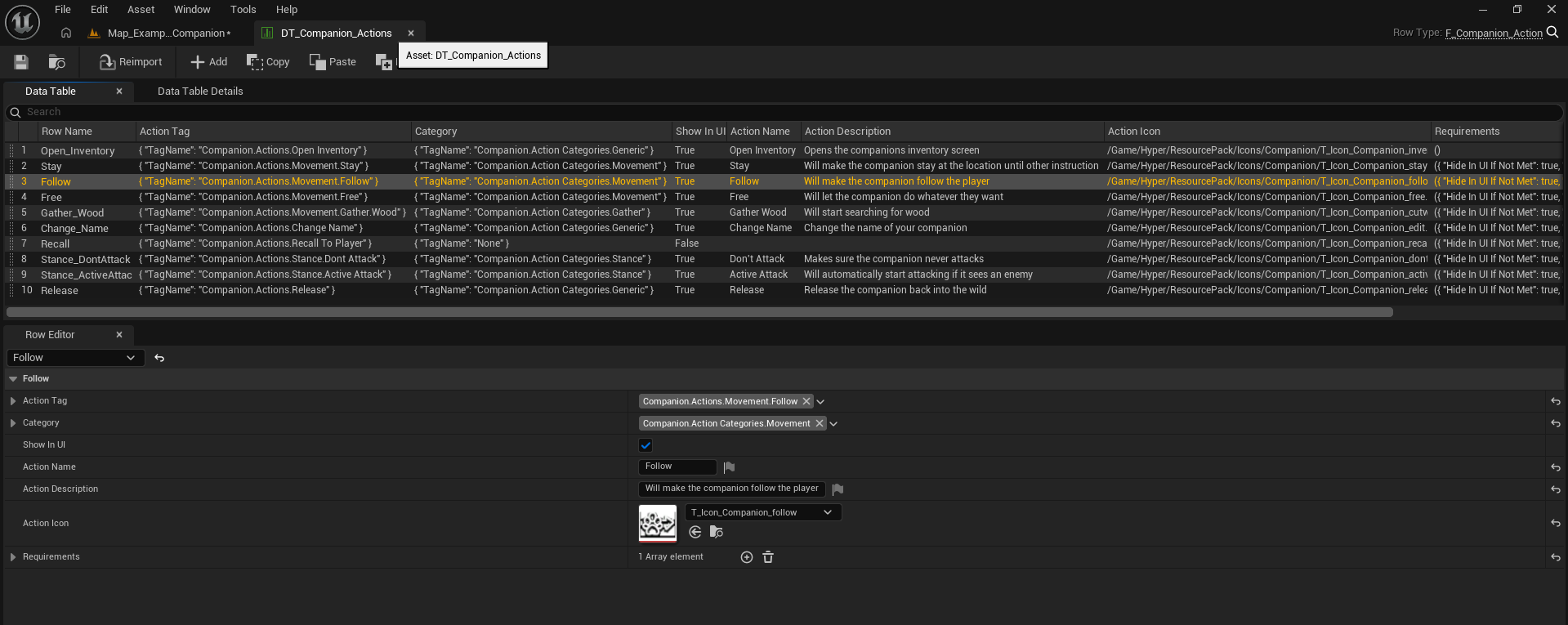
Sample rows from DT_Companion_Actions.
DT_Companions
DT_Companions stores one row per companion archetype using F_Companion. The sample data demonstrates at least two setup styles: a Deer row for taming, and a Humanoid row for direct recruitment.
Deer demonstrates a creature profile with taming enabled, recall settings, a tame routine override, and an action unlock list.
Humanoid demonstrates a recruitable companion profile that still uses the same action / storage / party systems once it becomes owned.
Both rows can define actions, routine override behavior, taming settings, and later bond or progression data using the same schema.
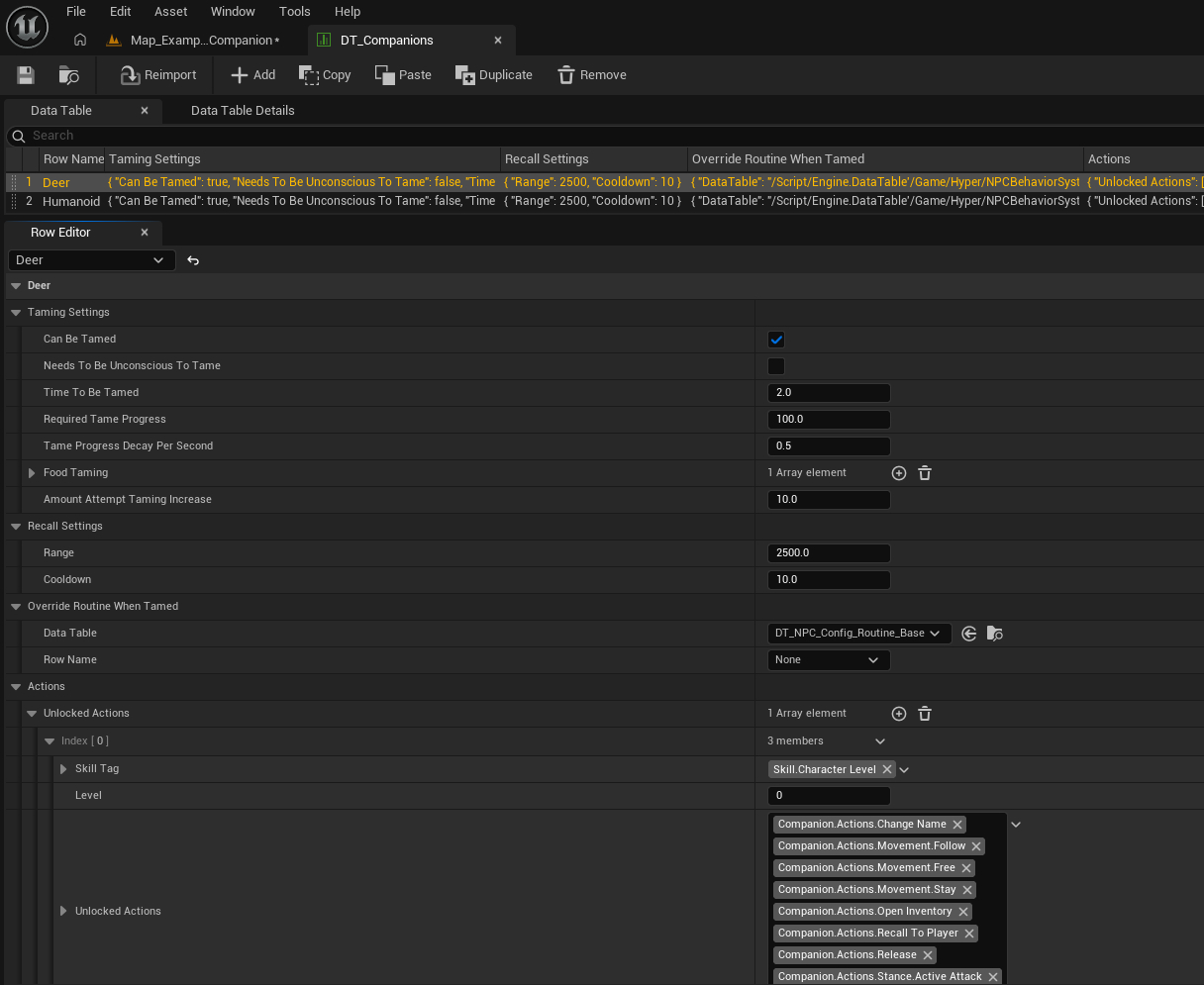
Sample rows from DT_Companions.
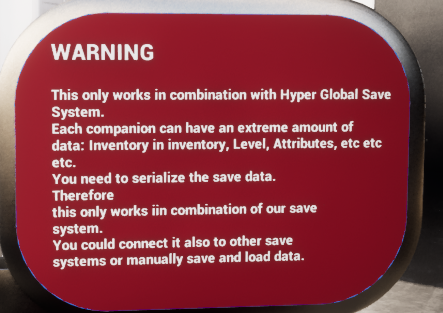
| Save system warning from the demo |
|---|
| The demo world includes a warning board explaining that full companion persistence is intended to work together with Hyper Global Save System. Each companion can carry large amounts of actor, component, inventory, level, and attribute data. The companion system can be wired into another save framework, but that requires replacing or replicating the actor/component serialization path used by the inactive companion data flow. |
Functions to Use
The most important public entry points are the ones used to validate actions, tame companions, manage slot storage, and open / resolve the radial menu.
Core companion runtime functions
| Function | Use |
|---|---|
| Is Tamed | Returns whether the companion currently has a valid owning player. |
| Does Player Meet Requirements For Action | Collects action requirements, companion-specific overrides, and requirement assets, then returns whether the action is valid. |
| Can Player Perform Any Action | Useful when deciding whether interaction should open the radial menu at all. |
| Unlock Action | Adds an action tag to the live available-actions set and broadcasts the unlock event. |
| Set Owner To | Assigns the owning player and triggers tame-success / ownership setup. |
| Override Routine To Tamed | Switches the NPC routine configuration to the configured tamed routine row. |
Taming / consumption functions
| Function | Use |
|---|---|
| Can Item Be Used For Food Taming | Checks whether an inventory item matches one of the accepted taming-food entries. |
| Try Remove Food Item From Inventory | Consumes a valid food item from inventory when taming requires it. |
| Reset Taming | Clears taming timers and resets taming state when taming ends or is interrupted. |
| Try Consume Water / Food | Consumes food / hydration items when the companion falls below configured thresholds. |
| Assign On State Effect Change | Reacts to state effects such as unconscious to begin or reset taming when needed. |
| On Die Retrieve | Retrieves a tamed companion back to the owner’s party when it dies. |
Storage / party functions
| Function | Use |
|---|---|
| Try Add Companion Automatically | Adds a companion to the first empty slot that can accept it. |
| Try Move Companion | Moves a stored companion from one slot to another, swapping if needed. |
| Try Transfer Companion | Moves a companion between two storage owners by finding an empty destination slot. |
| Swap Companions | Swaps two occupied slots. |
| Set Companion At Slot Index | Writes a companion into a storage slot and broadcasts the slot update event. |
| Set Slot To Empty | Clears a slot and broadcasts the slot update event. |
| Deploy Companion At Index | Spawns a stored companion into the active world / party. |
| Retrieve Companion At Index | Converts an active companion back into inactive stored data and despawns the actor. |
Interaction / UI functions
| Function | Use |
|---|---|
| Generate Radial Menu Categories For Companion | Builds the menu category list and segment list for currently valid actions. |
| Make Segment Details | Converts an F_Companion_Action into the radial-menu display struct. |
| Create Action Fail Prompt | Displays user-facing failure text when an action cannot be performed. |
| Change Name | Opens the rename prompt flow and routes the final decision back to the server. |
| Set Party Interaction Enabled | Shows or hides the party overlay interaction state. |
| Update Highlight Based On Selection | Refreshes the selected party slot highlight when input changes. |
Event Dispatchers
The shown implementation uses a set of dispatchers / event-style hooks so UI, storage, and runtime logic can react to companion state changes without hard-wiring all systems together.
| Dispatcher / Event | Inputs | Use |
|---|---|---|
| On Action Unlocked | Action Tag | Broadcast when a live companion gains a new action. |
| On Taming Ended | None | Used when taming is reset or finished and timers are cleared. |
| On Companion Tamed | Tamed Companion | Raised when taming or ownership assignment completes. |
| On Companion Slot Updated | Companion, Index | Raised whenever a storage slot changes. |
| On Companion Retrieved | Retrieved Companion | Raised when a live companion is converted back into stored data. |
| On Companion Deployed | Companion | Raised when stored data is deployed back into a live actor. |
| On Companion Released | Companion | Used during release / removal flow to strip ownership and storage bindings. |
Companion Actions, Taming, and Party Storage
The main strength of the system is that direct recruitment, taming, action control, and party management all converge into the same runtime model. Once a companion becomes owned, it can be surfaced through the same radial menu and the same party deployment / retrieval systems.
Radial menu action groups
Utility / Generic actions such as Open Inventory, Change Name, and Release.
Movement actions such as Stay, Follow, and Free.
Combat / stance actions such as Don’t Attack and Active Attack.
Task-style actions such as Gather Wood, which can launch State Tree-driven behavior.
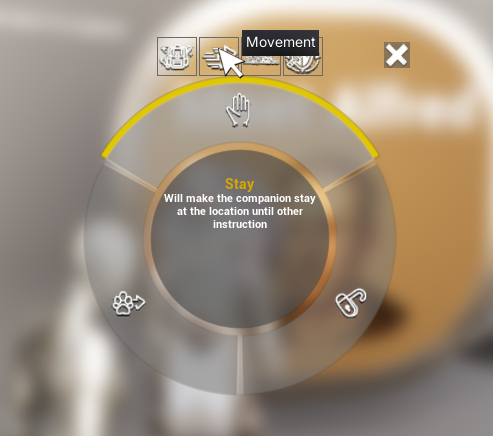
Movement category example from the radial menu.
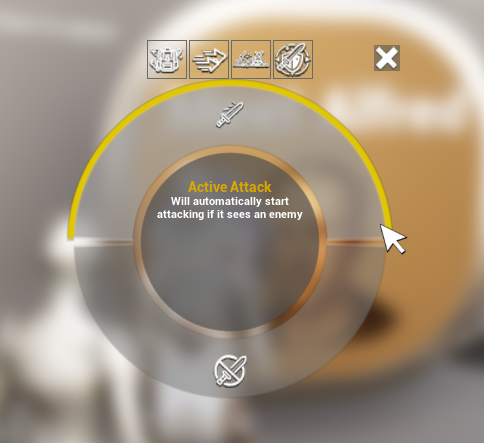
Combat stance example from the radial menu.
Party storage
The party system stores inactive companions in slot arrays and tracks deployed companions separately. Each active companion retains its link to the stored slot index it came from, which allows the player to deploy, retrieve, move, or swap companions cleanly.
Stored companions are represented by F_Inactive_Companion entries.
Active companions are tracked separately so the party UI can point to deployed actors.
Deploying turns stored data into a live actor.
Retrieving turns a live actor back into stored data and removes the active actor from the world.
Humanoids, Creatures, and Requirements
The demo intentionally shows that the system is not limited to one ownership flow. Humanoids can be recruited instantly, while creatures can use a more survival-focused taming loop. Both outcomes still use the same companion runtime after ownership is established.
Humanoid recruitment
The humanoid example starts in a Stay movement state.
Idle behavior is controlled by a State Tree.
Walking up and interacting recruits the humanoid immediately.
After recruitment, the character is assigned as the active companion and automatically added to the player’s party.
Creature taming
The creature taming example follows an ARK-style flow.
The player incapacitates the creature, opens the creature inventory, and adds the required food.
Tame progress advances over time according to the row settings in DT_Companions.
When progress reaches the required value, the creature becomes a companion and enters the same post-tame flow as any other companion.
Requirement Blueprints
Action requirements are authored as dedicated Blueprint checks. The sample requirement assets visible in the provided material include ownership checks, tamed-state checks, unconscious-state checks, and equipment checks such as requiring a hatchet before the Gather Wood action is shown or allowed.
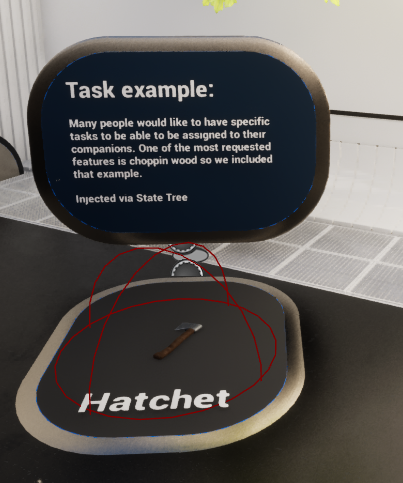
The task example in the demo shows Gather Wood, which is gated by a hatchet requirement.
Taming Progression, Food, and Recall
Taming is controlled by the F_Companion_Taming settings inside the companion row. The runtime component checks state effects, inventory contents, and timers to decide when to begin taming, when to consume food, and when to reset progress.
A companion can be marked tameable or non-tameable per row.
Taming can optionally require the companion to be unconscious first.
Accepted food items are checked against the configured food entries.
Progress can increase per attempt and decay over time when conditions are not maintained.
When taming succeeds, the runtime uses Set Owner To and then runs the tame success flow.
Recall behavior is configured separately. The recall settings define the range and cooldown for recalling a companion back to the player. In the sample action table, Recall To Player exists as an action tag even though it is hidden from normal radial UI in the shown setup.
| User guide note |
|---|
| The taming boards in the demo are intentionally instructional. They are useful reference text for what the system expects at runtime: enter the correct state, add the correct food, and let time-based progress complete. |
Predefined Actions and Custom Requirements
The system separates action definitions from requirement logic.
Predefined actions
Predefined actions live in DT_Companion_Actions. These rows give the radial menu its visible name, icon, category, description, and the base requirement list.
Custom requirements
Custom requirements are the Blueprint assets referenced by F_Requirement_Options. This allows very project-specific checks without rewriting the action manager itself.
Ownership rules can be enforced with a requirement such as BP_Action_Requirement_InteractingIsOwner.
Tamed-only rules can be enforced with BP_Action_Requirement_Tamed.
Task equipment gates can be enforced with BP_Action_Requirement_HasHatchet.
Invert and Hide In UI If Not Met give designers control over whether invalid actions fail visibly or disappear entirely.
Registering, Deploying, and Retrieving Companions
Companion ownership is only one part of the loop. The system also needs to add companions into party data, turn live actors into inactive data, and turn inactive data back into live actors.
Direct recruitment or tame success usually routes into companion manager / party logic to add the companion automatically.
Deploying uses the selected stored slot index. If a companion is already active in that slot, the party component retrieves it instead of deploying again.
Retrieving saves or generates an F_Inactive_Companion struct, stores it back into the relevant slot, then removes the live actor from the world.
Party selection is driven by the current selected index and can be changed through enhanced input on both client and server for responsiveness.
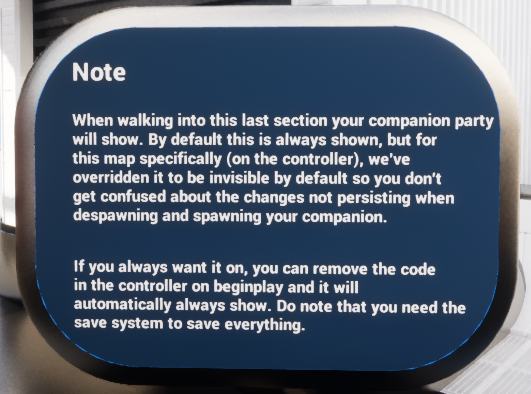
The demo notes that the party UI can be hidden or shown depending on how you want to present the system during testing.
Hooking Companions Into Other Systems
The companion system is designed to connect into other Hyper systems rather than duplicate their responsibilities.
Inventory System – used to check taming food, remove food, and open the companion inventory action.
Attribute / State Effect System – used for unconscious checks, food / hydration monitoring, and death-driven retrieval behavior.
NPC Behavior / State Tree – used for idle behavior, task execution such as Gather Wood, and switching to a tamed routine configuration.
Perception / Alertness – damage events can increase alertness so the companion enters a combat-ready state.
Information Prompt Manager – used for fail prompts and success notifications such as taming completed.
Save System – used to serialize actor and component data when inactive companion storage is meant to persist across sessions.
In practical terms, this means you usually should not rewrite the companion system to own inventory, attributes, AI, or saving. Instead, connect the expected components and let the companion logic orchestrate them.
How To: Add Your Own Humanoid Companion
Use the Humanoid row and BP_Companion_Humanoid pattern as the starting point whenever you want a recruitable NPC companion without a full taming phase.
Create or duplicate a humanoid companion actor that uses BP_Companion_Humanoid behavior.
Make sure AC_CH_Companion is present on the actor and that its companion row points to the correct DT_Companions row.
Populate the row with the actions you want available at level 0 or later levels.
Set the desired tamed routine override so the NPC swaps to the player-owned routine when recruited.
For an NPC that becomes owned directly on interact, keep the ownership-on-interact flow used by the humanoid example.
Test the actor by interacting once, then confirm the radial menu, party add, and deploy / retrieve flow all work.
How To: Add Your Own Creature Companion
Use the creature taming pattern when you want the player to earn ownership through incapacitation, feeding, and time-based progress.
Create a DT_Companions row for the creature.
Enable Can Be Tamed and decide whether unconscious is required.
Set Time To Be Tamed, Required Tame Progress, Tame Progress Decay Per Second, and Amount Attempt Taming Increase.
Fill the Food Taming entries so the system knows which items count as valid taming food.
Ensure the creature has the required inventory / attribute / state-effect setup so food and unconscious logic can run.
Optionally set an Override Routine When Tamed row so the creature swaps into your preferred tamed AI routine.
Test by feeding the configured item and watching progress complete, then verify the companion enters the same post-owning flow as any other companion.
How To: Add Your Own Action
New actions are usually added in DT_Companion_Actions first, then unlocked through the companion row, then optionally handled in companion manager logic if the tag needs a brand-new execution branch.
Add a new row to DT_Companion_Actions.
Set the Action Tag, Category, Show In UI flag, Action Name, Action Description, and Action Icon.
Add any requirement assets needed for that action.
Add the action tag to the correct unlock entry in the companion’s Actions settings in DT_Companions.
If the action is one of the existing generic movement / stance patterns, follow the same gameplay-tag naming conventions so existing logic can match it.
If the action needs custom execution, add the handling branch inside AC_PC_Companion_Manager where the radial menu action tag is resolved.
Test that the action appears in the correct category, can be selected, and produces the intended result or failure prompt.
How To: Add Your Own Action Requirement
Requirement Blueprints are the cleanest way to gate actions without hardcoding every rule in the companion manager.
Create a new Blueprint in the ActionRequirements folder, based on the same requirement base used by the sample requirements.
Implement the Meets Requirements function.
Use the Companion and Player Companion inputs to evaluate the condition you care about.
Return true or false, and provide fail prompt text when a visible user-facing failure message is needed.
Attach the requirement through F_Requirement_Options in DT_Companion_Actions or through Extra Action Requirements on the companion row.
Choose whether the action should be hidden entirely when invalid by enabling Hide In UI If Not Met.
Use Invert when the logic should be reversed.
How To: Set Up Party Storage / Deploy / Retrieve
Party storage is what turns a companion system into a usable player-facing feature instead of just an ownership flag.
Place the party storage component on the Player Controller.
Ensure the overlay widget is created on the local client and that input mapping is linked.
Resize or configure the stored companion array to the number of slots you want.
Use Try Add Companion Automatically when a new companion becomes owned and should enter the first free slot.
Use Deploy Companion At Index to spawn a stored companion into the world and Active Companions tracking array.
Use Retrieve Companion At Index to convert a live companion back into inactive data and remove it from the active list.
Use Update Highlight Based On Selection and Set Party Interaction Enabled to make the user-facing slot flow readable.
How To: Enable Save Support
Full persistence is the one part of the system that depends most heavily on your wider project setup.
Preferred path: connect Hyper Global Save System and keep the inactive companion generation / deploy flow as authored.
When retrieving a companion, store both actor save data and component save data into F_Inactive_Companion.
When deploying, spawn the saved actor and restore its serialized data.
If you do not use Hyper Global Save System, replace those save-manager calls with your own persistence framework.
The fallback class-spawn path shown in the sample should be treated as an example path, not as a full persistence solution.
Always test deploy, retrieve, quit / reload, and deploy again before considering persistence complete.
Example Flows
Direct-recruit humanoid
The player approaches the humanoid example companion.
Interaction assigns ownership immediately.
The companion is added to the active party automatically.
The player interacts again to open the radial menu and use actions such as Stay, Follow, Change Name, Open Inventory, or Release.
Creature taming with food
The player incapacitates the creature if required by the row setup.
The player places one of the accepted food items into the companion inventory.
The runtime checks the item against the food taming list and adds tame progress.
When enough progress is reached, tame success sets ownership and forwards the companion into the normal party flow.
Gather Wood task example
The player opens the radial menu and selects Gather Wood.
The action requirement checks whether the companion has a hatchet.
If the hatchet requirement fails, the radial menu can hide the action or display the configured fail prompt text.
If valid, the action routes into State Tree-driven task execution.
Deploy / retrieve loop
The player highlights a party slot.
If the selected slot currently represents a deployed companion, the input retrieves it.
If the selected slot is inactive, the input deploys it into the world.
The party storage component keeps the active companion list and stored slot list synchronized.
Summary
The Hyper Companion System is designed to cover the full loop of ownership, control, storage, and reuse. Humanoids can be recruited immediately, creatures can be tamed through food-based progression, and both end up under the same radial-menu and party-management framework.
For designers, most setup work happens in DT_Companion_Actions, DT_Companions, and requirement Blueprints. For implementers, the main extension points are AC_CH_Companion for runtime behavior, AC_PC_Companion_Manager for interaction UI and action routing, and the storage / party components for slot behavior and persistence.
Used as intended, the system gives you a reusable companion foundation that can scale from a small direct-follow NPC setup to a fuller survival-style tame, deploy, recall, and save pipeline.