
Core Principles of Respawn Actor Manager #
Overview #
The Respawn Actor Manager is a system that handles the automatic respawning of actors in the world after they've been destroyed, collected, or damaged. This is commonly used for resource nodes, harvestable objects, and pickup items.
The system is useful for:
- Resource gathering (trees, rocks, plants)
- Harvestable crops or foliage
- Collectible items that should reappear
- Any actor that should regenerate after being used
Key Features:
- Automatic respawning based on inactivity or destruction
- Support for both actor respawning and static mesh respawning
- Instanced static mesh integration for performance
- Customizable respawn timers
- Respawn radius for randomized positions
- Component-based system that can be added to any actor
- Separation between respawn logic and placeholder management
The system uses a component hierarchy where different levels of functionality are implemented in parent and child components. This allows for flexible customization and easy extension for specific use cases.
Component Hierarchy #
The respawn system is built using three component classes that inherit from each other, each adding specific functionality.
AC_RespawnActor_Abstract #
The abstract component is the base of the respawn system and provides the fundamental respawn functionality.
Purpose
This component defines the core respawn interface and basic settings that all respawn components need.
Key Variables:
- Does Respawn: Whether this actor should respawn at all
- Respawn as Static Mesh: Whether to respawn as a static mesh instead of a full actor
- Respawn with Overlap Activation: Whether the respawned actor can be interacted with immediately
- Start Inactivity Timer on Begin Play: Whether to start the inactivity timer when the actor spawns
Events:
- Start Inactivity Timer: Begins counting down to respawn
- This event is exposed so child components and external systems can trigger respawn countdown
The abstract component doesn't implement the full respawn logic itself – it provides the interface that child components use.
Design Purpose
By separating the abstract base from the implementation, you can:
- Define common variables used by all respawn types
- Create a consistent interface for triggering respawns
- Extend the system with custom respawn types
- Override specific functionality in child components
AC_RespawnActor_Base #
The base component implements the core respawn logic and placeholder management.
Purpose
This component handles the actual respawn process, including destroying the actor, spawning placeholder, and recreating the actor after the respawn timer.
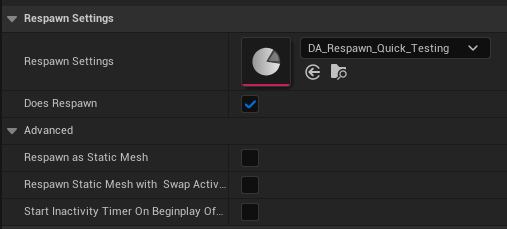
Key Functions:
BeginPlay
- Binds to the owner actor's OnDestroyed event
- Starts the inactivity timer if configured
- Initializes respawn settings
OnDestroyed Event
- Called when the owner actor is destroyed
- Triggers the respawn process by spawning a placeholder
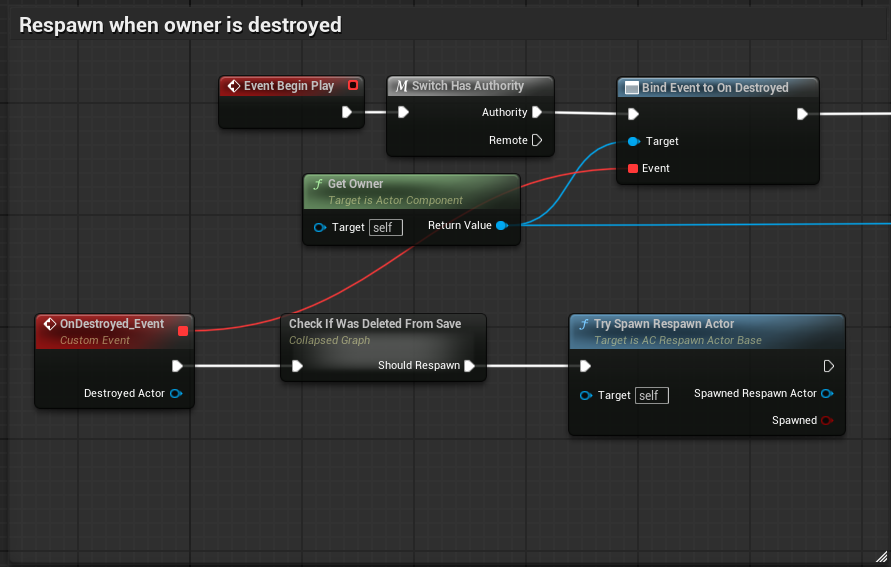
Try Respawn Actor
- Main respawn function that handles the respawn logic
- Spawns a respawn placeholder actor at the current location
- Passes respawn settings to the placeholder
Start Inactivity Timer
- Starts a countdown timer
- When the timer expires, calls Try Respawn Actor
- Used for respawning based on inactivity rather than destruction
On Damage (Optional)
- Can restart the inactivity timer when the actor takes damage
- Prevents respawning while the actor is being actively used
- Useful for resources that should only respawn when left alone
Respawn Placeholder System #
Instead of directly respawning the actor, the base component spawns a placeholder actor. The placeholder is a simple actor that:
- Stores the respawn timer
- Stores information about what to respawn
- Waits for the respawn time to elapse
- Spawns the actual actor when ready
- Destroys itself after spawning the actor
This separation allows:
- Clean actor lifecycle management
- The original actor to be fully destroyed and garbage collected
- Multiple respawn timers to exist independently
- Easy cleanup of pending respawns
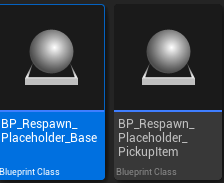
Static Mesh Respawn Logic
The base component includes logic for respawning as static meshes:
If respawning as static mesh:
- Check if there's a linked instanced static mesh component
- If yes, use that component to respawn the mesh instance
- If no, get the first static mesh component from the owner
- Optionally use an override static mesh instead of the original
This allows for efficient respawning of many similar objects using instanced static meshes, which is much more performant than spawning full actors.
AC_RespawnActor_PickUpItem #
The pickup item component extends the base component with specific logic for pickup items that have inventory data.
Purpose
Pickup items need special handling because they contain inventory item data (what item they represent, quantity, durability, etc.). This component ensures that data is preserved during respawn.
Override: Spawn Respawn Actor Function
The pickup item component overrides the SpawnRespawnActor function to:
- Get the inventory item data from the owner (PickupMaster)
- Pass that item data to the respawn placeholder
- Ensure the respawned pickup has the correct item
This override prevents the need to duplicate respawn logic while adding pickup-specific functionality.
Why Override Instead of Modify Base?
By using a child component with overrides:
- The base component remains generic and reusable
- Pickup-specific logic is isolated to the pickup component
- Other actor types can use the base component directly
- Easy to add more specialized respawn types (respawn with modified properties, respawn as different actor, etc.)
Usage Example
When a player picks up an apple:
- The apple pickup actor is destroyed
- The pickup item component's OnDestroyed event triggers
- Try Respawn Actor is called
- A respawn placeholder is spawned with the apple's item data
- After the respawn timer expires, a new apple pickup is spawned
- The new apple has the same item data as the original
Respawn System Architecture #
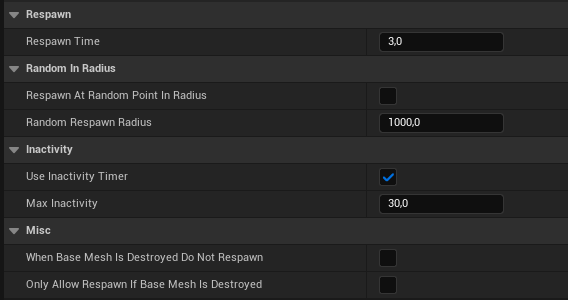
Inactivity Timer System #
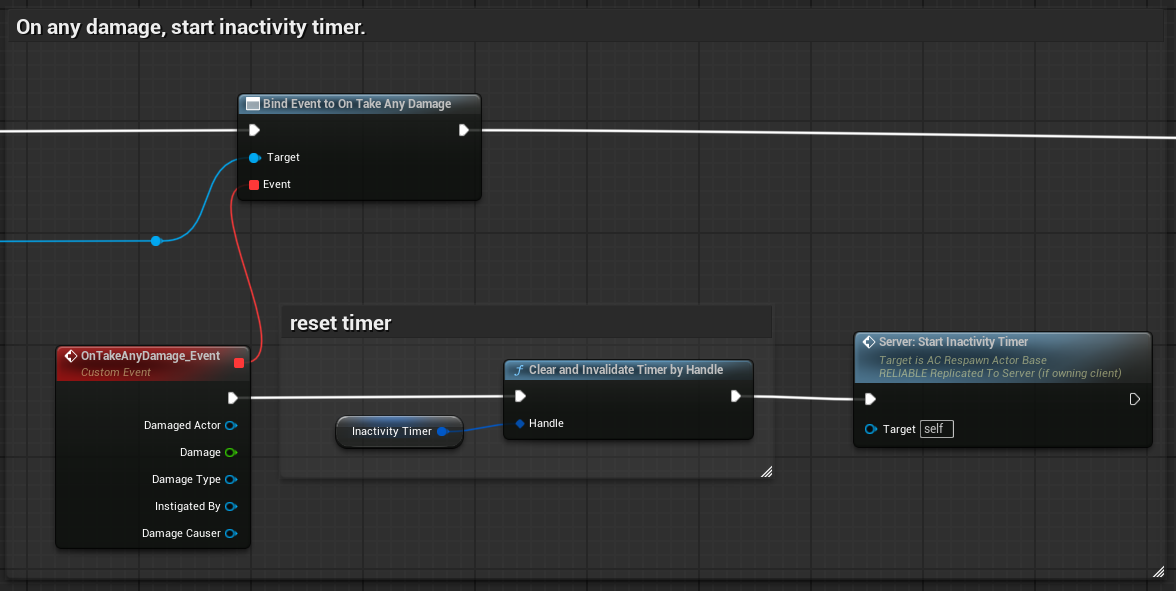
The inactivity timer is a mechanism to respawn actors after a period of no interaction.
How It Works:
- When the actor spawns or takes damage, start the inactivity timer
- If the timer reaches zero without being reset, trigger respawn
- If the actor is destroyed before the timer expires, use destruction-based respawn instead
Use Cases:
Resource Nodes
A tree that hasn't been damaged in 5 minutes automatically respawns (restores) to full health.
Loot Containers
A loot chest that hasn't been opened in 10 minutes automatically refills with loot.
Temporary Objects
A dropped item that hasn't been picked up in 2 minutes despawns and respawns at original location.
Configuration:
- Inactivity Time: How long to wait before respawning (in seconds)
- Reset Timer on Damage: Whether taking damage resets the timer
- Start on BeginPlay: Whether to start timing immediately when spawned
Resetting the Timer
The timer can be reset by:
- Taking damage
- Being interacted with
- Custom events in your gameplay code
- Any event that indicates the actor is being actively used
This prevents actors from respawning while players are using them.
Respawn Placeholder System #
The respawn placeholder is a simple actor that manages the respawn process.
Respawn Placeholder Base Actor
This actor is spawned when the original actor is destroyed or triggers respawn. It:
- Stores respawn settings (what to spawn, where, when)
- Runs a timer for the respawn delay
- Spawns the new actor when the timer completes
- Destroys itself after spawning
Placeholder Lifecycle:
- Original actor destroyed or inactive
- Respawn component spawns placeholder at actor's location
- Placeholder stores respawn data
- Placeholder starts timer (respawn delay)
- Timer completes
- Placeholder spawns new actor
- Placeholder destroys itself
Why Use Placeholders?
- Allows the original actor to be completely destroyed and cleaned up
- Separates respawn timing from actor lifecycle
- Multiple placeholders can exist independently
- Easy to query or cancel pending respawns
- Centralizes respawn logic in one place
Respawn Settings Struct
The placeholder receives a settings struct containing:
- Actor class to spawn
- Transform (location, rotation, scale)
- Whether to respawn as static mesh
- Static mesh to use (if applicable)
- Instanced static mesh component reference
- Inventory item data (for pickups)
- Any other custom respawn data
This struct passes all necessary information from the respawn component to the placeholder, ensuring the respawned actor is configured correctly.
Static Mesh Respawning #
Static mesh respawning provides a performant alternative to spawning full actors.
Instanced Static Mesh Support #
For large numbers of identical respawning objects, instanced static meshes provide significant performance benefits.
How It Works:
- Place an Instanced Static Mesh Component in your level
- Add multiple instances of the mesh (rocks, trees, plants, etc.)
- Link each instance to a respawn component
- When an instance is removed (harvested), the respawn component tracks it
- After respawn time, the instance is re-added to the instanced static mesh
Linking to Instanced Static Mesh:
The respawn component can be configured to:
- Reference a specific Instanced Static Mesh Component
- Know which instance index it represents
- Add/remove instances from that component
When respawning:
- The placeholder receives the instanced static mesh reference
- At respawn time, it adds a new instance at the correct location
- The instance appears instantly with no actor spawn overhead
Performance Benefits:
- One draw call for all instances instead of one per actor
- Minimal memory overhead per instance
- Faster spawn/despawn operations
- Better for large numbers of identical objects
Use Cases:
- Foliage harvesting (hundreds of plants)
- Rock/ore nodes (many identical resources)
- Collectible items scattered across the map
- Any scenario with many identical respawning objects
Static Mesh Actor Spawning #
For objects that should respawn as static meshes but aren't using instanced static meshes, the system can spawn static mesh actors.
How It Works:
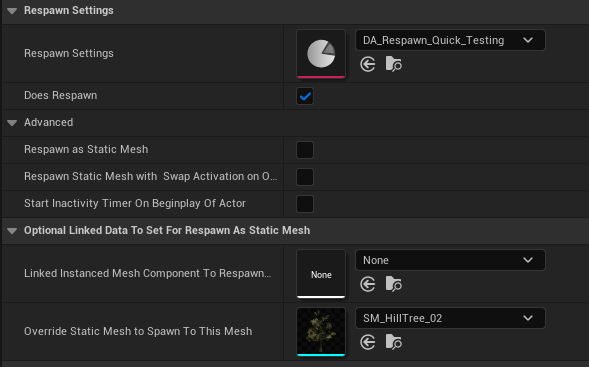
- The respawn component is configured to “Respawn as Static Mesh”
- When respawning, instead of spawning the original actor class, spawn a static mesh actor
- The static mesh actor is lightweight (no complex blueprints, just a mesh)
- The mesh matches the original actor's appearance
Workflow:
- Player harvests a tree (full actor with components and logic)
- Tree is destroyed
- After respawn time, a simple static mesh actor is spawned
- Static mesh actor looks like a tree but has no complex logic
- Saves performance compared to respawning the full tree actor
Configuration:
- Respawn as Static Mesh: Enable this option
- Override Respawn Static Mesh: Optionally specify a different mesh than the original
- The system automatically gets the mesh from the actor's static mesh component if no override
When to Use:
- Objects that don't need full actor logic after respawn
- Visual placeholders until players interact again
- Performance optimization for many respawning objects
- Objects where player interaction converts them to full actors
Regular Actor Respawning #
When static mesh respawning isn't appropriate, the system spawns full actors.
How It Works:
- The respawn component stores the actor class to spawn
- When respawning, spawn a new instance of that class
- The new actor is fully functional with all components and logic
- For pickups, the inventory item data is passed to the new actor
Actor Class Determination:
- By default, use the owner actor's class
- For pickups, use the PickupMaster class with the correct item data
- Can be overridden for custom respawn behavior
Full Functionality:
The respawned actor is identical to placing a new instance in the editor:
- All components are initialized
- All blueprints run normally
- All properties are set to defaults (or passed values)
- Respawn component is included and configured
This is the most flexible respawn method but also the most expensive for performance.
Setup and Configuration #
Configuring Respawn Settings #
Detailed configuration options for the respawn system.
Does Respawn
Simple boolean: should this actor respawn at all?
- True: Actor will respawn after destruction/inactivity
- False: Actor is permanently destroyed
Use Case: Quest items might have this set to False (should not respawn), while resources have it set to True.
Respawn Time
Time in seconds before respawn occurs.
- Short (60-180s): Common resources, quick respawn
- Medium (300-600s): Valuable resources, balanced respawn
- Long (1800-3600s): Rare resources, slow respawn
- Very Long (7200+s): Unique or special resources
Consider game balance when setting respawn times.
Respawn in Radius
If greater than 0, the actor respawns at a random location within this radius of the original position.
- 0: Exact same position
- 100-500: Slight variation, keeps resources in the same area
- 500-1000: Significant variation, spreads resources around
Requires Navigation Mesh
For respawn in radius to work properly, you need a navigation mesh in your level. The system uses the navmesh to find valid spawn locations within the radius.
If no navmesh exists, the actor will respawn at the exact original location regardless of the radius setting.
Respawn as Static Mesh
Whether to respawn as a lightweight static mesh actor instead of a full actor.
- True: Better performance, less functionality
- False: Full functionality, more expensive
Override Respawn Static Mesh
If respawning as static mesh, you can specify which mesh to use:
- Empty: Uses the actor's existing static mesh component
- Set: Uses the specified override mesh
Useful for respawning different variations or damaged/restored states.
Static Mesh vs Actor Respawn #
Choosing between static mesh and actor respawn depends on your needs.
Use Actor Respawn When:
- The object needs full functionality (interaction, animation, complex logic)
- It's a pickup with inventory data
- There are relatively few instances
- Performance isn't a critical concern
- The object has multiple components or complex behavior
- Named loot chests with specific contents
- Quest-related objects
- Unique interactive objects
- Pickups with special effects
Use Static Mesh Respawn When:
- You have many identical objects
- Performance is important
- The object is purely visual until interacted with
- The object has simple or no interaction
- You're using instanced static meshes
- Common resource nodes (rocks, trees, plants)
- Collectible items scattered across a large map
- Decorative objects that can be destroyed and should reappear
- Harvestable foliage
Hybrid Approach:
You can combine both approaches:
- Initial placement uses full actors
- After destruction, respawn as static mesh for performance
- When player interacts with static mesh, convert back to full actor
- This provides full functionality when needed with performance when idle
How to Guides #
How to Set Up Respawning Resources #
This guide explains how to create a resource node that respawns after being harvested.
Step 1: Create Resource Actor
Create or open your resource actor blueprint (tree, rock, plant, etc.).
Step 2: Add Respawn Component
Add the AC_RespawnActor_Base component to the actor:
- In the Components panel, click Add Component
- Search for “AC_RespawnActor_Base
- Add the component
Step 3: Configure Respawn Settings
In the component details:
- Does Respawn: True
- Respawn Time: 300 (5 minutes, adjust as needed)
- Respawn as Static Mesh: False (or True for performance)
- Respawn in Radius: 0 (exact position) or 100-500 (slight variation)
Step 4: Set Up Destruction
Ensure your resource can be destroyed:
- When the resource is depleted (0 health, fully harvested, etc.)
- Call Destroy Actor on self
- The respawn component will automatically trigger on destruction
Step 5: Optional: Use Inactivity Timer
If you want the resource to regenerate health while not being harvested:
- Set Start Inactivity Timer on Begin Play: True
- Set Inactivity Time: 600 (10 minutes, or desired time)
- On Damage, the timer resets
- If left alone for the inactivity time, the resource respawns (restores)
Step 6: Test the Resource
Test harvesting and respawning:
- Place the resource in the level
- Harvest it completely until it's destroyed
- Wait for the respawn time (or use console command to speed up time)
- Verify the resource reappears
- Test that it can be harvested again
Step 7: Optimize for Multiple Resources
If you have many identical resources:
- Consider using Respawn as Static Mesh: True
- Or set up instanced static meshes for better performance
- Monitor performance with many active respawn timers
How to Configure Custom Respawn Behavior #
This guide explains how to create custom respawn logic for special cases.
Step 1: Create Child Component
Create a child of AC_RespawnActor_Base:
- In the content browser, right-click AC_RespawnActor_Base
- Select “Create Child Blueprint Class”
- Name it appropriately (e.g., AC_RespawnActor_Custom)
Step 2: Override Spawn Respawn Actor Function
In your custom component:
- Override the “Spawn Respawn Actor” function
- This function is called when respawn is triggered
Step 3: Implement Custom Logic
In the override function, implement your custom behavior.
- Call parent function to get base behavior
- Get the spawned actor reference
- Modify properties (health, loot quality, visual appearance, etc.)
- Return the modified actor
- Instead of calling parent, spawn a different actor class
- Based on game state, time of day, player level, etc.
- Configure the new actor
- Return the spawned actor
- Check game conditions (time, player count, difficulty, etc.)
- If conditions met, call parent to respawn normally
- If conditions not met, don't respawn (or delay further)
Step 4: Add Custom Variables
Add variables to your custom component for configuration:
- Respawn variation chance
- Alternate actor classes
- Condition requirements
- Modified property values
Step 5: Use Custom Component
Use your custom component instead of the base:
- Remove AC_RespawnActor_Base from your actor
- Add your custom component instead
- Configure the custom variables
- Test the custom behavior
Step 6: Example Use Cases
Seasonal Respawn:
- Check current season
- Respawn with seasonal variation (snowy tree in winter, blooming in spring)
Difficulty Scaling:
- Respawn with difficulty appropriate loot or health
- Based on player level or game progression
Random Variation:
- Randomly select from multiple possible respawn actors
- Create variety in resource nodes
Degradation:
- Each respawn reduces quality or quantity slightly
- Encourages players to move to new areas