
Event Manager
Updated May 25, 2026
The Event Manager is a lightweight event system for loosely coupled communication between gameplay systems. Systems register listeners for named events, other systems trigger those events with parameters, and listeners handle the work without direct references between the systems.
Use this page for player-specific events, global world events, event registration, event triggering, return values, naming conventions, and common integration patterns. For shared setup guidance, see the Migration Guide and Integration Guide. Use the System Atlas to look up functions, variables, events, components, and ownership references.
Related Video
Basics course videos are not specific to this project system. Use them to understand the Unreal Engine or Blueprint principle, then follow this page for project-specific names and setup.
Blueprint Communication – Event Dispatching Play
Core Idea
The Event Manager replaces direct cross-system calls with event registration and triggering.
| Approach | Behavior | Risk |
|---|---|---|
| Tightly coupled | The Quest System gets direct references to Inventory, Attribute Manager, UI, and other systems. | Changes cascade through dependencies, and systems are harder to test or disable independently. |
| Event-driven | The Quest System triggers events such as Add Item, Add XP, or Quest Completed. Interested systems listen and respond. | The trigger only needs to know the Event Manager and the event contract. |
Example flow:
- The Quest System triggers Add Item with item ID and quantity.
- The Event Manager finds all listeners registered to Add Item.
- The Inventory System adds the item.
- The Achievement System can track the collection.
- The Quest System can check quest item updates.
- The UI System can refresh the inventory display.
Common Uses
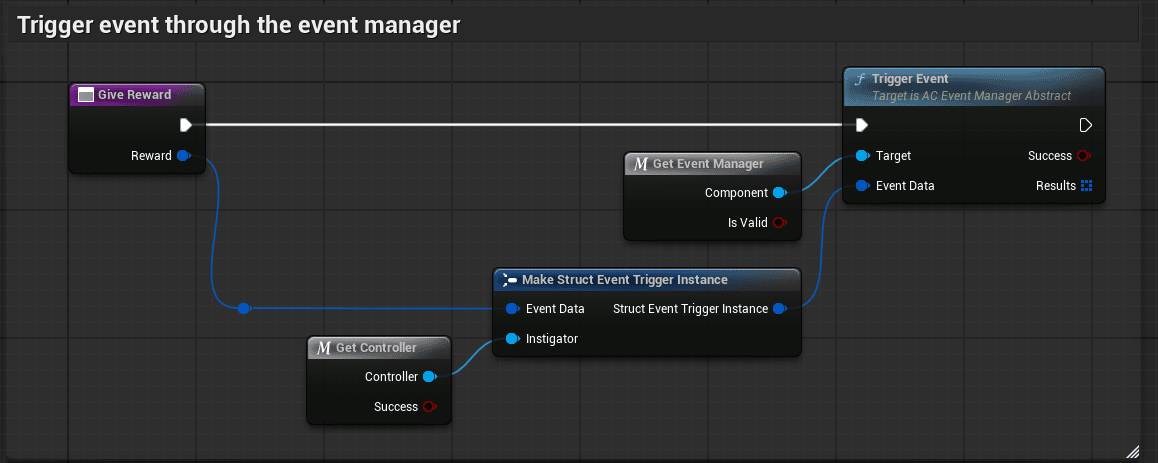

- Quest reward distribution: quest completion triggers item, XP, or reputation rewards.
- Inventory management: Add Item, Remove Item, and Has Item events allow inventory actions and queries.
- Attribute/progression integration: Add XP, Add Reputation, and Level Up events can connect to progression systems.
- Global world events: Boss Defeated, Area Captured, Time of Day Changed, and Weather Changed events coordinate world state.
- Achievement tracking: achievement systems can listen to gameplay events without being referenced by the gameplay systems.
- UI refresh: UI can refresh when inventory, quest, or stat events fire instead of polling constantly.
Event Manager Locations
Use separate Event Managers for player-specific and global behavior.
| Location | Use for | Examples |
|---|---|---|
| BP_PlayerController | Events that affect one player. | Add Item, Remove Item, Has Item, Add XP, Add Reputation, Quest Completed, Achievement Unlocked. |
| BP_GameState | Events that affect the world or all players. | Boss Defeated, Area Captured, Time of Day Changed, Weather Changed, Server Announcement, World State Changed. |
Each player’s Player Controller Event Manager is independent. If Player 1 triggers Add Item, only Player 1’s inventory receives that player-specific event. Global events belong on the Game State so world actors and player systems can listen to the same world-level signal.
Player event reference:
Get Player Controller -> Get Event Manager Component -> Register/Trigger Events

Global event reference:
Get Game State -> Get Event Manager Component -> Register/Trigger Events
Registering Events
Registering means subscribing a function or custom event to be called when an event is triggered.

| Input | Purpose |
|---|---|
| Event Name | String or gameplay tag identifying the event, such as Add Item or Event.Inventory.AddItem. |
| Callback Function | Custom event or function called when the event is triggered. |
Register in Begin Play or component initialization, and unregister when the component is destroyed. This prevents stale listeners from being called after their owning object is gone.
Inventory registration example:
- Get the Event Manager from the Player Controller.
- Register Add Item to On Add Item.
- Register Remove Item to On Remove Item.
- Register Has Item to On Has Item.
- In each callback, receive parameters, perform the inventory operation, and return success or failure where needed.
Triggering Events
Triggering broadcasts an event to every listener registered for that event name.
Trigger Event(Event Name, Parameters...)
Returns: Boolean success/failure when the event is used as a command or query.
Quest reward example:
- The quest completes.
- The Quest System reads reward data, such as item ID Sword_Iron and quantity 1.
- The Quest System gets the player Event Manager.
- It triggers Add Item with item ID and quantity.
- The Inventory System receives the event and adds the item.
Events can be triggered from quests, pickup actors, crafting systems, combat systems, world event systems, or any gameplay system that needs to notify listeners.
Return Values
Events can return success or failure, which makes the Event Manager useful for queries as well as commands.
| Event | Example use | Return |
|---|---|---|
| Has Item | A door checks whether the player has Key_Red. | True opens the door; false shows a locked message. |
| Add Item | A pickup tries to add Potion_Health. | Success destroys the pickup; failure leaves it and can show Inventory Full. |
If multiple listeners return values, the Event Manager returns true only if all listeners report success. This is useful when all registered systems must handle the event successfully.
Event Parameters
Keep parameters simple, consistent, and documented. Use structs for complex parameter sets when needed.
| Event | Parameters | Example |
|---|---|---|
| Add Item | Item ID, Quantity. | Trigger Event(“Add Item”, “Sword_Iron”, 1) |
| Remove Item | Item ID, Quantity. | Trigger Event(“Remove Item”, “Potion_Health”, 5) |
| Has Item | Item ID. | Trigger Event(“Has Item”, “Key_Red”) |
| Add XP | XP Amount. | Trigger Event(“Add XP”, 100) |
| Quest Completed | Quest ID. | Trigger Event(“Quest Completed”, “MainQuest_001”) |
| Boss Defeated | Boss ID, Player Who Killed. | Trigger Event(“Boss Defeated”, “Dragon_Fire”, Player Reference) |
| Weather Changed | Old Weather, New Weather, Transition Duration. | Used by weather listeners, AI, effects, and world actors. |
Naming Convention
Use descriptive event names and keep verb tense consistent. Gameplay tags are recommended when you want type safety, editor autocomplete, hierarchy, and easier refactoring.
Event
  Event.Inventory.AddItem
  Event.Inventory.RemoveItem
  Event.Inventory.HasItem
  Event.Quest.Completed
  Event.World.BossDefeated
  Event.World.AreaCaptured
Document each event’s name, parameters, return value, trigger source, and listeners so all systems use the same contract.
Registration Patterns
- Single system registration: Inventory registers to Add Item, Remove Item, and Has Item.
- Multi-system registration: Inventory, Achievement, Quest, and UI systems all listen to Add Item for different reasons.
- Conditional registration: Achievement systems register only for events relevant to active achievement requirements.
- Temporary registration: A mini-game registers to Item Collected only while the mini-game is active, then unregisters when it ends.
Workflows
Create a Custom Event
- Define the event name, parameters, and return value.
- Create a listener in the component that should respond.
- Get the correct Event Manager from the Player Controller or Game State.
- Register the listener callback.
- Create the callback function or custom event.
- Trigger the event from the gameplay system that owns the action.
- Add optional listeners such as UI, achievements, analytics, or quest systems.
- Document the event contract.
Example contract for Player Damaged:
| Parameters | Damage Amount (Float), Damage Type (String), Attacker (Actor Reference). |
|---|---|
| Return Value | Boolean, true if damage was applied and false if blocked or immune. |
| Triggers | When the player takes damage from any source. |
| Listeners | Health Component, UI System, Achievement System. |
Set Up Global World Events
- Open BP_GameState.
- Add the Event Manager Component if it is not already present.
- In a world actor such as BP_Boss_Dragon, get the Game State Event Manager when the global event occurs.
- Trigger a global event such as Boss Defeated with boss ID Dragon_Fire and the killer reference.
- Register player-specific listeners, such as quest components, to the Game State Event Manager when they need global event updates.
- Register world-level listeners such as world managers, lighting systems, weather systems, or spawn point systems.
- Test with multiple players where relevant and verify that all intended listeners respond.
Useful global events include Time Of Day Changed, Weather Changed, and Area Captured. Use the Game State Event Manager for events that affect all players, and the Player Controller Event Manager for events that belong to one player.
Summary
The Event Manager keeps systems modular by routing communication through explicit event contracts. Use Player Controller event managers for player-specific actions, Game State event managers for global world state, gameplay tags for stable event names, and clear parameter documentation so listeners can be added without changing the systems that trigger the events.