
Mesh to Actor Swap System
Updated May 25, 2026
The Hyper Mesh To Actor Swap System improves level performance by keeping large numbers of world objects as static meshes or instanced static meshes, then swapping them into actors only when gameplay needs actor behavior.
For shared setup guidance, see the Migration Guide and Integration Guide. Use the System Atlas to look up functions, variables, events, components, and ownership references. Use this page for Mesh To Actor Swap-specific collision, data table, actor, and performance setup.
Related setup: Set Up Mesh to Actor Swap.
Related Videos and Support
Some videos may have been recorded before V4. The same principles still apply, but asset names, component names, and folder locations may differ. Treat the current written documentation and V4 names as the source of truth.
Swap Your Massive PCG Forests To Interactable Actors PlayIn Depth overview of the Mesh to Actor Swap system PlayMesh to Actor Swap – Use millions of actors in your world Devlog Play- Verified Discord support channel
- Additional tutorial for expanding the data table configuration
Overview
The system can swap meshes into actors when the player overlaps them or when they are hit, then swap actors back into meshes based on configuration. It supports static meshes and instanced static meshes placed through PCG, foliage painting, direct placement, or custom runtime placement.
- Uses data tables to define which meshes can become which actor Blueprints.
- Supports automatic actor-to-mesh cleanup through respawn components.
- Works with the Games by Hyper V3 DT_Items structure for pickup and inventory items.
- Can be adapted to another inventory system if that system provides the required static mesh and optional actor Blueprint data.
- Includes a demo map and example actors for setup reference.
Core Components
| Component / Asset | Purpose |
|---|---|
| AC_CH_MeshToActor_Swapper | Player-side actor component that reads swap data tables, detects swappable meshes, performs mesh-to-actor swaps, saves and loads swapped state, and cleans up swapped actors through the respawn flow. |
| AC_Respawn_Actor_Base | Actor-side component that can swap an actor back into a mesh when it has not been interacted with, and handles respawn behavior when interaction did occur. |
| AC_Respawn_Actor_PickupItem | Pickup-specific child component used by BP_Pickup_Base for inventory item respawning. |
| DT_Items | Games by Hyper item data table containing general interactable pickup and inventory item data. |
| DT_MeshToActorSwap | Defines mesh-to-actor links that are not defined in DT_Items. If the same mesh exists in both tables, the in-memory actor mapping can be replaced by the swap table entry. |
| PDA_Respawn | Used for most respawn settings. Mesh-to-actor swap respawn settings are configured directly on the editable AC_CH_MeshToActor_Swapper settings. |
Project Collision Setup
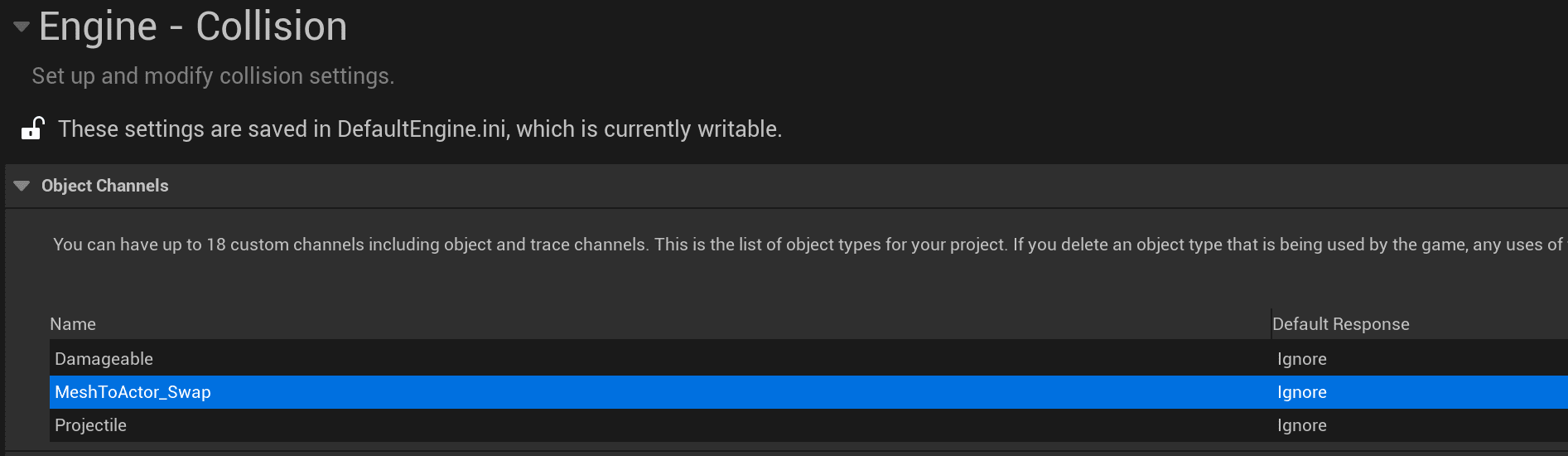
- Open Project Settings > Collision.
- Add the object channel MeshToActor_Swap.
- Set the default response to Ignore.
Games by Hyper V3 asset projects already define this channel.
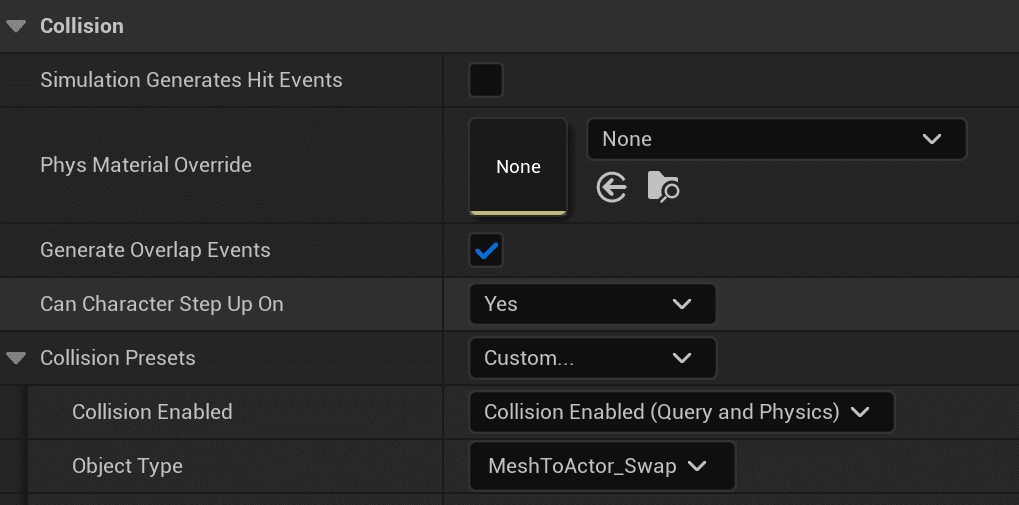
For meshes placed in the world through PCG, foliage painting, or direct placement:
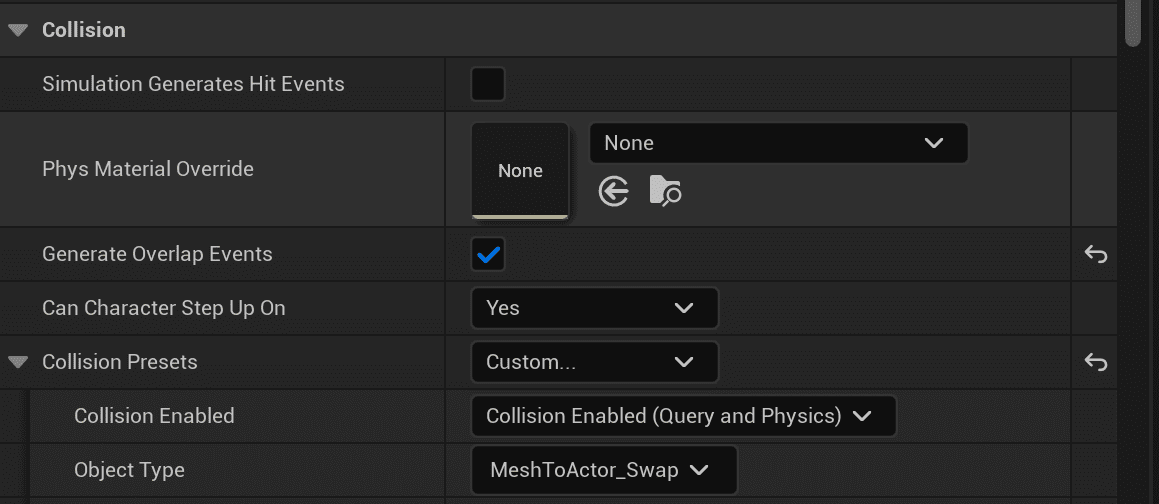
- Set Generate Overlap Events to True for meshes that swap on overlap.
- Set Generate Overlap Events to False for meshes that swap on hit.
- Set Collision Preset to Custom.
- Set Object Type to MeshToActor_Swap.
- Use a Query collision enabled type appropriate for the mesh.
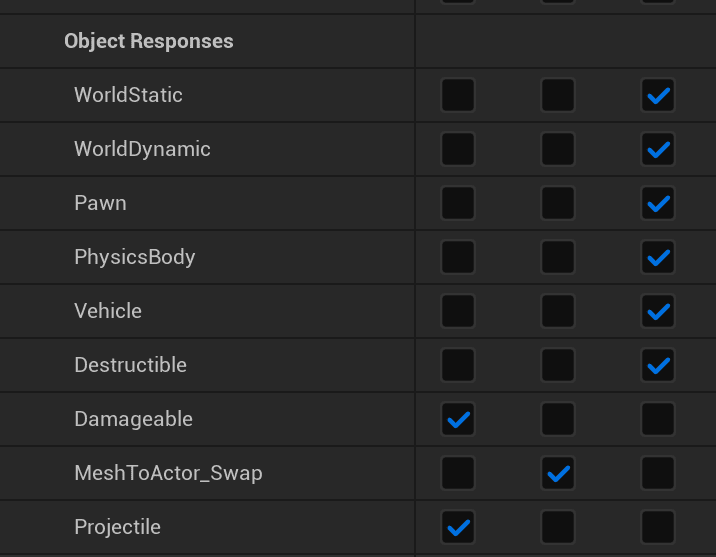
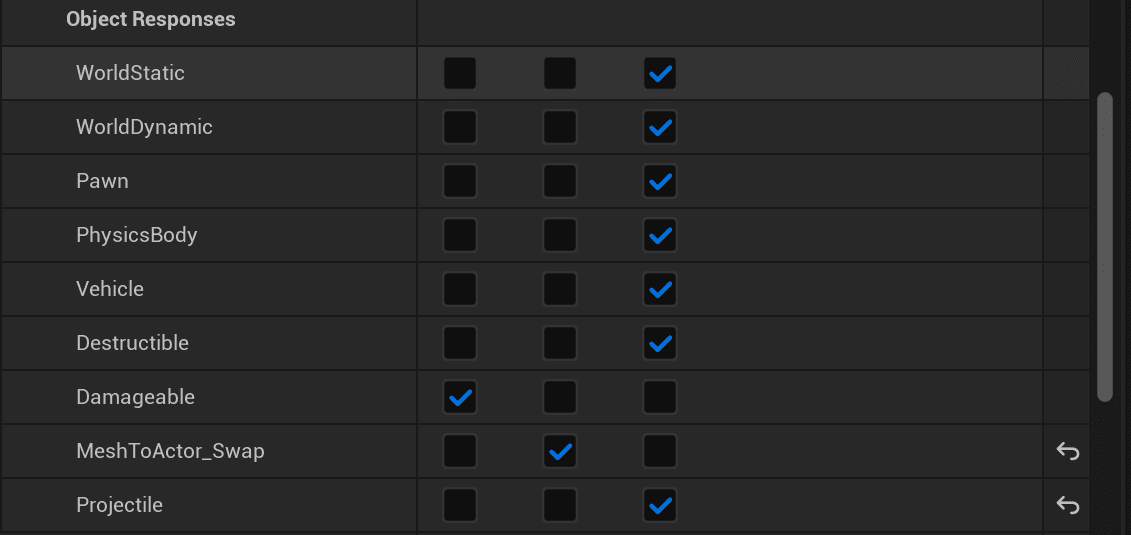
- Set the MeshToActor_Swap object response to Overlap.
Player Character Setup
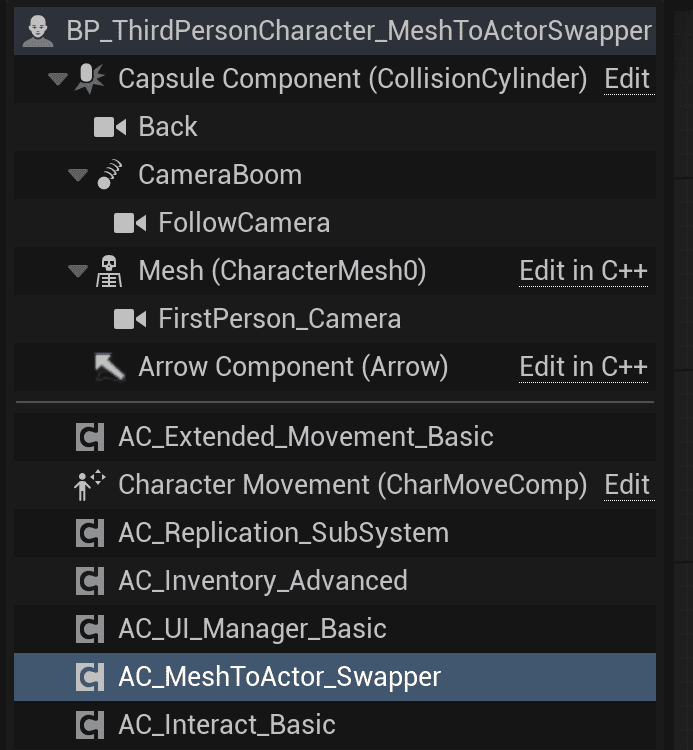
Add AC_CH_MeshToActor_Swapper to the player character. Select the component in the Details panel to adjust its settings.
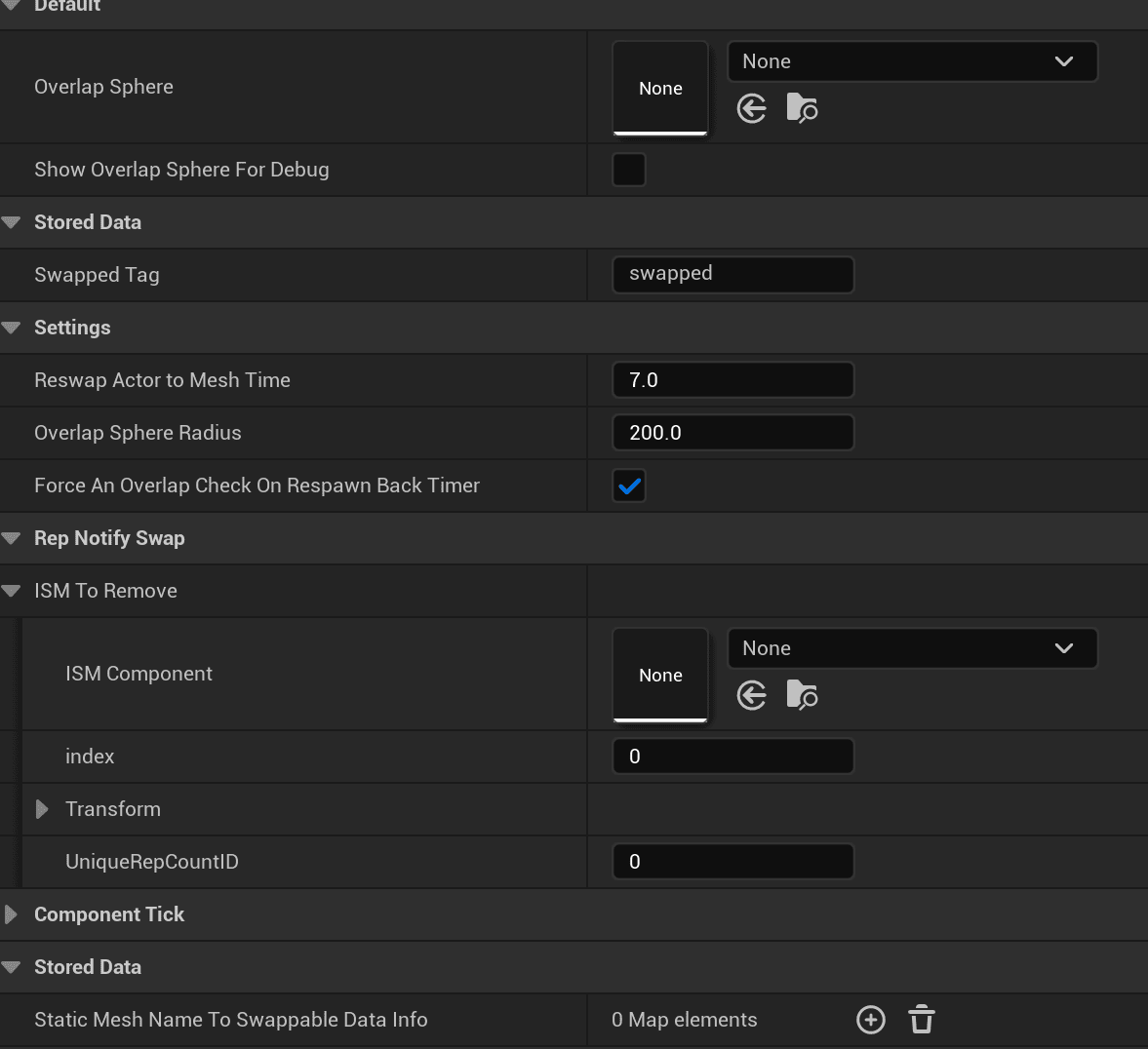
| Setting | Purpose |
|---|---|
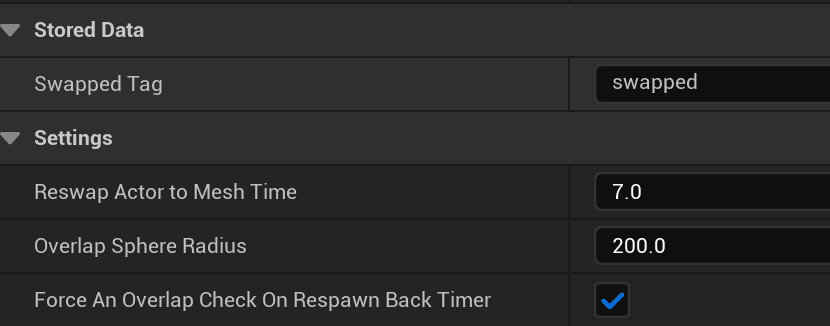
| Reswap Actor to Mesh Time | Time in seconds before an actor is swapped back into a mesh if the player does not interact with it. The default is 7 seconds. |
| Overlap Sphere Radius | Radius, in Unreal units, of the overlap sphere created on the player at runtime. This controls how far away overlap-based swaps can happen. The default is 200. |
| Force an Overlap Check on Respawn Back Timer | When true, the system checks whether the actor is still inside the overlap sphere before swapping it back into a mesh. This is usually left enabled. |
| Swapped Tag | Tag added to swapped actors so the system can identify actors that originated from meshes. The default tag is swapped. |
Swapped Actor Setup
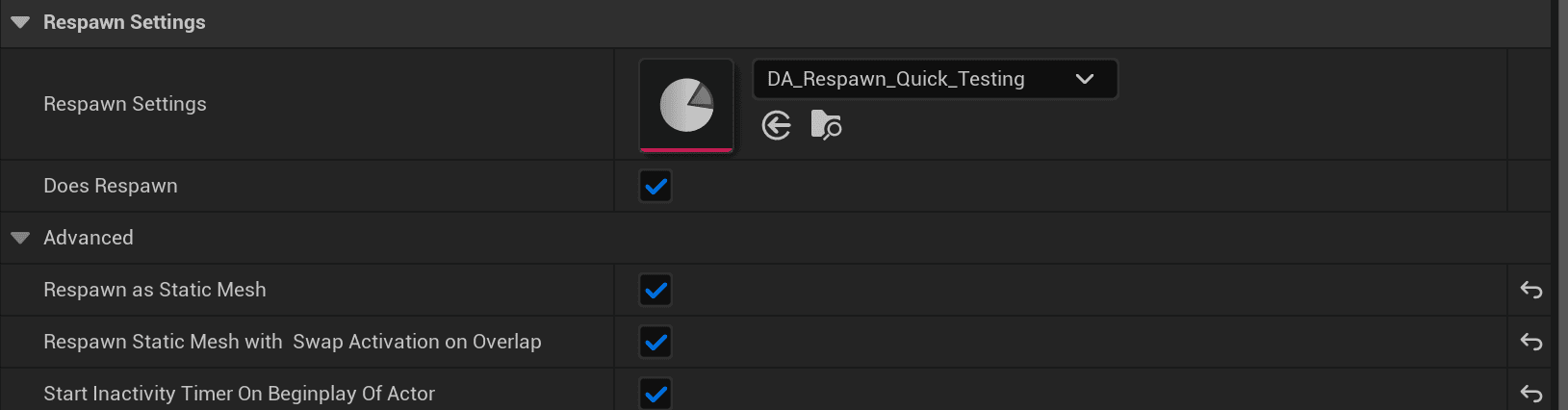
Actors that should swap back into meshes need an appropriate respawn component. BP_Pickup_Base uses AC_Respawn_Actor_PickupItem, a child of AC_Respawn_Actor_Base, because pickup items respawn from inventory item data.
For pickup items that swap on overlap, add or configure AC_Respawn_Actor_PickupItem and enable:
- Respawn as Static Mesh
- Respawn Static Mesh with Swap Activation on Overlap
- Start Inactivity Timer On BeginPlay Of Actor
For swap-on-hit actors that should not swap on overlap, use AC_Respawn_Actor_Base and enable:
- Respawn as Static Mesh
- Start Inactivity Timer On BeginPlay Of Actor
Disable Respawn Static Mesh with Swap Activation on Overlap for those actors.
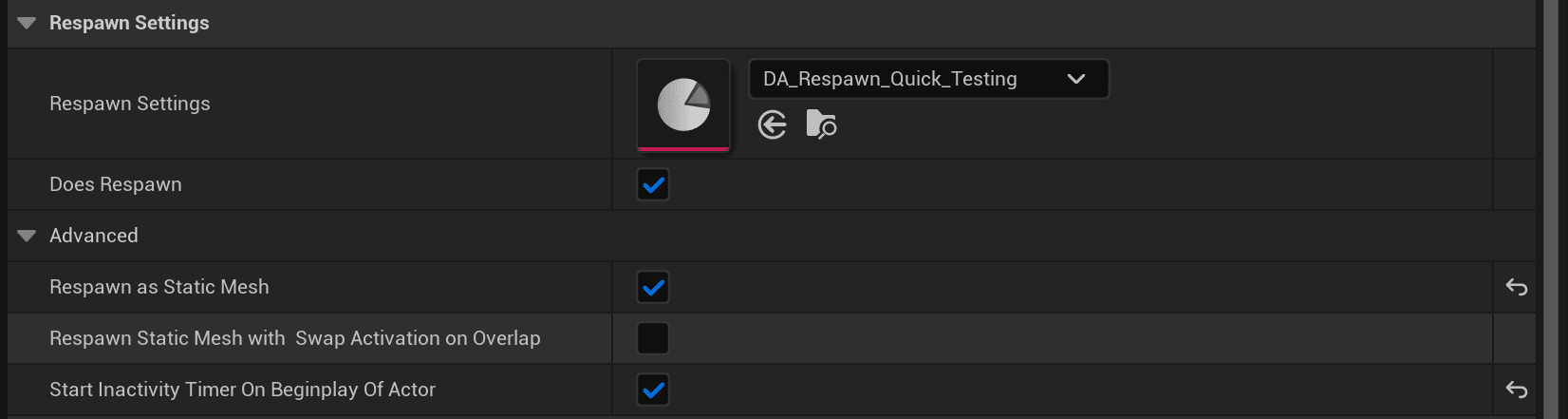
DA_Respawn_Quick_Testing configures actor respawn behavior that is separate from the Mesh To Actor Swap System itself.
Data Table Configuration
If you use the Hyper Inventory system for inventory and pickup items, the existing item data table may already provide the required item mapping. If you use Hyper Mineable Rocks or Choppable Trees, add the tree or rock Blueprints and meshes to DT_MeshToActorSwap.
- Open DT_MeshToActorSwap.
- Open the tree or rock Blueprint that will be used in the level, such as chaos/staged rocks or chaos/materialoffset/instantbreakable trees.
- Select the static mesh inside the actor and copy the mesh property data.
- Return to the data table and assign the actor Blueprint to the actor BP entry.
- Paste the copied static mesh property data into the mesh field.
- Enable SwapOnHit for hit-driven swaps or SwapOnOverlapRadius for player-radius swaps.
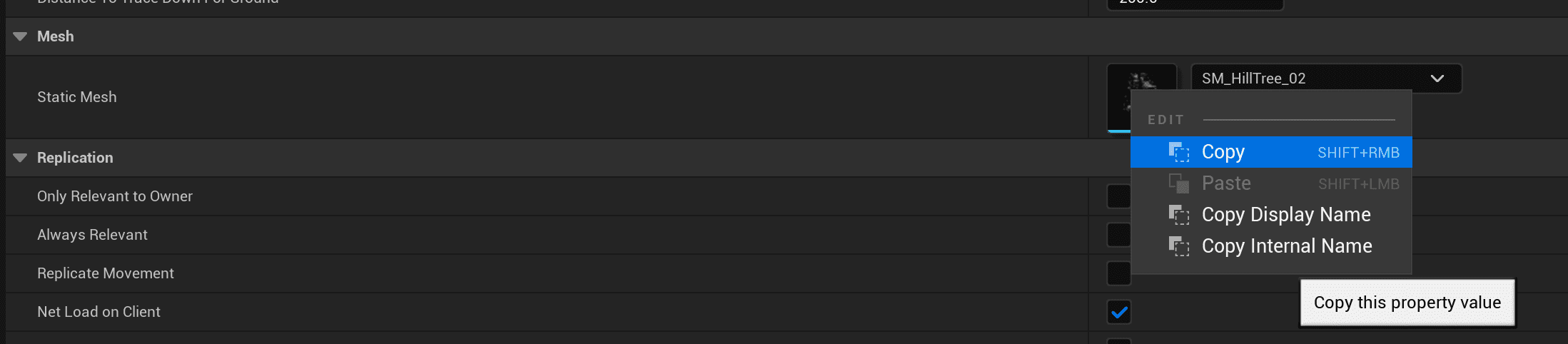
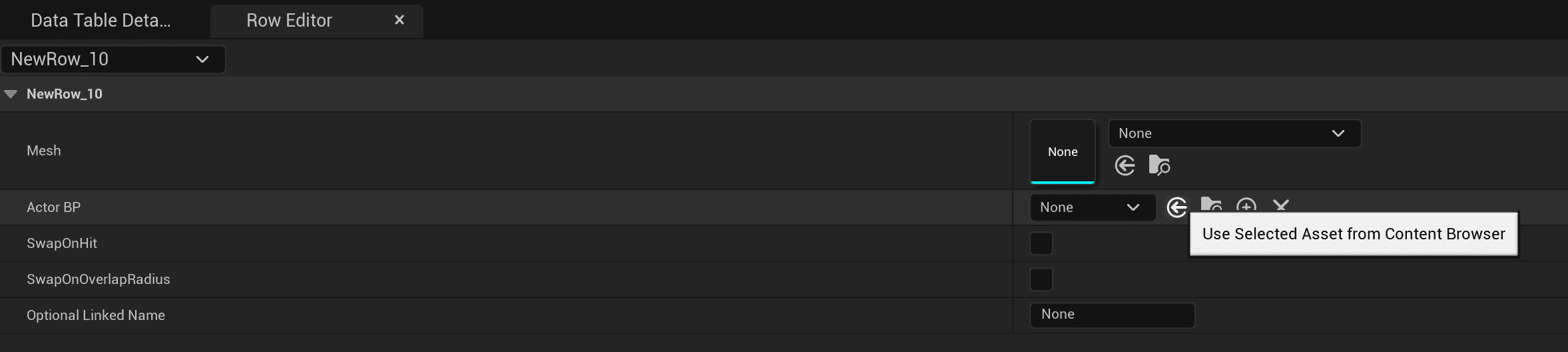
In this example, the actor is BP_MaterialBased_ChoppableTree_Base_Hilltree.

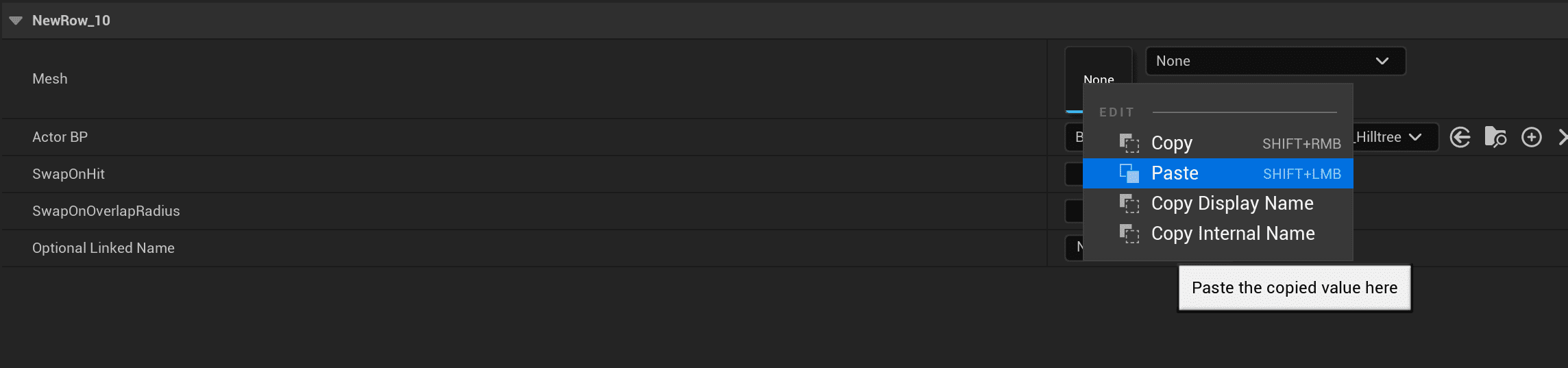

Note: DT_MeshToActorSwap uses F_Swappable_Mesh. Custom swappable mesh data tables must use this structure because Store_SwappableMeshesToActorMap expects it.
Static Mesh Placement
The same collision rules apply whether meshes are placed through foliage painting, PCG, or direct placement.
Foliage Painting
When adding static meshes to the foliage paint panel, configure the collision settings and make sure MeshToActor_Swap is set to Overlap.

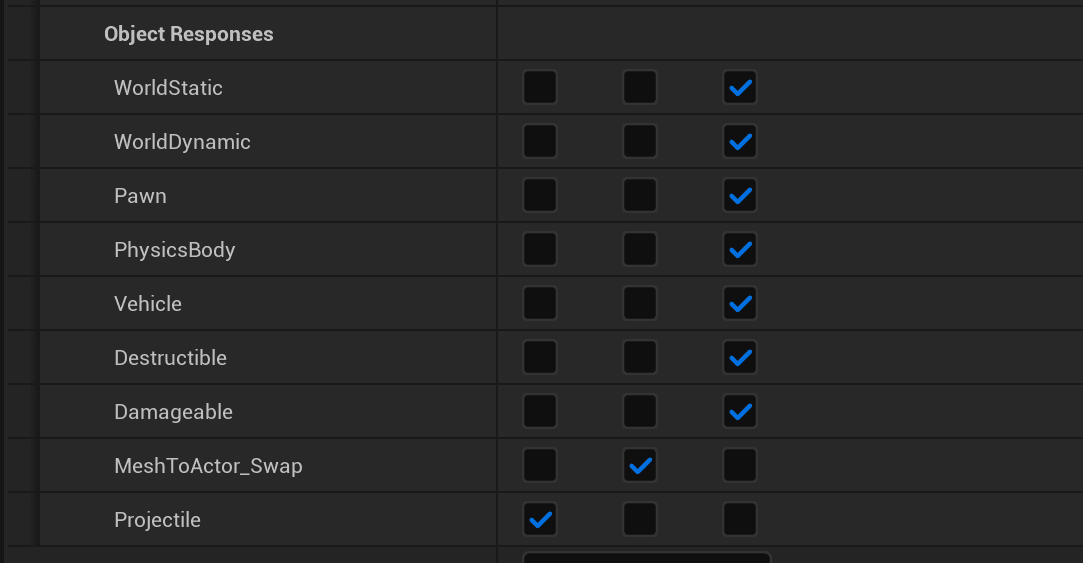
If the mesh swaps on hit, set Damageable to Block in the Object Response section.
Select the FoliageInstancedStaticMesh actor in the Outliner, then select all instances in the Details panel.
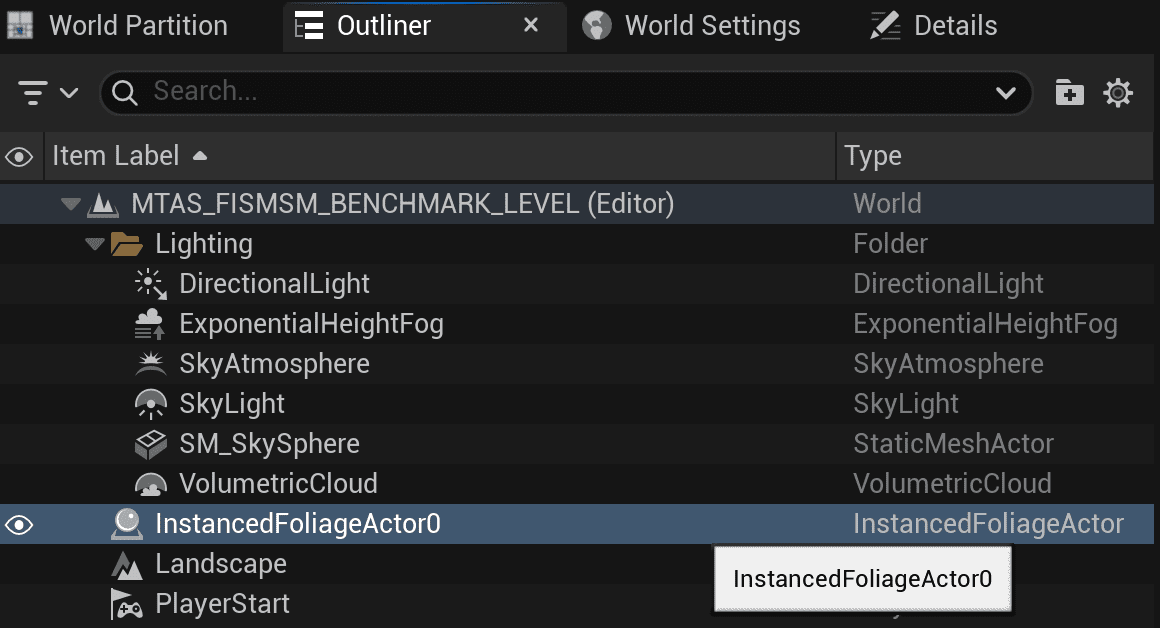
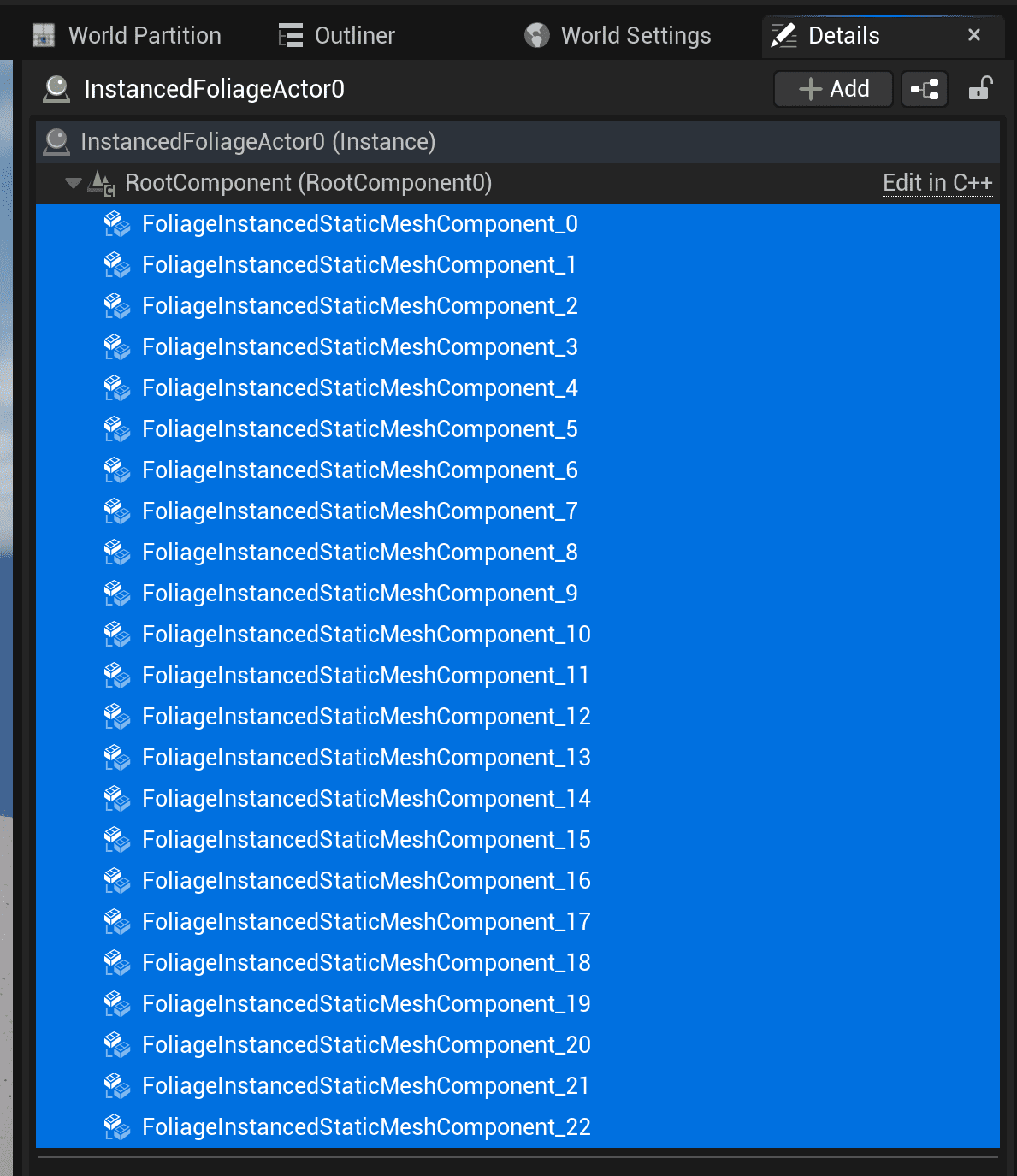
Set the Collision Settings object type to MeshToActor_Swap and confirm the object responses. The important setting is that MeshToActor_Swap Object Response is Overlap.

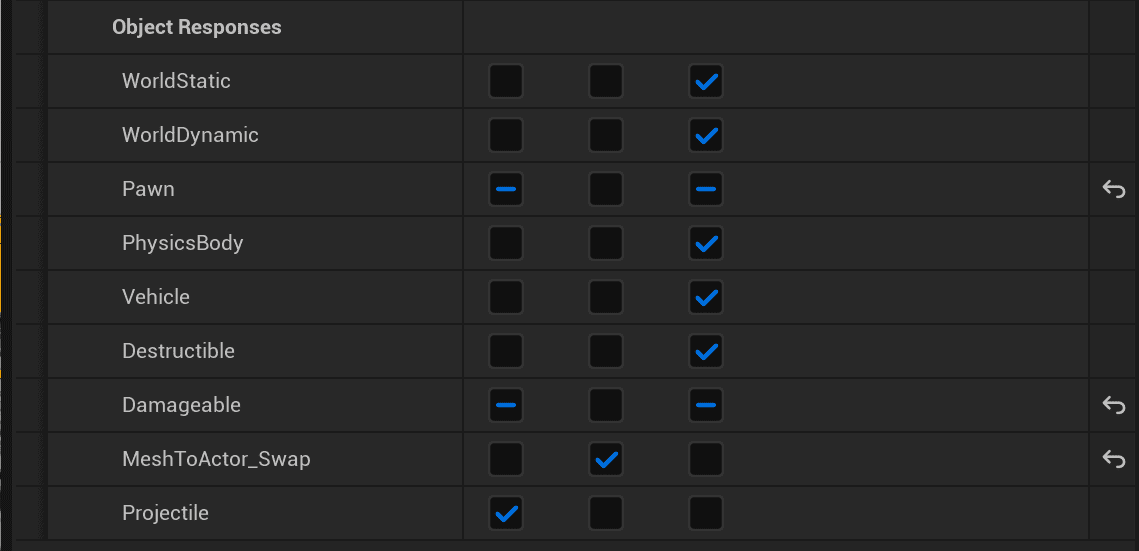
The example contains a mixture of overlap-swapped and hit-swapped objects, which is why the Damageable object response differs across entries.
PCG Graph Spawning
When using a PCG Static Mesh Spawner, configure collision data for each mesh entry in the array.
- For Swap On Hit, set Generate Overlap Events to False and set the Damageable object response to Block.
- For Swap On Overlap, use the overlap setup shown in the screenshots.
- Set Collision Preset to Custom.
- Set Collision Enabled to an appropriate Query option.
- Set Object Type to MeshToActor_Swap.
- Set the MeshToActor_Swap response to Overlap.
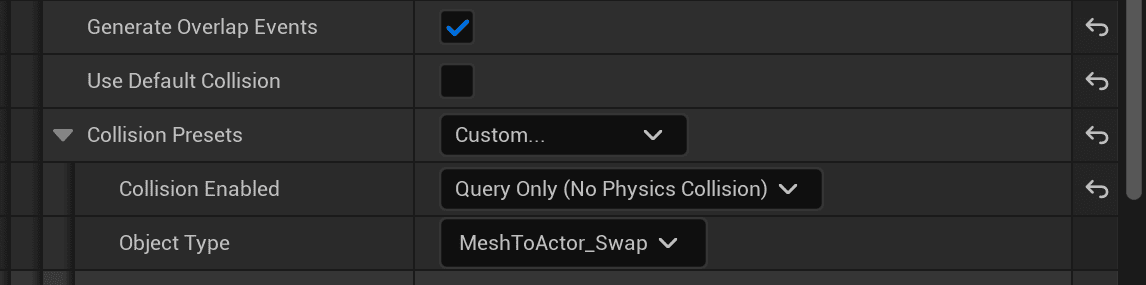
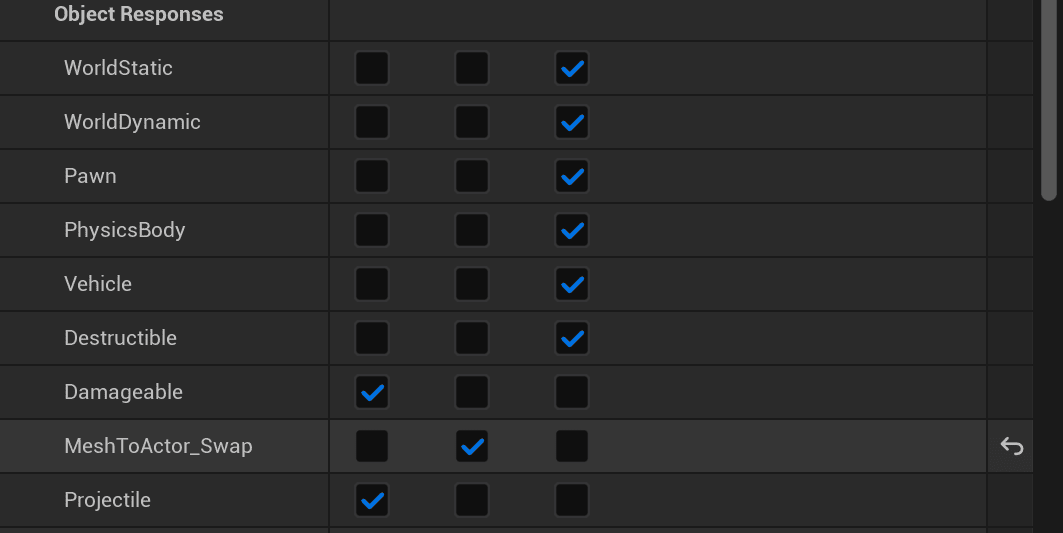
Direct World Placement
For static meshes placed manually in the world, configure the placed mesh instance directly.
- Set Generate Overlaps to True for Swap On Overlap, or False for Swap On Hit.
- Set Collision Preset to Custom.
- Set Collision Enabled to a suitable Query type.
- Set Object Type to MeshToActor_Swap.
- Set the MeshToActor_Swap object response to Overlap.
Performance Measuring
The provided performance example was measured in Play In Editor, which is a poor-case performance environment. The test level used a 1K x 1K landscape with a little over 150K visible meshes configured for actor swapping, running at approximately 70 FPS on an Intel 12900KS, Nvidia 4080 Super TI 16GB, and 128GB RAM.
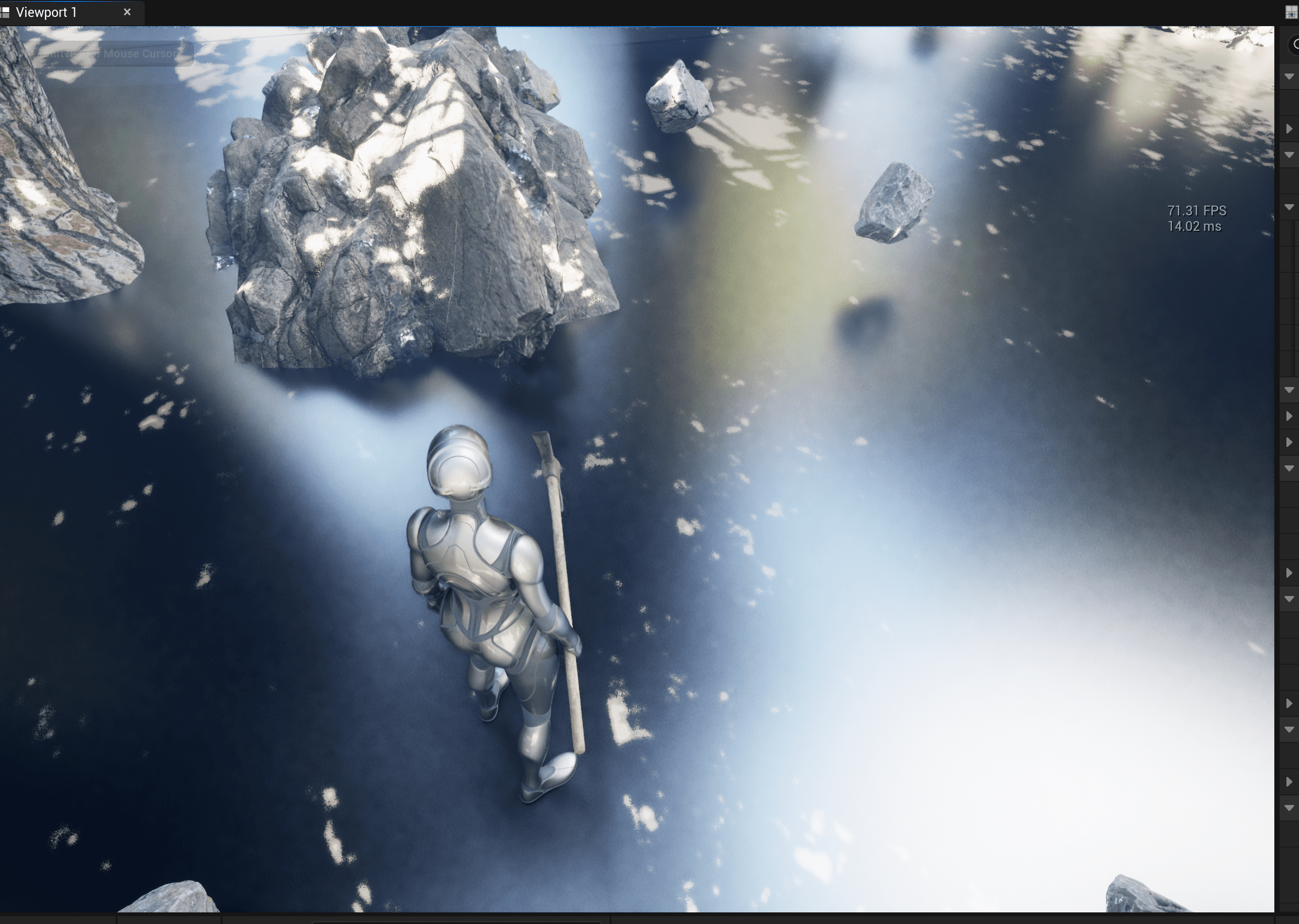
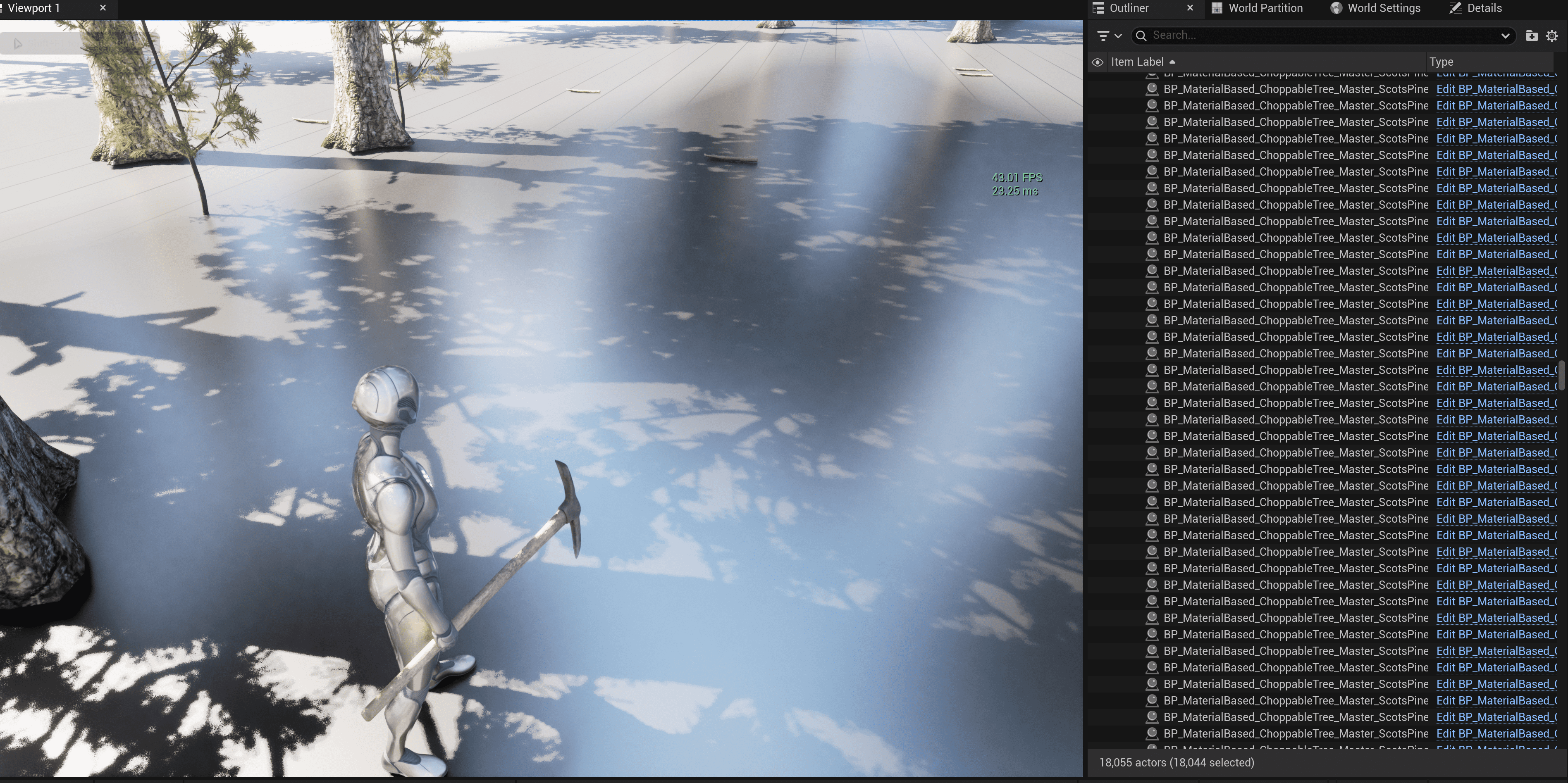
Compared with actors instead of meshes, the difference is significant. In the same dev environment, 70K actors reduced performance to approximately 8 seconds per frame, while 18K actors generated through a PCG graph produced similar FPS to 150K swappable static meshes.
F_Swappable_Mesh
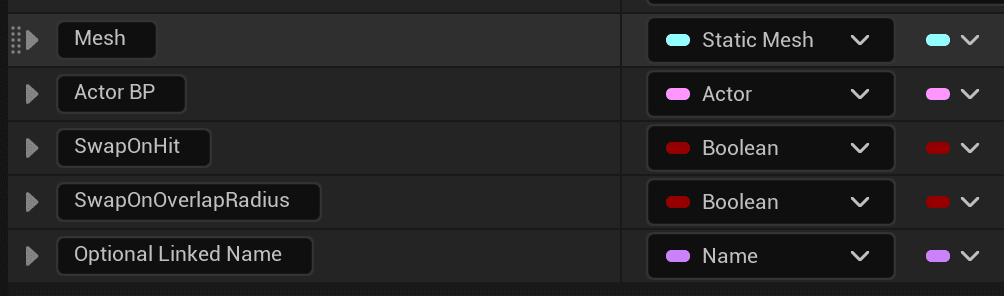
| Field | Description |
|---|---|
| Mesh | Static mesh used to determine which mesh can be swapped. It should use the MeshToActor_Swap object type when added to the level through foliage paint, direct placement, PCG, custom runtime placement, or another supported method. |
| Actor_BP | Actor Blueprint spawned when the mesh is swapped into an actor. |
| SwapOnHit | If true, the mesh only swaps after being hit through the OnTakeDamage event. |
| SwapOnOverlapRadius | If true, the mesh swaps when it is inside the overlap radius sphere created on the player character by the system. |
| Optional_Linked_Name | Primarily used when reading from the Items Data Table. It links a swappable mesh to a specific data table row name and can be used by custom code for actor preset data. One example is Spawn_Pickup_Item. |
Graphs and Events
| Graph / Event | Purpose |
|---|---|
| Store Mesh To Actor Swappable Data | Creates and stores swappable data during initialization. |
| Overlap Sphere Initialization And Bind | Creates the player overlap sphere and binds overlap behavior for nearby swaps. |
| Forcing An Update Overlap On Begin Play | Sets up overlap detection on begin play. |
| Multi Remove Instance | Removes individual instances from instancing components such as ISM, FISM, HISM, painted foliage, PCG-generated instances, or custom runtime-generated instances. |
| OnComponentBeginOverlap_Event | Checks overlap events with the player and activates swapping when appropriate. |
| Multicast_Multi: Remove Instance | Removes individual instances and manages removed-instance data. |
| Begin Play | Configures and initializes the overall system. |
| Event Server: Try Swap Mesh To Actor | Attempts to swap a static mesh into an actor on the server. |
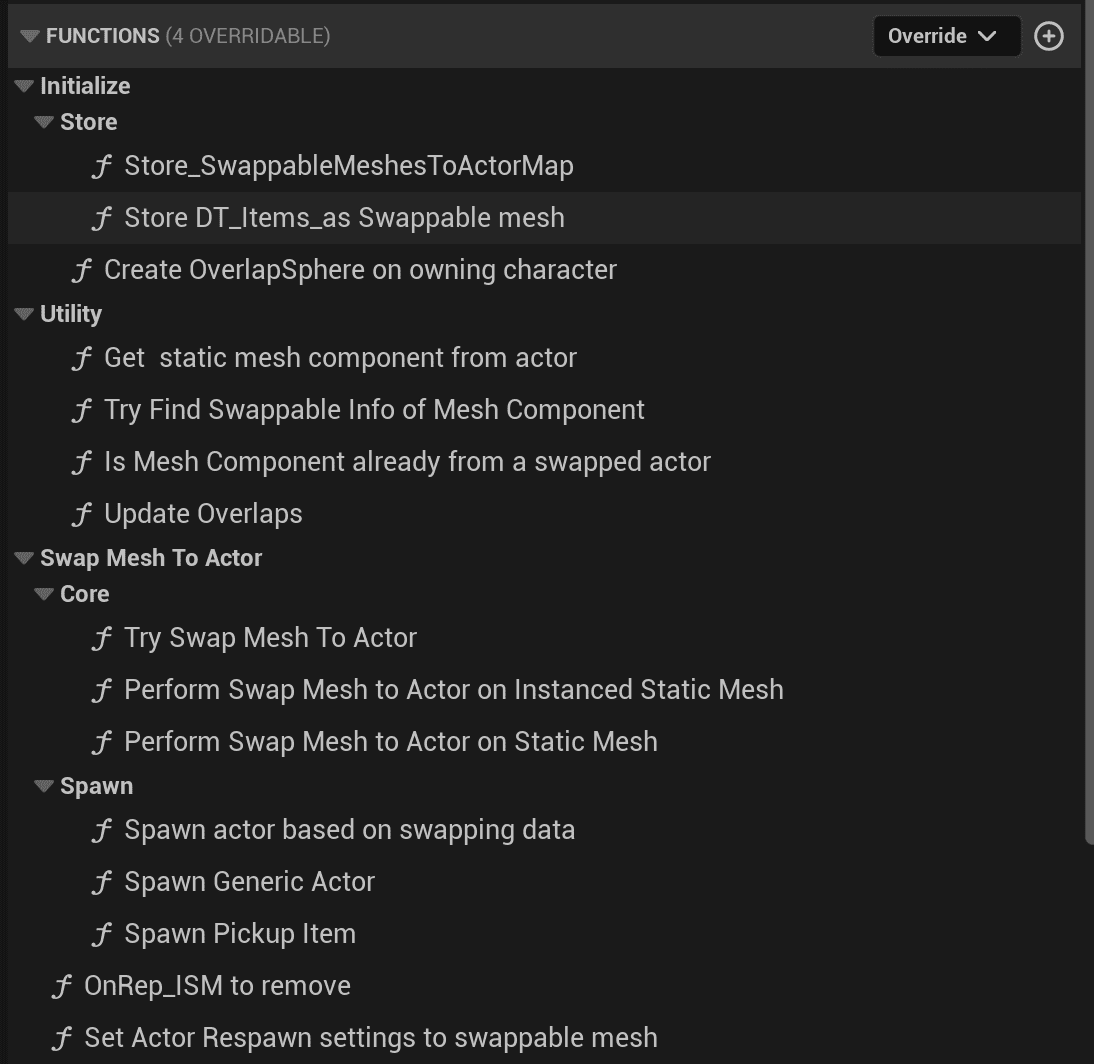
Function Categories
| Category | Purpose |
|---|---|
| Initialization | Initializes component data. |
| Store | Reads data tables and caches swapping data. |
| Utility | Support functions used by other functions and events. |
| Swap Mesh To Actor | Performs mesh-to-actor swapping. |
| Core | Core swap actions for different mesh types. |
| Spawn | Spawns actors based on swapping data. |
Two additional functions handle replication and setting respawn settings on swapped actors.
Function Reference
| Function | Category | Description |
|---|---|---|
| Store_SwappableMeshesToActorMap | Store | Reads DT_MeshToActorSwap and stores its contents in StaticMeshName_to_SwappableDataInfo. |
| Store_DT_Items_as Swappable mesh | Store | Reads DT_Items and stores the required data in StaticMeshName_to_SwappableDataInfo. |
| Create OverlapSphere on owning character | Store | Creates an OverlapSphere collision sphere component on the owning character and links it to the Overlap_Sphere variable. |
| Get static mesh component from actor | Utility | Requires an Actor Object Reference. Returns true and the Static Mesh Component when successful; otherwise false. |
| Try Find Swappable info of Mesh Component | Utility | Requires a Static Mesh Component Object Reference. Returns Swappable_Swappable_Mesh and true if a swappable mesh is found; otherwise false. |
| Is Mesh Component already from a swapped actor | Utility | Requires a Static Mesh Component Object Reference. Returns true when the mesh component belongs to an actor that was already swapped from a mesh. |
| Update Overlaps | Utility | Forces an update of the overlap sphere. |
| Try Swap Mesh To Actor | Core | Requires a Static Mesh Component Object Reference, a hit index integer, and a bool indicating whether the swap is hit-driven. Returns true and the actor reference when successful. |
| Perform Swap Mesh to Actor on instanced Static Mesh | Core | Requires an Instanced Static Mesh Component, instance index, and swapping data. Performs the swap for ISM, FISM, HISM, and similar components. |
| Perform Swap Mesh to Actor on Static Mesh | Core | Requires a Static Mesh Component and swapping data. Performs the swap for direct or runtime-placed static mesh components. |
| Spawn actor based on swapping data | Spawn | Requires F_Swappable_Mesh and a Transform. Spawns the actor stored in the swappable mesh data. |
| Spawn Generic Actor | Spawn | Requires an Actor Class and Transform. Returns the spawned Actor Object reference. |
| Spawn Pickup Item | Spawn | Requires an Actor Class, Transform, and F_Swappable_Mesh. Spawns BP_Pickup_Item for inventory items in DT_Items. |
| Set Actor Respawn settings to swappable mesh | Swap Mesh To Actor | Requires an Actor Object Reference and a bool indicating whether it swaps on hit. Configures respawn settings so the actor can respawn as a static mesh if it is not interacted with. The actor must have a child of AC_GM_Respawn_Abstract, otherwise respawn settings are skipped. |
BP_ISM_Proxy_Manager
Drag BP_ISM_Proxy_Manager into the scene when the level uses ISM instances with the Mesh To Actor Swap System. It manages removing ISM instances, adding them back, and handling replication for multiplayer games.
Performance Tips
For higher mesh density, tune the mesh-spawning settings in Foliage Paint and PCG Static Mesh Spawner setups. Useful areas include cull distance, shadow casting, virtual shadow map cache invalidation, and lighting settings.
The source document notes that an 8K x 8K single-level map without world partition can run with more than 2 million swappable meshes at 80 FPS or higher when those surrounding Unreal Engine settings are configured appropriately.