
Respawn Actor Manager
Updated May 25, 2026
Important: Read the Inventory documentation first so the container and pickup item flow is clear before working with respawning pickup actors.
Overview
The Respawn Actor Manager handles actors that should return after they are destroyed, collected, depleted, or left inactive. It is mainly used for resource nodes, harvestable objects, foliage, collectible pickups, and other world actors that need a controlled regeneration cycle.
For shared setup guidance, see the Migration Guide and Integration Guide. Use the System Atlas to look up functions, variables, events, components, and ownership references. Use this page for Respawn Actor Manager-specific setup, runtime behavior, extension points, and integration notes.
The system supports:
- Automatic respawn after destruction or inactivity.
- Actor respawning and static mesh respawning.
- Instanced Static Mesh integration for large numbers of similar objects.
- Configurable respawn timers and randomized respawn radius.
- A component-based workflow that can be added to any actor.
- A separate placeholder actor that manages delayed respawn timing.
Note: Loot chests and containers that respawn with items are handled by the Item Allocator system, not by the Respawn Actor Manager.
Component Hierarchy
The respawn system is built from a small component hierarchy. Each child adds behavior while keeping the base respawn flow reusable.
AC_Respawn_Actor_Abstract
AC_Respawn_Actor_Abstract defines the core interface and shared settings used by all respawn components.
- Does Respawn: Controls whether the owner should respawn at all.
- Respawn as Static Mesh: Uses a static mesh respawn instead of spawning a full actor.
- Respawn with Overlap Activation: Controls whether the respawned actor can be interacted with immediately.
- Start Inactivity Timer on Begin Play: Starts the inactivity timer when the actor spawns.
- Start Inactivity Timer: Event exposed so child components and external systems can trigger the respawn countdown.
The abstract component does not implement the full respawn logic. It keeps common variables and events in one place so child components can share a consistent respawn interface.
AC_Respawn_Actor_Base
AC_Respawn_Actor_Base implements the main respawn process: initialize settings, listen for destruction, spawn the placeholder, and recreate the actor or mesh after the timer completes.
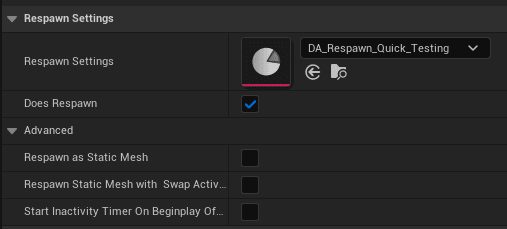
Core behavior includes:
- BeginPlay: Binds to the owner actor’s OnDestroyed event, initializes respawn settings, and starts the inactivity timer when configured.
- OnDestroyed: Runs when the owner actor is destroyed and triggers the placeholder-based respawn flow.
- Try Respawn Actor: Spawns a respawn placeholder at the current location and passes the relevant respawn settings to it.
- Start Inactivity Timer: Starts a countdown and calls Try Respawn Actor when the timer expires.
- On Damage: Can restart the inactivity timer so an actor does not respawn while it is being actively used.

AC_RespawnActor_PickUpItem
AC_RespawnActor_PickUpItem extends the base component for pickup actors that contain inventory item data. Pickup respawn needs this specialization because the respawned pickup must keep the correct item, quantity, durability, and related inventory data.
The component overrides SpawnRespawnActor to get the item data from the owner, pass it to the respawn placeholder, and ensure the new pickup is created with the same item data as the original.
This keeps the base component generic while isolating pickup-specific behavior in a child component. Other actor types can use AC_Respawn_Actor_Base directly, and additional respawn variants can override only the behavior they need.
Example pickup flow:
- The player picks up an apple.
- The apple pickup actor is destroyed.
- AC_RespawnActor_PickUpItem receives the destruction event.
- Try Respawn Actor creates a respawn placeholder with the apple’s item data.
- After the respawn timer expires, a new apple pickup is spawned.
- The new pickup uses the same item data as the original.
Placeholder-Based Respawning
The system does not directly recreate the actor from the destroyed actor itself. Instead, the respawn component spawns a placeholder actor that owns the delayed respawn process.
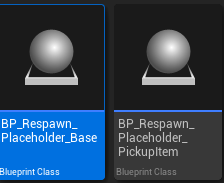
The placeholder:
- Stores the respawn timer.
- Stores what needs to respawn and where it should appear.
- Waits for the configured delay.
- Spawns the new actor, static mesh actor, or instanced mesh entry.
- Destroys itself after the respawn is complete.
This separation keeps the original actor lifecycle clean. The original actor can be destroyed and garbage collected while the placeholder remains as a lightweight record of the pending respawn.
Typical placeholder lifecycle:
- The original actor is destroyed or becomes inactive.
- The respawn component spawns a placeholder at the actor’s location.
- The placeholder stores respawn data and starts its timer.
- When the timer completes, the placeholder spawns the replacement actor or mesh.
- The placeholder destroys itself.
The placeholder receives a settings struct with the actor class, transform, static mesh settings, Instanced Static Mesh reference when applicable, pickup item data for pickups, and any custom respawn data used by the component.
System Architecture

The architecture separates the owner actor, respawn component, and placeholder actor so respawn timing does not depend on keeping the destroyed actor alive. Components decide when respawn should begin; placeholders manage the delayed spawn; the replacement actor starts as a fresh instance or mesh entry.
Inactivity Timer
The inactivity timer respawns an actor after a period without interaction. This is useful for resources or temporary objects that should reset after being ignored instead of only after being destroyed.
- The actor spawns or takes damage.
- The component starts or resets the inactivity timer.
- If the timer reaches zero without another reset, the component triggers respawn.
- If the actor is destroyed first, the destruction-based respawn flow handles it instead.

Common uses include:
- Resource nodes: A tree that has not been damaged for several minutes restores or respawns.
- Loot containers: A chest that has not been opened for a configured time refills or resets.
- Temporary objects: A dropped item that is not picked up despawns and returns to its original location.
Relevant configuration:
- Inactivity Time: How long to wait before triggering respawn.
- Reset Timer on Damage: Whether taking damage restarts the timer.
- Start on BeginPlay: Whether timing starts immediately when the actor spawns.
The timer can also be reset by interaction events, custom gameplay events, or any event that indicates the actor is still being used.
Static Mesh Respawning
Static mesh respawning is a lighter alternative to spawning full actors. Use it when the respawned object only needs visual presence or when large numbers of identical objects need to return efficiently.
Instanced Static Mesh Support
For large sets of identical resources, the component can work with an Instanced Static Mesh setup instead of spawning individual actors.
- Place an Instanced Static Mesh Component in the level.
- Add instances for the repeated mesh, such as rocks, trees, or plants.
- Link each harvested instance to respawn data.
- When an instance is removed, the respawn component tracks it.
- After the respawn time, the placeholder adds the instance back at the correct location.
This approach reduces actor spawn overhead and keeps draw-call and memory cost lower for dense resource fields.
Static Mesh Actor Spawning
If the object should respawn as a static mesh but is not using an Instanced Static Mesh Component, the system can spawn a lightweight static mesh actor.

- The respawn component is configured with Respawn as Static Mesh.
- On respawn, the system spawns a static mesh actor instead of the original actor class.
- The mesh comes from the original actor’s static mesh component unless an override mesh is set.
- The result keeps the visual object in the world without the full blueprint and component cost.
Use this for objects that do not need full actor logic after respawn, visual placeholders that later become interactive again, or large sets of simple resource objects.
Regular Actor Respawning
Regular actor respawning creates a full new instance of the actor class. Use this when the replacement needs interaction, animation, inventory data, component logic, or other full actor behavior.
- By default, the component uses the owner actor’s class.
- For pickups, the pickup-specific component uses the pickup class with the preserved inventory item data.
- Custom respawn components can override the actor class or configure the spawned actor differently.
This is the most flexible respawn method, but it is heavier than static mesh respawning.
Respawn Settings
Configure these settings on the respawn component according to how the actor should return.
- Does Respawn: Enables or disables respawning. Quest items may be permanent; resources usually respawn.
- Respawn Time: Time in seconds before respawn occurs. Short timers fit common resources; longer timers fit rare or special resources.
- Respawn in Radius: If greater than 0, respawns at a random location within the radius of the original position.
- Requires Navigation Mesh: Radius-based respawn uses the navmesh to find valid locations. Without navmesh support, the actor returns to the original location.
- Respawn as Static Mesh: Uses a lightweight static mesh respawn instead of a full actor respawn.
- Override Respawn Static Mesh: Uses a specific mesh for static mesh respawn instead of the actor’s existing static mesh component.
Actor Respawn vs Static Mesh Respawn
Choose the respawn type based on how much behavior the returned object needs.
| Use actor respawn when | Use static mesh respawn when |
|---|---|
|
|
| Named chests, quest objects, unique interactables, pickups with special effects. | Common resource nodes, harvestable foliage, large collectible fields, simple destructible decoration. |
A hybrid setup can use full actors for active interaction, then respawn as static meshes while idle, and convert back to full actors when the player interacts again.
Set Up a Respawning Resource
- Create or open the resource actor blueprint, such as a tree, rock, or plant.
- Add the AC_Respawn_Actor_Base component from the Components panel.
- Enable Does Respawn.
- Set Respawn Time, for example 300 seconds for a five-minute respawn.
- Choose whether the object should respawn as a full actor or as a static mesh.
- Set Respawn in Radius to 0 for the same position, or use a small radius for variation.
- When the resource is depleted, call Destroy Actor on the resource actor. The respawn component triggers from the destruction event.
- Place the resource in the level, harvest it, wait for the respawn time, and verify that the resource returns and can be harvested again.
For resources that should reset after being left alone, enable the inactivity timer settings and reset the timer when the actor takes damage or is used.
Custom Respawn Behavior
Create a child component from AC_Respawn_Actor_Base when a system needs special respawn rules.
- Create a child Blueprint class, such as AC_RespawnActor_Custom.
- Override Spawn Respawn Actor.
- Add the custom behavior needed for the actor type.
- Add configuration variables to the custom component, such as alternate actor classes, condition requirements, variation chance, or modified property values.
- Use the custom component on the actor instead of AC_Respawn_Actor_Base.
- Test the custom behavior in the level.
Examples of custom behavior already supported by this extension pattern include respawning with modified properties, selecting a different actor class, checking game conditions before respawn, seasonal variations, difficulty-based values, random variations, or degradation over repeated respawns.