
Score Manager
Updated May 23, 2026
The Score Manager is the central scoring system for multiplayer sessions. It tracks player stats, calculates final game score from multipliers, stores team scores, supports win-based and aggregate scoring, shows score popups, and exposes events for scoreboards and game modes.
Player Manager is required. Set up Player Manager first. Score Manager binds to Player Manager kill, death, join, and leave events. For shared setup guidance, see the Migration Guide and Integration Guide. Use the System Atlas to look up functions, variables, events, components, and ownership references.
Related Video
Some videos may have been recorded before V4. The same principles still apply, but asset names, component names, and folder locations may differ. Use this written page and the current V4 names as the source of truth.
Player Manager for Team Games Devlog Play
System Role
Score Manager provides one source of truth for player and team scores.
- Creates a score entry when a player joins.
- Tracks kills, deaths, assists, objectives, and custom score tags.
- Calculates Final Game Score from raw stat counts and multipliers.
- Tracks team scores for team modes.
- Supports Win-Based and Aggregate scoring.
- Broadcasts score change events for UI, scoreboards, and game mode win checks.
- Shows client-side score popups through AC_PC_Score.
Recommended GameState component order from the source document:
- AC_SessionManager
- AC_GS_TeamManager if using team scores
- AC_GS_ScoreManager
- AC_PlayerManager
Core Components
AC_GS_ScoreManager
AC_GS_ScoreManager lives on the GameState and owns server-authoritative score state. It tracks player score arrays, team score arrays, score multipliers, winning score, automatic Player Manager events, and manual scoring calls.
| Responsibility | Details |
|---|---|
| Player scores | Tracks kills, deaths, assists, objectives, and custom score tags per player. |
| Team scores | Stores team scores in an integer array matching Team Manager team indexes. |
| Final Game Score | Calculates point totals from raw score counts and multipliers. |
| Automatic tracking | Binds to Player Manager kill/death events and creates score entries when players join. |
| Manual scoring | Supports adding score to players or teams from game mode logic. |
| Events | Broadcasts OnPlayerScoreChanged, OnTeamScoreChanged, and OnWinningScoreChanged. |
AC_PC_Score
AC_PC_Score lives on the PlayerController and handles per-player score popups. It displays changes in Final Game Score, such as +100, -10, or +200, on the local player’s screen.
Score Data Structures
F_PlayerScore
F_PlayerScore stores one player’s score state.
| Field | Purpose |
|---|---|
| Player Name | Name from PlayerState/GetPlayerName. |
| Scores | Array of F_Single_Score entries. |
| Game Score | Calculated final game score. |
F_Single_Score
F_Single_Score stores one raw score stat.
| Field | Example | Meaning |
|---|---|---|
| Tag | Score.Kills | Gameplay tag identifying the stat. |
| Value | 10 | Raw count, not final points. |
Standard score tags include Score.Kills, Score.Deaths, Score.Assists, Score.Objectives, Score.Headshots, Score.DamageDealt, Score.Revives, and Score.ObjectivesCaptured.
Team Scores
Team scores are stored in an integer array. The index matches the Team Manager team index.
- TeamScores[0]: Team A score.
- TeamScores[1]: Team B score.
- TeamScores[2]: Team C score.
If Team Manager deletes a team, Score Manager removes the matching team score index.
Score Multipliers
Score multipliers convert raw score counts into Final Game Score points.
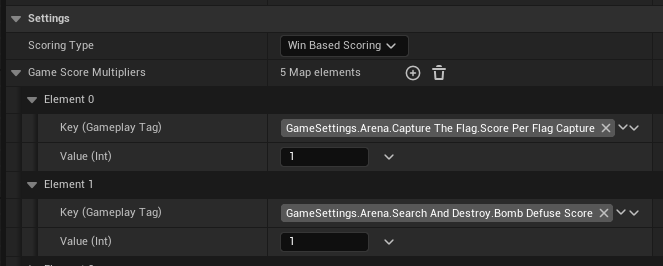
Multiplier sources:
- Game settings from DA_GameMode_Defaults are the primary source.
- Predefined multipliers are fallback values.
- Manual override can be used for special modes.
Example multipliers: Score.Kills = 100, Score.Deaths = -10, Score.Assists = 50, Score.Objectives = 200.
Example calculation:
Final Game Score = (Kills * Kill Multiplier) + (Deaths * Death Multiplier) + (Assists * Assist Multiplier)For 15 kills, 8 deaths, and 5 assists with multipliers 100, -10, and 50, the score is 1670.
Scoring Types
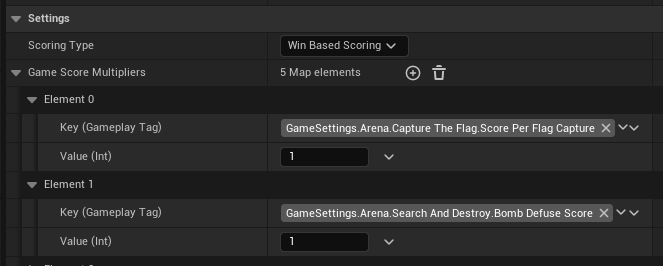
| Type | Use for | Behavior |
|---|---|---|
| Win-Based Scoring | Domination, Search and Destroy, Capture the Flag, objective modes. | Game Mode manually adds points to teams. Individual stats can still display on the scoreboard. |
| Aggregate Scoring | Team Deathmatch, Free for All, score-from-player-stats modes. | Team score is calculated from the sum of player Final Game Scores. |
Scoring type can be configured through game settings, manual configuration, or Session Manager settings, with game settings recommended where available.
Score Tracking
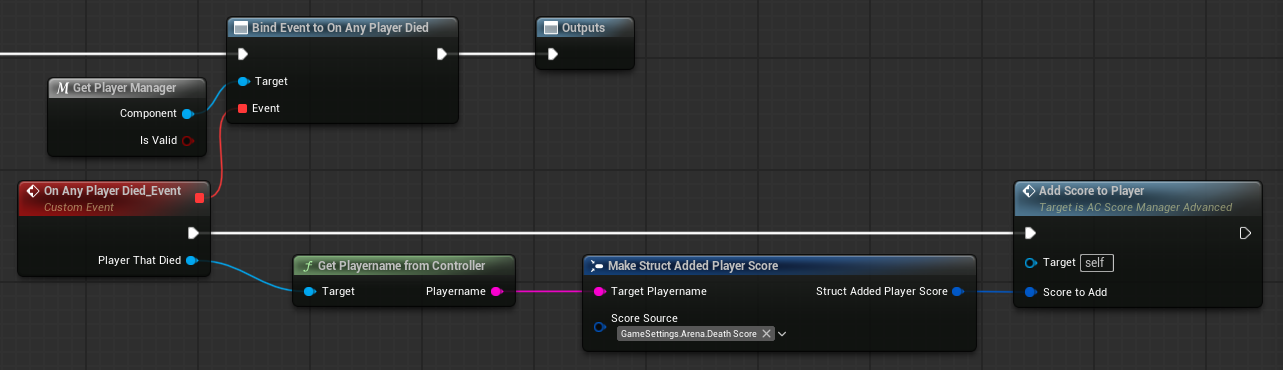
Score Manager binds to Player Manager events:
- OnPlayerJoined: create a new F_PlayerScore entry and initialize scores to 0.
- OnPlayerKilledPlayer: increment Score.Kills, recalculate Final Game Score, update aggregate team score if needed, broadcast score events, and show popup.
- OnPlayerDied: increment Score.Deaths, recalculate Final Game Score, update aggregate team score if needed, broadcast score events, and show popup.
Assist tracking is marked in the source as dependent on assist system support.
Adding Scores
Add Score to Player
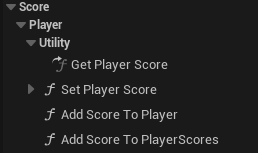
Use player scoring when an action belongs to a specific player, such as kills, assists, objectives, revives, or custom score tags.
- Find the player’s score entry.
- Find or create the matching score tag.
- Increment the raw score value.
- Recalculate Final Game Score.
- Update aggregate team score if aggregate scoring is active.
- Broadcast OnPlayerScoreChanged.
Add Score to Team
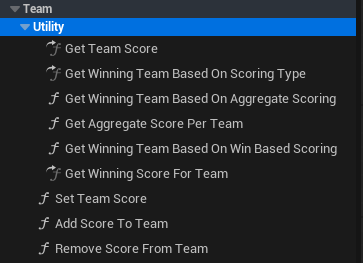
Use team scoring for win-based modes where the game mode directly awards team points, such as control point captures, flag captures, or Search and Destroy round outcomes.
- Get the team index.
- Add the score amount to TeamScores[TeamIndex].
- Update the winning score if needed.
- Broadcast OnTeamScoreChanged and OnWinningScoreChanged when relevant.
Final Game Score and Team Score
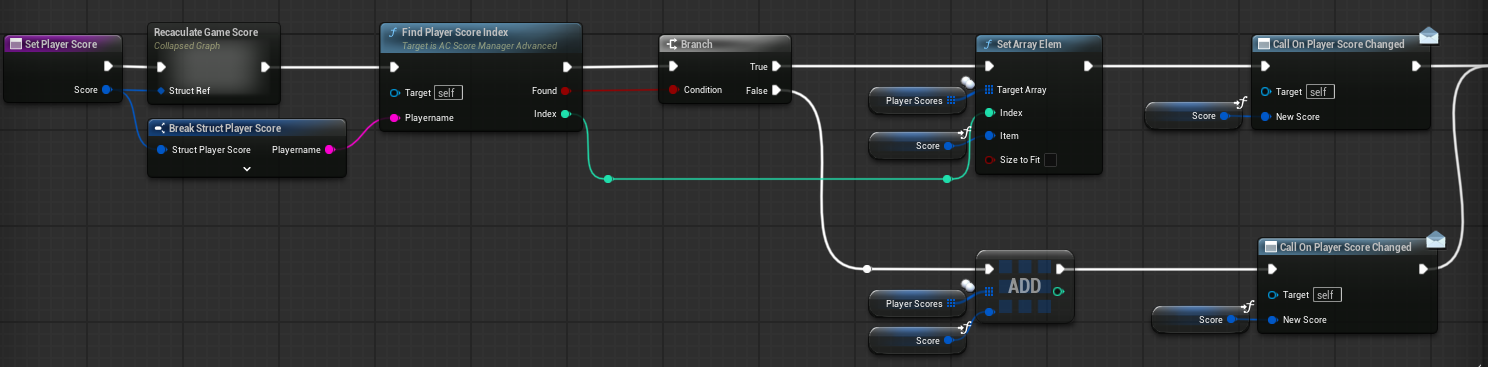
Final Game Score is calculated from each F_Single_Score value multiplied by its configured score multiplier. The score is recalculated whenever the player’s raw scores change.
For team scores:
- Win-Based: Team score changes only when game mode logic calls team scoring functions.
- Aggregate: Team score is recalculated from all team members’ Final Game Scores.
Winning Score tracks the current highest team or player score, depending on the scoring mode and game mode needs.
Reset Behavior
Scores reset between games. In round-based games, score behavior depends on the game mode implementation. Some modes reset scores per round, while others accumulate across rounds and track round wins separately.
Events and Utility Functions
| Event or function | Use |
|---|---|
| OnPlayerScoreChanged | Update player score UI, popups, scoreboard rows, and player-specific displays. |
| OnTeamScoreChanged | Update team scoreboard and let game modes check win conditions. |
| OnWinningScoreChanged | Notify UI or game mode logic that the current leader changed. |
| GetAllPlayerScores | Return player score data for UI or gameplay queries. |
| FindPlayerScoreIndex | Find a player’s score entry. |
| FindScoreInScoreArray | Find a score tag entry inside a player’s scores. |
Integration Notes
- Player Manager: required for player join, kill, and death events.
- Team Manager: provides team structure, team indexes, and member lists for team scores.
- Game Mode System: uses player/team scores for win conditions and decides whether to use win-based or aggregate scoring.
- Session Manager: can provide game settings and scoring type configuration.
- Scoreboard: reads player scores, team scores, winning score, and score-change events.
Workflows
Set Up Score Manager
- Set up Player Manager first.
- Add AC_GS_ScoreManager to the GameState above AC_PlayerManager.
- Add AC_PC_Score to the PlayerController for popups.
- Add AC_GS_TeamManager if team scoring is used.
- Configure scoring type and score multipliers.
- Test player join, kill, death, manual scoring, team score updates, and UI events.
Add Custom Score Tags
- Create gameplay tags such as Score.Headshots, Score.DamageDealt, Score.Revives, or Score.ObjectivesCaptured.
- Add matching multipliers through game settings or fallback configuration.
- Call player scoring from the relevant gameplay system.
- Verify Final Game Score and scoreboard output.
Implement Score UI
- Create a score widget such as BP_ScoreDisplay.
- Bind to OnPlayerScoreChanged, OnTeamScoreChanged, and OnWinningScoreChanged.
- Read player scores through utility functions.
- Display raw stats, Final Game Score, team scores, and current leader.
Summary
AC_GS_ScoreManager owns server-side scoring. AC_PC_Score handles local score popups. Player Manager provides the events that drive automatic score tracking, Team Manager provides team structure for team scores, and Game Mode System uses score changes to determine winners.