
Team Affiliation
Updated May 25, 2026
The Team Affiliation System is a gameplay-tag-based relationship system. It checks whether two actors share at least one affiliation tag, then lets damage, AI, vendors, quests, access control, or team logic decide what to do with that relationship.
Use this page for tag setup, component placement, affiliation checks, and common gameplay integrations. For shared setup guidance, see the Migration Guide and Integration Guide. Use the System Atlas to look up functions, variables, events, components, and ownership references.
Related Video
Some videos may have been recorded before V4. The same principles still apply, but asset names, component names, and folder locations may differ. Use this written page and the current V4 names as the source of truth.
Player Manager for Team Games Devlog Play
Core Concept
Two actors are affiliated when their gameplay tag containers share at least one affiliation tag.
| Actor A | Actor B | Result |
|---|---|---|
| Team.Chaos | Team.Chaos | Affiliated. |
| Team.Chaos | Team.Order | Not affiliated. |
| Team.BlueTeam, Faction.Merchant | Faction.Merchant | Affiliated because both actors share Faction.Merchant. |
This makes the system more flexible than a single hardcoded team ID. A character can belong to a team, faction, guild, clan, or temporary disguise group at the same time.
Gameplay Tag Setup
The system uses Gameplay Tag Components to store affiliation tags.
Team
  Team.BlueTeam
  Team.RedTeam
  Team.GreenTeam
  Team.Chaos
  Team.Order
Faction
  Faction.Empire
  Faction.Rebels
  Faction.Merchants
  Faction.Neutral
Guild
  Guild.Warriors
  Guild.Mages
  Guild.Thieves
Use a clear hierarchy for team, faction, guild, and custom relationship tags. Tags are designer-friendly, extensible, and can be replicated through the Gameplay Tag Component.

Component Placement
| Where | Use when | Examples |
|---|---|---|
| Player Controller | The affiliation should persist through death, respawn, save/load, or level transition. | Multiplayer team assignment, persistent faction membership, saved player allegiance. |
| Character | The affiliation belongs to the spawned character or should reset on death. | AI/NPC faction, temporary disguise, testing, single-player affiliations without persistence. |
| Any actor | The actor needs to participate in affiliation checks. | Vendors, doors, quest givers, restricted areas, objective actors. |
AI and NPCs
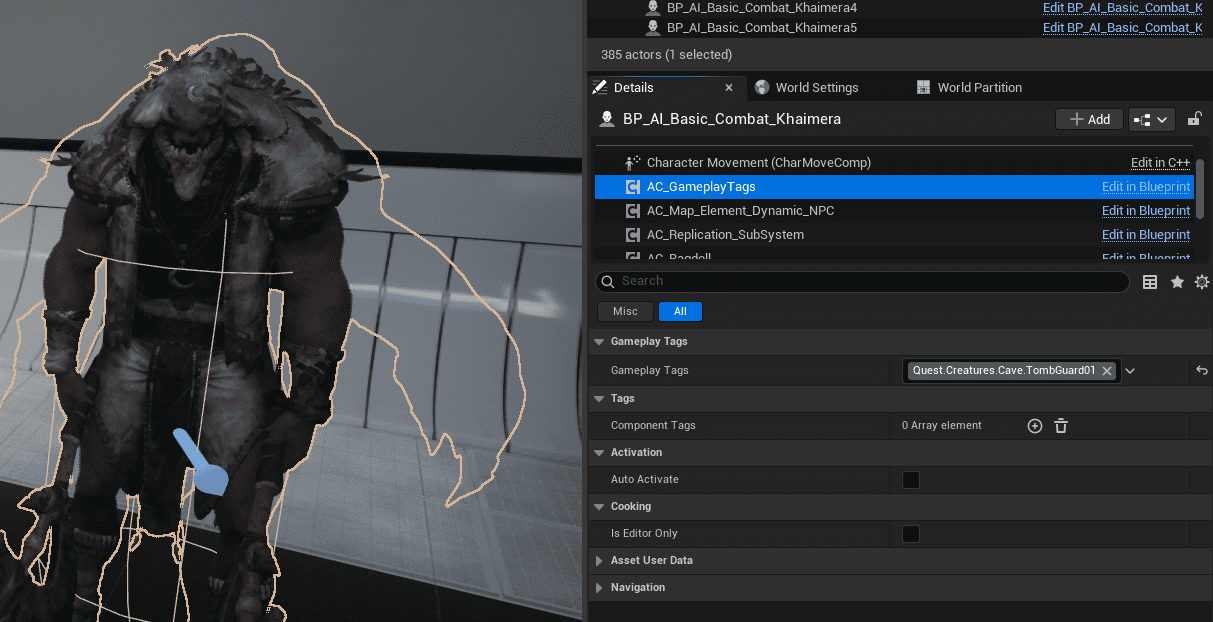
For static AI/NPC affiliations, add a Gameplay Tag Component to the character Blueprint and assign tags in the component details.
- BP_Enemy_Chaos: Team.Chaos
- BP_Enemy_Order: Team.Order
Chaos enemies are affiliated with other Chaos enemies, but not with Order enemies.
Players
For multiplayer teams or persistent factions, store tags on BP_PlayerController. For temporary character-specific behavior, store tags on BP_PlayerCharacter.
- When a player joins Team Blue, add Team.BlueTeam.
- When the player switches to Team Red, remove Team.BlueTeam and add Team.RedTeam.
- For a disguise mechanic, add a temporary character tag such as Faction.Enemy; remove it when the disguise ends or the character dies.
Checking Affiliation
The core check is Is Affiliated.
- Get the Gameplay Tag Component from Actor A.
- Get the Gameplay Tag Component from Actor B.
- Compare their tag containers.
- If any tag matches, return true.
- If no tags match, return false.
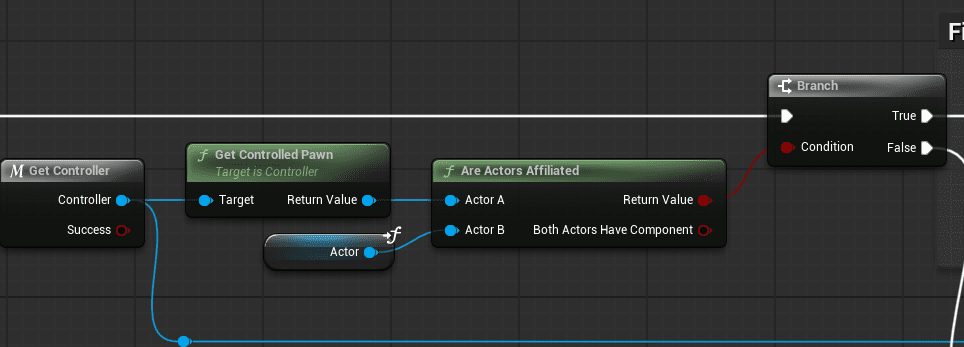
Example damage flow:
- An attacker hits a target.
- The damage system calls Is Affiliated(Attacker, Target).
- If true, block friendly fire or apply reduced damage.
- If false, apply full damage.
Common Uses
| Use case | How affiliation is used |
|---|---|
| Friendly fire prevention | Check attacker and victim before applying damage. |
| AI target selection | Ignore affiliated actors and target non-affiliated actors. |
| Vendor discounts | Apply faction pricing when the player is affiliated with the vendor. |
| Quest access | Show faction quests or deny access based on player/quest-giver affiliation. |
| Door or area access | Allow entry only when the player matches the required faction/team tag. |
| Multiplayer coordination | Support clans, parties, raid groups, PvP teams, or alliances. |
The affiliation system only provides the relationship check. Damage, AI, vendor, quest, or access-control systems implement the actual behavior.
Example Implementations
Call of Duty-Style Teams
- Create Team.BlueTeam and Team.RedTeam.
- Assign a team tag to each player’s Player Controller when they join.
- Use Is Affiliated in damage logic for friendly fire behavior.
- Configure spawn points and team UI using the same team tags.
- When switching teams, remove the old tag, add the new tag, and respawn the player at the new team spawn.
RPG Faction System
- Create faction tags such as Faction.Empire, Faction.Rebels, Faction.Merchants, and guild tags such as Guild.Warriors or Guild.Mages.
- Add static faction tags to NPC character Blueprints.
- Store the player’s current faction tags on BP_PlayerController.
- Add or remove tags when quests, choices, guild joins, or reputation changes happen.
- Use affiliation checks for AI hostility, vendor pricing, quest access, and restricted areas.
Example: completing an Empire quest can add Faction.Empire and remove Faction.Rebels. Joining the Warrior Guild can add Guild.Warriors while keeping the current faction tag.
Workflows
Set Up Faction-Based RPG Tags
- Open Project Settings and go to Gameplay Tags.
- Create the faction and guild tag hierarchy.
- Add a Gameplay Tag Component to NPC Blueprints.
- Assign tags such as Faction.Empire, Faction.Rebels, or Faction.Merchants.
- Add a Gameplay Tag Component to BP_PlayerController.
- Add or remove player faction tags from quests, dialogue, or faction join interactions.
- Use Is Affiliated in vendors, quests, AI, and access systems.
Create Custom Affiliation Logic
Use Is Affiliated as the base relationship check, then layer extra rules on top when needed.
- Reputation benefits: if affiliated, read reputation level and apply benefits based on that value.
- Conditional affiliation: require shared affiliation plus same area, an active event flag, or a time-of-day restriction.
- Temporary disguise: add a temporary faction tag to the character and remove it when the disguise expires.
Summary
Team Affiliation uses gameplay tags to answer one question: do these actors share a relationship tag? Store persistent player affiliations on the Player Controller, temporary or AI affiliations on the character, and use Is Affiliated from damage, AI, vendor, quest, and access-control systems to implement the behavior you need.