
Visual Novel System
Updated May 25, 2026
The Visual Novel System provides a cinematic storytelling framework for dialogue-driven scenes in Unreal Engine. It combines images, audio, text, optional animation, and memory context into structured sequences that can play automatically or wait for player input.
For shared setup guidance, see the Migration Guide and Integration Guide. Use the System Atlas to look up functions, variables, events, components, and ownership references. Use this page for Visual Novel-specific data assets, structs, and trigger setup.
Related setup: Set Up First Narrative.
For projects that mix visual novel scenes with regular NPC conversations, also check the Dialogue System.
Each sequence is defined through data assets. Those assets reference scenes, and each scene contains background images, music, sentences, optional voice/audio, optional animation, and memory context.
Core Features
Scene-based storytelling: Chain backgrounds, soundscapes, and dialogue lines into story moments. Data-driven setup: Build sequences through data assets instead of custom Blueprint scripting for each sequence. Audio and animation support: Sentences can include recorded voice lines, ambient sound, and character montages. Manual or automatic progression: Let the player advance scenes manually or let the Timeline progress automatically. Memory integration: Sentences can store memory context for future dialogue or gameplay events. Example Use Cases Introductory cutscenes or chapter openings. Story moments between missions or after major events. Flashbacks or dream sequences. Lore delivery, character introductions, or narrated endings. Related Videos Some videos may have been recorded before V4. The same principles still apply, but asset names, component names, and folder locations may differ. Treat the current written documentation and V4 names as the source of truth. PlayCommunity demonstration: Testing Play
Struct_VisualNovel
Struct_VisualNovel defines one visual novel sequence. It controls whether the player advances the sequence manually and which scenes are played in order.
| Field | Type | Description | Use |
|---|---|---|---|
| Wait For Player Input | Boolean | Determines how the visual novel progresses. | True waits for the player to manually advance each scene. False progresses automatically using the Timeline settings. |
| Timeline | Array of Struct_VisualNovelScene | All scenes that make up the full sequence. | Use one scene for a single background and line, or multiple scenes for a complete conversation or story segment. |
Struct_VisualNovelScene
Struct_VisualNovelScene defines one frame or moment in a visual novel sequence. It controls what the player sees, hears, and reads during that segment.
| Field | Type | Description | Example Use |
|---|---|---|---|
| Background Image | Texture2D | Main image displayed behind the dialogue text. | A forest background, town scene, close-up portrait, or cinematic illustration. |
| Background Music To Play | Sound Base | Optional music or ambient sound played when the scene begins. | A calm track that changes to tense music when danger is revealed. If empty, the previous scene’s music continues. |
| Sentences | Array of F_Sentence | Dialogue or narration lines spoken during this scene. | Lines such as We’ve finally made it. and But… where is everyone? |
| Maximum Display Time When Sentences Finished | Float, seconds | How long the scene remains visible after all sentences are complete. Used only when Wait For Player Input is false. | Set to 2.5 seconds for a short pause before fading into the next image. |
F_Sentence
A Sentence is the smallest narrative unit in the system: one spoken line, narrated line, thought, or subtitle entry.
| Field | Type | Description | Example Use |
|---|---|---|---|
| Audio | Sound Base | Optional audio clip played when the sentence begins. | A recorded voice line, grunt, sigh, or sound effect. If provided, it overrides auto-generated gibberish or default voice sounds. |
| Spoken Text | Text | The line displayed in subtitles or the dialogue box. | We have to move before nightfall. |
| Should Play Animation While Saying Sentence | Boolean | If true, plays the specified animation montage while the line is spoken. | Enable for gestures or talking animations. Disable for narration, off-screen dialogue, or environmental storytelling. |
| Montage To Play On Sentence Start | Anim Montage | Animation montage played when the sentence begins. | An NPC points during a command, or a character bows at the end of a conversation. |
| Memory Context | Struct_Memory | Memory tag or gameplay context associated with this line. | Store that the player promised help so an NPC can reference it later. |
DA_VisualNovel
The Visual Novel Data Asset stores the full configuration for one playable story sequence. It uses F_VisualNovel and Struct_VisualNovelScene to organize every scene and line in order.
This lets designers create story sequences directly in the editor without writing Blueprint logic for each one.
| Field | Type | Description |
|---|---|---|
| Wait For Player Input | Boolean | Checked means the player must press a key or button to move forward. Unchecked means scenes advance automatically after the configured duration. |
| Timeline | Array of Struct_VisualNovelScene | The full ordered sequence of scenes. Each index defines the background image, music or ambient sound, sentences, and maximum display time for that scene. |
Example Scene Breakdown
| Field | Description |
|---|---|
| Background Image | T_VisualNovel_Scene_Town, the town environment shown during the scene. |
| Background Music To Play | sfx_amb_crows_caw_nl_01, the ambient background audio for crows and town ambience. |
| Sentences | Two dialogue entries, each defining text, optional audio, optional animation, and optional memory context. |
| Maximum Display Time When Sentences Finished | 0.0. Since player input is required, the timer is not used. |
Runtime Flow
- The visual novel sequence begins.
- The system loads the background and music for the first scene.
- Each sentence plays in order, including text, optional audio, optional animation, and memory context.
- When all sentences are complete, the player presses input or the timer ends.
- The sequence advances to the next scene until the final scene ends.
Start a Visual Novel
Visual novels can be triggered from gameplay events such as entering a trigger volume, interacting with an NPC, or completing a quest. The example below starts a visual novel when the player enters an overlap sphere.
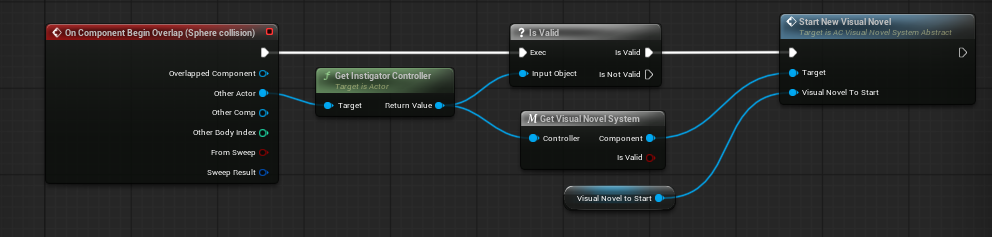
- On Component Begin Overlap: Fires when an actor, usually the player, enters the sphere collision.
- Get Instigator Controller: Retrieves the controller responsible for the overlapping actor.
- Is Valid: Stops the chain if the controller is invalid, such as when a non-player object triggered the overlap.
- Get Visual Novel System: Retrieves the player’s Visual Novel Component.
- Start New Visual Novel: Starts the selected Visual Novel Data Asset through the player’s Visual Novel System component.
Once called, the system loads the first scene, displays the background, starts the audio, and begins the visual novel flow.
Alternative Event Triggers
- NPC Interaction: Start a sequence when the player talks to a specific NPC.
- Quest Completion: Start a narrative reward scene from an On Quest Completed event.
- Location Trigger / Discovery: Start a narrated sequence when the player enters a new region or discovers a landmark.
- Timed or Scheduled Events: Start a scene during in-world events such as sunrise, midnight, or a festival.
- Scripted Cutscenes: Combine visual novels with Cinematic Camera or Level Sequence content for dialogue-driven cutscenes.
Creating Your Own Visual Novel

- Follow the shown file path.
- Duplicate an existing visual novel data asset.
- Rename it to match the new visual novel.
- Delete the duplicated timeline indexes you do not need.
- Set your own parameters. For parameter meanings, see DA_VisualNovel.